Category Archives: How to Fix

Redis takes the member with the largest score in Zset

1. Zrange key start stop [withscores]

zrange key-1-1 [withscores]

Return to ordered set

key , a member of the specified interval.

members of the position according to the score value increment ( since the childhood ) to sort.

with the same score members of the value according to the dictionary sequence ( lexicographical order to line up.

if you need a member according to the score value decreasing ( from big to small ) to line up, Please use the ZREVRANGE command.

subscript parameter start and stop to 0 at the bottom, that is to say, With 0 said ordered set first members, with 1 said ordered set the second member, and so on.

you can also use negative indices, with 1 said last member, 2 said penultimate members, and so on.


2. Zrevrange key start stop [withscores]

zrevrange key 0 0 [withscores]

members of the position according to the score value decreasing ( from big to small to line up.

Zrevrangebyscore key +inf 0 limit 0 1

ZRANGEBYSCORE key min Max [WITHSCORES] [LIMIT offset count]

The value of adding two fields of MySQL

q:

in mysql, I want to add two fields. The SQL statement is as follows :

select c1 + c2 from table where Id = 1

now there is a problem, when the value of any field c1 or c2 is null, then the result of the addition is null, how to solve this problem?

a:
Select IFNULL(c1,0) + IFNULL(c2,0) from table where Id = 1

or use case when

How to generate and view SSH keys in Ubuntu 16.04

ubuntu 16.04 how to generate SSH key and how to view SSH key

check if SSH Key exists locally

enter

at the terminal

ls -al ~/.ssh

if output is:

No such file or directory

then there is no SSH key

, if you have it, it looks like this:

generates a new SSH key

first enter

in the terminal

ssh-keygen -t rsa -C "[email protected]"

[email protected] for your email address when registering on GitHub or GitLab

enter the terminal will display:

Created directory '/Users/xxx/.ssh'.
Enter passphrase (empty for no passphrase):

The path to save.ssh/ id_RSA is /Users/ XXX /.ssh/ id_RSA, press enter directly.

one thing to note here is that if you already have an SSH key and you want to recreate it using the above it will tell you that you don’t want to regenerate, just type y and press enter.

and the terminal will prompt:

Created directory '/Users/xxx/.ssh'.
Enter passphrase (empty for no passphrase):

You are prompted to set passphrase. You are required to enter passphrase every time you communicate with Git to avoid problems caused by some wrong operation. It is recommended to set it.

after success, the terminal will prompt:

Your identification has been saved in /Users/xxx/.ssh/id_rsa.

Your public key has been saved in /Users/xxx/.ssh/id_rsa.pub.

The key fingerprint is:

16:27:ac:a5:76:28:2d:36:63:1b:56:4d:eb:df:a6:48 [email protected]

The key's randomart image is:

心形图形

Then input at the terminal:

ssh-add ~/.ssh/id_rsa

You will be asked to enter the Passphrase entered in the above step

after success, the terminal display:

Identity added: /Users/xxx/.ssh/id_rsa (/Users/xxx/.ssh/id_rsa)

Finally, two files are generated in /Users/ XXX /.ssh/, id_RSA and id_Rsa.pub

input at the terminal:

cat /Users/xxx/.ssh/id_rsa.pub

terminal will display your SSH key, just copy it directly.

that’s all ~ ~ O (∩ _ ∩) O ha ha ~

Android license status unknown solution

The

problem introduces

In the article on the Flutter development environment built on the Mac, when doctor is used to check whether other dependencies need to be installed, three problems are detected! , Doctor found issues in 3 categories.

[!] Android toolchain - develop for Android devices (Android SDK 27.0.3)
    ✗ Android license status unknown.

problem solved

from the error prompt, you need to add the Android license.
execute command:

flutter doctor --android-licenses

when prompted to accept the license, enter y to confirm, as follows:

Review licenses that have not been accepted (y/N)?y
All SDK package licenses accepted

if this command is executed, error is reported when:

A newer version of the Android SDK is required. To update, run:
/Users/***/Android/sdk/tools/bin/sdkmanager --update

you need to do

first

/Users/***/Android/sdk/tools/bin/sdkmanager --update

after this command is executed, execute doctor flutter --android-licenses.

validation

again doctor, you can see that the error on Android license is gone.

MacBook Pro battery 0%, connected to the power but showed that the battery is not charging solution

blogger MBP just bought, there was a situation of not charging, almost scared to death, summed up the online solution to solve the problem, in order to prevent the next time similar problems, first recorded:

Connect the power adapter to the power supply and the MBP.

  • on the internal keyboard, press the left Shift+Control+Option key and power button
  • simultaneously release all the keys and power button
  • open the computer and find the problem solved, thank god ~~
  • Python implements inserting content in the specified position of text

    1. scene
    The

    production environment requires writing to a large number of json files, inserting an attribute in the specified node. As follows:

    {
        "dataSources":{
            "test_dataSource_hod":{
                "spec":{
                    "dataSchema":{
                        "dataSource":"test_dataSource_hod",
                        "parser":{
                            "type":"string",
                            "parseSpec":{
                                "timestampSpec":{
                                    "column":"timestamp",
                                    "format":"yyyy-MM-dd HH:mm:ss"
                                },
                                "dimensionsSpec":{
                                    "dimensions":[
                                        "method",
                                        "key"
                                    ]
                                },
                                "format":"json"
                            }
                        },
                        "granularitySpec":{
                            "type":"uniform",
                            "segmentGranularity":"hour",
                            "queryGranularity":"none"
                        },
                        "metricsSpec":[
                            {
                                "name":"count",
                                "type":"count"
                            },
                            {
                                "name":"call_count",
                                "type":"longSum",
                                "fieldName":"call_count"
                            },
                            {
                                "name":"succ_count",
                                "type":"longSum",
                                "fieldName":"succ_count"
                            },
                            {
                                "name":"fail_count",
                                "type":"longSum",
                                "fieldName":"fail_count"
                            }
                        ]
                    },
                    "ioConfig":{
                        "type":"realtime"
                    },
                    "tuningConfig":{
                        "type":"realtime",
                        "maxRowsInMemory":"100000",
                        "intermediatePersistPeriod":"PT10M",
                        "windowPeriod":"PT10M"
                    }
                },
                "properties":{
                    "task.partitions":"1",
                    "task.replicants":"1",
                    "topicPattern":"test_topic"
                }
            }
        },
        "properties":{
            "zookeeper.connect":"zookeeper.com:2015",
            "druid.discovery.curator.path":"/druid/discovery",
            "druid.selectors.indexing.serviceName":"druid/overlord",
            "commit.periodMillis":"12500",
            "consumer.numThreads":"1",
            "kafka.zookeeper.connect":"kafkaka.com:2181,kafka.com:2181,kafka.com:2181",
            "kafka.group.id":"test_dataSource_hod_dd"
        }
    }
    

    needs to be at the end of the properties node to add a "druidBeam. RandomizeTaskId" : "true" property.

    2. Ideas

    the general idea is as follows:

    1. scan all files to be changed
    2. confirm the position to be changed
    3. insert new character

    in the file

    where I find it a little bit harder is where I confirm the insertion location. We know is "druid. Selectors. Indexing. The serviceName" : "druid/overlord", this thing must be in the node, that as long as I can find this stuff, and then in his behind with respect to OK.
    ok, we've got the idea, let's write the code.

    #!/usr/bin/python
    # coding:utf-8
    
    import os
    
    
    old_string = '"druid/overlord"'
    new_string = ('"druid/overlord",' +
                  '\n        ' +
                  '"druidBeam.randomizeTaskId":"true",')
    
    
    def insertrandomproperty(file_name):
        if '.json' in file_name:
            with open(file, 'r') as oldfile:
                content = oldfile.read()
                checkandinsert(content, file)
    
        else:
            pass
    
    
    def checkandinsert(content, file):
        if 'druidBeam.randomizeTaskId' not in content:
           # to avoid ^M appear in the new file because of different os
           # we replace \r  with '' 
            new_content = content.replace(old_string, new_string).replace('\r', '')
    
            with open(file, 'w') as newfile:
                newfile.write(new_content)
        else:
            pass
    
    
    if __name__ == '__main__':
        files = os.listdir('/home/tranquility/conf/service_bak')
        os.chdir('/home/tranquility/conf/service_bak')
        for file in files:
            insertrandomproperty(file)


    is just updating the content in memory, and then rewriting it back to the file. The code is just a rough representation of the idea and can be modified and optimized as needed.
    Use Python to insert the specified content in the specified line of the specified file

    #! /usr/bin/python
    
    fp = file('data.txt')           #指定文件
    s = fp.read()                   #将指定文件读入内存
    fp.close()                      #关闭该文件
    a = s.split('\n')
    a.insert(LINE, 'a new line')    #在第 LINE+1 行插入
    s = '\n'.join(a)                #用'\n'连接各个元素
    fp = file('data.txt', 'w')
    fp.write(s)
    fp.close()

    fp = file('data.txt')         
    lines = []
    for line in fp:                  #内置的迭代器, 效率很高
        lines.append(line)
    fp.close()
    
    lines.insert(LINE, 'a new line') #在第 LINE+1 行插入
    s = '\n'.join(lines)
    fp = file('data.txt', 'w')
    fp.write(s)
    fp.close()

    Failed: execution error, return code 1 from org.apache.hadoop . hive.ql.exec .DDLTask…

    before installing the hive (address: https://blog.csdn.net/qq_43437122/article/details/104989110), practice today ordered out of the question, when the problem are as follows:

    FAILED: Execution Error, return code 1 from org.apache.hadoop.hive.ql.exec.DDLTask. MetaException(message:javax.jdo.JDOException: Exception thrown when executing query
            at org.datanucleus.api.jdo.NucleusJDOHelper.getJDOExceptionForNucleusException(NucleusJDOHelper.java:596)
            at org.datanucleus.api.jdo.JDOQuery.execute(JDOQuery.java:275)
            at org.apache.hadoop.hive.metastore.ObjectStore.getMTable(ObjectStore.java:900)
            at org.apache.hadoop.hive.metastore.ObjectStore.dropTable(ObjectStore.java:781)
            at sun.reflect.NativeMethodAccessorImpl.invoke0(Native Method)
            at sun.reflect.NativeMethodAccessorImpl.invoke(NativeMethodAccessorImpl.java:62)
            at sun.reflect.DelegatingMethodAccessorImpl.invoke(DelegatingMethodAccessorImpl.java:43)
            at java.lang.reflect.Method.invoke(Method.java:498)
            at org.apache.hadoop.hive.metastore.RawStoreProxy.invoke(RawStoreProxy.java:108)
            at com.sun.proxy.$Proxy6.dropTable(Unknown Source)
            at org.apache.hadoop.hive.metastore.HiveMetaStore$HMSHandler.drop_table_core(HiveMetaStore.java:1378)
            at org.apache.hadoop.hive.metastore.HiveMetaStore$HMSHandler.drop_table_with_environment_context(HiveMetaStore.java:1517)
            at sun.reflect.NativeMethodAccessorImpl.invoke0(Native Method)
            at sun.reflect.NativeMethodAccessorImpl.invoke(NativeMethodAccessorImpl.java:62)
            at sun.reflect.DelegatingMethodAccessorImpl.invoke(DelegatingMethodAccessorImpl.java:43)
            at java.lang.reflect.Method.invoke(Method.java:498)
            at org.apache.hadoop.hive.metastore.RetryingHMSHandler.invoke(RetryingHMSHandler.java:105)
            at com.sun.proxy.$Proxy15.drop_table_with_environment_context(Unknown Source)
            at org.apache.hadoop.hive.metastore.HiveMetaStoreClient.dropTable(HiveMetaStoreClient.java:774)
            at org.apache.hadoop.hive.metastore.HiveMetaStoreClient.dropTable(HiveMetaStoreClient.java:750)
            at sun.reflect.NativeMethodAccessorImpl.invoke0(Native Method)
            at sun.reflect.NativeMethodAccessorImpl.invoke(NativeMethodAccessorImpl.java:62)
            at sun.reflect.DelegatingMethodAccessorImpl.invoke(DelegatingMethodAccessorImpl.java:43)
            at java.lang.reflect.Method.invoke(Method.java:498)
            at org.apache.hadoop.hive.metastore.RetryingMetaStoreClient.invoke(RetryingMetaStoreClient.java:89)
            at com.sun.proxy.$Proxy16.dropTable(Unknown Source)
            at org.apache.hadoop.hive.ql.metadata.Hive.dropTable(Hive.java:886)
            at org.apache.hadoop.hive.ql.metadata.Hive.dropTable(Hive.java:853)
            at org.apache.hadoop.hive.ql.exec.DDLTask.dropTable(DDLTask.java:3917)
            at org.apache.hadoop.hive.ql.exec.DDLTask.dropTableOrPartitions(DDLTask.java:3852)
            at org.apache.hadoop.hive.ql.exec.DDLTask.execute(DDLTask.java:306)
            at org.apache.hadoop.hive.ql.exec.Task.executeTask(Task.java:153)
            at org.apache.hadoop.hive.ql.exec.TaskRunner.runSequential(TaskRunner.java:85)
            at org.apache.hadoop.hive.ql.Driver.launchTask(Driver.java:1472)
            at org.apache.hadoop.hive.ql.Driver.execute(Driver.java:1239)
            at org.apache.hadoop.hive.ql.Driver.runInternal(Driver.java:1057)
            at org.apache.hadoop.hive.ql.Driver.run(Driver.java:880)
            at org.apache.hadoop.hive.ql.Driver.run(Driver.java:870)
            at org.apache.hadoop.hive.cli.CliDriver.processLocalCmd(CliDriver.java:268)
            at org.apache.hadoop.hive.cli.CliDriver.processCmd(CliDriver.java:220)
            at org.apache.hadoop.hive.cli.CliDriver.processLine(CliDriver.java:423)
            at org.apache.hadoop.hive.cli.CliDriver.executeDriver(CliDriver.java:792)
            at org.apache.hadoop.hive.cli.CliDriver.run(CliDriver.java:686)
            at org.apache.hadoop.hive.cli.CliDriver.main(CliDriver.java:625)
            at sun.reflect.NativeMethodAccessorImpl.invoke0(Native Method)
            at sun.reflect.NativeMethodAccessorImpl.invoke(NativeMethodAccessorImpl.java:62)
            at sun.reflect.DelegatingMethodAccessorImpl.invoke(DelegatingMethodAccessorImpl.java:43)
            at java.lang.reflect.Method.invoke(Method.java:498)
            at org.apache.hadoop.util.RunJar.run(RunJar.java:221)
            at org.apache.hadoop.util.RunJar.main(RunJar.java:136)
    NestedThrowablesStackTrace:
    com.mysql.jdbc.exceptions.jdbc4.MySQLSyntaxErrorException: You have an error in your SQL syntax; check the manual that corresponds to your MySQL server version for the right syntax to use near 'OPTION SQL_SELECT_LIMIT=DEFAULT' at line 1
            at sun.reflect.NativeConstructorAccessorImpl.newInstance0(Native Method)
            at sun.reflect.NativeConstructorAccessorImpl.newInstance(NativeConstructorAccessorImpl.java:62)
            at sun.reflect.DelegatingConstructorAccessorImpl.newInstance(DelegatingConstructorAccessorImpl.java:45)
            at java.lang.reflect.Constructor.newInstance(Constructor.java:423)
            at com.mysql.jdbc.Util.handleNewInstance(Util.java:406)
            at com.mysql.jdbc.Util.getInstance(Util.java:381)
            at com.mysql.jdbc.SQLError.createSQLException(SQLError.java:1030)
            at com.mysql.jdbc.SQLError.createSQLException(SQLError.java:956)
            at com.mysql.jdbc.MysqlIO.checkErrorPacket(MysqlIO.java:3536)
            at com.mysql.jdbc.MysqlIO.checkErrorPacket(MysqlIO.java:3468)
            at com.mysql.jdbc.MysqlIO.sendCommand(MysqlIO.java:1957)
            at com.mysql.jdbc.MysqlIO.sqlQueryDirect(MysqlIO.java:2107)
            at com.mysql.jdbc.ConnectionImpl.execSQL(ConnectionImpl.java:2642)
            at com.mysql.jdbc.StatementImpl.executeSimpleNonQuery(StatementImpl.java:1531)
            at com.mysql.jdbc.PreparedStatement.executeQuery(PreparedStatement.java:2221)
            at com.jolbox.bonecp.PreparedStatementHandle.executeQuery(PreparedStatementHandle.java:174)
            at org.datanucleus.store.rdbms.ParamLoggingPreparedStatement.executeQuery(ParamLoggingPreparedStatement.java:381)
            at org.datanucleus.store.rdbms.SQLController.executeStatementQuery(SQLController.java:504)
            at org.datanucleus.store.rdbms.query.JDOQLQuery.performExecute(JDOQLQuery.java:651)
            at org.datanucleus.store.query.Query.executeQuery(Query.java:1786)
            at org.datanucleus.store.query.Query.executeWithArray(Query.java:1672)
            at org.datanucleus.api.jdo.JDOQuery.execute(JDOQuery.java:266)
            at org.apache.hadoop.hive.metastore.ObjectStore.getMTable(ObjectStore.java:900)
            at org.apache.hadoop.hive.metastore.ObjectStore.dropTable(ObjectStore.java:781)
            at sun.reflect.NativeMethodAccessorImpl.invoke0(Native Method)
            at sun.reflect.NativeMethodAccessorImpl.invoke(NativeMethodAccessorImpl.java:62)
            at sun.reflect.DelegatingMethodAccessorImpl.invoke(DelegatingMethodAccessorImpl.java:43)
            at java.lang.reflect.Method.invoke(Method.java:498)
            at org.apache.hadoop.hive.metastore.RawStoreProxy.invoke(RawStoreProxy.java:108)
            at com.sun.proxy.$Proxy6.dropTable(Unknown Source)
            at org.apache.hadoop.hive.metastore.HiveMetaStore$HMSHandler.drop_table_core(HiveMetaStore.java:1378)
            at org.apache.hadoop.hive.metastore.HiveMetaStore$HMSHandler.drop_table_with_environment_context(HiveMetaStore.java:1517)
            at sun.reflect.NativeMethodAccessorImpl.invoke0(Native Method)
            at sun.reflect.NativeMethodAccessorImpl.invoke(NativeMethodAccessorImpl.java:62)
            at sun.reflect.DelegatingMethodAccessorImpl.invoke(DelegatingMethodAccessorImpl.java:43)
            at java.lang.reflect.Method.invoke(Method.java:498)
            at org.apache.hadoop.hive.metastore.RetryingHMSHandler.invoke(RetryingHMSHandler.java:105)
            at com.sun.proxy.$Proxy15.drop_table_with_environment_context(Unknown Source)
            at org.apache.hadoop.hive.metastore.HiveMetaStoreClient.dropTable(HiveMetaStoreClient.java:774)
            at org.apache.hadoop.hive.metastore.HiveMetaStoreClient.dropTable(HiveMetaStoreClient.java:750)
            at sun.reflect.NativeMethodAccessorImpl.invoke0(Native Method)
            at sun.reflect.NativeMethodAccessorImpl.invoke(NativeMethodAccessorImpl.java:62)
            at sun.reflect.DelegatingMethodAccessorImpl.invoke(DelegatingMethodAccessorImpl.java:43)
            at java.lang.reflect.Method.invoke(Method.java:498)
            at org.apache.hadoop.hive.metastore.RetryingMetaStoreClient.invoke(RetryingMetaStoreClient.java:89)
            at com.sun.proxy.$Proxy16.dropTable(Unknown Source)
            at org.apache.hadoop.hive.ql.metadata.Hive.dropTable(Hive.java:886)
            at org.apache.hadoop.hive.ql.metadata.Hive.dropTable(Hive.java:853)
            at org.apache.hadoop.hive.ql.exec.DDLTask.dropTable(DDLTask.java:3917)
            at org.apache.hadoop.hive.ql.exec.DDLTask.dropTableOrPartitions(DDLTask.java:3852)
            at org.apache.hadoop.hive.ql.exec.DDLTask.execute(DDLTask.java:306)
            at org.apache.hadoop.hive.ql.exec.Task.executeTask(Task.java:153)
            at org.apache.hadoop.hive.ql.exec.TaskRunner.runSequential(TaskRunner.java:85)
            at org.apache.hadoop.hive.ql.Driver.launchTask(Driver.java:1472)
            at org.apache.hadoop.hive.ql.Driver.execute(Driver.java:1239)
            at org.apache.hadoop.hive.ql.Driver.runInternal(Driver.java:1057)
            at org.apache.hadoop.hive.ql.Driver.run(Driver.java:880)
            at org.apache.hadoop.hive.ql.Driver.run(Driver.java:870)
            at org.apache.hadoop.hive.cli.CliDriver.processLocalCmd(CliDriver.java:268)
            at org.apache.hadoop.hive.cli.CliDriver.processCmd(CliDriver.java:220)
            at org.apache.hadoop.hive.cli.CliDriver.processLine(CliDriver.java:423)
            at org.apache.hadoop.hive.cli.CliDriver.executeDriver(CliDriver.java:792)
            at org.apache.hadoop.hive.cli.CliDriver.run(CliDriver.java:686)
            at org.apache.hadoop.hive.cli.CliDriver.main(CliDriver.java:625)
            at sun.reflect.NativeMethodAccessorImpl.invoke0(Native Method)
            at sun.reflect.NativeMethodAccessorImpl.invoke(NativeMethodAccessorImpl.java:62)
            at sun.reflect.DelegatingMethodAccessorImpl.invoke(DelegatingMethodAccessorImpl.java:43)
            at java.lang.reflect.Method.invoke(Method.java:498)
            at org.apache.hadoop.util.RunJar.run(RunJar.java:221)
            at org.apache.hadoop.util.RunJar.main(RunJar.java:136)
    )
    

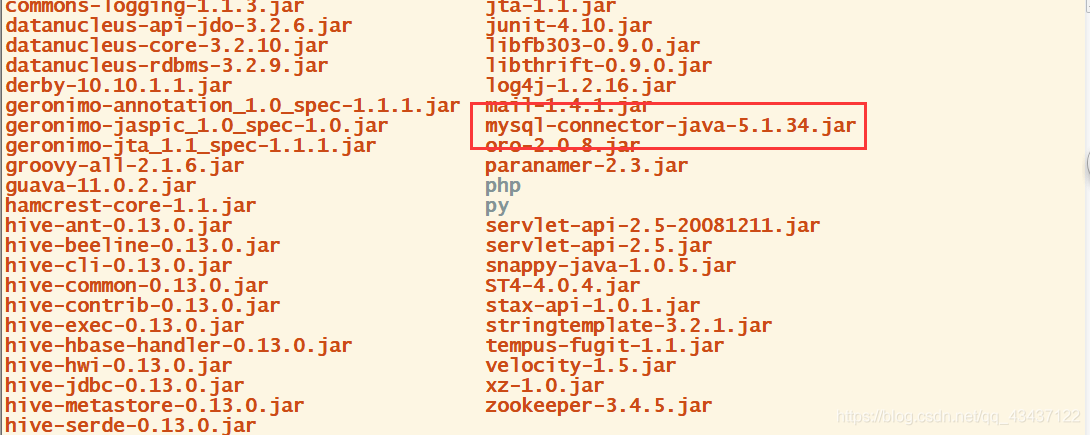
    this problem and create the tabulated fault or not quite same, most is to set up the mysql database inside the hive database coding for the latin1, but after the modification still not, actually, the cause of the problem is your mysql – the X.X.X.J ar version is too old is 5.1.8 (I), so you need to download a high version of the jar file.

    download address: https://blog.csdn.net/qq_43437122/article/details/105017307

    is recommended to download 5.1.34 version. If the version is too new, there will be a warning.

    delete the old version, put the new version in the lib directory, re-enter hive, delete successfully as shown below.

    Solution to “error code is 0x4001” when Intel SGX is running

    by qiu pengfei

    I was running the Intel SGX application on my computer yesterday, but this morning when I was running some minor modifications to the program based on the example provided by Intel, a 0x4001 error occurred. The prompt is as follows:

    Error code is 0x4001. Please refer to the "Intel SGX SDK Developer Reference" for more details.

    this affects the mood! Yesterday was also the afternoon to write a half – day program, how can there be a problem?I wonder if there is something wrong with my code, not through printing debugging, just start to delete one function after another, or not. Then, I replaced the example files provided by Intel one by one. If the problem is not my own code, I will directly run the example program provided by Intel, and the error 0x4001 still appears. To query the Intel provide SGX SDK development reference documentation, reference documentation can be downloaded at https://download.01.org/intel-sgx/linux-2.0/docs/Intel_SGX_SDK_Developer_Reference_Linux_2.0_Open_Source.pdf, query 0 x4001, indeed as expected to, the above is this to say:

    AE service did not respond or the requested service is not supported.

    means that the architecture service provided by Intel SGX is not responsive or the requested service is not supported, and that Intel SGX itself provides some enclaves, assisting the creation of enclaves, report generation, and so on. In this way, it should be the problem of SGX itself. Some people said that it was ok to compile and run in simulation mode, but not in hardware mode, which further verified the problem of SGX itself. Quickly boot up, enter the BIOS to see whether the SGX service is on, a look is on, this bothers me. The computer supports SGX and the service is on. How can there be a problem?Later think may be the driver problem, quickly reinstall the driver, enter the SGX driver download folder, execute the following command, re-install the SGX driver.

    sudo ./sgx_linux_x64_driver_eb61a95.bin

    compile and run the SGX application again, and there you go! Although I do not know why the driver will go wrong, do not know where the driver problem, but finally solved, or quite gratified.

    Execution error, return code 1 from org.apache.hadoop . hive.ql.exec .DDLTask.

    FAILED: Execution Error, return code 1 from org.apache.hadoop.hive.ql.exec.DDLTask. MetaException(message:javax.jdo.JDODataStoreException: You have an error in your SQL syntax; check the manual that corresponds to your MySQL server version for the right syntax to use near 'OPTION SQL_SELECT_LIMIT=DEFAULT' at line 1
    	at org.datanucleus.api.jdo.NucleusJDOHelper.getJDOExceptionForNucleusException(NucleusJDOHelper.java:451)
    	at org.datanucleus.api.jdo.JDOQuery.execute(JDOQuery.java:252)
    	at org.apache.hadoop.hive.metastore.ObjectStore.getMDatabase(ObjectStore.java:508)
    	at org.apache.hadoop.hive.metastore.ObjectStore.getDatabase(ObjectStore.java:528)
    	at sun.reflect.NativeMethodAccessorImpl.invoke0(Native Method)
    	at sun.reflect.NativeMethodAccessorImpl.invoke(NativeMethodAccessorImpl.java:62)
    	at sun.reflect.DelegatingMethodAccessorImpl.invoke(DelegatingMethodAccessorImpl.java:43)
    	at java.lang.reflect.Method.invoke(Method.java:498)
    	at org.apache.hadoop.hive.metastore.RawStoreProxy.invoke(RawStoreProxy.java:108)
    	at com.sun.proxy.$Proxy2.getDatabase(Unknown Source)
    	at org.apache.hadoop.hive.metastore.HiveMetaStore$HMSHandler.get_database(HiveMetaStore.java:807)
    	at sun.reflect.NativeMethodAccessorImpl.invoke0(Native Method)
    	at sun.reflect.NativeMethodAccessorImpl.invoke(NativeMethodAccessorImpl.java:62)
    	at sun.reflect.DelegatingMethodAccessorImpl.invoke(DelegatingMethodAccessorImpl.java:43)
    	at java.lang.reflect.Method.invoke(Method.java:498)
    	at org.apache.hadoop.hive.metastore.RetryingHMSHandler.invoke(RetryingHMSHandler.java:106)
    	at com.sun.proxy.$Proxy4.get_database(Unknown Source)
    	at org.apache.hadoop.hive.metastore.api.ThriftHiveMetastore$Processor$get_database.getResult(ThriftHiveMetastore.java:7696)
    	at org.apache.hadoop.hive.metastore.api.ThriftHiveMetastore$Processor$get_database.getResult(ThriftHiveMetastore.java:7680)
    	at org.apache.thrift.ProcessFunction.process(ProcessFunction.java:39)
    	at org.apache.thrift.TBaseProcessor.process(TBaseProcessor.java:39)
    	at org.apache.hadoop.hive.metastore.TSetIpAddressProcessor.process(TSetIpAddressProcessor.java:48)
    	at org.apache.thrift.server.TThreadPoolServer$WorkerProcess.run(TThreadPoolServer.java:244)
    	at java.util.concurrent.ThreadPoolExecutor.runWorker(ThreadPoolExecutor.java:1149)
    	at java.util.concurrent.ThreadPoolExecutor$Worker.run(ThreadPoolExecutor.java:624)
    	at java.lang.Thread.run(Thread.java:748)
    NestedThrowablesStackTrace:
    com.mysql.jdbc.exceptions.jdbc4.MySQLSyntaxErrorException: You have an error in your SQL syntax; check the manual that corresponds to your MySQL server version for the right syntax to use near 'OPTION SQL_SELECT_LIMIT=DEFAULT' at line 1
    	at sun.reflect.NativeConstructorAccessorImpl.newInstance0(Native Method)
    	at sun.reflect.NativeConstructorAccessorImpl.newInstance(NativeConstructorAccessorImpl.java:62)
    	at sun.reflect.DelegatingConstructorAccessorImpl.newInstance(DelegatingConstructorAccessorImpl.java:45)
    	at java.lang.reflect.Constructor.newInstance(Constructor.java:423)
    	at com.mysql.jdbc.Util.handleNewInstance(Util.java:406)
    	at com.mysql.jdbc.Util.getInstance(Util.java:381)
    	at com.mysql.jdbc.SQLError.createSQLException(SQLError.java:1030)
    	at com.mysql.jdbc.SQLError.createSQLException(SQLError.java:956)
    	at com.mysql.jdbc.MysqlIO.checkErrorPacket(MysqlIO.java:3515)
    	at com.mysql.jdbc.MysqlIO.checkErrorPacket(MysqlIO.java:3447)
    	at com.mysql.jdbc.MysqlIO.sendCommand(MysqlIO.java:1951)
    	at com.mysql.jdbc.MysqlIO.sqlQueryDirect(MysqlIO.java:2101)
    	at com.mysql.jdbc.ConnectionImpl.execSQL(ConnectionImpl.java:2548)
    	at com.mysql.jdbc.StatementImpl.executeSimpleNonQuery(StatementImpl.java:1502)
    	at com.mysql.jdbc.StatementImpl.executeQuery(StatementImpl.java:1404)
    	at com.mysql.jdbc.ConnectionImpl.getTransactionIsolation(ConnectionImpl.java:3131)
    	at com.jolbox.bonecp.ConnectionHandle.getTransactionIsolation(ConnectionHandle.java:825)
    	at org.datanucleus.store.rdbms.ConnectionFactoryImpl$ManagedConnectionImpl.getConnection(ConnectionFactoryImpl.java:444)
    	at org.datanucleus.store.rdbms.ConnectionFactoryImpl$ManagedConnectionImpl.getXAResource(ConnectionFactoryImpl.java:378)
    	at org.datanucleus.store.connection.ConnectionManagerImpl.allocateConnection(ConnectionManagerImpl.java:328)
    	at org.datanucleus.store.connection.AbstractConnectionFactory.getConnection(AbstractConnectionFactory.java:94)
    	at org.datanucleus.store.AbstractStoreManager.getConnection(AbstractStoreManager.java:430)
    	at org.datanucleus.store.AbstractStoreManager.getConnection(AbstractStoreManager.java:396)
    	at org.datanucleus.store.rdbms.query.JDOQLQuery.performExecute(JDOQLQuery.java:621)
    	at org.datanucleus.store.query.Query.executeQuery(Query.java:1786)
    	at org.datanucleus.store.query.Query.executeWithArray(Query.java:1672)
    	at org.datanucleus.api.jdo.JDOQuery.execute(JDOQuery.java:243)
    	at org.apache.hadoop.hive.metastore.ObjectStore.getMDatabase(ObjectStore.java:508)
    	at org.apache.hadoop.hive.metastore.ObjectStore.getDatabase(ObjectStore.java:528)
    	at sun.reflect.NativeMethodAccessorImpl.invoke0(Native Method)
    	at sun.reflect.NativeMethodAccessorImpl.invoke(NativeMethodAccessorImpl.java:62)
    	at sun.reflect.DelegatingMethodAccessorImpl.invoke(DelegatingMethodAccessorImpl.java:43)
    	at java.lang.reflect.Method.invoke(Method.java:498)
    	at org.apache.hadoop.hive.metastore.RawStoreProxy.invoke(RawStoreProxy.java:108)
    	at com.sun.proxy.$Proxy2.getDatabase(Unknown Source)
    	at org.apache.hadoop.hive.metastore.HiveMetaStore$HMSHandler.get_database(HiveMetaStore.java:807)
    	at sun.reflect.NativeMethodAccessorImpl.invoke0(Native Method)
    	at sun.reflect.NativeMethodAccessorImpl.invoke(NativeMethodAccessorImpl.java:62)
    	at sun.reflect.DelegatingMethodAccessorImpl.invoke(DelegatingMethodAccessorImpl.java:43)
    	at java.lang.reflect.Method.invoke(Method.java:498)
    	at org.apache.hadoop.hive.metastore.RetryingHMSHandler.invoke(RetryingHMSHandler.java:106)
    	at com.sun.proxy.$Proxy4.get_database(Unknown Source)
    	at org.apache.hadoop.hive.metastore.api.ThriftHiveMetastore$Processor$get_database.getResult(ThriftHiveMetastore.java:7696)
    	at org.apache.hadoop.hive.metastore.api.ThriftHiveMetastore$Processor$get_database.getResult(ThriftHiveMetastore.java:7680)
    	at org.apache.thrift.ProcessFunction.process(ProcessFunction.java:39)
    	at org.apache.thrift.TBaseProcessor.process(TBaseProcessor.java:39)
    	at org.apache.hadoop.hive.metastore.TSetIpAddressProcessor.process(TSetIpAddressProcessor.java:48)
    	at org.apache.thrift.server.TThreadPoolServer$WorkerProcess.run(TThreadPoolServer.java:244)
    	at java.util.concurrent.ThreadPoolExecutor.runWorker(ThreadPoolExecutor.java:1149)
    	at java.util.concurrent.ThreadPoolExecutor$Worker.run(ThreadPoolExecutor.java:624)
    	at java.lang.Thread.run(Thread.java:748)
    )


    , while processing data in hive, accidentally deleted some metadata, causing all hiveQL operations to fail, and reported the above error, the mood is broken.

    solution : lower mysql-connect jar version, I lower it to 5.1.27,
    successful! Hive can run again.
    but there is still a question, why??Will this happen??
    hope some big guy see, can give the answer.