Category Archives: How to Fix

Ubuntu 16.04 modify jupyter default path

  • view the path to the configuration file
jupyter notebook --generate-config --allow-root 
  • modify the configuration file (enter I to edit normally)
vim 上一步看到的路径/.jupyter/jupyter_notebook_config.py

open jupyter_notebook_config.py and find the following text:

 
  1. ## The default URL to redirect to from `/`

  2. #c.NotebookApp.default_url = '/tree'

change it to:

 
  1. ## The default URL to redirect to from `/`

  2. c.NotebookApp.default_url = '/tree/Coding'

at this time, Jupyter’s default directory path becomes /home/Coding, namely Users/lab/Coding

then, open the terminal and type the following command directly:

jupyter notebook

Compiler problem, error: ‘for’ loop initial declarations are only allowed in C99 mode

using GCC to compile the code is to report

error: ‘for’ loop initial declarations are only allowed in C99 mode

note: use option -std=c99 or -std=gnu99 to compile your code

The

error is due to the increment being initialized in GCC directly in the for loop:

  1. for (int I = 0; I< len; I++) {
  2. }

    this syntax is incorrect in GCC, you must first define the I variable:

    1. int I;
    2. for (I = 0; i< len; I++) {
    3. }

      this is because GCC is based on the c89 standard, instead of the C99 standard, you can define the I variable within the for loop:

      gcc src.c -std=c99 -o src

Several calculation methods of Python execution time

let me start by saying a few things about the pits I ran into, the production problems I ran into, the fact that I was scheduling Python scripts to execute and monitoring the process, and that Python scripts took much longer to execute than the Python scripts themselves.
monitor python script execution time is 36 hours , while python script statistics their execution time time is 4 hours or so.
problem after the first thought was that there was a problem with Linux, looking for various logs did not find any exceptions.
is then thought of in python as py2neo writing data asynchronously, blocking the execution of the process. Finally, the problem was identified: the python script USES time.clock(), which counts the CPU execution time, not the program execution time. Next, compare several python time statistics:

method 1:

import datetime
starttime = datetime.datetime.now()
#long running
#do something other
endtime = datetime.datetime.now()
print (endtime - starttime).seconds

datetime. Datetime. Now () gets the current date, which is execution time after the execution of the program.

method 2:

start = time.time()
#long running
#do something other
end = time.time()
print end-start

time.time() gets the current time, in seconds, since epoch. If the system clock provides them, fractions of seconds may exist. So this is going to return a floating point type. This is also the program execution time .

method 3:

start = time.clock()
#long running
#do something other
end = time.clock()
print end-start

time.clock() returns the CPU time since the program started or the first time it was called clock(). This has as much precision as the system records. It also returns a floating point type. What you get here is CPU execution time . Note: program execution time = CPU time + IO time + sleep or wait time

The solution to the problem that the virtual machine and the host SSH can’t connect on vmvare

vmvare hosts are often unable to SSH to each other due to configuration errors or upgrades of the host system and virtual system. Here is the author’s solution:

1. Enter the host and virtual machine to view the IP address, check whether normal IP address is assigned, window view IP command: ipconfig/all, Linux view IP command: ifconfig. If normal IP addresses are assigned, jump to step 2.

2. Check the connection mode of the virtual machine in vmvare. If it is NAT connection, please check whether the network segment of the virtual network card vmnet1(vmnet8) in the host is the same as the network segment of the virtual machine. Refer to other solutions on the web if you are in bridge or host sharing mode, etc.

3. Complete step 2, ping each other between the host and the virtual machine. If ping is not possible, check whether the firewalls of both parties are closed.

4. If SSH is not available after step 3, check to see if the SSH service and port number are working.

Lua — using remove to delete table data

in Lua, everything is table, all the data, functions are stored in table, but when we use table, how to clean up the table table data.
first see a function:
table.remove(table[,pos]) : delete the element on pos position, the latter element will move forward one, and then the deleted index will move forward, resulting in the deleted data is not what you want. When pos is not filled in, the data at the end of the table is deleted.
see the following code:

local array = {"a","a","a","b","a","a","b"}
for i,v in ipairs(array) do
    if v == "a" then
        table.remove(array, i)
    end
end
for i,v in ipairs(array) do
    print(i,v)
end

output result:

we wanted to delete all “a” data in the table, but the output result did not delete all “a” data. So we want to continuously delete the table data can not be used in this way, here is the correct way to delete.

local array = {"a","a","a","b","a","a","b"}
for i=#array,1,-1 do
    if array[i] == "a" then
        table.remove(array, i)
    end
end
for i,v in ipairs(array) do
    print(i,v)
end

so you get the correct deletion.
so we can encapsulate a function


-- 删除table表中符合conditionFunc的数据
-- @param tb 要删除数据的table
-- @param conditionFunc 符合要删除的数据的条件函数
local function table.removeTableData(tb, conditionFunc)
    -- body
    if tb ~= nil and next(tb) ~= nil then
        -- todo
        for i = #tb, 1, -1 do
            if conditionFunc(tb[i]) then
                -- todo
                table.remove(tb, i)
            end
        end
    end
end

-- 删除数据是否符合条件
-- @param data 要删除的数据
-- @return 返回是否符合删除data条件
local function removeCondition(data)
    -- body
    -- TODO data 符合删除的条件
    return true
end

we just need to write TODO and pass in the table.

The method of getting shell command output in Python

python to get shell command output :

1.

import subprocess

output = subprocess.Popen(['ls','-l'],stdout=subprocess.PIPE,shell=True).commun
icate()
print output[0]

2。

import commands

return_code, output = commands.getstatusoutput('ls -l')

3。

import os

process = os.popen('ls -l') # return file
output = process.read()
process.close()

the original address: http://www.cnblogs.com/snow-backup/p/5035792.html

Boot nginx flash back under Windows

preface:

use nginx in the project, start back, check the error log, the error is given as follows:

nginx: [emerg] bind() to 0.0.0.0:80 failed (10013: An attempt was made to access
 a socket in a way forbidden by its access permissions)

analysis:

, the default port of nginx is 80. The error log shows that port 80 is occupied, which causes nginx to fail to start.

solution:

1. Press win+R to open the interface, enter CMD to enter the console interface

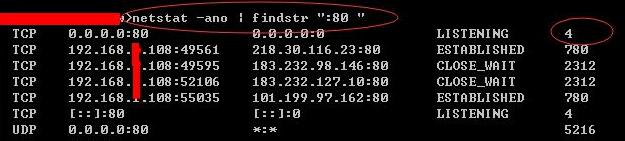
2, type netstat -ano | findstr “:80 “

through the command above to check the 80 port occupation, the value of pid is 4.


3, type tasklist /fi “PID eq 4”

through the command above to see 4 corresponding service name, is System


4, enter regedit during run to open registry editor.


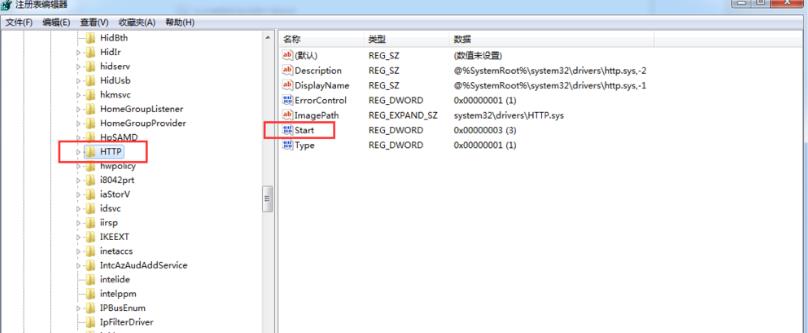
5, find HKEY_LOCAL_MACHINE\SYSTEM\CurrentControlSet\services\HTTP


6. Find Start, right-click and change it to 4.


7. Restart the System, the System process will not occupy port 80, and nginx can start normally.

can be viewed through step 2 for 80 port occupancy

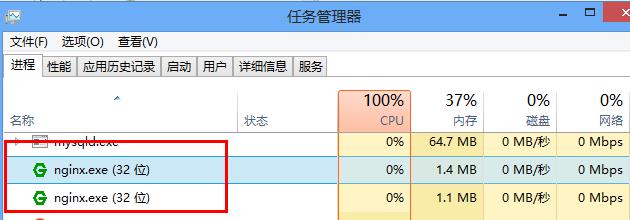
8. Start nginx again, it can start normally, and the process of nginx can be viewed in the task manager.


summary:

this nginx startup flash is caused by the fact that port 80 is occupied by System. The port 80 occupied by System is released by changing the value corresponding to Start under HTTP in the registry editor. Thus nginx starts normally.

[Oracle] when inserting data, “ora-00001: unique constraint” appears

background:

background service testing found an error unique constraint on inserting data into the oracle database table, as follows:

### Error updating database.  Cause: java.sql.SQLIntegrityConstraintViolationException: ORA-00001: unique constraint (TEST53.SYS_C0032604) violated
### The error may exist in class path resource [sqlmapper/ACMClaimMapper.xml]
### The error may involve com.las.core.dal.dao.ACMClaimMapper.insert-Inline
### The error occurred while setting parameters
### SQL: insert into TBL_ACM_CLAIM ( SEQ_NO, ACCT_NO, FUND_CHANNEL,STATUS,CREATE_DATE,CSM_NAME,CSM_CARD,LOAN_DATE,LOAN_AMT ) values ( ?,?,?,?,?,?,?,?,?)
### Cause: java.sql.SQLIntegrityConstraintViolationException: ORA-00001: unique constraint (TEST53.SYS_C0032604) violated
; SQL []; ORA-00001: unique constraint (TEST53.SYS_C0032604) violated
; nested exception is java.sql.SQLIntegrityConstraintViolationException: ORA-00001: unique constraint (TEST53.SYS_C0032604) violated

cause:

according to the tip of the index number, found in the table field “SEQ_NO”, found that is because the test database is by another database synchronization, automatic sequence number in the table were disrupted, lead to the next when inserting data, automatically generates SQL serial number in the table has data, so the error led to the only constraints. Of course, data deletion errors and human error operations can cause this problem.

resolved:

first, we can query where the sequence number of this table is located (my table is TBL_ACM_CLAIM) :

select SEQ_ACM_CLAIM.NEXTVAL  from DUAL

do not execute this SQL, because if it is not executed once, the index will increase by +1. If the value of SEQ_NO in the table is greater than the value of the query, the index value will be updated. Set the sequence step size to 100 (usually 1). Execute the following SQL:

alter sequence SEQ_ACM_CLAIM increment by 100

note: SEQ_ACM_CLAIM is not a table name, and the index value cannot modify the current value, but can only be modified to increase, not decrease.

hint:

query all indexes:

select * from user_sequences;

delete index:

drop sequence SEQ_ACM_CLAIM;

Create indexes:

CREATE UNIQUE INDEX SEQ_ACM_CLAIM ON TBL_ACM_CLAIM(SEQ_NO);

summary:

delete library to run road, one second is enough.

How to import Python from relative path

For example, we have a file with the following structure:

pkg/
  __init__.py
  libs/
    some_lib.py
    __init__.py
  components/
    code.py
    __init__.py

if we want to call in code.py libs/some_lib.py module, such as using relative call: from.. Libs.some_lib import something, it is not enough simply to add /___ to the package. Py . Python returns the error ValueError: first import in non-package. So how do you solve this problem?

has the following solution:

Add the current path to sys.path

considering that compontent and libs are folders at the same level, we can add the following code directly in code.py to add the parent folder of the current folder to the system path.

import sys
from os import path
sys.path.append( path.dirname( path.dirname( path.abspath(__file__) ) ) )

or the following (this is true for any relational folder, as long as we give the absolute path to the folder in lib_path) :

import os, sys
lib_path = os.path.abspath(os.path.join('..'))
sys.path.append(lib_path)

so we can import something with from libs.some_lib import something.

executes the code in package mode:

python -m pkg.components.code

and then we can use from.. Libs.some_lib import something to import.

note that you don’t need .py to end the file.

summary

we can actually combine these two approaches:

if __name__ == '__main__':
    if __package__ is None:
        import sys
        from os import path
        sys.path.append( <path to the package> )
       from libs.some_lib import something
    else:
        from ..libs.some_lib import something

Principle and usage of feof ()


1. What is feof()?

feof() is a function that detects the end of a file on the stream, and returns a non-zero value if the file ends, or 0

if not

is commonly used in file operations, where feof() is often used to determine whether a file is finished.


two, feof() classic error

according to the definition of this function, everyone is so commonly used, but such use, regardless of whether there is content in file, will be judged as “file isn’t empty.”

#include<stdio.h>
int main(void)
{
    FILE *p;
    p = fopen("open.txt", "r");
    if (feof(p))
    {
        printf("文件为空。");
    }
    else
    {
        printf("文件不为空。");
    }
    return 0;
 }

3. Principle of feof()

1.EOF

EOF is a computer term, short for End Of File, which in the operating system means that the source has no more data to read. Data sources are often referred to as files or streams. This character usually exists at the end of the text to indicate the end of the data.

The

definition means that the end of the document has a hidden character “EOF”, and when the program reads it, it knows that the file has reached the end. The while loop plus the EOF judgment is usually used as a marker for the end of the read.

The value

EOF is usually -1, but it varies depending on the system.

2.feof()

  • feof() principle:
    The

    • feof() function does not evaluate whether the file is empty by reading the EOF.
    • for feof(), it works by standing at the cursor and looking backwards to see if there are any characters left. If so, return 0; If not, return non-0. It doesn’t read the information, it just checks to see if there’s anything left behind the cursor.
  • use error analysis:
    • for an empty file, when the program opens it, its cursor stops at the beginning of the file, but since nothing is stored in the file (but EOF does exist), the entire file is stored as an EOF. When the program opens the file and calls Feof () directly, the function looks over its head from the cursor, sees EOF, and of course returns 0.

4. How to use properly

now that we understand the principle, how do we use it correctly?

#include<stdio.h>
int main(void)
{
    FILE *p;
    p = fopen("open.txt", "r");
    getc(p);
    if (feof(p))
    {
        printf("文件为空。");
    }
    else
    {
        rewind(p);//将光标跳回到文件开头
        int a;
        fscanf(p,"%d",&a);
        printf("%d", a);
    }
    return 0;
 }

analysis:

  • for files, whether empty files or files with information, when the file is opened and the cursor is at the default beginning, there is information behind the cursor. At this time, calling feof() to see if there is any content behind the cursor, it makes no sense.
  • so we need to find the difference from the same, first use getc(), read a character from the file, move the cursor back one character. The cursor of the space-time file has been moved to the end of EOF, and using Feof () returns 1. This is the correct use of feof().
  • note that the cursor must be returned to the beginning of the file, because the cursor was moved forward one bit when deciding whether the file was empty. The cursor must be restored to the beginning, so as to ensure the normal reading of the file.