Category Archives: How to Fix

Using JSTL to traverse the list set reports an error

Use JSTL to report an error when traversing the list set

javax.el.PropertyNotFoundException: Property [department] not found on type [com.studying.model.Employee]

However, the Department attribute in the data transmitted from the back end has a value

Error reason

After careful search, it is found that the set/get method of attribute Department has been forgotten in the employee class

    public Department getDepartment() {
        return department;
    }

    public void setDepartment(Department department) {
        this.department = department;
    }

Error in PIP install BS4 under Linux

1. The error information is as follows:

$ sudo pip install bs4==0.0.1
Collecting bs4==0.0.1
  Downloading http://pip.pgw.getui.com/packages/10/ed/7e8b97591f6f456174139ec089c769f89a94a1a4025fe967691de971f314/bs4-0.0.1.tar.gz
Collecting beautifulsoup4 (from bs4==0.0.1)
  Downloading http://pip.pgw.getui.com/packages/a1/69/daeee6d8f22c997e522cdbeb59641c4d31ab120aba0f2c799500f7456b7e/beautifulsoup4-4.10.0.tar.gz (399kB)
    100% |████████████████████████████████| 409kB 11.7MB/s
    Complete output from command python setup.py egg_info:
    Traceback (most recent call last):
      File "<string>", line 1, in <module>
      File "/tmp/pip-build-USqeae/beautifulsoup4/setup.py", line 7, in <module>
        from bs4 import __version__
      File "bs4/__init__.py", line 36, in <module>
        raise ImportError('You are trying to use a Python 3-specific version of Beautiful Soup under Python 2. This will not work. The final version of Beautiful Soup to support Python 2 was 4.9.3.')
    ImportError: You are trying to use a Python 3-specific version of Beautiful Soup under Python 2. This will not work. The final version of Beautiful Soup to support Python 2 was 4.9.3.

    ----------------------------------------
Command "python setup.py egg_info" failed with error code 1 in /tmp/pip-build-USqeae/beautifulsoup4/

2 solution

Install beatifulsoup4 first

$ sudo  pip install beautifulsoup4==4.9.0
Collecting beautifulsoup4==4.9.0
  Downloading http://pip.pgw.getui.com/packages/2d/3e/8b2fc5d3c31c84d7209313f4059858f502f2e4a9d986693eca03fe325565/beautifulsoup4-4.9.0-py2-none-any.whl (109kB)
    100% |████████████████████████████████| 112kB 872kB/s
Collecting soupsieve<2.0 (from beautifulsoup4==4.9.0)
  Downloading http://pip.pgw.getui.com/packages/39/36/f35056eb9978a622bbcedc554993d10777e3c6ff1ca24cde53f4be9c5fc4/soupsieve-1.9.6-py2.py3-none-any.whl
Collecting backports.functools-lru-cache; python_version < "3" (from soupsieve<2.0->beautifulsoup4==4.9.0)
  Downloading http://pip.pgw.getui.com/packages/e5/c1/1a48a4bb9b515480d6c666977eeca9243be9fa9e6fb5a34be0ad9627f737/backports.functools_lru_cache-1.6.4-py2.py3-none-any.whl
Installing collected packages: backports.functools-lru-cache, soupsieve, beautifulsoup4
Successfully installed backports.functools-lru-cache-1.6.4 beautifulsoup4-4.9.0 soupsieve-1.9.6

Installing BS4

$ sudo  pip install  bs4==0.0.1
Collecting bs4==0.0.1
  Downloading http://pip.pgw.getui.com/packages/10/ed/7e8b97591f6f456174139ec089c769f89a94a1a4025fe967691de971f314/bs4-0.0.1.tar.gz
Requirement already satisfied (use --upgrade to upgrade): beautifulsoup4 in /usr/lib/python2.7/site-packages (from bs4==0.0.1)
Requirement already satisfied (use --upgrade to upgrade): soupsieve<2.0 in /usr/lib/python2.7/site-packages (from beautifulsoup4->bs4==0.0.1)
Requirement already satisfied (use --upgrade to upgrade): backports.functools-lru-cache; python_version < "3" in /usr/lib/python2.7/site-packages (from soupsieve<2.0->beautifulsoup4->bs4==0.0.1)
Installing collected packages: bs4
  Running setup.py install for bs4 ... done
Successfully installed bs4-0.0.1


Mac idea springboot project reported an error

Class JavaLaunchHelper is implemented in both /Library/Java/JavaVirtualMachines/jdk1.8.0_ 144.jdk/Contents/Home/bin/java (0x10dd324c0) and /Library/Java/JavaVirtualMachines/jdk1.8.0_ 144.jdk/contents/home/jre/lib/libinstrument.dylib error

To solve the problem, you need to set the idea custom properties. Click Help on the navigation bar and select Edit custom properties,

For the first time, there is no properties file. At this time, the following interface will pop up in idea to prompt you to create it. Click Create directly.

Write idea. No. launcher = true in idea.properties, and then restart idea.

Error reporting using NVIDIA SMI

Error reporting using NVIDIA SMI:

NVIDIA-SMI has failed because it couldn’t communicate with the NVIDIA driver. Make sure that the latest NVIDIA driver is installed and running

This is a common problem, which often occurs in Ubuntu systems. The main reason is that the system kernel has been upgraded, resulting in the mismatch between the new kernel and the original graphics card driver

Solution 1:

Just execute two commands:

Sudo apt get install DKMS
sudo DKMS install – M NVIDIA – V 440.44 (440.44 indicates the driver version number)

Use the command ll/usr/SRC/to view the nvidia-440.44/ folder below. The version number varies from computer to computer
 

Error in running script in openwrt

Details of error reporting are as follows
root@OpenWrt :~# /root/connect_ net.sh
-ash: /root/connect_ net.sh: not found

When running a script, the above error occurs. The variables in the script are defined as
code = curl - O/dev/null - SW% {http_code} www.baidu. Com

After querying, it is found that the shell only supports ash in openwrt, while Bash is used by default in Linux and Ubuntu

The solution here is when defining variables, the left and right sides of the equal sign '=' are not left blank, as shown in the example
code = curl - O/dev/null - SW% {http_code} www.baidu. Com

The operation of variables in openwrt still needs attention

    variable operation only supports expr, not $[], $(()), let. These three formats must leave a space around the plus sign “+”

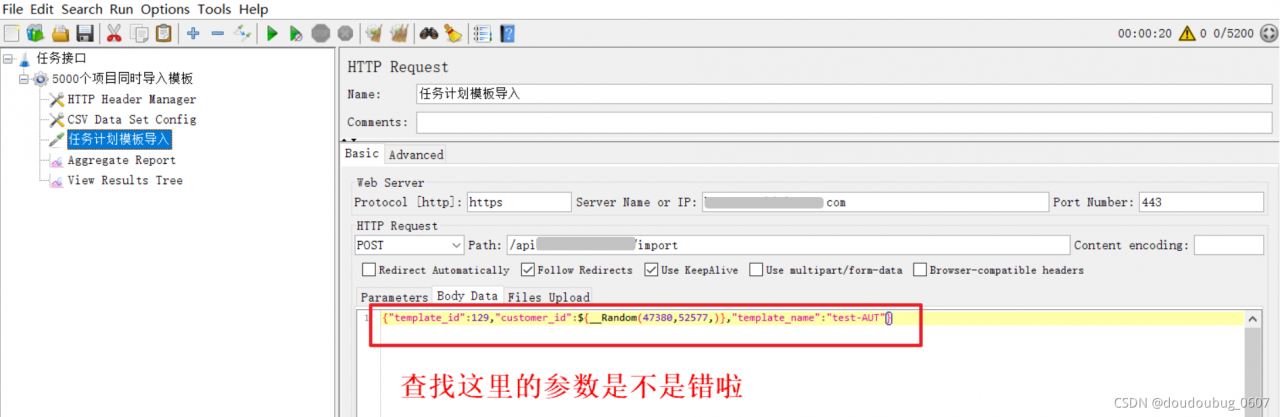
JMeter running error response code: non HTTP response code: java.lang.illegalargumentexception find and solve

JMeter operation error

Response code: non HTTP response code: java.lang.illegalargumentexception
response message: non HTTP response message: bound must be greater than origin


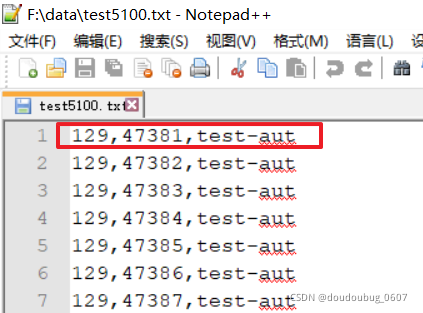
the error is due to the problem of parameter transmission. First, we need to check whether the parameter is correct


after checking, we find that the name is wrong, The case is not distinguished, so it can’t be found all the time. It’s successful to run after modification.

[Win 10] Docker Error: error during connect: In the default daemon configuration on Windows

error during connect: In the default daemon configuration on Windows, 
the docker client must be run with elevated privileges to connect.: 
Get http://%2F%2F.%2Fpipe%2Fdocker_engine/v1.24/containers/json: 
open //./pipe/docker_engine: The system cannot find the file specified.

solution: 

cd "C:\Program Files\Docker\Docker"
DockerCli.exe -SwitchDaemon