Category Archives: How to Fix

Compiling the pi_kernel source code appears: fatal error: openssl/opensslv.h: No such file or directory

The make error message appears in the Raspberry PI source code project
Build environment: Ubuntu14.04 32-bit system

scripts/sign-file.c:25:30: fatal error: openssl/opensslv.h: No such file or directory
 #include <openssl/opensslv.h>
                              ^
compilation terminated.
make[1]: *** [scripts/sign-file] Error 1
make: *** [scripts] Error 2

solution

$ sudo apt-get install libssl-dev

After the installation is complete, re-execute the make command.


React runs the browser and reports an error [A may have only one child element]

The error message

Uncaught Invariant Violation: A <Router> may have only one child element
    at invariant (http://localhost:8111/bundle.js:1071:15)
    at Router.componentWillMount (http://localhost:8111/bundle.js:2413:54)
    at callComponentWillMount (http://localhost:8111/bundle.js:27042:14)
    at mountClassInstance (http://localhost:8111/bundle.js:27135:5)
    at updateClassComponent (http://localhost:8111/bundle.js:30309:5)
    at beginWork (http://localhost:8111/bundle.js:31265:16)
    at performUnitOfWork (http://localhost:8111/bundle.js:34933:12)
    at workLoop (http://localhost:8111/bundle.js:34973:24)
    at renderRoot (http://localhost:8111/bundle.js:35056:7)
    at performWorkOnRoot (http://localhost:8111/bundle.js:35963:7)

The solution

The original demo

ReactDom.render(
    <BrowserRouter>
	    <Nav />
	    {getRouter()}
    </BrowserRouter>,
    document.getElementById('app')
)

Resolved Demo (if there are multiple components in The BrowserRouter, add a layer of div to the BrowserRouter)

ReactDom.render(
    <BrowserRouter>
        <div>
            <Nav />
            {getRouter()}
        </div>
    </BrowserRouter>,
    document.getElementById('app')
)

As for the reasons, I haven’t studied them in detail yet. If you know some friends, you can communicate with them, or explain them in the comments below. Thank you.

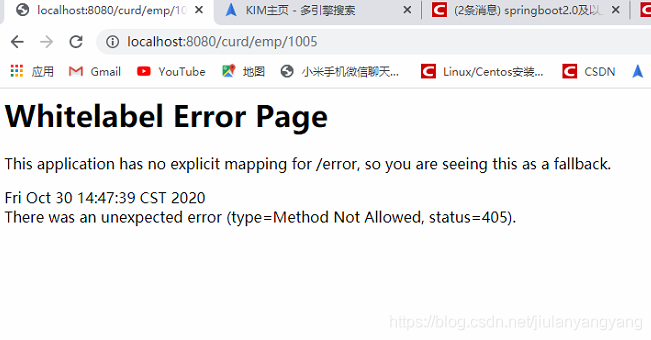
Solve the problem that the delete request is not available under SpringBoot. There was an unexpected error (type=Method Not Allowed, status=405).


1. Whitelabel Error Page Error occurs when the Page submits the DELETE request

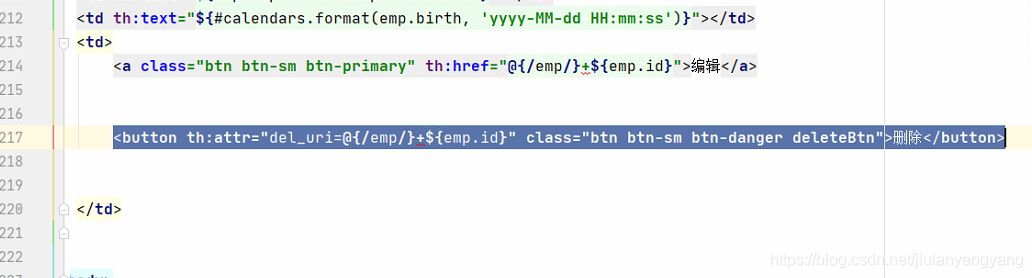
<button th:attr="del_uri=@{/emp/}+${emp.id}" class="btn btn-sm btn-danger deleteBtn">Del</button>

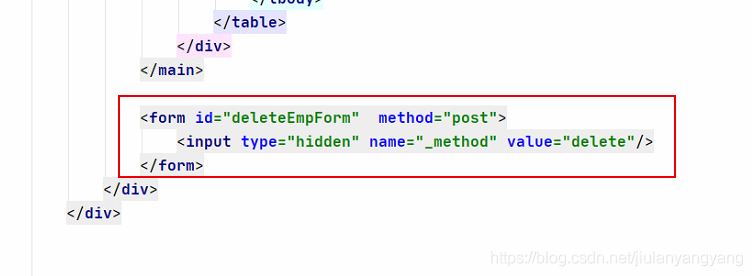
<form id="deleteEmpForm"  method="post">
	<input type="hidden" name="_method" value="delete"/>
</form>

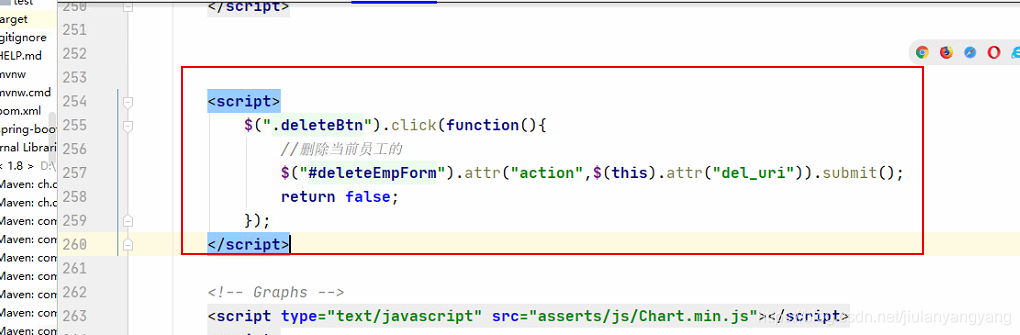
<script>
	$(".deleteBtn").click(function(){
			   $("#deleteEmpForm").attr("action",$(this).attr("del_uri")).submit();
				return false;
			});
</script>


solution
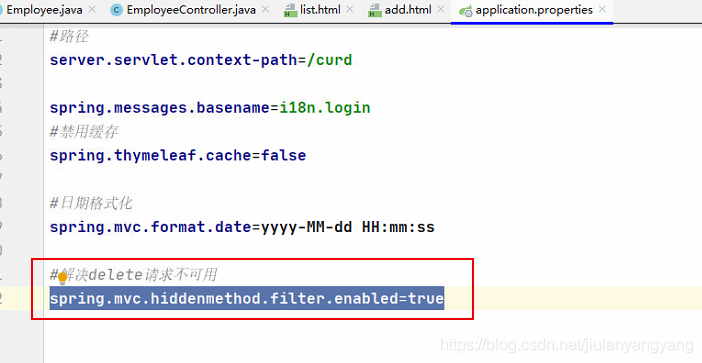
You only need to configure [Application.Properties] in the SpringBoot configuration:

spring.mvc.hiddenmethod.filter.enabled=true

Analysis of R language error replacement has length zero problem

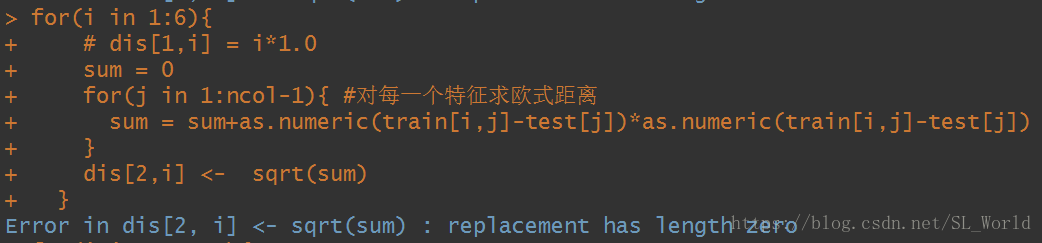
I encountered this problem before when I was doing a for loop, where the second layer of the loop is , ncol=3, so here the loop is going to be for(j in 1:2) and then the assignment matrix is the following error.

After
, it was found on the Internet that the error was caused by improper alignment of array or matrix or out-of-bounds subscripts. After checking the code, it was found that there was indeed a small error, that is, for(j in 1:ncol-1) is equivalent to for(j in 0:1). Obviously, an error will be reported when assigning the value. for(j in 1: ncol-1)) correct.

Syntax error, insert “Finally” to complete TryStatem in Myeclipse in Java-

I. This kind of mistake occurs:

Multiple annotations found at this line: – Syntax error, insert “Finally” to complete TryStatement – Syntax error, insert “}” to complete ArrayInitializer – Syntax error on token(s), misplaced construct(s) – Syntax error on tokens, delete these tokens

Solution One:

It turns out there’s a “} “missing, so you can check out the JavaScript code you inserted into the JSP! There must be a brace missing somewhere!

Solution Two

JDK mismatch. If the other party’s JDK version is different from yours, or even between 1.6 and 1.7, this error is bound to occur. Just change it to your own JDK. Right-click on the item properties-& GT; The Java Build Path can be found later.

Solution 3:

If this isn’t the case, try Project-Clean. If it doesn’t, it’s probably code or something.

How to modify the JDK version used in the MyEclipse project

1. After opening, find our Java project

2. Then right click — “Build Path– > Confirgure Build Path”

3. From the interface that appears, select the “Libraries” TAB, select the “JRE System Libraries (VERSION of the JDK)”, and then click on the right “Edit… “Button

4. In the pop-up dialog, as shown below, select the version of the JDK that you want to modify, and click the “Finish” button

5. Return to the interface for modifying the JDK version, then select “Java Compiler” in the left menu, and select the version that matches the JDK version

6. The last step is critical; be sure to check (search Java Compiler)

Field userrepository in com.example.demo2.service.imp.UserServiceImp required a bean of type ‘com.ex

Spring Boot projects may encounter classes in the DAO layer that cannot be injected, as indicated below

Field XXXXXpository in required a bean of type that could not be found.

The injection point has the following annotations:
	- @org.springframework.beans.factory.annotation.Autowired(required=true)


My solution for my project is to add @ComponentScan(basePackages = {” package name “}) to the startup class. This annotation allows the application to scan the configuration under dao at a specified location. The package name should be written to the package containing mapper, starting from the first package in the Java file. Such as: com. Example. Demo2. Dao

Adding a reference in the system-user.dtsi file cannot modify the device tree file pl.dtsi

Project Scenario:
when creating a petalinux system using Xilinx’s petalinux tool, modify the device tree file pl.dtsi by adding a reference to the system-user.dtsi file


Problem description:
cannot modify pl.dtsi configuration through system-user.dtsi


/include/ "system-conf.dtsi"
/{
};
 
&amba_pl{
    axidma_chrdev: axidma_chrdev@0 {
            compatible = "xlnx,axidma-chrdev";
            dmas = <&axi_dma_0 0 &axi_dma_0 1>;
            dma-names = "tx_channel", "rx_channel";
    };
};
 
&axi_dma_0{
    dma-channel@40400000 {
        xlnx,device-id = <0x0>;
    };
    dma-channel@40400030 {
        xlnx,device-id = <0x1>;
    };
}

Reason analysis:
system-user. Dtsi file format error, space between dma and {!!!


Solutions:
modify the code format, create system.dtb, use the following statement to reverse generate DTS file, found that part of the pl configuration has been successfully modified!

dtc -I dtb -O dts -o system.dts system.dtb

Modified code:


/include/ "system-conf.dtsi"
/{
};
 
&amba_pl {
    axidma_chrdev: axidma_chrdev@0 {
            compatible = "xlnx,axidma-chrdev";
            dmas = <&axi_dma_0 0 &axi_dma_0 1>;
            dma-names = "tx_channel", "rx_channel";
    };
};
 
&axi_dma_0 {
    dma-channel@40400000 {
        xlnx,device-id = <0x0>;
    };
    dma-channel@40400030 {
        xlnx,device-id = <0x1>;
    };
}

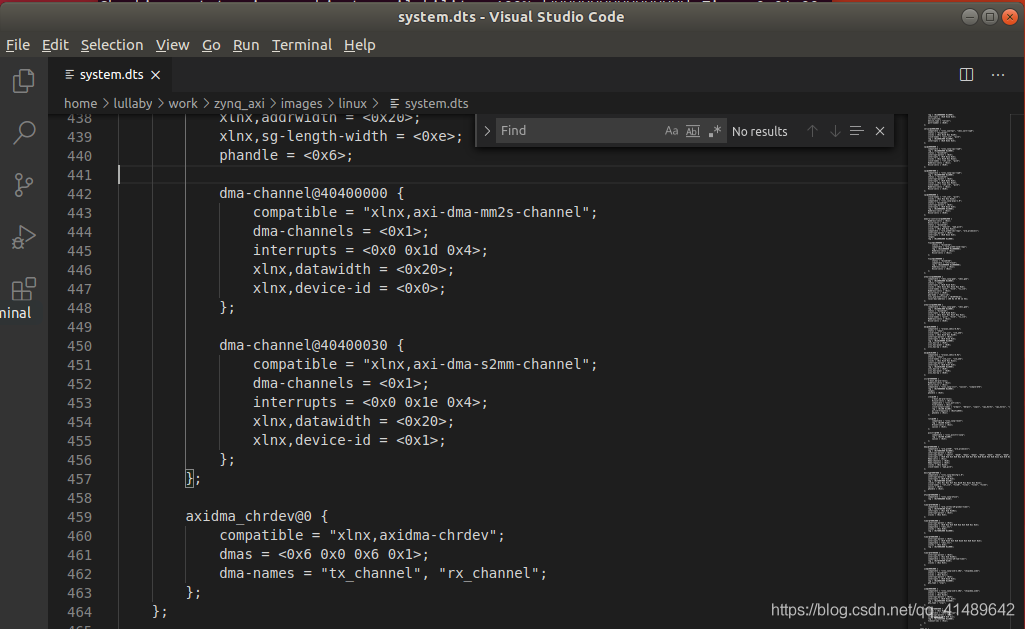
Results in system. DTS:

Elasticsearch in Spring uses Spel to dynamically create Index of Documet class

1 Usage Scenario
In some projects, the index of ES needs to be dynamically generated according to the conditions in the program to achieve the purpose of data collation. For example, a system log with a large amount of data needs to be indexed, so index needs to be generated dynamically.
2 Spel generates Index dynamically
Here USES the spring - data - elasticsearch </ code> ElasticsearchRestTemplate </ code> es operation, version for 3.2.0.

<dependency>
	<groupId>org.springframework.data</groupId>
	<artifactId>spring-data-elasticsearch</artifactId>
	<version>3.2.0.RELEASE</version>
</dependency>

You can specify the static IndexName when identifying POJO objects using the @document annotation.

@Document(indexName = "indexName", type = "logger")

But how do you dynamically generate an index?So let’s say Spel.
Spel full name is Spring Expression Language, is a Spring Expression Language, function is very powerful, official website.
Using Spel, you can call the Bean’s methods through an expression in the annotation to assign values to parameters.
Therefore, the idea of dynamic generation is to create an index generator and call the generator method in @ducument to assign the attribute indexName.
Examples of generators are as follows:

@Component("indexNameGenerator")
public class IndexNameGenerator {
    public String commonIndex() {
        String date = LocalDate.now().format(DateTimeFormatter.ofPattern("yyyy-MM-dd"));
        return "collectlog_" + date;
    }
}

An instance of the Document class is as follows:

@NoArgsConstructor
@Data
@Document(indexName = "#{@indexNameGenerator.commonIndex()}", type = "logger")
public class ESDocument {
    @Field(analyzer = "ik_max_word", searchAnalyzer = "ik_max_word")
    private String content;
    private String cluster;
    private long date = LocalDateTime.now().toInstant(ZoneOffset.ofHours(8)).toEpochMilli();
    private String path;
    private String ip;
    private String level;
}

As you can see, in the @ the Document </ code> annotation, call the indexNameGenerator.com monIndex () </ code>, the method to obtain the Index of every day.
this method is called every time new data is added.
3. Some notes
Note that Spel USES context to get the corresponding Bean Resolver. If the project is running and an exception is reported,

org.springframework.expression.spel.SpelEvaluationException: 
EL1057E: No bean resolver registered in the context to resolve access to bean 'indexNameGenerator'

This reason is mainly caused by problems with the spring context used in Spel, you can break to the SpelExpression#getValue method debugging problem.

org.springframework.expression.spel.standard.SpelExpression#getValue(org.springframework.expression.EvaluationContext, java.lang.Class<T>) 

When used in ES, if is to manually create the ElasticsearchRestTemplate </ code>, must be set when creating the instance of ElasticsearchConverter </ code>, or you will quote the exception.
ElasticsearchConverter can use the generated Bean in springboot autoconfig, in which the correct ApplicationContext has been injected. The example is as follows:

@EnableConfigurationProperties(ESProperties.class)
@Service("elasticSearchHandlerFactory")
public class ElasticSearchHandlerFactory {
    @Resource
    ESProperties esProperties;

    @Resource
    ElasticsearchConverter elasticsearchConverter;

    public ElasticsearchRestTemplate getHandler() {
        ESProperties.DbConfig dbConfig = esProperties.getDbList().get("c1");
        final ClientConfiguration configuration = ClientConfiguration.builder()
                .connectedTo(dbConfig.getHostAndPort())
                .withBasicAuth(dbConfig.getUsername(), dbConfig.getPassword())
                .build();
        RestHighLevelClient client = RestClients.create(configuration).rest();
        return new ElasticsearchRestTemplate(client, elasticsearchConverter);
    }
}

The above content is a personal learning summary, if there is any improper, welcome to correct in the comments
development diary raspberries pie module driven 190401