Category Archives: How to Fix

Http Error 12057 (Bug Fix Note)

A Bug has been reported in the product that only occurs for a specific platform, Windows Server 2003 Standard Edition.
Check the Trace Log and find that the wrapper class of Wininet call returns Error 12057, with the specific Error contents as follows:

ERROR_WINHTTP_SECURE_CERT_REV_FAILED

12057

Indicates that revocation cannot be checked because the revocation server was offline (equivalent to CRYPT_E_REVOCATION_OFFLINE).
Open the
IE-> Tools-> Internet Options-> Advanced Tab-> Security Options – & gt;” Check for server certificate revocation(Requires Restart) “

This option is currently selected. Remove this option and the Bug symptoms disappear. Only IE with Windows Server 2003 Standard Edition is checked by default, and Error 12057 (Microsoft’s Bug?) does not occur when this option is checked on other platforms. or with other options?) . Decided to code the problem.
The code to solve this problem is quite simple. Add the following code after HttpOpenRequest to set the current Http connection options to cancel this check
DWORD dwFlags = 0;

DWORD dwError = 0;

DWORD dwBuffLen = sizeof(dwFlags);
InternetQueryOption(m_hRequest, INTERNET_OPTION_SECURITY_FLAGS,

(LPVOID)& dwFlags, & dwBuffLen);

dwFlags |= SECURITY_FLAG_IGNORE_REVOCATION;

InternetSetOption(m_hRequest, INTERNET_OPTION_SECURITY_FLAGS, (LPVOID)& dwFlags, sizeof(dwFlags)) ;
supervisor ERROR (spawn error)

Processes configured in supervisor cannot start properly
supervisorctl status
cerebro FATAL Exited too quickly (process log may have details)

There is so little information here that we need to go to the specific log to see what went wrong.
tail -20 /var/log/supervisord.log

2017-08-07 13:23:36,829 INFO spawned: 'cerebro' with pid 16482
2017-08-07 13:23:36,863 INFO exited: cerebro (exit status 1; not expected)
2017-08-07 13:23:36,863 INFO gave up: cerebro entered FATAL state, too many start retries too quickly

There is more information here, but there is nothing of substance.
So what happens when you boot it up
cupname stdout
> this command is the dynamic output when the process is launched

/usr/bin/env: bash: Not a directory

Environment variables are not configured correctly.
I have already configured the Java environment variable in /etc/profile, but it has no effect.
The supervisor does not load /etc/profile when it starts. (The design itself)
But supervisor provides a configuration parameter, Enviroment

[program:cerebro]
environment = JAVA_HOME="/opt/jdk/"
command =/bin/bash /opt/cerebro/bin/cerebro
autostart =true
autorestart =  true

use

supervisorctl update
supervisorctl reload
supervisorctl status

Process working properly

cerebro                          RUNNING   pid 17236, uptime 0:00:08
elasticsearch                    RUNNING   pid 17235, uptime 0:00:08

Run time error “430”

Recently, the use of VB6.0, encountered a lot of trouble problems, is about. DLL problems. After the source program is introduced into the machine, you need to register the.DLL files used. But sometimes there will be some changes so that the files registered in the system cannot adapt to the changed environment, then Runtime Error 430
Class dose not support automation or does not support expected interface will occur. Error message.
Solution: Manually unregister the original.DLL file from the system with Regsvr32/U /s XXx. DLL and re-register it with RegSVr32 /s XXX. DLL.
This version inconsistency often occurs when a program is introduced to a native. The best way is to re-register all the files in the original reference.

Exception ignored in: bound method basesession__ del__ Of

Error message

Exception ignored in: <bound method BaseSession.__del__ of <tensorflow.python.client.session.Session object at 0x000000001AB286D8>>
Traceback (most recent call last):
  File "python3.5.2\lib\site-packages\tensorflow\python\client\session.py", line xxx, in __del__
TypeError: 'NoneType' object is not callable

Reason: When the Python garbage collection mechanism collects the Session object, it finds that c_api_util or Tf_session has been collected, resulting in a null pointer. The following comment is the reason given when an exception is thrown in the source code of TensorFlow

# At shutdown, `c_api_util` or `tf_session` may have been garbage
# collected, causing the above method calls to fail. In this case,
# silently leak since the program is about to terminate anyway.

The solution
Method one:

import keras.backend as K

# your code

K.clear_session()

Method 2:

import gc

# your code

gc.collect()

reference
https://github.com/tensorflow/tensorflow/issues/3388
https://www.cnblogs.com/kaituorensheng/p/4449457.html

Infragistics.NetAdvantage . 2006.vol2 error 1609 solution

Description:
error 1609,an error occurred while applying security settings.
aspnet is not a valid user or group.this could be a problem with the package,or a problem connecting to a domain controller on the network.check your network connection and click retry,or cancel to end the install.
Error 1609
error applying security Settings. The user is not a valid user or group. This could be due to a problem with the package or a problem connecting to a domain controller on the network.
Simply put, the ASPNET user does not exist or the domain in which the user resides has a problem. If the user doesn’t exist, create a user named ASPNET, or if it does, it could be a domain problem.
I encountered a situation where the user already existed. Solution: In “My Computer” right-click “Administration”, disable, enable, and add ASPNET users to the list owned by Administrator. The installation passes.  

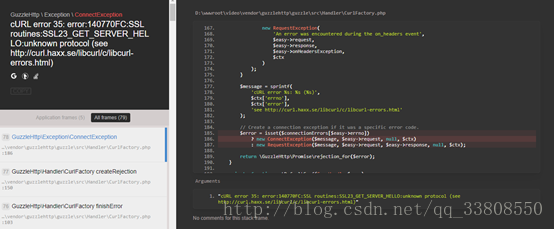
cURL error 35:error:140770FC:SSL routines:SSL_23_GET_SERVER_HELLO:unknown protocol

A problem occurred during the SSL/TLS handshake. You do need error buffering and reading messages there, because it hints at the problem. This can be a certificate (file format, path, permission), password, and so on.

Bug tip :cURL Error 35: Error :140770FC:SSL :SSL_23_GET_SERVER_HELLO: Unknown Protocol

Solutions:
1. Modify SSL version

Curl_setopt ($ch, CURLOPT_SSLVERSION, 3); // Set SSL version,1-3 switch

Curl_setopt ($ch, CURLOPT_SSL_VERIFYPEER, false); //
Do not check certificates

If this doesn’t work, see below

2. Modify the file permissions to 777
If this doesn’t work, see below
3. Remove the requested https://
Example: change https://www.360kan.com to www.360kan.com

TFTP: server says: file not found solution

Under Linux, regardless of which super-Server, inetd, or xinetd is used, the TFTP service is disabled by default, so modify the file to open the service.
According to the installation method of (1), the file /etc/xinetd.d/ TFTP can be modified. It is mainly to set the root directory of the TFTP server and start the service. The modified file is as follows:
service tftp
{socket_type = dgram
Protocol = udp
Wait = yes
User = root
Server =/usr/sbin/in TFTPD
Server_args = -s/home/LQM/tftpboot – c
Disable = no
Per_source = 11
The CPS = 100 2
Flags = IPv4
}
Server_args = -s < server_args= -s < path> -c, where < path> Change to the root directory of your TFTP-server. The parameter -s specifies chroot and -c specifies that files can be created.
3. Create TFTP root directory and start TFTP-Server.
#mkdir /home/lqm/tftpboot
# chmod o + w/home/LQM/tftpboot
#service xinetd restart
Stop xinetd: [sure]
start xinetd: [sure]
At this point, TFTP-Server is started. You can log in to test the following commands:
# TFTP & lt; your-ip-address>
tftp> get < download file>
tftp> put < upload file>
tftp> q
#

installation process problems and causes
phenomenon 1:
tftp> Log
Transfer timed out.
reason:
TFTPD service doesn’t start
Phenomenon.
tftp> put test2
Error code 0: Permission denied

run the command, check the system log
# tail /var/log/messages
found the following text:
Mar 24 19:05:26 localhost set: SELinux is preventing /usr/sbin/in. TFTPD (tftpd_t) \”write\” to tftpboot (tftpdir_t). For complete SELinux messages.run sealert-l 40a5a6bf-8ded-4bfa-ab6e-fa669a25fc6c
know this is caused by SELinux, in FC3 and FC versions after FC3 SELinux is turned on by default, now close it, modify the file /etc/sysconfig/ SELinux, set which
SELINUX=disabled
Then restart the computer
Or execute the system-config-SecurityLevel command to open the Security-Level Configuration dialog box and change “forced” to “allowed” in the SELinux (S) option.
Phenomenon 3:
tftp> Log
Error code 1: File not found
reason:
specified File does not exist; Or the -c option is not specified in the TFTPD boot parameter, allowing the file to be uploaded
Phenomenon 4:
tftp> Get test.log
Error code 2: Only absolute filenames allowed
reason:
server_args set in /etc/xinetd.d/ tftpd-hpa
cat /etc/defaul/tftpd-hpa
#Defaults for tftpd-hpa
RUN_DAEMON=\”no\”
OPTIONS=\”-s /home/tftpd-c-p-u 077-u To set TFTPD \”
, simply change server_args = to your server folder

Event ID 407, 408 – when NAT is used as a DNS server

QUESTION NO: 211

You are the administrator of TestKing’s network, which consists of a single Windows 2000 Domain. The

relevant portion of its configuration is shown in the exhibit.

You configure a Windows 2000 Server computer named NAT1 as the DNS server for the domain. You

install Routing and Remote Access on NAT1. You configure NAT1 to provide network address

translation services for client computers to access the Internet.

Users now report that they cannot log on to the domain or access network resources. On investigation,

you discover that you cannot query NAT1 for name resolution. In the application event log on NAT1, you

find the following event messages:

Event ID: 407

Source: DNS

Description: DNS server could not bind a datagram (UDP) socket to

192.168.0.1. The data is the error.

Event ID: 408

Source: DNS

Description: DNS server could not open socket for address 192.168.0.1.

Verify that this is a valid IP address on this machine.

How should you correct this problem?

A. Disable the DNS proxy functionality on NAT1

B. Enable the DNS proxy functionality on NAT1

C. Reconfigure the DNS server service not to listen on the internal address of NAT1.

D. Reconfigure the DNS server service not to listen on the external address of NAT1.

Answer: C

Explanation: This problem can occur when you have a NAT server that also is used as a DNS server. NAT has

a DNS Proxy setting that enables DHCP clients to direct DNS queries to the NAT server. The client DNS

queries are then forwarded to the NAT server’s configured DNS server. The DNS Proxy and the DNS Server

service cannot coexist on the same host, if the host is using the same interface and IP address with the default

settings.

There are three methods to overcome this problem:

1. Reconfigure the DNS server service not to listen on the internal address. This is the solution in this scenario.

2. Install NAT and DNS on different servers. We cannot change this configuration here since this option is not

listed.

3. Use the DHCP server Service in NAT, NOT the DHCP Allocator and DNS Proxy.

Reference: JSI Tip 3284, Your DNS Event Log reports Event Ids 407 and 408

Incorrect Answers:

A: We could disable both the DNS proxy functionality and the DHCP allocator.

B: The DNS proxy function on the NAT server is partly to blame. Enabling it will not help.

D: We must configure the DNS server not to listen to the internal address, not the external address.

cURL error 60: SSL certificate problem…

PHP reports this error in curl:

cURL error 60: SSL certificate problem: unable to get local issuer certificate (see http://curl.haxx.se/libcurl/c/libcurl-errors.html)

Query 60 errors according to the address indicated after the error report:

CURLE_SSL_CACERT (60)
Peer certificate cannot be authenticated with known CA certificates.

Unable to obtain local issuer certificate
Solution: (http://stackoverflow.com/questions/29822686/curl-error-60-ssl-certificate-unable-to-get-local-issuer-certificate) search on the net
Error regarding “SSL Certificate Problem: Unable to obtain local issuer certificate”. Obviously, this applies to the system that sends CURL requests (and the server that doesn’t receive them)
1) from https://curl.haxx.se/ca/cacert.pem. Download the latest cacert pem
2) Add the following line to php.ini (if this is Shared hosting and you do not have access to php.ini then you can add to.user.ini in public_html)
curl.cainfo=/path/to/downloaded/cacert.pem
3) by default, the FastCGI process will analytical new file every 300 seconds (if needed, you can add several files to change frequency, such as suggested here https://ss88.uk/blog/fast-cgi-and-user-ini – files – the – new – htaccess file /)

Windows Update Error: 80244019

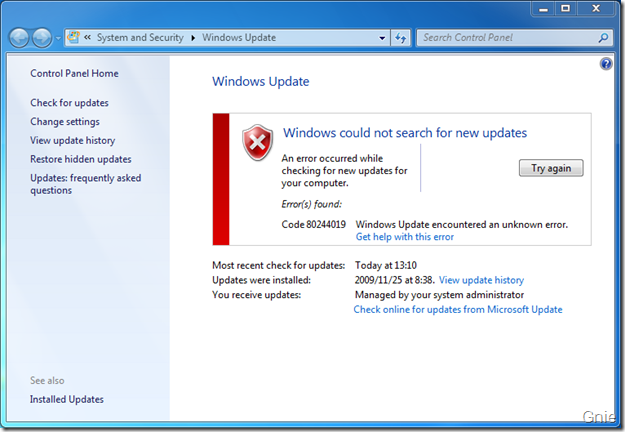
Recently, It was found that Windows Update (hereinafter referred to as WU) always prompts 80244019 error when checking for updates (as shown in the figure below). Notice the prompt “Managed by your system Administrator” at the bottom of the window. It is preliminarily estimated that WU could not connect to Microsoft Update due to the group policy deployed by domain control on all computers.

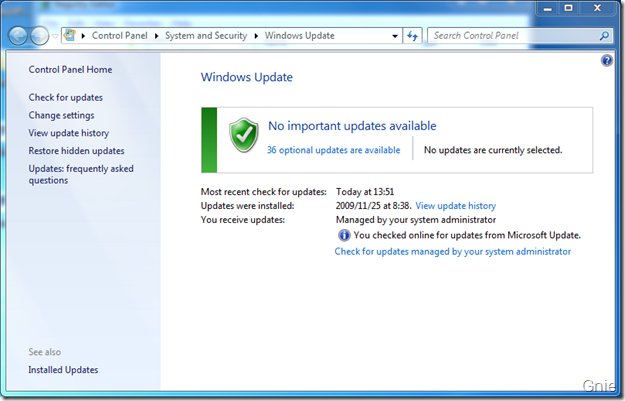
Check Online for Updates from Microsoft Update link. This should be another way to deal with the failure of connecting to Microsoft updates. WU started searching for updates after clicking on the link.

But doing so each time is cumbersome, as the domain controller must have modified some location in the registry when deploying the group policy to make it unusable for WU. So finding them and fixing them should solve the problem. Look around in the Policy and find something WindowsUpdate.
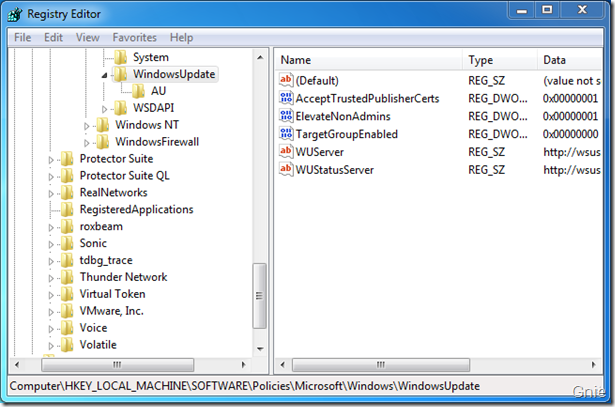
[HKEY_LOCAL_MACHINE\SOFTWARE\Policies\Microsoft\Windows\WindowsUpdate]
1. Click WindowsUpdate, and if domaincontrol has deployed WSUS, its Settings will be shown here: WUServer, WUStatusServer, both of which say WSUS server address in the domain, without saying delete (first backup is best, don’t be too bold…) .

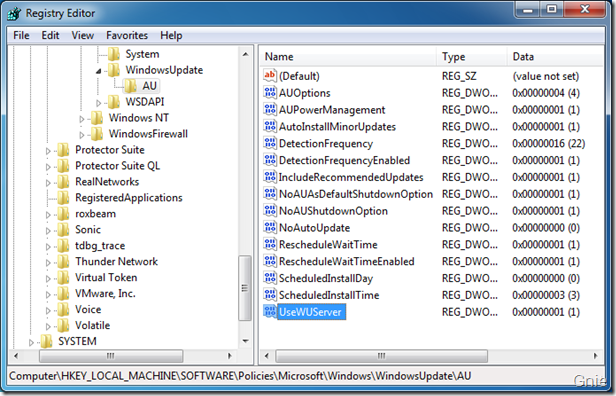
2. Let’s take a look at what’s in the AU below WindowsUpdate, which also holds parameters for group policy Settings. Especially UseWUServer, which is supposed to tell WU where to find Windows updates, just set its Data to “0”.

Reboot to see what happens. WU is back to his old self:


3. In fact, compared with a non-domain computer, if the group policy has not been modified, there is no WindowsUpdate directory in the registry, that is to say, it is ok to delete all [HKEY_LOCAL_MACHINE\SOFTWARE\Policies\Microsoft\Windows\Windows \WindowsUpdate]. The fact proves that there is no problem with all deletion. Attach a Reg for deletion.

Error debug in box2d createfixture Error:R6025 pure Virtual function call solution

This error occurs because the ShapeDef is on the shape. Do not create it in a field at the same level as the ShapeDef when you create the Shape. For example, this throws an exception:

b2FixtureDef boxDef;

    if (isCircle)
    {
        b2CircleShape circle;
        circle.m_radius = sprite->getContentSize().width/2.0f/PTM_RATIO;
        boxDef.shape = &circle;
    }
    else
    {
        b2PolygonShape box;
        box.SetAsBox(sprite->getContentSize().width/2.0f/PTM_RATIO, sprite->getContentSize().height/2.0f/PTM_RATIO);
        boxDef.shape = &box;
    }

can be written to avoid exceptions:

    b2CircleShape circle;
    b2PolygonShape box;
    if (isCircle)
    {
        circle.m_radius = sprite->getContentSize().width/2.0f/PTM_RATIO;
        boxDef.shape = &circle;
    }
    else
    {
        box.SetAsBox(sprite->getContentSize().width/2.0f/PTM_RATIO, sprite->getContentSize().height/2.0f/PTM_RATIO);
        boxDef.shape = &box;
    }