Category Archives: How to Fix

Pull is not possible because you have unmerged files

Question reappearance:
Pull is not possible because you have unmerged files.
Please, fix them up in the work tree, and then use ‘git add/rm < file> ‘
as appropriate to mark resolution, or use ‘git commit -a’.
Reasons:
In the process of [Git pull], if there are conflicting files, all other files except the conflicting files are saved as antinuclear zone files.
Local push and merge form references such as merge-head and pushhead.
– HEAD represents a local reference formed after a recent successful push;
The -merge-head represents the reference formed after a successful pull.
Solutions:
You can MERGE-HEAD or HEAD to achieve the effect of type and SVN Revet.
1. Open Git console:
Right click on the project –& GT; 【Open in Terminal】 –& GT; Use the Git command console.
2. Input: Git reset –hard FETCH_HEAD
– To reset conflicting local files, not only to merge-head or HEAD, but also -hard;
– No later hard, no local workspace will be flushed. It just overwhelms the stage.
3. Input: Git pull
Resubmission will succeed.
 
For more highlights, please follow my “toutiao” : Java cloud notes
, anytime, anywhere, to give you the latest, most convenient handheld cloud services
Override the equals method and override the toString method

Override equals and toString methods


//Rewrute equals
public boolean equals(Object obj) {
	if (obj == null) {
		return false;
	}
	if (obj == this) {
		return true;
	}
	if (obj instanceof People) {
		People p = (People)obj;
		if (p.name.equals(this.name) && p.age == this.age && p.sex == this.sex) {
			return true;
		}
	}
	return false;
}
//Rewrute tostring
	public String toString() {
		return name+":"+age+":"+sex;
	}

Vue element admin configure global styles

Background: Recently, we made a management platform. For convenience, we used Vue-element-admin, but the overall theme of UI design is red. In order to facilitate maintenance and ease the workload of other pages, we decided to configure a global style to cover the original Element style.
1. Global component style, overwriting the original element style
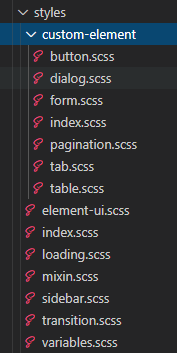
(1) Find the styles file, create a new customs-Element folder, create an index.CSS file, and introduce the required component styles, preferably one component and one file name

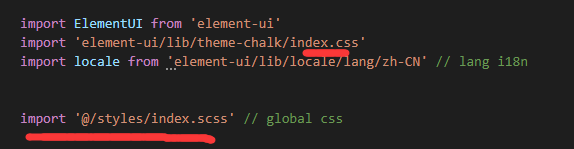
(2) Introduce index. SCSS into styles/index. SCSS, and introduce styles/index. SCSS into main.js

2. Global variable control of color is convenient for later maintenance and skin peeling
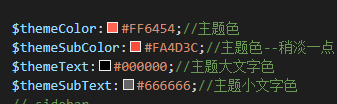
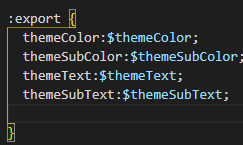
Declare variables in styles/variables. SCSS

How do we use it globally?In general, we declare the SCSS variable, and we need to import the file when we refer to it.
But you can do this by adding plug-ins, global configurations, even without references
Plug-in: Ass-Resources-Loader

npm install --save-dev sass-resources-loader

Find the vue.config.js configuration file, add the following code in Module. exports, and restart to make a global reference without import

css: {
    // Only files ending in *.module.[ext] will be treated as CSS Modules.
    requireModuleExtension: true,
    loaderOptions: {
      // Use variables from variables.scss globally.
      sass: {
        prependData: `@import "@/styles/variables.scss";`
      }
    }
  },

Compatibility of mobile display frame

Border1 pixel problem
For example:
HTML:

<div class="content  border-1px"></div>

css:

.border-1px{
  position: relative;
}
.border-1px:before{
  position: absolute;
  top: 0;
  right: 0;
  bottom: 0;
  left: 0;
}
@media only screen and (-webkit-min-device-pixel-ratio: 2) {
  .border-1px:before {
    right: -100%;
    bottom: -100%;
    -webkit-transform: scale(0.5);
    transform: scale(0.5);
  }
}

@media only screen and (-webkit-min-device-pixel-ratio: 3) {
  .border-1px:before {
    right: -200%;
    bottom: -200%;
    -webkit-transform: scale(0.333333);
    transform: scale(0.333333);
  }
}
.content:before{
  border: 1px solid red;
}

Effect:

Installing zookeeper under Linux system

Install the zookeeper
1. Unpack

Tar ZXVF – apache – they are – 3.6.1 track – bin. Tar. Gz

Create folders

mkdir /usr/local/

3. Move folders

Mv apache – they are – 3.6.1 track – bin/usr/local /

4. Rename configuration files

CD/usr/local/apache – they are – 3.6.1 track – bin/conf
Cp zoo_sample. CFG zoo. CFG

5. Modify the configuration file

Vi Zoo. CFG, modify the corresponding content as follows

dataDir=/usr/local/apache-zookeeper-3.6.1-bin/data

# new

admin.serverPort=18888

6, start,

CD/usr/local/apache – they are – 3.6.1 track – bin/bin
./zkServer.sh start

7, test,

netstat -anp|grep 2181

javax.persistence.EntityNotFoundException : unable to find error

Javax.mail. Persistence. EntityNotFoundException: Unable to find a class with id?
The reason:
Whether @OneToone or @ManyToone, this is due to the fact that the child table (associated table) has no records corresponding to the ID in the primary table (associated table).
Solutions:

    to check why there is no record for ID in the primary table if the data can be loaded normally without a record for ID in the primary table, you need to add an @notfound Annotation to the primary table field. Example: @onetoone (optional=true)
    @joincolumn (name=”UserId “,insertable=false, updatable=false)
    @notfound (action=NotFoundAction.IGNORE)
    private UserId UserId; In this way, when no data is found in the child table, the corresponding field in the main table is null and no error is reported. Or contact the business personnel, see the data simulation problem, directly kill (I am directly killed)

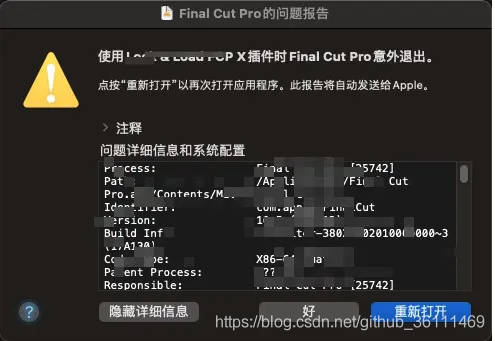
The software of Final Cut Pro x 10.5 failed to open, and it flashed back directly.


Final Cut Pro X 10.5 software failed to open, and the problem of flash back was directly caused.


if the Final Cut Pro exits unexpectedly when using ‘****’ plug-in, please go to ‘/Library/ plug-ins /FxPlug’ folder and delete the corresponding ‘****. FxPlug’ folder.
This easily solves the problem of still not opening the software after installing FCPX

**** refers to the source of the application for your plug-in. For example, Lock is the name of the application for Lock & Load FCP X.fxplug

Solution: open the terminal; Enter the above command, ‘sudo xattr-d com.apple. email /Applications/ XXXX. App’, note that ‘/Applications/ XXXX. App’ can be replaced with your corresponding APP address

Golong based tool for automatically generating the corresponding struct file according to XML file

By reading in an XML file, the corresponding struct is automatically generated and saved in the specified file.
XmlLoader. Go and xmlNodeStructCreator. Go are the following two files.
XmlLoader. Go parses the XML into a chained structured data. XmlNodeStructCreator. Go recursively extracts node information from the chained structured data and generates the corresponding structure file of the XML.
This is rough, especially the naming of field in the structure, which is directly named after the node. Interested friends can change it by themselves.
In addition, the Repository contains two other widgets that you may be interested in viewing.
Tool source code

Solve the problem of testing redis cluster“ java.lang.NumberFormatException : For input string: “ [email protected]@17002 “And so on

Solve the test times redis cluster “Java. Lang. A NumberFormatException: For input string:” 7003 @ 17003… 7002@17002″ and other anomalies…
1. Problem Description:

About redis5.0 cluster mode, through the client test code debugging quote “the Exception in the thread” main “Java. Lang. A NumberFormatException: For input string:” 7003 @ 17003… 7002@17002″, details of the log are as follows:

Exception in thread "main" java.lang.NumberFormatException: For input string: "7003@17003"
    at java.lang.NumberFormatException.forInputString(NumberFormatException.java:65)
    at java.lang.Integer.parseInt(Integer.java:492)
    at java.lang.Integer.valueOf(Integer.java:582)
    at redis.clients.util.ClusterNodeInformationParser.getHostAndPortFromNodeLine(ClusterNodeInformationParser.java:40)
    at redis.clients.util.ClusterNodeInformationParser.parse(ClusterNodeInformationParser.java:14)
    at redis.clients.jedis.JedisClusterInfoCache.discoverClusterNodesAndSlots(JedisClusterInfoCache.java:40)
    at redis.clients.jedis.JedisClusterConnectionHandler.initializeSlotsCache(JedisClusterConnectionHandler.java:50)
    at redis.clients.jedis.JedisClusterConnectionHandler.<init>(JedisClusterConnectionHandler.java:31)
    at redis.clients.jedis.JedisSlotBasedConnectionHandler.<init>(JedisSlotBasedConnectionHandler.java:17)
    at redis.clients.jedis.JedisCluster.<init>(JedisCluster.java:51)
    at redis.clients.jedis.JedisCluster.<init>(JedisCluster.java:35)
    at redis.clients.jedis.JedisCluster.<init>(JedisCluster.java:26)
    at redis.clients.jedis.JedisCluster.<init>(JedisCluster.java:30)
    at com.xwood.redis.cluster.JedisClusterTest.main(JedisClusterTest.java:23)

2. Solutions
Because of the jedIS-2.7.0.jar version, changing to the Jedis-3.2.0.jar version will solve the problem, because the Redis5.0 version requires a high version driver package for the client.

kafka-eagle-2.0.3:Note: Kafka version is – or JMX Port is -1 maybe kafka broker jmxport disable.

Kafka-eagle-2.0.3 Cannot obtain kafka cluster information
Kafka turns on JMX so that kafka cluster status can be viewed through Kafka-Eagle.
Solution 1:
Modify the kafka-run-class.sh script by adding JMX_PORT=9988 to the first line.

vim /moudle/kafka-2.6/bin/kafka-run-class.sh
JMX_PORT=9988

Solution 2:
start kafka JMX_PORT=9988

JMX_PORT=9988 kafka-server-start.sh -daemon /moudle/kafka-2.6/config/server.properties

Win10 must be optimized after installation to solve 100% disk occupation

01 Close home group
Control Panel – Admin tool – Service – HomeGroup Listener and HomeGroup Provider disabled.
Close the disk defragmentation, automatic maintenance scheduling tasks
Select disk C- properties – Tools – Optimize and defragment the drive – optimize – change Settings – deselect to run as planned.
03 Windows Defender off (as the case may be)
Control Panel – Windows Defender – Settings – Implement protection – Remove check and Administrator – Enable Windows Defender – Remove check.
Control Panel – Admin Tool – Services – Windows Defender Service disabled.
04 Close Windows Search
Control Panel – Admin Tool – Services – Windows Search disabled.
Set up the Superfetch service
Control panel – Management tool – Service – Superfetch – startup type – auto (delayed startup).
06 Clean the Windows.old folder
C disk – right click – Properties – Disk cleanup – select the previous Windows Installation check box – Confirm cleanup.
Set automatic login
Win+R – Enter Netplwiz – Cancel the option of having to enter your username and password when using your computer – then double-click on the account that requires automatic login – enter your password.
08 closed ipv6
Network sharing center – Network connection – Ethernet – Properties – Cancel ipv6.
09 Closing effects
System properties – Advanced – Performance – Settings – Visual effects – Turn off fade-in effects.
Close virtual memory
System Properties – Advanced – Performance – Settings, select “Advanced”, click “Change” in virtual memory, remove the check box of “Automatically manage the paging file size of drive”, click “No Paging File” below, click “Set” and “OK”.

kubectl get csr No resources found.

Error message: kubectl get CSR
No resources found.
error analysis: the master side could not receive the node application to join kubernetes request information
problem solved: by checking the log file, it was found that kubelet did not start successfully. After screening kubelet, it was found that there was No kubelet command option