Category Archives: How to Fix

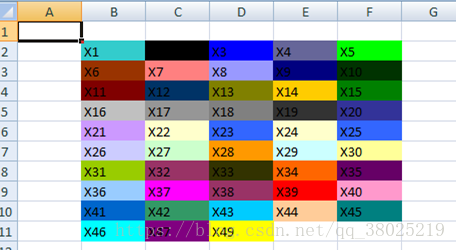
POI set excel cell background color (use of setfillforegrondcolor and setfillpattern)

    IndexedColors.AQUA.getIndex()IndexedColors.AUTOMATIC.getIndex()IndexedColors.BLUE.getIndex()IndexedColors.BLUE_GREY.getIndex()IndexedColors.BRIGHT_GREEN.getIndex()IndexedColors.BROWN.getIndex()Ind exedColors.CORAL.getIndex()IndexedColors.CORNFLOWER_BLUE.getIndex()IndexedColors.DARK_BLUE.getIndex()IndexedColors.DARK_GREEN.getIndex()IndexedColors.DARK_RED.getIndex()IndexedColors.DARK_TEAL.getInde x()IndexedColors.DARK_YELLOW.getIndex()IndexedColors.GOLD.getIndex()IndexedColors.GREEN.getIndex()IndexedColors.GREY_25_PERCENT.getIndex()IndexedColors.GREY_40_PERCENT.getIndex()IndexedColors.GREY_50_ PERCENT.getIndex()IndexedColors.GREY_80_PERCENT.getIndex()IndexedColors.INDIGO.getIndex()IndexedColors.LAVENDER.getIndex()IndexedColors.LEMON_CHIFFON.getIndex()IndexedColors.LIGHT_BLUE.getIndex()Index edColors.LEMON_CHIFFON.getIndex()IndexedColors.LIGHT_BLUE.getIndex()IndexedColors.LIGHT_CORNFLOWER_BLUE.getIndex()IndexedColors.LIGHT_GREEN.getIndex()IndexedColors.LIGHT_ORANGE.getIndex()IndexedColors .LIGHT_TURQUOISE.getIndex()IndexedColors.LIGHT_YELLOW.getIndex()IndexedColors.LIME.getIndex()IndexedColors.MAROON.getIndex()IndexedColors.OLIVE_GREEN.getIndex()IndexedColors.ORANGE.getIndex()IndexedCo lors.ORCHID.getIndex()IndexedColors.PALE_BLUE.getIndex()IndexedColors.PINK.getIndex()IndexedColors.PLUM.getIndex()IndexedColors.RED.getIndex()IndexedColors.ROSE.getIndex()IndexedColors.ROYAL_BLUE.getI ndex()IndexedColors.SEA_GREEN.getIndex()IndexedColors.SKY_BLUE.getIndex()IndexedColors.TAN.getIndex()IndexedColors.TEAL.getIndex()IndexedColors.TURQUOISE.getIndex()IndexedColors.VIOLET.getIndex()Index EdColors. WHITE. GetIndex IndexedColors ()// WHITE. YELLOW. GetIndex ()

Installing Vue devtools under mac

A, download
Go to the official Vue DevTools home page at GitHub. Because downloading directly from the Chrome app store requires over the wall.
the official address: https://github.com/vuejs/vue-devtools.git
Install the NPM package, the dependency package required by the project
Go to the directory where you downloaded the Vue-devtools-dev folder and enter the following code from the command

   npm install

Edit project files

  npm run build

Iv. Modify Persistent
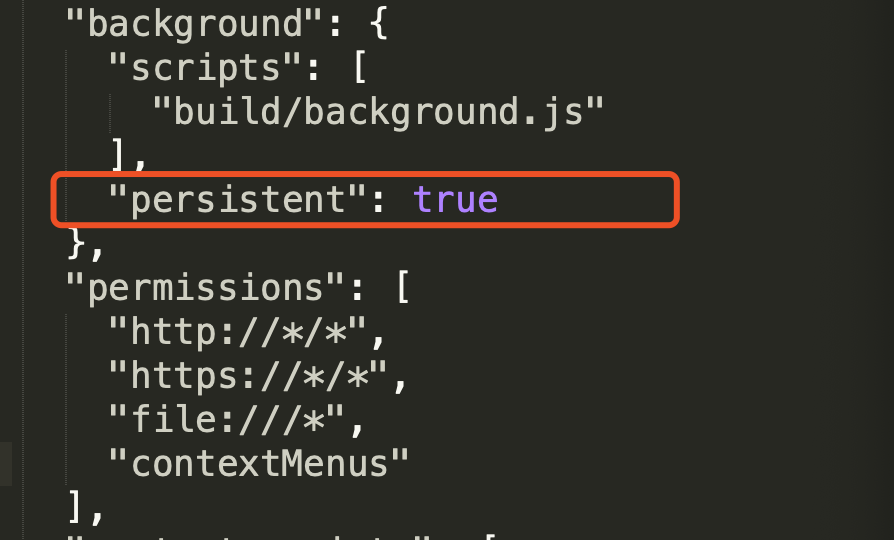
Shells -> enter under the vue-devtools-dev folder. chrome -> Manifest.json, find Persistent, and change its value to true

Add to Chrome
1. Open the chrome extensions page, and make the following extensions available:
– chrome://extensions/
– more tools L – extensions (E)

Retrofit displays the downloaded content

        HttpLoggingInterceptor interceptor = new HttpLoggingInterceptor();
        interceptor.setLevel(HttpLoggingInterceptor.Level.BODY);
        OkHttpClient client = new OkHttpClient.Builder()
                .addInterceptor(interceptor)
                .retryOnConnectionFailure(true)
                .connectTimeout(15, TimeUnit.SECONDS)
                .build();


        Retrofit retrofit = new Retrofit.Builder().baseUrl(api_url).client(client).addConverterFactory(GsonConverterFactory.create()).build();
                RetrofitService service = retrofit.create(RetrofitService.class);

        Call<ApiGetMapFarms> getMapFarms = service.getMapFarms(api_token, farm_group_id);
        getMapFarms.enqueue(new Callback<ApiGetMapFarms>() {

Note: if the parse line to the parse line, if the copy of the parse will not resolve because of the whitespace problem

Quickly create a local typescript running environment.

Quickly create a native Typescript runtime environment.

npm init -f
npm -D i typescript@4
npm -D i @types/node@12 @types/vscode@1
npm -D i ts-node

npm -g i https://github.com/zhmhbest/AttachConfiguration
attach package.json "main='src/index.ts'"
attach package.json "scripts>build='tsc -p ./'"
attach package.json "scripts>watch='tsc -watch -p ./'"
attach package.json "scripts>start='ts-node src/index.ts'"

mkdir src
mkdir .vscode
touch ./tsconfig.json
touch ./src/index.ts
touch ./.vscode/launch.json

tsconfig.json

{
    "compilerOptions": {
        "sourceMap": true,
        "module": "CommonJS",
        "target": "ES2016",
        "lib": ["ES2016"],
        "rootDir": "./src",
        "outDir": "./out",
        "strict": true,
        "skipLibCheck": true,
        "noImplicitReturns": true,
        "noFallthroughCasesInSwitch": true,
        "noUnusedParameters": true,
    },
    "include": ["./src/**/*"],
    "exclude": ["node_modules", "dist", "out"]
}

launch.json

{
    "version": "0.2.0",
    "configurations": [
        {
            "name": "Debug",
            "type": "node",
            "request": "launch",
            "args": [
                "${workspaceRoot}/src/index.ts"
            ],
            "runtimeArgs": [
                "--nolazy",
                "-r",
                "ts-node/register"
            ],
            "sourceMaps": true,
            "cwd": "${workspaceRoot}",
            "protocol": "inspector",
            "console": "integratedTerminal",
            "internalConsoleOptions": "neverOpen"
        }
    ]
}

index.ts

function sayHello() {
    console.log("Hello!");
}
sayHello();
Introduction of Hadoop HDFS and the use of basic client commands

HDFS basic functions
Basic function
has the basic operation function of file system;

file blocks for unit store the data in different machine disk
the default 128 MB large data slices, 3 copies of the
the NameNode master node: virtual directory maintenance, management of child nodes (Secondly the NameNode) storage resources scheduling, and the client interaction
the DataNode from multiple nodes: save the data, register when they start with the master node, the master node can know the information of it, convenient later call
(DataNode from cluster nodes to meet the basic conditions: Linux01, 02 01… The IP domain name between the secret set. Because nodes communicate with each other)
Linux01:NameNode DataNode
Linux02:DataNode
Linux03:DataNode
Use of client base commands

    location bin/HDFS DFS among them are some commands to upload: HDFS DFS – put./to/(the front is a local path, followed by HDFS path) directory: HDFS DFS – ls/(files in the directory view points, and other road king in the same way) to create folders: HDFS DFS – mkdir/data (create the folder in the root directory) to check the file content: HDFS DFS – cat file path from HDFS download: HDFS DFS get /data/1.txt/(HDFS path in front followed by local path)

Linux shell RM deletes all. O suffix files in the subdirectory

How it works: Use the pipe command to find the files you want to delete in your home directory, then construct the parameter list using “xargs” and run the command.
Example 1: Delete all files with the suffix O in the current directory including subdirectories of the current directory

find . -name "*.o"  | xargs rm -f

Example 2: Remove all bak suffix files including subdirectories under /root

find /root -name *.bak | xargs rm -f

Command details reference:
Linux Shell LS Xargs RM Combined Delete File
https://blog.csdn.net/whatday/article/details/104027935


Abnormal report error javax.net.ssl .SSLHandshakeException: server certificate change is restrictedduring renegotiation

Project Scenario:
Access the external interface address


Problem description:
The following abnormalities appear:

javax.net.ssl.SSLHandshakeException: server certificate change is restrictedduring renegotiation
	at sun.security.ssl.Alerts.getSSLException(Alerts.java:192)
	at sun.security.ssl.SSLSocketImpl.fatal(SSLSocketImpl.java:1884)
	at sun.security.ssl.Handshaker.fatalSE(Handshaker.java:276)
	at sun.security.ssl.Handshaker.fatalSE(Handshaker.java:266)
	at sun.security.ssl.ClientHandshaker.serverCertificate(ClientHandshaker.java:1402)
	at sun.security.ssl.ClientHandshaker.processMessage(ClientHandshaker.java:209)
	at sun.security.ssl.Handshaker.processLoop(Handshaker.java:878)
	at sun.security.ssl.Handshaker.process_record(Handshaker.java:814)
	at sun.security.ssl.SSLSocketImpl.readRecord(SSLSocketImpl.java:1016)
	at sun.security.ssl.SSLSocketImpl.performInitialHandshake(SSLSocketImpl.java:1312)
	at sun.security.ssl.SSLSocketImpl.startHandshake(SSLSocketImpl.java:1339)
	at sun.security.ssl.SSLSocketImpl.startHandshake(SSLSocketImpl.java:1323)
	at org.apache.http.conn.ssl.SSLConnectionSocketFactory.createLayeredSocket(SSLConnectionSocketFactory.java:395)
	at org.apache.http.conn.ssl.SSLConnectionSocketFactory.connectSocket(SSLConnectionSocketFactory.java:354)
	at org.apache.http.impl.conn.DefaultHttpClientConnectionOperator.connect(DefaultHttpClientConnectionOperator.java:134)
	at org.apache.http.impl.conn.PoolingHttpClientConnectionManager.connect(PoolingHttpClientConnectionManager.java:353)
	at org.apache.http.impl.execchain.MainClientExec.establishRoute(MainClientExec.java:380)
	at org.apache.http.impl.execchain.MainClientExec.execute(MainClientExec.java:236)
	at org.apache.http.impl.execchain.ProtocolExec.execute(ProtocolExec.java:184)
	at org.apache.http.impl.execchain.RetryExec.execute(RetryExec.java:88)
	at org.apache.http.impl.execchain.RedirectExec.execute(RedirectExec.java:110)
	at org.apache.http.impl.client.InternalHttpClient.doExecute(InternalHttpClient.java:184)
	at org.apache.http.impl.client.CloseableHttpClient.execute(CloseableHttpClient.java:71)
	at org.apache.http.impl.client.CloseableHttpClient.execute(CloseableHttpClient.java:220)
	at org.apache.http.impl.client.CloseableHttpClient.execute(CloseableHttpClient.java:164)
	at org.apache.http.impl.client.CloseableHttpClient.execute(CloseableHttpClient.java:139)

Reason analysis:
As a result of the Http access certificate problem, it is possible that the project environment is too old. The current Java environment is JDK1.7, Tomcat1.7
Solutions:
Turn off HTTP certificate validation
Measures are as follows:
Modify the Tomcat startup script Catalina.sh
Location: Tomcat root directory /bin/catalina.sh
Add the following values for the JAVA_OPTS parameter:

-Djdk.tls.allowUnsafeServerCertChange=true 
-Dsun.security.ssl.allowUnsafeRenegotiation=true

Restart the project and see if the parameter Settings take effect in the Tomcat startup log
Problem solving.

Python packaged *. Exe is running os.popen (cmd)/ subprocess.Popen *. Exe crashes with invalid [winerror 6] handle

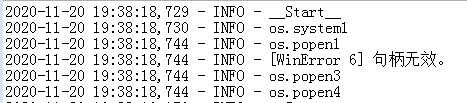
Summary of the problem: last week I used Python3.8.5 to write an upgrade script for a software running on Windows 7, and by printing and exception catching found that the script crashed when the script was executed to os.popen(CMD), the exception was [WinError 6] handle invalid

Part of the test code:

logging.info('__Start__')
logging.info('os.system1')
logging.info('os.popen1')
try:
    logging.info(os.popen('c:'))
    logging.info('os.popen2')
except Exception as a:
    logging.info(a)
    logging.info('os.popen3')
logging.info('os.popen4')

Effect :

After testing, it was found that the program and script could run normally on Win10, and the script was executed separately on Win7 without any problem, and the script was called with the program on Win7, even if the script was executed OS.popen (‘ c: ‘) would crash.

Because os.popen is actually the encapsulation of subprocess.Popen, so the title also carries subprocess.Popen
solution: to implement a function myPopen, or use subproce. popen0 will be 1 stdin = Subprocess. DEVNULL to modify, the code is as follows:

def myPopen(cmd):
    proc = subprocess.Popen(cmd,
                            shell=True,
                            stdout=subprocess.PIPE,
                            stdin=subprocess.DEVNULL)
    return proc.stdout.read().decode()

Python running as Windows Service: OSError: [WinError 6] The handle is invalid
Popen(

Adding project folder in SourceInsight is empty

A very strange problem occurred when I added the folder named Stdio to the project and found that the folder appeared empty in Soureinsight.
At first I thought it was a folder permissions issue, so I made all the files readable and writable. Still not solving the problem, I stumbled across a particular project in SourceInsight: the Base project
The purpose of this project is to put files that are common to all projects, thus achieving the effect of sharing public files. Have a try!
Come on!!

Shows my function!!

Creation and use of Oracle sequence

Creation of an Oracle sequence
CREATE SEQUENCE name
[br>]
[START WITH n]

[{MAXVALUE n>5 NOMAXVALUE}]0
1 2 [{MINVALUE n>6 NOMINVALUE}]3
4 [{CYCLE|NOCYCLE}]
[{CACHE n| NOCACHE}];
Parameter description:
INCREMENT BY– the step of a sequence change, that is, the step of the sequence, defaults to 1; Negative values indicate that the value of this Oracle sequence is decreasing in this step.
START WITH– – the initial value of the sequence, default is 1.
MAXVALUE – – the maximum that can be generated by the sequence. (default does not limit maximum: NOMAXVALUE — for increasing Oracle sequences, the maximum the system can produce is 10 to the 27th power; For descending sequences, the maximum value is -1)
MINVALUE – – the minimum value that can be generated by the sequence. (default does not limit minimum: NOMINVALUE)
CYCLE – – used to define whether a CYCLE (NOCYCLE: NOCYCLE, CYCLE: CYCLE) will occur when the value produced by the sequence reaches the limit value.
CACHE – – represents the number of cached sequences. Abnormal termination of the database may cause the sequence to be interrupted and discontinuous. The default value is 20.
Example:

CREATE SEQUENCE SEQ_DEMO INCREMENT BY 1 START WITH 1 NOMAXVALUE NOCYCLE NOCACHE

Use of Oracle sequences
currval – represents the current value of the sequence, the new sequence must be used once nextval to obtain the value, otherwise an error will be reported
nextval – represents the next value of the sequence. The first time a new sequence is used, the initial value of the sequence is obtained, and the set step increments start from the second use
The value of the query sequence:
select seq_name.[currval/nextval] seqno from dual;

1) dual : is a virtual table of oracle, not real.
2) seq_name : is the name given by the developer as a “sequence”, which is usually used to generate id Numbers.
3) seq_name.nextval : takes the next value of the sequence. If the current value of the sequence is 100, execute the above SELECT statement and seqNO becomes 101. One more time, seqno will get to 102… …

Conclusion:
To implement id autoincrement, Oracle needs to use sequence implementation. nextval must be called to generate a sequence value before using currval to see the current value. The starting value of the sequence must not be less than the minimum value; To create a loop sequence, the maximum value must be set; If a cached sequence is created, the cached value must satisfy the constraint formula: Max - min > =(cache value -1)* the value of each loop .