Category Archives: How to Fix

non-static variable this cannot be referenced from a static context

While practicing Java today, I found an interesting question that may actually be common sense for computer science majors. But I don’t know how many friends like me, or even computer related professional friends noticed this problem.

Idle talk less, get down to business, look at the code first.
Error code 1:

class ConsDemo {

            private static String name;  //declare name attribute
            private static int age; // delcare age attribute

            public static void tell(){
                   System.out.println("name: "+this.name+",age: "+this.age);
             }

 }

The above code will report an error, such as the question.

Why?

First, adjust the code as follows:
 

class ConsDemo {

            private String name;  //declare name attribute
            private int age; // delcare age attribute

            public  void tell(){
                   System.out.println("name: "+this.name+",age: "+this.age);
             }

 }

The above code can be run or rewritten as follows:
Fixed code 2:

 
class ConsDemo {

            private static String name;  //declare name attribute
            private static int age; // delcare age attribute   
            public  static void tell(){
                  System.out.println("name: "+name+",age: "+age);
            }
}

So here’s the conclusion:

If this pointer is removed from the error code 1, the error will become: non-static variable name cannot be referenced from a static context; The static variable name,age, cannot be found in the context.
So the tell method static declaration is removed from code one, while the name is removed from code two, and the static declaration keyword is added to the age property.
Therefore, the following conclusions can be drawn:
You can only use static variables in static methods;
The same:
Class methods can only use class variables.

CNN and other websites encounter error 503

According to foreign media reports, CNN (CNN) and other well-known websites recently encountered Error 503. According to users, the affected sites include Reddit, The New York Times, CNN, BuzzFeed and other well-known websites, whose network management systems are experiencing major problems.
▲CNN and other well-known websites have encountered Error 503
The user says Error 503: Maximum Threads for service reached will be displayed on the screen.
Fastly, a company that provides cloud services for these sites, said the situation was a “global event” and multiple teams were working to fix and investigate.
Some analysts believe that the accident may be the result of a DDoS (distributed denial of service) attack. Error 503 occurs because the server is overloaded and cannot process new requests.
In addition, a new ransomware virus is sweeping the world, infiltrating many large multinational companies. Companies affected include WPP, Rosneft, Maersk, Merck, the US pharmaceutical company, Evraz, Russia’s second-largest steel company, and DLA Piper, among others. Ukraine has been hit extensively, affecting the state-owned power company Ukrenergo as well as several of the country’s Banks.
The WannaCry virus, which hit more than 200,000 Windows computers in more than 100 countries over a weekend in May, has affected organizations around the world, including French carmakers, Russian Banks and Telefonica operators, and captured the world’s attention. Vital information on Internet users’ computers has been encrypted by a virus that hackers say can only be recovered if a ransom is paid.
Jiangsu Sanai Network Technology Co. LTD
 

Reproduced in: https://my.oschina.net/u/3351259/blog/1116273

Error occurred during initialization of VM Could not reserve enough space for object heap

Error message:

Error occurred during initialization of VM
Could not reserve enough space for object heap

The Java Virtual machine (JVM) allocates more memory than the system has available, so there is not enough space for the JVM to create objects
Solution: You can see how much system memory is left on your machine to ensure that it is large enough to boot Java with -XMx512m-xMS512m-xx :MaxPermSize=256M
Such as Eclipse:
Set the appropriate parameters for the JVM (smaller than the current one)
(1) Click “Window-> Preferences-> Java-> Installed JREs “can be seen in all JRE’s.
(2) Click the JRE currently in use, and then click “Edit” on the right.
(3) Is the “Default VM Arguments” configuration parameter value of the JRE: -XMx512m-xms512m-xx :MaxPermSize=256M.

MySQL restart error the server quit without updating PID file

Objective: To turn on MySQL binlog.
environment: CentOS6.5, MySQL5.6.10.
question: Starting MySQL… ERROR! The server quit without updating The PID file (/ var/lib/mysql/common PID).
view: in the MySQL data directory to view the log, the log named hostname. Err, after view there is the following error message. It is verified to be a bug of MySQL version.

solution: use the log – bin =/var/lib/mysql/mysql – bin instead of the original three lines of configuration. The modified restart was successful.
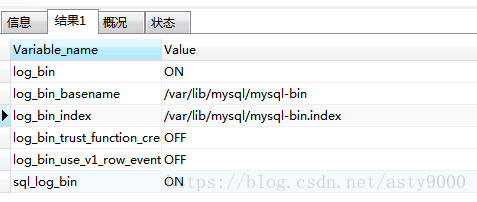
validation: execute SQL:

show variables like '%log_bin%';

As a result, the Binlog log was successfully turned on.

error: cannot open .git/FETCH_ Head: permission denied resolved

Error in Git pull code:
error: cannot open .git/FETCH_HEAD: Permission denied
The reason:
The current logged in user does not have permission to modify the directory.
Solutions:
Modify the current directory permissions
1. Whoami view the current logged in user

xxx$ whoami

Assume the above query login account as: Zhangsan
2. PWD view current directory

xxx:$ pwd

Suppose the query result of the above directory is: /Users/work
3. Modify permissions for Sudo Chown

xxx$ sudo chown -R zhangsan:admin /Users/work

Sudo Chow-r Current user: Admin Current directory

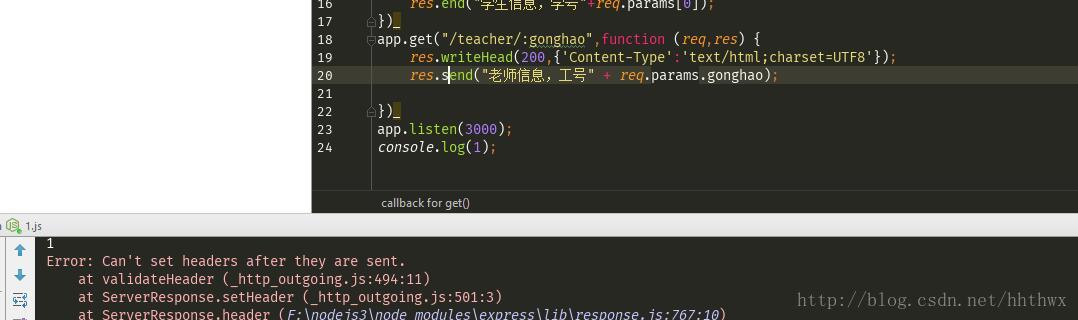
can’t set headers after they are sent


error display: can’t set headers after they are sent after they are sent because
server will output the response header and then the body when processing HTTP request, and once output the response header (for example: Res.writehead () or res.write() or res.end()) and an error is reported when we again try to set the response header via res.setheader () or res.writehead () (some methods such as Res.Redirect () call res.writehead ().
when I change res.send() to res.end(), the code runs successfully
What’s the difference between res.send() and Res.end ()?
Res.end
if there is no data returned to the client from the server then res.end
but if there is data returned to the client from the server then res.send must be used instead of res.end
Here is an excerpt of how res.send() is used:
res.send([body|status], [body])
You can either send the content directly, or you can send the first parameter status and the second parameter content.
If the content is sent directly, the status will be completed automatically.

example:
res.send(newBuffer(‘ whoop ‘));
res.send({some: ‘json’});
res. Send (” some HTML “);
res.send(404, Sorry, we cannot find that! ‘);
res.send(500, {error: ‘something blew up’});
res.send(200);
[1] The first way is to send binary Content. When its parameter is Buffer, content-type will be set to “Application /octet-stream”. This means that its file suffix (file Type) is of certain types.

and http://www.w3school.com.cn/media/media_mimeref.asp wiki says
application/octet – stream (arbitrary binary data)
that is to say, this is an arbitrary binary data, how to explain the specific depends on actual situation (such as suffix), such as he may be a img, could also be a video.
[2] If a string is sent, it will be interpreted as an HTML file.
that is, content-type is set to “text/ HTML” by default:
for example, send a post, then I res.send(” aaa “), then the page will jump to a page with only text aaa;
[3] If the parameter is Array, or Ojbect (object), then a JSON is returned.

No such file or directory

 
No such file or directory can not be found when reading file in R
 
Recently, while reading the file, the following problem occurred
> Passenger = read. CSV (‘ international – the airline – passengers. CSV, sep = ‘, ‘)
Error in File (file, “RT “) : Unable to open link
Warning Message:
In the file (file, “rt”) :
Unable to open file ‘international-Airline-passengers. CSV ‘: No such file or Directory

R can’t find the file.
 
File path, divided into absolute path and relative path, using absolute path is troublesome, usually use relative path, and relative path refers to, relative to the current working path.
 
Using the geTWd () function, you can get the current working path

Solution 1
Set the directory where the international-airline-travel.csv file is placed to the working directory
 
Solution 2
Copy the file international-airline-passengers. CSV to the current working directory

Problems encountered after Maven installation or upgrade: could not find or load main class org.codehaus.plexus .class…..

After the M2_HOME environment variable is changed, mVN-V is executed on the terminal and the following error occurs:
 
Exception in thread “main” java.lang.NoClassDefFoundError: org/codehaus/plexus/classworlds/launcher/Launcher
Caused by: java.lang.ClassNotFoundException: org.codehaus.plexus.classworlds.launcher.Launcher
at java.net.URLClassLoader$1.run(URLClassLoader.java:202)
at java.security.AccessController.doPrivileged(Native Method)
at java.net.URLClassLoader.findClass(URLClassLoader.java:190)
at java.lang.ClassLoader.loadClass(ClassLoader.java:306)
at sun.misc.Launcher$AppClassLoader.loadClass(Launcher.java:301)
at java.lang.ClassLoader.loadClass(ClassLoader.java:247)
Could not find the main class: org. Codehaus. Breadth. Classworlds. The launcher. The launcher. The Program will exit.
 
 
If you are a Linux system, you may be in the/etc/profile, ~ /. Following/~/bashrc file configured in the environment variable M2_HOME, when M2_HOME value change, even if you execute the source/etc/profile operation, also can appear as wrong, then you will need to open a terminal or log back in to, if you are a Windows system, to open a CMD window, generally is ok, So the root cause of the appeal error is that mVN-V was executed on the same terminal when switching between two versions of Maven without opening a new terminal or logging in again.

fatal error: Python.h: No such file or directory compilation terminated.

When installing pot module, an error was found as follows:

sudo pip3 install pot
The directory '/home/wdong/.cache/pip/http' or its parent directory is not owned by the current user and the cache has been disabled. Please check the permissions and owner of that directory. If executing pip with sudo, you may want sudo's -H flag.
The directory '/home/wdong/.cache/pip' or its parent directory is not owned by the current user and caching wheels has been disabled. check the permissions and owner of that directory. If executing pip with sudo, you may want sudo's -H flag.
Collecting pot
  Retrying (Retry(total=4, connect=None, read=None, redirect=None, status=None)) after connection broken by 'NewConnectionError('<pip._vendor.urllib3.connection.VerifiedHTTPSConnection object at 0x7f68b137e320>: Failed to establish a new connection: [Errno 101] Network is unreachable',)': /packages/28/4b/7aaa1f840a359f5953dd378e0237fa8faf9b0a415ff7282b7375fbe68d27/POT-0.5.1.tar.gz
  Downloading https://files.pythonhosted.org/packages/28/4b/7aaa1f840a359f5953dd378e0237fa8faf9b0a415ff7282b7375fbe68d27/POT-0.5.1.tar.gz (720kB)
    100% |████████████████████████████████| 727kB 90kB/s 
Requirement already satisfied: numpy in /usr/local/lib/python3.5/dist-packages (from pot) (1.16.2)
Requirement already satisfied: scipy in /usr/local/lib/python3.5/dist-packages (from pot) (1.2.1)
Requirement already satisfied: cython in /usr/local/lib/python3.5/dist-packages (from pot) (0.29.6)
Requirement already satisfied: matplotlib in /usr/local/lib/python3.5/dist-packages (from pot) (3.0.3)
Requirement already satisfied: cycler>=0.10 in /usr/local/lib/python3.5/dist-packages (from matplotlib->pot) (0.10.0)
Requirement already satisfied: kiwisolver>=1.0.1 in /usr/local/lib/python3.5/dist-packages (from matplotlib->pot) (1.0.1)
Requirement already satisfied: python-dateutil>=2.1 in /usr/local/lib/python3.5/dist-packages (from matplotlib->pot) (2.8.0)
Requirement already satisfied: pyparsing!=2.0.4,!=2.1.2,!=2.1.6,>=2.0.1 in /usr/lib/python3/dist-packages (from matplotlib->pot) (2.0.3)
Requirement already satisfied: six in /usr/lib/python3/dist-packages (from cycler>=0.10->matplotlib->pot) (1.10.0)
Requirement already satisfied: setuptools in /usr/local/lib/python3.5/dist-packages (from kiwisolver>=1.0.1->matplotlib->pot) (40.8.0)
Installing collected packages: pot
  Running setup.py install for pot ... error
    Complete output from command /usr/bin/python3 -u -c "import setuptools, tokenize;__file__='/tmp/pip-install-hp2npzwa/pot/setup.py';f=getattr(tokenize, 'open', open)(__file__);code=f.read().replace('\r\n', '\n');f.close();exec(compile(code, __file__, 'exec'))" install --record /tmp/pip-record-ebdwbzel/install-record.txt --single-version-externally-managed --compile:
    running install
    running build
    running build_py
    creating build
    creating build/lib.linux-x86_64-3.5
    creating build/lib.linux-x86_64-3.5/ot
    copying ot/dr.py -> build/lib.linux-x86_64-3.5/ot
    copying ot/__init__.py -> build/lib.linux-x86_64-3.5/ot
    copying ot/gromov.py -> build/lib.linux-x86_64-3.5/ot
    copying ot/da.py -> build/lib.linux-x86_64-3.5/ot
    copying ot/plot.py -> build/lib.linux-x86_64-3.5/ot
    copying ot/utils.py -> build/lib.linux-x86_64-3.5/ot
    copying ot/datasets.py -> build/lib.linux-x86_64-3.5/ot
    copying ot/stochastic.py -> build/lib.linux-x86_64-3.5/ot
    copying ot/bregman.py -> build/lib.linux-x86_64-3.5/ot
    copying ot/optim.py -> build/lib.linux-x86_64-3.5/ot
    copying ot/smooth.py -> build/lib.linux-x86_64-3.5/ot
    creating build/lib.linux-x86_64-3.5/ot/gpu
    copying ot/gpu/__init__.py -> build/lib.linux-x86_64-3.5/ot/gpu
    copying ot/gpu/da.py -> build/lib.linux-x86_64-3.5/ot/gpu
    copying ot/gpu/utils.py -> build/lib.linux-x86_64-3.5/ot/gpu
    copying ot/gpu/bregman.py -> build/lib.linux-x86_64-3.5/ot/gpu
    creating build/lib.linux-x86_64-3.5/ot/lp
    copying ot/lp/__init__.py -> build/lib.linux-x86_64-3.5/ot/lp
    copying ot/lp/cvx.py -> build/lib.linux-x86_64-3.5/ot/lp
    creating build/lib.linux-x86_64-3.5/ot/externals
    copying ot/externals/__init__.py -> build/lib.linux-x86_64-3.5/ot/externals
    copying ot/externals/funcsigs.py -> build/lib.linux-x86_64-3.5/ot/externals
    running build_ext
    building 'ot.lp.emd_wrap' extension
    creating build/temp.linux-x86_64-3.5
    creating build/temp.linux-x86_64-3.5/ot
    creating build/temp.linux-x86_64-3.5/ot/lp
    x86_64-linux-gnu-gcc -pthread -DNDEBUG -g -fwrapv -O2 -Wall -Wstrict-prototypes -g -fstack-protector-strong -Wformat -Werror=format-security -Wdate-time -D_FORTIFY_SOURCE=2 -fPIC -Iot/lp -I/usr/local/lib/python3.5/dist-packages/numpy/core/include -I/tmp/pip-install-hp2npzwa/pot/ot/lp -I/usr/include/python3.5m -c ot/lp/emd_wrap.cpp -o build/temp.linux-x86_64-3.5/ot/lp/emd_wrap.o
    cc1plus: warning: command line option ‘-Wstrict-prototypes’ is valid for C/ObjC but not for C++
    ot/lp/emd_wrap.cpp:28:20: fatal error: Python.h: No such file or directory
    compilation terminated.
    error: command 'x86_64-linux-gnu-gcc' failed with exit status 1
    
    ----------------------------------------
Command "/usr/bin/python3 -u -c "import setuptools, tokenize;__file__='/tmp/pip-install-hp2npzwa/pot/setup.py';f=getattr(tokenize, 'open', open)(__file__);code=f.read().replace('\r\n', '\n');f.close();exec(compile(code, __file__, 'exec'))" install --record /tmp/pip-record-ebdwbzel/install-record.txt --single-version-externally-managed --compile" failed with error code 1 in /tmp/pip-install-hp2npzwa/pot/

Solutions:

sudo apt-get install python-dev   # for python2.x installs
sudo apt-get install python3-dev  # for python3.x installs