In the configuration of Babel times wrong below
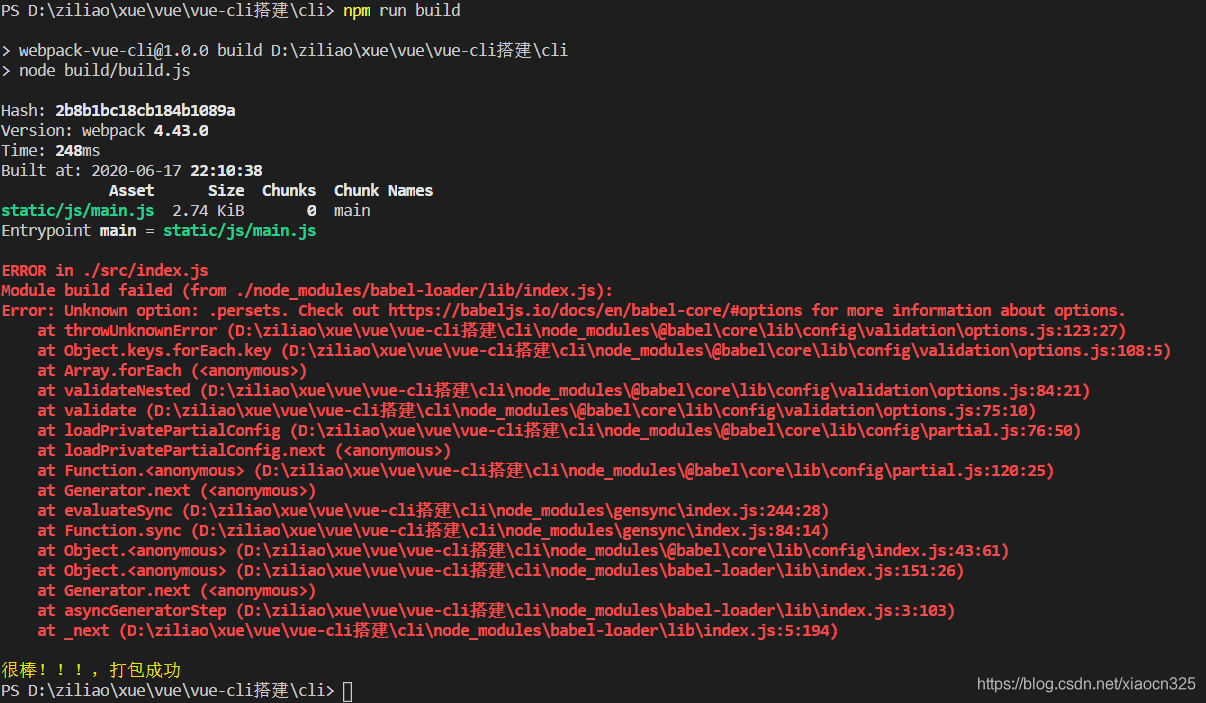
as we can see from the error prompt time configuration Babel when make a mistake, then we need to look to the specific configuration of Babel, this is my configuration
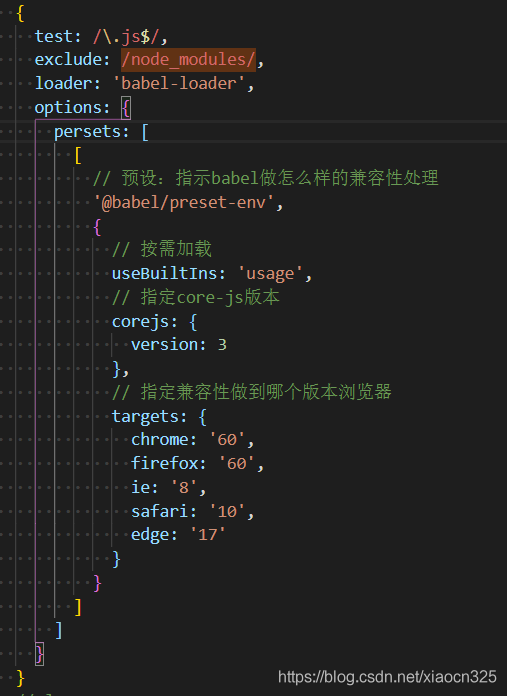
from the configuration, see can see problems in persets words are spelt wrong, this kind of error is quite common, the correct method is presets
Category Archives: How to Fix
Error report and solution of PHP module introduced by Apache
Preface:
Today, I will share with you the introduction of Apache PHP module error and solution
The incoming module file path has Spaces

Solution: The path is enclosed in double quotes

The requested operation has failed. The requested operation has failed.
Solutions:
1. View the version of HTTPD

2. Check the PHP version

3. Check the VC version of the machine
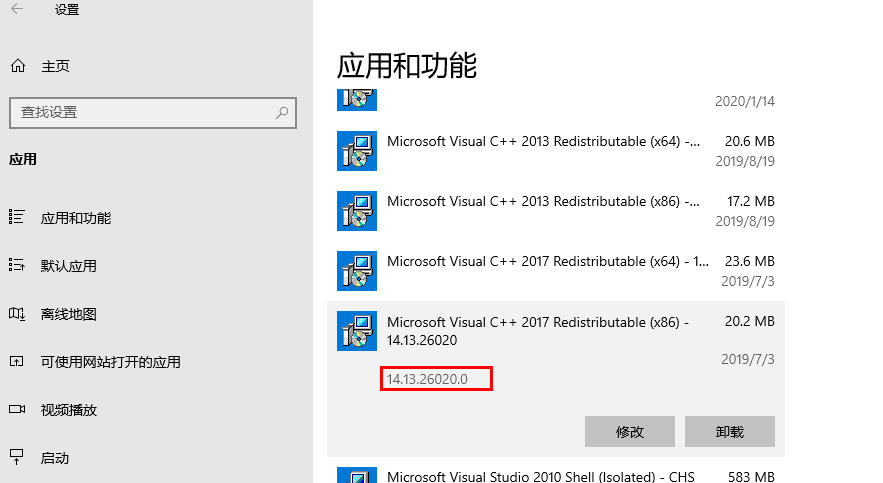
Then we can use this information to select the appropriate PHP package

In the above picture, I downloaded the Win32 vc14 x86 PHP package, only to download the corresponding version, can not report errors.
Today, I will share with you the introduction of Apache PHP module error and solution
The incoming module file path has Spaces
Solution: The path is enclosed in double quotes
The requested operation has failed. The requested operation has failed.
Solutions:
1. View the version of HTTPD
2. Check the PHP version
3. Check the VC version of the machine
Then we can use this information to select the appropriate PHP package
In the above picture, I downloaded the Win32 vc14 x86 PHP package, only to download the corresponding version, can not report errors.
Linux basic command execution error: the solution of command not found
This is due to a problem with the environment variable. The profile file is not written correctly, resulting in the command line ls and other commands can not be recognized.
Solution: Just type in the following section from the command line. Add the PATH of all the commands under PATH. The system can find these command script files
export PATH=/usr/local/sbin:/usr/local/bin:/sbin:/bin:/usr/sbin:/usr/bin:/root/bin
@In slf4j log.info Compile error: cannot find symbol log
The article directories
Problem troubleshooting process solution
The problem
I’m using the IDEA integrated development environment, and up until now, log.info() was fine.
have a wonderful work of problems today, an error code compilation, unable to log identification symbols, as follows:
Cannot find symbol log
The screening process
I have installed Lombok’s plugin and it won’t work before.
see the notes on class is also introduced.
The solution
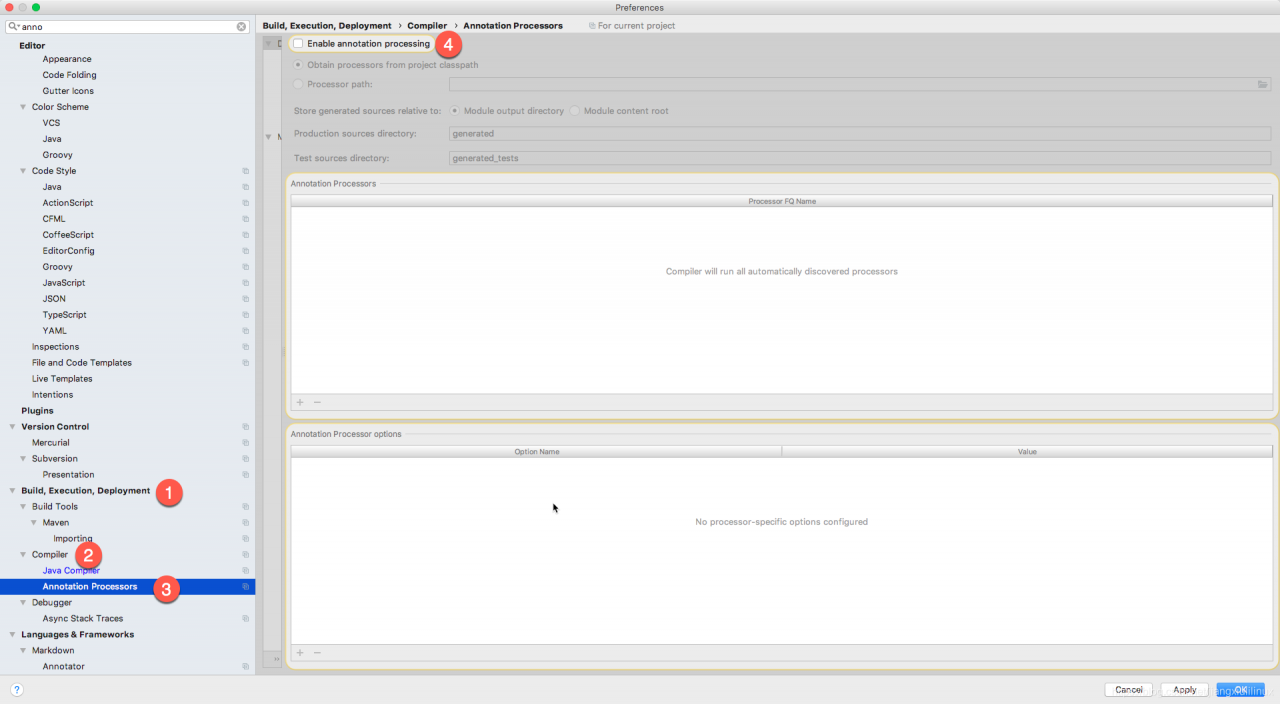
It is better to find that it is actually a check box in IDEA. I don’t know why it is not checked. I don’t remember to change it.
Is the IDEA – & gt; Preference – & gt; Build, Excecution, Deployment – & gt; The Compiler – & gt; There’s an Enable Annotation Processing option on Annocation Processors. Check that and everything will work fine.
Anaconda update error
No module named conda_package_handling. API: No module named conda_package_handling
After a while, Google decided to install Anaconda3 again
Just change the environment variables according to the following tutorial
https://blog.csdn.net/ychgyyn/article/details/82258136
After a while, Google decided to install Anaconda3 again
Just change the environment variables according to the following tutorial
https://blog.csdn.net/ychgyyn/article/details/82258136
Unknown error in POM file of springboot project
SpringBoot project POM file is Unknown error
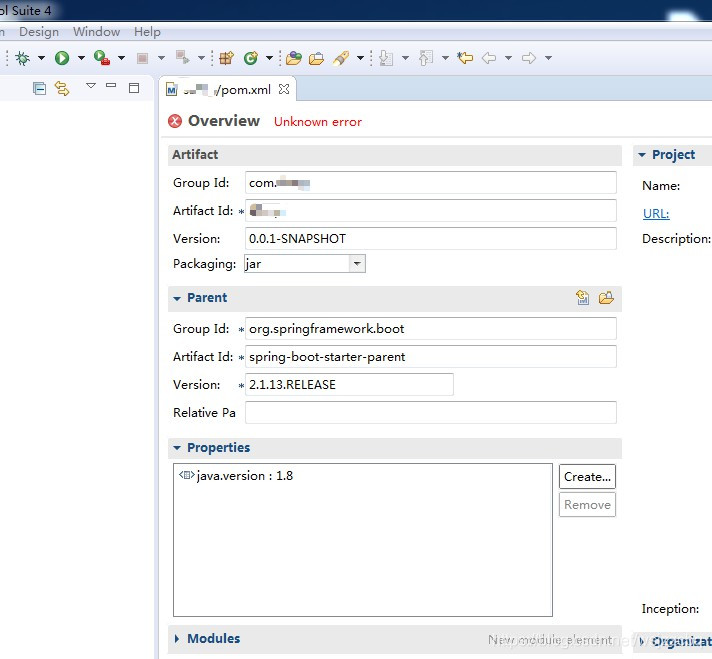
The Maven Jar plugin was updated from 3.1.1 to 3.1.2 from Spring Boot 2.1.5. Release
Solution: Downgrade the Maven JAR plug-in to 3.1.1 and add the following configuration in the POM file properties
The Maven Jar plugin was updated from 3.1.1 to 3.1.2 from Spring Boot 2.1.5. Release
Solution: Downgrade the Maven JAR plug-in to 3.1.1 and add the following configuration in the POM file properties
<maven-jar-plugin.version>3.1.1</maven-jar-plugin.version>
The following figure

Reference: https://bugs.eclipse.org/bugs/show_bug.cgi?id=547340
Idea startup project Lombok error, no symbol found
The error message is as follows:
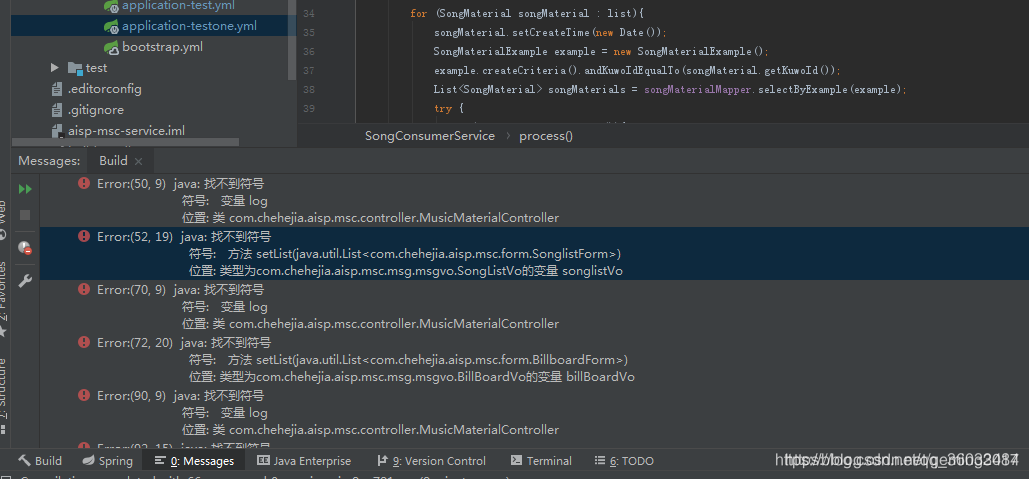
About the solution to this problem on-line machine-made, basic is lombok plug-in installation restart idea, or check the Enable the annotation processing, if these are not solve, might as well have a look at your project using the SDK version is too high lead to do not compatible with lombok, such as my idea version is 2019.3.3, default jdk11, and I install ombok plug-in version is 029-2019.3, the experiment proved that the version are not compatible. Solution:
Click “File” in the upper left corner and select Project Structure, as shown in the picture
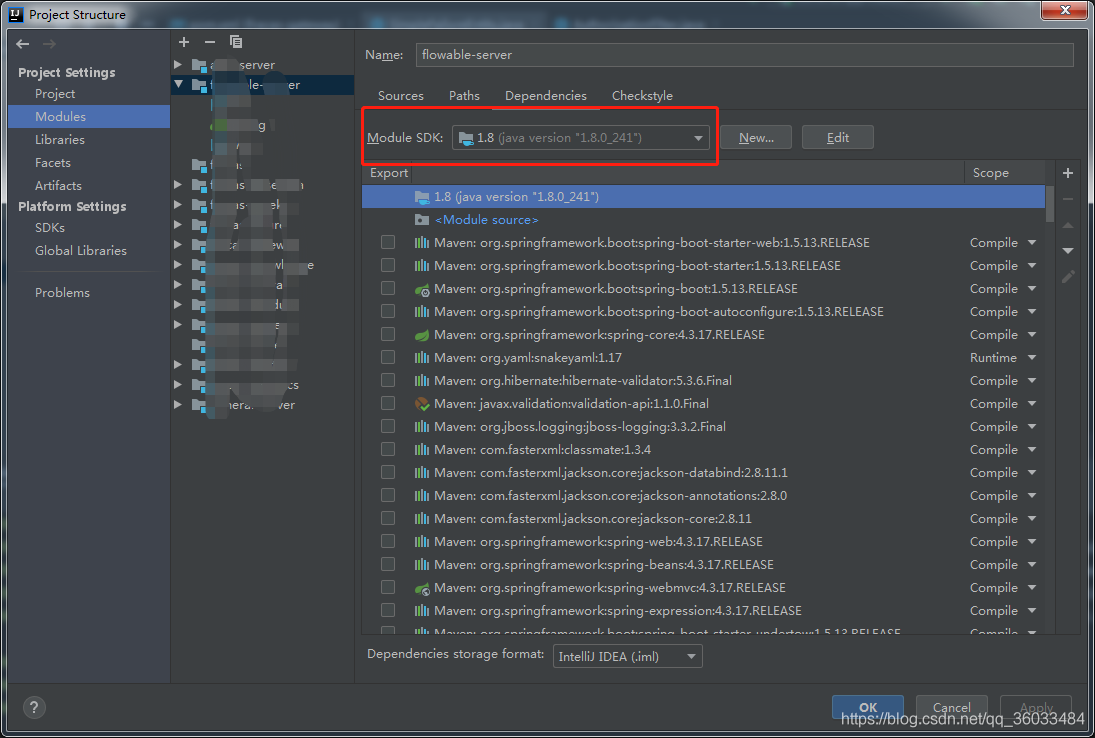 : select the Module SDK from 1.8 or any other Lombok version that is compatible with your installation.
About the solution to this problem on-line machine-made, basic is lombok plug-in installation restart idea, or check the Enable the annotation processing, if these are not solve, might as well have a look at your project using the SDK version is too high lead to do not compatible with lombok, such as my idea version is 2019.3.3, default jdk11, and I install ombok plug-in version is 029-2019.3, the experiment proved that the version are not compatible. Solution:
Click “File” in the upper left corner and select Project Structure, as shown in the picture
: select the Module SDK from 1.8 or any other Lombok version that is compatible with your installation.
The shell script exits after an error is reported
When you’re doing DevOps or Continuous Integration or Continuous Delivery, you sometimes write shell scripts.
However, in the sequential execution of the shell script, there may be an intermediate stage that will report an error, and the execution will continue.
So how do you avoid the problem of quitting later execution when something goes wrong?
Reference code:
#!/bin/bash
set -o errexit
Add at the beginning of the set -o errexit can (or set -e )
To be closed when the set + o errexit (or set ) + e
Idea error: error: Java: error: release 5 is not supported
When I test the class run, the following error occurs:
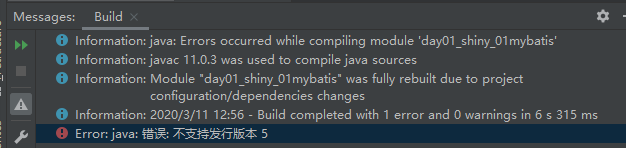
Possible cause: Java version inconsistencies The project builds the configuration using the wrong version of Java
Solution:
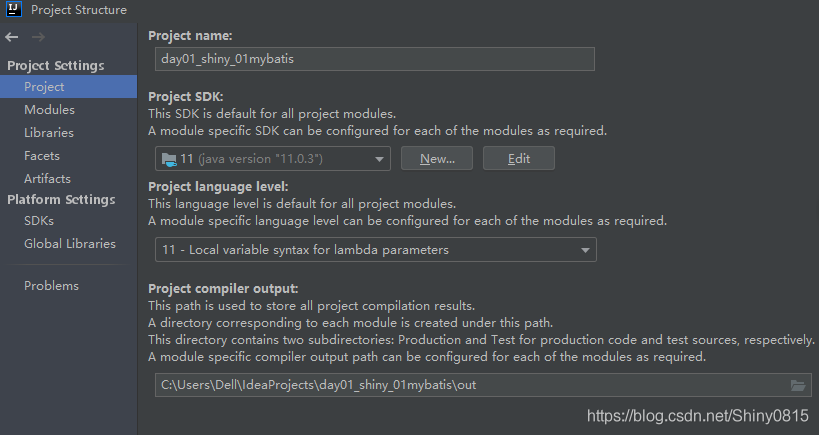
Step 1: File –Project Structure– Project (2 versions are changed to the same: the numbers in the second and third bars are 11)
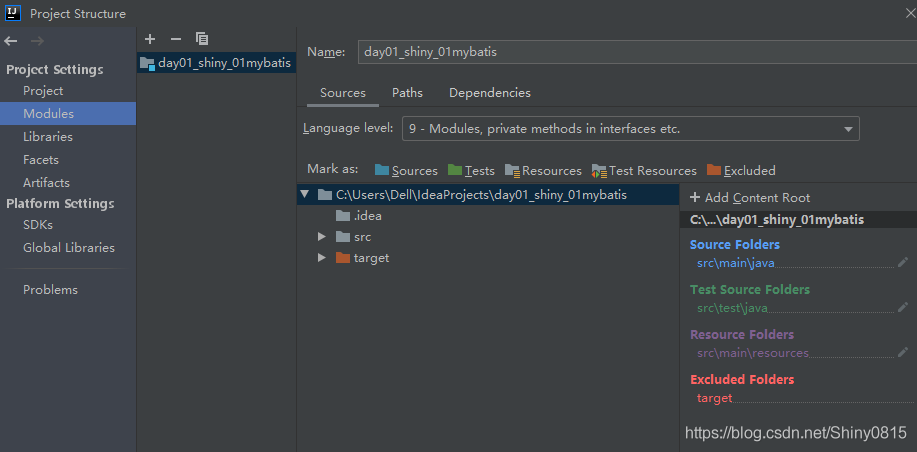
File — –Project Structure– Modules (second bar changed from 9 to 11 as in Project)
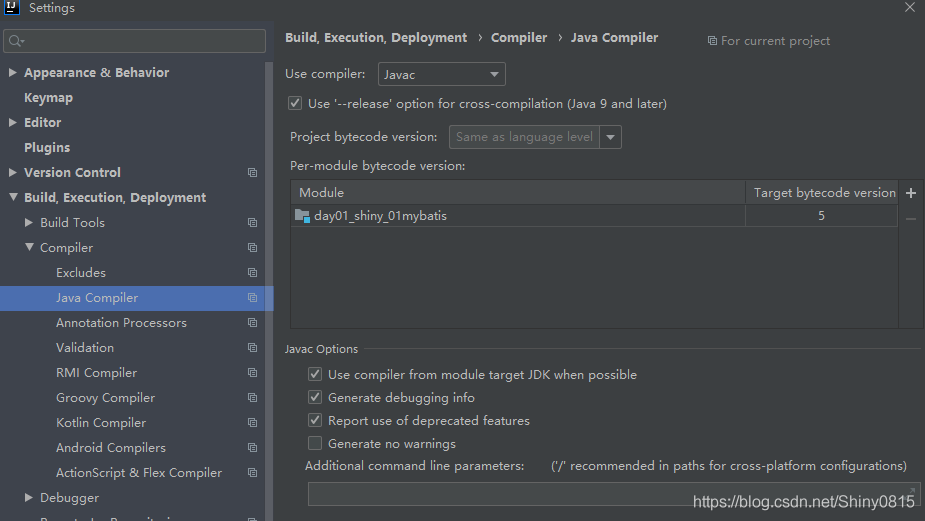
Step 2: File– Setting– build, execution, deployment– Java Compiler (right-most, Target bytecode version 5)
Possible cause: Java version inconsistencies The project builds the configuration using the wrong version of Java
Solution:
Step 1: File –Project Structure– Project (2 versions are changed to the same: the numbers in the second and third bars are 11)
File — –Project Structure– Modules (second bar changed from 9 to 11 as in Project)
Step 2: File– Setting– build, execution, deployment– Java Compiler (right-most, Target bytecode version 5)
The solution to the error of importing CSV from Python to Python
Daily analysis of data sources into Python, sometimes there will be errors and display garbled code problems, today to review the common errors.
Python code
import pandas as pd
import numpy as np
Df = pd read_csv invest_record_2018. CSV (” “)
Error message
UnicodeDecodeError Traceback (most recent call last)
pandas/_libs/parsers.pyx in pandas._libs.parsers.TextReader._convert_tokens
(pandas/_libs/parsers.c:14858)()
pandas/_libs/parsers.pyx in
pandas._libs.parsers.TextReader._convert_with_dtype
(pandas/_libs/parsers.c:17119)()
Error message shows the file encoding error, so adjust the code
import pandas as pd
import numpy as np
df=pd.read_csv(“invest_record_2018.csv”,encoding=”utf-8″)
Error report still, change the code
import pandas as pd
import numpy as np
df=pd.read_csv(“invest_record_2018.csv”,encoding=”gbk”)
Encoding =” iso-8859-1 “can also be used to stop the error
import pandas as pd
import numpy as np
df=pd.read_csv(“invest_record_2018.csv”,encoding=”ISO-8859-1″)
Neither code will display an error. You can continue writing.
Chinese garbled code problem
df.head()
Preview the first 5 lines, Chinese display garbled code
Continue to change the code
import pandas as pd
import numpy as np
df=pd.read_csv(“invest_record_2018.csv”,encoding=”gbk”)
df.head()
After execution, display is normal, problem solved.
Coding classification
Encoding =” UTF-8 “(encoding=” UTF-8″, encoding=” UTF-8 “, encoding=” UTF-8 “)
Python code
import pandas as pd
import numpy as np
Df = pd read_csv invest_record_2018. CSV (” “)
Error message
UnicodeDecodeError Traceback (most recent call last)
pandas/_libs/parsers.pyx in pandas._libs.parsers.TextReader._convert_tokens
(pandas/_libs/parsers.c:14858)()
pandas/_libs/parsers.pyx in
pandas._libs.parsers.TextReader._convert_with_dtype
(pandas/_libs/parsers.c:17119)()
Error message shows the file encoding error, so adjust the code
import pandas as pd
import numpy as np
df=pd.read_csv(“invest_record_2018.csv”,encoding=”utf-8″)
Error report still, change the code
import pandas as pd
import numpy as np
df=pd.read_csv(“invest_record_2018.csv”,encoding=”gbk”)
Encoding =” iso-8859-1 “can also be used to stop the error
import pandas as pd
import numpy as np
df=pd.read_csv(“invest_record_2018.csv”,encoding=”ISO-8859-1″)
Neither code will display an error. You can continue writing.
Chinese garbled code problem
df.head()
Preview the first 5 lines, Chinese display garbled code
Continue to change the code
import pandas as pd
import numpy as np
df=pd.read_csv(“invest_record_2018.csv”,encoding=”gbk”)
df.head()
After execution, display is normal, problem solved.
Coding classification
Encoding =” UTF-8 “(encoding=” UTF-8″, encoding=” UTF-8 “, encoding=” UTF-8 “)
Minifiedreacterror — react error report notes
Invariant unthinkant: Minified React error# XXX
cause React render error
1, {{}} change {} BBB
2, AAA. The map ((item, index) = & gt; Map ((item,index)=>; BBB) or AAA. The map ((item, index) = & gt; { return bbb} )
cause React render error
1, {{}} change {} BBB
2, AAA. The map ((item, index) = & gt; Map ((item,index)=>; BBB) or AAA. The map ((item, index) = & gt; { return bbb} )
Global variable error: unboundlocalerror: local variable ‘l’ referenced before assignment
Conclusion:
- internal function, do not change the global variable can access the global variable internal function, modify the same global variable, python will think it is a local variable before internal function to modify a global variable with the same call variable names (such as print the sum), cause Unbound – LocalError
The sum set in the program belongs to the global variable, and there is no definition of sum in the function. According to Python’s rules for accessing local and global variables, when searching for a variable,
If the variable is not found in the local scope, then Python looks for the variable in the global variable. If it is not found, it throws an exception (NameError or Unbound-LocalError, depending on the Python version).
if you have any references to external internal function function of the same variable or a global variable, and is modified for this variable. Python assumes that it is a local variable, and because there is no definition or assignment of sum in the function, it returns an error.
from the following two procedures separate access or modify a global variable, is not an error ~
# accessing global variables #! /usr/bin/python
import
sys
sum
=
5
def
add
(
a
=
1
.
b
=
3
) :
print
a
.
b
print
sum
#
Just to visit
add
(
4
.
8
)
print
sum
[
root
@rac3
python
]
# python local.py
4
8
5
5
# modify a global variable of the same name
Is considered a local variable
#! /usr/bin/python
import
sys
sum
=
5
def
add
(
a
=
1
.
b
=
3
) :
print
a
.
b
#
An inner function has a variable of the same name or a global variable that refers to an outer function, and changes are made to that variable. Python will think of it as a local variable
sum
=
b
+
a
#
Modify inside the function
print
sum
add
(
4
.
8
)
[
root
@rac3
python
]
# python local.py
4 8
12
If the inner function has a variable of the same name or a global variable that refers to the outer function, and the variable is modified. Python assumes that it is a local variable, and because there is no definition or assignment of sum in the function, it returns an error
#! /usr/bin/python
import
sys
sum
=
5
def
add
(
a
=
1
.
b
=
3
) :
print
a
.
b
print
The sum # inner function refers to a variable of the same name and modifies that variable. Python thinks of it as a local variable. Because the sum variable was not defined before print here, an error will be reported. (It is recommended to compare with case 1, note: this is only before the above example: print sum)
sum
=
b
+
a
print
sum
add
(
4
.
8
)
print
sum
[
root
@rac3
python
]
# python local.py
4
8
Traceback
(
most
recent
call
last
) :
File
“local.py”
.
line
10
.
in
?
add
(
4
.
8
)
File
“local.py”
.
line
6
.
in
add
print
sum
UnboundLocalError
:
local
variable
‘sum’
referenced
before
assignment
You can use the: global keyword when you access a global variable in your program and you want to change the value of the global variable. Declare the variable as a global in a function
#! /usr/bin/python
import
sys
sum
=
5
print
‘Before changing: sum=’
.
sum
def
add
(
a
=
1
.
b
=
3
) :
global
sum
print
‘add ‘:sum=’
.
sum
sum
=
b
+
a
print
‘function :sum=’
.
sum
add
(
4
.
8
)
print
‘change sum=’
.
sum
[
root
@rac3
python
]
# vim local.py
Before you change:
sum
=
5
add
In the function
:
sum
=
5
When I change the function
:
sum
=
12
After the change
sum
=
12