Category Archives: How to Fix

Solutions to several VTK compilation errors (vtk5.8 + VS2010)

There are several common errors that can occur during the compilation of a VTK project. The solutions are as follows:
error 1:
fatal error C1189: #error : This file requires _WIN32_WINNT to be #defined at least to 0x0403
cause:
The minimum version of the system set for version migration is too low
Visual C++ 2010 no longer supports targeting Windows 95, Windows 98, Windows ME, or Windows NT. If your WINVER or _WIN32_WINNT macros are assigned to one of these versions of Windows, you must modify the macros. When you upgrade a project that was created by using an earlier version of Visual C++, You may see compilation errors related to the WINVER or _WIN32_WINNT macros if they are assigned to a version of Windows that is no longer supported (From MSDN)
The immediate cause – there are three lines of code in atlcore.h:
#if _WIN32_WINNT < 0x0403
#error This file requires _WIN32_WINNT to be #defined at least to 0x0403. Value 0x0501 or higher is recommended.
#endif
> bbb>
All in VTK directory stdafx. H file reference to modify WINVER, http://msdn.microsoft.com/en-us/library/aa383745.aspx _WIN32_WINNT, _WIN32_WINDOWS and _WIN32_IE definition, for example: # define WINVER 0 x0501


error 2:
error C2371: ‘char16_t’ : redefinition
:
In VTK project files are generated in the process of choosing the Matlab support (tex-mex), and adopted the VS2010 and above programming environment (http://connect.microsoft.com/VisualStudio/feedback/details/498952/vs2010-iostream-is-incompatible-with-matlab-matrix-h) :
I looked at the source code for matrix.h < core/matlab/include/matrix.h>
It has a definition for char16_t
typedef char16_t char16_t;” . Also the C++ header “Microsoft Visual Studio 10.0\VC\ Include \ YVALS. H “Also defines the same identifier(CHAR16_T). Because of these two definitions we get the redefinition error when matrix iostream.h(it internally includes yvals.h) are included in some cpp file.
Declaration of char16_t in the yvals.h is newly introduced in dev10 and was not there in VS2008. Therefore you are getting this redefinition error now on VS 2010(Dev10).

> solution 1 (without follow-up test) : BBB>
//added by John for solving conflict with VS2010
#if (_MSC_VER) < 1600 //VS2010
# ifndef __STDC_UTF_16__
# ifndef CHAR16_T
# if defined(_WIN32) & & defined(_MSC_VER)
# define CHAR16_T wchar_t
# else
# define CHAR16_T UINT16_T
# endif
typedef CHAR16_T char16_t;
# endif
#endif
#else
#include < yvals.h>
#endif//VS2010
> solution 2 (without follow-up test) : BBB>
Rename all char16_t in matrix.h
 
error 3:
LNK4199: /DELAYLOAD:vtkIO.dll ignored; no imports found from vtkIO.dll
cause:
DelayLoad (selected from the in-depth analysis DelayLoad “http://blog.csdn.net/panda1987/article/details/5936770).
As we know, there are two basic methods of DLL loading: implicit loading and explicit loading. Implicit loading is the method introduced in the previous article, where the input table of a PE loads the DLL into the memory space before entering the entry function. Explicit loading uses methods like LoadLibrary and GetProAddress to load the DLL into the process space when needed. Both of these methods are the ones we use most often. So what is delay load?
A DLL designated as Delay Load will not actually load the process space until it is needed, which means that the DLL will not be loaded if no function located in the DLL is called. The loading process is done by LoadLibrary and GetProcAddress, which is, of course, transparent to the programmer.
What are the benefits of this?There is no doubt that the program starts faster, because many DLLs may not be used at startup. Even some DLLs may not be used in the entire life cycle, so with Delay Load, the DLL does not need any memory.
> bbb>
Because for dynamic libraries, the load information is still recorded in the corresponding lib file, so in the properties of the project Linker->; Input-> Additional Depandencies may also have #pragma comment(lib, “vtkio. lib”) at the beginning of the Cpp. If the file is not found by the compile prompt, it is also required in the Linder->; General-> Add the location of the file in the Additional Library Directory.
If someone is the difference between the Lib and Dll unclear, see: http://www.cppblog.com/amazon/archive/2011/01/01/95318.html

Reproduced in: https://www.cnblogs.com/johnzjq/archive/2011/12/14/2287823.html
The collapse pits of VTK projects that are not generated by cmake

Some of the compilation options for CMake and IDE are different, so we users need to do a little more work. And VTK officials also said:
If you are not using CMake to compile your code, you need to add some # cbb0
I. OpenGL version problem, if it is OpenGL2 version, need to add

#include <vtkAutoInit.h>

VTK_MODULE_INIT(vtkRenderingOpenGL2);

Two, about VTKRenderingFreeType, once in the interactive window render a VTKTextActor, report abnormal report vomiting (output information as shown below). When I see this solution on Stack Overflow, I need to add the next line of code

VTK_MODULE_INIT(vtkRenderingFreeType);


outputWindow ณณ:ERROR: In D:\VTK6.3\VTK-src\Rendering\Core\vtkTextActor.cxx, line 110
vtkTextActor (0509BA90): Failed to get the TextRenderer instance!

Post build event after VC generation

Requirement: Maybe we need to release a version to the artist, so we need *.exe, *.dll and resources all in one folder and then synchronize them to the artist
Problem: The.exe generated directory may not match the resource directory, so you can’t manually copy the generated.exe and DLL to the resource directory every time you compile the project

Solution: Use the build post batch command that comes with Visual Studio
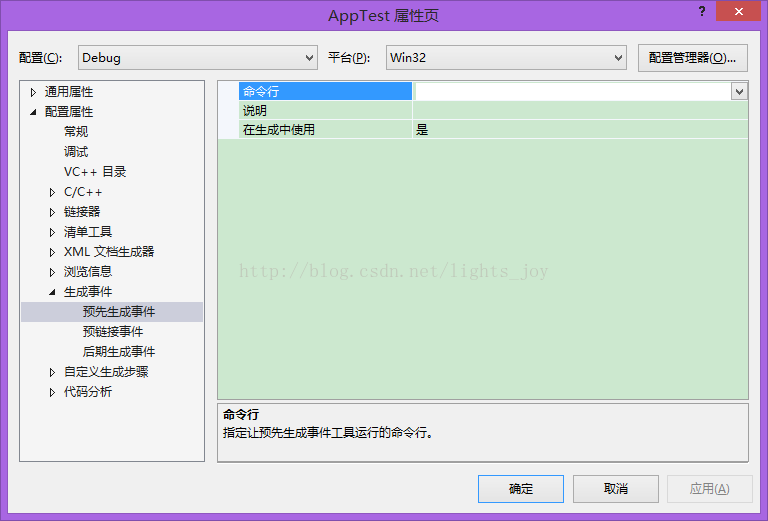
visual studio-> Right-click project ->; properties-> Build Events-> Post-Build Event-> Under the Command Line

Xcopy $(OutDir) $(TargetFileName) $(ProjectDir.). \Resources
\/Y

This imperative function copies the exe files in the build directory to the Resources folder one level above the project directory

Note:

$outDir = $outDir = $outDir = $outDir

2. Generate post-event xcopy is simply running a console command, so
Command does not support ‘/’

Like an error command written earlier

Xcopy $(OutDir) $(TargetFileName) $(ProjectDir.).
/ Resources \/Y

Runtime will prompt an error

3. “/Y” is a parameter, indicating that there is the same file to replace

You can also copy the entire folder

Xcopy “$(ProjectDir) controls,” “$(TargetDir).. \ app1 \ controls “/ y/I/e/exclude: CodeFilesToExclude. TXT

For specific parameters, refer to the CMD console to see the specific function of xcopy…

Velt-0.1.3 development: generating events

Happy shrimp
http://blog.csdn.net/lights_joy/ (QQ group: Visual EmbedLinux Tools 375515651).
Welcome to reprint, but please keep the author’s information

Velt, the full name of Visual EmbedlinuxTools, is a Visual Studio plugin similar to Visual GDB to assist Linux development. With this plug-in, you will be able to develop Linux applications (including compilation and debugging) in the Visual Studio IDE, and you can also compile the uboot and Linux kernel, and locate the source code correctly based on error messages at compile time. The current version is 0.1.2, which only supports VS2013, and is a plug-in that has just started development. Can be downloaded in CSDN download channels (http://download.csdn.net/detail/lights_joy/8359251), the installation process, see the Linux development: using Vs2013 + VELT – 0.1.0 from environment to build “. Here are its basic functions:

    supports x86 Linux, HI3516, HI3520, MinGW platforms. Complete the compilation of UBOOT, and automatically locate the corresponding file location according to the error information compiled. Complete the Linux kernel compilation, and automatically locate the corresponding file location according to the compilation error information. Complete the configuration of the Linux kernel. You do not use Makefiles to compile Linux applications. Connect to the target machine using SSH and debug the application with GDB. Connect the target machine with Telnet and debug the application with GDB.

Three build events are defined in VS:


MSBuild defines these three goals as:

  <Target Name="PreBuildEvent" Condition="'$(PreBuildEventUseInBuild)'!='false'">
    <Message Text="Description: %(PreBuildEvent.Message)" Condition="'%(PreBuildEvent.Message)' != '' and '%(PreBuildEvent.Command)' != ''"/>
    <Exec Command="%(PreBuildEvent.Command)$(_BuildSuffix)" Condition="'%(PreBuildEvent.Command)' != ''"/>
  </Target>

  <Target Name="PreLinkEvent" Condition="'$(PreLinkEventUseInBuild)'!='false'">
    <Message Text="Description: %(PreLinkEvent.Message)" Condition="'%(PreLinkEvent.Message)' != '' and '%(PreLinkEvent.Command)' != ''"/>
    <Exec Command="%(PreLinkEvent.Command)$(_BuildSuffix)" Condition="'%(PreLinkEvent.Command)' != ''"/>
  </Target>

  <Target Name="PostBuildEvent" Condition="'$(PostBuildEventUseInBuild)'!='false'">
    <Message Text="Description: %(PostBuildEvent.Message)" Condition="'%(PostBuildEvent.Message)' != '' and '%(PostBuildEvent.Command)' != ''"/>
    <Exec Command="%(PostBuildEvent.Command)$(_BuildSuffix)" Condition="'%(PostBuildEvent.Command)' != ''"/>
  </Target>

In effect, you just throw the commands you entered here to cmd.exe to execute.
For the MinGW platform, this is perfectly fine, but for platforms such as Linux you need to reload the task and leave it to bash.

Summary of problems encountered in compiling and installing vtk7 + vs2013 / 2015 + cmake

Most of the work is done according to the online compilation tutorial. Several problems encountered in the process are summarized as follows:
1, to generate the debug and release versions of the.lib file name repeated question:
in camke carried out in accordance with the tutorial after completion of the config, do not generate, point the Add Entry;
popup dialog box Name input :CMAKE_DEBUG_POSTFIX, type select :STRING, value input :d.
set up some config again, until all turned white, the generate again can
2, compilation of project in vs, ALL_BUILD after the success of the generated during the install error:
in the operation, the following three parts which are not necessarily must
1. C:\Program Files (x86)\Common Files\ Microsoft Shared \ Msenv \ vslauncher.exe, right click – “Properties -” compatibility, check the administrator permissions at the bottom to run;
Then close the current VS software, run VS as an administrator, open vtk.sln in the build directory
ter this step, right-click Install and generate Install only, again fail
2>

br>

3
3
3
3
3
3

The last step (key) should be
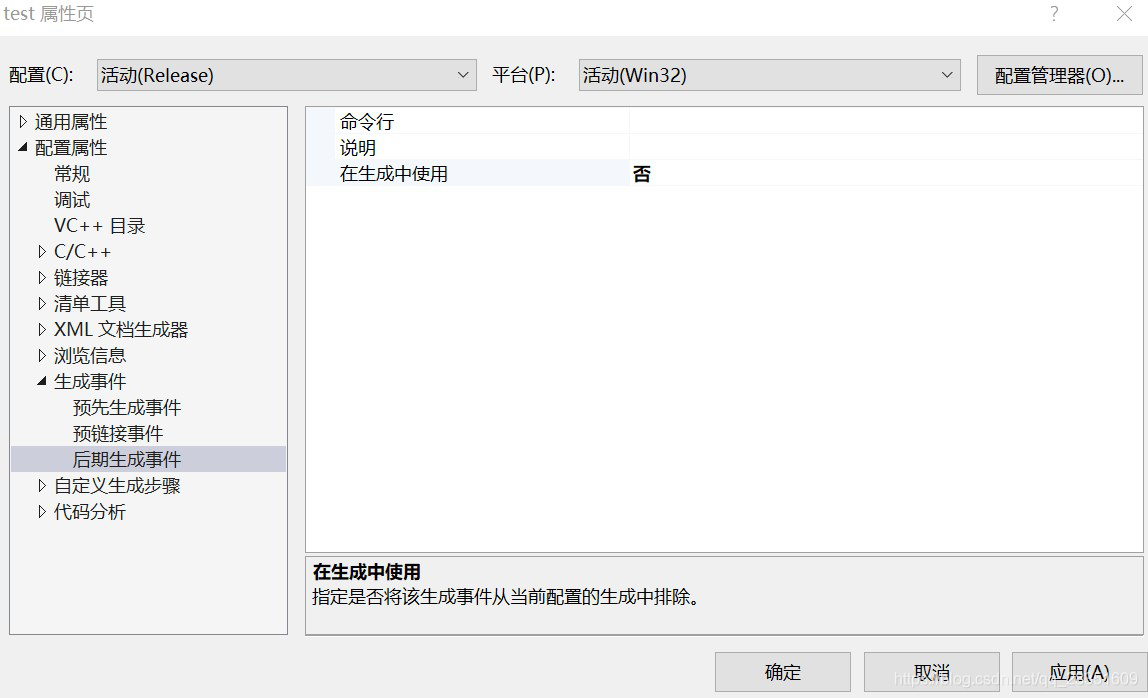
the debug, right-click the install project to open its properties page, generate an event in the late generates events – “-” “used in the generated” changed to “no”. Right install generated again can success
note: under the release, install project property page at this time in “use” in the generated above should be “yes”, also, then right-click the install the success

Install error after vs compilation (error msb3073)

The following error occurred in VS compilation:
Error MSB3073: command “setLocal
H:\PCL_BACKUP\PCL\CMake\bin\ cmake.exe-dbuild_type =Release -p cmake_install. Cmake
%errorlevel% neq 0 goto :cmEnd
:>nd
endLoca>amp; call :cmErrorLevel %errorlevel% & Goto :cmDone
exit /b %1
cmdone
i>errorlevel % neq 0 goto :VCEnd
: vcend> C: \ Program Files \ MSBuild \ Microsoft (x86) Cpp \ v4.0 \ V120 \ Microsoft CppCommon. The targets of 132 5 INSTALL
Solution:
Find the problematic project subitem
(install) project – & gt; Property – & gt; Generate events –>; Late generation event –>; Using –> in the build; no

Note:
When running vs

    , the install directory Settings in the disk C, did not start as an administrator will appear this kind of problem! CD :/openMVG/ install; CD :/openMVG/ install; CD :/eigen_3_4/eigen/installHere; CD :/eigen_3_4/eigen/installHere However, there is no installHere folder under D:/eigen_3_4/eigen/, so simply manually setting up the folder installHere can solve the problem.

Reproduced in: https://www.cnblogs.com/ZY-Dream/p/9955169.html

VTK compilation problem solving

Image processing with VTK/ITK article list
1 compiler error:
Qt5axserverd.lib (qaxserver.obj) : error LNK2019: Unable to parse external symbol “class QaxFactory * __cdecl Qax_instantiate (void)”
Problem: When copying someone else’s code, someone else used _tmain. Change it to main

Common mistakes and solutions of cmake + QT + VTK

1. Installation environment
Cmake3.0 + QT4.8.6 + VTK5.10
PS.VTK6.10 or above can only be used with QT5.0 or above versions
2. Compile and install
Reference: http://blog.csdn.net/www_doling_net/article/details/8532742
3. Common mistakes
1, Could not find a package configuration file provided by “Qt5Widgets” with
any of the following names:

Qt5WidgetsConfig. Cmake
Qt5Widgets – config. Cmake

Add the installation prefix of “Qt5Widgets” to CMAKE_PREFIX_PATH or set
“Qt5Widgets_DIR” to a directory containing one of the above files. If
“Qt5widgets” provides a separate development package or SDK, be sure it has
been installed.
This error is generally caused by the incorrect selection of the version number of Qt. Carefully check whether the version number of Qt is 4 or 5. We can solve it.
2

Failing to find Glu32 is usually due to the wrong path. Be careful to check the installation path.
3. There are a lot of things you can’t select from the CMake process, such as the build file. You have to install something in order to be able to cmake, so try to follow the tutorial as much as possible.
What problems can leave a message below, a lot of problems, have not been able to recall in time.

Qt5 when compiling VTK_ The solution of dir-notfound

The module Module_vtkGUISupportQt and Module_vtkViewsQt are opened, and Qt5 is used. Qt5_DIR-NOTFOUND error CMake Configure Qt5_DIR-NOTFOUND error The solution is as follows.
1. QT5 installation path
Take my computer’s QT5 installation path as an example. On my computer, Qt is installed in: E: Toolkits\Qt\Qt5.5.1.
2. VTK source file path
I am using the official release of VTK 7.0.0.rc2. Unzip the VTK source code to: E:\Toolkits\ vtk-7.0.0.rc2 \source on my computer
QT5_DIR – NotFound = QT5_DIR – NotFound = QT5_DIR – NotFound
Open the file E:\Toolkits\ vtk-7.0.0.rc2 \source\ cmMakelists.txt in line 1 of the file as follows:

cmake_minimum_required(VERSION 2.8.8 FATAL_ERROR)

Add a line of script that reads:

cmake_minimum_required(VERSION 2.8.8 FATAL_ERROR)
set (CMAKE_PREFIX_PATH "E:/Toolkits/Qt/Qt5.5.1/qtbase")

Configure Generate. Configure Generate.

Compilation errors and warnings encountered in QT and their solutions

Preface: study QT also has a period of time, during encountered a lot of various problems, write this summary paste, on the one hand to oneself a summary, on the one hand to give everyone a reference. Update irregularly ~
1.No rule to make target '.. /dd.bmp', needed by 'debug/qrc_res.stop
The file image.qrc has been compiled. Deleting the file from the resource directory will not change the compiled image.qrc file.

0 1. Delete corresponding resource file, add new
2. Comment out the corresponding code in.pro first, then remove the comment after compilation, then compile again will not report an error.

#RESOURCES += \
#    image.qrc

2:-1: error: [release/qrc_image.cpp] error 1br> <>bb3


Solutions to various inexplicable errors after QT compilation

QT compiler is not very stable, and many times we compile successfully before, after add the code to compile error, but to change back to before the code to compile again is still can’t succeed, this is likely to be QT save error compiling information before but can’t automatic updates, it needs us to manually clear the wrong compilation of information at this time, the following methods gradually progressive, there is always a can solve, all bad!!!!!!!!!!
 
1. Delete the Debug and Release folders of the project
2. Delete ****. Pro. user file
C:\Users\” YourPath “\AppData\Local\QtProject\QtCreator\ Cache
C:\Users\” YourPath “\AppData\ QtProject\ QtCreator

Common errors and solutions of Qt development application under Ubuntu

Error: HelloWorld directly report error… :-1: error: cannot find -lGL
Reason: Lack of GL library
Sudo apt-get install libgl1-mesa-dev

I downloaded the latest version of QT-everywhere5.3.1, after porting it to the board directly created a Qt Quick program to run on the board, prompted the following error, can not find the solution online, ask how to solve this problem, thank you.
# ./qmlpng
QEglFSImx6Hooks will set environment variable FB_MULTI_BUFFER=2 to enable double buffering and vsync.
If this is not desired, you can override this via: export QT_EGLFS_IMX6_NO_FB_MULTI_BUFFER=1
QQmlApplicationEngine failed to load component
qrc:///main.qml:1 module “QtQuick” is not installed
qrc:///main.qml:2 module “QtQuick.Controls” is not installed
qrc:///main.qml:1 module “QtQuick” is not installed
qrc:///main.qml:2 module “QtQuick.Controls” is not installed

Qrc :// main. QML :1 module “QtQuick” is not installed. $QTDIR/ QML will be installed in a folder if you install it.

QXcbIntegration: Cannot create platform OpenGL context, neither GLX nor EGL are enabled
Failed to create OpenGL context for format QsurfaceFormat (version 2.0, options QFlags(), depthBufferSize 24, redBufferSize -1, greenBufferSize -1, blueBufferSize -1, alphaB

Or try export QML_IMPORT_PATH=$QTDIR/ QML. It is not clear what it is, it may be different from project to project.

Export QML2_IMPORT_PATH=$QTDIR/ QML =$QTDIR/ QML
If this is not desired, you can override this via:
QEglFSImx6Hooks will set environment variable FB_MULTI_BUFFER=2 to enable double buffering and vsync.
If this is not desired, you can override this via: Export QT_EGLFS_IMX6_NO_FB_MULTI_BUFFER=1
=1
=1
=1
=1
=1
=1
=1
=1
=1
=1
=1

The original address: http://www.qtcn.org/bbs/read-htm-tid-56902.html