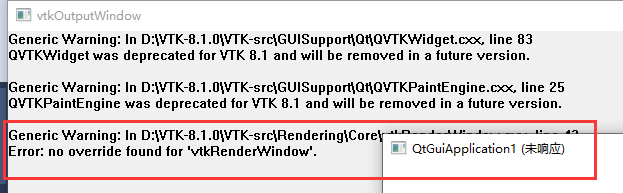
override found for 'vtkrenderWindow' <>ode> > code> >>
main.cpp/ code>>
#include <vtkAutoInit.h>
VTK_MODULE_INIT(vtkRenderingOpenGL2);
VTK_MODULE_INIT(vtkInteractionStyle);
override found for 'vtkrenderWindow' <>ode> > code> >>
main.cpp/ code>>
#include <vtkAutoInit.h>
VTK_MODULE_INIT(vtkRenderingOpenGL2);
VTK_MODULE_INIT(vtkInteractionStyle);
#include <vtkAutoInit.h>
VTK_MODULE_INIT(vtkRenderingOpenGL2);
VTK_MODULE_INIT(vtkInteractionStyle);
VTK_MODULE_INIT(vtkRenderingFreeType);
VTK_MODULE_INIT(vtkRenderingVolumeOpenGL2);
#include <vtkSmartPointer.h>
#include <vtkImageViewer2.h>
#include <vtkJPEGReader.h>
#include <vtkRenderWindow.h>
#include <vtkRenderWindowInteractor.h>
#include <vtkRenderer.h>

int main()
{
	//Verify input arguments
	/*
	  Filename(.jpeg)"
	*/

	//Read the image
	vtkSmartPointer<vtkJPEGReader> jpegReader =vtkSmartPointer<vtkJPEGReader>::New();
	jpegReader->SetFileName("F:\\vtkshuju\\lena.jpg");

	// Visualize
	vtkSmartPointer<vtkImageViewer2> imageViewer = vtkSmartPointer<vtkImageViewer2>::New();
	imageViewer->SetInputConnection(jpegReader->GetOutputPort());
	vtkSmartPointer<vtkRenderWindowInteractor> renderWindowInteractor =vtkSmartPointer<vtkRenderWindowInteractor>::New();
	imageViewer->SetupInteractor(renderWindowInteractor);
	imageViewer->Render();
	imageViewer->GetRenderer()->ResetCamera();
	imageViewer->Render();
	imageViewer->GetRenderWindow()->SetWindowName("read and show jpg test");

	renderWindowInteractor->Start();

	return EXIT_SUCCESS;
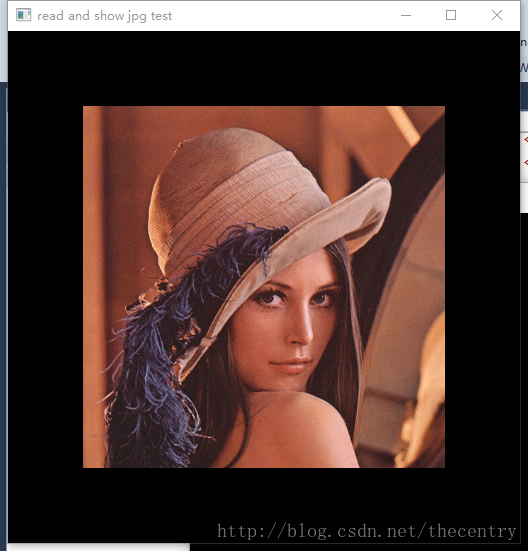
}
Console instance under VS15+VTK7.0:
#include <vtkAutoInit.h>
VTK_MODULE_INIT(vtkRenderingOpenGL2);
VTK_MODULE_INIT(vtkInteractionStyle);
VTK_MODULE_INIT(vtkRenderingFreeType);
VTK_MODULE_INIT(vtkRenderingVolumeOpenGL2);
//read and show .mha
#include <vtkImageData.h>
#include <vtkMetaImageReader.h>
#include <vtkSmartPointer.h>
#include <vtkInteractorStyleImage.h>
#include <vtkRenderer.h>
#include <vtkImageActor.h>
#include <vtkImageMapper3D.h>
#include <vtkRenderWindow.h>
#include <vtkRenderWindowInteractor.h>

int main()
{

//	 image.mha

	vtkSmartPointer<vtkMetaImageReader> reader =
		vtkSmartPointer<vtkMetaImageReader>::New();
	reader->SetFileName("F:\\vtkshuju\\itkBrainSliceComplex.mha");
	reader->Update();

	// Visualize
	vtkSmartPointer<vtkImageActor> actor =
		vtkSmartPointer<vtkImageActor>::New();
	actor->GetMapper()->SetInputConnection(reader->GetOutputPort());

	vtkSmartPointer<vtkRenderer> renderer =
		vtkSmartPointer<vtkRenderer>::New();
	renderer->AddActor(actor);
	renderer->ResetCamera();

	vtkSmartPointer<vtkRenderWindow> renderWindow =
		vtkSmartPointer<vtkRenderWindow>::New();
	renderWindow->AddRenderer(renderer);

	vtkSmartPointer<vtkRenderWindowInteractor> renderWindowInteractor =
		vtkSmartPointer<vtkRenderWindowInteractor>::New();
	vtkSmartPointer<vtkInteractorStyleImage> style =
		vtkSmartPointer<vtkInteractorStyleImage>::New();

	renderWindowInteractor->SetInteractorStyle(style);

	renderWindowInteractor->SetRenderWindow(renderWindow);
	renderWindowInteractor->Initialize();
	renderWindowInteractor->GetRenderWindow()->SetWindowName(".mha pic test");
	renderWindowInteractor->Start();

	return EXIT_SUCCESS;
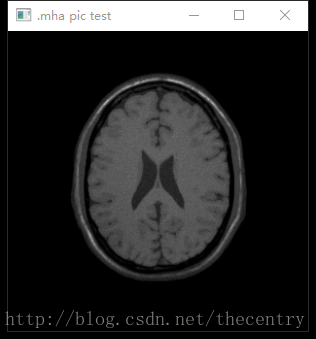
}
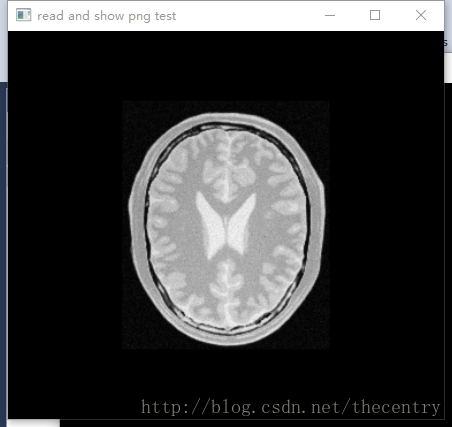
PNG image read and display: vtkPNGReader:
Console instance under VS15+VTK7.0:
#include <vtkAutoInit.h>
VTK_MODULE_INIT(vtkRenderingOpenGL2);
VTK_MODULE_INIT(vtkInteractionStyle);
VTK_MODULE_INIT(vtkRenderingFreeType);
VTK_MODULE_INIT(vtkRenderingVolumeOpenGL2);
//read and show png
#include <vtkSmartPointer.h>
#include <vtkImageViewer2.h>
#include <vtkPNGReader.h>
#include <vtkRenderWindow.h>
#include <vtkRenderWindowInteractor.h>
#include <vtkRenderer.h>

int main()
{
	// Verify input arguments

//			<< " Filename(.png)" << std::endl;

	// Read the image
	vtkSmartPointer<vtkPNGReader> reader =
		vtkSmartPointer<vtkPNGReader>::New();
	reader->SetFileName("F:\\vtkshuju\\BrainProtonDensitySlice.png");

	// Visualize
	vtkSmartPointer<vtkImageViewer2> imageViewer =
		vtkSmartPointer<vtkImageViewer2>::New();
	imageViewer->SetInputConnection(reader->GetOutputPort());
	vtkSmartPointer<vtkRenderWindowInteractor> renderWindowInteractor =
		vtkSmartPointer<vtkRenderWindowInteractor>::New();
	imageViewer->SetupInteractor(renderWindowInteractor);
	imageViewer->Render();
	imageViewer->GetRenderer()->ResetCamera();
	imageViewer->Render();
	imageViewer->GetRenderWindow()->SetWindowName("read and show png test");
	renderWindowInteractor->Start();

	return EXIT_SUCCESS;
}
Console instance under VS15+VTK7.0:
#include <vtkAutoInit.h>
VTK_MODULE_INIT(vtkRenderingOpenGL2);
VTK_MODULE_INIT(vtkInteractionStyle);
VTK_MODULE_INIT(vtkRenderingFreeType);
VTK_MODULE_INIT(vtkRenderingVolumeOpenGL2);
#include <vtkSmartPointer.h>
#include <vtkImageViewer2.h>
#include <vtkBMPReader.h>
#include <vtkRenderWindow.h>
#include <vtkRenderWindowInteractor.h>
#include <vtkRenderer.h>

int main(int argc, char* argv[])
{
	//Verify input arguments

//			<< " Filename(.bmp)" << std::endl;


	//Read the image
	vtkSmartPointer<vtkBMPReader> reader =
		vtkSmartPointer<vtkBMPReader>::New();
	reader->SetFileName("F:\\vtkshuju\\masonry.bmp");

	// Visualize
	vtkSmartPointer<vtkImageViewer2> imageViewer =
		vtkSmartPointer<vtkImageViewer2>::New();
	imageViewer->SetInputConnection(reader->GetOutputPort());
	vtkSmartPointer<vtkRenderWindowInteractor> renderWindowInteractor =
		vtkSmartPointer<vtkRenderWindowInteractor>::New();
	imageViewer->SetupInteractor(renderWindowInteractor);
	imageViewer->Render();
	imageViewer->GetRenderer()->ResetCamera();
	imageViewer->Render();
	imageViewer->GetRenderWindow()->SetWindowName("read and show bmp test");
	renderWindowInteractor->Start();

	return EXIT_SUCCESS;
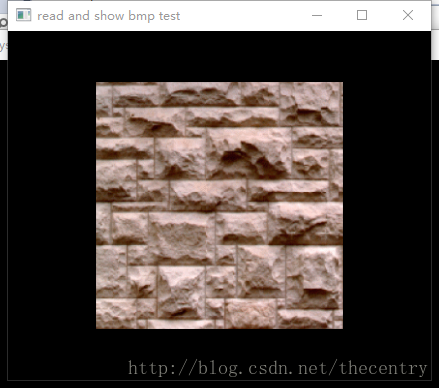
}

<span style="font-size:14px;">  // Description:
  // Delete a VTK object.  This method should always be used to delete
  // an object when the New() method was used to create it. Using the
  // C++ delete method will not work with reference counting.
  virtual void Delete();

  // Description:
  // Delete a reference to this object.  This version will not invoke
  // garbage collection and can potentially leak the object if it is
  // part of a reference loop.  Use this method only when it is known
  // that the object has another reference and would not be collected
  // if a full garbage collection check were done.
  virtual void FastDelete();</span>
Possible reasons:
The Activiz.net library downloaded on the CPU version does not match the local CPU version
>
download Activiz.net source code compilation of anyCPU version of the library.
Activiz.net source: https://github.com/bitzhuwei/Kitware.VTK.git
>
>
>
>
>
>
>
>
>
>
>
>
2, select Kitware project right click modify project properties – “build -” target platform anyCPU compilation
=
=
=
=
When embedding VTK qt met VTK widget can’t move, began to directly copy the official case inside vtkScalarBarWidget wording, is shown in the QVTKRenderWindowInteractor abnormalities, cannot interact with the widget.
https://vtk.org/Wiki/VTK/Examples/Python/Widgets/ScalarBarWidget
in writing is as follows:
# create the scalar_bar_widget
scalar_bar_widget = vtk.vtkScalarBarWidget()
scalar_bar_widget.SetInteractor(interactor)
scalar_bar_widget.SetScalarBarActor(scalar_bar)
scalar_bar_widget.On()
Changed to:
# create the scalar_bar_widget
self.scalar_bar_widget = vtk.vtkScalarBarWidget()
self.scalar_bar_widget.SetInteractor(self.iren)
self.scalar_bar_widget.SetScalarBarActor(scalar_bar)
self.scalar_bar_widget.On()
This means that the widget should be prefixed with self when loading with classes.
>
from PyQt5 import QtWidgets
from PyQt5.QtWidgets import QApplication
from vtk.qt.QVTKRenderWindowInteractor import QVTKRenderWindowInteractor
import sys
import vtk
class MainPage(QtWidgets.QMainWindow):
    def __init__(self, parent=None):
        QtWidgets.QMainWindow.__init__(self, parent)
        self.setObjectName("MainWindow")
        self.resize(603, 553)
        self.centralWidget = QtWidgets.QWidget(self)
        self.gridlayout = QtWidgets.QGridLayout(self.centralWidget)
        self.vtkWidget = QVTKRenderWindowInteractor(self.centralWidget)
        self.gridlayout.addWidget(self.vtkWidget)
        self.setCentralWidget(self.centralWidget)
        self.ren = vtk.vtkRenderer()
        self.vtkWidget.GetRenderWindow().AddRenderer(self.ren)
        self.iren = self.vtkWidget.GetRenderWindow().GetInteractor()
        # Create source
        source = vtk.vtkSphereSource()
        source.SetCenter(0, 0, 0)
        source.SetRadius(5.0)
        # Create a mapper
        mapper = vtk.vtkPolyDataMapper()
        mapper.SetInputConnection(source.GetOutputPort())
        # Create an actor
        actor = vtk.vtkActor()
        actor.SetMapper(mapper)
        self.ren.AddActor(actor)
        # create the scalar_bar
        scalar_bar = vtk.vtkScalarBarActor()
        scalar_bar.SetOrientationToHorizontal()
        lut = vtk.vtkLookupTable()
        lut.Build()
        scalar_bar.SetLookupTable(lut)
        # create the scalar_bar_widget
        self.scalar_bar_widget = vtk.vtkScalarBarWidget()
        self.scalar_bar_widget.SetInteractor(self.iren)
        self.scalar_bar_widget.SetScalarBarActor(scalar_bar)
        self.scalar_bar_widget.On()
if __name__ == "__main__":
    app = QApplication(sys.argv)
    window = MainPage()
    window.show()
    window.iren.Initialize()
    sys.exit(app.exec_())
Qt program in the Haysi HI3531A development board, update() repeatedly after the refresh interface program abnormal crash
Hi3531a qt program after the operation, many times after the update program hang up at http://www.ebaina.com/bbs/forum.php?mod=viewthread& tid=23327& fromuid=19660
(Source: Ebna Forum)
The problem
Open the packed program found collapse.
program is made up of two interface. After the first interface is login screen, click login will invoke the other main interface
login interface can open, there is no problem, call the main interface will collapse.
screening
I read it first
https://blog.csdn.net/cqltbe131421/article/details/78036684 the bosses of explanation.
Maybe it’s the pointer. Or event.
comments one by one code hou found the root cause again
inside the constructor USES a

program package after infinite collapse.
no problem after the 63 lines of code commented out.
thinking
Because my ExcelViewModel is an empty object. Inside the constructor does not have any code.
I wonder whether the problem.
later 
Added a line of setHeaderData () , the main is to set up the command excelViewModel data in it, and set the column number.
then collapse.
#include <vtkCylinderSource.h>
#include <vtkLineSource.h>
#include <vtkPolyData.h>
#include <vtkSmartPointer.h>
#include <vtkPolyDataMapper.h>
#include <vtkActor.h>
#include <vtkRenderWindow.h>
#include <vtkRenderer.h>
#include <vtkRenderWindowInteractor.h>
#include <vtkProperty.h>
#include <vtkTubeFilter.h>
#include <vtkBMPReader.h>
#include <vtkJPEGReader.h>
#include <vtkTexture.h>
#include <vtkTextureMapToCylinder.h>
#include <vtkTransformTextureCoords.h>

int main(int argc, char* argv[])
{
	if (argc < 2)
	{
		std::cout << "Usage: " << argv[0] << " texture(.jpg)" << std::endl;
		return EXIT_FAILURE;
	}

	// Create a Cylinder
	vtkSmartPointer<vtkCylinderSource> cylinderSource =
		vtkSmartPointer<vtkCylinderSource>::New();
	cylinderSource->SetHeight(10.0);
	cylinderSource->SetCenter(0.0, 0.0, 0.0);
	cylinderSource->SetRadius(2.0);
	cylinderSource->SetResolution(50);

	// Load a jpeg file
	vtkSmartPointer<vtkJPEGReader> jpegReader =
		vtkSmartPointer<vtkJPEGReader>::New();
	jpegReader->SetFileName(argv[1]);

	vtkSmartPointer<vtkTexture> texture =
		vtkSmartPointer<vtkTexture>::New();
	texture->SetInputConnection(jpegReader->GetOutputPort());
	texture->InterpolateOn();

	// map two-dimensional to three-dimensional, use cylinder
	vtkSmartPointer<vtkTextureMapToCylinder> textureMap =
		vtkSmartPointer<vtkTextureMapToCylinder>::New();
	textureMap->SetInputConnection(cylinderSource->GetOutputPort());

	vtkSmartPointer<vtkTransformTextureCoords> transformTextureCoords =
		vtkSmartPointer<vtkTransformTextureCoords>::New();
	transformTextureCoords->SetInputConnection(textureMap->GetOutputPort());
	//transformTextureCoords->SetScale(1, 1, 0);

	vtkSmartPointer<vtkPolyDataMapper> cylinderMapper =
		vtkSmartPointer<vtkPolyDataMapper>::New();
	cylinderMapper->SetInputConnection(/*textureMap*/transformTextureCoords->GetOutputPort());

	vtkSmartPointer<vtkActor> cylinderActor =
		vtkSmartPointer<vtkActor>::New();
	cylinderActor->SetMapper(cylinderMapper);
	cylinderActor->SetTexture(texture);

	vtkSmartPointer<vtkRenderer> renderer =
		vtkSmartPointer<vtkRenderer>::New();
	vtkSmartPointer<vtkRenderWindow> renderWindow =
		vtkSmartPointer<vtkRenderWindow>::New();
	renderWindow->SetSize(600, 600);
	renderWindow->AddRenderer(renderer);
	vtkSmartPointer<vtkRenderWindowInteractor> renderWindowInteractor =
		vtkSmartPointer<vtkRenderWindowInteractor>::New();
	renderWindowInteractor->SetRenderWindow(renderWindow);

	renderer->AddActor(cylinderActor);

	renderWindow->Render();
	renderWindowInteractor->Start();

	return EXIT_SUCCESS;
}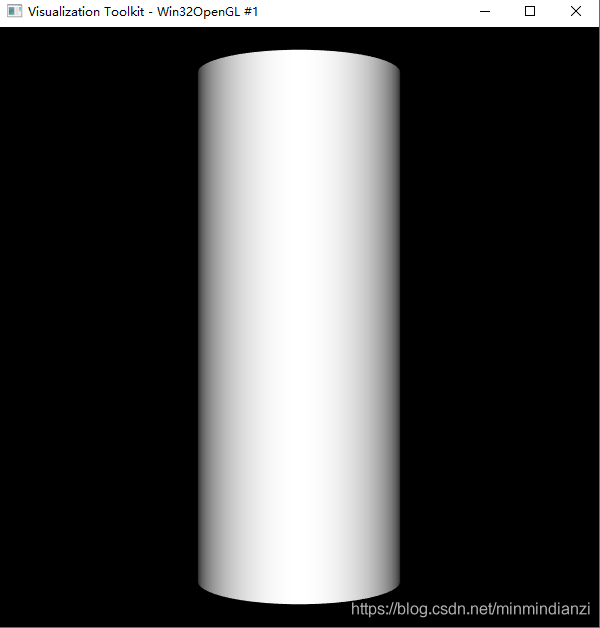
How to create a cylinder
The key code
vtkSmartPointer<vtkTexture> texture =
	vtkSmartPointer<vtkTexture>::New();
texture->SetInputConnection(/*bmpReader*/jpegReader->GetOutputPort());
texture->InterpolateOn();

// map two-dimensional to three-dimensional, use cylinder
vtkSmartPointer<vtkTextureMapToCylinder> textureMap =
	vtkSmartPointer<vtkTextureMapToCylinder>::New();
textureMap->SetInputConnection(cylinderSource->GetOutputPort());

vtkSmartPointer<vtkTransformTextureCoords> transformTextureCoords =
	vtkSmartPointer<vtkTransformTextureCoords>::New();
transformTextureCoords->SetInputConnection(textureMap->GetOutputPort());
//transformTextureCoords->SetScale(1, 1, 0);

vtkSmartPointer<vtkPolyDataMapper> cylinderMapper =
	vtkSmartPointer<vtkPolyDataMapper>::New();
cylinderMapper->SetInputConnection(/*textureMap*/transformTextureCoords->GetOutputPort());

vtkSmartPointer<vtkActor> cylinderActor =
	vtkSmartPointer<vtkActor>::New();
cylinderActor->SetMapper(cylinderMapper);
cylinderActor->SetTexture(texture);
rendering
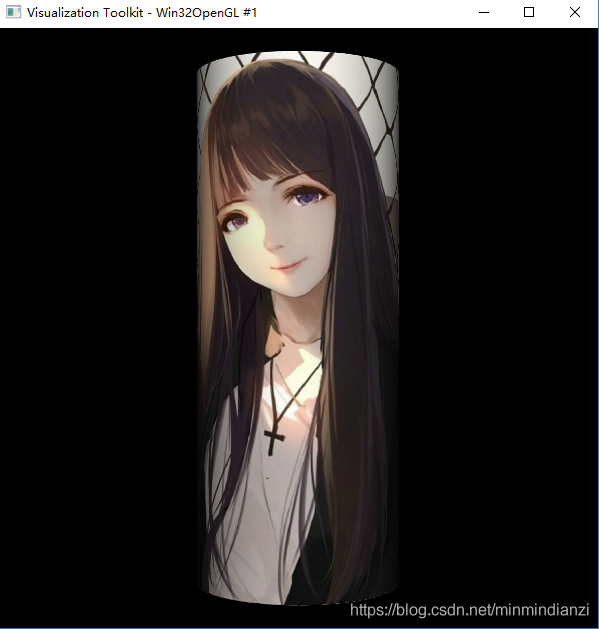
The complete code
Reference
VTK texture mapping principle introduction
VTK TransformTextRoots for texture mapping
VTK/Examples/Cxx/Texture/TexturedSphere

A slice is an image corresponding to a section of a three-dimensional image. The section can be a plane that passes through an inner point of the image and is parallel to the XY, YZ and XZ planes, or it can be any plane that passes through an inner point of the three-dimensional image in any direction. It is an important function of medical image browsing software to browse and analyze the internal tissue structure of images easily by extracting slices. In VTK, VTKImageReslice class realizes the function of image slice extraction.
Here is the code for slice extraction:#include <vtkAutoInit.h> VTK_MODULE_INIT(vtkRenderingOpenGL); #include <vtkSmartPointer.h> #include <vtkImageData.h> #include <vtkMetaImageReader.h> #include <vtkMatrix4x4.h> // #include <vtkImageReslice.h> #include <vtkLookupTable.h> #include <vtkImageMapToColors.h> #include <vtkImageActor.h> #include <vtkRenderer.h> #include <vtkRenderWindow.h> #include <vtkRenderWindowInteractor.h> #include <vtkInteractorStyleImage.h> int main(int argc, char* argv[]) { vtkSmartPointer<vtkMetaImageReader> reader = vtkSmartPointer<vtkMetaImageReader>::New(); reader->SetFileName("brain.mhd"); reader->Update(); int extent[6]; double spacing[3]; double origin[3]; reader->GetOutput()->GetExtent(extent); reader->GetOutput()->GetSpacing(spacing); reader->GetOutput()->GetOrigin(origin); double center[3]; center[0] = origin[0] + spacing[0] * 0.5 * (extent[0] + extent[1]); center[1] = origin[1] + spacing[1] * 0.5 * (extent[2] + extent[3]); center[2] = origin[2] + spacing[2] * 0.5 * (extent[4] + extent[5]); //*****************************************************************// static double axialElements[16] = { 1, 0, 0, 0, 0, 1, 0, 0, 0, 0, 1, 0, 0, 0, 0, 1 }; vtkSmartPointer<vtkMatrix4x4> resliceAxes = vtkSmartPointer<vtkMatrix4x4>::New(); resliceAxes->DeepCopy(axialElements); resliceAxes->SetElement(0, 3, center[0]); resliceAxes->SetElement(1, 3, center[1]); resliceAxes->SetElement(2, 3, center[2]); vtkSmartPointer<vtkImageReslice> reslice = vtkSmartPointer<vtkImageReslice>::New(); reslice->SetInputConnection(reader->GetOutputPort()); reslice->SetOutputDimensionality(2); reslice->SetResliceAxes(resliceAxes); reslice->SetInterpolationModeToLinear(); //*****************************************************************// vtkSmartPointer<vtkLookupTable> colorTable = vtkSmartPointer<vtkLookupTable>::New(); colorTable->SetRange(0, 1000); colorTable->SetValueRange(0.0, 1.0); colorTable->SetSaturationRange(0.0, 0.0); colorTable->SetRampToLinear(); colorTable->Build(); vtkSmartPointer<vtkImageMapToColors> colorMap = vtkSmartPointer<vtkImageMapToColors>::New(); colorMap->SetLookupTable(colorTable); colorMap->SetInputConnection(reslice->GetOutputPort()); //*****************************************************************// vtkSmartPointer<vtkImageActor> imgActor = vtkSmartPointer<vtkImageActor>::New(); imgActor->SetInputData(colorMap->GetOutput()); vtkSmartPointer<vtkRenderer> renderer = vtkSmartPointer<vtkRenderer>::New(); renderer->AddActor(imgActor); renderer->SetBackground(1.0, 1.0, 1.0); vtkSmartPointer<vtkRenderWindow> renderWindow = vtkSmartPointer<vtkRenderWindow>::New(); renderWindow->AddRenderer(renderer); renderWindow->Render(); renderWindow->SetSize(640, 480); renderWindow->SetWindowName("Extract3Dslice"); vtkSmartPointer<vtkRenderWindowInteractor> rwi = vtkSmartPointer<vtkRenderWindowInteractor>::New(); vtkSmartPointer<vtkInteractorStyleImage> imagestyle = vtkSmartPointer<vtkInteractorStyleImage>::New(); rwi->SetInteractorStyle(imagestyle); rwi->SetRenderWindow(renderWindow); rwi->Initialize(); rwi->Start(); return 0; }Firstly, a medical 3D image is read through VTK Metaimagereader, and the extent, origin and pixel interval of the image are obtained. From these three parameters, the center position of the image can be calculated. Next, we define the transformation matrix AxialElements. The first three columns of the matrix represent the x, y, and z vectors, and the fourth column represents the center coordinates.
AxialElements in the code represents a plane whose plane transformation matrix is consistent with the current coordinate system, whose plane is parallel to the XY plane, and whose plane is past the center point. Now, when you define that slice, it could be any plane, any plane, but you have to go through the interior of the image.
A common transformation matrix is given below.
Extraction of slices parallel to the XZ plane:static double coronalElements[16] = { 1, 0, 0, 0, 0, 0, 1, 0, 0,-1, 0, 0, 0, 0, 0, 1 };Extract slices parallel to the YZ plane:
static double sagittalElements[16] = {
0, 0,-1, 0,
1, 0, 0, 0,
0,-1, 0, 0,
0, 0, 0, 1 };
Extract oblique slice:
static double obliqueElements[16] = {
1, 0, 0, 0,
0, 0.866025, -0.5, 0,
0, 0.5, 0.866025, 0,
0, 0, 0, 1 };
Note that when using these transformation matrices, you need to replace the fourth column with a point coordinate of the image that the slice passes through. In the example above, add the center of the image to the AXIALElements matrix and set the transformation matrix with the function SetResliceAxes. SetOutputDimensionality(2) specifies that the output image is a two-dimensional image.
And function SetInterpolationModeToLinear () specifies the difference of edge extraction method for the linear difference, the class also provides other interpolation methods:
SetInterpolationModeToNearestNeighbor () : nearest neighbor approach
SetInterpolationModeToCubic () : three linear difference
After the setup is complete, execute Update() to complete the section calculation.The expected results provided by Dongling should be:
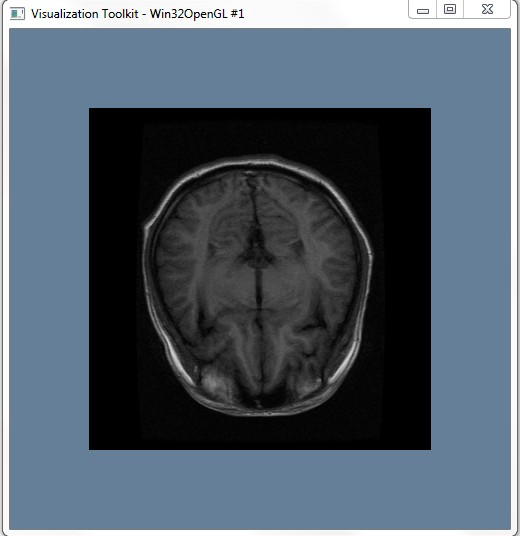
However, in the actual operation, we encountered the problem that VTKMetaimagereader could not read the file, which was normal in the previous 32bit system, and we are not sure where the problem appears temporarily, which needs further study!! Here are the questions:

2. See the data
1. C++ Primer
2. The VTK User’s Guide — 11 The Edition
3. The Visualization Toolkit — AnObject-Oriented Approach To 3D Graphics (4th Edition)
4. Zhang Xiaodong, Luo Huoling. Advance of VTK Graphics Image Development [M]. Machinery Industry Press, 2015.