Category Archives: How to Fix

Failure delivering result ResultInfo

java.lang.RuntimeException : Failure delivering result ResultInfo{who=null, request=65555, result=-1, data=Intent { dat= content://media/external/images/media/57064 flg=0x1 launchParam=MultiScreenLaunchParams { mDisplayId=0 mBaseDisplayId=0 mFlags=0 }

Inexplicably, there is a strange bug in the online app, which only appears on one user. The location of the crash is when sending pictures. The first moment I found the bug, I suspected the problem caused by too large pictures, but I read the newspaper wrong

Caused by: android.database.CursorIndexOutOfBoundsException : Index 0 requested, with a size of 0
    at android.database.AbstractCursor .checkPosition( AbstractCursor.java:460 )
    at android.database.AbstractWindowedCursor .checkPosition(Ab stractWindowedCursor.java:136 )
    at android.database.AbstractWindowedCursor .getString(Ab stractWindowedCursor.java:50 )
    at android.database.CursorWrapper .getString( CursorWrapper.java:137 )
    at com.easemob.chatuidemo . activity.ChatFragment.sendPicByUri ( ChatFragment.java:922 )
    at com.easemob.chatuidemo . activity.ChatFragment.onImageSelected ( ChatFragment.java:908 )
    at com.easemob.chatuidemo . activity.ChatFragment.onActivityResult ( ChatFragment.java:862 )
    at android.support .v4. app.FragmentActivity.onActivityResult ( FragmentActivity.java:164 )
    at com.rosevision.ofashion . activity.BaseWithoutActionBarLogicActivity .onActivityResult(BaseWithoutAc tionBarLogicActivity.java:364 )
    at android.app.Activity .dispatchActivityResult( Activity.java:7282 )
    at android.app.ActivityThread .deliverResults( ActivityThread.java:4516 )
    at android.app.ActivityThread .handleSendResult( ActivityThread.java:4563 )
    at android.app.ActivityThread .-wrap22( ActivityThread.java )
    at android.app.ActivityThread $H.handleMessage( ActivityThread.java:1698 )
    at android.os.Handler .dispatchMessage( Handler.java:102 )
    at android.os.Looper .loop( Looper.java:154 )
    at android.app.ActivityThread .main( ActivityThread.java:6776 )
    at java.lang.reflect . Method.invoke (Native Method)
    at com.android.internal . os.ZygoteInit $ MethodAndArgsCaller.run ( ZygoteInit.java:1520 )
    at com.android.internal . os.ZygoteInit.main ( ZygoteInit.java:1410 )

Obviously, this is not the problem. The error is caused by the cursor, but there is no problem with other mobile phones. This problem only occurs with this user, so it may be related to the problem of user settings. The next experiment verifies my conjecture
conclusion

The reason for this problem is that the user has turned off the application reading permission of the software in the settings or some security software, resulting in the situation that the cursor reading data is empty, resulting in the following crash
tf.contrib.layers .xavier_ Initializer function usage

First of all tf.contrib.layers

This is a packaged high-level Library in tensorflow1. X, in which there are many high-level packages of functions,

Convolution function tf.contrib.layers . conv2d(), pooling function tf.contrib.layers .max_ Pool2d() and tf.contrib.layers .avg_ Pool2d (), all join function tf.contrib.layers .fully_ Connected () and so on

Using this high-level library to develop programs will improve efficiency.

Here is an introduction tf.contrib.layers .xavier_ Initializer function

xavier_initializer(
    uniform=True,
    seed=None,
    dtype=tf.float32
)

This function returns an initializer “Xavier” for initializing weights.

This initializer is used to make the variance of each layer output as equal as possible.

Parameters:

Uniform: use uniform or normal distribution to initialize randomly.
seed: can be regarded as seed used to generate random numbers
dtype: only supports floating-point numbers.

Return value:

Initializing the weight matrix
is necessary

Tensorflow2. X does not use contrib advanced library

solution: how to initialize weights by Xavier rules in tensorflow 2.0?

QuartusII software exception: error: top level design entity “” is undefined


When using quartus to design digital circuits, we encountered the following compilation errors:

Info: *******************************************************************
Info: Running Quartus II 64-Bit Analysis & Synthesis
 Info: Version 11.0 Build 157 04/27/2011 SJ Full Version
 Info: Processing started: Thu May 15 13:09:59 2014
Info: Command: quartus_ map –read_ settings_ files=on –write_ settings_ files=off simulate -c simulate
Info: Parallel compilation is enabled and will use 2 of the 2 processors detected
Info: Found 1 design units, including 1 entities, in source file simulate.v
 Info: Found entity 1: modelsim_ test
Error: Top-level design entity “simulate” is undefined

Error: Quartus II 64-Bit Analysis & Synthesis was unsuccessful. 1 error, 0 warnings
 Error: Peak virtual memory: 324 megabytes
 Error: Processing ended: Thu May 15 13:10:01 2014
 Error: Elapsed time: 00:00:02
 Error: Total CPU time (on all processors): 00:00:01
Error: Quartus II Full Compilation was unsuccessful. 3 errors, 0 warnings


as a result of

The module name in Verilog file (. V) is inconsistent with the top-level design entity (usually the file name of. V file).

module modelsim_test(clk,rst_n,div);
input clk;
input rst_n;
output div;
reg div;
always@(posedge clk or negedge rst_n)
	if(!rst_n)div<=1'b0;
	else div<=~div;
endmodule 

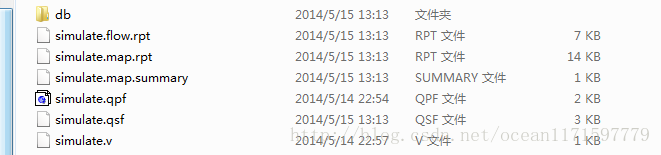
The name of the module above is Modelsim_ Test, and the Verilog file name in the project directory is simulate, as shown in the following figure.

The solution is: model sim_ Test is changed to simulate.

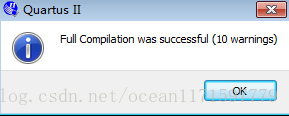
Compiled successfully!


Python Numpy.ndarray ValueError:assignment destination is read-only

reference resources: http://stackoverflow.com/questions/13572448/change-values-in-a-numpy-array

###################################################################3

Get the video stream from the raspberry pie camera and convert it to opencv format:

http://blog.csdn.net/u012005313/article/details/51482994

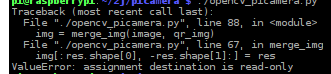
At the same time, you want to operate on each frame, but there is an error:

ValueError:assignment destination is read-only

Images cannot be manipulated because they are read-only.

Find a way on stackhover: because in Python, the opencv image format is Numpy.ndarray You can modify the properties of ndarray by:

img.flags.writeable = True

####################################################################

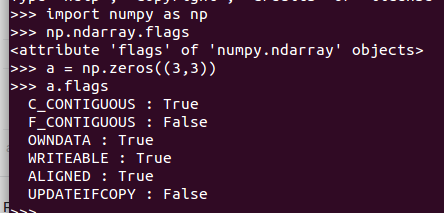
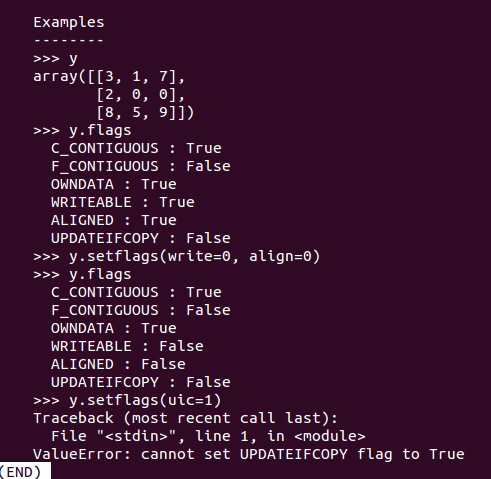
Numpy.ndarray It has the following attributes:

C_ CONTIGUOUS(c_ contiguous)

F_ CONTIGUOUS(f_ contiguous)

OWNDATA(owndata)

WRITEABLE(writeable)

ALIGNED(aligned)

UPDATEIFCOPY(updateifcopy)

import numpy as np
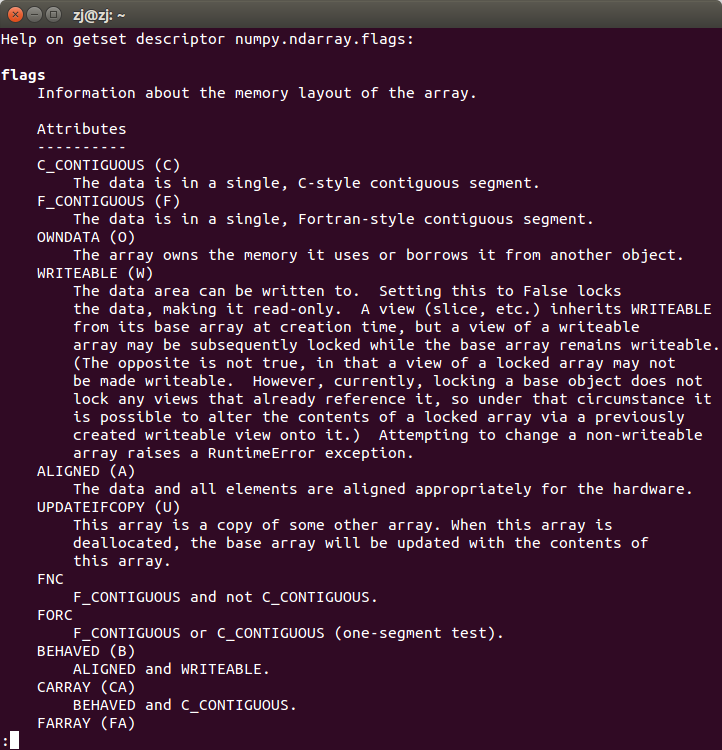
help(np.ndarray.flags)

The flags property is information about the array memory layout

Among them, the flags attribute can be modified in the form of a dictionary, for example:

a.flags['WRITEABLE'] = True

You can also use lowercase attribute names:

a.flags.writeable = True

Abbreviations (‘c ‘/’f’, etc.) are only used in dictionary form

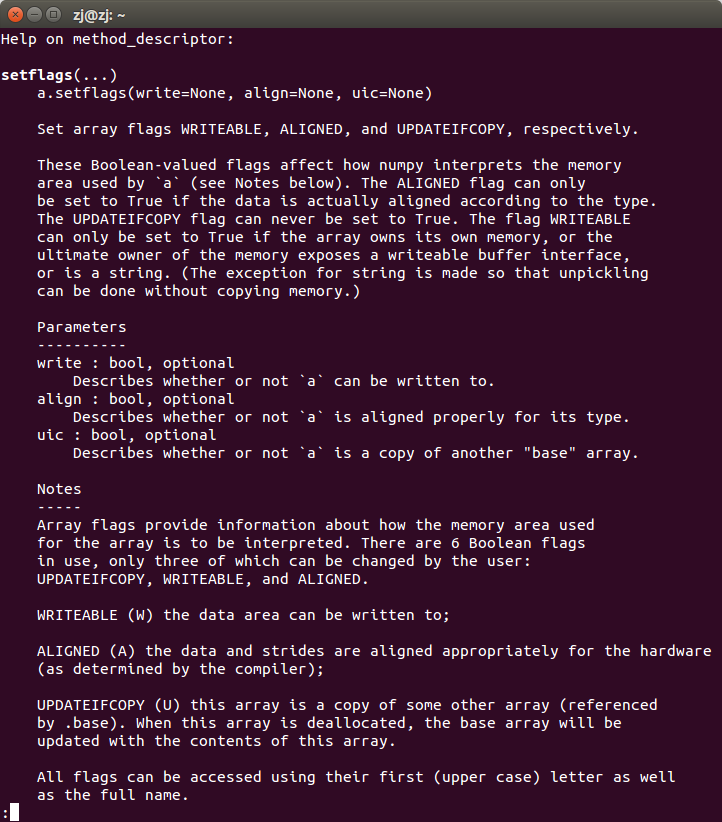
Only the attributes updateifcopy, writeable and aligned can be modified by users in three ways

1. Direct assignment:

a.flags.writeable = True

2. Dictionary input:

a.flags['WRITEABLE'] = True

3. Use function ndarray.setflags :

help(np.ndarray.setflags)

Aapt2 error: check logs for details

Exception:

Caused by: com.android.builder . internal.aapt .v2.Aapt2Exception: AAPT2 error: check logs for details
    at com.android.builder . png.AaptProcess $N otifierProcessOutput.handleOutput ( AaptProcess.java:443 )
    at com.android.builder . png.AaptProcess $N otifierProcessOutput.err ( AaptProcess.java:395 )
    at com.android.builder . png.AaptProcess $ ProcessOutputFacade.err ( AaptProcess.java:312 )
    at com.android.utils .GrabProcessOutput$1.run( GrabProcessOutput.java:104 )

All r documents are wrong and red;

Aapt2 explains:

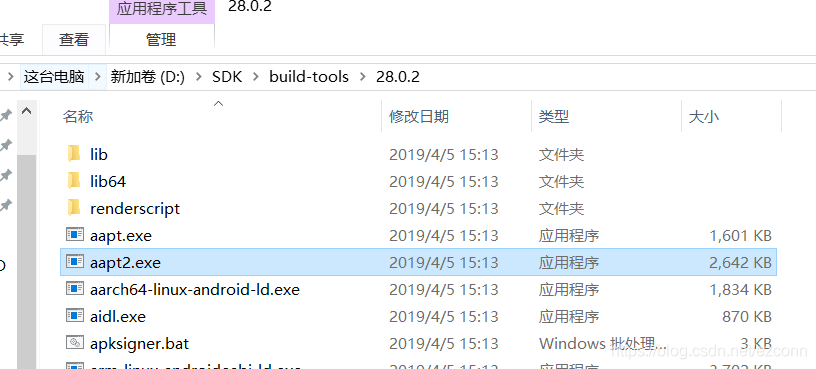
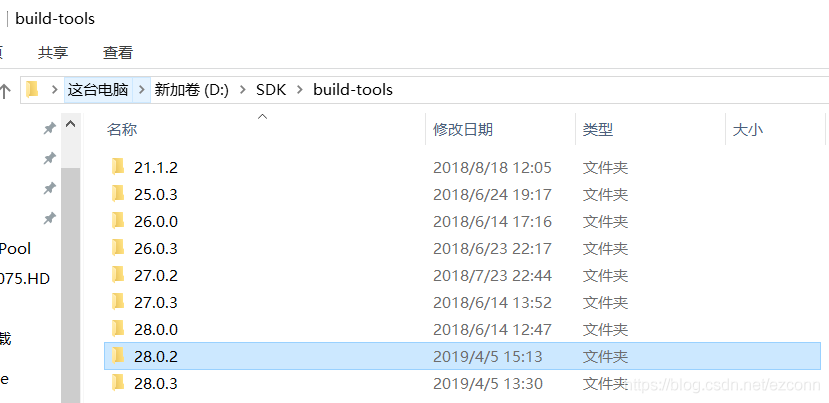
AAPT is the full name of Android asset packaging tool. It is an indispensable tool to build app and even Android system. Its function is to compress and package all resource files into Android APK. We can find it in the Android SDK directory. For example, I can find it in my directory D: SDK, build tools, 28.0.2, and other versions of build tools;

Aapt2 is a new version of AAPT. Starting from Android studio 3.0, it is used as the default resource packaging tool.

terms of settlement:

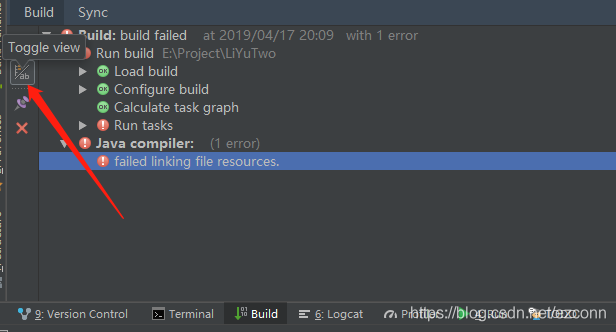
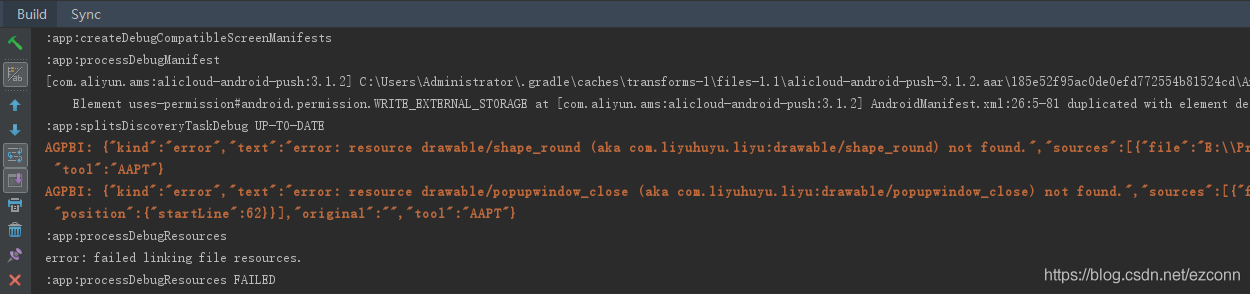
1. Click toggleview to view the execution output of gradle more clearly;

After clicking, it is shown as follows:

2. The red output information in the figure above has the following information:

AGPBI: {"kind":"error","text":"error: resource drawable/shape_round (aka com.liyuhuyu.liyu:drawable/shape_round) not found.","sources":[{"file":"E:\\Project\\LiYuTwo\\app\\src\\main\\res\\layout\\item_water.xml","position":{"startLine":10}}],"original":"","tool":"AAPT"}

AGPBI: {"kind":"error","text":"error: resource drawable/popupwindow_close (aka com.liyuhuyu.liyu:drawable/popupwindow_close) not found.","sources":[{"file":"E:\\Project\\LiYuTwo\\app\\src\\main\\res\\layout\\popupwindow_pay_select.xml","position":{"startLine":62}}],"original":"","tool":"AAPT"}

3. From the above prompt output information, we can know the following:

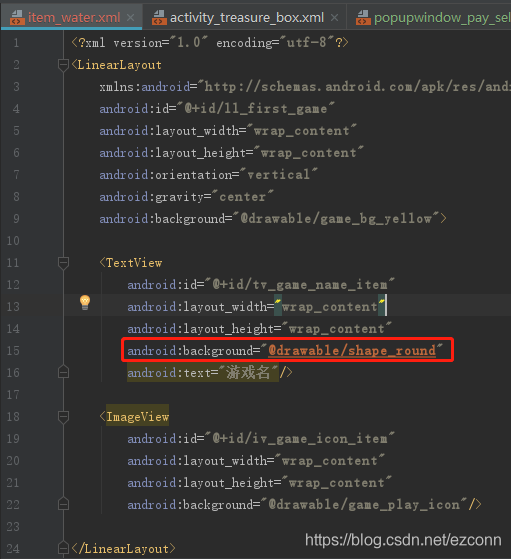
1) The file where the error occurred is item_ water.xml ;

2) The reason for the mistake is android:background Property value “@ drawable / shape”_ “Round” not found

4. Open item_ water.xml File, find the error location, as shown in the above output information error; delete or correct it;

Conclusion:

1) In fact, the reason for my error is that the referenced resource file cannot be found;

2) Aapt2 is a tool for packing resource files. If aapt2 reports an error, it is usually a problem with the resource file.

Other solutions:

Many solutions on the Internet say that the project is successful gradle.properties Add a line to“ android.enableAapt2=false “To shut down aapt2


Other knowledge:

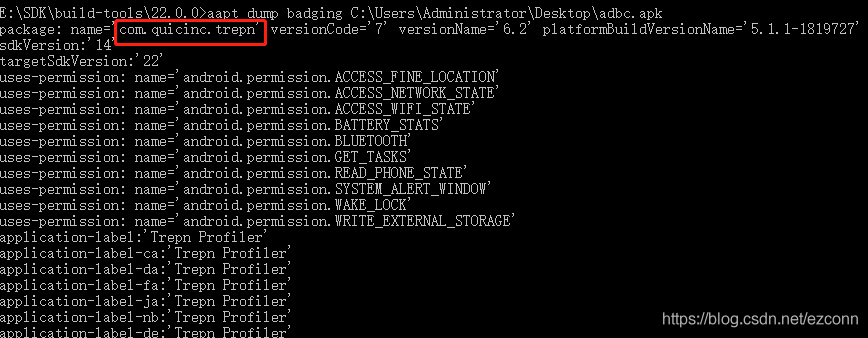
Use AAPT to view the app package name and other information

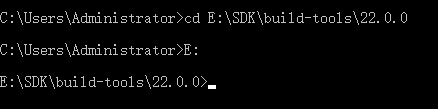
1, use CD in the command line of CMD to switch to the directory where AAPT is located

2. Enter the command “AAPT dump bagging C: / / users / administrator / desktop / find fault 201905171701. APK” to run, OK;

The path of the app is C: users, administrator, desktop, 201905171701.apk

LeetCode 23. Merge k Sorted Lists(java)

Merge k sorted linked lists and return it as one sorted list. Analyze and describe its complexity.

Solution 1: use heap to do it. First, put the first element of K lists into heap. After each poll, put it into the next element of the poll until the heap is empty. The time complexity is O (mklogk), and the space complexity is O (k)

public ListNode mergeKLists(ListNode[] lists) {
        if (lists == null || lists.length == 0) return null;
        if (lists.length == 1) return lists[0];
        PriorityQueue<ListNode> queue = new PriorityQueue<>(new Comparator<ListNode>() {
            public int compare(ListNode o1, ListNode o2) {
                return o1.val - o2.val;
            }
        });
        for (int i = 0; i < lists.length; i++) {
            if (lists[i] != null) queue.add(lists[i]);
        }
        ListNode dummy = new ListNode(-1), cur = dummy;
        while (!queue.isEmpty()) {
            ListNode temp = queue.poll();
            cur.next = temp;
            cur = temp;
            if (temp.next != null) queue.add(temp.next);
        }
        return dummy.next;
    }

Solution 2: the idea of merge sort is better than solution 1. List merges in pairs each time, until the merges into a list, the time complexity is O ((M / 2) (K / 2 + K / 4 + K / 8 +…) )It is O (kmlogk), but it has a constant number of optimizations than method one. The space complexity is O (1)

public ListNode mergeKLists(ListNode[] lists) {
        if (lists == null || lists.length == 0) return null;
        int begin = 0, end = lists.length - 1;
        while (begin < end) {
            int mid = (begin + end - 1) / 2;
            for (int i = 0; i <= mid; i++) {
                lists[i] = merge2list(lists[i], lists[end - i]);
            }
            end = (begin + end) / 2;
        }
        return lists[0];
    }
    public ListNode merge2list(ListNode l1, ListNode l2) {
        if (l1 == null && l2 == null) return null;
        if (l1 == null) return l2;
        if (l2 == null) return l1;
        ListNode dummy = new ListNode(-1), cur = dummy;
        while (l1 != null && l2 != null) {
            if (l1.val < l2.val) {
                cur.next = l1;
                cur = l1;
                l1 = l1.next;
            } else {
                cur.next = l2;
                cur = l2;
                l2 = l2.next;
            }
        }
        if (l1 != null) cur.next = l1;
        if (l2 != null) cur.next = l2;
        return dummy.next;
    }

Solve the problem that “figure size 640×480 with 1 axes” does not display pictures in jupyter notebook

Problem code: (negligible code)

import numpy as np
from sklearn.feature_selection import SelectKBest, f_classif
import matplotlib.pyplot as plt
predictors = ["Pclass", "Sex", "Age", "SibSp", "Parch", "Fare", "Embarked", "FamilySize", "Title", "NameLength"]

# Perform feature selection
selector = SelectKBest(f_classif, k=5)
selector.fit(titanic[predictors], titanic["Survived"])

# Get the raw p-values for each feature, and transform from p-values into scores
scores = -np.log10(selector.pvalues_)

# Plot the scores.  See how "Pclass", "Sex", "Title", and "Fare" are the best?
plt.bar(range(len(predictors)), scores)
plt.xticks(range(len(predictors)), predictors, rotation='vertical')
plt.show()

# Pick only the four best features.
predictors = ["Pclass", "Sex", "Fare", "Title"]

alg = RandomForestClassifier(random_state=1, n_estimators=50, min_samples_split=8, min_samples_leaf=4)

Running results:
& lt; figure size 640x480 with 1 axes & gt;
no pictures are displayed

Solution:
Add % Matplotlib inline to the code header

import pandas #ipython notebook
titanic = pandas.read_csv("titanic_train.csv")
titanic.head(5)
#print (titanic.describe())
%matplotlib inline

[Getting and Cleaning data] Quiz 2

Question 1Question 2Question 3Question 4Question 5

For more detail, see the html file here.
Question 1
Register an application with the Github API here github application. Access the API to get information on your instructors repositories(target url) . Use this data to find the time that the datasharing repo was created. What time was it created? This tutorial may be useful help tutorial. You may also need to run the code in the base R package and not R studio.
2013-11-07T13:25:07Z2014-03-05T16:11:46Z2014-02-06T16:13:11Z2012-06-20T18:39:06Z

library(httr)
library(httpuv)
# 1.OAuth settings for github:
Client_ID <- '66fba4580b9b23531d6e'
Client_Secret <- '7fd8a4f7d72ab12b6c01b5c4880bc6da7723eec2'
myapp <- oauth_app("First APP", key = Client_ID, secret = Client_Secret)
# 2. Get OAuth credentials
github_token <- oauth2.0_token(oauth_endpoints("github"), myapp)
# 3. Use API
gtoken <- config(token = github_token)
req <- GET("https://api.github.com/users/jtleek/repos", gtoken)
stop_for_status(req)
# 4. Extract out the content from the request
json1 = content(req)
# 5. convert the list to json
json2 = jsonlite::fromJSON(jsonlite::toJSON(json1))
# 6. Result 
json2[json2$full_name == "jtleek/datasharing", ]$created_at

Question 2
The sqldf package allows for execution of SQL commands on R data frames. We will use the sqldf package to practice the queries we might send with the dbSendQuery command in RMySQL. Download the American Community Survey data and load it into an R object called acs(data website), Which of the following commands will select only the data for the probability weights pwgtp1 with ages less than 50?
sqldf("select * from acs where AGEP < 50")sqldf("select * from acs")sqldf("select pwgtp1 from acs")sqldf("select pwgtp1 from acs where AGEP < 50")

# load package: sqldf is short for SQL select for data frame.
library(sqldf)
# 1. download data 
download.file(url = "https://d396qusza40orc.cloudfront.net/getdata%2Fdata%2Fss06pid.csv", destfile = "./data/acs.csv")
# 2. read data
acs <- read.csv("./data/acs.csv")
# 3. select using sqldf
#sqldf("select pwgtp1 from acs where AGEP<50", drv='SQLite')

Question 3
Using the same data frame you created in the previous problem, what is the equivalent function to unique(acs$AGEP)
sqldf("select unique AGEP from acs")sqldf("select distinct pwgtp1 from acs")sqldf("select AGEP where unique from acs")sqldf("select distinct AGEP from acs")

result <- sqldf("select distinct AGEP from acs", drv = "SQLite")
nrow(result)
length(unique(acs$AGEP))

Question 4
How many characters are in the 10th, 20th, 30th and 100th lines of HTML from this page: target page.(Hint: the nchar() function in R may be helpful)
45 31 2 2543 99 8 643 99 7 2545 0 2 245 31 7 2545 92 7 245 31 7 31

# 1. set url
url <- url("http://biostat.jhsph.edu/~jleek/contact.html")
# 2. read content from url
content <- readLines(url)
# 3. result
nchar(content[c(10, 20, 30, 100)])

Question 5
Read this data set into R and report the sum of the numbers in the fourth column data web. Original source of the data: original data web
(Hint this is a fixed width file format)
35824.9101.8336.5222243.128893.332426.7

# 1. read data
data <- read.fwf(file = "https://d396qusza40orc.cloudfront.net/getdata%2Fwksst8110.for",
                 skip = 4,
                 widths = c(12, 7,4, 9,4, 9,4, 9,4))
# 2. result
sum(as.numeric(data[,4]))

The problem of “value error: zero length field name in format” in Python 2.6.6 of CentOS 6.9

[root@MrYang ~]# python
Python 2.6.6 (r266:84292, Aug 18 2016, 15:13:37)
[GCC 4.4.7 20120313 (Red Hat 4.4.7-17)] on linux2
Type "help", "copyright", "credits" or "license" for more information.
>>> from fabric.api import *
Traceback (most recent call last):
  File "<stdin>", line 1, in <module>
  File "/usr/lib/python2.6/site-packages/fabric/api.py", line 9, in <module>
    from fabric.context_managers import (cd, hide, settings, show, path, prefix,
  File "/usr/lib/python2.6/site-packages/fabric/context_managers.py", line 42, in <module>
    from fabric.state import output, win32, connections, env
  File "/usr/lib/python2.6/site-packages/fabric/state.py", line 9, in <module>
    from fabric.network import HostConnectionCache, ssh
  File "/usr/lib/python2.6/site-packages/fabric/network.py", line 24, in <module>
    import paramiko as ssh
  File "/usr/lib/python2.6/site-packages/paramiko/__init__.py", line 22, in <module>
    from paramiko.transport import SecurityOptions, Transport
  File "/usr/lib/python2.6/site-packages/paramiko/transport.py", line 89, in <module>
    class Transport(threading.Thread, ClosingContextManager):
  File "/usr/lib/python2.6/site-packages/paramiko/transport.py", line 103, in Transport
    _CLIENT_ID = 'paramiko_{}'.format(paramiko.__version__)
ValueError: zero length field name in format

When using the paramiko third-party library of python2.6.6 and python3.6 on centos6.9, the above error has been reported all the time

Python official recommendation str.format () to format strings, so using “{} / N”. Format (x) to process strings may encounter problems.

In Python 2 & gt; = 2.7 and python 3 & gt; = 3.1, str.format The positional parameter in () method can be omitted by default, but in Python 2 (& lt; 2.7) and python 3 (& lt; 3.1), you must display the specified (subscript starts from 0), otherwise “zero length field name in format” error will appear.

“{}CMD”.format( os.sep )# “{0} CMD”. Format can run normally in Python 2.7( os.sep )# in Python & lt; = 2.6 / 3.1, the specified subscript must be displayed, even if there is only one element.

Reference link: https://www.aliyun.com/jiaocheng/460757.html

UE4 texture streaming pool over xxmb error

When UE4 has a large number of models and maps in the scene, it will report “texture streaming pool over xxmb” error after baking,

Solution 1:

In UE4, press tab and enter R streaming.poolsize To see the size.

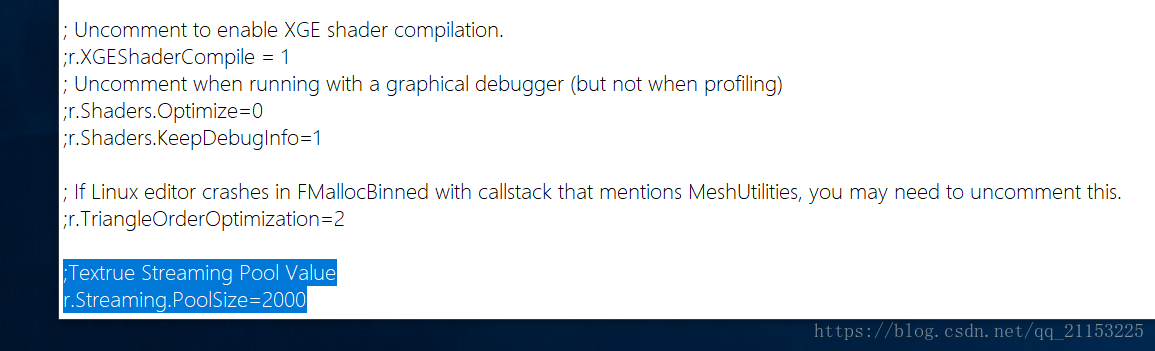
Then, in the installation directory of UE4, select UE_ 4.18 under the directory of engine / config, ConsoleVariables.ini File, right click, edit

On the last line, add (carriage return, semicolon)

;Textrue Streaming Pool Value
r. Streaming.PoolSize=2000

//=The value after the number can be written in size according to the requirements

Back to the engine, the error disappears

Solution 2:

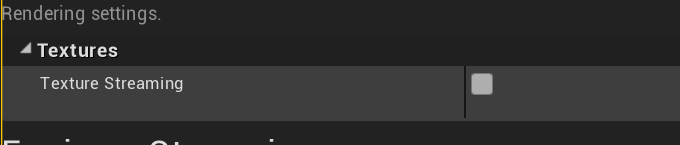
Project setting – rendering setting to turn off texture streaming