Category Archives: How to Fix

Solve the audio control and report domexception: the play() request was interrupted by a call to pause in the chrome console

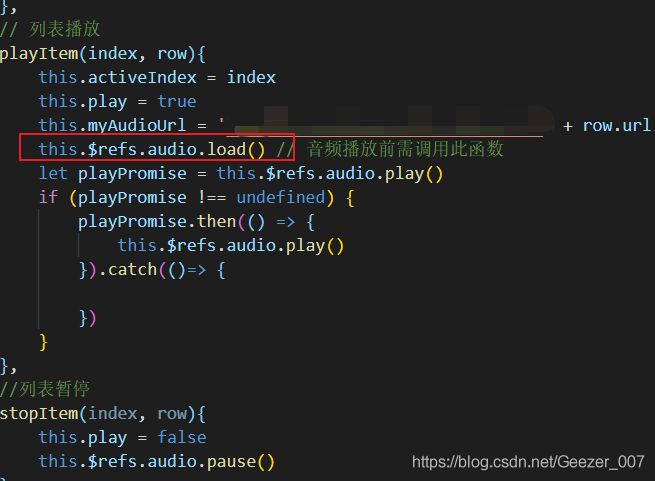
When using the audio control, the play() request will be interrupted by pause

The specific solutions are as follows:

Before judging whether the audio is playing, the load () method should be called to load the audio data;

Then the audio is judged by if, and then the playback or pause is processed asynchronously

Play or pause after successful callback, depending on business requirements;

Eureka failed to register error: saw local status change event statuschangeevent

The original usage of adding dependency is as follows:

dependencies {
    
    compile(” org.springframework.cloud :spring-cloud-starter-netflix-eureka- client:2.0.4.RELEASE “)

}

When starting, an error will be prompted: [warn] [2020-08-18 14:45:15.922] [main] com.netflix.discovery .DiscoveryClient [1297] – Saw local status change event StatusChangeEvent [timestamp=1597733115922, current=DOWN, previous=UP]


Later, it was found that the problem was how to write the service name

Add the dependency as follows:

dependencies {
    
    compile(” org.springframework.cloud :spring-cloud-starter-netflix-eureka- client:2.0.4.RELEASE “)

    compile(” org.apache.commons :commons-lang3:3.8.1″)
}

The service can be registered to Eureka


Saw local status change event statuschangeevent error during springcloud client registration

Start error message

2020-06-12 11:48:54.815  WARN 7728 --- [      Thread-31] com.netflix.discovery.DiscoveryClient    : Saw local status change event StatusChangeEvent [timestamp=1591933734815, current=DOWN, previous=UP]
2020-06-12 11:48:54.819  INFO 7728 --- [      Thread-31] com.netflix.discovery.DiscoveryClient    : Shutting down DiscoveryClient ...
2020-06-12 11:48:54.831  INFO 7728 --- [nfoReplicator-0] com.netflix.discovery.DiscoveryClient    : DiscoveryClient_KOALA-AI-PLATFORM-APP/192.168.100.1:18087 - registration status: 204
2020-06-12 11:48:54.832  INFO 7728 --- [nfoReplicator-0] com.netflix.discovery.DiscoveryClient    : DiscoveryClient_KOALA-AI-PLATFORM-APP/192.168.100.1:18087: registering service...
2020-06-12 11:48:54.836  INFO 7728 --- [nfoReplicator-0] com.netflix.discovery.DiscoveryClient    : DiscoveryClient_KOALA-AI-PLATFORM-APP/192.168.100.1:18087 - registration status: 204
2020-06-12 11:48:54.837  INFO 7728 --- [      Thread-31] com.netflix.discovery.DiscoveryClient    : Unregistering ...
2020-06-12 11:48:54.843  INFO 7728 --- [      Thread-31] com.netflix.discovery.DiscoveryClient    : DiscoveryClient_KOALA-AI-PLATFORM-APP/192.168.100.1:18087 - deregister  status: 200
2020-06-12 11:48:54.854  INFO 7728 --- [      Thread-31] com.netflix.discovery.DiscoveryClient    : Completed shut down of DiscoveryClient

The client can’t be registered in Eureka. After looking around, we found that spring boot starter web is missing in the client POM file, plus

    <dependency>
        <groupId>org.springframework.boot</groupId>
        <artifactId>spring-boot-starter-web</artifactId>
    </dependency>

WSL start QT error qt.qpa.xcb : could not connect to display :0.0

The error is as follows:

loaded library “/opt/qtcreator-4.8.2/lib/Qt/plugins/platforms/ libqxcb.so “
qt.qpa.xcb : could not connect to display :0.0
qt.qpa.plugin : Could not load the Qt platform plugin “xcb” in “” even though it was found.
This application failed to start because no Qt platform plugin could be initialized. Reinstalling the application may fix this problem.

Available platform plugins are: eglfs, linuxfb, minimal, minimalegl, offscreen, vnc, xcb.

The reason is: QT needs to display windows, but WSL does not have this function. It is necessary to install mobaxterm on Windows first. Open Ubuntu in mobaxterm, and then open QT in Ubuntu.

Using uniapp uni.downloadFile Download picture to photo album times error unknown problem

Suppose we upload a JPG image. When we upload using OSS, if we specify that the content type is image/jpeg, the generated outer chain will be displayed directly on the browser. If the set content type is application/octet stream or multipart/form data, the external link is downloaded directly. In the final analysis, the content type in the response header indicates what type the browser is, rather than judging by the URL suffix jpg

First of all, you need to pay attention to the type of image to download. Content type is image/jpeg type. If it is image/JPG type, it may lead to the problem of unknown


K8s deployment Kafka has been reporting errors.

Record that k8s will crash all the time when it deploys Kafka.

 ERROR [KafkaServer id=2] Fatal error during KafkaServer startup. Prepare to shutdown (kafka.server.KafkaServer)
java.lang.IllegalArgumentException: requirement failed: Configured end points 10.43.180.42:9092 in advertised listeners are already registered by broker 1
	at kafka.server.KafkaServer.$anonfun$createBrokerInfo$3(KafkaServer.scala:478)
	at kafka.server.KafkaServer.$anonfun$createBrokerInfo$3$adapted(KafkaServer.scala:476)
	at scala.collection.IterableOnceOps.foreach(IterableOnce.scala:553)
	at scala.collection.IterableOnceOps.foreach$(IterableOnce.scala:551)
	at scala.collection.AbstractIterable.foreach(Iterable.scala:920)
	at kafka.server.KafkaServer.createBrokerInfo(KafkaServer.scala:476)
	at kafka.server.KafkaServer.startup(KafkaServer.scala:311)
	at kafka.server.KafkaServerStartable.startup(KafkaServerStartable.scala:44)
	at kafka.Kafka$.main(Kafka.scala:82)
	at kafka.Kafka.main(Kafka.scala)

solve:

Change the name of deployment or statefulset to not “Kafka” and solve it successfully.

UnhandledPromiseRejectionWarning: MongoError: not authorized on elm to execute comman

Error in starting node project

UnhandledPromiseRejectionWarning: MongoError: not authorized on elm to execute command { insert: “hongbaos”, ordered: false, $db: “elm” }

The reason is that you do not have permission to connect to the database

The reason is that the database mongo.conf There is an auth = true solution

1. Comment out auth = true

2. Enter adimn to set the user name and password, and use the user name and password to access the database

Switch use admin before creating user

db.createUser(
	{
		user:"root",
		pwd:"123456",
		roles:[{role:"root",db:"admin"}]
	}
);

[Error] because it violates the following Content Security Policy directive

[Error] because it violates the following Content Security Policy directive

In the process of HTML development, we encountered the following error, which means the permission problem of HTML meta setting

Refused to connect to 'blob:http://localhost:8080/6d57f07f-3c2f-49ca-be30-fd0b7f4cff6e' 
because it violates the following Content Security Policy directive: 
"default-src * 'self' 'unsafe-inline' 'unsafe-eval' data: gap: content: ". 
Note that 'connect-src' was not explicitly set, so 'default-src' is used as a fallback.

Specifically, this bug appears when using vue-html2pdf.
The screenshot is as follows

the last time I encountered a similar problem was when I used the video tag.
These are similar problems

You need to open the source code of the HTML page (for example, index.html ), modify the meta in the head section

  <meta http-equiv="Content-Security-Policy" content="default-src * 'self' 'unsafe-inline' 'unsafe-eval' data: gap: content: https://ssl.gstatic.com; 
    media-src * blob: 'self' http://* 'unsafe-inline' 'unsafe-eval'; 
    style-src * 'self' 'unsafe-inline'; 
    img-src * 'self' data: content:; 
    connect-src * blob:;">

The example is divided into multiple lines and can be modified according to your own needs. For example, IMG SRC allows * and other types of resources.
Connect SRC allows * blob: and other types of resources. Note that * does not contain the blob: type. If it is not declared, blob: may be wrong

reference material

Used to connect to XXX – because it violates the following content security policy
Cordova rejected to connect to xxxxx - white list refuses to send network requests
meta tag official website: https://developer.mozilla.org/zh-CN/docs/Web/HTML/Element/meta
Content security policy website: https://developer.mozilla.org/zh-CN/docs/Web/HTTP/Headers/Content-Security-Policy__ by_ cnvoid