Category Archives: How to Fix

Notes on @ pathvariable annotation in springcloud openfeign

SpringCloud-Feign-@PathVariable
Feign pathvariable annotation was empty on param 0.
when using feign, if the parameter contains

@If the parameter is in the form of pathvariable, the corresponding parameter should be marked with value =, otherwise the IllegalStateException exception will be thrown

as

@GetMapping(value = "/payment/consumer/hystrix/ok/get/{id}")
    public String payment_ok(@PathVariable Integer id)

The above code will report feign pathvariable annotation was empty on param 0

    @GetMapping(value = "/payment/consumer/hystrix/ok/get/{id}")
    public String payment_ok(@PathVariable(value="id") Integer id)

So you can go through

Java:java.lang.OutOfMemoryError : GC overhead limit exceeded solution

1、 The exception is as follows:
exception in thread “main” java.lang.OutOfMemoryError : GC overhead limit exceeded


2、 Explanation:
JDK6 adds a new error type. Thrown when the GC takes a lot of time to free a small space.
It’s usually because the pile is too small. Cause of exception: not enough memory.


3、 Solution:

1. Check whether the system has large memory code or dead loop.
2. You can add the startup parameters of the JVM to limit the use of memory: – XX: – usegcoverheadlimit

Docker install zookeeper 3.6.2

1. Install image

 docker pull zookeeper:3.6.2

2. Start ZK

 docker run --privileged=true -d --name zookeeper -p 2181:2181  \
 -v /home/workspace/zookeeper/data:/data \
 -v /home/workspace/zookeeper/logs:/datalog \
 -d zookeeper:3.6.2

3. Go to ZK image summary

 docker exec -it zookeeper /bin/bash

3. View ZK log

 docker logs -f zookeeper 

4. Validation and FAQs

Refer to my last article:

https://blog.csdn.net/qq_ 42390636/article/details/114986157

Outofmemoryerror: GC overhead limit exceeded solution

When developing Java projects with idea, the service starts with a memory overflow error

Error:java : java.lang.OutOfMemoryError : GC overhead limit exceeded

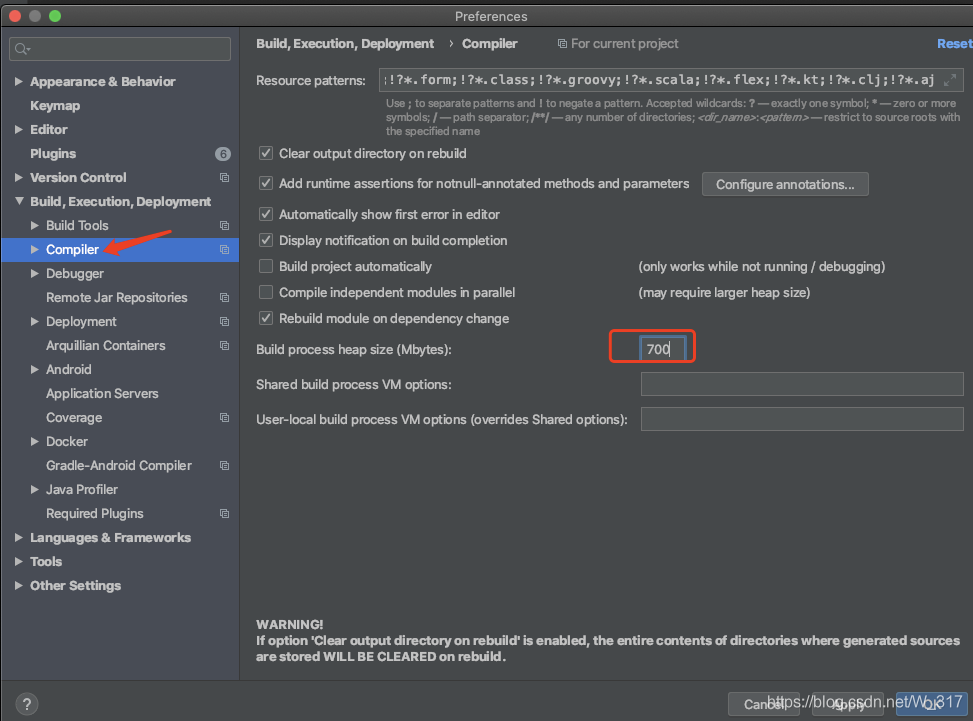
This error indicates that the memory is not enough during startup. Just set the memory value of idea’s startup process heap to a larger value.
Setting window: settings — & gt; build, execution, deployment — & gt; complier
increase the value of build process heap size
as shown in the figure below:


Change 700 in the box to 1000 and restart the service.

【MongoDB】 Failed to connect to 127.0.0.1:27017, reason: Connection refused

due to the need of the project, mongodb is installed on a virtual machine, but the following error occurs during startup:

[root@localhost bin]# ./mongo
MongoDB shell version v3.4.0
connecting to: mongodb://127.0.0.1:27017
2018-09-27T21:11:14.779+0800 W NETWORK  [main] Failed to connect to 127.0.0.1:27017, reason: Connection refused
2018-09-27T21:11:14.780+0800 E QUERY    [main] Error: couldn't connect to server 127.0.0.1:27017, connection attempt failed :
connect@src/mongo/shell/mongo.js:234:13
@(connect):1:6
exception: connect failed

the reason for the above may be in the data directory mongod.lock The problem with the document. You can use the command to repair:

[root@localhost mongodb]# ./bin/mongod --repair

but for impatient people like me, I went directly to the directory and deleted the file.
After repairing or deleting, restart mongodb:

./mongod --dbpath=/usr/local/mongodb/data/db/

then appears as follows:

2018-09-27T21:12:16.441+0800 I CONTROL  [initandlisten] MongoDB starting : pid=6748 port=27017 dbpath=/usr/local/mongodb/data/db/ 64-bit host=localhost.localdomain
2018-09-27T21:12:16.441+0800 I CONTROL  [initandlisten] db version v3.4.0
2018-09-27T21:12:16.441+0800 I CONTROL  [initandlisten] git version: f4240c60f005be757399042dc12f6addbc3170c1
2018-09-27T21:12:16.441+0800 I CONTROL  [initandlisten] allocator: tcmalloc
2018-09-27T21:12:16.441+0800 I CONTROL  [initandlisten] modules: none
2018-09-27T21:12:16.441+0800 I CONTROL  [initandlisten] build environment:
2018-09-27T21:12:16.441+0800 I CONTROL  [initandlisten]     distarch: x86_64
2018-09-27T21:12:16.441+0800 I CONTROL  [initandlisten]     target_arch: x86_64
2018-09-27T21:12:16.441+0800 I CONTROL  [initandlisten] options: { storage: { dbPath: "/usr/local/mongodb/data/db/" } }
2018-09-27T21:12:16.482+0800 I STORAGE  [initandlisten] wiredtiger_open config: create,cache_size=1383M,session_max=20000,eviction=(threads_max=4),config_base=false,statistics=(fast),log=(enabled=true,archive=true,path=journal,compressor=snappy),file_manager=(close_idle_time=100000),checkpoint=(wait=60,log_size=2GB),statistics_log=(wait=0),
2018-09-27T21:12:17.294+0800 I CONTROL  [initandlisten] 
2018-09-27T21:12:17.294+0800 I CONTROL  [initandlisten] ** WARNING: Access control is not enabled for the database.
2018-09-27T21:12:17.294+0800 I CONTROL  [initandlisten] **          Read and write access to data and configuration is unrestricted.
2018-09-27T21:12:17.294+0800 I CONTROL  [initandlisten] ** WARNING: You are running this process as the root user, which is not recommended.
2018-09-27T21:12:17.294+0800 I CONTROL  [initandlisten] 
2018-09-27T21:12:17.294+0800 I CONTROL  [initandlisten] ** WARNING: /sys/kernel/mm/transparent_hugepage/enabled is 'always'.
2018-09-27T21:12:17.294+0800 I CONTROL  [initandlisten] **        We suggest setting it to 'never'
2018-09-27T21:12:17.295+0800 I CONTROL  [initandlisten] 
2018-09-27T21:12:17.295+0800 I CONTROL  [initandlisten] ** WARNING: /sys/kernel/mm/transparent_hugepage/defrag is 'always'.
2018-09-27T21:12:17.295+0800 I CONTROL  [initandlisten] **        We suggest setting it to 'never'
2018-09-27T21:12:17.295+0800 I CONTROL  [initandlisten] 
2018-09-27T21:12:17.483+0800 I FTDC     [initandlisten] Initializing full-time diagnostic data capture with directory '/usr/local/mongodb/data/db/diagnostic.data'
2018-09-27T21:12:17.769+0800 I INDEX    [initandlisten] build index on: admin.system.version properties: { v: 2, key: { version: 1 }, name: "incompatible_with_version_32", ns: "admin.system.version" }
2018-09-27T21:12:17.769+0800 I INDEX    [initandlisten] 	 building index using bulk method; build may temporarily use up to 500 megabytes of RAM
2018-09-27T21:12:17.793+0800 I INDEX    [initandlisten] build index done.  scanned 0 total records. 0 secs
2018-09-27T21:12:17.794+0800 I COMMAND  [initandlisten] setting featureCompatibilityVersion to 3.4
2018-09-27T21:12:17.794+0800 I NETWORK  [thread1] waiting for connections on port 27017
2018-09-27T21:13:22.539+0800 I NETWORK  [thread1] connection accepted from 127.0.0.1:51708 #1 (1 connection now open)
2018-09-27T21:13:22.540+0800 I NETWORK  [conn1] received client metadata from 127.0.0.1:51708 conn1: { application: { name: "MongoDB Shell" }, driver: { name: "MongoDB Internal Client", version: "3.4.0" }, os: { type: "Linux", name: "CentOS Linux release 7.5.1804 (Core) ", architecture: "x86_64", version: "Kernel 3.10.0-862.el7.x86_64" } }
2018-09-27T21:14:00.424+0800 I NETWORK  [thread1] connection accepted from 192.168.20.29:10351 #2 (2 connections now open)
2018-09-27T21:14:00.424+0800 I -        [conn2] end connection 192.168.20.29:10351 (2 connections now open)
2018-09-27T21:14:00.969+0800 I NETWORK  [thread1] connection accepted from 192.168.20.29:10386 #3 (2 connections now open)
2018-09-27T21:14:00.969+0800 I NETWORK  [thread1] connection accepted from 192.168.20.29:10387 #4 (3 connections now open)
2018-09-27T21:14:03.063+0800 I NETWORK  [thread1] connection accepted from 192.168.20.29:10392 #5 (4 connections now open)
2018-09-27T21:14:03.063+0800 I NETWORK  [thread1] connection accepted from 192.168.20.29:10393 #6 (5 connections now open)
2018-09-27T21:14:03.063+0800 I -        [conn6] end connection 192.168.20.29:10393 (5 connections now open)
2018-09-27T21:14:03.469+0800 I -        [conn5] end connection 192.168.20.29:10392 (4 connections now open)
2018-09-27T21:16:31.073+0800 I NETWORK  [thread1] connection accepted from 192.168.21.247:1138 #7 (4 connections now open)
2018-09-27T21:16:31.714+0800 I INDEX    [conn7] build index on: NCRE3.01.files properties: { v: 2, key: { filename: 1, uploadDate: 1 }, name: "filename_1_uploadDate_1", ns: "NCRE3.01.files" }
2018-09-27T21:16:31.714+0800 I INDEX    [conn7] 	 building index using bulk method; build may temporarily use up to 500 megabytes of RAM
2018-09-27T21:16:31.765+0800 I INDEX    [conn7] build index done.  scanned 0 total records. 0 secs
2018-09-27T21:16:31.765+0800 I COMMAND  [conn7] insert NCRE3.system.indexes ninserted:1 numYields:0 locks:{ Global: { acquireCount: { r: 1, w: 1 } }, Database: { acquireCount: { W: 1 } }, Collection: { acquireCount: { w: 1 } } } 550ms
2018-09-27T21:16:32.627+0800 I INDEX    [conn7] build index on: NCRE3.01.chunks properties: { v: 2, unique: true, key: { files_id: 1, n: 1 }, name: "files_id_1_n_1", ns: "NCRE3.01.chunks" }
2018-09-27T21:16:32.627+0800 I INDEX    [conn7] 	 building index using bulk method; build may temporarily use up to 500 megabytes of RAM
2018-09-27T21:16:32.994+0800 I INDEX    [conn7] build index done.  scanned 0 total records. 0 secs
2018-09-27T21:16:32.994+0800 I COMMAND  [conn7] insert NCRE3.system.indexes ninserted:1 numYields:0 locks:{ Global: { acquireCount: { r: 1, w: 1 } }, Database: { acquireCount: { W: 1 } }, Collection: { acquireCount: { w: 1 } } } 1216ms
2018-09-27T21:16:35.895+0800 I -        [conn7] end connection 192.168.21.247:1138 (4 connections now open)
^C2018-09-27T21:17:17.799+0800 I CONTROL  [signalProcessingThread] got signal 2 (Interrupt), will terminate after current cmd ends
2018-09-27T21:17:17.799+0800 I NETWORK  [signalProcessingThread] shutdown: going to close listening sockets...
2018-09-27T21:17:17.799+0800 I NETWORK  [signalProcessingThread] closing listening socket: 6
2018-09-27T21:17:17.799+0800 I NETWORK  [signalProcessingThread] closing listening socket: 7
2018-09-27T21:17:17.799+0800 I NETWORK  [signalProcessingThread] removing socket file: /tmp/mongodb-27017.sock
2018-09-27T21:17:17.801+0800 I NETWORK  [signalProcessingThread] shutdown: going to flush diaglog...
2018-09-27T21:17:17.801+0800 I FTDC     [signalProcessingThread] Shutting down full-time diagnostic data capture
2018-09-27T21:17:17.803+0800 I STORAGE  [signalProcessingThread] WiredTigerKVEngine shutting down
2018-09-27T21:17:19.283+0800 I STORAGE  [signalProcessingThread] shutdown: removing fs lock...
2018-09-27T21:17:19.283+0800 I CONTROL  [signalProcessingThread] now exiting
2018-09-27T21:17:19.283+0800 I CONTROL  [signalProcessingThread] shutting down with code:0

this interface is successful. Then, do not close the interface, open a window again to start:

[root@localhost ~]# cd /usr/local/mongodb
[root@localhost mongodb]# ./bin/mongo
MongoDB shell version v3.4.0
connecting to: mongodb://127.0.0.1:27017
MongoDB server version: 3.4.0
Welcome to the MongoDB shell.
For interactive help, type "help".
For more comprehensive documentation, see
	http://docs.mongodb.org/
Questions?Try the support group
	http://groups.google.com/group/mongodb-user
Server has startup warnings: 
2018-09-27T21:12:17.294+0800 I CONTROL  [initandlisten] 
2018-09-27T21:12:17.294+0800 I CONTROL  [initandlisten] ** WARNING: Access control is not enabled for the database.
2018-09-27T21:12:17.294+0800 I CONTROL  [initandlisten] **          Read and write access to data and configuration is unrestricted.
2018-09-27T21:12:17.294+0800 I CONTROL  [initandlisten] ** WARNING: You are running this process as the root user, which is not recommended.
2018-09-27T21:12:17.294+0800 I CONTROL  [initandlisten] 
2018-09-27T21:12:17.294+0800 I CONTROL  [initandlisten] ** WARNING: /sys/kernel/mm/transparent_hugepage/enabled is 'always'.
2018-09-27T21:12:17.294+0800 I CONTROL  [initandlisten] **        We suggest setting it to 'never'
2018-09-27T21:12:17.295+0800 I CONTROL  [initandlisten] 
2018-09-27T21:12:17.295+0800 I CONTROL  [initandlisten] ** WARNING: /sys/kernel/mm/transparent_hugepage/defrag is 'always'.
2018-09-27T21:12:17.295+0800 I CONTROL  [initandlisten] **        We suggest setting it to 'never'
2018-09-27T21:12:17.295+0800 I CONTROL  [initandlisten] 

the appearance of such an interface means that the problem has been solved ~
at this time, visit the website and find that mongodb’s service is really started:

thank you for reading ~

Two dimensional array and pointer to one dimensional array

First, the previous two-dimensional array:

int a[3][4]={1,2,3,4,5,6,7,8,9,1,2,3};

How to operate a pointer for a two-dimensional array like this:
the first concept is that a two-dimensional array has rows and columns.

    the first point is that the * operator accesses the column, and the second point is that the [] subscript operator also accesses the column.

For example, a, * a, a [2], * (a + 2)
A: A is the address of the first row, while * a is the address of the first row and zero column, which is the address of the first row and zero column.
A [2]: the subscript accesses the column of the row, that is, the address of two rows and 0 column.
* (a + 2): a + 2 accesses the address at the beginning of the second line, and a * sign accesses the address at column 0 of the second line.

Pointer to one-dimensional array: int (* P) [4];
when this pointer P points to a two-dimensional array, every P + 1 skips four elements and points directly to the next line.

Ambari failed to monitor yarn ResourceManager, restart invalid

Question:

Yarn ResourceManager restart is invalid.

analysis:

It could be Hadoop yarn monitored by ambari- resourcemanager.pid The file does not properly record the process ID of ResourceManager.

solve:

    enter the directory/var/run/Hadoop yarn/yarn; view Hadoop yarn- resourcemanager.pid The process ID of ResourceManager recorded in; JPS view the ID number of ResourceManager running; if it is not equal, copy and fill in the process ID of ResourceManager viewed by JPS to Hadoop yarn- resourcemanager.pid Wait a few seconds, cluster ambari The display is normal;

[SharePoint] after deploying webpart, the solution to the resource file in the layouts mapping directory referenced by webpart cannot be found

preface

After deploying webpart in SharePoint, when viewing the webpart on the page, the resource file under the layouts mapping directory referenced by webpart cannot be found. The solution is as follows

Solution

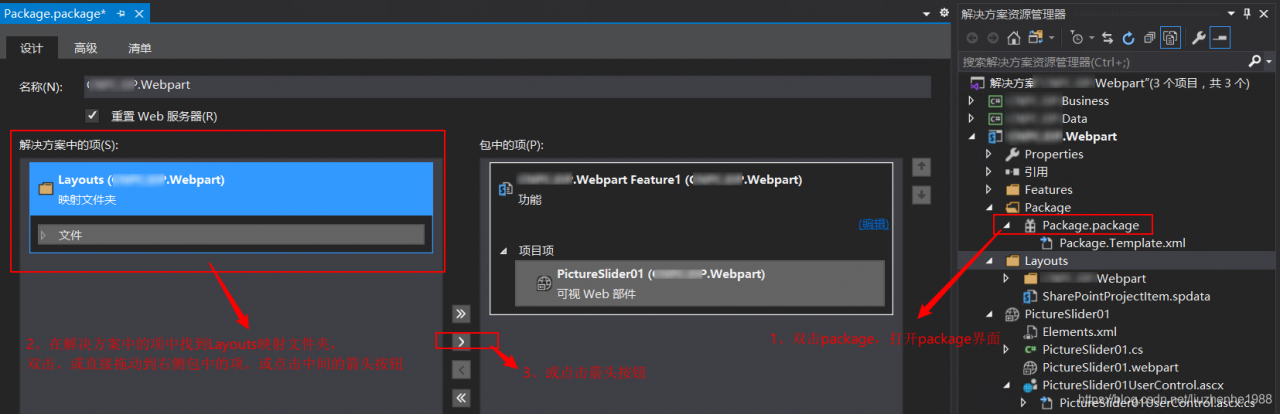
1. In the vs project, double-click package.package

2. In the solution on the left, select the file you want to deploy, such as the layouts folder

3. Double click, or drag directly to the item in the right package, or click the middle arrow button

4. Just redeploy

Other related

[SharePoint] after deploying webpart, visit the webpart page to report an error and prompt “file not found”. The solution is as follows

An error was reported when deploying SharePoint webpart: the function installation failed in the process of deploying the solution. SP: the function with ID of * * has been installed in this server farm. Please use mandatory properties to re install the function – solution

When adding webpart to the [SharePoint] page, you will be prompted that the type cannot be found or the type is not registered as a security type solution

[SharePoint] after deploying webpart, the solution to the resource file in the layouts mapping directory referenced by webpart cannot be found


web.xml Solution of < async supported > true < / async supported > error in configuration file

I’m writing web.xml I always reported cvc-complex-type. 2.4. A: invalid content was found starting with element error again. I also found a small red cross. I found a lot of Red Cross on the Internet. It was said that I wrote the code of red cross between & lt; JSP config & gt; & lt; & JSP config & gt;, but it was useless after trying. Then I found a solution to the problem on the foreign language website

Solution 1:
configure XML in eclipse
1 http://www.springmodules.org/schema/cache/springmodules-cache.xsd
   2、 http://www.springmodules.org/schema/cache/springmodules-ehcache.xsd
and then add these two xsds to the web.xml The code is as follows:

web.xml code

    <?xml version=”1.0″ encoding=”UTF-8″?>   < web-app version=”2.4″ xmlns=” http://java.sun.com/xml/ns/j2ee ”        xmlns:xsi= ” http://www.w3.org/2001/XMLSchema-instance    http://www.springmodules.org/schema/cache/springmodules-cache.xsd   http://www.springmodules.org/schema/cache/springmodules-ehcache.xsd ”     xsi:schemaLocation= ” http://java.sun.com/xml/ns/j2ee    http://java.sun.com/xml/ns/j2ee/web-app_ 2_ 4.xsd”>       <!–OS Work Flow –>       <display-name>OSWorkflow Example App</display-name>       <description>OSWorkflow Example App</description>                <servlet>           <servlet-name>SOAPWorkflow</servlet-name>           < servlet-class>                com.opensymphony.workflow . soap.SOAPWorkflowServlet            </servlet-class>       </servlet>       <servlet>           <description>               This is the description of my J2EE component           < /description>           <display-name>               This is the display name of my J2EE component           </display-name>           <servlet-name>Osworkflow</servlet-name>           <servlet-class> net.caiban.servlet .Osworkflow</servlet-class>        </servlet>       <servlet>           <description>               This is the description of my J2EE component           </description>           <display-name>                This is the display name of my J2EE component           </display-name>           <servlet-name>DoWorkflow</servlet-name>           <servlet-class> net.caiban.servlet .DoWorkflow</servlet-class>       </servlet>       <servlet>            <description>               This is the description of my J2EE component           </description>           <display-name>               This is the display name of my J2EE component           </display-name>            <servlet-name>CreateWorkflow</servlet-name>           <servlet-class> net.caiban.servlet .CreateWorkflow</servlet-class>       </servlet>                   <servlet-mapping>           <servlet-name>SOAPWorkflow</servlet-name>            <url-pattern>/soap/*</url-pattern>       </servlet-mapping>          <servlet-mapping>           <servlet-name>Osworkflow</servlet-name>           <url-pattern>/servlet/Osworkflow</url-pattern>       </servlet-mapping>        <servlet-mapping>           <servlet-name>DoWorkflow</servlet-name>           <url-pattern>/servlet/DoWorkflow</url-pattern>       </servlet-mapping>       <servlet-mapping>           <servlet-name>CreateWorkflow</servlet-name>            <url-pattern>/servlet/CreateWorkflow</url-pattern>       </servlet-mapping>          <welcome-file-list>           <welcome-file> default.jsp&lt ;/welcome-file>           <welcome-file> index.jsp&lt ;/welcome-file>       </welcome-file-list>        <resource-ref>           <res-ref-name>jdbc/oswf</res-ref-name>           <res-type> javax.sql.DataSource&lt ;/res-type>           <init-param driverClassName=” com.mysql.jdbc .Driver” />           <init-param url=” jdbc:mysql :// localhost:3306/osworkflow ” />            <init-param user=”root” />           <init-param password=”123465″ />           <init-param max-connections=”20″ />           <init-param max-idle-time=”30″ />       </resource-ref>       <!–OS Work Flow –>   </web-app>  

Solution 2:

≪ async supported & gt; true & lt;/async supported & gt; yes web.xml 3.0, just add

<web-app xmlns:xsi= ” http://www.w3.org/2001/XMLSchema-instance ” xmlns=” http://Java.sun.com/xml/ns/javaee ” xsi:schemaLocation= ” http://java.sun.com/xml/ns/javaee http://java.sun.com/xml/ns/javaee/web-app_ 2_ 5.xsd” id=”WebApp_ ID” version=”2.5″>

Change to:

<web-app xmlns:xsi= ” http://www.w3.org/2001/XMLSchema-instance ” xmlns=” http://java.sun.com/xml/ns/javaee ” xsi:schemaLocation= ” http://java.sun.com/xml/ns/javaee http://java.sun.com/xml/ns/javaee/web-app_ 3_ 0.xsd” id=”WebApp_ ID” version=”3.0″>

It can be solved.

Original address: http://blog.csdn.net/zxz547388910/article/details/50780068

CUBLAS_STATUS_ALLOC_FAILED


CUBLAS_ STATUS_ ALLOC_ FAILED


resolvent:

Extract binding CUDA

torch.rand (1, 3, 10, 10).cuda(7)

It’s OK in training, but not in prediction.


>>> input = torch.rand(1, 3, 10, 10)
>>> kh, kw = 3, 3
>>> weight = torch.rand(5, 3, kh, kw)
>>> # offset should have the same spatial size as the output
>>> # of the convolution. In this case, for an input of 10, stride of 1
>>> # and kernel size of 3, without padding, the output size is 8
>>> offset = torch.rand(5, 2 * kh * kw, 8, 8)
>>> out = deform_conv2d(input, offset, weight)


About MySQL 1058 error

When I used MySQL a few days ago, it was still normal, but today I find that MySQL can’t be started. The prompt of using net start MySQL command is as follows:


Then I found that there was no MySQL content in the registry, and the MySQL service could not find the path. So mysqld – remove, the MySQL service was deleted successfully, and then mysqld – install, but it prompted that the MySQL service already existed. Next, I use the net start MySQL command. This time, the prompt becomes error 1058, that is, the service cannot be started. The reason may be that the service has been disabled or the device associated with it has not been started.

Then, through Baidu found a solution, in the MySQL configuration file, my name is my.ini Add the following content to the configuration file:

Finally, the service mysqld – install is re installed to prompt that the service is installed successfully. Then start MySQL (net start MySQL) to run normally.