Category Archives: How to Fix

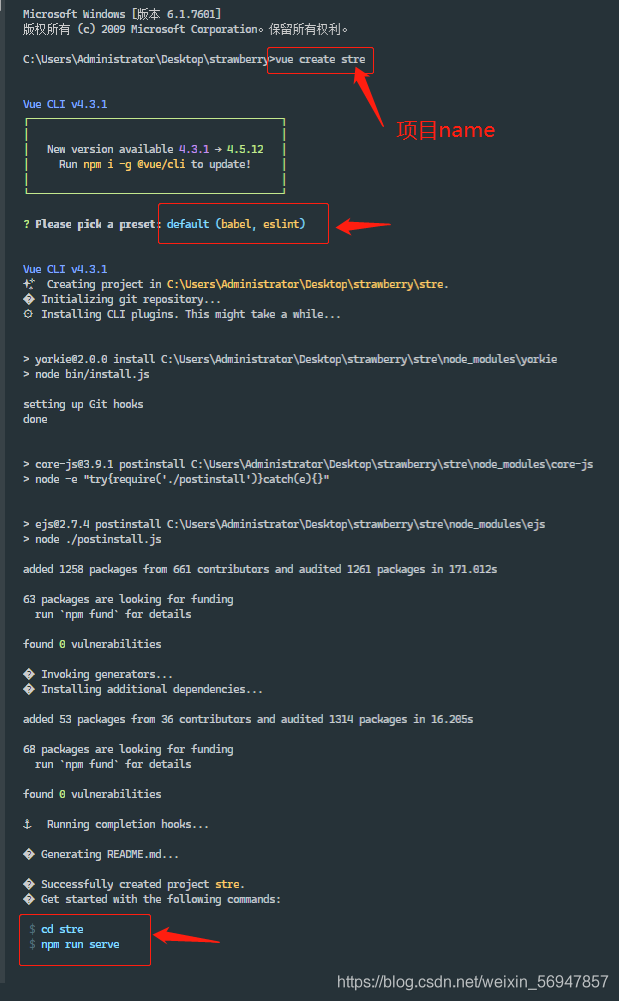
Cli4 frequently asked questions about creating projects loglevel error

Command failed: NPM install — loglevel error

Command failed: NPM install — loglevel error & amp& amp;& amp; command failed: npm install –loglevel error –registry= https://registry.npm.taobao.org The reason is whether Taobao image is selected during installationnpm install chromedriver –chromedriver_ cdnurl= http://cdn.npm.taobao.org/dist/chromedriver After completing the operation, re create the project NPM cache clean — force to clear the NPM cache If you choose Taobao image during installation, and the above two steps are not enough – & gt; Re install the following Taobao source NPM install – G cnpm — registry= https://registry.npm.taobao.org

Ant Design ‘cross env’ is not an internal or external command, nor is it an error reporting problem for a runnable program

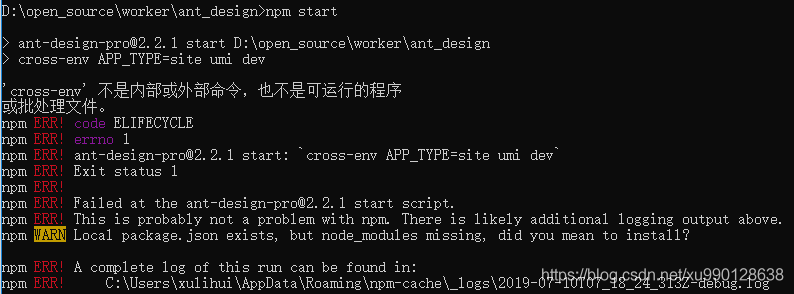
1. Phenomenon

D:\open_source\worker\ant_design>npm start
> [email protected] start D:\open_source\worker\ant_design
> cross-env APP_TYPE=site umi dev
‘cross-env’ is not an internal or external command, nor is it a runnable program
or batch file.
npm ERR! code ELIFECYCLE
npm ERR! errno 1
npm ERR! [email protected] start: `cross-env APP_TYPE=site umi dev`
npm ERR! Exit status 1
npm ERR!
npm ERR! Failed at the [email protected] start script.
npm ERR! This is probably not a problem with npm. There is likely additional logging output above.
npm WARN Local package.json exists, but node_modules missing, did you mean to install?
npm ERR! A complete log of this run can be found in:
npm ERR!     C:\Users\AppData\Roaming\npm-cache\_logs\2019-07-10T07_25_09_552Z-debug.log
2. run as administrator, execute the npm install command

How to Solve Hbase Error: Master is initializing

Error log

ERROR: org.apache.hadoop.hbase.PleaseHoldException: Master is initializing 
        at org.apache.hadoop.hbase.master.HMaster.checkInitialized(HMaster.java:2977) 
        at org.apache.hadoop.hbase.master.HMaster.disableTable (HMaster.java:2524) 
        at org.apache.hadoop.hbase.master.MasterRpcServices.disableTable(MasterRpcServices.java:726) 
        at org.apache.hadoop.hbase.shaded.protobuf.generated.MasterProtos$MasterService$2.callBlockingMethod( MasterProtos.java) 
        at org.apache.hadoop.hbase.ipc.RpcServer.call(RpcServer.java:413) 
        at org.apache.hadoop.hbase.ipc.CallRunner.run(CallRunner.java:130) 
        at org.apache .hadoop.hbase.ipc.RpcExecutor$Handler.run(RpcExecutor.java:324)
        at org.apache.hadoop.hbase.ipc.RpcExecutor$Handler.run(RpcExecutor.java:304)

Cause Analysis

Solution:

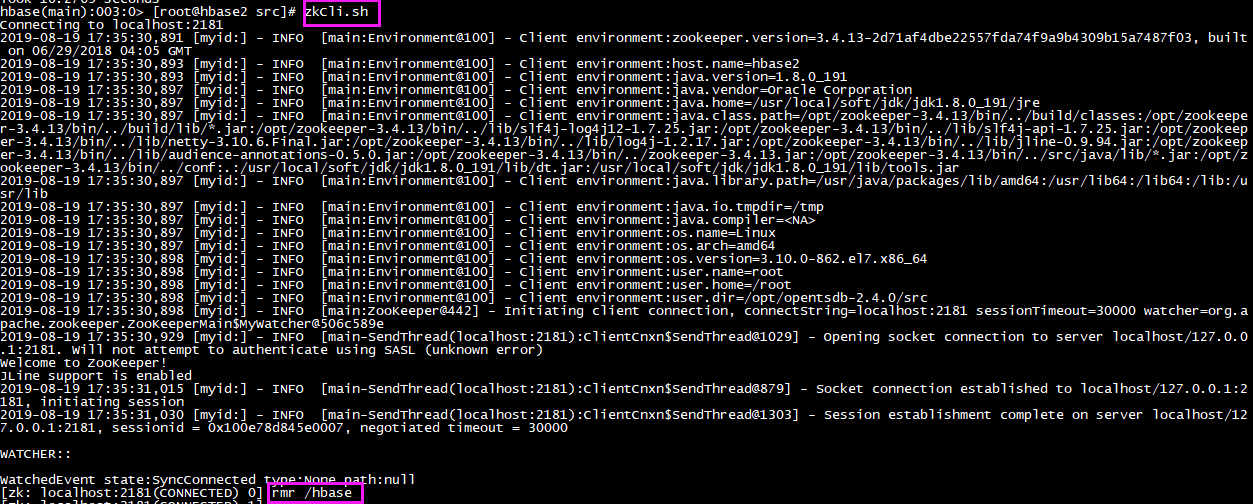
<!-- Enter zk client --> 
ZK_HOME/zkCli.sh 
<!-- Empty hbase --> 
rmr /hbase 
<!-- Restart hbase --> 
stop-hbase.sh  
start-hbase.sh

verification

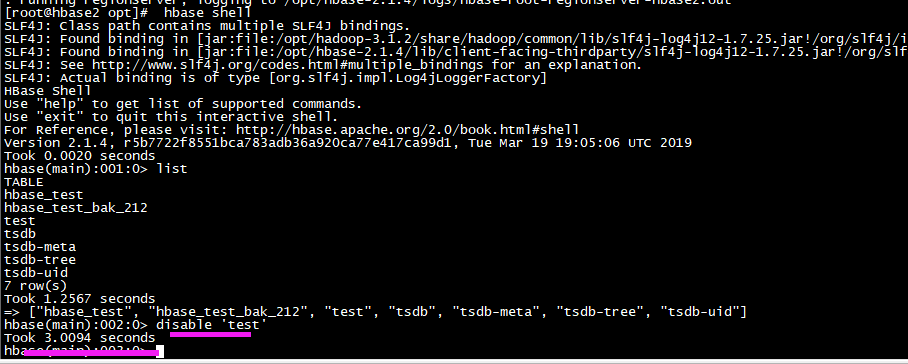
<!-- Enter shell command --> 
hbase shell 
<!-- View table --> 
list 

<!-- disable table --> disable'test 
'

[Four Methods] memcached unzip error: gzip: stdin: not in gzip format tar: Child returned status 1 tar: Error is not recoverable: exiting now

 Recently in the deployment environment, when decompressing during the installation of memcached,

 Unzip command: tar -zvxf memcached-1.4.34.tar.gz

Encountered a problem,

  gzip: stdin: not in gzip format

  tar: Child returned status 1

  tar: Error is not recoverable: exiting now

 Now I provide the solution I summarized:

method one:

#tar -vxf memcached-1.4.34.tar.gz

 Use the cvf parameter when compressing the tar package, the xvf parameter when decompressing it,
or the czvf parameter when compressing it, and the xzvf parameter when decompressing it.

If the bz package is encountered, replace the z parameter with the corresponding j parameter

Of course, if you do not solve your problem with method one like me, then look at method two. Look at the picture below, this baby is so bad that has not been resolved.

 

Method Two:

I found a way on the Internet at this time. It is to rename the memcached compressed package and decompress it.

Command: mv memcached-1.4.34.tar.gz  memcached-1.4.34.tar

Unzip again: tar -zvxf memcached-1.4.34.tar

However, it didn’t work, and my file still reported an error. This method did not solve my problem. And I feel that this method is actually similar to one.

Of course, some people can use this method. The reason for this problem may be that the installation package was originally memcached-1.4.34.tar, but the suffix was changed later.

Method three:

I accidentally saw an article saying that it might be because the installation package I downloaded online was damaged.

How to determine whether it is damaged?

Command: ls -lht view file size

And compared with the size of the installation package stored on Windows .

Sure enough, there is a problem with the installation package itself.

Well, my problem is solved here. Of course, if you have a small partner that solves your problem and a new problem arises, then you can look at method four.

Method four:

 gzip: stdin: not in gzip format
  tar: Child returned status 1
  tar: Error exit delayed from previous errors 

It is said that this is a problem of FTP transmission, and ascii transmission may be used during transmission. In this case, change to binary transmission.
[Solved] Incompatibile SockJS! Main site uses: “1.5.0”, the iframe: “1.0.0”. at s (VM6 sockjs.min.js:2) version issue

Incompatibile SockJS! Main site uses: “1.5.0”, the iframe: “1.0.0”. at s (VM6 sockjs.min.js:2) When

starting the service today, I got this error inexplicably, I thought it was my code There was a problem, Baidu search found that everyone said that the problem of nginx reverse proxy, I did not install nginx! nginx! nginx!
So I checked my package-lock.json and modified the sockjs-client version to 1.5.1, and reinstalled the dependency on npm i and it was ok.


Android: How to Solve Execution failed for task ‘:app:compileDebugJavaWithJavac‘. > javax/xml/bind/JAXBException

I recently upgraded Android studio 4.1.3 to the latest version 4.2.1, and the following error was reported when running the project:

The following project options are deprecated and have been removed:
android.databinding.enableV2
Databinding v1 is removed.

Unable to load class ‘javax.xml.bind.JAXBException’.

This is an unexpected error. Please file a bug containing the idea.log file.

Execution failed for task ‘:app:compileDebugJavaWithJavac’.
> javax/xml/bind/JAXBException

I was puzzled. I searched the Internet and found the reason. The Databinding framework requires Java 8 and below. The above version lacks some classes.

The new version of AS comes with 11, and then the jdk path is changed to 8, but it is not allowed to change, theoretically it should be possible to change it, there is no way, only the one before installation

AS4.1.3 version, and then run the project OK. Of course, this method is conservative and safe. If you have to use JDK11, it is estimated that the project will be changed.

Solved: No’Access-Control-Allow-Origin’ cross-domain issue

This article mainly introduces the solution: No’Access-Control-Allow-Origin’ cross-domain, the article introduces it in detail through the sample code, and has a certain reference learning value for everyone’s study or work. Friends who need it will follow Let’s study together with the editor

problem analysis:

This is a common cross-domain request problem, which is common in projects where the front and back ends are separated. The request path in the front-end project directly uses the back-end request path (for example: http://192.168.1.1:8080/demo/getUser.do), but According to the browser’s network request rules, the background server is not allowed to call directly in this way (it will be intercepted by malicious hackers). As a result, the cross-domain request was rejected (as shown below).

Access to XMLHttpRequest at’http://192.168.1.1:8080/app/easypoi/importExcelFile’ from origin’http://localhost:8080′ has been blocked by CORS policy: No’Access-Control-Allow-Origin’ header is present on the requested resource.

Solution:

Many on the Internet allow to modify the configuration files in various projects, but it is not easy to use. In fact: only need to modify a filtering configuration of the background server (such as java’s tomcat) to allow cross-domain requests;

Add the following configuration filter to the conf/web.xml configuration file of the requested server (tomcat)

(For example, when there are multiple filters in web.xml, put the following configuration at the forefront)

1
2
3
4
5
6
7
8
9
10
11
12
13
14
15
16
17
<filter>
 <filter-name>CorsFilter</filter-name>
 <filter-class>org.apache.catalina.filters.CorsFilter</filter-class>
 <init-param>
   <param-name>cors.allowed.methods</param-name>
   <param-value>GET,POST,HEAD,OPTIONS,PUT</param-value>
 </init-param>
 <init-param>
   <param-name>cors.allowed.headers</param-name>
   <param-value>Access-Control-Allow-Origin,Content-Type,X-Requested-With,accept,Origin,Access-Control-Request-Method,Access-Control-Request-Headers</param-value>
 </init-param>
 <async-supported>true</async-supported>
</filter>
<filter-mapping>
 <filter-name>CorsFilter</filter-name>
 <url-pattern>/*</url-pattern>
</filter-mapping>

In this way, cross-domain requests are allowed on the root (back-end), and there are also malicious injections by hackers that cause the server to be paralyzed (except for the intranet or stand-alone version).

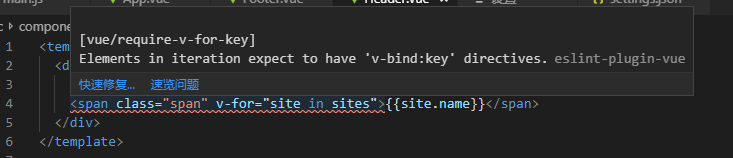
During the development of vue, v-for reported an error [vue/require-v-for-key] Elements in iteration expect to have’v-bind:key’ directives.

I used the VS Code tool, installed the vetur plug-in, and the error was reported as follows


[eslint-plugin-vue] [vue/require-v-for-key] Elements in iteration expect to have’v-bind:key’ directives.eslint-plugin-vue

In the Vue version, when using v-for in a component, the key is necessary.

Solution: 


In File -> Preferences -> Settings -> Enter in the search box: vetur.validation.template-“Find vetur.validation.template: true-“

Reset vetur.validation.template: true to false in the right frame and it is ok.

If there is no code for this game, add a sentence: “vetur.validation.template”: false

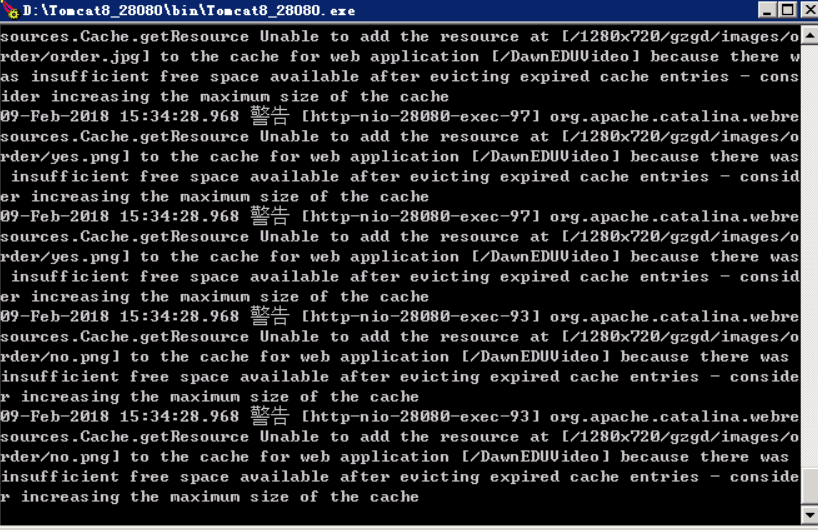
Tomcat Error: because there was insufficient free space available after evicting expired cache entries

When Tomcat is running, it warns

The version is Tomcat 8.5.15

The alarm information keywords are as follows

because there was insufficient free space available after evicting expired cache entries


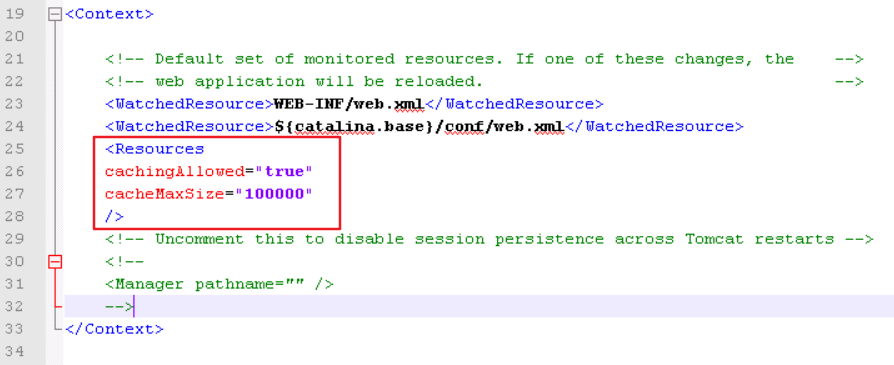
Just increase the maximum cacheable size of the resource in $CATALINA_BASE/conf/context.xml, and the size can be defined according to your needs

Resources
cachingAllowed= “true”
cacheMaxSize= “100000”
/>

 After adding it is as follows


Restart Tomcat

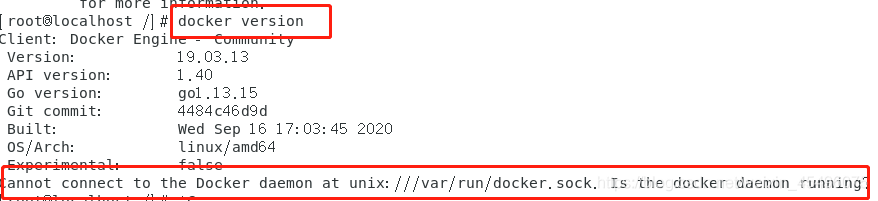
[Sovled] Cannot connect to the Docker daemon at unix:///var/run/docker.sock. Is the docker daemon running?

I turned on centos7 today. Since I did not set the boot-up auto-start, when I started docker, I found that docker-related commands would report errors. Baidu has said that I have tried reinstalling docker, but I still can’t solve the problem. Post a set of questions:

1. For example, I check the version information


2. Restart the container


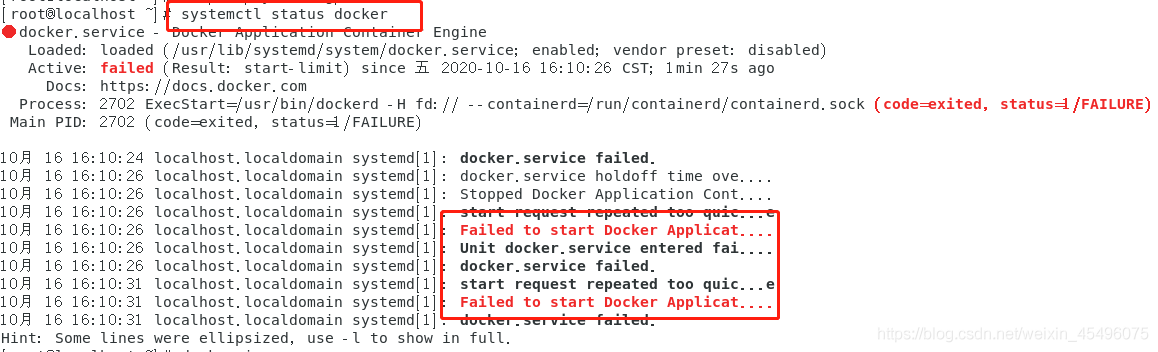
3. Systemctl status docker Checking the docker status also found an error:


The final solution to the problem is:
enter /etc/docker, create a new one without a daemon.json file:

cd /etc/docker


Edit the daemon.json file:
add this code:

{
“registry-mirrors”: [“https://registry.docker-cn.com”]
}


Then restart docker:

When systemctl restart docker.service

uses the docker command again, there is no problem.
I hope this method is useful for you.