Category Archives: Error

NBU The vnet proxy encounrtened an error [How to Solve]

0 div。

NBU 41 client Vnet agent encountered an error

prathakan

https://www.veritas.com/content/support/en_US/article.100039650
https://www.veritas.com/content/support/en_US/article.100039943

Problem description

After installing the NBU client software and adding the client to NBU, it is found that the client reports an error, such as the title. After consulting the official articles, it is found that the Vnet connection may have failed. It is necessary to test the connection on the client, and carry out the corresponding operation according to the error.

Client: Linux has completed the client software installation, windows, please read the resources

Processing steps

Processing steps:
1. Check whether other clients can connect normally. Click once, it can be the problem of the client

# Execute the following command on the NBU master to check the vnet status
bpps 

2. Log in to the client server
for preliminary check (all commands here need to be executed in the NBU client installation directory)

# 1、Test the connection status
<install_path>/netbackup/bin/bpclntcmd -pn -verbose
# The default installation directory is: /usr/openv/
cd /usr/openv/bin/

# 2. Check the certificate status:
<installation path>/netbackup/bin/nbcertcmd -listCACertDetails

Question 1: there is something wrong with the certificate

# First backup the original certificate
mv /usr/openv/var/webtruststore/cacert.pem /tmp
# Get the certificate from Master
nbcertcmd -getCACertificate
# View Certificate
nbcertcmd -listCACertDetails

Problem 2: there is a problem with the connection state

./nbcertcmd -getCertificate -host client Hostname -server nbuMaster Hostname
# The result of the execution is as follows.
Host certificate and certificate revocation list received successfully from server NBUMaster Hostname.

Rabbitmq failed to stop normally: ERROR: node with name “rabbit” already running on “localhost”

ERROR: node with name “rabbit” already running on “localhost”
[root@localhost init.d]# rabbitmqctl stop
Stopping and halting node rabbit@localhost
Error: unable to connect to node rabbit@localhost: nodedown
ERROR: node with name “rabbit” already running on “localhost”//Common rabbitmq commands
service rabbitmq-server   start
service rabbitmq-server   stop
service rabbitmq-server   status
service rabbitmq-server   rotate-logs|
service rabbitmq-server   restart
service rabbitmq-server   condrestart
service rabbitmq-server   try-restart
service rabbitmq-server   reload
service rabbitmq-server   force-reload
service rabbitmq-server   -detached    //Start in the background
ps -ef | grep rabbitmq View rabbitMq processes
netstat -anplt | grep LISTEN rabbitmq listens on port 15672/5672 by default
Currently, the only way to stop the process is to find the PID

[Solved] This is probably not a problem with npm. There is likely additional logging output above.

If this error occurs, you need to re install the node_ Contents in the modules folder   But before installing, you should clear all the previous contents. The steps are as follows:

1. Delete the node first_ modules

rmdir /s/q node_modules

2.delete package-lock.json file
3.npm cache clean –force
4.npm install(npm i is ok)

[Solved] Win10 Warning: ModuleNotFoundError: No module named ‘win32con‘ and No module named ‘antlr4‘

In the last article, win10 installs detectron2 (0.1 or 0.4.1) based on Python 1.8.1 and cuda11.1.1. After installing detectron2, run the test Demo:

python demo/demo.py --config-file configs/COCO-InstanceSegmentation/mask_rcnn_R_101_FPN_3x
.yaml   --input predict\input\1.jpg   --output predict\output --opts MODEL.WEIGHTS weights/e2e_mask_rcnn_R-101-FPN_1x.pkl

The following error occurred:

No module named ‘win32con’ and no module named ‘antlr4’

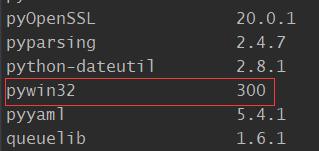
It is useless to install through pip, but there are two libraries through PIP list query

By directly looking at the file addresses of the above two packages, we found that there was no relevant py file in them. Finally, we successfully solved the problem by installing the compiled binary WHL file

pip install antlr4_python3_runtime-4.9.2-py3-none-any.whl
pip install pywin32-300-cp36-cp36m-win_amd64.whl

Run the command again to get the output:

[Solved] error: Failed dependencies libcrypto.so.10()(64bit) is needed, libssl.so.10()(64bit) is needed

Premise: I install percona-server-shared-compat-8.0.23-14.1.el8.x86 in percona server for MySQL 8.0 bundle on CentOS 8_ 64. RPM package, even if the latest version of OpenSSL (version: 1:1.1.1g-15.el8) is installed_ 3) It doesn’t help

error:Failed Dependencies
		libcrypto.so.10()(64bit) is needed by percona-server-shared-compat-8.0.23-14.1.el8.x86_64.rpm
		libcrypto.so.10(libcrypto.so.10)(64bit) is needed by percona-server-shared-compat-8.0.23-14.1.el8.x86_64.rpm
		libssl.so.10()(64bit) is needed by percona-server-shared-compat-8.0.23-14.1.el8.x86_64.rpm
		libssl.so.10(libssl.so.10)(64bit) is needed by percona-server-shared-compat-8.0.23-14.1.el8.x86_64.rpm

Process : Found the library when googling
https://pkgs.org/download/libcrypto.so.10()(64bit)
I found compat-openssl10 and an explanation to the effect that compat-openssl10 contains only libraries and provides compatibility with earlier versions and software that does not support compilation with OpenSSL-1.1.

The OpenSSL toolkit provides support for secure communications between machines. This version of OpenSSL package contains only the libraries and is provided for compatibility with previous releases and software that does not support compilation with OpenSSL-1.1.

From stackoverflow, we can find that openssl provides libcrypto.so.10 without the module name, making the system think that the dependency is missing

In your case, openssl seems to provide only libcrypto.so.10 without any module name, making geramer-server believe that dependency is missing as it requires libcrypto.so.10 from module libcrypto.so.10.

https://stackoverflow.com/questions/20518183/dependency-resolution-fails-on-installed-library

Solution:
yum install compat-openssl10
or
yum install http://mirror.centos.org/centos/8/AppStream/x86_64/os/Packages/compat-openssl10-1.0.2o-3.el8.x86_64.rpm

Result:

[Solved] Minidlna Error: checking for avformat_open_input in -lavformat -lavcodec -lavutil -lz… no

I have installed FFmpeg, but when I configured minidlna1.3.0, I found an error when I executed. /configure and found an error
checking for avformat_open_input in -lavformat -lavcodec -lavutil -lz… no
configure: error: Could not find libavformat – part of ffmpeg
Opening the configuration results file config.log reveals various errors.
For example.
libavformat/rtmpproto.c:1077: undefined reference to ‘inflateInit_’
libavcodec/vaapi_encode_h264.c:871: Undefined reference to ‘vaQueryVendorString’.

So the configure file needs to be modified

as_ac_Lib=`$as_echo "ac_cv_lib_avformat -lavcodec -lavutil -lz''_av_open_input_file" | $as_tr_sh`
modify to
as_ac_Lib=`$as_echo "ac_cv_lib_avformat -lavcodec -lavutil -lz -lm -lbz2 -lswresample -llzma -lX11 -lva -lva-x11 -lva-drm''_avformat_open_input" | $as_tr_sh`

LIBS="-lavformat -lavcodec -lavutil -lz  $LIBS"
modify to
LIBS=" -lpthread -lavformat -lavcodec -lavutil -lz  -lm -lbz2 -lswresample -llzma -lX11 -lva -lva-x11 -lva-drm $LIBS"

if test x"$ac_cv_lib_avformat__lavcodec__lavutil__lz___av_open_input_file" != x"yes" &&
test x"$ac_cv_lib_avformat__lavcodec__lavutil__lz___avformat_open_input" != x"yes"; then

modify to
if eval test \"x\$"$as_ac_Lib"\" != x"yes"; then

Android Studio Warning: Process ‘command ‘git‘‘ finished with non-zero exit value 1

At first, I thought it was a JDK problem. Later, I changed the JDK version and did not fix it. Looking up the information on the Internet, we found that it might be a git problem.

Enter git config user. Name in terminal   No corresponding user name was output.

Then configure the user name and mailbox

$ git config --global user.name usename
$ git config --global user.password password
$ git config --global user.password email

CREATE VIEW must be the only statement in the batch [How to Solve]

Just as the error says, the CREATE VIEW statement needs to be the only statement in the query batch.

You have two option in this scenario, depending on the functionality you want to achieve:

  1. Place the CREATE VIEW query at the beginning
    CREATE VIEW showing
    as
    select tradename, unitprice, GenericFlag
    from Medicine;
    
    with ExpAndCheapMedicine(MostMoney, MinMoney) as
    (
        select max(unitprice), min(unitprice)
        from Medicine
    )
    ,
    findmostexpensive(nameOfExpensive) as
    (
        select tradename
        from Medicine, ExpAndCheapMedicine
        where UnitPrice = MostMoney
    )
    ,
    findCheapest(nameOfCheapest) as
    (
        select tradename
        from Medicine, ExpAndCheapMedicine
            where UnitPrice = MinMoney
        )
    
  2. Use GO after the CTE and before the CREATE VIEW query

    — Option #2

    with ExpAndCheapMedicine(MostMoney, MinMoney) as
    (
        select max(unitprice), min(unitprice)
        from Medicine
    )
    ,
    findmostexpensive(nameOfExpensive) as
    (
        select tradename
        from Medicine, ExpAndCheapMedicine
        where UnitPrice = MostMoney
    )
    ,
    findCheapest(nameOfCheapest) as
    (
        select tradename
        from Medicine, ExpAndCheapMedicine
        where UnitPrice = MinMoney
    )
    
    GO    
    
    CREATE VIEW showing
    as
    select tradename, unitprice, GenericFlag
    from Medicine;


Create View needs to add Go up and down, if there are other SQL up and down

[Solved] Android MediaRecorder.stop() Error: java.lang.RuntimeException: stop failed.

    E/AndroidRuntime(7698): Cause by: java.lang.RuntimeException: stop failed.
if (mediarecorder != null) {  
        mediarecorder.stop();  
        mediarecorder.release();  
        mediarecorder = null;  
        if (mCamera != null) {  
            mCamera.release();  
            mCamera = null;  
        }  
    } 

Now, in mediarecord. Stop(); This sentence is wrong, now in mediarecord. Stop(); If you add a few sentences before this sentence, you won’t make a mistake

mediarecorder.setOnErrorListener(null);
mediarecorder.setOnInfoListener(null);
mediarecorder.setPreviewDisplay(null);

After modification:

if (mediarecorder != null) {  
            //added by ouyang start  
            try {  
                //The following three parameters must be added, if not, it will crash, in mediarecorder.stop();  
                // error is reported as: RuntimeException:stop failed  
                mediarecorder.setOnErrorListener(null);  
                mediarecorder.setOnInfoListener(null);    
                mediarecorder.setPreviewDisplay(null);  
                mediarecorder.stop();  
            } catch (IllegalStateException e) {  
                // TODO: handle exception  
                Log.i("Exception", Log.getStackTraceString(e));  
            }catch (RuntimeException e) {  
                // TODO: handle exception  
                Log.i("Exception", Log.getStackTraceString(e));  
            }catch (Exception e) {  
                // TODO: handle exception  
                Log.i("Exception", Log.getStackTraceString(e));  
            }  
            //added by ouyang end  
              
            mediarecorder.release();  
            mediarecorder = null;  
            if (mCamera != null) {  
                mCamera.release();  
                mCamera = null;  
            }  
        }  

It can be opened with localhost, but not with IP address. The request host name is invalid

Problem point
the webapi compiled by vs can only be used

http://localhost:64734/API/Default/GETIP 

unavailable

http://127.0.0.1:64734/API/Default/GETIP

The solution is
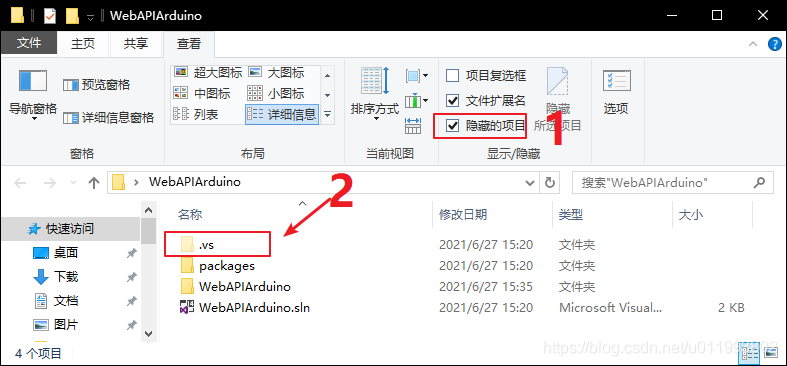
1, find the. Vs folder

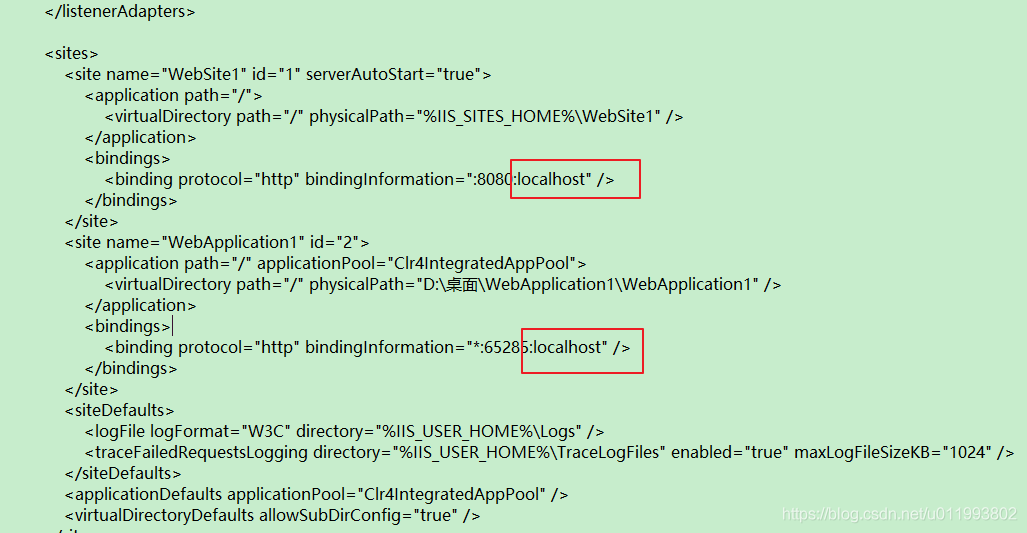
2, find the file D: desktop, webapiarduino. Vs, config, applicationhost. Config
the path depends on the project.

D:\Desktop\WebAPIArduino

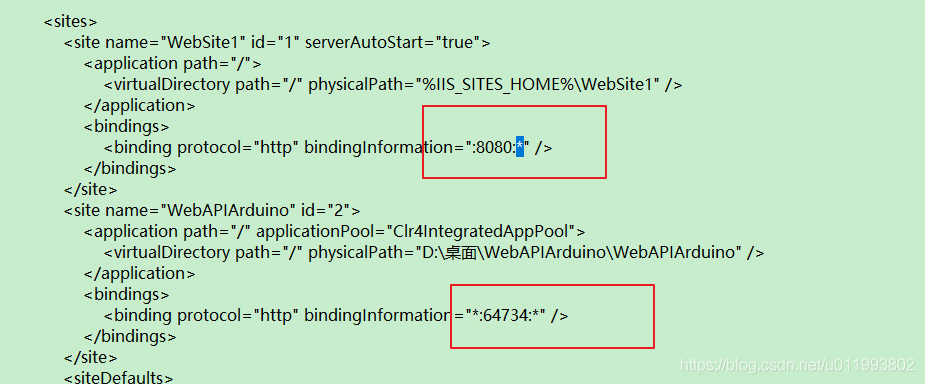
After searching the localhost, change the localhost to *

the modified result

is valid.

Mac Appium Error: Error executing adb Exec. Original error…

Appium error on MAC, error executing ADB exec. Original error

Error message: error executing adbexec. Original error: ‘command’/users/noogler/library/Android/SDK/platform tools/ADB – P 5037 – s clb7n18528000446 shell ‘settings delete global hidden_ api_ policy_ pre_ p_ apps; settings delete global hidden_ api_ policy_ p_ apps; settings delete global hidden_ api_ policy” exited with code 1

Process summary

Error information

: Error executing adbExec. Original error: ‘Command ‘/Users/noogler/Library/Android/sdk/platform-tools/adb -P 5037 -s CLB7N18528000446 shell ‘settings delete global hidden_ api_ policy_ pre_ p_ apps; settings delete global hidden_ api_ policy_ p_ apps; settings delete global hidden_ api_ policy’’ exited with code 1

Process

After clicking the start session button in appium, you can enter the page without screenshot and throw an error. After a long time in Google, stackworkflow, CSDN and GitHub failed to solve the problem for a long time. After updating the bundle tools of Android studio to the Android 11 version, it still has no effect. The SDK version of Android studio has 29 30 31. The Android device version connected to the computer is 10. The calling of the third-party Android SDK has been modified, but there is no solution.

adb shell settings put global hidden_ api_ policy_ p_ apps 1
*adb shell settings put global hidden_ api_ policy_ pre_ p_ Apps 1 reduces the version of appium desktop from 1.21 to 1.17!! So I tried to use version 1.21 on another iMac, and it also started successfully! The result of appium doctor is that all required and optional are installed. The Java SDK version is also 1.8. Try to find the appium configuration file to see if the configuration of 1.21 is different from that of 1.17. Finally, the ADB stopped responding, and the kill – server didn’t respond. It’s better to restart. Fortunately, after the restart, appium version 1.21 also successfully started the session, and no error was reported. 😂😂

Summary

If the results of appium doctor are all installed, there are also versions of Android SDK, JDK version is also 1.8, and so on. Direct suggestion

adb kill-server
adb start-server
adb shell

Maybe it can be solved. If there is no solution, you are welcome to throw out the mistakes and discuss them together. Even if I agree, it is not allowed to reprint