Category Archives: Error

[Solved] INSTALL_FAILED_DEXOPT (DEX optimization verification failed)

Phenomenon: APK installation of some mobile phones (system 5.0 11 model, system version is uncertain) fails, and the operation code is as follows:

The installation did not succeed.
The application could not be installed: INSTALL_FAILED_DEXOPT (DEX optimization verification failed)

List of apks:
[0]  ‘ D:\workspace\WalletHelper\app\build\outputs\apk\debug\app-debug.apk’
The device might have stale dexed jars that don’t match the current version (dexopt error).

Let’s start with the solution:

Put < in androidmanifest.xml; application> Set the Android: vmsafemode property of to true

Since minsdkversion 21 is set, Android 5.0 (API level 21) and later versions use the runtime named art, which itself supports loading multiple DEX files from APK files. Art performs precompiling during application installation, which scans for  classesN.dex   Files and compile them into a single file  .oat   File for Android devices to execute. So if your  minSdkVersion   For version 21 or later, multidex is enabled by default, and you do not need the multidex library.
Maven compiles Scala and reports an error stackoverflowerror

Error during Maven compilation: java.lang.stackoverflowerror

preface

Most of this error is caused by the java thread stack, but it is not caused by this reason. I don’t know if I’ve heard of [in scala-2.10. X version, when there are more than 22 elements of case class, an error will be reported after compilation]. I really do this because there are more than 130 member variables in a case class, But mine is Scala_ 2.11 so I don’t think the problem is caused by the version. During the experiment, when the membership is limited to about 100, it’s OK. Of course, I’m lazy to disassemble the case class

Online solution (my solution)

Another problem on the Internet is to solve my problem. This method is to add the configuration parameters directly to the POM file

<plugin>
    <groupId>net.alchim31.maven</groupId>
    <artifactId>scala-maven-plugin</artifactId>
    <version>3.4.0</version>
    
    <!-- Add-->
    <configuration>
        <displayCmd>true</displayCmd>
        <jvmArgs>
            <jvmArg>-Xss20m</jvmArg>
        </jvmArgs>
    </configuration>
    
    
    <executions>
        <execution>
            <goals>
                <goal>compile</goal>
                <goal>testCompile</goal>
            </goals>
        </execution>
    </executions>
</plugin>

How to Solve Cocos creator label text is too many error

Cocos creator label text is too many and an error is reported

There are thousands of lines of legal entries such as user agreements and privacy terms

That’s what it said

let labelNode = new Node('labelNode')
let label = labelNode.addComponent(Label)
label.cacheMode = Label.CacheMode.CHAR
label.string = '....' 

In this way, it can be loaded at once, and the protocol can be closed. When loading other protocols, an error of too long font size will be reported

After a long toss, the characters here are too long to keep the cache. Change the cachemode to none, but even none can’t load so much. Just write in several paragraphs

let a1 = ""
let a2 = ""
let a3 = ""
this.addLabel('a1', 0, a1)
this.addLabel('a2', -2000, a2)
this.addLabel('a3', -4000, a3)
addLabel(name:string, y: number, text:string){
	let labelNode = new Node(name)
	labelNode.layer = Layers.BitMask.UI_2D
	labelNode.setPosition(0, y)
	let label = labelNode.addComponent(Label)
	label.cacheMode = Label.CacheMode.NONE
	label.string = text
	this.node.addChild(labelNode)
}

How to Solve Ogg start error message ogg-00014

preface

recently, when configuring Ogg two-way replication, due to improper parameter settings, an error was reported at startup. The processing methods are summarized as follows


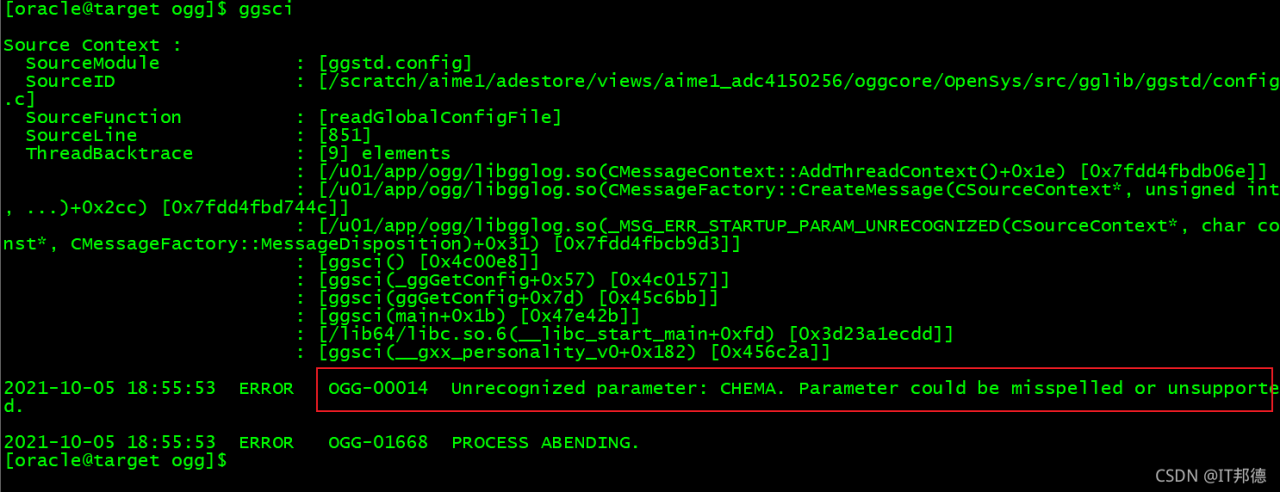
1. Startup error

[oracle@target ogg]$ ggsci
Explanation: According to the error message, the parameter is not set properly

2. Treatment method

[oracle@target ogg]$ more ./GLOBALS
CHEMA ogg
checkpointtable ogg.rep_demo_ckpt

Switch to OGG root directory, here CHEMA ogg error, should be GGSCHEMA ogg, modify can

[oracle@target ogg]$ ggsci
Login again, everything is OK

[Solved] Android Room: Database Common Error ‘missing database’

Common error 1:

D:\AndroidProjectsDemo\JetpeckTest\app\build\tmp\kapt3\stubs\debug\com\example\jetpecktest\room\BookDao.
java:15: error: There is a problem with the query: [SQLITE_ERROR] 
SQL error or missing database (no such table: BookEntity)
public abstract java.util.List<com.example.jetpecktest.room.BookEntity> loadAllBooks();

**Solution: * * the error report mentions no such table: bookentity , so first check whether your class is added to the database, that is, check the entities =?In the
annotation in your database class
did you add your entity class.

@Database(version = 2, entities = [BookEntity::class])
abstract class DataBase:RoomDatabase() {

[Solved] Azkaban Error: Missing required property ‘azkaban.native.lib’

Missing required property ‘azkaban.native.lib’

When Azkaban is used to submit a workflow, an error is reported: missing required property ‘Azkaban. Native. Lib’

reason:

The reason for this is that I didn’t switch to the exec directory or web server directory of Azkaban first, and directly use commands like “/ opt/module/Azkaban/azkaban-exec-server-3.84.4/bin/start-exec.sh” to start Azkaban. As a result, some Azkaban libraries cannot be found because of the path, and various problems due to insufficient packages will occur.

Solution:

First stop Azkaban, use the CD command to switch to the parent directory of the bin directory, and then use a command similar to “bin/start-exec.Sh” to start Azkaban’s executor and web service.

SSM project interceptor infinite loop error [How to Solve]

Question:

In the SSM project, the implementation of non login interception has been endless loop and does not jump to the page

Solution:

Page not intercepted is not configured in the configuration file, resulting in an infinite loop

<!-- Configure interceptors -->
    <mvc:interceptors>
        <mvc:interceptor>
            <! -- Intercept all pages under the directory -->
            <mvc:mapping path="/**"/>
            <! -- mvc:exclude-mapping is another kind of interception that allows you to unintercept a page in your later tests, so that you don't have to use it in the
                LoginInterceptor's preHandler method inside to get the unintercepted request uri address (preferred)-->
            <mvc:exclude-mapping path="/login.html" />
            <bean class="org.westos.interceptor.LoginInterceptor"></bean>
        </mvc:interceptor>
    </mvc:interceptors>

Because a page may consist of multiple pages and JS, it must be intercepted correctly

QGC Error: Fail: No CPU load information [How to Solve]

It is said that because the bootloader does not match the Px4 firmware version, it is necessary to modify the parameters in the QGC so that it can be updated to the matching version of bootloader when installing the firmware

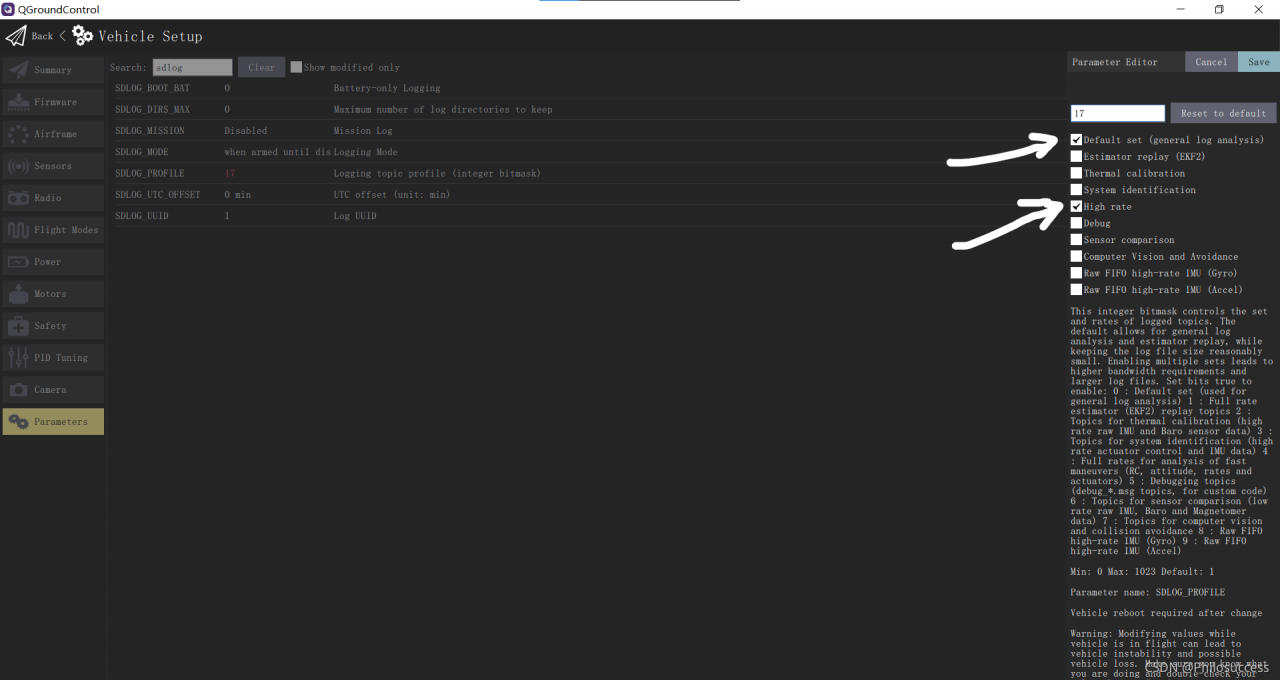
Step 1: modify  SDLOG_PROFILE   Parameters from “default” to “default” and “high rate.”   As shown in the figure:

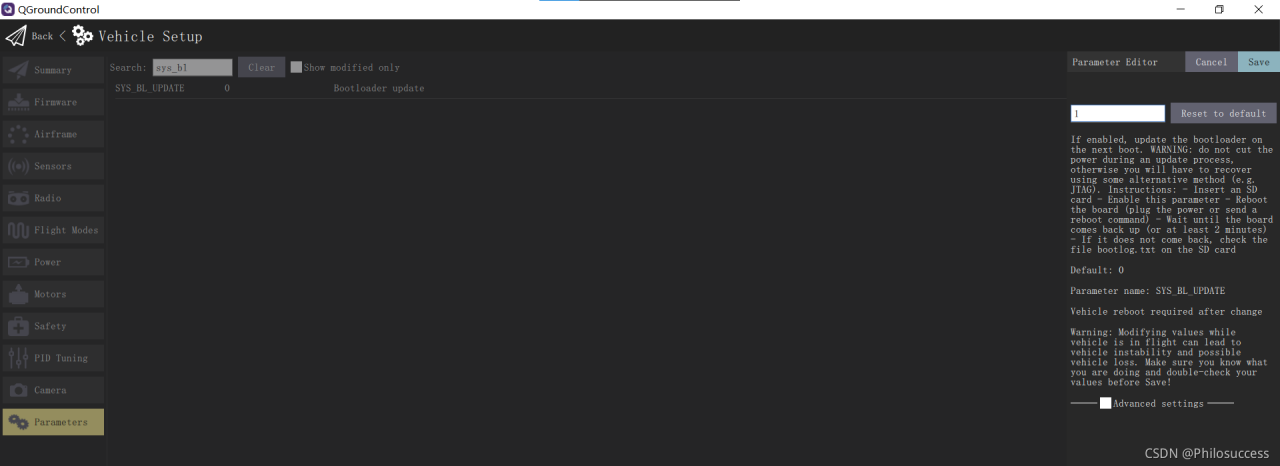
Step 2:   Modification SYS_BL_Update parameter to 1  As shown in the figure:

Step 3: format the SD card and download the firmware again

Problem solving!!!!!

The index.nvue page of uniapp reports an error about CSS

The console of uniapp reports an error:
reportJSException >>>> exception function:createInstanceContext,
exception:white screen cause create instanceContext failed,
check js stack ->Uncaught Error: Cannot find
module ‘…/…/…/…/…/…/…/common/zcm-main-nvue.css?vue&type=style&index=0&lang=css&mpType=page’
The console reports an error because the index.nvue page does not add @, to add @ to not report an error
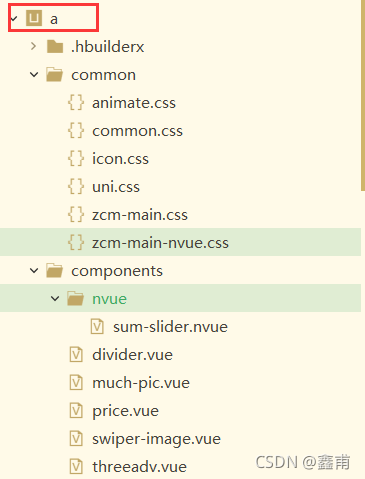
Note: @ stands for the outermost a folder