When debugging, compile the error report and view the error information:
Source lookup: unable to restore CPU-specific source container – expecting valid source container id value.
Solution:
Delete the .launches and .settings folders and recompile.
When debugging, compile the error report and view the error information:
Source lookup: unable to restore CPU-specific source container – expecting valid source container id value.
Solution:
Delete the .launches and .settings folders and recompile.
Error in adding MathType to word2016
Please restart word to load MathType addin properly
Options -> Add in
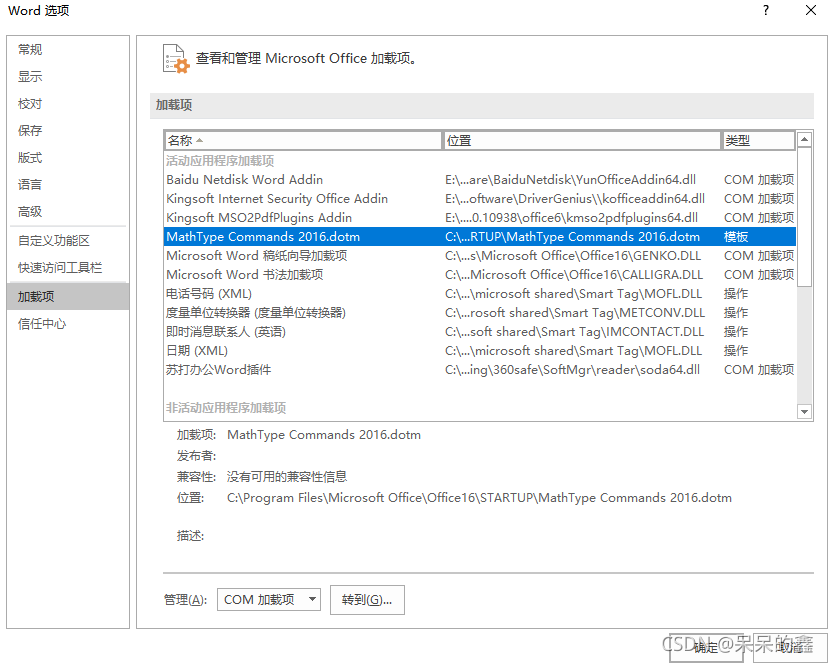
you can see the location of our add in
then we add the mathpage.wll file outside the file
example: C:\program files\Microsoft Office\office16
Ubutnu Qt Unable to start process “make” -f ‘ /usr/bin/ld: cannot find -lGL collect2: error: ld returned 1 exit status
I. Unable to start the process “make” -f ‘
Make is not installed on the system
sudo apt install make
2./usr/bin/ld: cannot find -lGL collect2: error: ld returned 1 exit status
sudo apt-get install libgl1-mesa-dev
1.Error Messages:
joes@joes:~/jiao/Project/demo01_ws$ rosrun helloworld helloworld_p.py
[INFO] [1636100465.680519]: Hello World by python_____from Jiaozhidong
Error in atexit._run_exitfuncs:
Traceback (most recent call last):
File “/opt/ros/kinetic/lib/python2.7/dist-packages/rospy/core.py”, line 513, in _ros_atexit
signal_shutdown(‘atexit’)
File “/opt/ros/kinetic/lib/python2.7/dist-packages/rospy/core.py”, line 496, in signal_shutdown
if t.isAlive():
AttributeError: ‘Thread’ object has no attribute ‘isAlive’
II. Solution.
1. sudo gedit /opt/ros/kinetic/lib/python2.7/dist-packages/rospy/core.py
(Fix it according to your own alarm path.)
2. Search for t.isAlive() in the alarm prompt
3. change t.isAlive() to t.is_alive()
Reason: python3 no longer supports isAlive function, need to update to is_alive format.
0x00 problem description
When updating apt sources with apt update today, it was exposed thatW: GPG error: http://dl.google.com/linux/chrome/deb stable InRelease: The following signatures couldn't be verified because the public key is not available: NO_PUBKEY 78BD65473CB3BD13
0x01 problem solving
问The essence of the problem is that the public key 78BD65473CB3BD13 is missing, just add it.
0x02 specific steps
sudo apt-key adv --keyserver keyserver.ubuntu.com --recv-keys <PUBKEY>There are two solutions:
Solution 1:
(solved through method 1)
Update brew directly
brew update method 2:
(the experiment in method 2 failed)
modify the environment variable:
brew config # Find
## Find:
HOMEBREW_BOTTLE_DOMAIN:https://mirrors.ustc.edu.cn/homebrew-bottles

echo 'export HOMEBREW_BOTTLE_DOMAIN=https://mirrors.ustc.edu.cn/homebrew-bottles/bottles' >> ~/.zshrc

source ~/.zshrc

echo 'export HOMEBREW_BOTTLE_DOMAIN=https://mirrors.ustc.edu.cn/homebrew-bottles/bottles' >> ~/.zprofile
source ~/.zprofile
Import uniontype data into test table with CSV file in hive_ After serializer, use select * from test_ An error occurred in the serializer
Error: Unrecognized column type: UNIONTYPE (state=,code=0)
Hive version: 2.3.9
After investigation, this is a bug that hive JDBC has solved in version 3.0.0 : HIVE-17259
I want to try to solve the bug without upgrading the version. Imagine using the bug repair code of version 3.0.0 in the source code of hive JDBC of version 2.3.9, that is, make the following modifications:
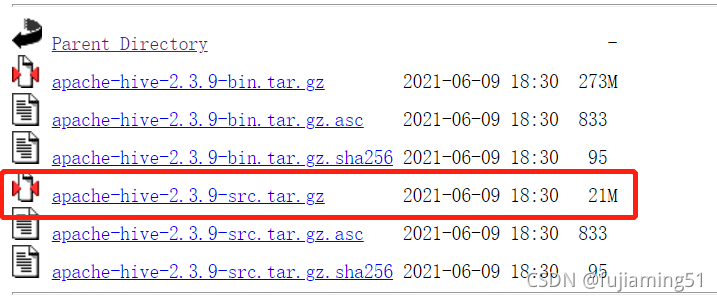
1. Find the corresponding version of hive JDBC source code on the Apache website and download it
Apache Downloads
2. Find jdbccolumn.java and modify it
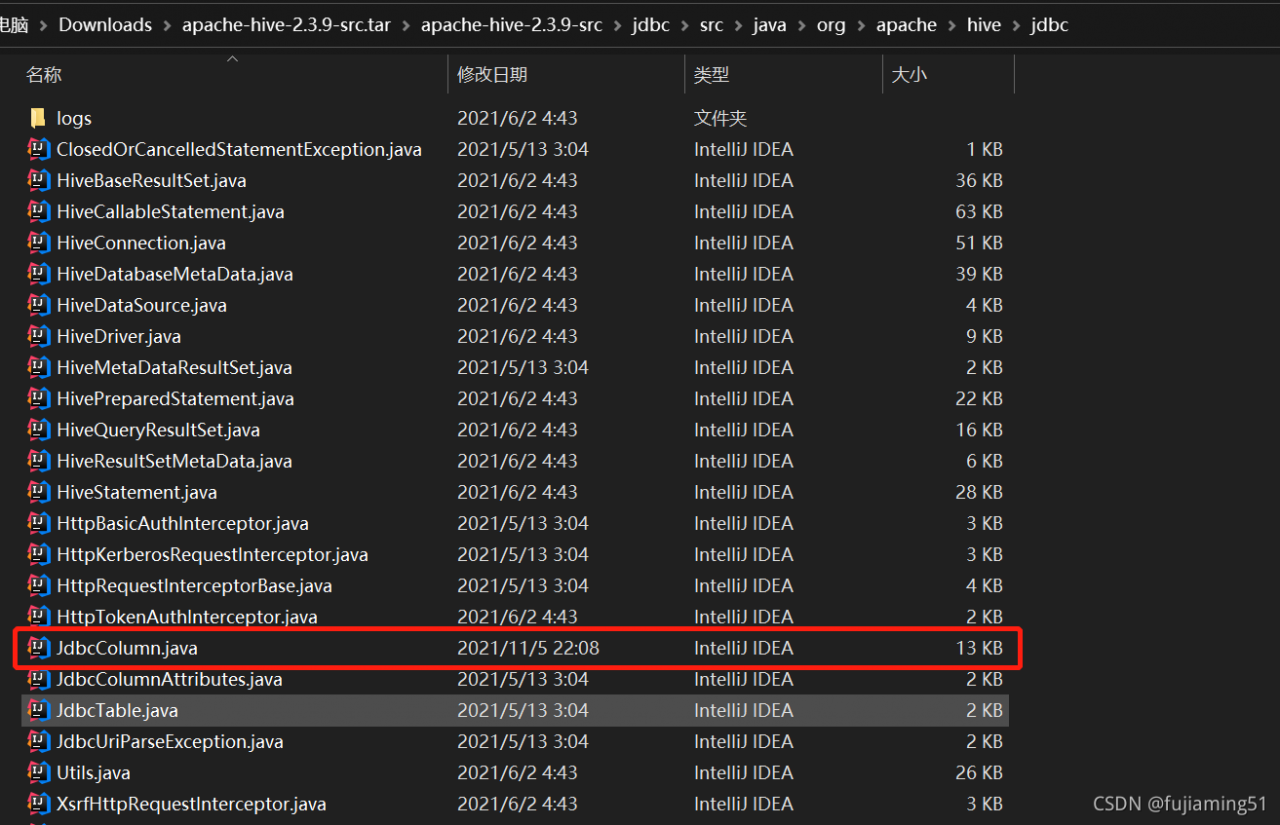
Add two lines of code as follows:
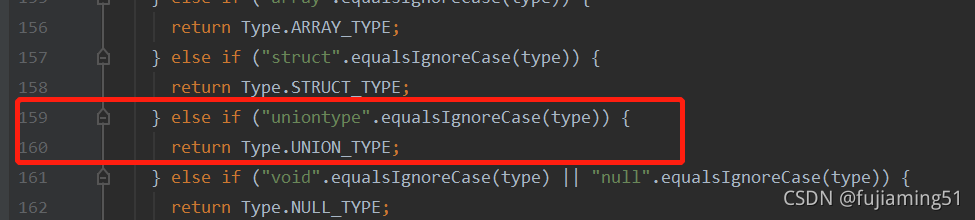
    } else if ("uniontype".equalsIgnoreCase(type)) {
      return Type.UNION_TYPE;
3. Package and generate a new JDBC jar file and copy it to hive server
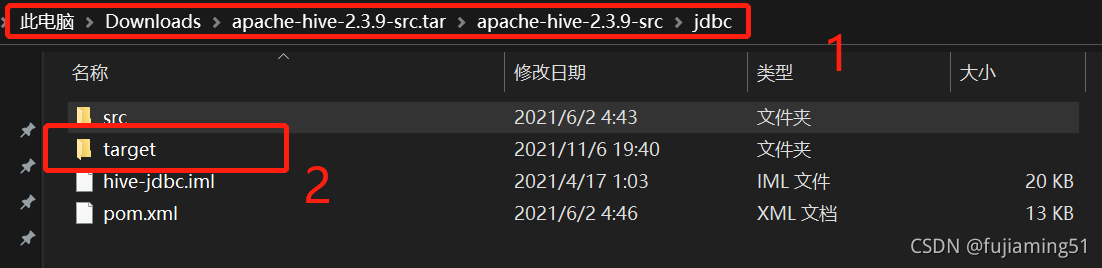
Navigate to the JDBC directory in CMD and use the MVN package command to package
 After packaging, find hive-jdbc-2.3.9-standalone.jar and hive-jdbc-2.3.9.jar in the target directory under the JDBC directory, copy them to {$hive_home}/JDBC and {$hive_home}/lib directories respectively, and restart hiverver2:
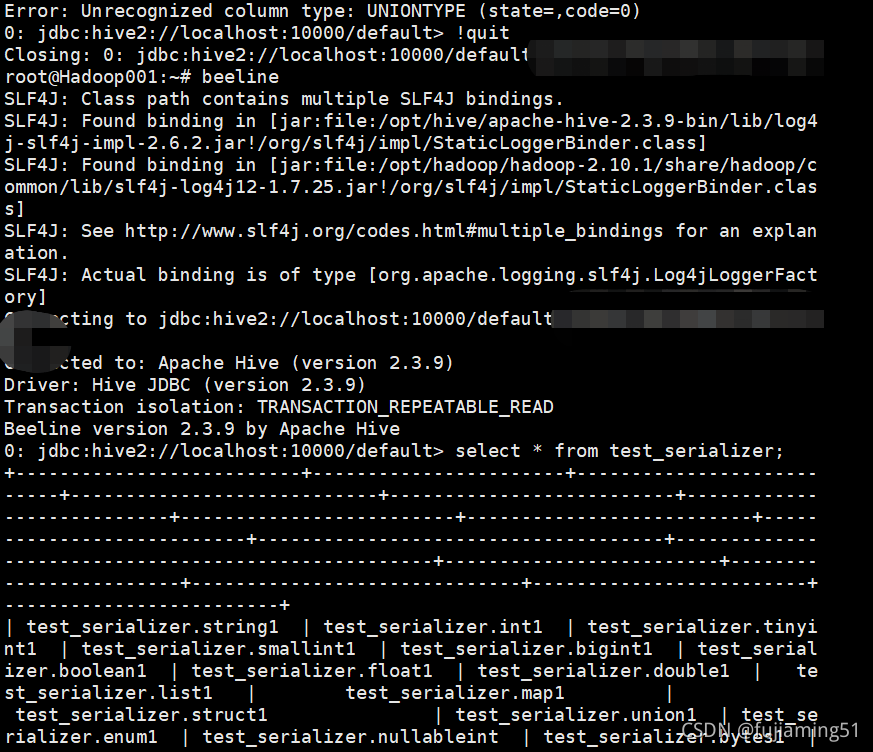
Implementation after repair:

Cocoapods installation failed
Complete error message trying to install my problem
Using alamofire needs to be based on cocoapods, but there are many problems in the process of trying to install cocoapods. It has failed for a long time. Finally, the installation is successful only after the on-demand broadcast of the leaders in the group. In fact, sometimes the solution to the problem is very simple. I hope this blog can help you.
Complete error reporting
yusael@air ~ % sudo gem install -n /usr/local/bin cocoapods
Fetching cocoapods-trunk-1.6.0.gem
Fetching cocoapods-search-1.0.1.gem
Fetching cocoapods-plugins-1.0.0.gem
Fetching cocoapods-try-1.2.0.gem
Fetching cocoapods-downloader-1.5.1.gem
Fetching cocoapods-deintegrate-1.0.5.gem
Successfully installed cocoapods-try-1.2.0
Successfully installed cocoapods-trunk-1.6.0
Successfully installed cocoapods-search-1.0.1
Successfully installed cocoapods-plugins-1.0.0
Successfully installed cocoapods-downloader-1.5.1
Successfully installed cocoapods-deintegrate-1.0.5
Building native extensions. This could take a while...
ERROR:  Error installing cocoapods:
	ERROR: Failed to build gem native extension.

    current directory: /Library/Ruby/Gems/2.6.0/gems/ffi-1.15.4/ext/ffi_c
/System/Library/Frameworks/Ruby.framework/Versions/2.6/usr/bin/ruby -I /Library/Ruby/Site/2.6.0 -r ./siteconf20211110-79554-472vcj.rb extconf.rb
checking for ffi.h... *** extconf.rb failed ***
Could not create Makefile due to some reason, probably lack of necessary
libraries and/or headers.  Check the mkmf.log file for more details.  You may
need configuration options.

Provided configuration options:
	--with-opt-dir
	--without-opt-dir
	--with-opt-include
	--without-opt-include=${opt-dir}/include
	--with-opt-lib
	--without-opt-lib=${opt-dir}/lib
	--with-make-prog
	--without-make-prog
	--srcdir=.
	--curdir
	--ruby=/System/Library/Frameworks/Ruby.framework/Versions/2.6/usr/bin/$(RUBY_BASE_NAME)
	--with-ffi_c-dir
	--without-ffi_c-dir
	--with-ffi_c-include
	--without-ffi_c-include=${ffi_c-dir}/include
	--with-ffi_c-lib
	--without-ffi_c-lib=${ffi_c-dir}/lib
	--enable-system-libffi
	--disable-system-libffi
	--with-libffi-config
	--without-libffi-config
	--with-pkg-config
	--without-pkg-config
/System/Library/Frameworks/Ruby.framework/Versions/2.6/usr/lib/ruby/2.6.0/mkmf.rb:467:in `try_do': The compiler failed to generate an executable file. (RuntimeError)
You have to install development tools first.
	from /System/Library/Frameworks/Ruby.framework/Versions/2.6/usr/lib/ruby/2.6.0/mkmf.rb:585:in `block in try_compile'
	from /System/Library/Frameworks/Ruby.framework/Versions/2.6/usr/lib/ruby/2.6.0/mkmf.rb:534:in `with_werror'
	from /System/Library/Frameworks/Ruby.framework/Versions/2.6/usr/lib/ruby/2.6.0/mkmf.rb:585:in `try_compile'
	from /System/Library/Frameworks/Ruby.framework/Versions/2.6/usr/lib/ruby/2.6.0/mkmf.rb:1109:in `block in have_header'
	from /System/Library/Frameworks/Ruby.framework/Versions/2.6/usr/lib/ruby/2.6.0/mkmf.rb:959:in `block in checking_for'
	from /System/Library/Frameworks/Ruby.framework/Versions/2.6/usr/lib/ruby/2.6.0/mkmf.rb:361:in `block (2 levels) in postpone'
	from /System/Library/Frameworks/Ruby.framework/Versions/2.6/usr/lib/ruby/2.6.0/mkmf.rb:331:in `open'
	from /System/Library/Frameworks/Ruby.framework/Versions/2.6/usr/lib/ruby/2.6.0/mkmf.rb:361:in `block in postpone'
	from /System/Library/Frameworks/Ruby.framework/Versions/2.6/usr/lib/ruby/2.6.0/mkmf.rb:331:in `open'
	from /System/Library/Frameworks/Ruby.framework/Versions/2.6/usr/lib/ruby/2.6.0/mkmf.rb:357:in `postpone'
	from /System/Library/Frameworks/Ruby.framework/Versions/2.6/usr/lib/ruby/2.6.0/mkmf.rb:958:in `checking_for'
	from /System/Library/Frameworks/Ruby.framework/Versions/2.6/usr/lib/ruby/2.6.0/mkmf.rb:1108:in `have_header'
	from extconf.rb:10:in `system_libffi_usable?'
	from extconf.rb:42:in `<main>'

To see why this extension failed to compile, please check the mkmf.log which can be found here:

  /Library/Ruby/Gems/2.6.0/extensions/universal-darwin-20/2.6.0/ffi-1.15.4/mkmf.log

extconf failed, exit code 1

Gem files will remain installed in /Library/Ruby/Gems/2.6.0/gems/ffi-1.15.4 for inspection.
Results logged to /Library/Ruby/Gems/2.6.0/extensions/universal-darwin-20/2.6.0/ffi-1.15.4/gem_make.out
Try to install
Steps: first install homebrew, then update ruby, and then install cocoapods
Note: many online blogs require the installation of RVM, in fact, RVM does not have to be </ font>, but is just a way to update ruby
The blog of the boss is directly quoted here. The reference is as follows:
My question
Generally speaking, the installation can be basically completed according to the above process. Here is my problem. My problem is that the version of ruby is too low. Before successful installation, my version is 2.6.3p62. I will update the ruby version to 3.0.2_ After 1, execute: sudo gem install - N/usr/local/bin cocoapods and the installation is successful!
The main problem here is that the latest ruby is updated through homebrew, but it is not necessarily the latest, so the installation fails.
(in fact, in the article of the boss cited above, it is written to configure the latest Ruby environment variables, but I didn’t read it carefully at the beginning)
Here are two ways to configure Ruby environment variables:
Method 1:
echo 'export PATH="/usr/local/opt/ruby/bin:$PATH"' >> ~/.zshrc
Method 2:
echo 'export PATH="/usr/local/opt/ruby/bin:$PATH"' >> ~/.bash_profile
source ~/.bash_profile
Check whether the ruby version is updated through Ruby - V and try to install it later
#Simulation data
df <- structure(list(`10` = c(0, 0, 0, 0, 0, 0), `33.95` = c(0, 0,
0, 0, 0, 0), `58.66` = c(0, 0, 0, 0, 0, 0), `84.42` = c(0, 0,
0, 0, 0, 0), `110.21` = c(0, 0, 0, 0, 0, 0), `134.16` = c(0,
0, 0, 0, 0, 0), `164.69` = c(0, 0, 0, 0, 0, 0), `199.1` = c(0,
0, 0, 0, 0, 0), `234.35` = c(0, 0, 0, 0, 0, 0), `257.19` = c(0,
0, 0, 0, 0, 0), `361.84` = c(0, 0, 0, 0, 0, 0), `432.74` = c(0,
0, 0, 0, 0, 0), `506.34` = c(1, 0, 0, 0, 0, 0), `581.46` = c(0,
0, 0, 0, 0, 0), `651.71` = c(0, 0, 0, 0, 0, 0), `732.59` = c(0,
0, 0, 0, 0, 1), `817.56` = c(0, 0, 0, 1, 0, 0), `896.24` = c(0,
0, 0, 0, 0, 0), `971.77` = c(0, 1, 1, 1, 0, 1), `1038.91` = c(0,
0, 0, 0, 0, 0), MW = c(3.9, 6.4, 7.4, 8.1, 9, 9.4)), .Names = c("10",
"33.95", "58.66", "84.42", "110.21", "134.16", "164.69", "199.1",
"234.35", "257.19", "361.84", "432.74", "506.34", "581.46", "651.71",
"732.59", "817.56", "896.24", "971.77", "1038.91", "MW"), row.names = c("Merc",
"Peug", "Fera", "Fiat", "Opel", "Volv"
), class = "data.frame")


df
Question:
library(reshape)

## Plotting
meltDF = melt(df, id.vars = 'MW')
ggplot(meltDF[meltDF$value == 1,]) + geom_point(aes(x = MW, y = variable)) +
  scale_x_continuous(limits=c(0, 1200), breaks=c(0, 400, 800, 1200)) +
  scale_y_continuous(limits=c(0, 1200), breaks=c(0, 400, 800, 1200))
Solution:
After the meltdf variable is defined, the factor variable can be transformed into numerical white energy;
If x is a numeric value, add scale_x_continual(); If x is a character/factor, add scale_x_discreate().
meltDF$variable=as.numeric(levels(meltDF$variable))[meltDF$variable]


ggplot(meltDF[meltDF$value == 1,]) + geom_point(aes(x = MW, y =   variable)) +
     scale_x_continuous(limits=c(0, 1200), breaks=c(0, 400, 800, 1200)) +
     scale_y_continuous(limits=c(0, 1200), breaks=c(0, 400, 800, 1200))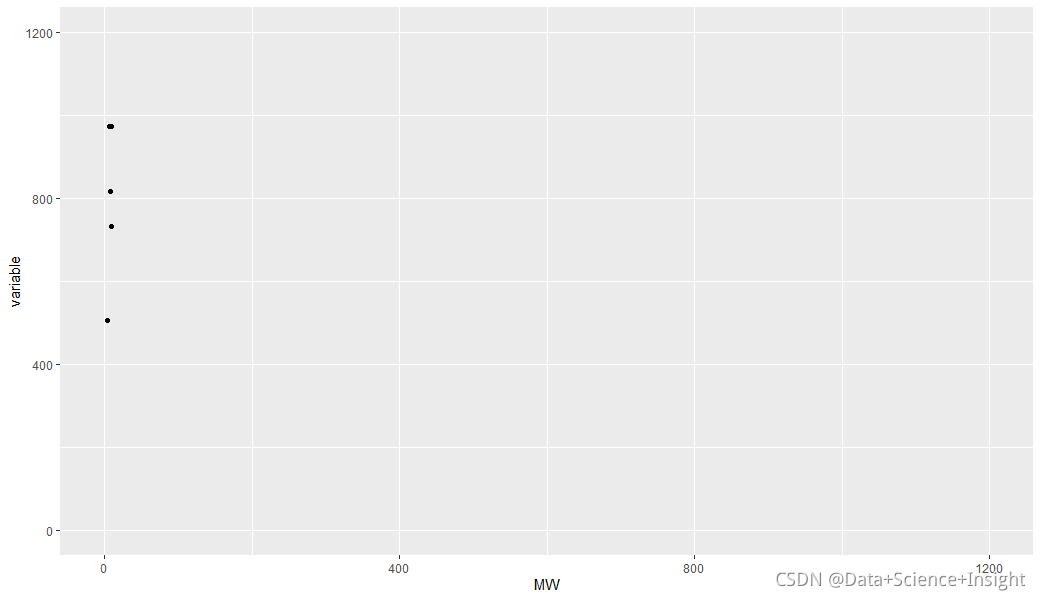
Full Error Messages:
> library(reshape)
>
> ## Plotting
> meltDF = melt(df, id.vars = ‘MW’)
> ggplot(meltDF[meltDF$value == 1,]) + geom_point(aes(x = MW, y = variable)) +
+ scale_x_continuous(limits=c(0, 1200), breaks=c(0, 400, 800, 1200)) +
+ scale_y_continuous(limits=c(0, 1200), breaks=c(0, 400, 800, 1200))
Error: Discrete value supplied to continuous scale
>
SQL Error [1] [08S01]: Error while processing statement: FAILED: Execution Error, return code 1 from org.apache.hadoop.hive.ql.exec.mr.MapRedTask. Permission denied: user=root, access=WRITE, inode="/user":hdfs:supergroup:drwxr-xr-x
    at org.apache.hadoop.hdfs.server.namenode.FSPermissionChecker.check(FSPermissionChecker.java:400)
    at org.apache.hadoop.hdfs.server.namenode.FSPermissionChecker.checkPermission(FSPermissionChecker.java:256)
    at org.apache.hadoop.hdfs.server.namenode.FSPermissionChecker.checkPermission(FSPermissionChecker.java:194)
    at org.apache.hadoop.hdfs.server.namenode.FSDirectory.checkPermission(FSDirectory.java:1855)
    at org.apache.hadoop.hdfs.server.namenode.FSDirectory.checkPermission(FSDirectory.java:1839)
    at org.apache.hadoop.hdfs.server.namenode.FSDirectory.checkAncestorAccess(FSDirectory.java:1798)
    at org.apache.hadoop.hdfs.server.namenode.FSDirMkdirOp.mkdirs(FSDirMkdirOp.java:61)
    at org.apache.hadoop.hdfs.server.namenode.FSNamesystem.mkdirs(FSNamesystem.java:3101)
    at org.apache.hadoop.hdfs.server.namenode.NameNodeRpcServer.mkdirs(NameNodeRpcServer.java:1123)
    at org.apache.hadoop.hdfs.protocolPB.ClientNamenodeProtocolServerSideTranslatorPB.mkdirs(ClientNamenodeProtocolServerSideTranslatorPB.java:696)
    at org.apache.hadoop.hdfs.protocol.proto.ClientNamenodeProtocolProtos$ClientNamenodeProtocol$2.callBlockingMethod(ClientNamenodeProtocolProtos.java)
    at org.apache.hadoop.ipc.ProtobufRpcEngine$Server$ProtoBufRpcInvoker.call(ProtobufRpcEngine.java:523)
    at org.apache.hadoop.ipc.RPC$Server.call(RPC.java:991)
    at org.apache.hadoop.ipc.Server$RpcCall.run(Server.java:869)
    at org.apache.hadoop.ipc.Server$RpcCall.run(Server.java:815)
    at java.security.AccessController.doPrivileged(Native Method)
    at javax.security.auth.Subject.doAs(Subject.java:422)
    at org.apache.hadoop.security.UserGroupInformation.doAs(UserGroupInformation.java:1875)
    at org.apache.hadoop.ipc.Server$Handler.run(Server.java:2675)
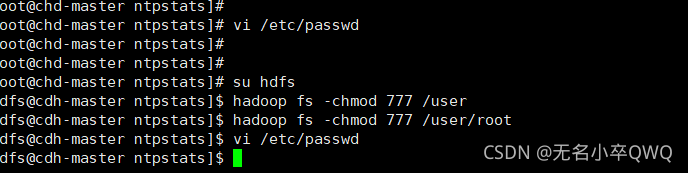
Solution: if su hdfs enter hdfs user vi /etc/password will
The back of hdfs is changed to the following

Then execute hadoop fs -chmod 777 /user