Author Archives: Robins

Fatal IO error 11

Installation of cenos-6.6 using VMware Workstation8.0 prompts the following error:
fatal io error 11 on x server:1
Method one:
In VMware Workstation8.0, set as follows:
1. Create the virtual machine as shown in the figure below
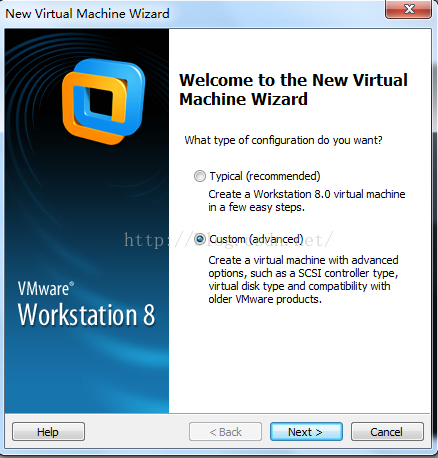
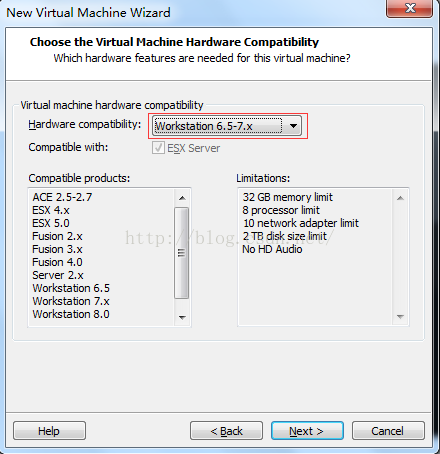
2. Modify the virtual machine hardware compatibility 6.5-7.x,
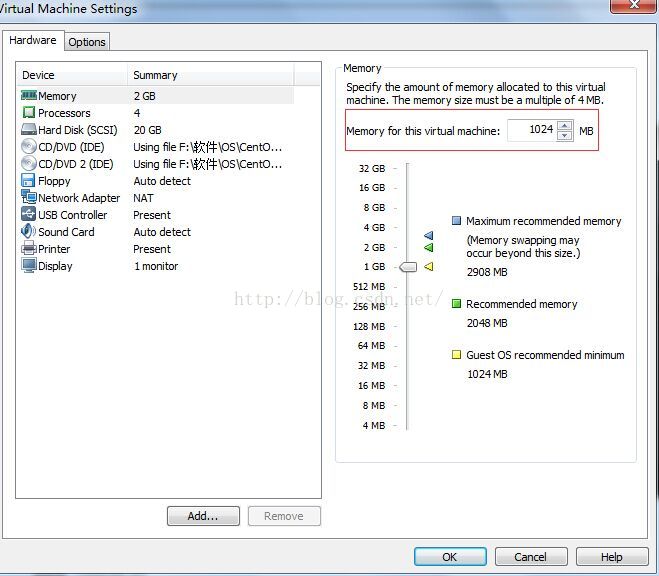
3. At least 1G of virtual machine memory
4. The resolution of the virtual machine is at least 800*600, and I set it to 1024*768

After the above four steps, fatal IO Error 11 on X Server :1 of Cenos-6.6 installed on the virtual machine can be resolved

Method 2:
Set the memory on the virtual machine to be less than 1024M, and I generally set the memory to be 512M, so as to skip the installation of X Server related services and solve the fault.


SQL server error 15404 solution

The job runs with “domain\ User” and the following error is encountered:
 

JOB RUN: 'Product_JobTest' was run on 2016/10/27 at 4:30:00
DURATION: 0 hours, 0 minutes, 0 seconds
STATUS: Failed
MESSAGES: The job failed. Unable to determine if the owner (domain\user) of job Product_JobTest has server access (reason: Could not obtain information about Windows NT group/user 'domain\user', error code 0x5. [SQLSTATE 42000] (Error 15404)).

 
Read the following reference articles:
http://www.cnblogs.com/kerrycode/p/3339558.html
http://www.cnblogs.com/kerrycode/p/5551994.html
http://consulting.risualblogs.com/blog/2013/03/01/could-not-obtain-information-about-windows-nt-groupuser-domainuser-error-code-0x5-sqlstate-42000-error-15404-connisloginsysadmin/
 
We started to try to modify the owner of the job as SA, and encountered two problems:
1. For the report subscription job generated by the report service, the subscription scheduling time of 2008R2 failed to be modified, and this problem was not encountered in 2014.
2. For the cross-server access job deployed by the business, it will be verified with the startup account of SQL Server Agent service, and the access permission of LINKEDSERVER needs to be configured.

Solutions:
On the domain controlled Server, add the startup account of SQL Server service to “BUILTIN\Windows Authorization Access Group”, and then let the job run with “Domain \ User” as the owner, and no error will be reported.

Error: option — single version externally managed not recognized

When PIP install mysql-connector-Python-RF ==2.1.3, the MAC receives an error message:
error: option –single-version-externally-managed not recognized

The reason may be that your installation package is in wheel format. If you do not have wheels installed on your computer, you will report this error.
Here’s how I solved it:
First install the wheel: PIP Install wheel
Then PIP install the package I want: PIP install mysql-connector-Python-RF ==2.1.3
Solved my problem:

Vs2013 package deployment error: isdev: error – 6003: an error occurred streaming

I used InstallShield 2015 and all the way to the end of “rebuild the solution,” the following error kept appearing:

ISDEV : error -6003: An error occurred streaming 'C:\Program Files\InstallShield\2009\Support\0x0804.ini' into setup.exe
ISDEV : error -6003: An error occurred streaming 'C:\Program Files\InstallShield\2009\Redist\Language Independent\i386\instmsiw.exe' into setup.exe
ISDEV : error -6003: An error occurred streaming 'C:\Program Files\InstallShield\2009\Redist\Language Independent\i386\instmsia.exe' into setup.ex

Back and forth redeployed several times are like this, the last word on the net:
shut down the computer anti-virus software, solved!
drunk drunk

VS 2010: An error occurred loading a configuration file: Failed to map the path ‘/’.

I was using the System.Web.Configuration. WebConfiguration class to open the configuration for the site from one of my logic dll’s and I got the wonderful error An error occurred loading a configuration file: Failed to map the path ‘/’.
I freaked out for a second, until I put more thought into it. This is running fine in production! What is the difference with my machine and the server?
Oh! My Visual Studio is running under UAC with limited privileges since I am in Windows 7. DUH!
So, I restarted Visual Studio 2010 under “Run as Administrator” and problem solved. So if you are on Vista or Windows 7, that’s the issue.
NOTE: If you develop with administrative rights, be careful you don’t make development mistakes that assume everyone will run your program as an admin. i.e. writing to program files directory, root directory, etc.
Happy Coding!

Error 0210: stick key 28 is displayed when ThinkPad E40 is turned on

Notebook boot prompt:
ERROR 0210: Stuck Key 24 Press to Setup

, “24” is Stuck, “J”
, find the J Key, cut off the Key cap, clean the base is generally ok. If you’re unlucky, you need to change the keyboard.
other error code reference:
[F1] 3A; F2 】 【 3 c; [F3] 3 d; “F4” 3 e; “F5” 3 f; [F6] 40; F7 41 】; “F8” 42; [F9] 43; F10 44 】; 【 F11 】 45; [F12] 46; [Q] 10; [W] 11; [E] 12; [R] 13; [T] 14; [Y] 15; [U] 16; [I] 17; [O] 18; [P] 19; 【 A 】 1 e; 1 f [S]; [D] 20; [F] 21; [G] 22; 23 [H]; [J] 24; 【 K 】 25; [L] 26. 27 [:] 27 [“] 28; [Z] 2 c; [X] 2 d; [C] 2 e; [V] 2 f; [B] 30; [N] 31; 【M】32 【<】 33. 【 & gt; 34. 35. “/” [Space] 39; 3 a Capslock 】 【; 1 c [Enter]; 【 Left Shift 】2A; 【 Left CTRL 】1D; [left Alt] 38

Reproduced in: https://www.cnblogs.com/lubing666666/p/4221394.html

A TPM error (7) occurred attempting to read a pcr value

A TPM error (7) occurred attempting to read a pcr value
E2fsck-f-y-v /dev/sdxx
2. If the system does not need TPM (reboot after setting), either of the following methods is ok.
(1) Echo Blacklist TPM_tis & GT; The/etc/modprobe. D/tpm_tis. Conf
The tPM_tis.conf file needs to be created by itself
(2) $sudo vim /etc/modprobe.d/tpm_tis.conf
Add the following: “Blacklist TPM_tis” and the color will change automatically
 

error code 0x534. [SQLSTATE 42000] (Error 15404)).

Today, I found that the monitoring system kept reporting errors, indicating a Job execution error. Looking at the log, I found that a user who created this Job was deleted (because he left his Job), resulting in a Job error.     
 
Date 4/27/2010 12:00:00 PM
Log Job History (Backup_Diff.Subplan_1)

Server mxosv-tress01
Job Name backup_diff. Subplan_1
Step Name (Job outcome)
Duration 00:00:00
Sql Severity 0
Sql Message ID 0
Operator group Net Sent
Operator Paged
Retries 0
Unable to determine if The owner (MX\Randy. Admin) of job Backup_Diff.Subplan_1 has server access (reason: Could not obtain information about Windows NT group/user ‘MX\Randy.admin’, error code 0x534. [SQLSTATE 42000] (Error 15404)).
 
When our system user name changes, we will find that the previous good maintenance plan in the original SQL suddenly fails, with the above error message. The solution is to start with SQL security & GT; > Change the original system user name in the login name to the current user name, then delete the existing maintenance plan and rebuild the maintenance plan.
 

From “ITPUB blog” link: http://blog.itpub.net/35489/viewspace-661497/, if you want to reprint, please indicate the source, otherwise will be investigated for legal responsibility.

Reproduced in: http://blog.itpub.net/35489/viewspace-661497/

Parsing error: Unexpected token

When using VUE Cli3, I encountered the following problems:

error: Parsing error: Unexpected token < at src\views\index.vue:1:1:
> 1 | <template>
    | ^
|   <div class="index">
|     <router-view></router-view>
|     <TabBar :data="tabbarData"></TabBar>

Looking up many websites, can not solve this problem, finally, in
https://stackoverflow.com/questions/53601579/parsing-error-unexpected-token-using-vuecli3-and-airbnb-eslint?r=SearchResults
Find a way
Open your.eslintrc.js file and find the Parser
Here’s my.eslintrc.js

module.exports = {
    rules: {
        'no-console': 'off',
        "parser": "vue-eslint-parser"
    },
}

Note:
This error is reported when I write “import”. In this case, I only need to put the “.eslintrc.js”
“Parser” : comment out “Vue-Eslint-Parser” and restart the project. Then, uncomment it and restart the project again with no error.
Why that should be, I don’t understand. If you have a better solution, please leave me a message, thank you!!

One of the ways to solve the problem of internal server error in flash learning

Recently in learning flask web development, encountered such a problem, is according to the book on the code, run is an Internal server error, because halfway to learn for the sake of convenience, to switch to pycharm to develop, pycharm automatically help me to create a virtual environment, the book says the venv can I do not pollute the environment, but in fact I use, because the initial development on sublime does directly, cause I have a lot of local module, reoccupy pycharm, I changed the environment variable a lot, changed it all to venV, and then this error happened, you can try to delete VENV, use the native environment, and at the same time, change the environment variable back to the native, you can use it. Personal analysis, think should be two environments exist some kind of conflict.

Reproduced in: https://www.cnblogs.com/sgatbl/p/9134283.html