Author Archives: Robins

The loop of life and death occurs when the El table component of element UI is bidirectional bound

Regarding the data binding of el-table, an error occurred, and the main error message is as follows.

TypeError: Cannot read property ‘offsetHeight’ of null

Cannot read property ‘offsetHeight’ of null

this.$el.querySelectorAll is not a function

1 recursive calls

TypeError: data.reduce is not a function

Cannot read property ‘instance’ of undefined

Error in callback for immediate watcher “data”: “TypeError: data.indexOf is not a function”

Reason:
:data = param The result is that this param is an object. Example.
vue

 <el-table :data="image.users" ref="usersRef" border>
 </el-table>

js

image:{
    users: {
      cryptionType: 'sha256',
      token: '',
      userList: [
        {
          username: '',
          password: '',
          groups: '',
          remark: ''
        }
      ]
    }
 }

Users is an object, and: data is bound to an array.
My situation is that the interface here has been changed. Users used to be an array, but now it has become an object. The real user array has been changed to the userlist of the users object, but the front-end code has not been changed, resulting in such an error.

So the front-end code is changed to : data= image.users.userList is normal.

com.alibaba.druid.sql.parser.ParserException: syntax error

Remember a simple mistake.

sql.append("select"
+"a.MEMBER_NAME, b.ACTION_NAME"
+"from CLUB_MEMBER a,CLUB c, MEMBER_ACTION_RECORD d");
sql.append("WHERE a.CLUB_MEMBER_ID = d.CLUB_MEMBER_ID"
				+ "AND a.CLUB_ID = b.CLUB_ID"
				+ "AND d.ACTION_ID = ?"); 

It’s wrong, why is it wrong? No spaces, SQL prints.
selecta.MEMBER_NAME, b.ACTION_NAMEfrom CLUB_MEMBER a,CLUB c, MEMBER_ACTION_RECORD dWHERE a.CLUB_MEMBER_ID = d.CLUB_MEMBER_IDAND a.CLUB_ID = b.CLUB_IDAND d.ACTION_ID = ?
Now you know why it’s wrong, right?
Correct Codes.

sql.append("select"
+" a.MEMBER_NAME, b.ACTION_NAME"
+" from CLUB_MEMBER a,CLUB c, MEMBER_ACTION_RECORD d");
sql.append(" WHERE a.CLUB_MEMBER_ID = d.CLUB_MEMBER_ID"
				+ " AND a.CLUB_ID = b.CLUB_ID"
				+ " AND d.ACTION_ID = ?"); 

It doesn’t seem to make a big difference, but it’s enough to take half an hour and patience to look at the code.

[Solved] ValueError: the indices for endog and exog are not aligned

When running the following code

x = data1        
y = data2
X = sm.add_constant(x)
result = (sm.OLS(y, X)).fit()
print(result.summary)

Error: valueerror: the indexes for endog and exog are not aligned

Solutions:

1. Check the data type: it has nothing to do with the service or dataframe type, and it has nothing to do with whether the data types of Y and X are consistent

2. Check data length: len (y) and Len (x) have the same length

3. It is found that although the length of len is the same, the index value of data is different. That’s the problem.

Because my x data is vertically combined by two dataframe data through concat, the index values of the data are different.

As shown in the figure below:

The complete data are as follows:

       date 
0    20180101
1    20180102
2    20180103
3    20180104
4    20180105
5    20180106

But the consolidated data is presented in this way, but:

       date 
0    20180101
1    20180102
2    20180103
3    20180104
0    20180105
1    20180106

Because the index values on the left side of the two groups of service data used for calculation are different, an error is reported. Solution:

Whether the original data is of dataframe or service type, it is converted to list type first. Take dataframe data as an example

datalist = data['close'].tolist()                    # change dataframe to list
datalist = data + templist                           # list MERGER
dataf = pd.DataFrame(datalist, columns=['close'])    # list TO dataframe

After a series of data processing in the early stage, the program is executed again, and the error disappears.

Normal display:

                            OLS Regression Results
==============================================================================
Dep. Variable:                  close   R-squared:                       0.326
Model:                            OLS   Adj. R-squared:                  0.326
Method:                 Least Squares   F-statistic:                     1932.
Date:                Tue, 22 Jan 2019   Prob (F-statistic):               0.00
Time:                        14:34:33   Log-Likelihood:                -11706.
No. Observations:                4000   AIC:                         2.342e+04
Df Residuals:                    3998   BIC:                         2.343e+04
Df Model:                           1
Covariance Type:            nonrobust
==============================================================================
                 coef    std err          t      P>|t|      [0.025      0.975]
------------------------------------------------------------------------------
const          6.8217      0.092     74.332      0.000       6.642       7.002
close          0.3305      0.008     43.951      0.000       0.316       0.345
==============================================================================
Omnibus:                      786.494   Durbin-Watson:                   0.009
Prob(Omnibus):                  0.000   Jarque-Bera (JB):             1384.316
Skew:                           1.260   Prob(JB):                    2.51e-301
Kurtosis:                       4.399   Cond. No.                         15.7
==============================================================================

Java Error | Error:java: Compilation failed: internal java compiler error

Background

Error:java: Compilation failed: internal java compiler error

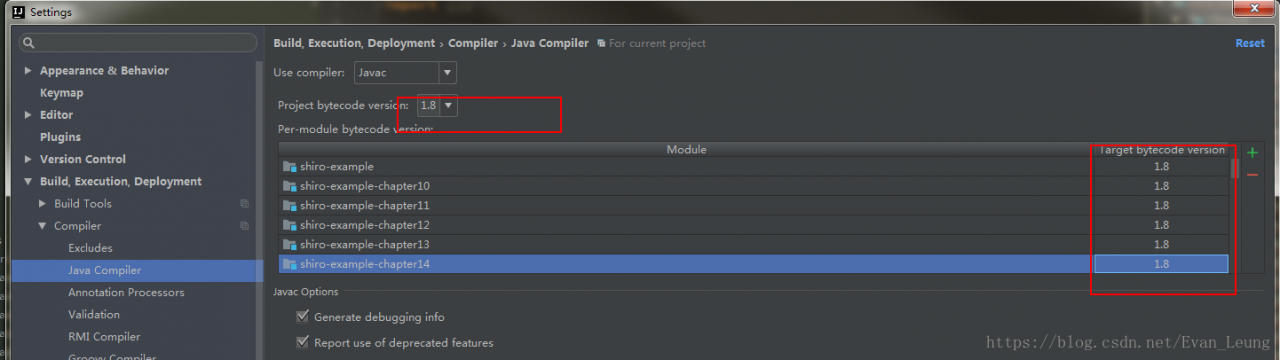
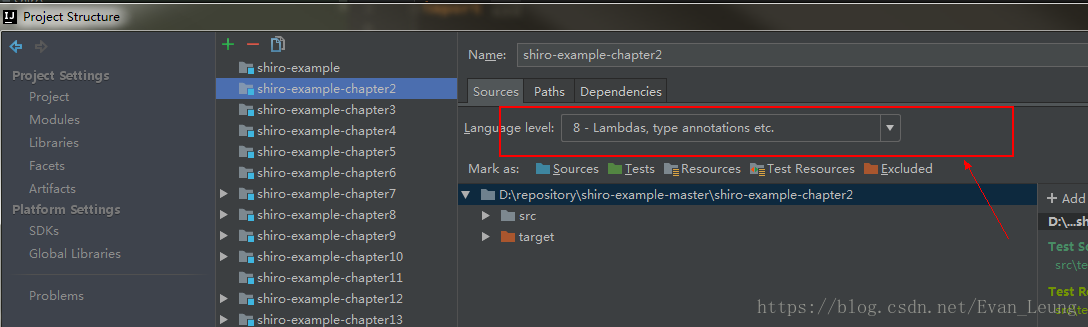
According to previous experience, the compiling environment of the read project is reset, and the JDK version is all specified as 1.8
1. Setting – & gt; Java complier

2.Project Structure->Modules

After the above steps are set, the same error will be reported in the recompile run

Solution

After investigation, the project Pom.xml The file does not specify a compiled version, in the Pom.xml Add the following plug-ins:

<build>

    <plugins>
        <plugin>
        <artifactId>maven-compiler-plugin</artifactId>
            <version>3.7.0</version>
            <configuration>
                <source>1.8</source>
                <target>1.8</target>
                <encoding>utf-8</encoding>
            </configuration>
        </plugin>
    </plugins>

</build>

Why not manage controller in spring container

Spring container and spring MVC container


1. Question: why not use spring to manage all classes?

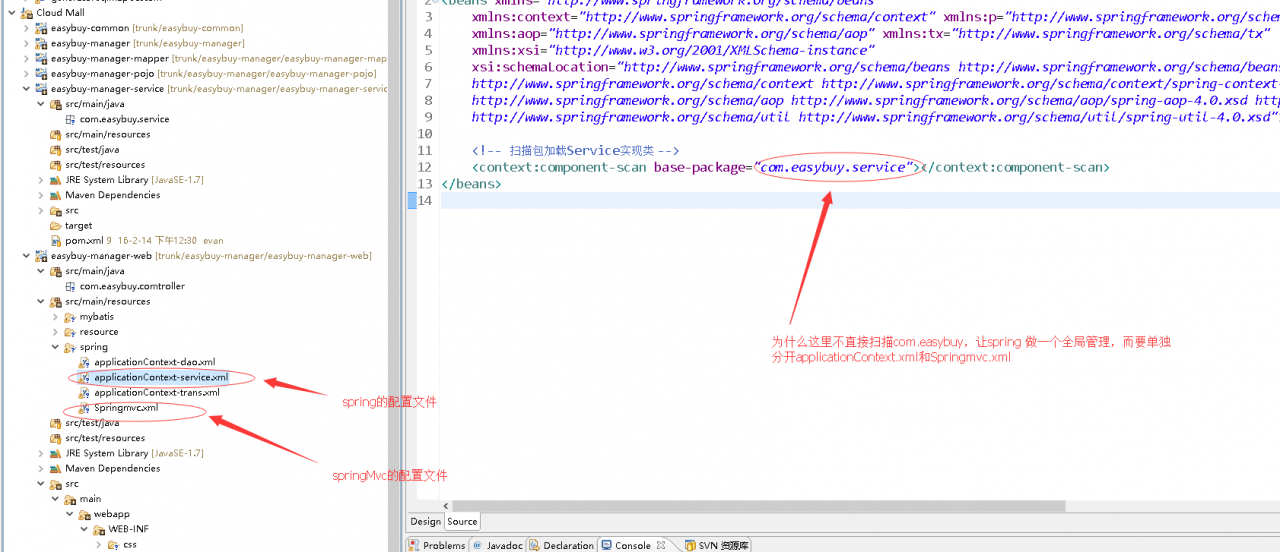
In our configuration of spring MVC, why does the controller not be directly managed by spring, but the spring MVC container should be managed separately


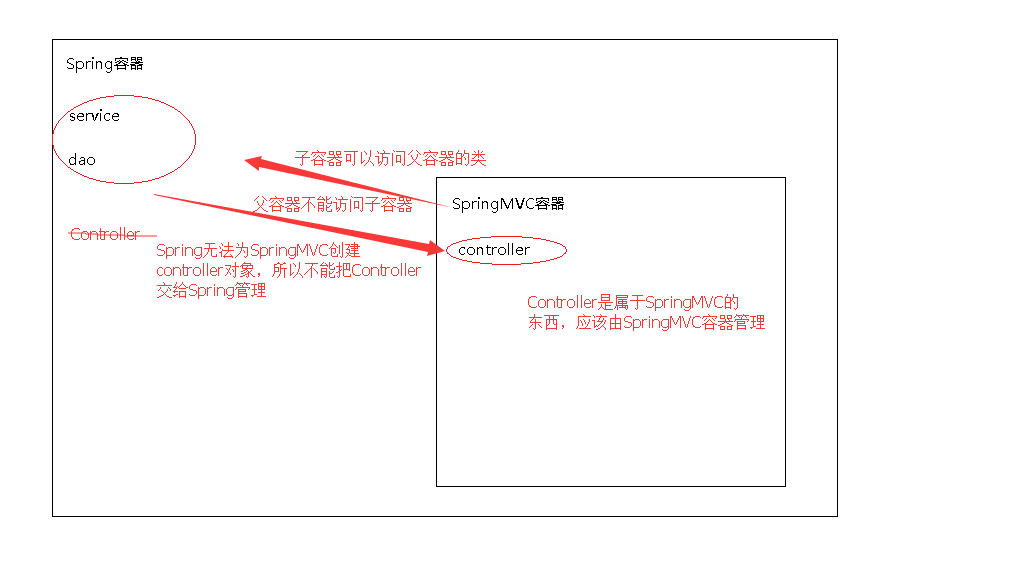
2. The relationship between spring container and spring MVC

Spring container is a parent-child relationship with spring MVC container. The child container can access the objects of the parent container, but the parent container can’t access the classes of the child container. If we scan all classes directly in the spring MVC configuration file and hand over service, Dao and controller to spring MVC for management, but if spring is used to manage contoller, it can’t access this class, because Co The ntoller is in the spring MVC container. If you configure spring to scan all classes directly, including controller, but do not configure spring MVC, the request sent by the server will have a 404 problem, because it can’t find the controller and spring can’t inject the controller

Example.
Configure in applicationContext-service.
<! -- Scan package to load Service implementation classes -->
<context:component-scan base-package="com.easybuy"></context:component-scan>
will scan for @Controller, @Service, @Repository, @Compnent

Springmvc.Xml does not scan.
Conclusion: springmvc. cannot provide services because there is no controller object in the springmvc subcontainer.

3. Why not directly SpringMVC.xml Scan all classes in?

In principle, we can leave the service, Dao and controller to spring MVC for management, and just let it scan all packages directly in the spring MVC configuration file. However, for the sake of future expansion, spring and spring MVC are configured separately, and spring manages the service, which is conducive to later expansion. Even if multiple struct2 are added in the future, the original configuration will not be affected

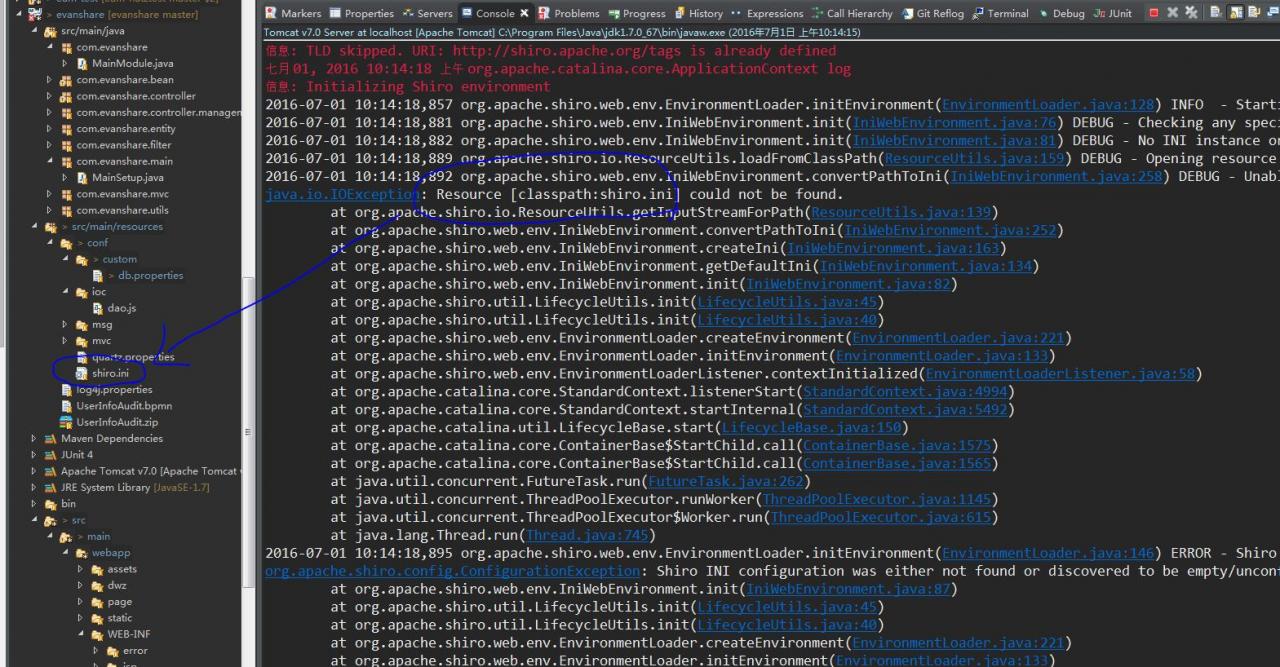
How to Solve Error: java.io.IOException: Resource [classpath:shiro.ini] could not be found.

scene

When Tomcat starts, it always reports an error. It can’t find the configuration file in the classpath, but the configuration file has been placed in the resource directory


Solution

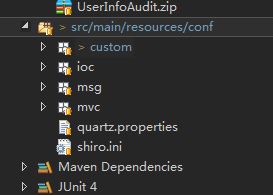
The reason for this exception is that the new conf folder cannot be recognized, because it is not set as a resource folder. Just right click the conf folder – >build path – > use as source folder


Eclipse PyDev “interpreter does not exist in filesystem”

The reason for the problem: this kind of problem is generally should be will python.exe The file has been renamed

Solution: there are generally two ways:

1: change the file name back (basically, it won’t be changed back, because the file name is usually changed to include both python2 and python3 on the computer. In order to add environment variables and successfully run two different versions of python, the file name is usually changed)

2: modify the python path of eclipse

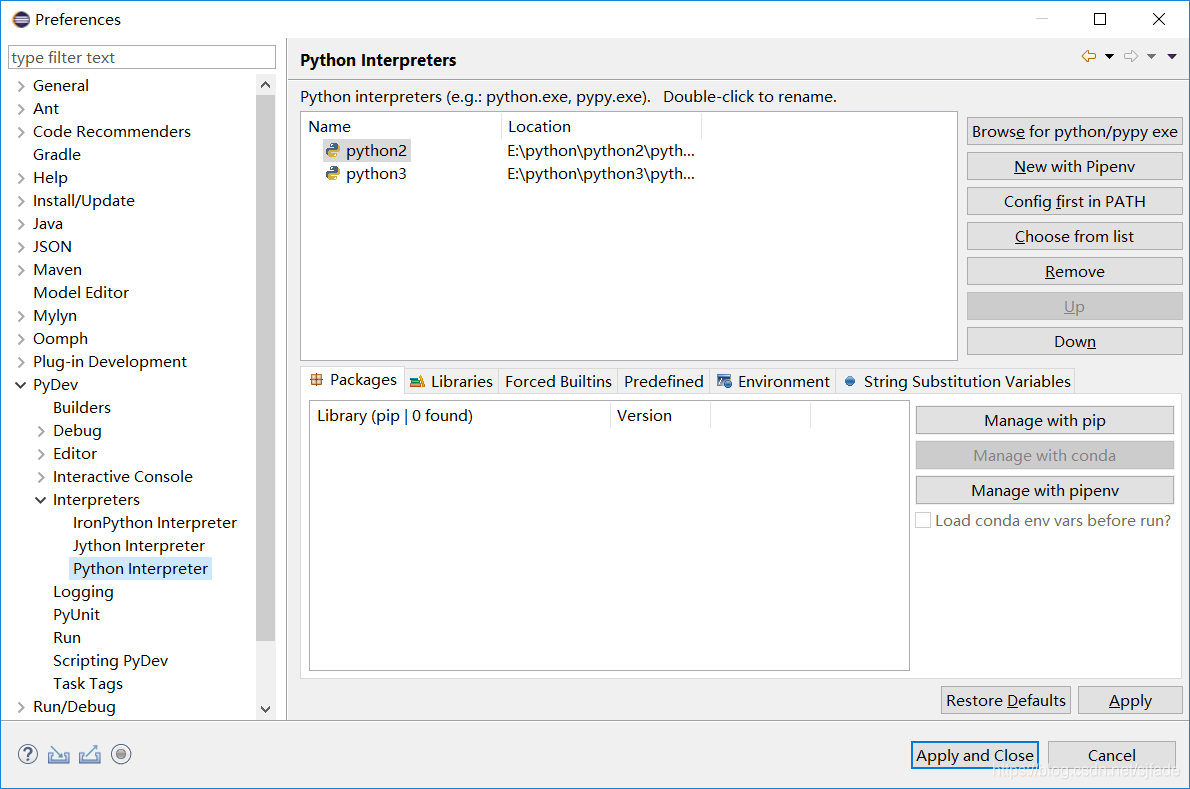
Modify in window – & gt; preferences – & gt; pydev – & gt; interpreters – & gt; Python interpreter


Use the remove button to delete the paths of the two Python versions, then click browse for Python/pypy exe, re select the path of python, and finally click apply and close


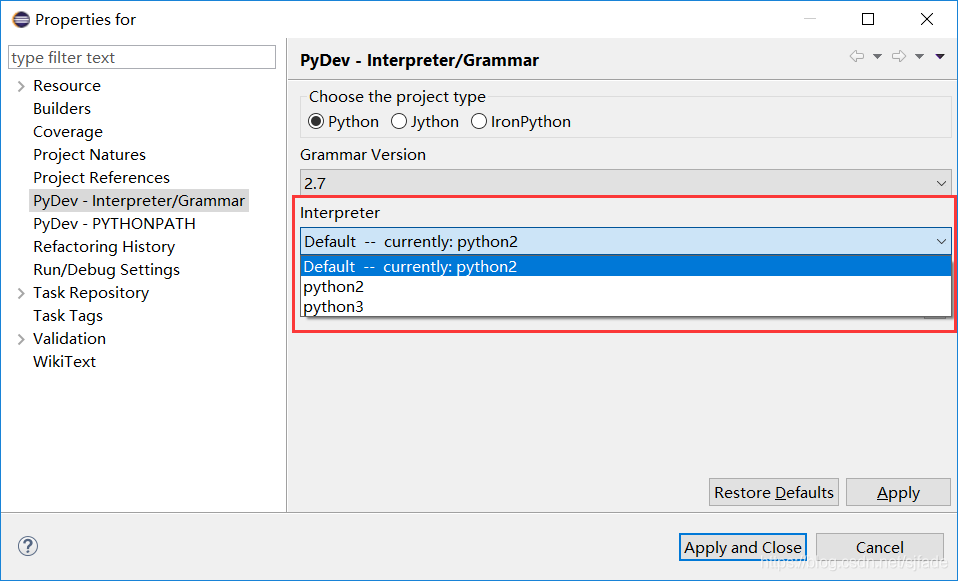
At this time, the project file still reports an error. At this time, select the project that reports an error, right-click and select the properties option – & gt; pydev interpreter/grammar, then switch to interpreter and select the corresponding Python Version (default)– currently:python2 Finally, click apply and close. Finally, restart eclipse


Nutz framework: using native SQL for CND conditions

case

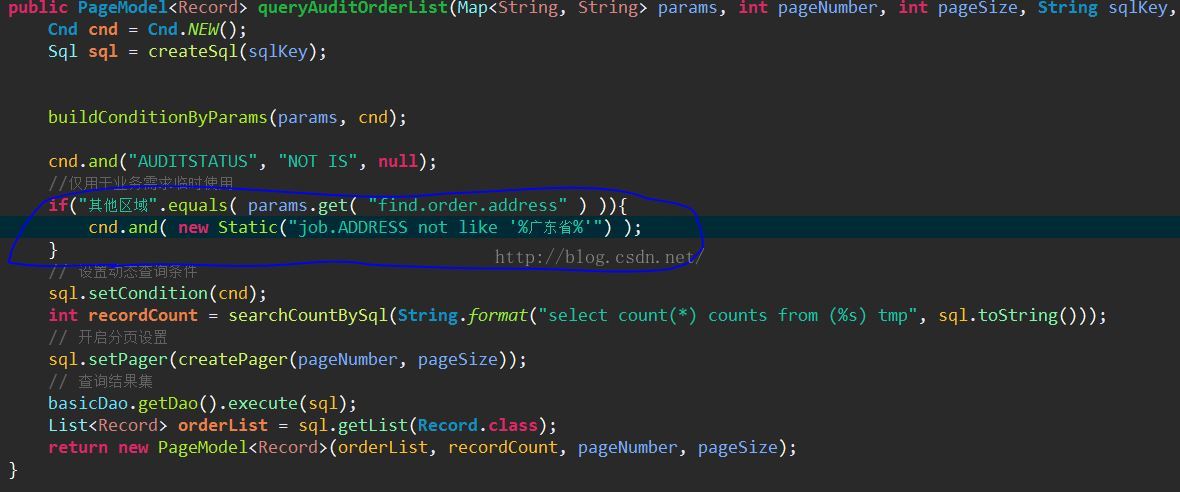
Today, I received a temporary business requirement. It takes a day or two for a simple filter to be used as a temporary business. So I thought of adding a not like to the original CND condition for filtering. However, I found that the existing CND condition query does not seem to meet the requirement


Solution

Using static class in Nutz framework to realize custom SQL and Cnd.and () splicing, new static (“xxxxx”) can connect any native SQL


cnd.and( new Static("job.ADDRESS not like '%GuangDong%'") );


Multithreading: when doing unit test, use thread pool to find that the specified code is not running and skip directly

Today, we did a unit test to debug the interface. We found that the interface call was successful, but we did not run the thread pool execution method. Instead, we directly skipped the execution code


 ExecutorService pool = Executors.newFixedThreadPool( 2 );


 public void callInterfaceCreditease(final String idcard,final String name,final String mobile){
        try{
            
            ExecutorService pool = Executors.newFixedThreadPool( 2 );
            //Interface
            pool.execute(new Runnable() {
                @Override
                public void run() {
                    creditCardCrediteaseService.doFetchCreditData(name, idcard, mobile);
                }
            });
            //Release thread pool resources
            pool.shutdown();
        }catch(Exception e){
            log.error("Calling interface exceptions:",e);
        }
                
    }


When using quartus for function simulation, “testbench” appears_ vector_ input_ The solution of “file option does not exist”

Environment: quartus 18 prime Standard Edition

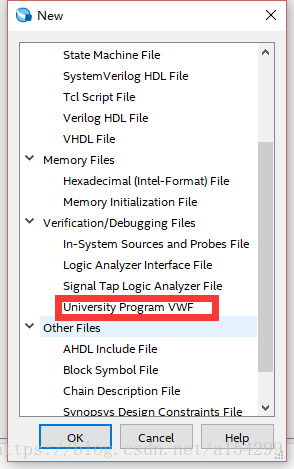
1. Create a new VMF file

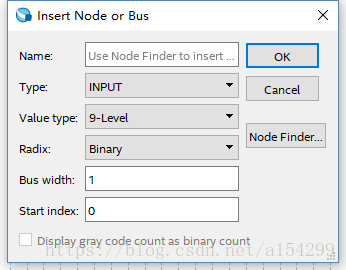
Add node or bus

2. Click processing – & gt; start – & gt; start test bench template writer, and a. VHT suffix file will be generated under the path of “project folder/simulation/Modelsim” (the path may be different due to different personal settings).

3. Copy the. VHT suffix file in the path of “project folder/simulation/Modelsim” to the path of “project folder/simulation/QSIM”.

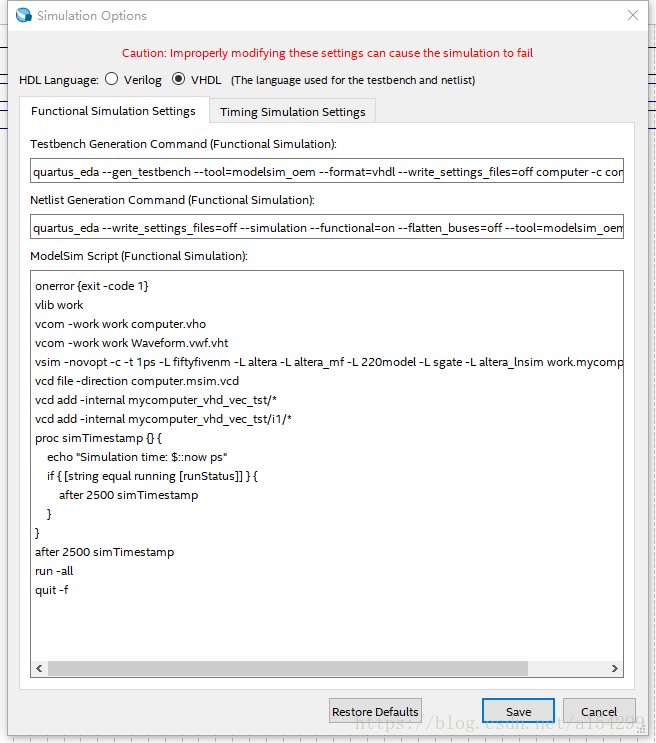
4. Open the vWF file created in step 1, click simulation – & gt; simulation settings, and the following interface will appear. Modify the contents in the functional simulation settings tab as follows (note that the direction of path separator in quartus software is opposite to that in windows, one is’/’, the other is’ \’):

(1) Change “- vector” in the testbench generation command (functional simulation) column to_ Change the path after “source” to the path of your own VWF file (note that the file name should also be changed to the name of your own file), “– testbench_ Change the path after “file” to the path of the. VHT suffix file copied in step 3 (note that the file name should also be changed to your own file name);

(2) Change “- output” in the netlist generation command (functional simulation) column_ The path after “directory” is changed to “project folder/simulation/QSIM”.

(3) Add VCOM – work in the Modelsim script (functional simulation) column Waveform.vwf.vht Change the file name to your own.

(4) If you want to do timing simulation, modify the contents of the timing simulation settings tab.

5. Finished, add input data and click simulation.