Using idea development, Maven build error:
Error assembling WAR: Problem creating war: Execution exception (and the archive is probably corrupt but I could not delete it)The cause of the error is that the memory of the JVM is not enough, so it’s better to configure it. The steps are as follows:
So we modify Maven’s JVM parameters directly in idea,
file-> setting-> Build,Execution,Deployment-> Maven-> Runner
Set the JVM parameter in VM option column, – xmx1g – XX: maxmetaspacesize = 128M
After setting, click Install on the right side to start the compilation, the parameter takes effect, and the maximum heap memory becomes 1g
0
gcc: error trying to exec ‘cc1‘: execvp: No such file or directory
gcc: error trying to exec ‘cc1’: execvp: No such file or directory
find /usr/ -name "*cc1*"
# out:  /usr/share/terminfo/x/xterm+pcc1
# out:  /usr/libexec/gcc/x86_64-redhat-linux/4.8.2/cc1
# out: /usr/libexec/gcc/x86_64-redhat-linux/4.8.2/cc1plus
export PATH=$PATH:/usr/libexec/gcc/x86_64-redhat-linux/4.8.2/
After the new video card rtx3060 arrives, configure tensorflow and run “TF. Test. Is”_ gpu_ The solution of “available ()” output false
First of all, install according to the normal installation method:
the necessary conditions for success are:
1. The version number should be correct, that is, CUDA should be installed above 11.1 (because CUDA version supported by 30 AMP architecture graphics card starts from 11.1)
link: https://developer.nvidia.com/zh-cn/cuda-downloads
2. Cudnn needs to install the, Link (to register and log in to NVIDIA account) https://developer.nvidia.com/zh-cn/cudnn
If you haven’t installed it, you can see other posts https://so.csdn.net/so/search/all?q=3060%20tensorflow& t=all& p=1& s=0& tm=0& lv=-1& ft=0& l=& U =
after installation, enter the created environment and run tf.test.is_ gpu_ available()。
if the computer can detect the graphics card, it can display the number of cores, computing power and other parameters of each graphics card, but the final answer is false
if the command line shows that cusolver64 cannot be found_ 10 documents
, at the following address C:// program files/NVIDIA GPU computing toolkit/CUDA/V11.1/bin
Will cusolver64_ 11. DLL renamed to cusolver64_ 10. Dll
and then run tf.test.is again_ gpu_ available()
Your uncle made it!
docker.errors.DockerException: Error while fetching server API version: (‘Connection aborted.‘, File
Problem description
ocker.errors.DockerException: Error while fetching server API version: (‘Connection aborted.’, FileNotFoundError(2, ‘No such file or directory’))
Causes
The reason is that docker did not start
terms of settlement
Open docker:
systemctl start docker
Look at docker process
ps -ef | grep docker
Final execution
docker-compose up -d
Using webpack to report typeerror: this.getresolve is not a function
##Using webpack to report typeerror: this.getresolve is not a function
###Error reason: the webpack version is too low or the loader version is too high
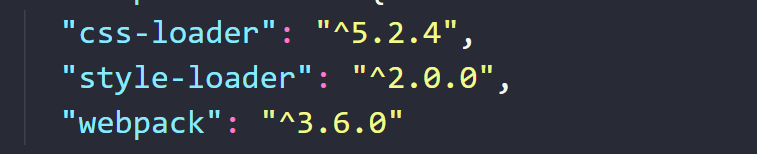
this is the original configuration version
##Solutions:
1. Upgrade the version of webpack to the highest version (there are many changes in the version of webpack, so I’m afraid it won’t catch up with others, So you can choose not to change the webpack version)
2. Reduce the version of the loader
(1) manually reduce the downloaded version of the loader in package.json

(2) download the loader you just used again
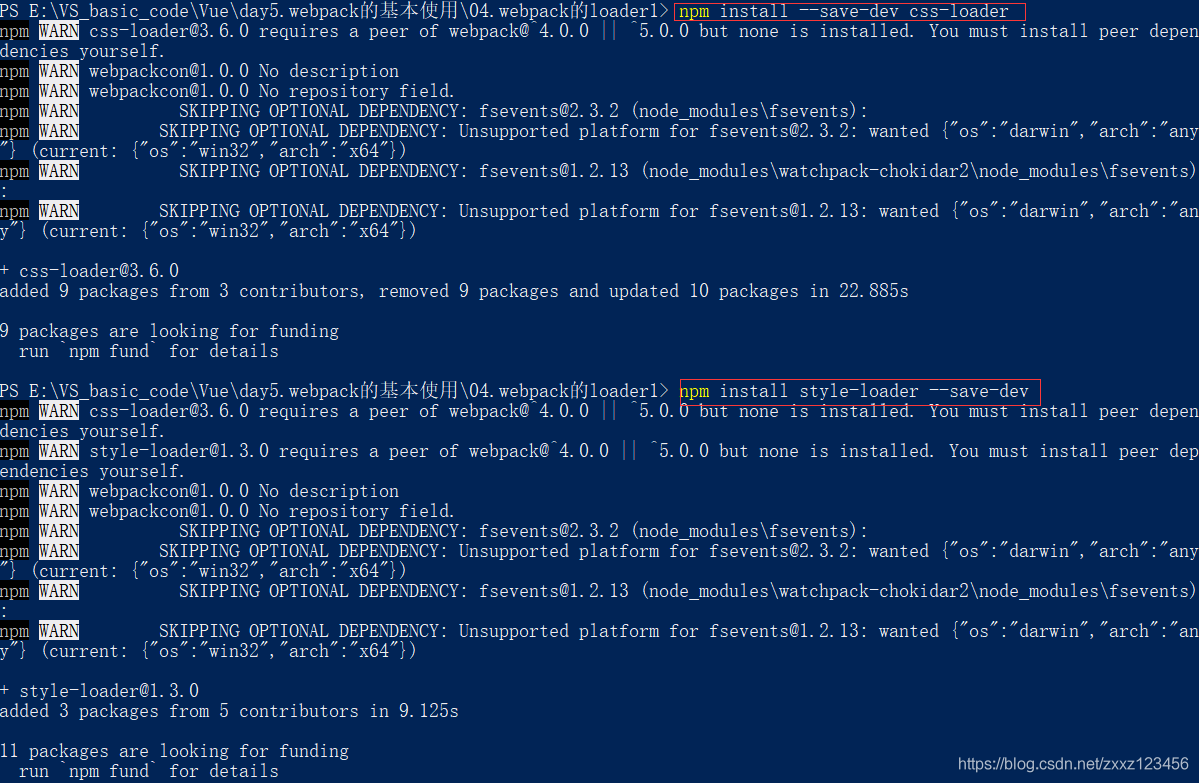
and then run it again
TypeError: this.getOptions is not a function
Yesterday, when less replaced sass, it reported this error after installing node sass and sass loader

In short, there is a version conflict. The version of SASS loader is too high. I installed 11 and the last project was 10, so the solution is very simple
Solution:
1.npm uninstall sass-loader or yarn remove sass-loader
2.npm install [email protected] -D or yarn add [email protected] -D
PS: my node sass version is 5.0.0, both of which are in the package npm i xx -D , I came according to the last project. Different people have different opinions on the details. Just report no mistakes
Link to the original text: https://blog.csdn.net/qq_ 42430948/article/details/113552673
AttributeError: module ‘os‘ has no attribute ‘fork‘
Error information:

Error reason:
The calling statement in the program is: id = OS. Fork(); There is no fork () on Windows system, so an error will be reported, but it can be called on MAC, Linux and UNIX.
Template execution failed: ReferenceError: htmlWebpackPlugin is not defined
“38382;” 39064;”22914;” 26631;”39064;
index.html< link rel=”icon” href=”<%=%20htmlWebpackPlugin.options.url%>%20favicon.ico”> gt; lt;/ link> 
25442?
< script src=<%= BASE URL%>/ tinymce4.7.5/tinymce.min.js> lt;/ script>
< script src=<%= BASE URL%>/ tinymce4.7.5/along/zhu CN.js> lt;/ script>

“26242;” 19981;”20160;”
No qualifying bean of type ‘javax.sql.DataSource‘ available: expected at least 1
The startup class has been configured
@SpringBootApplication(exclude = {DataSourceAutoConfiguration.class})
The error information is as follows:
 org.springframework.beans.factory.UnsatisfiedDependencyException: Error creating bean with name 'org.springframework.boot.autoconfigure.orm.jpa.HibernateJpaAutoConfiguration': Unsatisfied dependency expressed through field 'dataSource'; nested exception is org.springframework.beans.factory.NoSuchBeanDefinitionException: No qualifying bean of type 'javax.sql.DataSource' available: expected at least 1 bean which qualifies as autowire candidate. Dependency annotations: {@org.springframework.beans.factory.annotation.Autowired(required=true)}
 Caused by: org.springframework.beans.factory.NoSuchBeanDefinitionException: No qualifying bean of type 'javax.sql.DataSource' available: expected at least 1 bean which qualifies as autowire candidate. Dependency annotations: {@org.springframework.beans.factory.annotation.Autowired(required=true)}
Reason: the default datasource is used.
solution: start the accumulation configuration
@SpringBootApplication(exclude = {DataSourceAutoConfiguration.class, HibernateJpaAutoConfiguration.class})

Get connection timeout retry: 1 MySQL errorcode 0, state 08s01 docker container accessing MySQL container is very slow and sometimes interrupted
Today, I encountered a problem: starting the Tomcat container and then accessing the MySQL container, the query speed is very slow, and sometimes it is the same as disconnecting
solution: when starting the Tomcat container, do not add the host name and MAC address, it is likely that there is a conflict
Add and addmodelerror in modelstate
ModelState ModelState1 = new ModelState();
modelstate1. Errors. Add (“cannot be empty”);
//Add a property that does not exist in the key of modelstate
modelstate. Add (“123”, modelstate1);
//Add an error to the property
Modelstate. Addmodelerror (“123”, cannot be empty “);
AttributeError: module ‘onnxruntime‘ has no attribute ‘InferenceSession‘
Because the PY file name is named onnxruntime. Py and the python library onnxruntime have the same name. Change onnxruntime. Py to onnxruntime_ Just execute test. Py…