Author Archives: Robins

Compile .h file with error “error: backslash-newline at end of file [-Werror]:

Solution: add a blank line at the end of the file

For example, when compiling the following. H file, an error is reported

#define func1(name, begin)          \
    static thread_local A __x_y_z_agg_##name(#name); \
    (__x_y_z_agg_##name).B(begin)
    
#define func2 A::C

It needs to be changed to

#define func1(name, begin)          \
    static thread_local A __x_y_z_agg_##name(#name); \
    (__x_y_z_agg_##name).B(begin)
    
#define func2 A::C

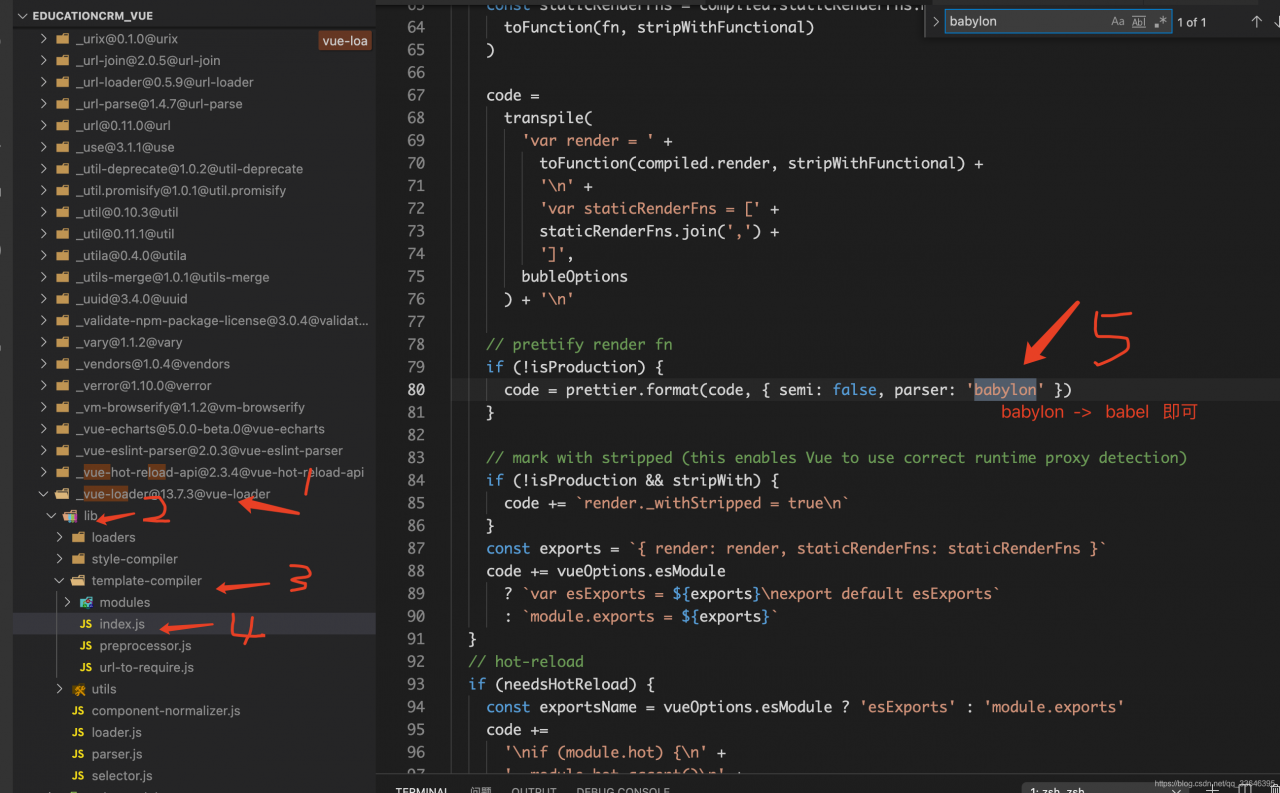
[Vue Run Error] Module build failed: Error: Couldn‘t resolve parser “babylon“

This is because the parser names of different versions of prettier are not the same, so it cannot be parsed. You just need to   node_ Modules in Vue loader   The parser in the prettier configuration file can be changed from Babylon to Babel.

Step 12345 as shown in the figure below

Linux yum Error: All mirror URLs are not using ftp

All mirror URLs are not using ftp, http[s] or file

Because the support of centos6 has been officially stopped

To solve this problem, execute the following command:

sed -i "s|enabled=1|enabled=0|g" /etc/yum/pluginconf.d/fastestmirror.conf

mv /etc/yum.repos.d/CentOS-Base.repo /etc/yum.repos.d/CentOS-Base.repo.backup

curl -o /etc/yum.repos.d/CentOS-Base.repo https://www.xmpan.com/Centos-6-Vault-Aliyun.repo

yum clean all

yum makecache

It’s OK

Idea stuck and error reported: UI was frozen for xxxxx MS problem solving

Phenomenon

After idea starts and clicks a menu, there is no reaction at all. When you click close, you can’t close it. Check the log and report the following error:

➜  bin 2021-04-30 00:20:31,777 [ 317987]   WARN - .diagnostic.PerformanceWatcher - UI was frozen for 5750ms, details saved to /home/zeek/.cache/JetBrains/IntelliJIdea2020.3/log/threadDumps-freeze-20210430-002031-IU-203.7148.57-RandomAccessFile.readBytes-5sec 
2021-04-30 00:20:45,194 [ 331404]   WARN - s.ui.configuration.SdkDetector - No version is returned for detected SDK IDEA JDK at /home/zeek/software/idea-IU-203.7148.57 
2021-04-30 00:22:05,304 [ 411514]   WARN - ystem.impl.ActionPopupMenuImpl - 1174ms to fill popup menu ProjectViewPopup 
2021-04-30 00:22:33,250 [ 439460]   WARN - ConfigurableExtensionPointUtil - ignore deprecated groupId: language for id: preferences.language.Kotlin.scripting 
2021-04-30 00:22:33,426 [ 439636]   WARN - ConfigurableExtensionPointUtil - use other group instead of unexpected one: build.android 
2021-04-30 00:22:44,580 [ 450790]   WARN - .diagnostic.PerformanceWatcher - UI was frozen for 12256ms, details saved to /home/zeek/.cache/JetBrains/IntelliJIdea2020.3/log/threadDumps-freeze-20210430-002237-IU-203.7148.57-ShowSettingsAction.perform-12sec

It was serious at the beginning, and I don’t know the specific reason.

Processing steps

First of all, because I use Linux operating system, the default JDK is openjdk 11. Generally speaking, openjdk is not as stable as Oracle JDK, and openjdk 11 is too new, so the default JDK of Jiujiang operating system is Oracle JDK 9.

➜  bin java -version
Picked up _JAVA_OPTIONS: -Dawt.useSystemAAFontSettings=on -Dswing.aatext=true
java version "9.0.1"
Java(TM) SE Runtime Environment (build 9.0.1+11)
Java HotSpot(TM) 64-Bit Server VM (build 9.0.1+11, mixed mode)

Secondly, because the default memory used by idea is about 700m, insufficient memory may also lead to the above situation. Therefore, the running memory of idea is adjusted to 2G, and the configuration file is idea installation directory/bin/idea64. Vmoptions . The configuration content is as follows (only the sizes of – XMS and – Xmx are modified)

-Xms512m
-Xmx2048m
-XX:ReservedCodeCacheSize=512m
-XX:+UseConcMarkSweepGC
-XX:SoftRefLRUPolicyMSPerMB=50
-XX:CICompilerCount=2
-XX:+HeapDumpOnOutOfMemoryError
-XX:-OmitStackTraceInFastThrow
-ea
-Dsun.io.useCanonCaches=false
-Djdk.http.auth.tunneling.disabledSchemes=""
-Djdk.attach.allowAttachSelf=true
-Djdk.module.illegalAccess.silent=true
-Dkotlinx.coroutines.debug=off
-Dsun.tools.attach.tmp.only=true

Finally, disable some plug-ins that you can’t use at ordinary times.

After the above three steps, the idea Caton phenomenon is not so obvious (invisible to the naked eye).


Title: idea stuck and error: UI was frozen for xxxxx MS problem solving
Author: zeekling
tips: Please note that the article is reproduced from personal blog: Xiaoling children’s shoes

The solution of unsuccessful rosdep update

After encountering this problem, we refer to no less than ten online tutorials, none of which is effective, including but not limited to:

1. Hang up VPN (it seems that many people finally rely on science to get online, but I still can’t hang it here

2. Modify the upper limit of time parameter: useless, the system has the default maximum value, about one minute, to treat the symptoms but not the root cause

3. Modify the host file: all kinds of addresses of Google and GitHub have been added in, which is useless

4. Hang hot spot: same as 1, useless

For the final solution, please refer to Baidu Post Bar:

sudo apt-get update

sudo apt-get install python-rosdep

  In the second step, there is an error message when installing Python rosdep. It seems that some files were not successfully installed, but in the end, rosdep update succeeded.

’nvcc.exe‘ failed with exit status 1

F:/study/easy-faster-rcnn.pytorch-master/support/src/cuda/ROIAlign_cuda.cu(280): error: no instance of function template "THCCeilDiv" matches the argument list
            argument types are: (long long, long)

F:/study/easy-faster-rcnn.pytorch-master/support/src/cuda/ROIAlign_cuda.cu(280): error: no instance of overloaded function "std::min" matches the argument list
            argument types are: (<error-type>, long)

F:/study/easy-faster-rcnn.pytorch-master/support/src/cuda/ROIAlign_cuda.cu(327): error: no instance of function template "THCCeilDiv" matches the argument list
            argument types are: (int64_t, long)

F:/stud/easy-faster-rcnn.pytorch-master/support/src/cuda/ROIAlign_cuda.cu(327): error: no instance of overloaded function "std::min" matches the argument list
            argument types are: (<error-type>, long)

4 errors detected in the compilation of "C:/Users/����֮/AppData/Local/Temp/tmpxft_000032d8_00000000-10_ROIAlign_cuda.cpp1.ii".
ROIAlign_cuda.cu
error: command 'C:\\Program Files\\NVIDIA GPU Computing Toolkit\\CUDA\\v9.0\\bin\\nvcc.exe' failed with exit status 1

Solution
Add (long) to the error

Cause: java.sql.BatchUpdateException: Unknown column ‘xxx‘ in ‘field list‘

Error 12164 – [xnio-1 TASK-2] p.p.c.s.c.globalexception handler resolver: Global exception information ex = com.xxx.cd.mapper.cdinvoiceinfomapper.insert (batch index # 1) failed———— Error information

Cause: java.sql.batchupdateexception: unknown column ‘xxx’ in ‘field list’ — prompt reason

Finding problems

First of all, the error prompt means that the field cannot be found in the database and the input is invalid

resolvent

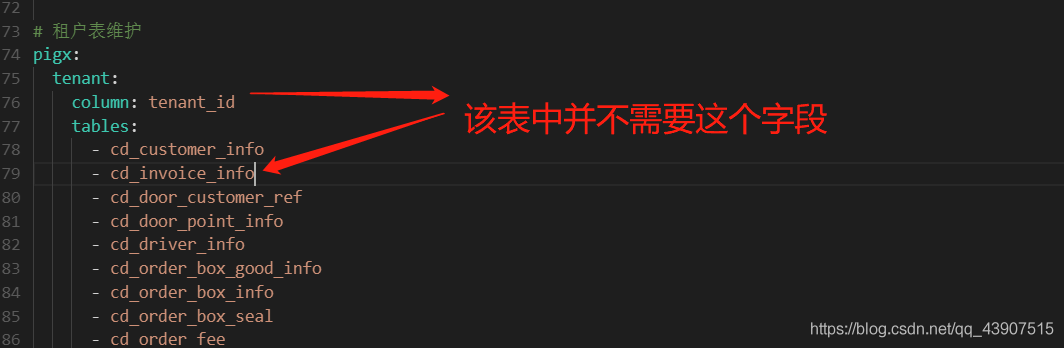
    first check the database to see if there is this field in the table. If not, add it. Then add this field to the corresponding mapper.xml and entity class. If the above problems do not exist or cannot be solved, it is recommended to check on the web side to see if there is this missing data in your input data. If not, check the service layer, Open the configuration in Nacos, maintain the table directory in this field, and find that there is this table, but this table does not need this field. Remove this table from it, and then you can do it

Summary

Don’t be afraid when you make mistakes. It’s best to read the error information and the reason patiently, and understand the meaning roughly. If you don’t understand, ask your colleagues first.

Typescript error “Cannot write file xxx because it would overwrite input file

The reason for this problem is that allowjs is turned on.

Because allowjs allows typescript compiler to compile JS. The compiled output file, namely XXX. JS, is the same as the source file.

So an error like “input file will be overwritten” will be reported.

In fact, we use third-party packaging tools such as webpack for our daily development. The compilation output is the responsibility of TS loader, so it is not necessary to care about the output of each TS file.

In this case, noemits can be set to true true

No Emit –
Do not emit compiler output files like JavaScript source code, source-maps or declarations.
This makes room for another tool like Babel, or swc to handle converting the TypeScript file to a file which can run inside a JavaScript environment.
You can then use TypeScript as a tool for providing editor integration, and as a source code type-checker.

In addition, you can specify the output directory to avoid conflicts.

For more details, please refer to https://github.com/kulshekhar/ts-jest/issues/1471

Uncaught type error: cannot read property ‘MSIE’ of undefined

Error:
uncaught typeerror: cannot read property ‘MSIE’ of undefined
reason:
$. Browser method has been removed in jQuery 1.9
write a $. Browser code by yourself (recommended)
write it in the script after jQuery reference

jQuery.browser = {};
(function () {
    jQuery.browser.msie = false;
    jQuery.browser.version = 0;
    if (navigator.userAgent.match(/MSIE ([0-9]+)\./)) {
        jQuery.browser.msie = true;
        jQuery.browser.version = RegExp.$1;
    }
})();

AttributeError: ‘Tensor‘ object has no attribute ‘_numpy‘

Problem Description:

In TF2. X environment, the user-defined loss function error, want to view y_ PRED and Y_ True, using K. Eval (y)_ pred),y_ Pred.numpy() error:
attributeerror: ‘tense’ object has no attribute ‘_ numpy’

resolvent:

Set run in model. Compile()_ When eagerly is changed to true, you can view it, but the running speed will be slow

Analysis of the reasons:

run_ Eagerly parameter setting model is to create dynamic graph or static graph (default is static graph, false)
running eagerly means that your model will run step by step, just like Python code. Dynamic graph mechanism may make the model run slowly, because it can’t use the optimization method of static graph in previous versions; But its advantage is that it is easy for you to debug
by default, we will compile your model and make it a static graph to get the best performance
reference blog
in TF2. X, by default, every tenor has numpy, but there is no GitHub problem description in keras