Author Archives: Robins

[Solved] paramiko.ssh_exception.SSHException: Error reading SSH protocol banner

Recently, SFTP upload and download should be configured in the project. After the environment is configured, the connection will report an error.

The error information is as follows:

paramiko.ssh_exception.SSHException: Error reading SSH protocol banner

Solution 1:

Set banner_ Timeout property value

You can change the transport.py under the paramiko Library in the site packages source file. The transport code is as follows:

 class Transport(threading.Thread, ClosingContextManager):
        self.banner_timeout = 15
        # how long (seconds) to wait for the handshake to finish after SSH

15 can be changed to 30

Solution 2:

Pay attention to check your host, port, username, password and other information, as well as upload or download directory path!

Linux Ubuntu ImportError: Libtk8.5.so: cannot open shared object file:No such file Install tkinter Library

Ubuntu resolves errors importerror: libtk8.5.so: cannot open shared object file:No such File to install Tkinter Library


terms of settlement


terms of settlement


at the beginning, I wanted to install with PIP3, but all of them made mistakes. It seems that PIP does not have this library?Then use </ font> instead

sudo apt-get update
sudo apt-get install python3-tk

   done

note: if there is an error in the installation process, you can refer to my previous article to add image source processing – Linux Ubuntu modify image source


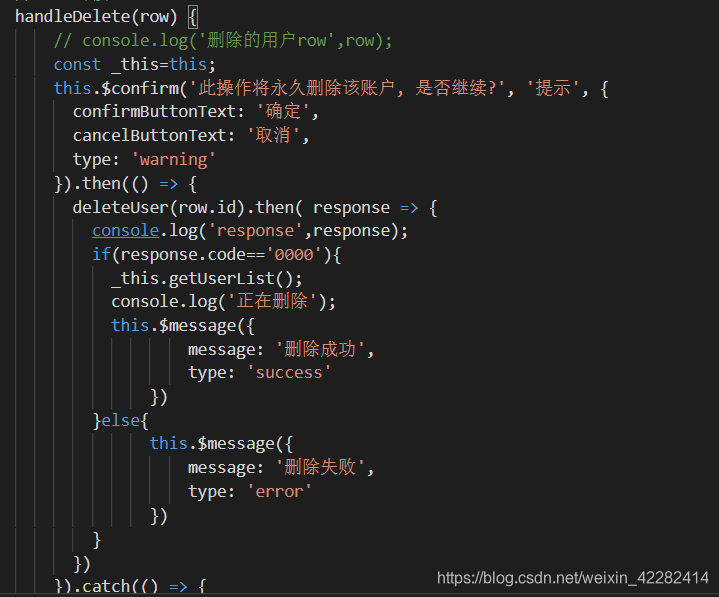
Uncaught (in promise) Error: Delete success at __webpack_exports__.default 405 error

Problem description

After deleting a user, you want to get the user list again, but you don’t get it again. You can see that the system reports uncaught (in promise) error: deletion succeeded at webpack_ Exports. Default this error

Problem solving

The reason is that the request is encapsulated in the project, and the response status code is hijacked. Find the processing location of the response in the corresponding project, annotate it and return it to the response directly

Facenet validate_on_lfw.py Error AssertionError: The number of LFW images must be an integer multip

When collecting Asian faces for model validation, run the following code:

python validate_on_lfw.py ../data/AsiaStar_160 ../20180402-114759 --lfw_pairs ../data/pairs_AsiaStar.txt

The error is as follows:

AssertionError: The number of LFW images must be an integer multiple of the LFW batch size

The number of pictures must be an integral multiple of the batch size. Batch size is 100, so the number of pictures must be an integral multiple of 100. In generating pairs. TXT, there must be 100 times of sample pairs.

org.hibernate.exception.SQLGrammarException: could not extract ResultSet, Resolve MySQL 5.7.5 or above GROUP_BY is not supported

Title: org.hibernate.exception.sqlgrammarexception: could not extract resultset, solve group above MySQL 5.7.5_ By is not supported

The reason for the problem:
MySQL 5.7.5 and above functions rely on the detection function. If only is enabled_ FULL_ GROUP_ By SQL mode (by default), MySQL will reject queries that select lists, having conditions, or order by lists, refer to non collection columns that are neither named nor functionally dependent on them in the group by clause( Before 5.7.5, MySQL did not detect any functional dependency, and only was not enabled by default_ FULL_ GROUP_ BY。 For a description of the behavior before 5.7.5, please refer to the MySQL 5.6 reference manual.)

Solution 1:

Open navcat,

Query with SQL:

select @@global.sql_ mode

The values are as follows:

ONLY_ FULL_ GROUP_ BY,STRICT_ TRANS_ TABLES,NO_ ZERO_ IN_ DATE,NO_ ZERO_ DATE,ERROR_ FOR_ DIVISION_ BY_ ZERO,NO_ AUTO_ CREATE_ USER,NO_ ENGINE_ SUBSTITUTION

Remove only_ FULL_ GROUP_ By, reset the value.

set @@global.sql_ mode
=’STRICT_ TRANS_ TABLES,NO_ ZERO_ IN_ DATE,NO_ ZERO_ DATE,ERROR_ FOR_ DIVISION_ BY_ ZERO,NO_ AUTO_ CREATE_ USER,NO_ ENGINE_ SUBSTITUTION’;

Solution 2:

Successful steps:

Item open

sudo vim /etc/mysql/conf.d/mysql.cnf

Scroll to the bottom of the file and copy and paste

[mysqld]
sql_ mode=STRICT_ TRANS_ TABLES,NO_ ZERO_ IN_ DATE,NO_ ZERO_ DATE,ERROR_ FOR_ DIVISION_ BY_ ZERO,NO_ AUTO_ CREATE_ USER,NO_ ENGINE_ SUBSTITUTION

Go to the bottom of the file

Save and exit input mode

sudo service mysql restart

Restart mysql
complete

Python PIP TypeError: expected str, bytes or os.PathLike object, not int

Exception:
Traceback (most recent call last):
File “/home/yu/anaconda3/envs/TRTC/lib/python3.6/site-packages/pip/basecommand.py”, line 215, in main
status = self.run(options, args)
File “/home/yu/anaconda3/envs/TRTC/lib/python3.6/site-packages/pip/commands/list.py”, line 157, in run
packages = self.get_outdated(packages, options)
File “/home/yu/anaconda3/envs/TRTC/lib/python3.6/site-packages/pip/commands/list.py”, line 168, in get_outdated
dist for dist in self.iter_packages_latest_infos(packages, options)
File “/home/yu/anaconda3/envs/TRTC/lib/python3.6/site-packages/pip/commands/list.py”, line 168, in
dist for dist in self.iter_packages_latest_infos(packages, options)
File “/home/yu/anaconda3/envs/TRTC/lib/python3.6/site-packages/pip/commands/list.py”, line 197, in iter_packages_latest_infos
with self._build_session(options) as session:
File “/home/yu/anaconda3/envs/TRTC/lib/python3.6/site-packages/pip/basecommand.py”, line 69, in _build_session
if options.cache_dir else None
File “/home/yu/anaconda3/envs/TRTC/lib/python3.6/posixpath.py”, line 78, in join
a = os.fspath(a)
TypeError: expected str, bytes or os.PathLike object, not int
Traceback (most recent call last):
File “/home/yu/anaconda3/envs/TRTC/bin/pip”, line 6, in
sys.exit(pip.main())
File “/home/yu/anaconda3/envs/TRTC/lib/python3.6/site-packages/pip/init.py”, line 249, in main
return command.main(cmd_args)
File “/home/yu/anaconda3/envs/TRTC/lib/python3.6/site-packages/pip/basecommand.py”, line 251, in main
timeout=min(5, options.timeout)) as session:
File “/home/yu/anaconda3/envs/TRTC/lib/python3.6/site-packages/pip/basecommand.py”, line 69, in _build_session
if options.cache_dir else None
File “/home/yu/anaconda3/envs/TRTC/lib/python3.6/posixpath.py”, line 78, in join
a = os.fspath(a)
TypeError: expected str, bytes or os.PathLike object, not int

Solution: (you can replace python with python3)
curl https://bootstrap.pypa.io/get-pip.py | python –
Guess the reason for the error is: setuptools and pip versions do not correspond, so upgrade the pip will be fine.

Flask Request an extension before_request after_request errorhandler

Contents of articles

1 before_first_Request: execute 2 before the first request after the project starts_ Request: execute 3 after before each request_ Request: after each request, the request will not be executed in case of exception. 4 errorhandler: you can customize the status code of the listening response and handle it: 5 teardown_ Request: a function is bound after each request, and will be executed even if an exception is encountered in ‘non debug’ mode. 6 template_ Global (): global template label 7 template_ Filter: global template filter

1 before_ first_ Request: the first request is executed after the project is started

@app.before_first_request
def before_first_request():
    print('Executed on the first request')

2 before_ Request: executed before each request

@app.before_request
def before_request():
    print('execute before each request')
    # return 'direct return' # If one writes a return return value, then the other before_request will not be executed and the view will not be executed.

be careful:

You can write more than one. If one has written the return value, then the others are before_ The request does not execute, nor does the view.

3 after_ Request: after each request, the request will not be executed in case of exception

def after_request(result):
    print('Execute after each request, requests with exceptions will not be executed')
    # The result is a wrapped response object that needs to be returned or else an error is reported
    return result

4 errorhandler: you can customize the status code of the listening response and process it

@app.errorhandler(404)
def errorhandler(error):
    print(error)  # is the specific error message
    return 'The 404 page ran to Mars'

@app.errorhandler(500)
def errorhandler(error):
    print('errorhandlererror message')
    print(error)
    return 'Server internal error 500'

5 teardown_ Request: a function is bound after each request, which will be executed even if an exception is encountered in non debug mode.

@app.teardown_request
def terardown_reqquest(error):
    print('The view function will be executed after execution regardless of whether the view function has an error')
    print('debug cannot be True if you want this function to work')
    print('error is the specific error message')
    print(error)

6 template_ Global (): global template label

@app.template_global()
def add(a1, a2):
    return a1+a2
# {{add(1,2)}}

This can be used as a global label in the template. It can be called directly in the template

{{add(1,2)}}

7 template_ Filter: global template filter

@app.template_filter()
def add_filter(a1, a2, a3):
    return a1 + a2 + a3

This can be used as a global filter in the template. It can be called directly in the template. The calling method is the same as template_ The difference between global:

{{1|add_filter(2,3,4)}}

Advantages:

Global template tags and global template filters simplify the need to manually transfer a function to a template call

# app.py
```

def test(a1,a2):
    return a1+a2
@app.route('/')
def index():
    return render_template('index.html',test=test)

```

# index.html
```
{{test(22,22)}}

```
ffmpeg:error while loading shared libraries: libopenh264.so.5

Problem Description:
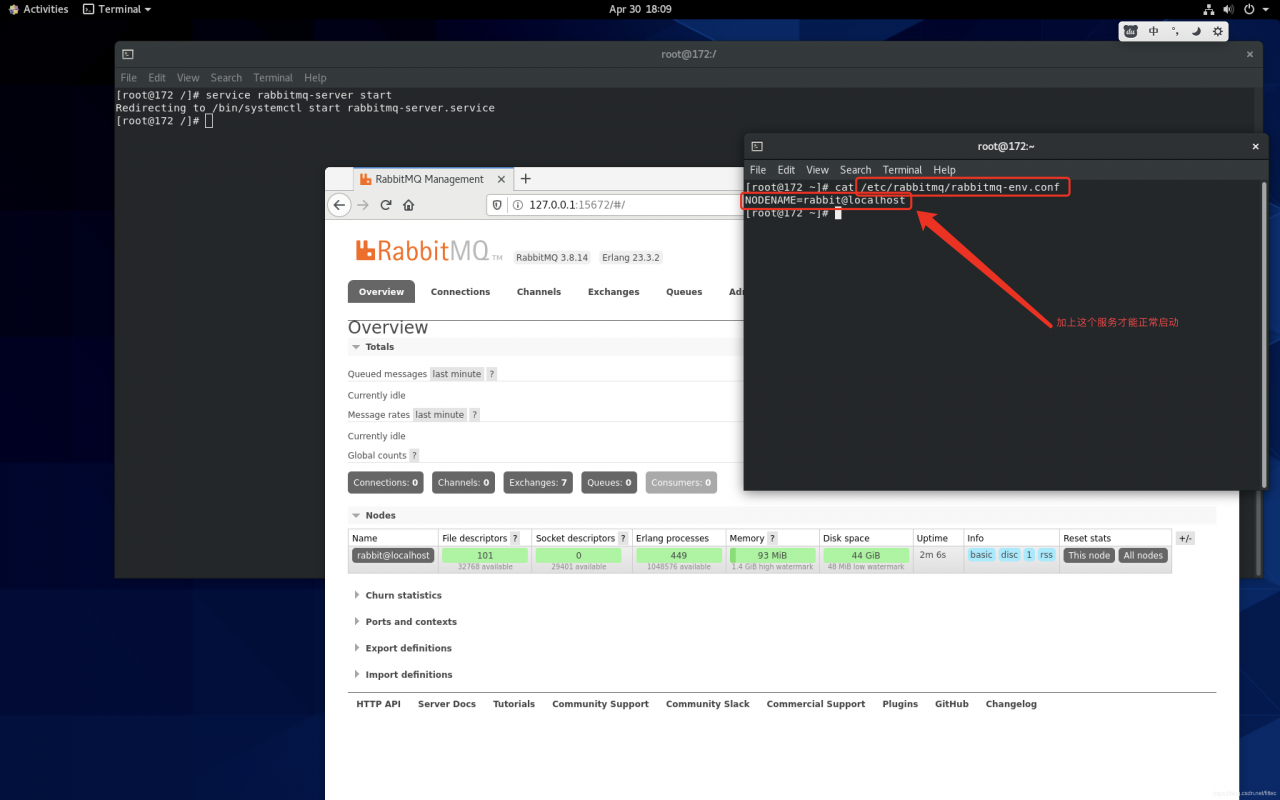
in the Ubuntu 10.04 system, we want to use ffmpeg for face cutting, but there is a title error. I can’t generate the corresponding version number by inputting ffmpeg – version. After Google[ https://stackoverflow.com/questions/62213783/ffmpeg-error-while-loading-shared-libraries-libopenh264-so-5 ]It turned out to be too new

I use the name of CONDA virtual environment, which is houyw. If houyw appears below, it is my virtual name.

(1) I’ll take a chance according to the instructions given by the boss

sudo ln -s ~/anaconda3/lib/libopenh264.so  ~/anaconda3/envs/houyw/lib/libopen264.so.5

As a result, there is no libopenh264. So in my ~/anaconda3/lib directory. So there is an error that the file does not exist

(2) At this time, I found that although there is no ~/anaconda3/lib directory, there is ~/anaconda3/envs/houyw/lib directory.. So I had a whim and tried to use libopenh264. So under ~/anaconda3/envs/houyw/lib (delete libopenh264. So. 5 first).

cd ~/anaconda3/envs/houyw/lib
rm -rf libopenh264.so.5
sudo ln -s libopenh264.so libopenh264.so.5

(3) Finished, input ffmpeg – version to display the version number correctly
(4) Summary: if libopenh264.so exists in ~/anaconda3/lib, use method 1, if not, use method 2. Finally, I hope everyone can solve this problem perfectly!!!