Author Archives: Robins

There is no getter for property named ‘id‘ in ‘class java.lang.Integer‘

Use mybatis to pass in parameters when the parameter type is string, integer, etc. If the if tag is used to determine whether the parameter is empty, there is no getter for property named ‘ID’ in ‘class java.lang.integer exception will be exploded.

Solution
1. Add @ param annotation to mapper interface parameters

List<User> selectUserById(@Param(value = "id") Integer id);

2、 It can be used when there is only one string or basic type parameter in your interface_ Parameter instead of parameter

<select id="selectUserById" resultType="com.zyq.entity.User" resultMap="userMap">
        SELECT * FROM t_user
        <where>
            <if test="_parameter != null">
                AND id = #{id}
            </if>
        </where>
    </select>

How to use C # to get image format without system. Drawing. Common

I wrote a blog to get the correct format of the picture. The code shown in the blog has been working well. Until today, when deploying the program to alicloud function computing, the following error occurred:

System.Drawing is not supported on this platform.

This shows that we can’t use GDI + related functions on the alicloud function computing server. Even so, we can still get the image format by reading the file header

   public static class ImageHelper
    {
        public enum ImageFormat
        {
            Bmp,
            Jpeg,
            Gif,
            Tiff,
            Png,
            Unknown
        }


        public static ImageFormat GetImageFormat(byte[] bytes)
        {
            var bmp = Encoding.ASCII.GetBytes("BM"); // BMP
            var gif = Encoding.ASCII.GetBytes("GIF"); // GIF
            var png = new byte[] {137, 80, 78, 71}; // PNG
            var tiff = new byte[] {73, 73, 42}; // TIFF
            var tiff2 = new byte[] {77, 77, 42}; // TIFF
            var jpeg = new byte[] {255, 216, 255, 224}; // jpeg
            var jpeg2 = new byte[] {255, 216, 255, 225}; // jpeg canon


            if (bmp.SequenceEqual(bytes.Take(bmp.Length)))
            {
                return ImageFormat.Bmp;
            }


            if (gif.SequenceEqual(bytes.Take(gif.Length)))
            {
                return ImageFormat.Gif;
            }


            if (png.SequenceEqual(bytes.Take(png.Length)))
            {
                return ImageFormat.Png;
            }


            if (tiff.SequenceEqual(bytes.Take(tiff.Length)))
            {
                return ImageFormat.Tiff;
            }


            if (tiff2.SequenceEqual(bytes.Take(tiff2.Length)))
            {
                return ImageFormat.Tiff;
            }


            if (jpeg.SequenceEqual(bytes.Take(jpeg.Length)))
            {
                return ImageFormat.Jpeg;
            }


            if (jpeg2.SequenceEqual(bytes.Take(jpeg2.Length)))
            {
                return ImageFormat.Jpeg;
            }


            return ImageFormat.Unknown;
        }
    }

new  ImageHelper   You need a binary array as a parameter, but that doesn’t mean you need to read all the contents of the file into memory. Using the following code can get better running effect:

    var fn = @"D:\1.jpg";
    using (var fs = File.OpenRead(fn))
    {
        var header = new byte[10];
        await fs.ReadAsync(header, 0, 10);
        var ext = ImageHelper.GetImageFormat(header);
        ext.Dump();
    }

Error in downloading update creation environment of CONDA: collecting package metadata (current_ repodata.json): failed

CONDA download updates are not available

There are the following problems

  environment variables:
                 CIO_TEST=<not set>
                CLASSPATH=.;C:\Program Files\Java\jdk1.8.0_131\lib
        CONDA_DEFAULT_ENV=base
                CONDA_EXE=F:\conda\anaconda\condabin\..\Scripts\conda.exe
               CONDA_EXES="F:\conda\anaconda\condabin\..\Scripts\conda.exe"
             CONDA_PREFIX=F:\conda\anaconda
    CONDA_PROMPT_MODIFIER=(base)
         CONDA_PYTHON_EXE=F:\conda\anaconda\python.exe
               CONDA_ROOT=F:\conda\anaconda
              CONDA_SHLVL=1
           CURL_CA_BUNDLE=<not set>
                 HOMEPATH=\Users\Lenovo
                     PATH=F:\conda\anaconda;F:\conda\anaconda\Library\mingw-w64\bin;F:\conda\ana
                          conda\Library\usr\bin;F:\conda\anaconda\Library\bin;F:\conda\anaconda\
                          Scripts;F:\conda\anaconda\bin;F:\conda\anaconda;F:\conda\anaconda\Libr
                          ary\mingw-w64\bin;F:\conda\anaconda\Library\usr\bin;F:\conda\anaconda\
                          Library\bin;F:\conda\anaconda\Scripts;F:\conda\anaconda\bin;F:\conda\a
                          naconda\condabin;C:\Program Files\Java\jdk1.8.0_131\bin;"C:\Program
                          Files\Java\jdk1.8.0_131\jre\bin;";F:\Xshell;C:\Program Files\Microsoft
                          MPI\Bin;C:\WINDOWS\system32;C:\WINDOWS;C:\WINDOWS\System32\Wbem;C:\WIN
                          DOWS\System32\WindowsPowerShell\v1.0;C:\Program Files\IDM Computer
                          Solutions\UltraEdit;C:\Program Files\dotnet;F:\matlab\mat\runtime\win6
                          4;F:\matlab\mat\bin;F:\matlab\mat\polyspace\bin;C:\Program
                          Files\MySQL\MySQL Server 8.0\bin;D:\opencv4\x64\vc16\bin;C:\Program
                          Files\python;C:\Program Files\python\Scripts;F:\_install\BtSoft\panel\
                          script;F:\spss\install\JRE\bin;F:\nodejs\nodejs;F:\phantomjs\phantomjs
                          -2.1.1-windows\phantomjs-2.1.1-windows\bin;F:\graphviz\bin\dot.exe;F:\
                          git\Git\cmd;C:\WINDOWS\System32\OpenSSH;F:\conda\anaconda;F:\conda\ana
                          conda\Library\mingw-w64\bin;F:\conda\anaconda\Library\usr\bin;F:\conda
                          \anaconda\Library\bin;F:\conda\anaconda\Scripts;C:\Users\Lenovo\AppDat
                          a\Local\Programs\Python\Python38\Scripts;C:\Users\Lenovo\AppData\Local
                          \Programs\Python\Python38;F:\python\python\Scripts;F:\python\python;F:
                          \python\python37\Scripts;F:\python\python37;C:\Users\Lenovo\AppData\Lo
                          cal\Microsoft\WindowsApps;F:\idea\idea\IntelliJ IDEA
                          2019.3.3\bin;.;F:\pycharm\PyCharm 2019.3.3\bin;.;C:\Program
                          Files\MySQL\MySQL Server 8.0\bin;F:\pycharm\PyCharm Community Edition
                          2020.3.3\bin;.;C:\Users\Lenovo\AppData\Roaming\npm;F:\graphviz\bin
             PSMODULEPATH=C:\Program Files\WindowsPowerShell\Modules;C:\WINDOWS\system32\Windows
                          PowerShell\v1.0\Modules
       REQUESTS_CA_BUNDLE=<not set>
            SSL_CERT_FILE=<not set>
           UNRAR_LIB_PATH=C:\Program Files\python\Lib\site-packages\unrar\UnRAR.dll

     active environment : base
    active env location : F:\conda\anaconda
            shell level : 1
       user config file : C:\Users\Lenovo\.condarc
 populated config files : C:\Users\Lenovo\.condarc
          conda version : 4.10.1
    conda-build version : not installed
         python version : 3.8.5.final.0
       virtual packages : __win=0=0
                          __archspec=1=x86_64
       base environment : F:\conda\anaconda  (writable)
      conda av data dir : F:\conda\anaconda\etc\conda
  conda av metadata url : https://repo.anaconda.com/pkgs/main
           channel URLs : https://mirrors.ustc.edu.cn/anaconda/cloud/win-64
                          https://mirrors.ustc.edu.cn/anaconda/cloud/noarch
                          https://mirrors.ustc.edu.cn/anaconda/cloud/menpo/win-64
                          https://mirrors.ustc.edu.cn/anaconda/cloud/menpo/noarch
                          https://mirrors.ustc.edu.cn/anaconda/cloud/bioconda/win-64
                          https://mirrors.ustc.edu.cn/anaconda/cloud/bioconda/noarch
                          https://mirrors.ustc.edu.cn/anaconda/cloud/msys2/win-64
                          https://mirrors.ustc.edu.cn/anaconda/cloud/msys2/noarch
                          https://mirrors.ustc.edu.cn/anaconda/cloud/conda-forge/win-64
                          https://mirrors.ustc.edu.cn/anaconda/cloud/conda-forge/noarch
                          https://mirrors.ustc.edu.cn/anaconda/pkgs/free/win-64
                          https://mirrors.ustc.edu.cn/anaconda/pkgs/free/noarch
                          https://mirrors.ustc.edu.cn/anaconda/pkgs/main/win-64
                          https://mirrors.ustc.edu.cn/anaconda/pkgs/main/noarch
          package cache : F:\conda\anaconda\pkgs
                          C:\Users\Lenovo\.conda\pkgs
                          C:\Users\Lenovo\AppData\Local\conda\conda\pkgs
       envs directories : F:\conda\anaconda\envs
                          C:\Users\Lenovo\.conda\envs
                          C:\Users\Lenovo\AppData\Local\conda\conda\envs
               platform : win-64
             user-agent : conda/4.10.1 requests/2.25.1 CPython/3.8.5 Windows/10 Windows/10.0.19041
          administrator : False
             netrc file : None
           offline mode : False


An unexpected error has occurred. Conda has prepared the above report.

If submitted, this report will be used by core maintainers to improve
future releases of conda.
Would you like conda to send this report to the core maintainers?

[y/N]: y
Upload did not complete.

Thank you for helping to improve conda.
Opt-in to always sending reports (and not see this message again)
by running

Solution

I’ve tried all the solutions to this problem on the Internet. I’ve also tried to change the source, uninstall and reload CONDA, but it’s not easy to use
finally! I found my network agent on!!! Just turn it off
you can check whether your network agent is on or off. Or refer to the great gods blog to set up a proxy, but I won’t, I just simply and rudely turn it off.

Report error when using microwave “must either be declared abstract” abstract method “getWXPayDomain()” in WXPayConfig

report errors:

Handler dispatch failed; nested exception is java.lang.AbstractMethodError:“must either be declared abstract   abstract method ‘getWXPayDomain()’ in ‘WXPayConfig

The payment can not work normally


solve:

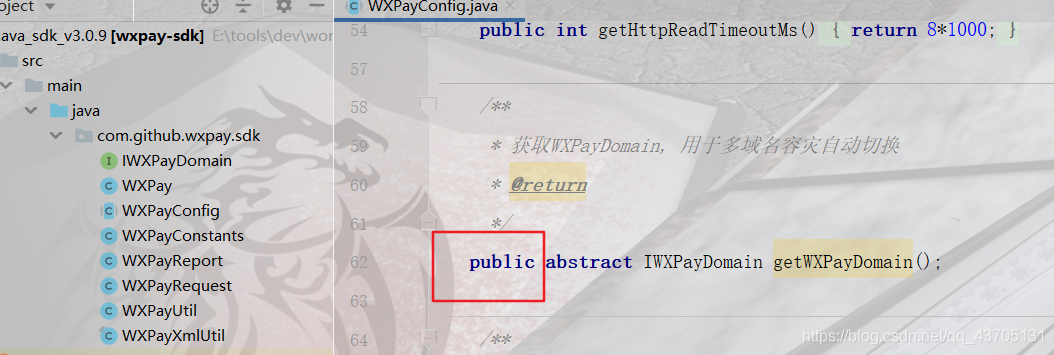
You need to download the Java version of the SDK package officially, and then open the wxpayconfig file

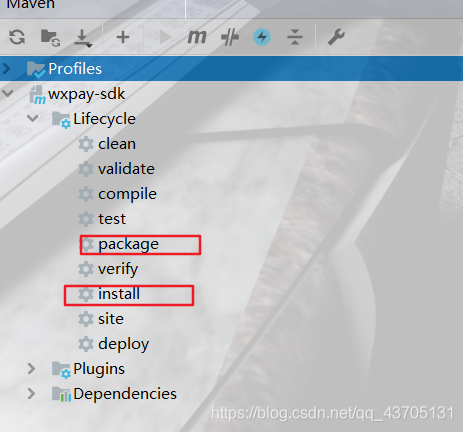
Add a public to all the abstract methods, and then package and install them locally to solve the problem


After watching, Congratulations, I know a little more!!!

The more you know, the more you don’t know!  
~ Thank you for reading,   Your support is the biggest motivation for my study!   come on.  , Strangers work together and encourage each other!!

Note: if there is any improvement or mistake in this article, you are welcome to specify one or two~~

net.sf.jasperreports.compilers.ReportExpressionEvaluationData

net.sf.jasperreports.compilers.ReportExpressionEvaluationData

net.sf.jasperreports.compilers.ReportExpressionEvaluationData

net.sf.jasperreports.compilers.ReportExpressionEvaluationData

An error occurred when using Jasper + ireport to generate report file
cause: Jasper uses version 5.6, which corresponds to ireport 5.6, and then uses Tibco Jaspersoft studio-6.16.0 to edit and compile the template, resulting in the addition of new elements of version 6.16 to the template and the use of jar package of Jasper 5.6 in the project, which causes the title exception, Because the lower version jar can’t compile the higher version elements.

Error reporting of eslint in webstorm

Background:

Webstorm2019.1 editor, import a new project, the package.json has been written, directly NPM install to install node_ Module package. And then the question came…

Problem Description:

Question 1: after installing node_ After the module, the eslint of the project does not work, so it can’t check the syntax and repair automatically; See editor tips eslint:this.cliEnigne is not a XXXX

Question 2: after installing eslint, the verification rules are not what you want…. For example: force all HTML tags to be written in Hump style, & lt; el-button> Change to & lt; ElButton> It’s awkward to look at…

terms of settlement:

The solution to problem 1:

The version of webstorm does not correspond to the version of eslint. I have reduced the version of eslint in the project.

npm uninstall eslint                  // Uninstall eslint

npm install [email protected] –save-dev                 // Install a lower version of eslint

be careful:   Remember to install it in devdependencies. The following items will not be packaged in the production environment. Command NPM install XXX   — When I installed save dev, I didn’t add dev, but it was installed under dependencies. As a result, I couldn’t install it or caused other errors.

The solution to problem 2:

Tried a lot of ways, also rewritten the eslintrc.js rule, added the rules about hump in the rules, but it didn’t work, I don’t know why…..

Finally, compared with the previous project, I changed the version of eslint package to the same one, and the problem was solved!

I changed these two bags

npm install [email protected] –save-dev

npm install [email protected] –save-dev

Little knowledge:

Do you really understand the difference between devdependencies and dependencies?

devdependencies for local environment development dependencies User publishing environment

Devdependencies are modules that will only be relied on in the development environment, and the production environment will not be included in the package. Through node_ Env = development or node_ Env = production specifies the development or production environment
the packages that depend on can be used not only in the development environment, but also in the production environment. In fact, this sentence is the key. According to this concept, it’s easy to decide whether to use — save or — save dev when installing a module


Solution of xshell error report on 2021.05.03

1. Problem: xshell error

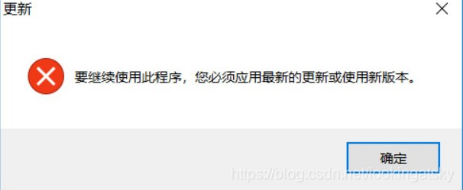
Xshell 6 prompts “to continue using this program, you must apply the latest update or use the new version”, but it is already the latest version

2. Solutions

According to the search to other people also encounter the solution of this situation, sort out, oneself solved the process of this problem
use the binary editor to modify the nslicense.dll file. The editor used here is UltraEdit
file location: xshell installation root directory

Specific steps:
Step 1: download the UltraEdit editor
Step 2: open the nslicense.dll file with the UltraEdit editor
Step 3: search for “7F 0C 81 F9 80 33 E1 01 0f 86 81”
Step 4: change “86” to “83”
Step 5: save the file

Re open xshell, found that it can be used, happy..

If xshell 5, step 3 searches for “7F 0C 81 F9 80 33 E1 01 0f 86 80”

Can’t Dubbo’s @ service be injected into the spring container?

Solution: rebuild the module and test again
when testing the Dubbo provider, adding @ service under the Dubbo path to the business implementation code will report that a test class is not injected
org.springframework.beans.factory.unsatisfied dependencyexception: error creating bean with name ‘com.tanhua.dubbo.server.api.testrecommenduserapi XXXXXX,
No qualifying bean of type ‘com. Tanhua. Dubbo. Server. API. Recommenduserapi’ available: (I think the interface recommenduserapi was not injected), so I replaced it with spring’s @ service line; But shouldn’t Dubbo’s @ service have spring’s @ service function?Baidu for a long time did not belong to their correct answer; After carefully checking the scan package, the annotation @ runwith (springrunner. Class) @ springboottest
on the test class has been added, and the @ service under Dubbo still reports an error
at last, the module was simply rebuilt by copying and pasting, and the final test was successful!! But what’s wrong?I don’t know. Maybe it’s related to building a module! Hope it works…

Solve the problem of jdk8 after win7 is installed. Has value ‘1.8’, but ‘1.7’ is required

I win7 x64 Ultimate Edition, installed JDK7 and jdk8 at the same time, after uninstalling jdk8, the CMD command line input: Java – version, originally thought to display java version 1.7, the result of error: has value ‘1.7’, but ‘1.8’ is required

 
I look at Java_ Home, the environment variable, is found to be OK, pointing to C:// Java/jdk1.7.0

resolvent:

After JDK7 is installed, jdk8 is installed, because when JDK1.8 is installed, java.exe, javaw.exe and javaws.exe are automatically copied to the directory C: (Windows) system32, because the priority of this directory in the windows environment variable is higher than Java_ The priority of the environment variable set by home.

After understanding this, you will know the cause of the error. Although JDK1.8 has been uninstalled, the three executable files of java.exe, javaw.exe and javaws.exe in the directory of C: (Windows) system32 are still JDK1.8, so the Java version of jdk1.7 is_ Copy the three corresponding executable files under home/bin to the directory of C: Windows/system32. At this time, enter Java – version on the command line of CMD, and everything is normal.

 
My situation is just the opposite of his, so I replace several files of jdk8 and overlay them in the directory of C: (Windows) system32.

According to the above modification, enter Java – version in CMD to display version 1.8

java.lang.AbstractMethodError: Receiver class com.alibaba.cloud.sentinel.feign.SentinelContractHolde

Caused by: java.lang.AbstractMethodError: Receiver class com.alibaba.cloud.sentinel.feign.SentinelContractHolder does not define or inherit an implementation of the resolved method abstract parseAndValidatateMetadata(Ljava/lang/Class;) Ljava/util/List; of interface feign.Contract.

When doing openfeign for sentinel service, I encountered the following errors:

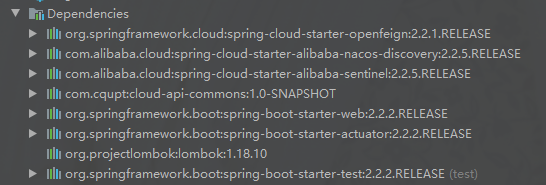
according to the source code tracing, I found that there was a problem with the implementation class of feign’s contract interface. In my project springcloud, Sr1 version h, depends on the following:

the reason for the problem is that the version is inconsistent. For feign’s contract interface, 2.2.1 and 2.2.2 are different
2.2.1.RELEASE:

// TODO: break this and correct spelling at some point
List<MethodMetadata> parseAndValidatateMetadata(Class<?> targetType);

2.2.2.RELEASE:

List<MethodMetadata> parseAndValidateMetadata(Class<?> targetType);

In 2.2.1.release, there is a line of comment description. The spelling of interface method name is wrong. In 2.2.2.release, the method name has been corrected, that is, the method name has changed
the sentinelcontractholder class in spring cloud Alibaba sentinel uses this method of the interface (feign 2.2.1. Release version)


```java
@Override
public List<MethodMetadata> parseAndValidatateMetadata(Class<?> targetType) {
	List<MethodMetadata> metadatas = delegate.parseAndValidatateMetadata(targetType);
	metadatas.forEach(metadata -> METADATA_MAP
			.put(targetType.getName() + metadata.configKey(), metadata));
	return metadatas;
}

After finding out the reason, modify the implementation class of contract interface of feign. Create a package of com.alibaba.cloud.sentinel.feign in the appropriate place of the project. Modify the implementation class sentinelcontractholder as follows:

/**
 * @author geng
 * @create 2021/4/30 -- 10:47
 */
public class SentinelContractHolder implements Contract {
    private final Contract delegate;

    /**
     * map key is constructed by ClassFullName + configKey. configKey is constructed by
     * {@link feign.Feign#configKey}
     */
    public final static Map<String, MethodMetadata> METADATA_MAP = new HashMap<>();

    public SentinelContractHolder(Contract delegate) {
        this.delegate = delegate;
    }

    @Override
    public List<MethodMetadata> parseAndValidateMetadata(Class<?> targetType) {
        List<MethodMetadata> metadatas = delegate.parseAndValidateMetadata(targetType);
        metadatas.forEach(metadata -> METADATA_MAP
                .put(targetType.getName() + metadata.configKey(), metadata));
        return metadatas;
    }
}

Run again, start successfully!

PhpMyAdmin localhost only displays the codes of configuration

One day, when using phpMyAdmin, you can’t jump out of the login page. Instead, it’s the code in configuration (see below). Due to the Mac operating system, the methods given by the Internet for a long time are not available. Later, it seems that some of the previous settings have been overridden.

<?php
/* vim: set expandtab sw=4 ts=4 sts=4: */
/**
 * Main loader script
 *
 * @package PhpMyAdmin
 */

/**
 * Gets some core libraries and displays a top message if required
 */
require_once 'libraries/common.inc.php';

/**
 * display Git revision if requested
 */
require_once 'libraries/display_git_revision.lib.php';
require_once 'libraries/Template.class.php';

/**
 * pass variables to child pages
 */
$drops = array(
    'lang',
    'server',
    'collation_connection',
    'db',
    'table'
);
foreach ($drops as $each_drop) {
    if (array_key_exists($each_drop, $_GET)) {
        unset($_GET[$each_drop]);
    }
}
unset($drops, $each_drop);

The LoaLoaLoaLoaLoaLoaLoaLoaLoaLoaLoaLoaLoaLoaLoaLoaLoaLoaLoaLoaLoaLoaLoaLoaLoaLoaLoaLoaLoaLoaLoaLoaLoaLoaLoaLoaLoaLoaLoaLoaLoaLoaLoaLoaLoaLoaLoaLoaLoaLoaLoaLoaLoaLoaLoaLoaLoaLoaLoaLoaLoaLoaLoaLoaLoaLoaLoaLoaLoaLoaLoaLoaLoaLoaLoaLoaLoaLoaLoaLoaLoaLoaLoaLoaLoaLoaLoaLoaLoaLoaLoaLoaLoaLoaLoaLoaLoaLoaLoaLoaLoaLoaLoaLoaLoaLoaLoaLoaLoaLoaLoaLoamodulmodulmodulmodulmodulmodulmodulmodulmodulmodulmodulmodulmodulmodulmodulmodulmodulmodulmodulmodulmodulmodulmodulmodulmodulmodulmodulmodulmodulmodulliblibliblibliblibliblibliblibliblibliblibliblibexe/ apaapache2/libliblibliblibliblibgaggaggaggaggaggaggaggaggaggaggaggaggaggaggaggaggaggaggaggaggaggaggaggaggaggaggag
sudo apachectl restart 256303;`