answer
macBy default, there is no php.ini file, but there is a corresponding template file php.ini.default, located here /etc/php.ini.default, you can copy a copy for modification.
cd /etc
sudo cp php.ini.default php.inimacBy default, there is no php.ini file, but there is a corresponding template file php.ini.default, located here /etc/php.ini.default, you can copy a copy for modification.
cd /etc
sudo cp php.ini.default php.ini[Vue warn]: Unknown custom element: did you register the component correctly? For recursive components, make sure to provide the "name" option.
The cause of the problem is: related components are used, but not introduced
First find the relevant code caused the error, see if there is use similar components, such as the use radio-groupand radioassembly, but not introduced, this time above error occurs
 <el-form-item label="状态:">
      <el-radio-group v-model="formData.status">
            <el-radio :key="item.value"
            :label="item.value"
            v-for="item in statusOptions" >{{item.label}}</el-radio>
      </el-radio-group>
</el-form-item>
Found in the project directory main.js, and then import {} fromintroduced into related components, re- Vue.use()use. For example:
import {
    Radio,
    RadioGroup,
} from 'element-ui';

Vue.use(Radio);
Vue.use(RadioGroup);
This completes the global introduction of components
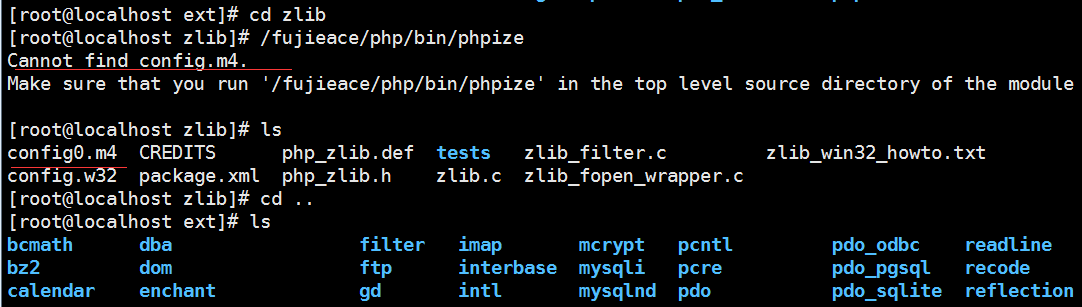
Compile expansion pack following names may not be config.m4, there may be a similar config0.m4document; therefore not the same name is not found, we need to use mv config0.m4 config.m4; modify the file name, run again phpize.
1. The screenshot of error report is as follows:
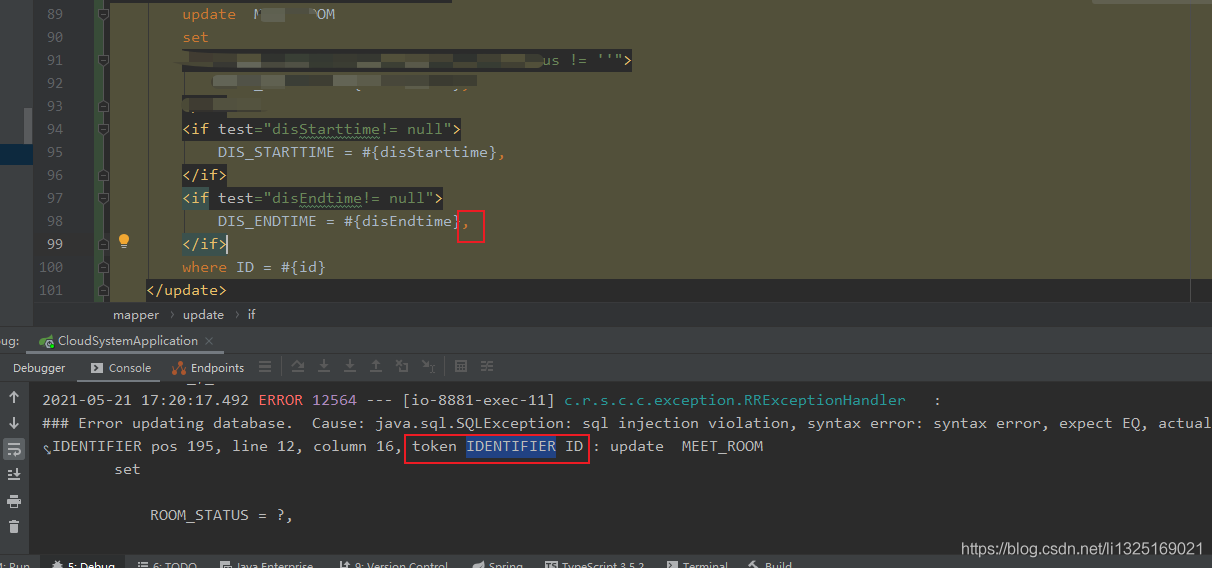
2. According to the error report output, check the position after the token, which appears near the ID field. The reason is that after LZ updates the last attribute of the statement, there is an extra comma in front of the where keyword.
3. Solutions
Remove the comma in the red box in the screenshot of step 1.
Error tokenizing data. C error: Expected 18 fields in line 173315, saw 20
The content of this line is
b55421db8f2f7f9610e7dfc08bcc76e5 Sales consultant listed company with high salary and high commission - 719 \N 1 10000 5000 20190314 20190413 0 -1 null College \N \N Job duties: 1. independent and high quality to complete the reception of visiting customers, to introduce courses and related services, and lead to registration; 2. patient, detailed answers to customer questions of the consultation 3.Explore the potential needs of customers and make accurate recommendations for the courses; 4.Work with the team to complete sales tasks according to the sales target set by the company; 5.Work with other departments to complete the work. Requirements: 1. Good customer service consciousness, good self-motivation; 2. Strong learning ability, active and positive, team spirit; 3. Quick thinking, fast reaction, standard Mandarin; 4. Sales experience is preferred. Benefits: 1. perfect social insurance (five insurance and one gold); 3. position promotion���� clear: course consultant - reserve principal - principal - regional director; 4. training: professional vocational skills training + personalized career promotion guidance; 5. open office environment of the Internet company. ☆ This is a team belonging to young people, this is the platform for you to play, this is your wonderful! Looking forward to growing with you!
Pandas can’t parse
although this line of data can be changed to the correct form after processing, there are 4000 + lines of data with different problems.
Using error_ bad_ Lines = false to solve the problem and ignore the disordered lines
# command-line-arguments
.\main.go:5:4: no new variables on left side of :=
package main
import “fmt”
func main(){
var b int;
b := 1;
fmt.Println(b);
}
The correct way to write it: remove the : or add a new variable
package main
import “fmt”
func main(){
var b int;
b,a := 1,2;
fmt.Println(b,a);
}
// No compile error is generated at this point because a new variable is declared, because := is a declaration statement
Error starting vue project
These dependencies were not found:
* @/views/md/TemplateSetting/create in ./src/router/modules/md.js
* @/views/md/TemplateSetting/index in ./src/router/modules/md.js
To install them, you can run: npm install –save @/views/md/TemplateSetting/create @/views/md/TemplateSetting/index
This is because the create page of the vue project is defined in md.js but the create.vue page is missing so it reports an error
Xcode is upgraded to 12.4. When you run iPhone 12 online, you will be prompted with errors were accounted while preparing your device for development. Please check the devices and simulators window.
Error message:
container_ linux.go:235: starting container process caused “process_ linux.go:258: applying cgroup configuration for process caused “Cannot set property TasksAccounting, or unknown property.””
/usr/bin/docker-current: Error response from daemon: oci runtime error: container_ linux.go:235: starting container process caused “process_ linux.go:258: applying cgroup configuration for process caused “Cannot set property TasksAccounting, or unknown prop
After the system is rebooted, the docker cannot be started. After the docker is reloaded, the startup container will report an error, as shown above
reason:
The docker version is not compatible with the operating system version. Upgrade the docker version
I use Yum to install docker. By default, I can only pull to a lower version, so I downloaded RPM docker from the Internet.