Author Archives: Robins

[app] install and compile libimobililedevice, How to solve the error

Problem Description:

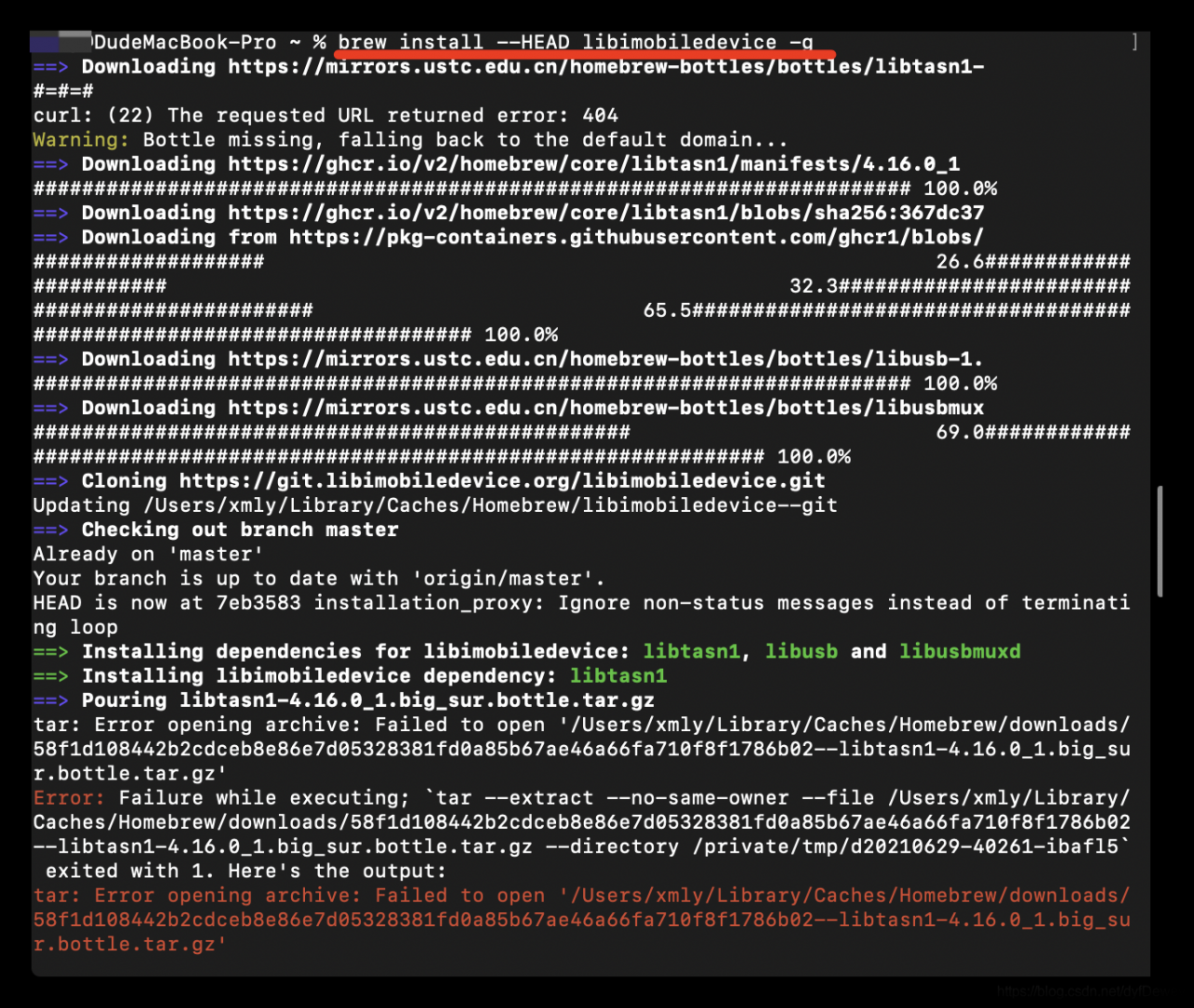
Error: Failure while executing; `tar --extract --no-same-owner --file /Users/xmly/Library/Caches/Homebrew/downloads/58f1d108442b2cdceb8e86e7d05328381fd0a85b67ae46a66fa710f8f1786b02--libtasn1-4.16.0_1.big_sur.bottle.tar.gz --directory /private/tmp/d20210629-40261-ibafl5` exited with 1. Here's the output:
tar: Error opening archive: Failed to open '/Users/xmly/Library/Caches/Homebrew/downloads/58f1d108442b2cdceb8e86e7d05328381fd0a85b67ae46a66fa710f8f1786b02--libtasn1-4.16.0_1.big_sur.bottle.tar.gz'

Cause of the problem:

Maybe some of the dependent libraries were not downloaded
later, after the installation environment was prepared, they succeeded


* brew install build-essential automake autoconf git cmake pkg-config libtool

install

* Method 1:
	git clone https://github.com/libimobiledevice/libimobiledevice.git
	cd libimobiledevice
	./autogen.sh
	make
	sudo make install

* Method 2:
	brew install --HADE libmobliedevice
	# If you do not add - HADE installation is an older version, does not support IOS 10 or above

[Solved] Failed to resolve: com.serenegiant:common:1.5.20

When using an appcloud project composed of multiple import modules, failed to resolve: com.se appears after the operation UI on the tablet side of the project is imported and synchronized renegiant:common : 1.5.20 find for many days can not solve, but today found the corresponding solution, record the first time to solve the bug excited, pro test effective.

Solution:

1. download the required common package

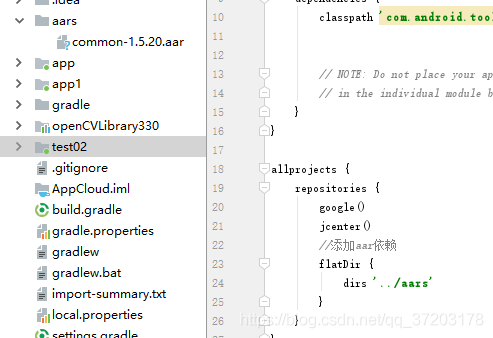
2. Set up an AARS folder in the root directory of the whole project, and unzip the downloaded common package and put it in it

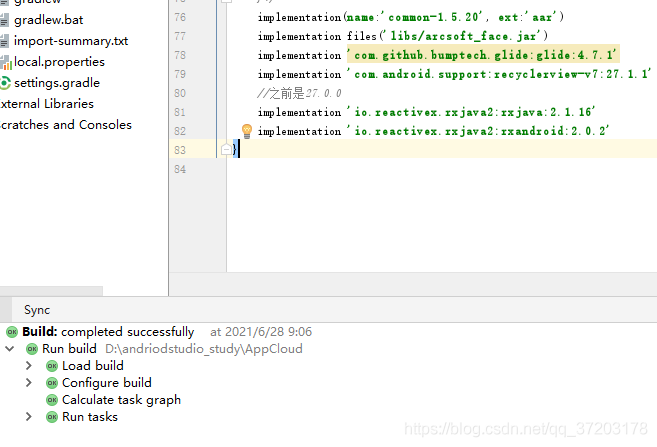
After adding the folder and common package, you need to add the corresponding AAR dependency in the build. Gradle of the root directory, as shown on the right side of the figure above.

3. AAR dependency code to be added

//Adding aar dependencies
flatDir {
    dirs '../aars'
}

4. Set in build.gradle of the module to be referenced

implementation(name:'common-1.5.20', ext:'aar')

And note the previous code about the package, such as

implementation('com.serenegiant:common:1.5.20') {
    exclude module: 'support-v4'
}

Or

api “com.se renegiant:common :${commonLibVersion}”

5. After modification, synchronize the whole project, and then the problem is solved.

[Solved] Excel plug in installation failed: unable to resolve the value of property ‘type’

[Description of the problem]
The third party to Excel plug-in installation package as Figure 1, I have not done Excel plug-in installation package, it is estimated that the callVSTOInstaller.exe

The installation failed with the following message

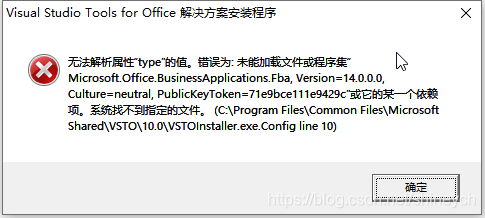
ERROR message ” The value of the property ‘type’ cannot be parsed. The error is: Could not load file or assembly ‘Microsoft.Office.BusinessApplications.Fba,Version=14.0.0.0,Culture=nutral, PublicKeyToken=71e9ce111e9429c’ or one of its dependencies. The system cannot find the file specified. (C:\Program Files\Common Files\Microsoft Shared\VSTO\10.0\VSTOInstaller.exe.Config Line 10)

[Solution]
Fixed location plugin folder


    1. C:\Program Files (x86)\Common Files\Microsoft shared\VSTO\10.0 or C:\Program Files\Common Files\Microsoft shared\VSTO\10.0.

Rename VSTOInstaller.exe.config, such as VSTOInstaller.exe.config.old. and reinstall successfully.

[Run Result]
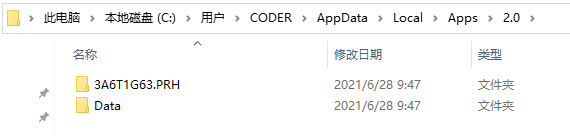
After installation plug-in directory.


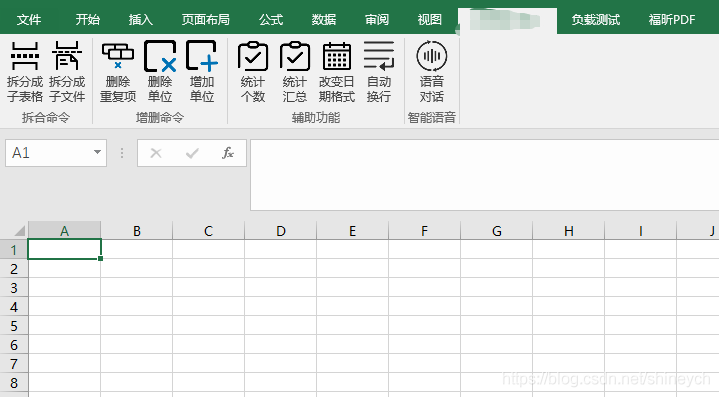
Normal operation interface.

[Solved] YOLOv5 Model training error: TypeError: new(): invalid data type ‘str’

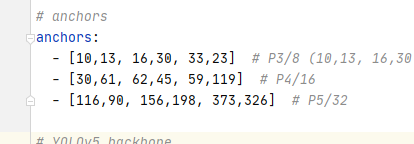
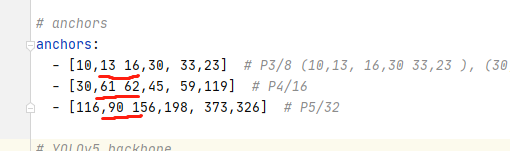
After modifying the anchors in yolov5s.yaml, I made an error report when I retrained. After carefully looking at the numbers in “[]”, I found that the reason was as follows:
the number in “[]” 👇 Here is the original configuration file

👇 This is my revised version of

because of the lack of “,” leading to continuous error reporting, we must be more careful and encourage each other

Uni-app Error when assigning a value to a component: [system] TypeError: Cannot read property ‘name‘ of undefined

[system] TypeError: Cannot read property ‘name’ of undefined

This error occurs because some of the attributes in your curly brackets are undefined
1. Wrong attribute name
2. Another case: when the data is obtained asynchronously, there is no such data attribute during initialization
in my case, case 2, the value of the string is relatively deep, and the definition is only one level up
value structure:

{
    "id": 105,
    ...
    "dealer": {
        "sn": null,
        "password": null,
        "name": "xx",
        "departmentSn": null,
    },
    ...
},
		<view class="content-row">
			 <text class="cause">待处理:</text>
			 <text class="cause-detail" v-if="claim_detail_basic_list" >{{claim_detail_basic_list.dealer.name}}</text>
			</view>

This side has done error prevention processing

v-if="claim_detail_basic_list"

Because the value object has to be further “claim”_ detail_ basic_ List. Dealer. Name ”

chunk-vendors.js:3874 [Vue warn]: Error in render: "TypeError: Cannot read property 'name' of undefined"

The solution can go one step further.

<view class="content-row">
			 <text class="cause">ToDoList:</text>
			 <text class="cause-detail" v-if="claim_detail_basic_list.dealer" >{{claim_detail_basic_list.dealer.name}}</text>
			</view>

{{claim_ detail_ basic_ List. Dealer. Name}
OK! Reason: the deep object was not created and there was no attribute of the object when it was initialized.

[Solved] Tensorflow/Keras Error reading weights: ValueError: axes don‘t match array

Error information:

Traceback (most recent call last):
  File "bs.py", line 149, in <module>
    tcpserver1=MYTCPServer(('192.168.0.109',54321)) 
  File "wserver_bs.py", line 65, in __init__
    self.model.load_weights(weight_filepath)
  File "/home/ps/anaconda3/envs/anomaly/lib/python3.6/site-packages/tensorflow/python/keras/engine/training.py", line 162, in load_weights
    return super(Model, self).load_weights(filepath, by_name)
  File "/home/ps/anaconda3/envs/anomaly/lib/python3.6/site-packages/tensorflow/python/keras/engine/network.py", line 1424, in load_weights
    saving.load_weights_from_hdf5_group(f, self.layers)
  File "/home/ps/anaconda3/envs/anomaly/lib/python3.6/site-packages/tensorflow/python/keras/saving/hdf5_format.py", line 749, in load_weights_from_hdf5_group
    layer, weight_values, original_keras_version, original_backend)
  File "/home/ps/anaconda3/envs/anomaly/lib/python3.6/site-packages/tensorflow/python/keras/saving/hdf5_format.py", line 456, in preprocess_weights_for_loading
    weights[0] = np.transpose(weights[0], (3, 2, 0, 1))
  File "<__array_function__ internals>", line 6, in transpose
  File "/home/ps/anaconda3/envs/anomaly/lib/python3.6/site-packages/numpy/core/fromnumeric.py", line 653, in transpose
    return _wrapfunc(a, 'transpose', axes)
  File "/home/ps/anaconda3/envs/anomaly/lib/python3.6/site-packages/numpy/core/fromnumeric.py", line 58, in _wrapfunc
    return bound(*args, **kwds)
ValueError: axes don't match array

Tossed half a night, the Internet to check a variety of methods are useless
the fault lies in load_ On the weights function, it’s a matter of setting the model!

When loading the model, the default input size is used

model = cnn.CNNLikeModel() 

The actual size of the input tensor is different from the default size, which leads to this error.

solve

1. Modify the default value of the function
2. Fill in the correct value when using this function.

[Solved] Win10 Install wsl2 unbuntu Error: WslRegisterDistribution failed with error: 0x80070002

Installing, this may take a few minutes...
WslRegisterDistribution failed with error: 0x80070002
Error: 0x80070002 The system cannot find the file specified.

Press any key to continue...

Solution: don’t use wsl2 by default, use wsl1 by default (input WSL — set default version 1 after PowerShell opens)

Then install Ubuntu again.

[Solved] NIC cannot be generated vf, intel/mellanox, write error: Cannot allocate memory “not enough MMIO resources for SR-IOV”

Phenomenon: # echo 2 > /sys/class/infiniband/mlx5_0/device/mlx5_num_vfs
write error: Cannot allocate memory
#echo 8 > /sys/class/net/enp1s0f0/device/sriov_numvfs
write error: Cannot allocate memory
Verification.
You can see this error in dmesg “not enough MMIO resources for SR-IOV”
Analysis.
Due to BIOS limitations or errors, the PCI code cannot reallocate enough MMIO. RHEL’s SR-IOV support makes it necessary to have enough resources to map all possible VFs, otherwise all VF MMIO space allocation will fail.
Solution.
1. The BIOS does not provide enough MMIO space for the VFs. Contact your hardware vendor for a firmware or bios update.
2. As a workaround, you can pass “pci=realloc” to kernel 2.6.32-228.el6 during boot.
Implementation.
Add the following section in red to grub.cfg.
[root@localhost ~]# cat /etc/default/grub
GRUB_TIMEOUT=5
GRUB_DISTRIBUTOR=”$(sed ‘s, release .*$,,g’ /etc/system-release)”
GRUB_DEFAULT=saved
GRUB_DISABLE_SUBMENU=true
GRUB_TERMINAL_OUTPUT=”console”
GRUB_CMDLINE_LINUX=”crashkernel=auto resume=/dev/mapper/cl-swap rd.lvm.lv=cl/root rd.lvm.lv=cl/swap rhgb quiet iommu=pt intel_iommu=on pci=assign-busses pci=realloc”
GRUB_DISABLE_RECOVERY=”true”
GRUB_ENABLE_BLSCFG=true
[root@localhost ~]#
Verification:
[root@localhost ~]# cat /proc/cmdline
BOOT_IMAGE=(hd0,gpt9)/vmlinuz-4.18.0-240.22.1.el8_3.x86_64 root=/dev/mapper/cl-root ro crashkernel=auto resume=/dev/mapper/cl-swap rd.lvm.lv=cl/root rd.lvm.lv=cl/swap rhgb quiet iommu=pt intel_iommu=on pci=assign-busses pci=realloc
[root@localhost ~]#
[root@localhost ~]#
[root@localhost ~]# lspci
00:00.0 Host bridge: Intel Corporation Device 9b33 (rev 05)
00:01.0 PCI bridge: Intel Corporation 6th-9th Gen Core Processor PCIe Controller (x16) (rev 05)
00:02.0 VGA compatible controller: Intel Corporation Device 9bc5 (rev 05)
00:08.0 System peripheral: Intel Corporation Xeon E3-1200 v5/v6/E3-1500 v5/6th/7th/8th Gen Core Processor Gaussian Mixture Model
00:12.0 Signal processing controller: Intel Corporation Comet Lake PCH Thermal Controller
00:14.0 USB controller: Intel Corporation Comet Lake USB 3.1 xHCI Host Controller
00:14.2 RAM memory: Intel Corporation Comet Lake PCH Shared SRAM
00:15.0 Serial bus controller [0c80]: Intel Corporation Comet Lake PCH Serial IO I2C Controller #0
00:16.0 Communication controller: Intel Corporation Comet Lake HECI Controller
00:17.0 SATA controller: Intel Corporation Device 06d2
00:1b.0 PCI bridge: Intel Corporation Comet Lake PCI Express Root Port #21 (rev f0)
00:1c.0 PCI bridge: Intel Corporation Device 06bd (rev f0)
00:1c.6 PCI bridge: Intel Corporation Device 06be (rev f0)
00:1f.0 ISA bridge: Intel Corporation Device 0687
00:1f.3 Audio device: Intel Corporation Comet Lake PCH cAVS
00:1f.4 SMBus: Intel Corporation Comet Lake PCH SMBus Controller
00:1f.5 Serial bus controller [0c80]: Intel Corporation Comet Lake PCH SPI Controller
00:1f.6 Ethernet controller: Intel Corporation Ethernet Connection (11) I219-LM
01:00.0 Ethernet controller: Mellanox Technologies MT27800 Family [ConnectX-5]
01:00.1 Ethernet controller: Mellanox Technologies MT27800 Family [ConnectX-5]
01:00.2 Ethernet controller: Mellanox Technologies MT27800 Family [ConnectX-5 Virtual Function]
01:00.3 Ethernet controller: Mellanox Technologies MT27800 Family [ConnectX-5 Virtual Function]
01:00.4 Ethernet controller: Mellanox Technologies MT27800 Family [ConnectX-5 Virtual Function]
01:00.5 Ethernet controller: Mellanox Technologies MT27800 Family [ConnectX-5 Virtual Function]
02:00.0 Non-Volatile memory controller: Intel Corporation SSD 660P Series (rev 03)
03:00.0 PCI bridge: Texas Instruments XIO2001 PCI Express-to-PCI Bridge
05:00.0 Network controller: Qualcomm Atheros AR9287 Wireless Network Adapter (PCI-Express) (rev 01)
[root@localhost ~]#related commands:
#modprobe mlx5_core max_vfs=8
#mlxconfig -d /dev/mst/mt4119_pciconf0 q set SRIOV_EN=1 NUM_OF_VFS=8
#mst start    //mlx manager tools   mst status
modprobe:
options mlx4_core num_vfs=4 port_type_array=1,2 probe_vf=1echo 0 > /sys/class/net/enp1s0f0/device/sriov_numvfs
echo 8 > /sys/class/net/enp1s0f0/device/sriov_numvfs

[Solved] Triton-inference-server Start Error: Internal – failed to load all models

Error message

Start Triton server

docker run --gpus=1 --rm -p 8000:8000 -p 8001:8001 -p 8002:8002 -v /full_path/deploy/models/:/models nvcr.io/nvidia/tritonserver:21.03-py3 tritonserver --model-repository=/models

When starting tritonserver , internal – failed to load all models </ mark> error is reported. The error message is as follows

+-----------+---------+----------------------------------------------------------------------------------------------------+
| Model     | Version | Status                                                                                             |
+-----------+---------+----------------------------------------------------------------------------------------------------+
| resnet152 | 1       | UNAVAILABLE: Internal - failed to load all models features |
+-----------+---------+----------------------------------------------------------------------------------------------------+
I0420 16:14:07.481496 1 server.cc:280] Waiting for in-flight requests to complete.
I0420 16:14:07.481506 1 model_repository_manager.cc:435] LiveBackendStates()
I0420 16:14:07.481512 1 server.cc:295] Timeout 30: Found 0 live models and 0 in-flight non-inference requests
error: creating server: Internal - failed to load all models

Error analysis

This error is usually caused by the inconsistency of the version of tensorrt . The inconsistency here refers to the inconsistency between the version of tensorrt and the version of tensorrt in the docker image Triton server when we convert the model from (onnx) to tensorrt, We only need to use tensorrt which is consistent with the version in tritonserver to re transform the model to solve the problem

Solution:

Enter the image

docker run --gpus all -it --rm -v /full_path/deploy/models/:/models nvcr.io/nvidia/tensorrt:21.03-py3
#Go to the installation directory of tensorrt, there is a trtexec executable file inside
The #trition-server relies on this to load the model
cd /workspace/tensorrt/bin

The purpose of the - V parameter is to map a directory so that we don’t want to copy the model file

Test whether tensorrt can load the model successfully

trtexec --loadEngine=resnet152.engine
#output
[06/25/2021-22:28:38] [I] Host Latency
[06/25/2021-22:28:38] [I] min: 3.96118 ms (end to end 3.97363 ms)
[06/25/2021-22:28:38] [I] max: 4.36243 ms (end to end 8.4928 ms)
[06/25/2021-22:28:38] [I] mean: 4.05112 ms (end to end 7.76932 ms)
[06/25/2021-22:28:38] [I] median: 4.02783 ms (end to end 7.79443 ms)
[06/25/2021-22:28:38] [I] percentile: 4.35217 ms at 99% (end to end 8.46191 ms at 99%)
[06/25/2021-22:28:38] [I] throughput: 250.151 qps
[06/25/2021-22:28:38] [I] walltime: 1.75494 s
[06/25/2021-22:28:38] [I] Enqueue Time
[06/25/2021-22:28:38] [I] min: 2.37549 ms
[06/25/2021-22:28:38] [I] max: 3.47607 ms
[06/25/2021-22:28:38] [I] median: 2.49707 ms
[06/25/2021-22:28:38] [I] GPU Compute
[06/25/2021-22:28:38] [I] min: 3.90149 ms
[06/25/2021-22:28:38] [I] max: 4.29773 ms
[06/25/2021-22:28:38] [I] mean: 3.98691 ms
[06/25/2021-22:28:38] [I] median: 3.96387 ms
[06/25/2021-22:28:38] [I] percentile: 4.28748 ms at 99%
[06/25/2021-22:28:38] [I] total compute time: 1.75025 s
&&&& PASSED TensorRT.trtexec

If the final output passed </ mark> indicates that the model is loaded successfully, let’s take a look at a case of loading failure

[06/26/2021-22:09:27] [I] === Device Information ===
[06/26/2021-22:09:27] [I] Selected Device: GeForce RTX 3090
[06/26/2021-22:09:27] [I] Compute Capability: 8.6
[06/26/2021-22:09:27] [I] SMs: 82
[06/26/2021-22:09:27] [I] Compute Clock Rate: 1.725 GHz
[06/26/2021-22:09:27] [I] Device Global Memory: 24265 MiB
[06/26/2021-22:09:27] [I] Shared Memory per SM: 100 KiB
[06/26/2021-22:09:27] [I] Memory Bus Width: 384 bits (ECC disabled)
[06/26/2021-22:09:27] [I] Memory Clock Rate: 9.751 GHz
[06/26/2021-22:09:27] [I] 
[06/26/2021-22:09:27] [I] TensorRT version: 8000
[06/26/2021-22:09:28] [I] [TRT] [MemUsageChange] Init CUDA: CPU +443, GPU +0, now: CPU 449, GPU 551 (MiB)
[06/26/2021-22:09:28] [I] [TRT] Loaded engine size: 222 MB
[06/26/2021-22:09:28] [I] [TRT] [MemUsageSnapshot] deserializeCudaEngine begin: CPU 449 MiB, GPU 551 MiB
[06/26/2021-22:09:28] [E] Error[1]: [stdArchiveReader.cpp::StdArchiveReader::34] Error Code 1: Serialization (Version tag does not match. Note: Current Version: 43, Serialized Engine Version: 96)
[06/26/2021-22:09:28] [E] Error[4]: [runtime.cpp::deserializeCudaEngine::74] Error Code 4: Internal Error (Engine deserialization failed.)
[06/26/2021-22:09:28] [E] Engine creation failed
[06/26/2021-22:09:28] [E] Engine set up failed
&&&& FAILED TensorRT.trtexec [TensorRT v8000]
#or
[06/25/2021-19:08:23] [I] Memory Clock Rate: 9.751 GHz
[06/25/2021-19:08:23] [I] 
[06/25/2021-19:08:25] [E] [TRT] INVALID_CONFIG: The engine plan file is not compatible with this version of TensorRT, expecting library version 7.2.3 got 7.2.2, please rebuild.
[06/25/2021-19:08:25] [E] [TRT] engine.cpp (1646) - Serialization Error in deserialize: 0 (Core engine deserialization failure)
[06/25/2021-19:08:25] [E] [TRT] INVALID_STATE: std::exception
[06/25/2021-19:08:25] [E] [TRT] INVALID_CONFIG: Deserialize the cuda engine failed.
[06/25/2021-19:08:25] [E] Engine creation failed
[06/25/2021-19:08:25] [E] Engine set up failed
&&&& FAILED TensorRT.trtexec

The above error message is a typical problem caused by the version mismatch of tensorrt . There are two ways to solve this problem. the first one is to re export the engine file of the model with the matching tensorrt version , the second one is to modify the version of tritonserver to match the version of tensorrt used in the engine model file

The first method

To pull a tensorrt version that is consistent with the tritonserver version, for example

#pull tritonserver mirror
docker pull nvcr.io/nvidia/tritonserver:21.03-py3
#pull tensorrt mirror
docker pull nvcr.io/nvidia/tensorrt:21.03-py3

After the pull is completed, the model can be transformed again through the corresponding version of tensorrt image

The second method

You can go to the NVIDIA image website and pull the Triton server with the same version as tensorrt. Each version of Triton server: the list of Triton server images
Ubuntu20.04 install the ROS noetic version in catkin_Problems in make compilation

2021-06-27 install ROS noetic version. There was a problem during compilation. Now record it

1. Error one

-- Could NOT find PY_em (missing: PY_EM) 
CMake Error at cmake/empy.cmake:30 (message):
Unable to find either executable 'empy' or Python module 'em'...  try
installing the package 'python-empy'

You need to install Python empy to solve the above problems

pip install empy

2. Error two

Once the error is resolved, continue with catkin_ The following error occurred when making

ImportError: "from catkin_pkg.package import parse_package" failed: No module named 'catkin_pkg'
Make sure that you have installed "catkin_pkg", it is up to date and on the PYTHONPATH

Try to find catkin_ PKG and check pythonpath with the following command:

locate catkin_pkg

If you execute the above command and report an error that locate is not installed, use the following command to install it:

sudo apt install mlocate

After executing locate catkin_ After PKG, in the displayed results, the first behavior is as follows:

/usr/lib/python3/dist-packages/catkin_pkg

View the path of pythonpath

echo $PYTHONPATH
# After executing the above command, the following result is displayed
/opt/ros/noetic/lib/python3/dist-packages

Therefore, catkin_ Make is not in the pythonpath path. Next, you need to add catkin_ Make is added to the pythonpath path

Edit the ~/.bashrc file and add the following two lines to the end of the file.
export PYTHONPATH=$PYTHONPATH:/usr/lib/python3/dist-packages

Save the file and run the source to update.
source ~/.bashrc

Re-check PYTHONPATH:
echo $PYTHONPATH
/opt/ros/noetic/lib/python3/dist-packages:/usr/lib/python3/dist-packages

To solve the above two problems