Author Archives: Robins

[Solved] Failed to resolve org.junit.platform:junit-platform-launcher:1.7.2

For springboot project, when using applicationtests to test, the following error will be prompted:

11:47 am  Error running ‘ShiroDemoApplicationTests.contextLoads’: Failed to resolve org.junit. platform:junit-platform-launcher :1.7.2

Reason: IntelliJ idea version and JUnit version do not match

solve:

1. Add the following dependencies to the pom.xml file of the project:

<dependency>
    <groupId>org.junit.platform</groupId>
    <artifactId>junit-platform-launcher</artifactId>
    <scope>test</scope>
</dependency>

2. It is more troublesome to adjust the two versions to match. The first method is recommended.

Job for network.service failed [How to Solve]

[root@centOS ~]# systemctl start network.service
Restarting network (via systemctl): Job for network.service failed because the control process exited with error code.
See “systemctl status network.service” and “journalctl -xe” for details.
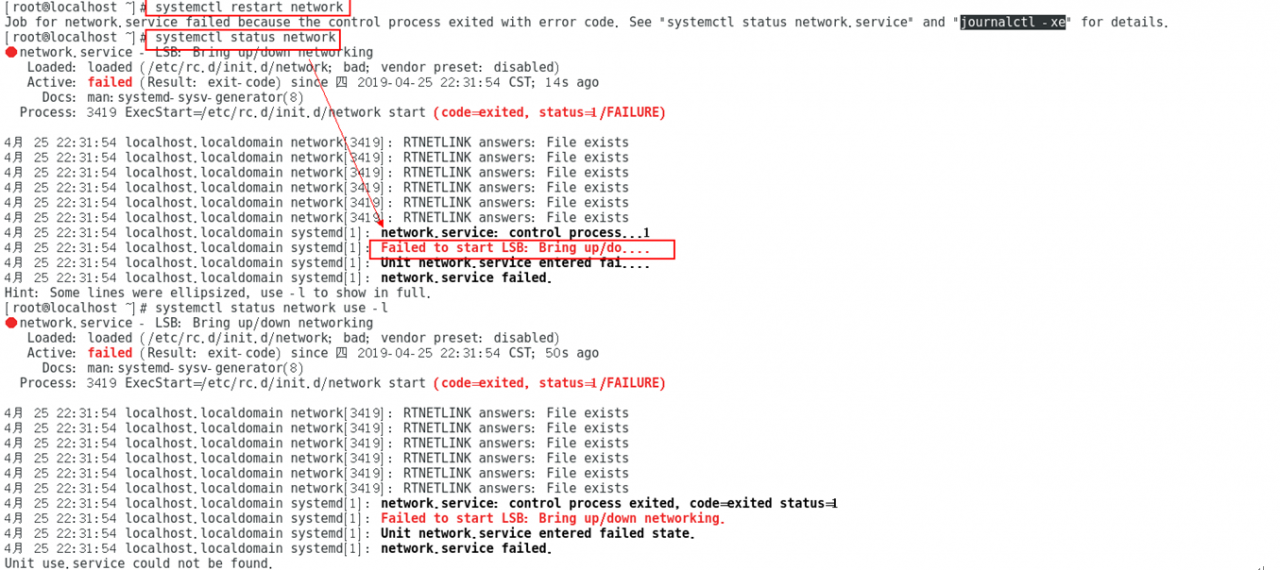
[root@centOS ~]# systemctl status network.service

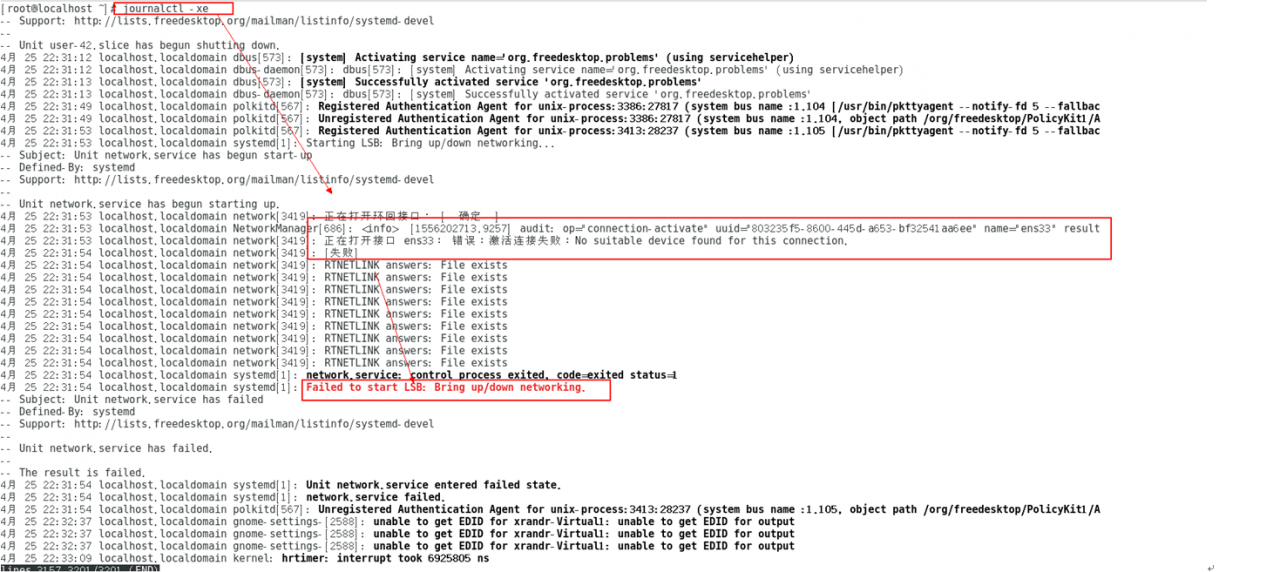
[root@centOS ~]# journalctl -xe[root@centOS ~]# systemctl start network.service
Restarting network (via systemctl): Job for network.service failed because the control process exited with error code.
See “systemctl status network.service” and “journalctl -xe” for details.
[root@centOS ~]# systemctl status network.service
[root@centOS ~]# journalctl -xe

Reason.
On CentOS system, there are currently two network management tools, NetworkManager and network. If both are configured, it will cause conflicts, and NetworkManager will clean up the routes when the network is disconnected. If some custom routes, which are not added to NetworkManager’s configuration file, the routes are cleaned up and need to be custom added on after the network is connected.
Solution.
1. Stop the networkmanager service
systemctl stop NetworkManager
systemctl disable NetworkManager
2. restart the network card, it is OK
systemctl restart network
systemctl status network

[Solved] nested exception is com.alibaba.dubbo.rpc.RpcException: Failed t o invoke the method findPage

When calling the background interface, the code reported the following error:

Warning: Servlet.service() for servlet [springmvc] in context with path [] threw exception [Request processing failed; nested exception is com.alibaba.dubbo.rpc.RpcException: Failed t
o invoke the method findPage in the service com.service.BrandService. Tried 3 times of the providers [172.16.94.115:20881] (1/1) from the registry 192.168.25.129:2181 on the consum
er 172.16.94.115 using the dubbo version 2.8.4. Last error is: Invoke remote method timeout. method: findPage, provider: dubbo://172.16.94.115:20881/com.service.BrandService?anyhos
t=true&application=tystore-manager-web&check=false&dubbo=2.8.4&generic=false&interface=com.service.BrandService&methods=add,findById,update,findPage,delete,findAll&pid=15116&revisi
on=1.0-SNAPSHOT&side=consumer&timestamp=1624929883885, cause: Waiting server-side response timeout. start time: 2021-06-29 09:25:49.385, end time: 2021-06-29 09:25:50.386, client e
lapsed: 0 ms, server elapsed: 1001 ms, timeout: 1000 ms, request: Request [id=17, version=2.0.0, twoway=true, event=false, broken=false, data=RpcInvocation [methodName=findPage, pa
rameterTypes=[class com.pojo.TbBrand, class java.lang.Integer, class java.lang.Integer], arguments=[com.pojo.TbBrand@7268b2f8, 1, 10], attachments={path=com.service.BrandService, i
nterface=com.service.BrandService, version=0.0.0}]], channel: /172.16.94.115:53263 -> /172.16.94.115:20881] with root cause
com.alibaba.dubbo.remoting.TimeoutException: Waiting server-side response timeout. start time: 2021-06-29 09:25:49.385, end time: 2021-06-29 09:25:50.386, client elapsed: 0 ms, ser
ver elapsed: 1001 ms, timeout: 1000 ms, request: Request [id=17, version=2.0.0, twoway=true, event=false, broken=false, data=RpcInvocation [methodName=findPage, parameterTypes=[cla
ss com.pojo.TbBrand, class java.lang.Integer, class java.lang.Integer], arguments=[com.pojo.TbBrand@7268b2f8, 1, 10], attachments={path=com.service.BrandService, interface=com.serv
ice.BrandService, version=0.0.0}]], channel: /172.16.94.115:53263 -> /172.16.94.115:20881

After checking the following:

    1. POJO serializes local IP and service ipdubbo running state, and closes firewall

The final reason is that the server performance is not enough, the response time is long, and the automatic timeout.

@Service(
        interfaceName = "com.service.BrandService",
        timeout = 600000)

After setting the timeout on the service, it will be normal.

Java.sql.sqlexception: unable to read more data from socket

Some online is to modify the configuration, I tried no effect, later found that because the query statement, the subquery contains the order statement, the subquery Order to remove the problem. This statement through the PLSQL direct query is no problem, but through the jdbc background query will report an error.
error:
exe_sql = select * from (select t1.*, rownum r from ( select device_site.major,device_site.site_code,device_site.type_code,device_site.site_type,device_site.site_name,device_site.site_prop,device_site.site_level,device_site.site_allname,device_site.major_code,device_site.site_comname,device_site.rule_name,device_site.special,device_site.install_site,device_site.arrive,device_site.pinyin,device_site.house_code,device_site.dept_name,device_site.area,device_site.photo,device_site.mi_num,device_site.wmi_num,device_site.site_supe_code,device_site.memo,device_site.site_id from device_site where (site_id like (select site_id || ‘%’ from water_reg where water_id=?)) order by site_code asc) t1 where rownum < 51) t2 where t2.r > 0
where_type = string
where_value = eam-704-556
2021-06-28 13:55:31 jxstar: org.jxstar.dao.DaoUtil.showException on line: -1
java.sql.SQLException:Unable to read more data from a socket
at oracle.jdbc.driver.T4CMAREngine.unmarshalUB1(T4CMAREngine.java:1200)
at oracle.jdbc.driver.T4CMAREngine.unmarshalSB1(T4CMAREngine.java:1155)
at oracle.jdbc.driver.T4CTTIfun.receive(T4CTTIfun.java:279)
at oracle.jdbc.driver.T4CTTIfun.doRPC(T4CTTIfun.java:186)
at oracle.jdbc.driver.T4C8Oall.doOALL(T4C8Oall.java:521)
at oracle.jdbc.driver.T4CPreparedStatement.doOall8(T4CPreparedStatement.java:205)
at oracle.jdbc.driver.T4CPreparedStatement.executeForDescribe(T4CPreparedStatement.java:861)
at oracle.jdbc.driver.OracleStatement.executeMaybeDescribe(OracleStatement.java:1145)
at oracle.jdbc.driver.OracleStatement.doExecuteWithTimeout(OracleStatement.java:1267)
at oracle.jdbc.driver.OraclePreparedStatement.executeInternal(OraclePreparedStatement.java:3449)
at oracle.jdbc.driver.OraclePreparedStatement.executeQuery(OraclePreparedStatement.java:3493)
at oracle.jdbc.driver.OraclePreparedStatementWrapper.executeQuery(OraclePreparedStatementWrapper.java:1203)
at org.apache.commons.dbcp.DelegatingPreparedStatement.executeQuery(DelegatingPreparedStatement.java:96)
at org.jxstar.dao.JsonDao.query(Unknown Source)
at org.jxstar.service.query.GridQuery.query(GridQuery.java:139)
at sun.reflect.GeneratedMethodAccessor40.invoke(Unknown Source)
at sun.reflect.DelegatingMethodAccessorImpl.invoke(DelegatingMethodAccessorImpl.java:43)
at java.lang.reflect.Method.invoke(Method.java:497)
at org.jxstar.service.control.ControlerUtil.invoke(Unknown Source)
at org.jxstar.service.control.ControlerUtil.executeEvent(Unknown Source)
at org.jxstar.service.control.ServiceControllerImp.execute(Unknown Source)
at org.jxstar.control.action.CommonAction._$1(Unknown Source)
at org.jxstar.control.action.CommonAction.execute(Unknown Source)
at org.jxstar.control.AjaxController.processRequest(Unknown Source)
at org.jxstar.control.AjaxController.doPost(Unknown Source)
at javax.servlet.http.HttpServlet.service(HttpServlet.java:643)
at javax.servlet.http.HttpServlet.service(HttpServlet.java:723)
at org.apache.catalina.core.ApplicationFilterChain.internalDoFilter(ApplicationFilterChain.java:290)
at org.apache.catalina.core.ApplicationFilterChain.doFilter(ApplicationFilterChain.java:206)
at org.jxstar.control.filter.JxstarFilter.doFilter(Unknown Source)
at org.apache.catalina.core.ApplicationFilterChain.internalDoFilter(ApplicationFilterChain.java:235)
at org.apache.catalina.core.ApplicationFilterChain.doFilter(ApplicationFilterChain.java:206)
at org.jxstar.control.filter.XSSFilter.doFilter(Unknown Source)
at org.apache.catalina.core.ApplicationFilterChain.internalDoFilter(ApplicationFilterChain.java:235)
at org.apache.catalina.core.ApplicationFilterChain.doFilter(ApplicationFilterChain.java:206)
at org.apache.catalina.core.StandardWrapperValve.invoke(StandardWrapperValve.java:233)
at org.apache.catalina.core.StandardContextValve.invoke(StandardContextValve.java:191)
at org.apache.catalina.core.StandardHostValve.invoke(StandardHostValve.java:127)
at org.apache.catalina.valves.ErrorReportValve.invoke(ErrorReportValve.java:103)
at org.apache.catalina.core.StandardEngineValve.invoke(StandardEngineValve.java:109)
at org.apache.catalina.connector.CoyoteAdapter.service(CoyoteAdapter.java:293)
at org.apache.coyote.http11.Http11Processor.process(Http11Processor.java:859)
at org.apache.coyote.http11.Http11Protocol$Http11ConnectionHandler.process(Http11Protocol.java:610)
at org.apache.tomcat.util.net.JIoEndpoint$Worker.run(JIoEndpoint.java:503)
at java.lang.Thread.run(Thread.java:745)
2021-06-28 13:55:31 jxstar: org.jxstar.service.query.GridQuery.query on line: 141
warn: grid query error!
2021-06-28 13:55:31 jxstar: org.jxstar.service.control.ServiceControllerImp.execute on line: -1
org.jxstar.dao.transaction.TransactionException: tranobject.rollback:Unable to read more data from a socket
at org.jxstar.dao.transaction.TransactionObjectImp.rollback(Unknown Source)
at org.jxstar.dao.transaction.TransactionManagerImp.rollbackTran(Unknown Source)
at org.jxstar.service.control.ServiceControllerImp.execute(Unknown Source)
at org.jxstar.control.action.CommonAction._$1(Unknown Source)
at org.jxstar.control.action.CommonAction.execute(Unknown Source)
at org.jxstar.control.AjaxController.processRequest(Unknown Source)
at org.jxstar.control.AjaxController.doPost(Unknown Source)
at javax.servlet.http.HttpServlet.service(HttpServlet.java:643)
at javax.servlet.http.HttpServlet.service(HttpServlet.java:723)
at org.apache.catalina.core.ApplicationFilterChain.internalDoFilter(ApplicationFilterChain.java:290)
at org.apache.catalina.core.ApplicationFilterChain.doFilter(ApplicationFilterChain.java:206)
at org.jxstar.control.filter.JxstarFilter.doFilter(Unknown Source)
at org.apache.catalina.core.ApplicationFilterChain.internalDoFilter(ApplicationFilterChain.java:235)
at org.apache.catalina.core.ApplicationFilterChain.doFilter(ApplicationFilterChain.java:206)
at org.jxstar.control.filter.XSSFilter.doFilter(Unknown Source)
at org.apache.catalina.core.ApplicationFilterChain.internalDoFilter(ApplicationFilterChain.java:235)
at org.apache.catalina.core.ApplicationFilterChain.doFilter(ApplicationFilterChain.java:206)
at org.apache.catalina.core.StandardWrapperValve.invoke(StandardWrapperValve.java:233)
at org.apache.catalina.core.StandardContextValve.invoke(StandardContextValve.java:191)
at org.apache.catalina.core.StandardHostValve.invoke(StandardHostValve.java:127)
at org.apache.catalina.valves.ErrorReportValve.invoke(ErrorReportValve.java:103)
at org.apache.catalina.core.StandardEngineValve.invoke(StandardEngineValve.java:109)
at org.apache.catalina.connector.CoyoteAdapter.service(CoyoteAdapter.java:293)
at org.apache.coyote.http11.Http11Processor.process(Http11Processor.java:859)
at org.apache.coyote.http11.Http11Protocol$Http11ConnectionHandler.process(Http11Protocol.java:610)
at org.apache.tomcat.util.net.JIoEndpoint$Worker.run(JIoEndpoint.java:503)
at java.lang.Thread.run(Thread.java:745)
2021-06-28 13:55:34 jxstar: request is have file upload: false

[Solved] Job for docker.service failed because the control process exited with error code. After changing the docker configuration

Solution
( 1) Change       Cnetos7 managed startup file   , When the configuration service starts, does the daemon use the    Some profiles

vim /usr/lib/systemd/system/docker.service

[ Service]

ExecStart=/usr/bin/dockerd            # delete  – After H (including)   All content

(2) There is a problem with the configuration of daemon.json
Look carefully. What’s wrong

I didn’t write that before   ,   number

{    # Turn on remote connection
” hosts”: [” tcp://0.0.0.0 :2375″,”unix:///var/run/docker.sock”],

#  Image acceleration (write your own, alicloud, don’t write it)
” registry-mirrors”: [“https://*******.mirror.aliyuncs.com”]

}

systemctl   daemon-reload

systemctl   start   docker
Wait for the startup to succeed,

ss -anput  | grep  : two thousand three hundred and seventy-five      Display, port open

Docker pull Command Error response from daemon: Head https://registry-1.docker.io/v2/library/

Exception information:

Error response from daemon: Head https://registry-1.docker.io/v2/library/redis/manifests/latest: Get https://auth.docker.io/token?scope=repository%3Alibrary%2Fredis%3Apull&service=registry.docker.io: net/http: request canceled while waiting for connection (Client.Timeout exceeded while awaiting headers)

There are two main ways to solve this problem

Method 1:
Parsing IP is not available. You can use dig @ 114.114.114.114 registry-1.docker.io to find the following information

;; ANSWER SECTION:
registry-1.docker.io.   forty       IN       A       3.209.182.229
Fill in the information in answer section and etc/hosts file

Method 2:
DNS resolution error
in/etc/resolv. Conf
Add Google’s DNS domain name resolution address:
nameserver 8.8.4.4
nameserver localdomain
restart the docker command after saving:

[Solved] Raspberry Pi Error: AttributeError: module ‘serial‘ has no attribute ‘Serial‘

Solution: you only need to install pyserial instead of serial. If serial has been installed, you can uninstall it.
—————————————————-
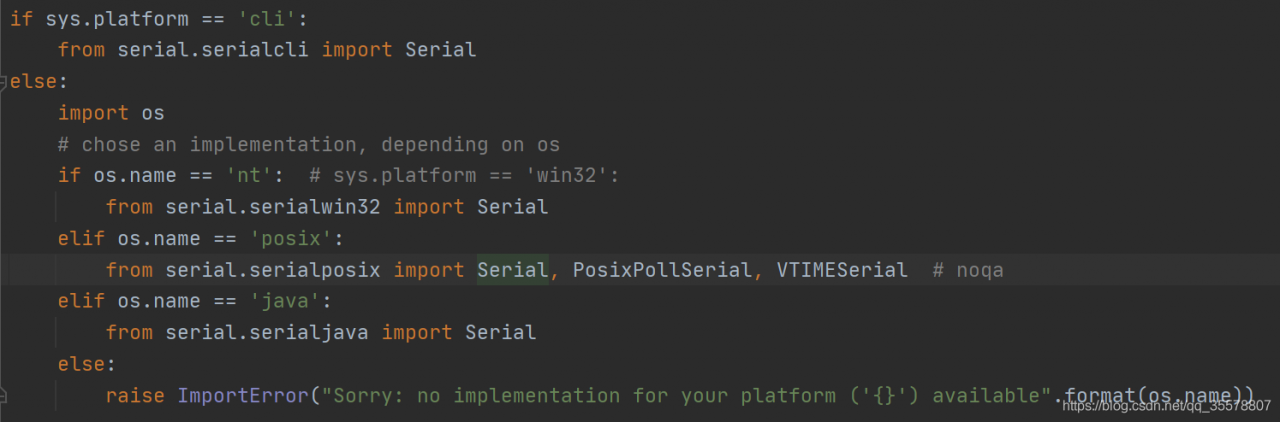
solution: open pychar on your computer and find that it can run. PIP list shows that only pyserial is installed, After importing serial, click in to see the specific method. It is found that the init.py of the serial on the computer is different from that on the raspberry pie
the raspberry pie on the computer is basically empty. You can run it after uninstalling the serial discovery program
I don’t know why all bloggers on Baidu search need to install serial and pyserial

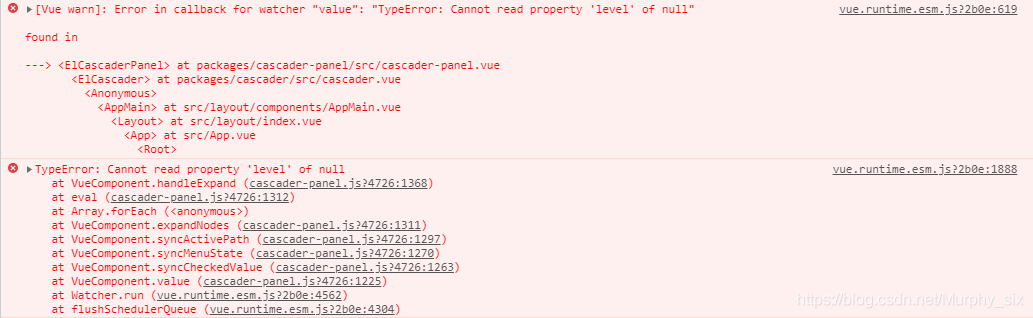
[Solved] Error in callback for watcher “value“: “TypeError: Cannot read property ‘level‘ of null“

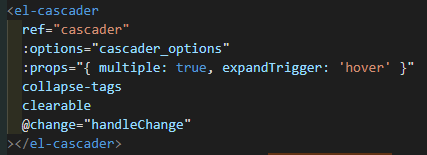
The cascade selector selects multiple selection{   Multiple: true} and any one level option {checkstrict: true} will be invalid when you click , and an error will be reported as follows

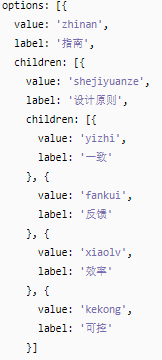
Cascade selection has strict requirements on data. Each data item contains at least two items: value and label, and the subset is children </ Font> the data styles provided on the official website are as follows:

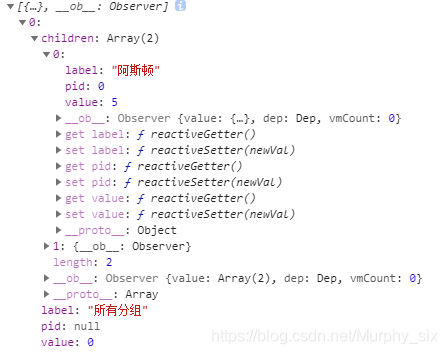
Here is my data on the console

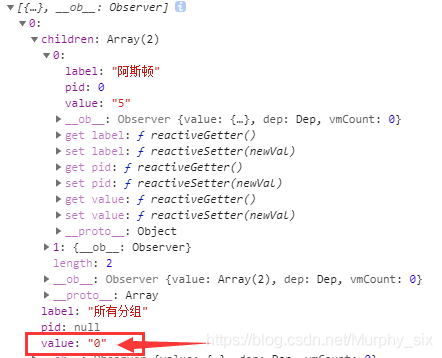
When I change the value of value from int type to string type, I will not report an error. See the figure below for details.

The simplest way is + “, when any type is added to string, it will be converted to string first

[Solved] Doris 5 Doris_core Run make Error: bk_messages.hh:214:26 error: invalid conversion from ‘char‘ …

Doris 5 error during installation

Problem Description:

Doris in Doris 5_ Error when executing make in the core folder: BK_ messages.hh:214:26 error: invalid conversion from ‘char’ to ‘const char*’ [fpermissive]

strcat(name_, ‘\ 0’);// terminate id

Solution:

Find Doris_ BK in the core folder_ Message.hh file, comment out line 214 strcat (name, '\ 0');, add name_[ 9] = '\0';

It should be changed as follows:

211   if (strlen(id)>=10)
212      {
213       strncpy(name_,id,9);
#         strcat(name_,'\0');
214       name_[9] = '\0':
215      }
216    else
217      {

[Solved] Tensorflow cuda Error: Could not load dynamic library ‘libcudart.so.11.0‘; dlerror: libcudart.so.11.0:

Dlerror: libcudart. So. 11.0: problem solving

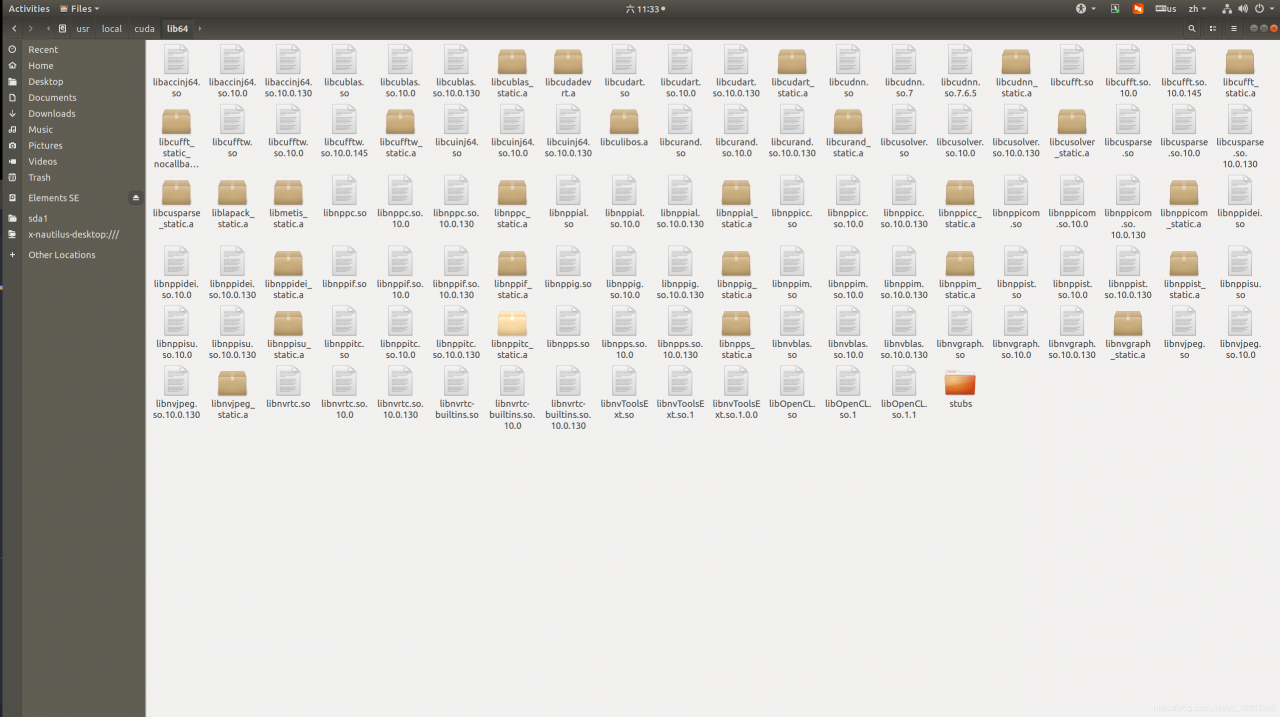
First find your computer path

/usr/local/cuda/lib64

Check your CUDA version
. According to the above figure, I find that my computer’s CUDA version is 10.0, so I will report an error at runtime. At this time, there are two solutions.

Scheme 1

If you force the CUDA environment of the local computer to be the running CUDA environment, there may be problems, which I haven’t tried.

cd /usr/local/cuda/lib64/
sudo ln -sf libcudart.so.10.0 libcudart.so.11.0

Scheme 2

Installing dynamic CUDA environment in CONDA environment

conda install tensorflow-gpu cudatoolkit=11.0

Failed to establish a new connection: [winerror 10048] in the requests thread pool, the interface is called circularly to get the datagram error

To solve the problem that in the requests thread pool, loop call the interface to get data and report an error failed to establish a new connection: [winerror 10048] generally, each socket address (Protocol/network address/port) is only allowed to be used once

My code first

import json
import csv
from threadpool import ThreadPool
import threadpool
from threadpool import makeRequests
import time
import random
with open('all_balance.csv','r') as f:
    list1 = csv.reader(f)
    list1 = list(list1)
def load_data(name):
    while True:
        Payload = {
          "id": 0,
          "jsonrpc": "2.0",
          "method": "Filecoin.StateGetActor",
          "params":
          [name[0],[{'/': 'bafy2bzaceazzbdegiso5c4tsjipxjmdabpk5uamj6khzhuwycb4bjeafbhaeo'}, {'/': 'bafy2bzacea4pnuzojwownzajhjdlqitt4wodbvgmhhfc4dujqdkjz3lgl6sac'}, {'/': 'bafy2bzacecjsgkjrcg6bejnqbvm2lktrhxpiazrqwfppueijfzte2bf2kwx42'}, {'/': 'bafy2bzaceaeglquy7h5i6tobxqikaqh2onzvhdjzdhpdneo47grs3qdvvbzc6'}, {'/': 'bafy2bzacea2knbqirjgw7rsfrydo6gfams6wnbpfdrvxhasuo6obqipn4zoco'}, {'/': 'bafy2bzacecmfiu5w7gpuhvdudqpd4qvwng2wokoj6mqydismrujcobgtcunxe'}, {'/': 'bafy2bzacec5mzv2jqqd7k2ripfddlsjv5k2eq52tihjpbtjok37p5hkxep2za'}, {'/': 'bafy2bzacedqyr6oufui2plsbykvevrioa6ukuviyb4i5iz5mq34xxq3gzlz32'}, {'/': 'bafy2bzacecled7zvadjt2jjn354pfhyga22apgqeh5c3ig3vv62tqb6rujsxk'}, {'/': 'bafy2bzacecfyxsfr445b6cvlxnl2p53twzfw4fjqy67bg6nioopb5apa6zb62'}, {'/': 'bafy2bzacech6xyahzbhyyjjd747cyzpllgx4abksncyidxpuxg7hsm2gydxw6'}, {'/': 'bafy2bzaceaisnevf7cpht6cmiwg2l63cqxi5jqyrinjsmdqyvax3delxnj4gg'}]]}
        headers = {"Content-Type": "application/json"}`

        respon = requests.post('http://********:1248/rpc/v0',headers=headers, data=json.dumps(Payload))

        if respon.status_code == 200:
            if respon.json().get('result'):
                print(name[0],int(respon.json()['result']['Balance'])/10**18)
                with open('all_balance_6_24.csv', 'a', encoding='utf-8', newline='') as f:
                    writer = csv.writer(f)
                    writer.writerow([name[0], int(respon.json()['result']['Balance'])/10**18])
                return
        else:
            print(respon.status_code)
            print(respon.text)
            time.sleep(20)
tasks = threadpool.makeRequests(load_data, [list1[i] for i in range(1, 488013)])
pool = threadpool.ThreadPool(100)
for task in tasks:
    pool.putRequest(task)
pool.wait()

Error code

Traceback (most recent call last):
  File "E:\project\chain\lib\site-packages\threadpool.py", line 158, in run
    result = request.callable(*request.args, **request.kwds)
  File "E:\project\chain\chain_main_get_state.py", line 22, in load_data
    respon = requests.post('http://10.0.6.22:1248/rpc/v0',headers=headers, data=json.dumps(Payload))
  File "E:\project\chain\lib\site-packages\requests\api.py", line 119, in post
    return request('post', url, data=data, json=json, **kwargs)
  File "E:\project\chain\lib\site-packages\requests\api.py", line 61, in request
    return session.request(method=method, url=url, **kwargs)
  File "E:\project\chain\lib\site-packages\requests\sessions.py", line 542, in request
    resp = self.send(prep, **send_kwargs)
  File "E:\project\chain\lib\site-packages\requests\sessions.py", line 655, in send
    r = adapter.send(request, **kwargs)
  File "E:\project\chain\lib\site-packages\requests\adapters.py", line 516, in send
    raise ConnectionError(e, request=request)
requests.exceptions.ConnectionError: HTTPConnectionPool(host='10.0.6.22', port=1248): Max retries exceeded with url: /rpc/v0 (Caused by NewConnectionError('<urllib3.connection.HTTPConnection object at 0x0000028BAE472C40>: Failed to establish a new connection: [WinError 10048] 通常每个套接字地址(协议/网络地址/端口)只允许使用一次。'))

Because it’s multithreading, the so-called shutdown of Python process is not the way I want. Finally, I find an effective way to test the effectiveness:

use regedit command to access HKEY_ LOCAL_ Machine/system/currentcontrolset/services/TCPIP/parameters registry subkey and create a new reg named tcptimedwaitdelay_ DWORD value. Set this value to decimal 30, which is hexadecimal 0x0000001E. This value sets the wait time to 30 seconds</ Code>
access HKEY with regedit command_ LOCAL_ Machine/system/currentcontrolset/services/TCPIP/parameters registry subkey and create a new reg named maxuserport_ DWORD value. Stop and restart the system. Default: no recommendation: at least 32768 decimal

When I called the interface, using the command-line tool netstat – N, I found that nearly 4000 connections to the IP address of the target computer running the interface were in time_ In wait state, you can increase the default maxuserport setting and decrease the tcptimedwaitdelay setting at the same time, so that the client anonymous port will not be exhausted. For example, you can set maxuserport to 20000 and tcptimedwaitdelay to 30. A lower tcptimedwaitdelay setting means that the socket is in time_ The waiting time in wait state is shorter. A higher maxuserport setting means that you can put more sockets in time_ Wait status