Author Archives: Robins

MySQL Install Error: MySQL error 1042: Unable to connect to any of the specified MySQL hosts

The following error occurred in the last step of installing MySQL:
MySQL error 1042: unable to connect to any of the specified MySQL hosts

There are two solutions

First, treat the symptoms but not the root cause. Open Win + R and run it. Enter services.msc to open the service. Find the service name added when installing mysql. Generally, MySQL version 8.0 is MySQL 80 by default. Double click to open it. Under the login tab, change the selected account to the local system account.

It’s OK to execute after the application is confirmed, but this method needs to be operated once every time you reload mysql.

Another way is to configure group policy, which is a problem caused by the permission management of windows. The steps are as follows:
right click this computer – > Management – > Local users and groups – > Group – > Double click administrators – > Add – > Advanced
add network service to the administrators group

Module not found: Error: Can‘t resolve ‘core-js/modules/es.promise.js‘ in

Core-js is not installed
In the directory where package.json is located: npm i core-js -D

ERROR in . /src/js/index.js 1:0-48
Production environment configuration \15js compatibility handling\src\js'

ERROR in ./src/js/index.js 2:0-39
Module not found: Error: Can't resolve 'core-js/modules/es.promise.js' in 'D:\Desktop\My Files\RecentlyStudy\WebPack\demo\3.webpack production environment configuration 
webpack production environment configuration \15js compatibility handling\src\js'

ERROR in ./src/js/index.js 3:0-39
Module not found: Error: Can't resolve 'core-js/modules/web.timers.js' in 'D:\Desktop\My Files\RecentlyStudy\WebPack\demo\3.webpack

3 errors have detailed information that is not shown.
Use 'stats.errorDetails: true' resp. '--stats-error-details' to show it.

Crawler overtime error socket.timeout: timed out/NameError: name ‘socket‘ is not defined

Question 1: socket. Timeout: timed out

Source code:

import urllib.request#Get a get request

import urllib.parse #Get a pos request

import urllib.error
headers = {
    'User-Agent': 'Mozilla/5.0 (Windows NT 6.3; Win64; x64) AppleWebKit/537.36 (KHTML, like Gecko) Chrome/91.0.4472.114 Safari/537.36'}
data1 = urllib.request.Request("http://httpbin.org/post", headers=headers)

response = urllib.request.Request("http://httpbin.org/get", headers=headers)
response1 = urllib.request.urlopen(response, timeout=0.01)
# response1 = urllib.request.urlopen(response)
print(response1.read().decode("utf-8"))

Abnormal operation result:

Traceback (most recent call last):
  File "D:\PycharmProjects\pythonProject\douban\test1\testurllib.py", line 53, in <module>
    response1 = urllib.request.urlopen(response, timeout=0.01)
  File "C:\Users\lord\AppData\Local\Programs\Python\Python39\lib\urllib\request.py", line 214, in urlopen
    return opener.open(url, data, timeout)
  File "C:\Users\lord\AppData\Local\Programs\Python\Python39\lib\urllib\request.py", line 517, in open
    response = self._open(req, data)
  File "C:\Users\lord\AppData\Local\Programs\Python\Python39\lib\urllib\request.py", line 534, in _open
    result = self._call_chain(self.handle_open, protocol, protocol +
  File "C:\Users\lord\AppData\Local\Programs\Python\Python39\lib\urllib\request.py", line 494, in _call_chain
    result = func(*args)
  File "C:\Users\lord\AppData\Local\Programs\Python\Python39\lib\urllib\request.py", line 1375, in http_open
    return self.do_open(http.client.HTTPConnection, req)
  File "C:\Users\lord\AppData\Local\Programs\Python\Python39\lib\urllib\request.py", line 1350, in do_open
    r = h.getresponse()
  File "C:\Users\lord\AppData\Local\Programs\Python\Python39\lib\http\client.py", line 1345, in getresponse
    response.begin()
  File "C:\Users\lord\AppData\Local\Programs\Python\Python39\lib\http\client.py", line 307, in begin
    version, status, reason = self._read_status()
  File "C:\Users\lord\AppData\Local\Programs\Python\Python39\lib\http\client.py", line 268, in _read_status
    line = str(self.fp.readline(_MAXLINE + 1), "iso-8859-1")
  File "C:\Users\lord\AppData\Local\Programs\Python\Python39\lib\socket.py", line 704, in readinto
    return self._sock.recv_into(b)
socket.timeout: timed out

Process finished with exit code 1

Question 2: NameError: name ‘socket’ is not defined

Source code:


import urllib.request#Get a get request

import urllib.parse #Get a pos request
import urllib.error
try:
    headers = {
        'User-Agent': 'Mozilla/5.0 (Windows NT 6.3; Win64; x64) AppleWebKit/537.36 (KHTML, like Gecko) Chrome/91.0.4472.114 Safari/537.36'}
    # data1 = urllib.request.Request("http://httpbin.org/post", headers=headers)

    response = urllib.request.Request("http://httpbin.org/get", headers=headers)
    response1 = urllib.request.urlopen(response, timeout=0.01)
    print(response1.read().decode("utf-8"))

except socket.timeout as e:
# except Exceptio as e:
# except urllib.error.URLError as e:##error socket.timeout: timed out
    print("time out!")

Abnormal operation result:

Traceback (most recent call last):
  File "D:\PycharmProjects\pythonProject\douban\test1\temp.py", line 19, in <module>
    response1 = urllib.request.urlopen(response, timeout=0.01)
  File "C:\Users\lord\AppData\Local\Programs\Python\Python39\lib\urllib\request.py", line 214, in urlopen
    return opener.open(url, data, timeout)
  File "C:\Users\lord\AppData\Local\Programs\Python\Python39\lib\urllib\request.py", line 517, in open
    response = self._open(req, data)
  File "C:\Users\lord\AppData\Local\Programs\Python\Python39\lib\urllib\request.py", line 534, in _open
    result = self._call_chain(self.handle_open, protocol, protocol +
  File "C:\Users\lord\AppData\Local\Programs\Python\Python39\lib\urllib\request.py", line 494, in _call_chain
    result = func(*args)
  File "C:\Users\lord\AppData\Local\Programs\Python\Python39\lib\urllib\request.py", line 1375, in http_open
    return self.do_open(http.client.HTTPConnection, req)
  File "C:\Users\lord\AppData\Local\Programs\Python\Python39\lib\urllib\request.py", line 1350, in do_open
    r = h.getresponse()
  File "C:\Users\lord\AppData\Local\Programs\Python\Python39\lib\http\client.py", line 1345, in getresponse
    response.begin()
  File "C:\Users\lord\AppData\Local\Programs\Python\Python39\lib\http\client.py", line 307, in begin
    version, status, reason = self._read_status()
  File "C:\Users\lord\AppData\Local\Programs\Python\Python39\lib\http\client.py", line 268, in _read_status
    line = str(self.fp.readline(_MAXLINE + 1), "iso-8859-1")
  File "C:\Users\lord\AppData\Local\Programs\Python\Python39\lib\socket.py", line 704, in readinto
    return self._sock.recv_into(b)
socket.timeout: timed out

During handling of the above exception, another exception occurred:

Traceback (most recent call last):
  File "D:\PycharmProjects\pythonProject\douban\test1\temp.py", line 22, in <module>
    except socket.timeout as e:
NameError: name 'socket' is not defined

Solution:

Refer to the network resources, delete and install Python again, and still report an error.

By introducing socket library, problem one and problem two are solved.

import socket    ##Introducing the socket library

Correct code:

import socket ## Introduce the socket library

import urllib.request # Get a get request

import urllib.parse # Get a pos request
import urllib.error

try:
    headers = {
        'User-Agent': 'Mozilla/5.0 (Windows NT 6.3; Win64; x64) AppleWebKit/537.36 (KHTML, like Gecko) Chrome/91.0.4472.114 Safari/537.36'}
    # data1 = urllib.request.Request("http://httpbin.org/post", headers=headers)

    response = urllib.request.Request("http://httpbin.org/get", headers=headers)
    response1 = urllib.request.urlopen(response, timeout=0.01)
    print(response1.read().decode("utf-8"))

except socket.timeout as e:
# except Exceptio as e:##normal
# except urllib.error.URLError as e:## error socket.timeout: timed out
    print("time out!")

Results of correct operation:

time out!

Process finished with exit code 0

Conclusion:

If try/except statement is not used, the program will report error a
a try/except statement has been added. It should be noted that the exception name of except should correspond to a. the error “NameError: name ‘socket’ is not defined” is reported here because the socket library is not imported.
[Solved] Access /oauth/token in SpringCloud OAuth2 and report server_error

The problem I encountered was solved by myself:
using grant in spring cloud oauth2 project_ The type is password/OAuth/token to access and obtain the token_ error。 In postman, as shown in the figure below:

{
    "error": "server_error",
    "error_description": "Internal Server Error"
}

Java background error is as follows:

endpoint.TokenEndpoint : Handling error: NestedServletException, Handler dispatch failed; nested exception is java.lang.StackOverflowError

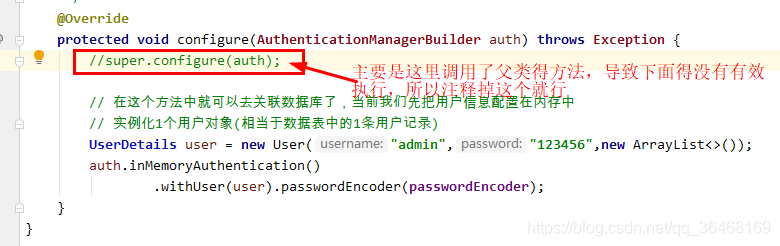
This problem is due to grant_ Type = password represents the user name and password authorization

/**
 * This configuration class, which mainly handles the verification of user names and passwords, etc.
 */
@Configuration
public class SecurityConfiger extends WebSecurityConfigurerAdapter {

    @Autowired
    private PasswordEncoder passwordEncoder;

    //register 1 authentication manager object to the container
    @Bean
    @Override
    public AuthenticationManager authenticationManagerBean() throws Exception {
        return super.authenticationManagerBean();
    }

    /**
     * Password encoding object (passwords are not encrypted)
     */
    @Bean
    public PasswordEncoder passwordEncoder() {
        return NoOpPasswordEncoder.getInstance();
    }

    /**
     * Handle username and password authentication
     * 1) The client passes username and password parameters to the authentication server
     * 2) Generally, username and password are stored in the database in the user table
     * 3) Verify the legitimacy of the currently passed user information based on the data in the user table
     */
    @Override
    protected void configure(AuthenticationManagerBuilder auth) throws Exception {
        super.configure(auth);

        // In this method you can go to the associated database, currently we first configure the user information in memory
        // instantiate 1 user object (equivalent to 1 user record in the data table)
        UserDetails user = new User("admin","123456",new ArrayList<>());
        auth.inMemoryAuthentication()
                .withUser(user).passwordEncoder(passwordEncoder);
    }
}

Problem solving: the following are purely personal views:

CMake Error: The source directory “opencv Install Catalog“ does not appear to contain CMakeLists.txt.

Cmake error: the source directory “opencv installation directory” does not appear to contain cmakelists.txt

I want to build opencv 4.5.0 in Ubuntu 20.04 this morning; In the C + + environment, I tried to learn opencv in the Linux system, but I was not familiar with the use of Linux system. I was puzzled by one step in building the environment, and the error was as follows:

Cmake error: the source directory “opencv installation directory” does not appear to contain cmakelists.txt

In Baidu search, we found many solutions provided by big men. After some attempts, we failed collectively. After carefully studying the reasons for the error and checking our opencv installation directory, we found that the specific path of our cmakelists.txt is "home"/ ××××/ Opencv/opencv master/cmakelists.txt " instead of " home/ ×××/ Opencv/cmakelists. TXT ", finally found the cause of the error and solved the problem. Therefore, I hope this article can help some beginners like me. Thank you for your support!

RabbitMQ:address (cannot connect to host/port) [How to Solve]

Scene

[root@taishan-atlas init.d]# service rabbitmq-server start
Failed to get D-Bus connection: Operation not permitted
ERROR: epmd error for host taishan-atlas: address (cannot connect to host/port)

Solution

Modify/etc/hosts and add 127.0.0.1         taishan-atlas

127.0.0.1       localhost
127.0.0.1       taishan-atlas
192.168.12.42   taishan-atlas

Note: here 127.0.0.1 Taishan Atlas 192.168.12.42 Taishan atlas corresponds to the IP address in front of the host name. One is the loopback IP address and the other is the real IP address of the device. If the real IP address is not configured correctly, a similar problem will occur: error: epmd error for host Taishan Atlas: address (cannot connect to host/port)

Note: the reason why you need to manually add a local domain name is that you have modified the local machine’s host name, so you need to modify it accordingly. After the system is installed, a host name will be generated by default

[Solved] SSH WARNING: REMOTE HOST IDENTIFICATION HAS CHANGED!

WARNING: REMOTE HOST IDENTIFICATION HAS CHANGED!

root@node145:~# ssh-copy-id -i ~/.ssh/id_rsa.pub  [email protected]
/usr/bin/ssh-copy-id: INFO: Source of key(s) to be installed: "/root/.ssh/id_rsa.pub"
/usr/bin/ssh-copy-id: INFO: attempting to log in with the new key(s), to filter out any that are already installed
​
/usr/bin/ssh-copy-id: ERROR: @@@@@@@@@@@@@@@@@@@@@@@@@@@@@@@@@@@@@@@@@@@@@@@@@@@@@@@@@@@
ERROR: @    WARNING: REMOTE HOST IDENTIFICATION HAS CHANGED!     @
ERROR: @@@@@@@@@@@@@@@@@@@@@@@@@@@@@@@@@@@@@@@@@@@@@@@@@@@@@@@@@@@
ERROR: IT IS POSSIBLE THAT SOMEONE IS DOING SOMETHING NASTY!
ERROR: Someone could be eavesdropping on you right now (man-in-the-middle attack)!
ERROR: It is also possible that a host key has just been changed.
ERROR: The fingerprint for the ECDSA key sent by the remote host is
ERROR: SHA256:PO6FFmEQ9kOL1nodp3vLqVvCRW00Rhnn6cD9+SxbfbU.
ERROR: Please contact your system administrator.
ERROR: Add correct host key in /root/.ssh/known_hosts to get rid of this message.
ERROR: Offending ECDSA key in /root/.ssh/known_hosts:2
ERROR:   remove with:
ERROR:   ssh-keygen -f "/root/.ssh/known_hosts" -R "10.17.20.144"
ERROR: ECDSA host key for 10.17.20.144 has changed and you have requested strict checking.
ERROR: Host key verification failed.
​
### Solution Reassign the name of the file where the key is saved
root@node145:~# ssh-keygen -f "/root/.ssh/known_hosts" -R 10.17.20.144
# Host 10.17.20.144 found: line 2
/root/.ssh/known_hosts updated.
Original contents retained as /root/.ssh/known_hosts.old
root@node145:~# ssh-copy-id -i ~/.ssh/id_rsa.pub  [email protected]
/usr/bin/ssh-copy-id: INFO: Source of key(s) to be installed: "/root/.ssh/id_rsa.pub"
The authenticity of host '10.17.20.144 (10.17.20.144)' can't be established.
ECDSA key fingerprint is SHA256:PO6FFmEQ9kOL1nodp3vLqVvCRW00Rhnn6cD9+SxbfbU.
Are you sure you want to continue connecting (yes/no)?yes
/usr/bin/ssh-copy-id: INFO: attempting to log in with the new key(s), to filter out any that are already installed
/usr/bin/ssh-copy-id: INFO: 1 key(s) remain to be installed -- if you are prompted now it is to install the new keys
[email protected]'s password: 
​
Number of key(s) added: 1
​
Now try logging into the machine, with:   "ssh '[email protected]'"
and check to make sure that only the key(s) you wanted were added.

SSH keygen command is used to generate, manage and transform authentication key for SSH. It supports RSA and DSA

SSH keygen (option)

-b: specify the length of the key. 
-e : read the private or public key file of openssh. 
-C: add comment. 
-f: specify the name of the file used to save the key. 
-i : reads the unencrypted ssh-v2 compatible private/public key file and then displays the openssh compatible private/public key on the standard output device. 
-l: display the fingerprint data of the public key file. 
-N: provide a new cipher. 
-P: provide the (old) cipher.
-q: silent mode. 
-t: specify the type of key to be created.

Rabbitmq: Erlang distribution failed solution

Preface
System version: CentOS Linux release 7.7.1908 (Core)
Adding a user to rabbitmq via the rabbitmqctl add_user admin 12345 command prompts an error.
[root@localhost perl]# rabbitmqctl add_user admin 12345
Error: unable to connect to node rabbit@localhost: nodedown
DIAGNOSTICS
===========
attempted to contact: [rabbit@localhost]
rabbit@localhost:
* connected to epmd (port 4369) on localhost
* epmd reports node ‘rabbit’ running on port 25672
* TCP connection succeeded but Erlang distribution failed
* Authentication failed (rejected by the remote node), please check the Erlang cookie

current node details:
– node name: ‘rabbitmq-cli-49@localhost’
– home dir: /root
– cookie hash: BgvEr+lGkDjLTQzT85cpyw==


Solution:
1)Search the .erlang.cookie file
[root@localhost mnesia]# find/-name *.cookie
/root/.erlang.cookie
/opt/rabbitmq_server-3.6.10/.erlang.cookie
2)Overwrite the /root/.erlang.cookie file
cp /opt/rabbitmq_server-3.6.10/.erlang.cookie  /root/

Cause:
RabbitMQ’s .erlang.cookie conflicts with the user’s cookie and needs to override the user’s cookie with RabbitMQ’s cookie