Author Archives: Robins

Ubuntu 20.04: How to create shortcut startup mode in IntelliJ idea

(1) First, install IntelliJ idea
(2) then CD to the desktop directory
(3) enter touch idea.desktop
(4) enter sudo VI idea.desktop

[Desktop Entry]
Name=IntelliJ IDEA
Comment=IntelliJ IDEA
Exec=/usr/local/ideaIU/bin/idea.sh //This is in the IDEA directory of your own installation
Icon=/usr/local/ideaIU/bin/idea.png //This is in the IDEA directory of your own installation
Terminal=false
Type=Application
Categories=Developer;

After quitting,
Enter sudo Chmod + X idea. Desktop
and the idea. Desktop file will appear on the desktop. Right click and click allow to start

[Solved] Manifest merger failed: Apps targeting Android 12 and higher are required to specify an explicit

Android Studio run app error:

Manifest merger failed : Apps targeting Android 12 and higher are required to specify an explicit value for `android:exported` when the corresponding component has an intent filter defined. See https://developer.android.com/guide/topics/manifest/activity-element#exported for details.

Environment used: Android studio 4.2.2, Pixel 2 API 29
Solution reference.
Add android:exported to activity in AndroidManifest.xml file, e.g:

<activity android:name=".MainActivity" android:exported="true">

Mybatis plus configuration console prints complete SQL statement with parameters

Solution
if it is application.yml

#mybatis-plus configures the console to print full SQL statements with parameters
mybatis-plus:
  configuration:
    log-impl: org.apache.ibatis.logging.stdout.StdOutImpl

If it is application.properties, add:

#mybatis-plus configures the console to print full SQL statements with parameters
mybatis-plus.configuration.log-impl=org.apache.ibatis.logging.stdout.StdOutImpl

Go compiles the EXE executable to remove the CMD window at run time

         Recently, I started to contact go language again and wrote an EXE executable program. However, such a console window will appear every time I execute it, and there is no content yet. It’s not elegant, of course.

We can solve this problem by setting compilation parameters in go build

go build -ldflags "-s -w -H=windowsgui"

-s Omit the symbol table and debug information
-w Omit the DWARF symbol table Omit the DWARF symbol table
-H windowsgui does not print messages to the console (On Windows, -H windowsgui writes a "GUI binary" instead of a "console binary."), so there is no cmd window

In this way, the EXE program generated by go compilation can run in the background.

The problem of cursor skipping in wangeditor

Problem description

When using wangeditor, input content, and press enter to switch to the next line, the cursor cuts over and automatically jumps back.

Cause of the problem

After encapsulating a component, the onchange event of wangeditor will be triggered every time the content passed in from the parent is used. In the onchange event, the modified value is assigned to the parent component by passing the child to the parent. After the value of the parent component changes, the value of the child component wangeditor will also be modified. Therefore, the cursor always jumps to the last. At this point, there is another problem of concurrency, that is, it is invalid after the undo and resume click.

Solution

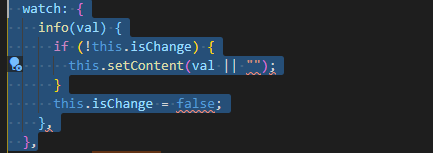
When the child component watch listens to the value passed in by the parent component, it adds judgment to ensure that the input content is zero and the assignment will not be triggered

Instead of using the official recommended catchdata, the child component uses the method of passing the value to the parent component (that is, $emit) to synchronize the value to the parent component, so as to ensure that the value of the parent component is consistent with the content of the rich text when saving

if it can help you, please use your little hand to like it
thank you.

The solution of no space left on device always appears when using TF’s debug tool (tfdbg)

The first time you use tensorflow’s debug tool, but when you use it for the second time, there is always a shortage of space, which can be solved through the following steps.

  df -h

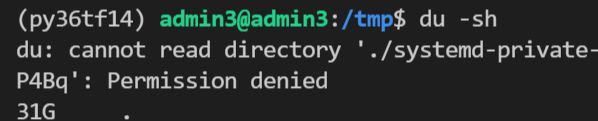
Find that the root directory is full, then go to the root directory and check the occupied directory  

  du –max-depth=1 -h

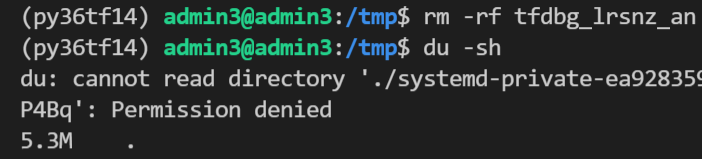
  It is found that TMP directory takes up a lot of space


Sure enough, when you go to TMP, you find files related to tfdbg. Just delete them  。


The solution of white screen crash when loading QML

1 reference link

qt – Rectangle element is not displayed – Stack Overflow

(122 messages) when QML starts on the development board, a white screen appears (two loading modes of QML)_ xi__ Q’s column CSDN blog

(122 messages) about the solution to the problem that the stackview cannot be displayed (white screen) on the target machine (customized Ubuntu) when QML is migrated from Ubuntu development_ Changsha red fat network technology (original name: Red Imitation workshop) – CSDN blog

2 best practices

main.cpp

#include <QGuiApplication>
#include <QQuickView>

int main(int argc, char *argv[])
{
    QGuiApplication app(argc, argv);

    QQuickView engine(QUrl(QStringLiteral("qrc:/main.qml")));
    engine.show();

    return app.exec();
}

Master.qml

import QtQuick 2.0

Rectangle {
    width: 100
    height: 100
    color: "red"
}

Several problems caused by device encryption

Description: ora-12541tns no monitor program + velvet software icon turns black

Problem Description:                 

         After Oracle is unloaded and reloaded, ora-12541tns no monitor program will not appear for the time being, and then the problem of restarting the computer appears again — the problem solved from the perspective of Oracle (this problem will appear again in a few days after it is solved through other operations — the above error occurs when opening PL/SQL developer software.)

         At the same time, the tinder software icon turns black or the tinder software installation pop-up cannot be installed in the encrypted directory (prompt: when the tinder is installed in other disks other than disk C.).

        At this point, the big probability is due to the problem of device encryption.

resolvent:

        Turn off device encryption settings.

Process (simple operation, just two steps)

1. Window + Q output “device encryption”( The window key icon is similar to the key of the window where the window is turned on. It is generally located near FN in the lower left corner.)

2. Select close( It will take some time)

         I was puzzled by this problem for a period of time. During this period, I solved it through online methods. I even uninstalled Oracle and then reloaded it. At that time, it was solved and there was no problem. However, the problem will still appear later, which is more annoying.

         Later, I found out the problem. The problem is quite special and the solution is also quite special. I would like to share it with those who encounter similar and partial problems. Finally, I hope I can help you solve the problem.


To solve the problem that deep in 20.2 system cannot save and transform the format of typora, and provide an effective installation method of typora

Background: deep in 20.2 system app store can only edit files after downloading typora, but can’t save files and convert file formats (such as exporting PDF, word, etc.) without any error prompt, just can’t convert.

Cause analysis: the typora downloaded from the deep in app store comes with its own pandoc plug-in, so there is no problem that there is no pandoc; The deepin version of TA is 20.0, but it can be used normally. I use the command line to run typora for operation, and there is no error related to file conversion or saving. Subjective conjecture is that the latest version of deepin is incompatible with the app store’s typora version.

resolvent:

Uninstall the app store, and download and install it from the official website https://www.typora.io/ (just use the operation method of Linux system on the official website)

Actual operation:

The following is the official website installation operation and possible errors, I give my own solution:

1. Get the key

wget -qO – https://typora.io/linux/public-key.asc | sudo apt-key add –

2. Add the repository of typora

sudo add-apt-repository ‘deb https://typora.io/linux ./’
sudo apt-get update

in this step, you may report an error of “unable to find the repository command”

Try some methods on the network is not feasible, so directly add violence!

    use the VIM command to edit the configuration file of apt get installation( The directory is/etc/apt/source. List)

      Press’ I ‘to enter edit mode and add: DEB https://typora.io/linux . /,
      then press ESC + “: WQ” to save and exit

        then execute sudo apt get update to update the configuration file

        3. Install typora

        sudo apt-get install typora

Invalidstorage.notfound when uploading video in alicloud VOD

Use Java SDK to upload video files according to official documents

  In the end, it will report an error

InvalidStorage.NotFound
The StorageLocation does not exist.  

View the cause of the error in the official document

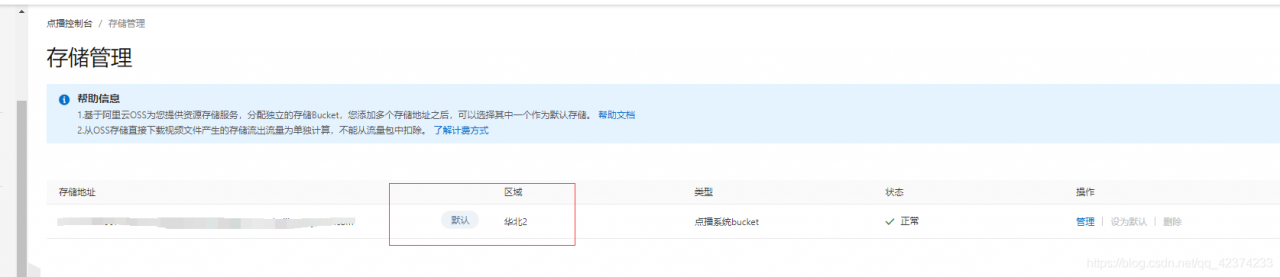
If the set storage address does not exist, log in to the on demand console and select configuration management  & gt;   Media asset management and allocation  & gt;   Storage management   Check and confirm in.

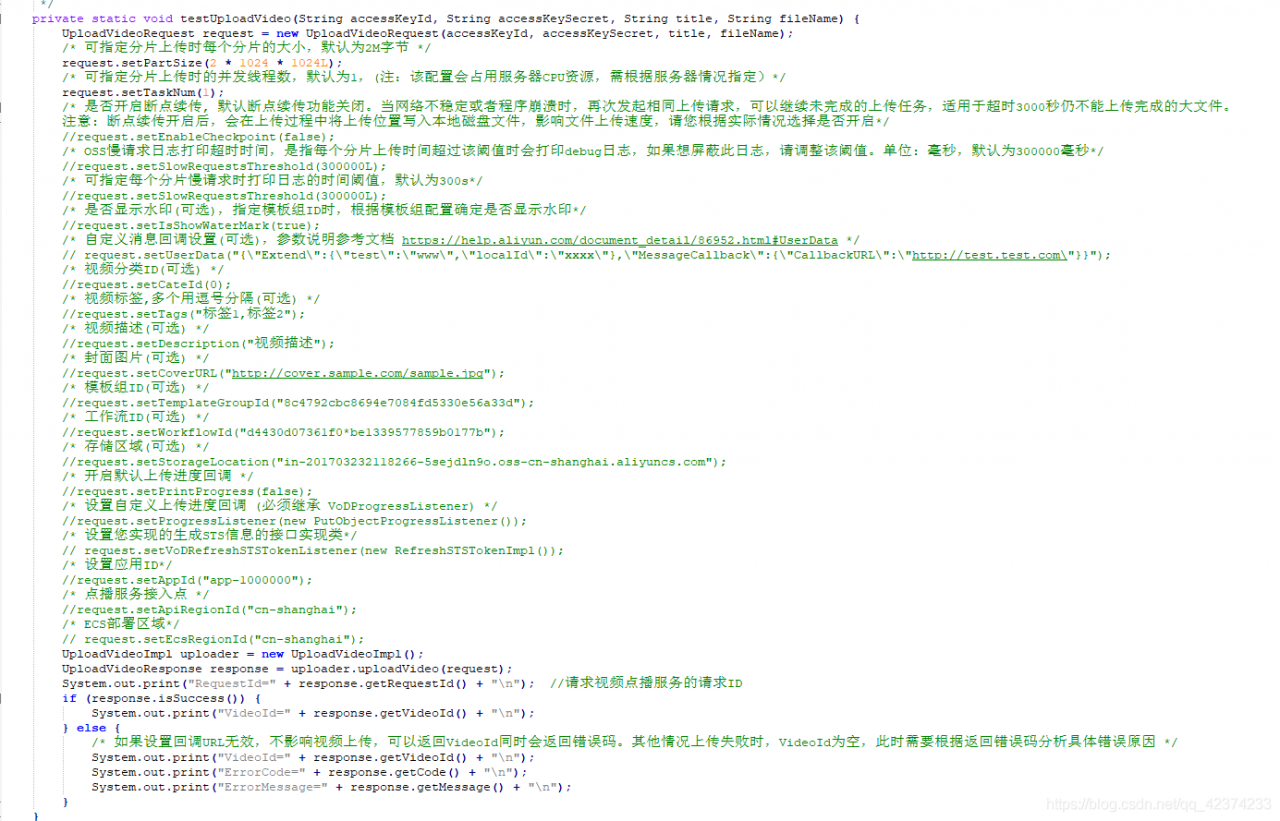
  But I will still report an error after setting the default storage address (the default code is Shanghai)

The solution here is

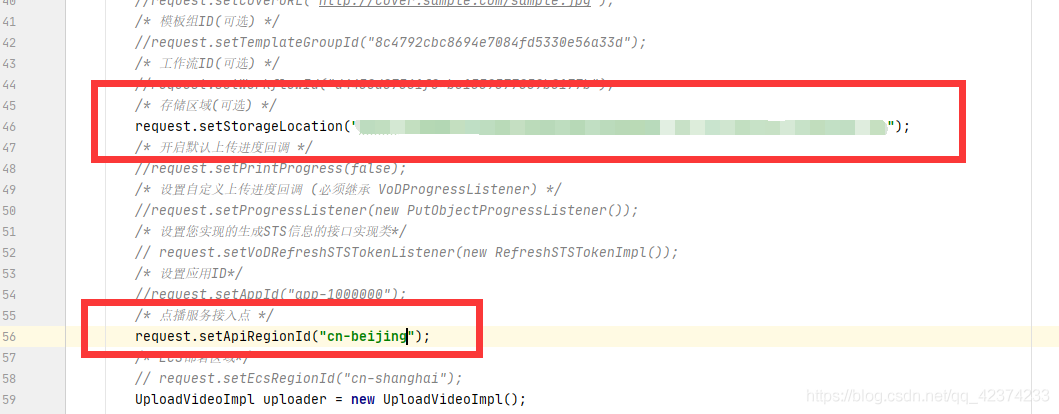
Manually set in the code and then upload it

The above code is the local upload video, other ways of streaming and other solutions are the same.

Python 2.7: How to Install PIP

Python2 is no longer supported after PIP 2.1. Here you can use scripts to automatically download the highest supported version of PIP

1. Python2.7 the latest version of PIP installation file get-pip.py can be obtained by streaming

2. Install the file through Python 2.7

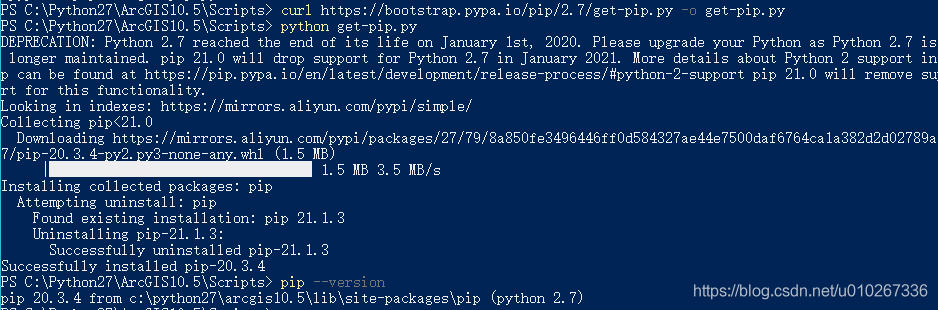
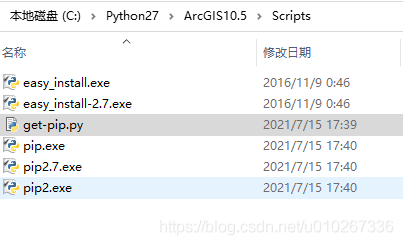
In the scripts folder, execute the following command to pull the get-pip.py file

curl https://bootstrap.pypa.io/pip/2.7/get-pip.py -o get-pip.py

After downloading, execute the file to install the latest version of PIP supported by python2.7

python get-pip.py

You can see that the PIP version of automatic installation is 20.3

.4