Author Archives: Robins

Oracle 12.2.0.1 opatch lsinventory Error: LsInventorySession failed: RawInventory gets null OracleHomeInfo

[grid@node1 ~]$ opatch lsinventory -detail -oh /u01/app/12.2.0/grid
Oracle Interim Patch Installer version 12.2.0.1.25
Oracle Home : /u01/app/12.2.0/grid
Central Inventory : /u01/app/oraInventory
from : /u01/app/12.2.0/grid/oraInst.loc
OPatch version : 12.2.0.1.25
OUI version : 12.2.0.1.4
Log file location : /u01/app/12.2.0/grid/cfgtoollogs/opatch/opatch2021-07-22_11-46-24AM_1.log
List of Homes on this system:
Home name= OraDB12Home1, Location= “/u01/app/oracle/product/12.2.0/db_1”
LsInventorySession failed: RawInventory gets null OracleHomeInfo
OPatch failed with error code 73

Codes:

[grid@node1 ~]$ cd $ORACLE_HOME
[grid@node1 grid]$ cd oui
[grid@node1 oui]$ cd bin/
[grid@node1 bin]$ ls -l attachHome.sh 
-rwxr-x--- 1 grid oinstall 276 Jul 21 19:11 attachHome.sh
[grid@node1 bin]$ sh attachHome.sh 
Starting Oracle Universal Installer...

Checking swap space: must be greater than 500 MB.   Actual 2557 MB    Passed
The inventory pointer is located at /etc/oraInst.loc
'AttachHome' was successful.
[grid@node1 bin]$ opatch lsinventory -detail -oh /u01/app/12.2.0/grid
Oracle Interim Patch Installer version 12.2.0.1.25
Copyright (c) 2021, Oracle Corporation.  All rights reserved.


Oracle Home       : /u01/app/12.2.0/grid
Central Inventory : /u01/app/oraInventory
   from           : /u01/app/12.2.0/grid/oraInst.loc
OPatch version    : 12.2.0.1.25
OUI version       : 12.2.0.1.4
Log file location : /u01/app/12.2.0/grid/cfgtoollogs/opatch/opatch2021-07-22_11-51-26AM_1.log

Lsinventory Output file location : /u01/app/12.2.0/grid/cfgtoollogs/opatch/lsinv/lsinventory2021-07-22_11-51-26AM.txt
--------------------------------------------------------------------------------
Local Machine Information::
Hostname: node1
ARU platform id: 226
ARU platform description:: Linux x86-64

Installed Top-level Products (1): 

Oracle Grid Infrastructure 12c                                       12.2.0.1.0
There are 1 products installed in this Oracle Home.


Installed Products (99): 

Assistant Common Files                                               12.2.0.1.0
Automatic Storage Management Assistant                               12.2.0.1.0
BLASLAPACK Component                                                 12.2.0.1.0

[Solved] Sudo doesn‘t work: “/etc/sudoers is owned by uid 1000, should be 0”

1.error
When I type a sudo command into the terminal it shows the following error:

sudo: /etc/sudoers is owned by uid 1000, should be 0
sudo: no valid sudoers sources found, quitting
sudo: unable to initialize policy plugin

How do I fix this?
2. Solution:
Change the owner back to root:

pkexec chown root:root /etc/sudoers /etc/sudoers.d -R

Or use the visudo command to ensure general correctness of the files:

pkexec visudo

JAVA: How to Use Minio to upload pictures

In the recent project, the Minio drawing bed server is used to upload pictures. Make a record here. The environment of the project is as follows:
Nacos, gradle, springboot, mybatis, MySQL

First, you need to add Minio dependency in gradle. Version 3.0.10 is used in this project

compile 'io.minio:minio:3.0.10'

Then add the configuration class of minioutils in the project to call the service of Minio and provide the interface for calling Minio to upload pictures. All the parameters required in the project are written in the Nacos configuration center. Therefore, take the corresponding parameters from the Nacos configuration file in the annotation form of @ nacosvalue and call the interface for uploading pictures, Returns the URL of a Minio domain name/bucket name/file name stored in the bucket

import com.alibaba.nacos.api.config.annotation.NacosValue;
import com.iid.common.helper.IdHelper;
import io.minio.MinioClient;
import io.minio.errors.*;
import lombok.extern.slf4j.Slf4j;
import org.springframework.stereotype.Component;
import org.xmlpull.v1.XmlPullParserException;

import javax.annotation.PostConstruct;
import java.io.IOException;
import java.io.InputStream;
import java.security.InvalidKeyException;
import java.security.NoSuchAlgorithmException;

/**
 * @ClassName MinioUtils
 * @Description: TODO
 * @Author XuJianSong
 * @Date 2021-01-07
 * @Version V1.0
 **/
@Slf4j
@Component
public class MinioUtils {
    private MinioClient minioClient;
    @NacosValue(value = "${ymukj.minio.endpoint}")
    private String endPoint;
    @NacosValue(value = "${ymukj.minio.accessKey}")
    private String accessKey;
    @NacosValue(value = "${ymukj.minio.secretKey}")
    private String secretKey;
    @NacosValue(value = "${ymukj.minio.preUrl}")
    private String preUrl;

    @PostConstruct
    public void initMinioClient() {
        try {
            minioClient = new MinioClient(endPoint, accessKey, secretKey);
        } catch (InvalidEndpointException e) {
            log.error(e.getMessage(), e);
        } catch (InvalidPortException e) {
            log.error(e.getMessage(), e);
        }
    }

    public String uploadFile(String bucketName, String objName, InputStream inputStream, Long lenght, String contentType) {
        // Use putObject to upload a file to the storage bucket.
        try {
            minioClient.putObject(bucketName, objName, inputStream, lenght, contentType);
            boolean isExist = minioClient.bucketExists(bucketName);
            if (!isExist) {
                minioClient.makeBucket(bucketName);
            }
            return preUrl+"/"+objName;
        } catch (Exception e) {
            e.printStackTrace();
            log.info(">>>>>>>>>>>>>>>>>>>>>>>>>Error:" + e);
            return null;
        }
    }
}

In Minio, there is the concept of “bucket”. The so-called bucket is the folder on the Minio drawing bed. If the bucket name passed to the parameter already exists on the drawing bed, the uploaded picture will be stored in the current bucket
if the bucket name transferred to the parameter does not exist on the drawing bed, the bucket will be created in the source code method first and then saved
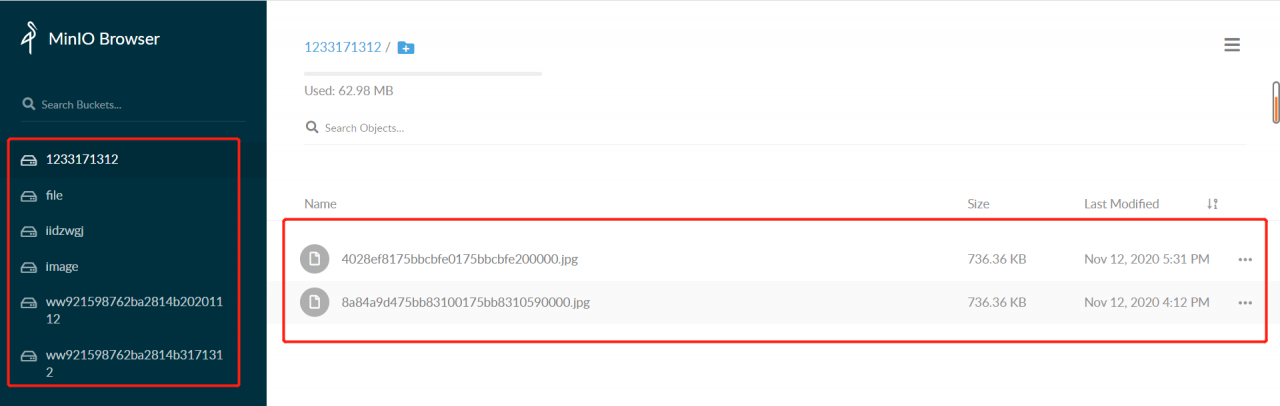
As shown in the figure: the bucket in the Minio drawing bed is on the left, and the files in the bucket are on the right. Minio supports uploading all files. Video and document files are OK, but these functions are not involved in the project, which will be studied later

The next step is to write the interface for uploading pictures in the project. Because it does not involve the operation of the database, I directly wrote all the interfaces in the controller layer and did not call the method of the service layer
the controller layer interface receives the file parameters from the front end, and then processes the files according to the requirements of the parameters received by the method for uploading pictures in the minioutils configuration class, First, we can see that the upload image interface in the miniutils configuration file requires four parameters: bucket, objname, InputStream, lenght and contenttype. The four parameters are: bucket name, file name uploaded and saved to bucket, file input stream and file type. If the upload is successful, a URL will be returned. Put the URL in the browser to directly open the picture. If you need to use the picture in the project, you can directly store the URL in the database and get it from the database later

public GlobalResponse uploadPic(MultipartFile file) {
    String bucket = "pic";
    String filename = file.getOriginalFilename();
    String[] exts = filename.split("\\.");
    String ext = exts[exts.length - 1];
    String caselsh = filename.substring(0,filename.lastIndexOf("."));
    String objName = SystemHelper.now() + caselsh + "." + ext;
    log.info(">>>>>>>>>>>>>>>>>>>>>>>>>>objName:" + objName);
    String contentType = file.getContentType();
    InputStream inputStream = null;
    Long lenght = null;
    try {
        inputStream = file.getInputStream();
        lenght = Long.valueOf(inputStream.available());
    } catch (IOException e) {
        e.printStackTrace();
    }
    String picUrl = minioUtils.uploadFile(bucket, objName, inputStream, lenght, contentType);
    log.info(">>>>>>>>>>>>>>>>>>>>>>>>>>picUrl:" + picUrl);
    return GlobalResponse.success(picUrl);
}

Note that the file name uploaded to the bucket should not be repeated! Don’t repeat! Don’t repeat
because duplicate file names can cause a problem: for example, if you upload a picture a.png first and save it in the bucket with the name 111.png, then the Minio domain name/bucket name/111.png can directly open the picture a.png, but if you upload a picture B.png and save it to the same name 111.png, then the Minio domain name/bucket name/111.png opens the picture B.png, If the picture a.png has been stored in the database and has been used, the consequences can be imagined
therefore, the solution used in the interface is to use the form of timestamp + original file name + suffix. Because the timestamp is 13 bits and milliseconds, even if a file with the same name is uploaded, there will be no problem that the file name saved in the bucket will be repeated

That’s all for this sharing. If you have any mistakes, please correct them!

[Solved] Exception in replication between CentOS virtual machine and host

Exception in replication between CentOS virtual machine and host

Question:

Error copying file from host to virtual machine:

Error when getting information for file “//tmp/VMwareDnD/p6v6B6/.”: No such file or directory

It was found that there was a problem with vmtools

resolvent:

1. Uninstalled packages

yum remove open-vm-tools

Prompt after success:

Delete:
  open-vm-tools.x86_64 0:11.0.5-3.el7                                           

Deleted as a dependency:
  open-vm-tools-desktop.x86_64 0:11.0.5-3.el7                                   

Done!

2. Restart

3. Install VMware Tools
return to the main interface of VMware application and click the “install VMware Tools” menu item in the “virtual machine” menu
4. Mount the CD-ROM to the specified directory

Usually, the device directory/dev/CDROM is mounted to the/MNT/CDROM directory.
if the CDROM directory does not exist in the/MNT directory, it is created

Check for CDROM

[root@centos7 /]# ll /mnt/cdrom/
Total 56849
-r-xr-xr-x. 1 xxxx xxxx     1976 3月  25 2020 manifest.txt
-r-xr-xr-x. 1 xxxx xxxx     4943 3月  25 2020 run_upgrader.sh
-r--r--r--. 1 xxxx xxxx     56414224 3月  25 2020 VMwareTools-10.3.22-15902021.tar.gz
-r-xr-xr-x. 1 xxxx xxxx     872044 3月  25 2020 vmware-tools-upgrader-32
-r-xr-xr-x. 1 xxxx xxxx     918184 3月  25 2020 vmware-tools-upgrader-64

Create if/MNT/CDROM does not exist

[root@centos7 /]# mkdir /mnt/cdrom

Mount directory

[root@centos7 /]# mount -t auto /dev/cdrom /mnt/cdrom
mount: /dev/sr0 Write-protected, will mount as read-only
mount: /dev/sr0 is mounted or /mnt/cdrom is busy
       /dev/sr0 has been mounted on /run/media/xxxx/VMware Tools
       /dev/sr0 is already mounted on /mnt/cdrom

Copy the installation package to the user’s home directory

[root@centos7 /]# cp /mnt/cdrom/VMwareTools-10.3.22-15902021.tar.gz /

Unmount

[root@centos7 /]# umount /dev/cdrom

Unzip the installation package

[root@centos7 /]# tar -zxvf VMwareTools-10.3.22-15902021.tar.gz

Installing VMware Tools

Enter the unzipped source directory

[root@centos7 /]# cd vmware-tools-distrib

run vmware-install.pl 文件

[root@centos7 vmware-tools-distrib]# ./vmware-install.pl

Then enter all the way and 0 yes
the last successful prompt

Generating the key and certificate files.
Successfully generated the key and certificate files.
The configuration of VMware Tools 10.3.22 build-15902021 for Linux for this 
running kernel completed successfully.

You must restart your X session before any mouse or graphics changes take 
effect.

To enable advanced X features (e.g., guest resolution fit, drag and drop, and 
file and text copy/paste), you will need to do one (or more) of the following:
1. Manually start /usr/bin/vmware-user
2. Log out and log back into your desktop session
3. Restart your X session.

Found VMware Tools CDROM mounted at /run/media/tong/VMware Tools. Ejecting 
device /dev/sr0 ...
Enjoy,

--the VMware team

LGWR waits for event ‘DLM cross inst call completion’ [How to Solve]

Click “blue word” above

Pay attention to us and enjoy more dry goods!

The customer has a set of Oracle 19C DataGuard database environment. The standby side always has large gap at intervals. At the same time, LGWR (ospid: 105521) waits for event ‘DLM cross Inst call completion’ for n secs. The standby side does not provide external queries. At the same time, multi instance log applications are disabled, and the operating system resources are idle, The number of LMS processes is normal. If other nodes are shut down, leaving only the apply log does not exist. DLM is a distributed lock manager, which belongs to the core mechanism of Rac architecture. It realizes multi node resource sharing scheduling and transmits requests through the interconnect network. Here is a brief record of this case:

db alert log

PR00 (PID:109603): Media Recovery Log +ARCH/anbob1/ARCHIVELOG/2021_07_12/thread_3_seq_13586.1479.1077669291
2021-07-12T20:25:29.643687+08:00
PR00 (PID:109603): Media Recovery Log +ARCH/anbob1/ARCHIVELOG/2021_07_12/thread_2_seq_14361.1072.1077669019
2021-07-12T20:29:38.183656+08:00
LGWR (ospid: 105521) waits for event 'DLM cross inst call completion' for 1 secs.
2021-07-12T20:29:48.137737+08:00
LGWR (ospid: 105521) waits for event 'DLM cross inst call completion' for 2 secs.
2021-07-12T20:31:21.952345+08:00
 rfs (PID:113884): Selected LNO:26 for T-2.S-14456 dbid 3902007743 branch 1037635587
2021-07-12T20:31:21.987333+08:00
 rfs (PID:114704): Error ORA-235 occurred during an un-locked control file
 rfs (PID:114704): transaction.  This error can be ignored.  The control
 rfs (PID:114704): file transaction will be retried.
2021-07-12T20:31:43.532600+08:00
ARC2 (PID:106404): Archived Log entry 9591 added for T-2.S-14455 ID 0xe894b1bf LAD:1
2021-07-12T20:31:47.151671+08:00
 rfs (PID:113882): Selected LNO:31 for T-3.S-13731 dbid 3902007743 branch 1037635587
2021-07-12T20:31:49.116049+08:00
 rfs (PID:113880): Selected LNO:22 for T-1.S-13006 dbid 3902007743 branch 1037635587
2021-07-12T20:31:53.393547+08:00
ARC3 (PID:106408): Archived Log entry 9592 added for T-1.S-13005 ID 0xe894b1bf LAD:1
2021-07-12T20:32:02.346585+08:00
ARC2 (PID:106404): Archived Log entry 9593 added for T-3.S-13730 ID 0xe894b1bf LAD:1
2021-07-12T20:33:13.805344+08:00
LGWR (ospid: 105521) waits for event 'DLM cross inst call completion' for 0 secs.
2021-07-12T20:33:13.805470+08:00
LGWR (ospid: 105521) is hung in an acceptable location (inwait 0x1.ffff).
2021-07-12T20:33:21.196764+08:00
LGWR (ospid: 105521) waits for event 'DLM cross inst call completion' for 2 secs.
2021-07-12T20:33:31.310737+08:00
LGWR (ospid: 105521) waits for event 'DLM cross inst call completion' for 0 secs.
2021-07-12T20:33:41.223781+08:00
LGWR (ospid: 105521) waits for event 'DLM cross inst call completion' for 1 secs.
2021-07-12T20:33:51.205776+08:00
LGWR (ospid: 105521) waits for event 'DLM cross inst call completion' for 2 secs.
2021-07-12T20:34:01.307770+08:00
LGWR (ospid: 105521) waits for event 'DLM cross inst call completion' for 0 secs.
2021-07-12T20:34:25.440231+08:00
PR00 (PID:109603): Media Recovery Log +ARCH/anbob1/ARCHIVELOG/2021_07_12/thread_2_seq_14362.1867.1077670807
2021-07-12T20:34:44.864009+08:00
PR00 (PID:109603): Media Recovery Log +ARCH/anbob1/ARCHIVELOG/2021_07_12/thread_3_seq_13587.691.1077670845
2021-07-12T20:34:45.204773+08:00
PR00 (PID:109603): Media Recovery Log +ARCH/anbob1/ARCHIVELOG/2021_07_12/thread_1_seq_12934.1156.1077670917
2021-07-12T20:36:09.378685+08:00
LGWR (ospid: 105521) waits for event 'DLM cross inst call completion' for 2 secs.
2021-07-12T20:36:19.341635+08:00
LGWR (ospid: 105521) waits for event 'DLM cross inst call completion' for 0 secs.
2021-07-12T20:36:28.416573+08:00
LGWR (ospid: 105521) waits for event 'DLM cross inst call completion' for 0 secs.
2021-07-12T20:36:38.375742+08:00
LGWR (ospid: 105521) waits for event 'DLM cross inst call completion' for 1 secs.

LGWR trace

*** 2021-07-12T20:33:43.793041+08:00 ((4))
Received ORADEBUG command (#235) 'dump KSTDUMPCURPROC 1' from process '105470'
-------------------------------------------------------------------------------
Trace Bucket Dump Begin: default bucket for process 47 (osid: 105521, LGWR)
CDB_NAME(CON_ID):CON_UID:TIME(*=approx):SEQ:COMPONENT:FILE@LINE:FUNCTION:SECT/DUMP:SID:SERIAL#: [EVENT#:PID] DATA
-------------------------------------------------------------------------------
IRMSDB(4):3247498417:2021-07-12 20:33:42.784 :KJCI:kjci.c@1957:kjci_complete():4466:40278: freeing request 0x20fd651e8 (inst|inc|reqid)=(1|88|823031) with opcode=146 and completion status [DONE]
IRMSDB(4):3247498417:2021-07-12 20:33:42.784 :KJCI:kjci.c@1089:kjci_initreq():4466:40278: request 0x20fd651e8 (inst|inc|reqid)=(1|88|823032) with group (type|id)=(1|1), opcode=146, flags=0x0, msglen=56, where=[kqlmClusterMessage] to target instances=
IRMSDB(4):3247498417:2021-07-12 20:33:42.784 :KJCI:kjci.c@1091:kjci_initreq():4466:40278:    1 2
IRMSDB(4):3247498417:2021-07-12 20:33:42.784 :KJCI:kjci.c@1618:kjci_processcrq():4466:40278: processing reply 0x2cff2d4e8 for request 0x20fd651e8 (inst|inc|reqid)=(1|88|823032) with opcode=146 from callee (inst|pid|psn)=(1|36|1)
IRMSDB(4):3247498417:2021-07-12 20:33:42.784 :KJCI:kjci.c@1618:kjci_processcrq():4466:40278: processing reply 0x2cff2d718 for request 0x20fd651e8 (inst|inc|reqid)=(1|88|823032) with opcode=146 from callee (inst|pid|psn)=(2|36|1)
IRMSDB(4):3247498417:2021-07-12 20:33:42.784 :KJCI:kjci.c@1957:kjci_complete():4466:40278: freeing request 0x20fd651e8 (inst|inc|reqid)=(1|88|823032) with opcode=146 and completion status [DONE]
IRMSDB(4):3247498417:2021-07-12 20:33:42.785 :KJCI:kjci.c@1089:kjci_initreq():4466:40278: request 0x20fd651e8 (inst|inc|reqid)=(1|88|823033) with group (type|id)=(1|1), opcode=146, flags=0x0, msglen=56, where=[kqlmClusterMessage] to target instances=
IRMSDB(4):3247498417:2021-07-12 20:33:42.785 :KJCI:kjci.c@1091:kjci_initreq():4466:40278:    1 2
IRMSDB(4):3247498417:2021-07-12 20:33:42.785 :KJCI:kjci.c@1618:kjci_processcrq():4466:40278: processing reply 0x2cff2d4e8 for request 0x20fd651e8 (inst|inc|reqid)=(1|88|823033) with opcode=146 from callee (inst|pid|psn)=(1|36|1)
IRMSDB(4):3247498417:2021-07-12 20:33:42.785 :KJCI:kjci.c@1618:kjci_processcrq():4466:40278: processing reply 0x2cff2d718 for request 0x20fd651e8 (inst|inc|reqid)=(1|88|823033) with opcode=146 from callee (inst|pid|psn)=(2|36|1)
IRMSDB(4):3247498417:2021-07-12 20:33:42.785 :KJCI:kjci.c@1957:kjci_complete():4466:40278: freeing request 0x20fd651e8 (inst|inc|reqid)=(1|88|823033) with opcode=146 and completion status [DONE]
IRMSDB(4):3247498417:2021-07-12 20:33:42.785 :KJCI:kjci.c@1089:kjci_initreq():4466:40278: request 0x20fd651e8 (inst|inc|reqid)=(1|88|823034) with group (type|id)=(1|1), opcode=146, flags=0x0, msglen=56, where=[kqlmClusterMessage] to target instances=
IRMSDB(4):3247498417:2021-07-12 20:33:42.785 :KJCI:kjci.c@1091:kjci_initreq():4466:40278:    1 2

**KJCJ ** ==> ( kjci)_ processcrq – kernel lock management communication cross instance call

For cross node communication, there is no known bug in MOS. First analyze the network problem. You can also do SSD from the process blocker or view the hangmgr trace. The AHF framework in Oracle 19C CRS comes with OSW.

OSW netstat data

zzz ***Tue Jul 13 00:59:51 CST 2021
...
#kernel
IpInReceives                    1456201695         0.0
IpInHdrErrors                   0                  0.0
IpInAddrErrors                  0                  0.0
IpForwDatagrams                 0                  0.0
IpInUnknownProtos               0                  0.0
IpInDiscards                    0                  0.0
IpInDelivers                    1085210966         0.0
IpOutRequests                   1007206469         0.0
IpOutDiscards                   5280               0.0
IpOutNoRoutes                   8                  0.0
IpReasmTimeout                  6333500            0.0
IpReasmReqds                    408470736          0.0
IpReasmOKs                      37504539           0.0
IpReasmFails                    8651478            0.0
IpFragOKs                       29029579           0.0

Note:
currently, there are high IP reorganization failure packets, which is a cumulative value. You can view the daily changes below.

View the failure of daily IP reorganization

 awk '/zzz/{d=$3"/"$4" "$5}/IpReasmFails/{curr=$2;diff=curr-prev;if(diff>5)print d,diff,prev,curr;prev=curr}' *.dat
Jul/13 00:00:16 8620039  8620039
Jul/13 00:00:46 185 8620039 8620224
Jul/13 00:01:16 242 8620224 8620466
Jul/13 00:01:46 324 8620466 8620790
Jul/13 00:02:16 279 8620790 8621069
Jul/13 00:02:46 325 8621069 8621394
Jul/13 00:03:16 325 8621394 8621719
Jul/13 00:03:46 247 8621719 8621966
Jul/13 00:04:16 246 8621966 8622212
Jul/13 00:04:46 210 8622212 8622422
Jul/13 00:05:16 327 8622422 8622749
Jul/13 00:05:46 247 8622749 8622996
Jul/13 00:06:16 238 8622996 8623234
Jul/13 00:06:46 219 8623234 8623453
Jul/13 00:07:16 262 8623453 8623715
Jul/13 00:07:46 254 8623715 8623969
Jul/13 00:08:16 179 8623969 8624148
Jul/13 00:08:46 294 8624148 8624442

Note:
it can be seen that there are high IP reorganization failures at ordinary times. Let’s try to use Ping to verify the network

Using Ping authentication

— on node1

ping -s 4000 {node2-privateIP}
Note:

Forget to keep the historical output here. It is found that there is 12% package loss, indicating that the current and heartbeat networks are not healthy. However, the bond made of two network cards is used. At present, it is in active backup active and standby mode. You can try to switch another network card.

Network card switching

cat /proc/net/bonding/bond0

Note:

Check that the current primary card is ens9f0 and switch to the standby card ens9f1

ifenslave -c bond0 ens9f1

After switching between active and standby network cards: Ping is normal, IP reorganization failure disappears, DLM cross Inst call completion does not appear, DG synchronization is normal, and the problem is solved.

[Solved] Vite packing error: some chunks are larger than 500kb after minification

Vite packing error: some chunks are larger than 500kb after minification

Solution 1: increase the size of the limit and change 500kb to 1000KB or more

chunkSizeWarningLimit:1500,

build.chunkSizeWarningLimit

Type: number Default: 500 limit of block size warning (in KBS).

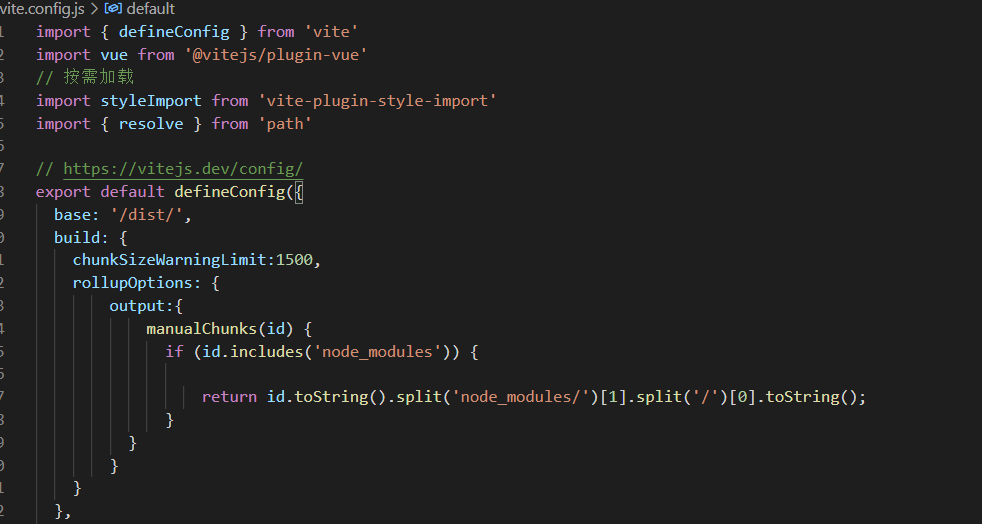
Solution 2: decompose blocks, breaking large blocks into smaller blocks

rollupOptions: {
        output:{
            manualChunks(id) {
              if (id.includes('node_modules')) {
                  return id.toString().split('node_modules/')[1].split('/')[0].toString();
              }
          }
        }
    }

build.rollupOptions

Type: rollupoptions directly customize the underlying rollup package. This is the same as the options that can be exported from the rollup configuration file and will be combined with vite’s internal rollup options. For more details, see the summary options documentation.

code:

import { defineConfig } from 'vite'
import vue from '@vitejs/plugin-vue'
import styleImport from 'vite-plugin-style-import'
import { resolve } from 'path'

// https://vitejs.dev/config/
export default defineConfig({
  base: '/dist/',
  build: {
    chunkSizeWarningLimit:1500,
    rollupOptions: {
        output:{
            manualChunks(id) {
              if (id.includes('node_modules')) {
                
                  return id.toString().split('node_modules/')[1].split('/')[0].toString();
              }
          }
        }
    }
  }
})

Solve the asynchronous execution of callback function in Axios request processing interceptor

The Axios request handles the asynchronous execution of the callback function in the interceptor, resulting in the failure to get the token refresh

https.interceptors.request.use(config => {
    if (Determine if the token is expired) {
        let promisefresh = new Promise(function (resolve, reject) {
            WebViewJavascriptBridge.callHandler(
                "getUserInfo",
                {
                    key: "111"
                },
                function (responseData) {
                    removeItem("FToken");
                    setItem("FToken", responseData);
                    config.headers["FToken"] = getItem("FToken"); 
                    config.headers["FAppType"] = "M"; 
                    resolve(config);
                }
            );
        });
        return promisefresh;
    } else {
        config.headers["FToken"] = getItem("FToken"); 
        config.headers["FAppType"] = "M"; 
        return config;
    }
}, function (error) {
    return Promise.reject(error);
});

axios.interceptors.response.use();

[Solved] Snap Error: snap-confine has elevated permissions and is not confined but should be. Refusing to continue

I wanted to log in to the micro transmission point file with snap, but the error came suddenly. Baidu couldn’t find a solution.

Finally, I found a perfect solution on GitHub!!!

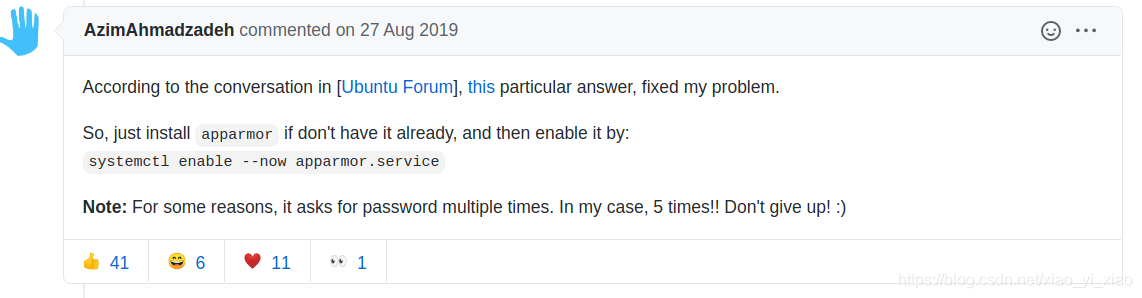
Just run the command. Note that you should use root permission!

systemctl enable --now apparmor.service

Note: if there is no AppArmor, use apt to install it!

Post the source of the solution:

https://github.com/ubuntu/microk8s/issues/249

Cesium uses mediastreamrecorder or mediarecorder to record and download videos, and turn on the camera for recording.

Cesium recording canvas video

Using H5 API Mediarecorder and borrow canvas.capturestream to record the screen.

Direct upper code (Vue lower)

recorderCanvas () {
      let that = this
      let viewer = window.earth
      const stream = viewer.canvas.captureStream()
      const recorder = new MediaRecorder(stream, { MimeType: 'video/webm' })
      that.data = []
      recorder.ondataavailable = function (event) {
        if (event.data && event.data.size) {
          that.data.push(event.data)
        }
      }
      recorder.onstop = () => {
        that.url = URL.createObjectURL(new Blob(that.data, { type: 'video/webm' }))
        that.startDownload(that.url) 
      }
      recorder.start()
      setTimeout(() => {
        recorder.stop()
      }, 10000)
    },

Disadvantages: only canvas can be recorded, and other DOM pages cannot be recorded.

Add a camera to open the video, also using mediarecorder or   Mediastreamrecorder, mediastreamrecorder provides more control means, and the corresponding JS files need to be imported.

Mediastreamrecorder GitHub address

Mediarecorder mode

Note that when creating a mediarecorder instance, you should correctly set the value of mimeType. Otherwise, the downloaded video will be black. In addition, the video format chrome seems to only support WEMP format.

Calling mediarecorder. Stop() does not turn off the camera. You need to manually turn off video and audio by stream.gettracks.

makeRecordes () {
      if (navigator.mediaDevices) {
        console.log('getUserMedia supported.')

        var constraints = { audio: true, video: { width: 1280, height: 720 } }
        var chunks = []
        let that = this
        navigator.mediaDevices.getUserMedia(constraints)
          .then(function (stream) {
            var mediaRecorder = new MediaRecorder(stream, { mimeType: 'video/webm;codecs=vp8,opus' })

            mediaRecorder.start()
            mediaRecorder.ondataavailable = function (e) {
              chunks.push(e.data)
            }
            setTimeout(() => {
              mediaRecorder.stop()
              stream.getTracks().forEach(function (track) {
                track.stop()
              })
              mediaRecorder.onstop = () => {
                const videoBlob = new Blob(chunks, { 'type': 'video/webm' })
                let videoUrl = window.URL.createObjectURL(videoBlob)
                that.startDownload(videoUrl)
              }
            }, 10000)
          })
          .catch(function (err) {
            console.log('The following error occurred: ' + err)
          })
      }
    },

If you need more control, such as pause, and don’t want to implement it yourself, use mediastreamrecorder

Also set the value mimeType correctly, otherwise the recorded video will be black.

makeRecordesByMSR () {
      if (navigator.mediaDevices) {
        console.log('getUserMedia supported.')

        var constraints = { audio: true, video: { width: 1280, height: 720 } }
        navigator.mediaDevices.getUserMedia(constraints)
          .then(function (stream) {
            // eslint-disable-next-line no-undef
            var mediaRecorder = new MediaStreamRecorder(stream)
            mediaRecorder.stream = stream
            mediaRecorder.width = window.screen.width
            mediaRecorder.height = window.screen.height
            mediaRecorder.mimeType = 'video/webm;codecs=vp8,opus'
            mediaRecorder.ondataavailable = function (blob) {
              mediaRecorder.save(blob, 'myName.webm')
            }
            mediaRecorder.start(6000)

            setTimeout(() => {
              mediaRecorder.stream.stop()
            }, 12000)
          })
          .catch(function (err) {
            console.log('The following error occurred: ' + err)
          })
      }
    }

[Solved] cannot find package “go.opentelemetry.io/otel/api/trace“ in any of

cannot find package “go.opentelemetry.io/otel/api/trace” in any of
cannot find package “go.opentelemetry.io/otel/api/global” in any of
cannot find package “go.opentelemetry.io/otel/api/metric” in any of
Solution:
Create a new folder named go.opentelemetry.io for the $GOPATH/src directory, and then download the package.
git clone https://github.com/open-telemetry/opentelemetry-go $GOPATH/src/go.opentelemetry.io/otel
Replace $GOPATH with your $GOPATH directory, the same way under Linux

[Solved] redis.exceptions.ResponseError: unknown command `KEYS`

Error message

When querying redis using python, all key information will be reported as errors

redis.exceptions.ResponseError: unknown command `KEYS`, with args beginning with: `*`, 

The code is as follows

import redis

pool = redis.ConnectionPool(host='127.0,0.1', port=6379, db=0, password='123456')
r = redis.StrictRedis(connection_pool=pool_16_6)
print(r.keys())

Solution:

for key in r.scan_iter("*"):
     print(key)

Dbeaver connects hive to solve the problem that hive custom UDF functions cannot be used in SQL queries in dbeaver

1. Emergence of problems

Today, connect hive with dbeaver and test several SQL executed on the hive client yesterday. There are custom UDF, udtf, udaf, etc. in the SQL, but when the execute button is pressed in dbeaver, an error is reported, saying that it is an invalid function. But it has been registered as a permanent function in hive and has been run. How can it be invalid in dbeaver?

2. Settle

1.Put the create permanent function statement executed at the hive command line into Dbeaver and execute it again

(1) The statement to create a permanent function is as follows:

create function testudf as 'test.CustomUDF' using jar 'hdfs://cls:8020/user/hive/warehouse/testudf/TESTUDF.jar';

3.Cause (not carefully verified)

1. Because my hive client uses hive commands to connect and register functions, and because Dbeaver connects to hive with hiveserver2 service, which is beeline connection. It is said that hive client registration hiveserver2 cannot be used.
2. In the actual operation process, when I execute the instruction to register the permanent function in Dbeaver, the execution result reports that the function already exists, and it will be fine when I execute the sql statement again. So I think it’s possible that the function information was refreshed, because the function was reported to be invalid at the beginning of the execution, indicating that the sql was also executed.