Author Archives: Robins

[Solved] Linux – error: cannot open Packages database in /var/lib/rpm

Error Message:

[root@VM_0_17_centos rabbitmq]# yum install xxx.rpm
error: rpmdb: BDB0113 Thread/process 27590/140471762446144 failed: BDB1507 Thread died in Berkeley DB library
error: db5 error(-30973) from dbenv->failchk: BDB0087 DB_RUNRECOVERY: Fatal error, run database recovery
error: cannot open Packages index using db5 –  (-30973)
error: cannot open Packages database in /var/lib/rpm
CRITICAL:yum.main:
Error: rpmdb open failed

Solution:

[root@VM_0_17_centos]# cd /var/lib/rpm
[root@VM_0_17_centos rpm]# ls
Basenames  Conflictname  __db.001  __db.002  __db.003  Dirnames  Group  Installtid  Name  Obsoletename  Packages  Providename  Requirename  Sha1header  Sigmd5  Triggername
[root@VM_0_17_centos rpm]# rm -rf __db*
[root@VM_0_17_centos rpm]# rpm --rebuilddb

[Solved] Python Networkx Error: Network error: random_state_index is incorrect

A few months ago, you can also use the Networkx package in Python. Recently, you rerun the previous code and report the following error

Network error: random_state_index is incorrect

Now the landlord has solved this problem. The specific steps are as follows:

First: open Anaconda prompt (Anaconda 3), demote Networkx package and decorator package, and enter the following code:

pip install --user decorator==4.3.0
pip install --user networkx==2.3

Second: turn off Anaconda prompt (Anaconda 3) and reopen Python to run without problem.

[Maven] maven filtering OTS parsing error incorrect file size in WOFF head [Two Methods to Solve]

Background description

The front-end static resource file is placed in the Resources folder of the back-end spring boot project. After multi-environment packaging, the icon and text on the front-end page are not displayed as expected. Check the browser console and find the following errors.

OTS parsing error: incorrect file size in WOFF header

Cause location

Let’s first look at the configured Maven POM content.

<build>
        <finalName>project-name</finalName>
        <plugins>
            <plugin>
                <groupId>org.apache.maven.plugins</groupId>
                <artifactId>maven-resources-plugin</artifactId>
                <configuration>
                    <encoding>utf-8</encoding>
                    <delimiters>
                        <delimiter>@</delimiter>
                    </delimiters>
                    <useDefaultDelimiters>false</useDefaultDelimiters>
                </configuration>
            </plugin>
            <plugin>
                <groupId>org.springframework.boot</groupId>
                <artifactId>spring-boot-maven-plugin</artifactId>
            </plugin>
        </plugins>
        <resources>
            <resource>
                <directory>src/main/resources</directory>
                <filtering>true</filtering>
            </resource>
        </resources>
</build>

You can see that the filtering tag is true, which indicates that the filtering mode is enabled. So what is the function of filtering true?

Filtering: turn on filtering and replace the parameter (eg. ${name}) in the file under the directory with the specified parameter. Directory: specify the location of the resource file.

However, it should be noted that because the project needs to configure multiple environments, it needs to use @profile. Active @ , so the @ method is configured for replacement instead of using the default $symbol.

# application.ymlIn the file
spring:
  # Configure which environment to use, dev development, beta testing, prod online, mainly different data sources.
  profiles:
    # Get the environment specified by maven
    active: @profile.active@

Therefore, the main meaning of the above POM is to replace all @ XXX @ under Src/main/resources. Please refer to the relevant contents of Maven profile for the specific replacement principle, which will not be introduced here.

Solution:

Because there are many @ symbols in the woff file, the above configuration causes the original content of the woff file to be replaced, which leads to errors in browser parsing
therefore, the core of the solution is to prevent woff files from being scanned under filtering.

Scheme 1: when the filtering mode is started, the contents in the static directory will not be replaced.

    <build>
        <finalName>package-name</finalName>
        <plugins>
            <plugin>
                <groupId>org.apache.maven.plugins</groupId>
                <artifactId>maven-resources-plugin</artifactId>
                <configuration>
                    <encoding>utf-8</encoding>
                    <delimiters>
                        <delimiter>@</delimiter>
                    </delimiters>
                    <useDefaultDelimiters>false</useDefaultDelimiters>
                </configuration>
            </plugin>
            <plugin>
                <groupId>org.springframework.boot</groupId>
                <artifactId>spring-boot-maven-plugin</artifactId>
            </plugin>
        </plugins>
        <resources>
            <resource>
                <directory>src/main/resources</directory>
                <!-- Turn on filtering and replace the parameters in the file under directory with the specified parameters -->
                <filtering>true</filtering>
                <! -- Use filter to exclude files under fonts/ first, otherwise the page icon will not be loaded -->
                <excludes>
                    <exclude>static/fonts/**</exclude>
                </excludes>
            </resource>
            <resource>
                <directory>src/main/resources</directory>
                <!-- Re-copy the excluded files under fonts/ without using the filter -->
                <filtering>false</filtering>
                <includes>
                    <include>static/fonts/**</include>
                </includes>
            </resource>
        </resources>
    </build>

Scheme 2: the nonfilteredfileextensions tag specifies which suffix files are not uniformly encoded.

    <build>
        <finalName>package-name</finalName>
        <plugins>
            <plugin>
                <groupId>org.apache.maven.plugins</groupId>
                <artifactId>maven-resources-plugin</artifactId>
                <configuration>
                    <encoding>utf-8</encoding>
                    <delimiters>
                        <delimiter>@</delimiter>
                    </delimiters>
                    <useDefaultDelimiters>false</useDefaultDelimiters>
                    <nonFilteredFileExtensions>woff</nonFilteredFileExtensions>
                    <nonFilteredFileExtensions>woff2</nonFilteredFileExtensions>
                    <nonFilteredFileExtensions>tff</nonFilteredFileExtensions>
                </configuration>
            </plugin>
            <plugin>
                <groupId>org.springframework.boot</groupId>
                <artifactId>spring-boot-maven-plugin</artifactId>
            </plugin>
        </plugins>
        <resources>
            <resource>
                <directory>src/main/resources</directory>
                <filtering>true</filtering>
            </resource>
        </resources>
    </build>

[Solved] PostgreSQL enumeration type usage error: operator does not exist error handling

//Creating Enumeration Classes
CREATE TYPE USER_ROLE AS ENUM ('MALE', 'FEMALE');
//Add conversion rules
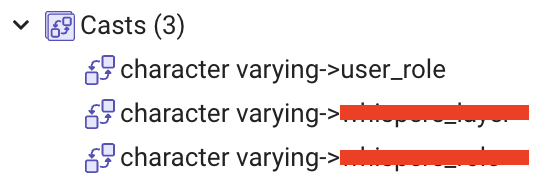
CREATE CAST (VARCHAR AS USER_ROLE) WITH INOUT AS IMPLICIT;
//Create table, add fields of enumeration type
create table sys_user
(
    row_id      bigserial          not null
        constraint sys_user_pkey primary key,
    create_time timestamp(6),
    update_time timestamp(6),
    del_flag    smallint default 0 not null,
    role        USER_ROLE      not null,
    user_name   varchar(200)       not null
);

Because the conversion rule is added, you can directly use the varchar type string as the judgment condition query in pgadmin, but if you use mybatis to query the database, the error operator does not exist will be reported

select * from sys_user where del_flag = 0 and role = 'MALE'

Solution: convert varchar type to enumeration type and compare

Method 1
select * from sys_user where del_flag = 0 and role = cast(#{role} as user_role);
Method 2
select * from sys_user where del_flag = 0 and role = #{role}::user_role;

[Solved] Redis Error: Error creating bean with name stringRedisTemplate defined in class path resource

  1. Error Message

org.springframework.beans.factory.UnsatisfiedDependencyException: Error creating bean with name ‘redissonController’: Unsatisfied dependency expressed through field ‘stringRedisTemplate’; nested exception is org.springframework.beans.factory.UnsatisfiedDependencyException: Error creating bean with name ‘stringRedisTemplate’ defined in class path resource [org/springframework/boot/autoconfigure/data/redis/RedisAutoConfiguration.class]: Unsatisfied dependency expressed through method ‘stringRedisTemplate’ parameter 0; nested exception is org.springframework.beans.factory.BeanCreationException: Error creating bean with name ‘redisConnectionFactory’ defined in class path resource [org/springframework/boot/autoconfigure/data/redis/JedisConnectionConfiguration.class]: Bean instantiation via factory method failed; nested exception is org.springframework.beans.BeanInstantiationException: Failed to instantiate [org.springframework.data.redis.connection.jedis.JedisConnectionFactory]: Factory method ‘redisConnectionFactory’ threw exception; nested exception is java.lang.NoClassDefFoundError: redis/clients/util/SafeEncoder

2. Solution

springboot2.1.5 jedis3.3.0 The main reason is that jedis and spring-boot-starter-data-redis are not compatible with the version of the maven dependency, which is a frequent problem. The same is true for JedisConnectionFactory, which cannot be created. Changing to the following version will solve the problem

    <parent>
        <groupId>org.springframework.boot</groupId>
        <artifactId>spring-boot-starter-parent</artifactId>
        <version>2.1.5.RELEASE</version>
        <relativePath/> <!-- lookup parent from repository -->
    </parent>
		<dependency>
            <groupId>org.springframework.boot</groupId>
            <artifactId>spring-boot-starter-data-redis</artifactId>
            <exclusions>
                <exclusion>
                    <groupId>io.lettuce</groupId>
                    <artifactId>lettuce-core</artifactId>
                </exclusion>
            </exclusions>
        </dependency>
        <dependency>
            <groupId>redis.clients</groupId>
            <artifactId>jedis</artifactId>
            <version>2.9.1</version>
        </dependency>

[Solved] Vuex state Error: [vuex] do not mutate vuex store state outside mutation handlers.

Vuex Error: [vuex] do not mutate vuex store state outside mutation handlers.

Error: [vuex] do not mutate vuex store state outside mutation handlers.

Error reason: the only way to change the status in vuex’s store is to submit mutation.

Vuex also provides a strict mode to control whether to prompt non-standard store value modification. After the strict mode is turned on, if the value is modified outside the mutation, it can also be dynamically rendered to the page, but Vue will have a warning prompt.

My usage scenario:

Vuex saves the data requested by the interface uniformly, and I call the interface in mutation to assign data to state.

solution:

The following reference official documents:

Mixing asynchronous calls in mutation will make your program difficult to debug. For example, when you call two mutation with asynchronous callbacks to change the state, how do you know when to call back and which to call back first?That’s why we have to distinguish between these two concepts. In vuex, mutation is a synchronous transaction

Asynchronous requests cannot be made in mutation. Asynchronous requests are placed in actions. Mutation must be a synchronous function!!

The test.js code example in the store file is as follows:

import * as types from './mutation-types';
import api from '../apis/orderList';
export const state = () => ({
  test: '111',
  defeatList: []
});

export const getters = {};

export const actions = {
  changeNum ({ commit }, Num) {
    commit('change_num', Num);
  },
  getDefeatList ({ commit }, params) {
    api.getDefeatList(params).then(res => {
      if (res && res.data) {
        let List = res.data;
        commit(types.GET_DEFEATLIST, List);
      }
    });
  }
};

export const mutations = {
  change_num (state, Num) {
    state.test = Num;
  },
  [types.GET_DEFEATLIST] (state, List) {
    state.defeatList = List;
  }
};

Component invocation:

<template>
	<a-table
		:columns="columns"
		:row-selection="{ selectedRowKeys: selectedRowKeys, onChange: onSelectChange }"
		:data-source="defeatList"
		:scroll="{ x: 1500 }"
		:pagination="paginationProps"
		:row-key="record => record.carNumber"
	 ></a-table>
</template>
computed: {
    test () {
      return this.$store.state.orderlist.test;
    },
    defeatList () {
      return this.$store.state.orderlist.defeatList;
    }
 },
methods: {
	initList () {
      let params = {
        pageNum: 1,
        ...this.form
      };
      this.$store.dispatch("test/getDefeatList", params); 
    },
}

[Solved] Redis—-(error) MISCONF Redis is configured to save RDB snapshots

Error

Just after installing redis, I saw that the error reporting people below were stupid

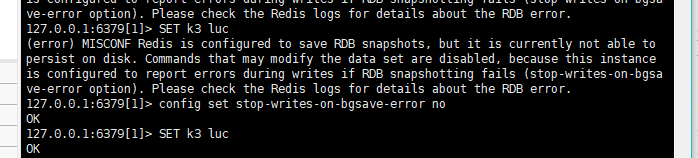
(error) MISCONF Redis is configured to save RDB snapshots, but it is currently not able to persist on disk. Commands that may modify the data set are disabled, because this instance is configured to report errors during writes if RDB snapshotting fails (stop-writes-on-bgsave-error option). Please check the Redis logs for details about the RDB error.
127.0.0.1:6379[1]> config set stop-writes-on-bgsave-error no

A very simple set operation

127.0.0.1:6379[1]> Configure the stop writing error number on bgsave

I checked some related solutions on the Internet
this problem can be avoided by setting the stop writes on bgsave error value to No
solution 1:
one is to modify through the redis command line. This method is convenient and direct. The change takes effect directly to solve the problem.

Example of command line modification method:

127.0.0.1:6379[1]> config set stop-writes-on-bgsave-error no

Solution 2:
modify the redis.conf configuration file directly, but restart redis after the change
modify the redis.conf file:
(1) VIM opens the redis.conf file configured for redis server,
(2) use the quick matching mode:
/stop writes on bgsave error to locate the stop writes on bgsave error string,
(3) set the following yes to No.

Keytool: How to solve javax.net.ssl.SSLHandshakeException Error?

A java microservice function exception in the environment, look at the logs reporting errors.
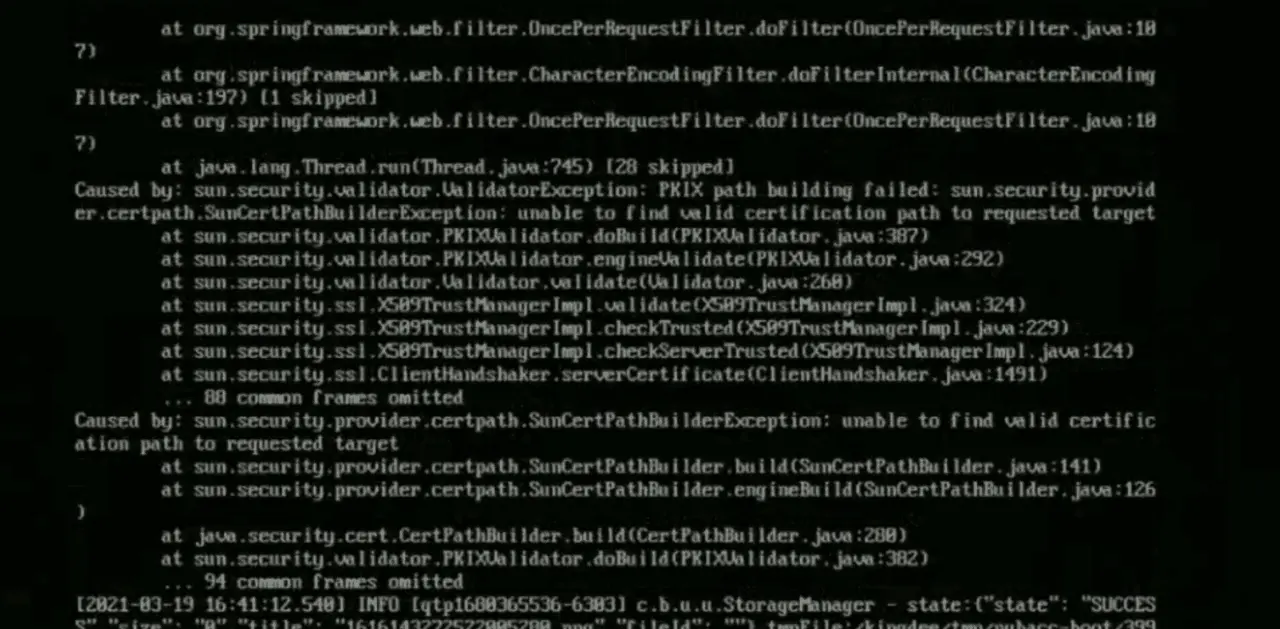
javax.net.ssl.SSLHandshakeException: sun.security.validator.ValidatorException: PKIX path building failed: sun.security.provider.certpath.SunCertPathBuilderException: unable to find valid certification path to requested target

Reason: The self-signed certificate used by the customer is not trusted by jdk.

Import the customer domain SSL certificate into jdk library.

# export LANG=”en_US.UTF-8″
# openssl s_client -connect www.example.com:443 < /dev/null | sed -ne ‘/-BEGIN CERTIFICATE-/,/-END CERTIFICATE-/p’ > www.example.com.crt
# keytool -import  -file  www.example.com.crt  -alias  www.example.com  -keystore $JAVA_HOME/jre/lib/security/cacerts  –storepass “changeit” –noprompt   -trustcacerts

Restart the relevant java application and solve it.

Vue-element-admin Use npm install Error: npm ERR! Error while executing:

This post is about solving the error when installing dependencies on vue-element-admin.
When using npm install to download dependencies, the first problem I encountered was as follows.

npm ERR! Error while executing:
npm ERR! D:\git\Git\cmd\git.EXE ls-remote -h -t https://github.com/nhn/raphael.git
npm ERR!
npm ERR! fatal: unable to access ‘https://github.com/nhn/raphael.git/’: OpenSSL SSL_read: Connection was reset, errno 10054
npm ERR!
npm ERR! exited with error code: 128
npm ERR! A complete log of this run can be found in:
npm ERR! C:\Users\new\AppData\Roaming\npm-cache_logs\2021-09-08T01_40_03_853Z-debug.log

This is a bad network, you can change a network and then re-download the dependency, I re-downloaded after changing the network, and encountered another kind of error, as follows.

npm ERR! Error while executing:
npm ERR! D:\git\Git\cmd\git.EXE ls-remote -h -t https://github.com/nhn/raphael.git
npm ERR!
npm ERR! fatal: unable to access ‘https://github.com/nhn/raphael.git/’: Failed to connect to github.com port 443: Timed out
npm ERR!
npm ERR! exited with error code: 128
npm ERR! A complete log of this run can be found in:
npm ERR! C:\Users\new\AppData\Roaming\npm-cache_logs\2021-09-08T01_23_18_405Z-debug.log

This problem can be solved by executing directly from the terminal.

git config –global url.“https://”.insteadOf git://

After execution, download the dependency again, and it will download normally

[Solved] Jupyter Notebook Start Error: Fatal error in launcher: Unable to create process using

Problem description

Previously, rename a CONDA virtual environment with the following command:

conda create -n torch --clone rl
conda remove -n rl --all

Then start jupyter from Torch virtual environment, and the following error is reported:

Fatal error in launcher: Unable to create process using
"g:\miniconda3\envs\rl\python.exe"
 "G:\miniconda3\envs\torch\Scripts\jupyter-notebook.EXE"

Reference solutions

I checked the online information and found that it was better after a mess… So I’m not sure which operation fixed the problem. What’s more certain is the last few executed commands:

pip uninstall ipython
pip uninstall jupyter
pip uninstall notebook

Or (after the above command is executed, try installing jupyter first. If the problem cannot be solved, execute the following command)

pip install pip-autoremove
pip-autoremove jupyter -y

Then install jupyter

pip install jupter

Error from server (BadRequest): a container name must be specified for pod

report errors

Previously, I used kubectl logs -f <POD-name> -n <nameSpace> to view the logs of a pod. One day when I used this command to check the status of a pod that was runnning, I got an error.

Error from server (BadRequest): a container name must be specified for pod xxx ,choose one of:[xxx  xxx]


Causes and treatment of error reporting

Reason: originally, a pod used a container. When you use the command to view the pod log, the log of the pod’s container will be output…
but one day, the architect adjusted the structure of the pod and enabled multiple containers in a pod. From then on, you need to specify which container to view the pod when viewing the log. You can use the command – C < container_ name> Specify that the name of the container that can be viewed is listed in the choose one of error message

 kubectl logs -f  <POD-name> -n <nameSpace> -c  <container_name>