Operating environment.
Appium-windows-1.21.0,手机vivo s7/Android 10
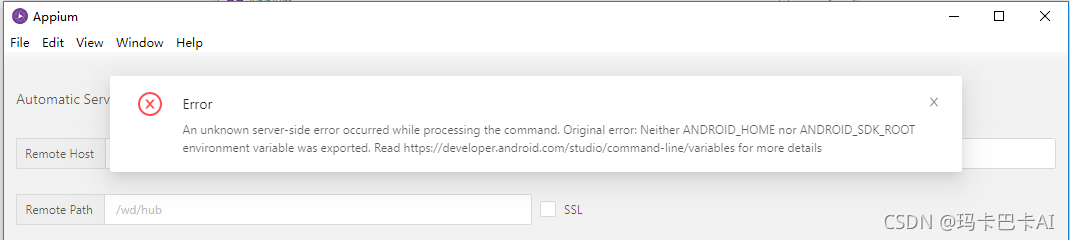
appium startup error: An unknown server-side error occurred while processing the command. Original error: Neither ANDROID_HOME nor ANDROID_SDK_ROOT environment variable was exported. Read https://developer.android.com/studio/command-line/variables for more details
The general idea is that the SDK environment variables are not configured correctly and cannot be read, so you can use manual configuration.
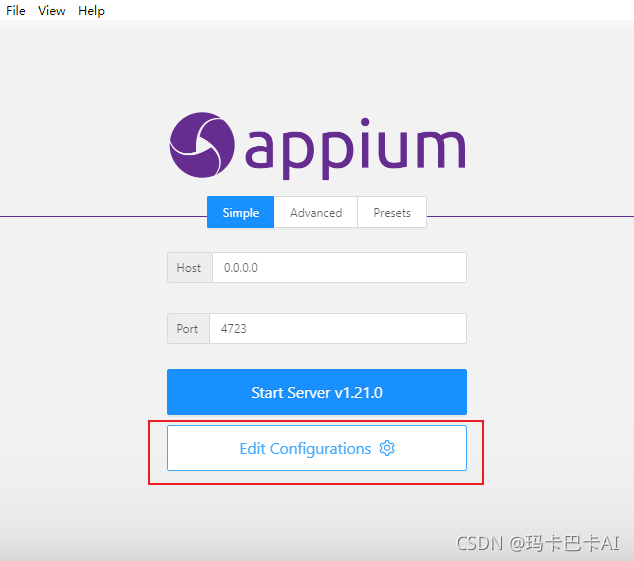
Solution, manually select the android SDK
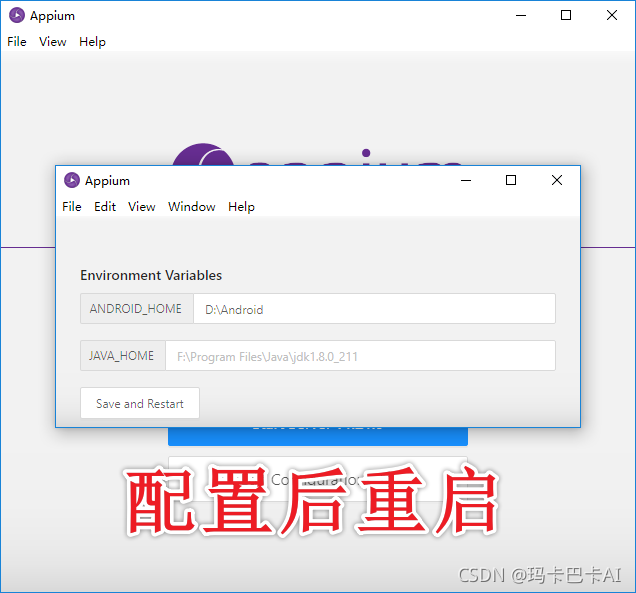
I thought this would be solved, I did not expect that there are new mishaps
An unknown server-side error occurred while processing the command. Original error: Error executing adbExec. Original error: ‘Command ‘D:\Android\platform-tools\adb.exe -P 5037 -s 2591584f install -g ‘C:\Program Files\Appium\resources\app\node_modules\appium\node_modules\io.appium.settings\apks\settings_apk-debug.apk’’ exited with code 1’; Stderr: ‘adb: failed to install C:\Program Files\Appium\resources\app\node_modules\appium\node_modules\io.appium.settings\apks\settings_apk-debug.apk: Failure [INSTALL_FAILED_ABORTED: User rejected permissions]’; Code: ‘1’

Solution: Because the Vivo phone I used did not give permission to open the developer mode to connect to debug after a one-time installation of several appium-related apk, just keep agreeing, you can enter.
Author Archives: Robins
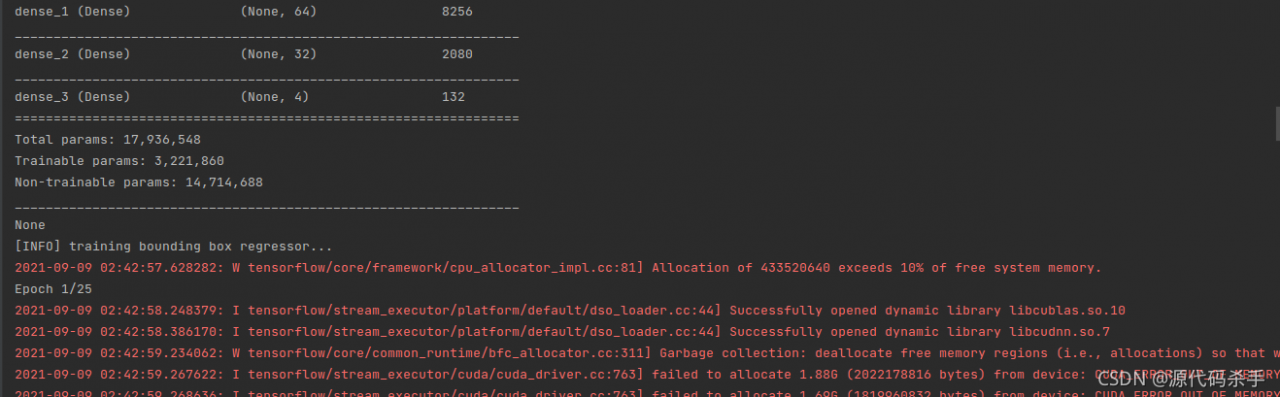
[Solved] Could not create cudnn handle: CUDNN_STATUS_INTERNAL_ERROR
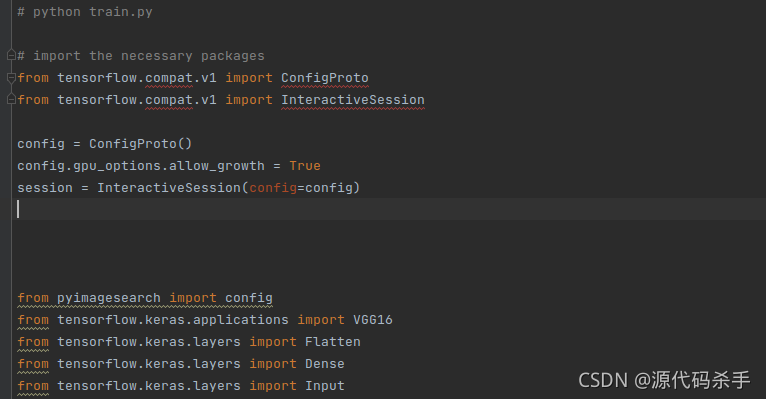
Enter the following code at the beginning of the code to solve the problem:
from tensorflow.compat.v1 import ConfigProto
from tensorflow.compat.v1 import InteractiveSession

config = ConfigProto()
config.gpu_options.allow_growth = True
session = InteractiveSession(config=config)
[Python] Right-click Selenium to Save the picture error: attributeerror: solution to module ‘pyscreen’ has no attribute ‘locationonwindow’
When crawling pictures with selenium module, simulate right clicking and select “save picture as” to save the picture (pyautogui module is not used)
from selenium.webdriver.common.action_chains import ActionChains
from selenium.webdriver.common.keys import Keys
from selenium import webdriver
from time import sleep

url = 'https://gimg2.baidu.com/image_search/src=http%3A%2F%2Fcdn.duitang.com%2Fuploads%2Fitem%2F201202%2F18%2F20120218194349_ZHW5V.thumb.700_0.jpg&refer=http%3A%2F%2Fcdn.duitang.com&app=2002&size=f9999,10000&q=a80&n=0&g=0n&fmt=jpeg?sec=1633348528&t=794e58b55dfe37e5f3082568feb89783'

driver = webdriver.Chrome()
driver.get(url)
element = driver.find_element_by_xpath('/html/body/img[1]')

action = ActionChains(driver)
action.move_to_element(element)
action.context_click(element)
action.send_keys(Keys.ARROW_DOWN)
action.send_keys('v')

action.perform()
sleep(2)

driver.quit()
When you execute the above code, you will find that you do not click the keyboard after right clicking, because the page is not controlled by selenium after right clicking. At this point, we need to use the pyautogui module, which is a module for automatically controlling the mouse and keyboard
you need to PIP download the wheel first
pip install pyautogui
Modified code:
from selenium.webdriver.common.action_chains import ActionChains
from selenium import webdriver
from time import sleep
import pyautogui

url = 'https://gimg2.baidu.com/image_search/src=http%3A%2F%2Fcdn.duitang.com%2Fuploads%2Fitem%2F201202%2F18%2F20120218194349_ZHW5V.thumb.700_0.jpg&refer=http%3A%2F%2Fcdn.duitang.com&app=2002&size=f9999,10000&q=a80&n=0&g=0n&fmt=jpeg?sec=1633348528&t=794e58b55dfe37e5f3082568feb89783'

driver = webdriver.Chrome()
driver.get(url)
element = driver.find_element_by_xpath('/html/body/img[1]')

action = ActionChains(driver)
action.move_to_element(element)
action.context_click(element)
action.perform()

pyautogui.typewrite(['v'])
sleep(1)
pyautogui.typewrite(['1', '.', 'j', 'p', 'g'])
pyautogui.typewrite(['enter'])

sleep(1)

driver.quit()
The red explosion will be found after execution:

attributeerror: module ‘pyscreen’ has no attribute ‘locateonwindow’
It is actually very simple to solve this problem
we directly download the highest version 0.9.53 after PIP install pyautogui
we only need to download version 0.9.50, so this problem will not exist
pip install pyautogui==0.9.50
Just execute the code again~
[Solved] ELK Log System Error: “statusCode“:429,“error“:“Too Many Requests“,“message“ Data too large
Elk log system error
The error information is as follows:
{"statusCode":429,"error":"Too Many Requests","message":"[circuit_breaking_exception] [parent] Data too large, data for [indices:data/write/bulk[s]] would be [2087165840/1.9gb], which is larger than the limit of [2040109465/1.8gb], real usage: [2087165392/1.9gb], new bytes reserved: [448/448b], usages [request=0/0b, fielddata=182738/178.4kb, in_flight_requests=448/448b, model_inference=0/0b, accounting=89449992/85.3mb], with { bytes_wanted=2087165840 & bytes_limit=2040109465 & durability=\"PERMANENT\" }"}
Du Niang said something, which probably means that the memory given to ES is not enough. However, there is no timely recovery of memory
too much data leads to insufficient memory. You can set the memory limit of fielddata, which is 60% by default
Solution 1: modify the configuration file
Modify the ES configuration file and add the following configuration
[ root@sjyt -node-1 ~]# vim /etc/elasticsearch/elasticsearch.yml
# Avoid OOM, which can have a significant impact on the cluster, by combining request and fielddata breakers to ensure that the combination of the two does not use more than 70% of the heap memory.
indices.breaker.total.limit: 80%

# With this setting, the longest unused (LRU) fielddata will be reclaimed to make room for new data
indices.fielddata.cache.size: 10%

# fielddata breaker defaults to set the heap as the upper limit of fielddata size.
indices.breaker.fielddata.limit: 60%

The #request breaker estimates the size of structures that need to complete other request parts, such as creating an aggregation bucket, with a default limit of 40% of the heap memory.
indices.breaker.request.limit: 40%

#Longest unused (LRU) fielddata will be reclaimed to make room for new data Must add configuration
indices.breaker.total.use_real_memory: false
After removing the note:
indices.breaker.total.limit: 80%
indices.fielddata.cache.size: 10%
indices.breaker.fielddata.limit: 60%
indices.breaker.request.limit: 40%
indices.breaker.total.use_real_memory: false
Solution 2: dynamic setting
Reference connection: https://blog.csdn.net/sdlyjzh/article/details/48035723
PUT /_cluster/settings
{
"persistent" : {
"indices.breaker.fielddata.limit" : "40%"
}
}
When the size of the fielddata circuit breaker exceeds the set value, the data too large mentioned at the beginning will appear.
ERROR StatusLogger No Log4j 2 configuration file found. Using default configuration…
ERROR StatusLogger No Log4j 2 configuration file found. Using default configuration (logging only errors to the console), or user programmatically provided configurations. Set system property ‘log4j2.debug’ to show Log4j 2 internal initialization logging. See https://logging.apache.org/log4j/2.x/manual/configuration.html for instructions on how to configure Log4j 2

This text probably means that there is no Log4j 2 configuration file
Create a new Log4j 2.xml file and paste the code of this text in the file, then run the file and it’s OK
<?xml version="1.0" encoding="UTF-8"?>
<Configuration status="WARN">
    <Appenders>
        <Console name="Console" target="SYSTEM_OUT">
            <PatternLayout pattern="%d{YYYY-MM-dd HH:mm:ss} [%t] %-5p %c{1}:%L - %msg%n" />
        </Console>

        <RollingFile name="RollingFile" filename="log/test.log"
                     filepattern="${logPath}/%d{YYYYMMddHHmmss}-fargo.log">
            <PatternLayout pattern="%d{YYYY-MM-dd HH:mm:ss} [%t] %-5p %c{1}:%L - %msg%n" />
            <Policies>
                <SizeBasedTriggeringPolicy size="10 MB" />
            </Policies>
            <DefaultRolloverStrategy max="20" />
        </RollingFile>

    </Appenders>
    <Loggers>
        <Root level="info">
            <AppenderRef ref="Console" />
            <AppenderRef ref="RollingFile" />
        </Root>
    </Loggers>
</Configuration>
ASIC VCS Error: Error-[VCS_COM_UNE] Cannot find VCS compiler [Solved]
[xxxx@localhost ~]$ vcs -h

Error-[VCS_COM_UNE] Cannot find VCS compiler
  VCS compiler not found. Environment variable VCS_HOME
  (/opt/eda/synopsys/vcs-mx/N-2017.12-SP2/linux) is selecting a directory in
  which there isn't a compiler
  '/opt/eda/synopsys/vcs-mx/N-2017.12-SP2/linux/bin/vcs1' for a machine of
  this type 'linux'.
  Please check whether 'VCS_HOME' is incorrect; if not, see below.

 Perhaps vcs hasn't been installed for machine of type "linux".
 Or the installation has been damaged.
 To verify whether vcsN-2017.12 supports machine of type "Linux 3.10.0-1160.31.1.el7.x86_64",
 please look at ReleaseNotes for more details .
 We determine the machine type from uname; maybe uname is incorrect.
 You can fix installation problems by reinstalling from CDROM
 or downloading it from the Synopsys ftp server.
 For assistance, please contact vcs technical support
 at [email protected] or call 1-800-VERILOG
Two solutions:
1. Specify VCs as 64 bit mode through the – full64 parameter
alias vcs ='vcs -full64'2. Set VCS_ TARGET_ Arch is linux64
export VCS_TARGET_ARCH=linux64[Solved] Error response from daemon: manifest for nvidia/cuda:latest not found: manifest unknown: manifest
Reason:
The “latest” tag for CUDA, CUDAGL, and OPENGL images has been deprecated on NGC and Docker Hub
CUDA, CUDAGL and OPENGL images in Docker Hub have deprecated the “latest” tag and use the
docker pull nvidia/cudaOr specify in dockerfile
FROM nvidia/cuda:latestWill appear
Error response from daemon: manifest for nvidia/cuda:latest not found: manifest unknown: manifest unknown
Error
Solution:
Find the CUDA version corresponding to your system in supported tags, and change the latest in NVIDIA/CUDA: latest to the corresponding version
For example:
nvidia/cuda:10.0-cudnn7-devel-ubuntu16.04[Win 10] Docker Error: error during connect: In the default daemon configuration on Windows
error during connect: In the default daemon configuration on Windows,
the docker client must be run with elevated privileges to connect.:
Get http://%2F%2F.%2Fpipe%2Fdocker_engine/v1.24/containers/json:
open //./pipe/docker_engine: The system cannot find the file specified.
solution:
cd "C:\Program Files\Docker\Docker"
DockerCli.exe -SwitchDaemon
[Vue warn]: Error in render: “TypeError: Cannot read properties of undefined

e.g.
<div>{{obj.name}}</div>
<div>{{obj.info.access_control}}</div>

data(){
	return {
		obj:{}
	}
}
The data format of template rendering is obj.name or obj.info.access_ Control, why does obj.name not report the above dislocation and obj.info.access_ The above error will appear in control. Because obj data has not been requested from the back end to assign its value, the obj object is still an empty object. Without the attribute info, obj.info is naturally undefined, and then undefined.access_ Control will naturally report the above error.
Solution: add info null object in obj object
data(){
	return {
		obj:{
			info:{}
		}
	}
}
[Solved] Fatal error: Class ‘think\Container‘ not found & [InvalidArgumentException] Could not find package
Fatal error: class’ think \ container ‘not found. This error means that the ThinkPHP core framework warehouse is not a branch of version 5.1, so the container of version 5.1 is not found;
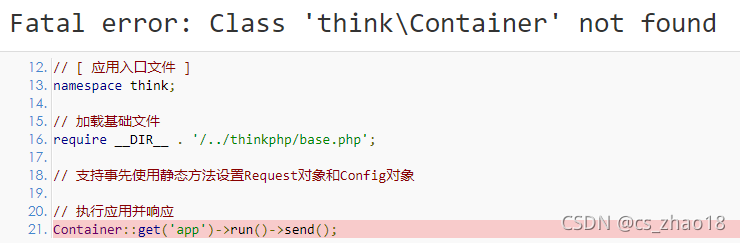
The solution is to execute the following command on the terminal terminal of the IDE:
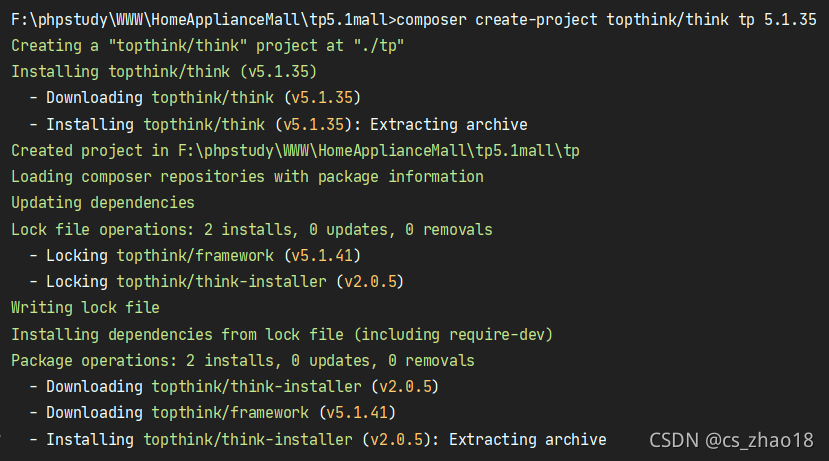
composer create-project topthink/think tp 5.1.35Starting from tp5.1, the official website no longer provides a full version download, but can only be installed through the composer method.
[invalidargumentexception] could not find package. This error means that the installation package of the corresponding version is not found. The problem in the figure below is that the version number behind 5.1 is missing. It is correct after supplement as shown in the figure above.
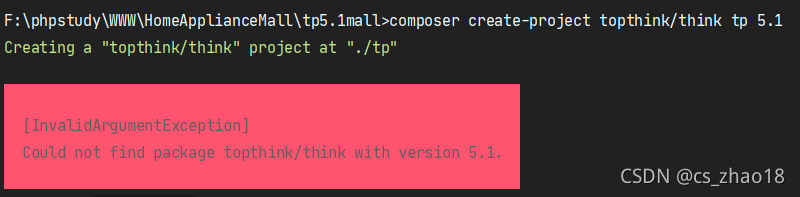 The program operation after correct input is as follows:
SpringBoot—Error starting ApplicationContext. To display the auto-configuration report re-run your a
Error: Starting the main SpringBoot application gives the prompt.
Error starting ApplicationContext. To display the auto-configuration report re-run your application
Found the error in the pom.xmlFile:
<thymeleaf-layout-dialect.version>2.1.1</thymeleaf-layout-dialect.version>write wrong to
<thymeleaf.layout-dialect.version>2.1.1</thymeleaf.layout-dialect.version>
should be used in thymeleaf and layout – connection
[Solved] Error creating bean with name ‘org.springframework.web.servlet.handler.SimpleUrlHandlerMapping#0‘:
Error:
Error creating bean with name’org.springframework.web.servlet.handler.SimpleUrlHandlerMapping0’: Instantiation of bean failed;
Error Message:
05-Sep-2021 16:44:18.866 Message [http-apr-8080-exec-8]
org.springframework.web.servlet.FrameworkServlet.initServletBean Initializing Servlet 'springmvc'

05-Sep-2021 16:44:18.974 Warning [http-apr-8080-exec-8] org.springframework.context.support.AbstractApplicationContext.refresh Exception encountered during context initialization - cancelling refresh attempt: org.springframework.beans.factory.BeanCreationException: Error creating bean with name 'org.springframework.web.servlet.handler.SimpleUrlHandlerMapping#0': Instantiation of bean failed; nested exception is org.springframework.beans.BeanInstantiationException: Failed to instantiate [org.springframework.web.servlet.handler.SimpleUrlHandlerMapping]: Constructor threw exception; nested exception is java.lang.NoSuchMethodError: org.springframework.core.log.LogDelegateFactory.getHiddenLog(Ljava/lang/String;)Lorg/apache/commons/logging/Log;
Cause analysis:
bean instantiation failed
Solution:
There are three ways:
1. Comment out the following comments.

2.Servlet API dependency is missing. Add the following dependencies
 <dependency>
      <groupId>tomcat</groupId>
      <artifactId>servlet-api</artifactId>
      <version>5.5.23</version>
    </dependency>
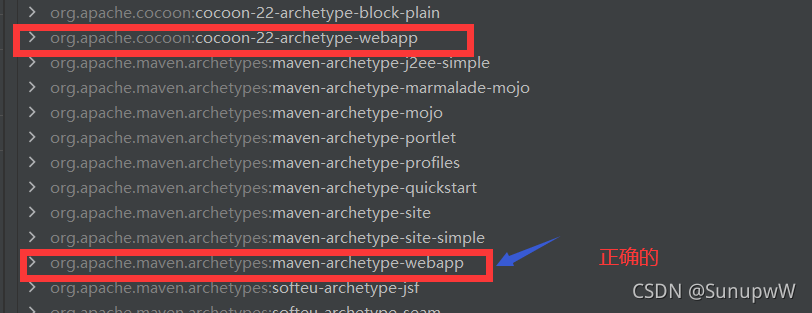
3.the web project created has the wrong prototype selected