Error: error: try ‘\ 302’ in program
cause: there is a garbled code in the file content
solution: directly open the file with another compiler and delete the garbled characters
Author Archives: Robins
error: resource android:attr/lStar not found [Pefect Solution]
Today, the following errors suddenly appear in the project, and the compilation will report an error
D:\AndroidProjects\XXXXX\app\build\intermediates\incremental\mergeDebugResources\
merged.dir\values\values.xml:10858: AAPT: error: resource android:attr/lStar not found.
No one submitted the code. I could still run yesterday, but I suddenly couldn’t do it today. Then there were all kinds of tosses. I tried the common methods for difficult and miscellaneous problems in the development process. Clean project, clear the studio cache and restart, restart the computer, etc. the problems still exist. I searched for a circle and didn’t find the corresponding solutions.
Problem:
The project or third-party library relies on androidx.core: core KTX: + , and there is no limited version. Therefore, the latest core KTX version 1.7.0 is used, and the above compilation error is reported, and it is still sudden.
Solution:
The specific version number depends on the project, not necessarily 1.3.2. I understand that it can be lower than 1.7.0
Method 1: project reference and directly set the specific version number. For example, my project:
implementation "Android. Core: core KTX: 1.3.2"
method 2: the version number is not set in the third-party dependency library. You can add the following code in build.gradle of APP module:
at the same level as Android {}
configurations.all {
    resolutionStrategy {
        force 'androidx.core:core-ktx:1.3.2'
    }
}
Note: the specific version number of remote dependency must be set. Never use the + end. This compilation will pull the corresponding latest remote dependency. Maybe there will be an inexplicable problem that day.
[Solved] Python Error: tensorflow.python.framework.errors_impl.UnknownError: 2 root error(s) found.
environment
Environment: docker
System: Ubuntu 18.04
graphics card: RTX 1080ti
tf-v: 1.15.0
Run the neural network model and report the error of the title
The screenshot of the error is as follows:

solution:
Add the following code after the import of the entry file:
config = tf.compat.v1.ConfigProto()
config.gpu_options.per_process_gpu_memory_fraction = 0.6  # 0.6 sometimes works better for folks
keras.backend.tensorflow_backend.set_session(tf.compat.v1.Session(config=config))
Limit the running memory of Tensorflow
Error while injecting dependencies into App\Controller\IndexController: No entry or class found for
An error occurs when a service consumer class is manually created for the hyperf 2.2.0 microservice.
In the documentation on the official website, when manually creating a consumer class, its recommended configuration of services.php is as follows.
<?php
return [
    'consumers' => [
        [
            'name' => 'CalculatorService',
            'registry' => [
                'protocol' => 'consul',
                'address' => 'http://127.0.0.1:8500',
            ],
            'nodes' => [
                ['host' => '127.0.0.1', 'port' => 9504],
            ],
        ]
    ],
];
Later, I saw the video on the official website jsonrpc. The recommendation in the video is as follows.
<?php
return [
    'consumers' => [
        [
            'name' => 'CalculatorService',
            'nodes' => [
                ['host' => '127.0.0.1', 'port' => 9504],
            ],
        ]
    ],
];
I wonder if the above writing is only applicable to the 1. X.x era?When I upgrade to 2.2.0, it is reported above
[ERROR] Error while injecting dependencies into App\Controller\IndexController: No entry or class found for ‘App\Rpc\CalculatorServiceInterface'[101]
After tossing for a long time, I found that there are few services.php configurations
'service' => \App\Rpc\CalculatorServiceInterface::class,So, don’t lose service. The complete services.php is like this
return [
    'consumers' => [
        [
            // name needs to be the same as the name attribute of the service provider
            'name' => 'CalculatorService',
            // service interface name, optional, default value is equal to the value configured by name, if name is defined directly as an interface class then this line can be ignored, if name is a string then you need to configure service to correspond to the interface class
            'service' => \App\Rpc\CalculatorServiceInterface::class,
            // corresponding to the container object ID, optional, default value is equal to the service configuration value, used to define the dependency injection key
            'id' => \App\Rpc\CalculatorServiceInterface::class,
            // Service protocol of the service provider, optional, default value is jsonrpc-http
            // optional jsonrpc-http jsonrpc jsonrpc-tcp-length-check
            'protocol' => 'jsonrpc-http',
            // load balancing algorithm, optional, default value is random
// 'load_balancer' => 'random',
            // which service center this consumer will get the node information from, if not configured it will not get the node information from the service center
// 'registry' => [
// 'protocol' => 'consul',
// 'address' => 'http://127.0.0.1:8500',
// ],
            // If the above registry configuration is not specified, i.e., the node is consumed directly for the specified node, and the node information of the service provider is configured with the following nodes parameter
            'nodes' => [
                ['host' => '127.0.0.1', 'port' => 9504],
            ],
        ]
    ],
];
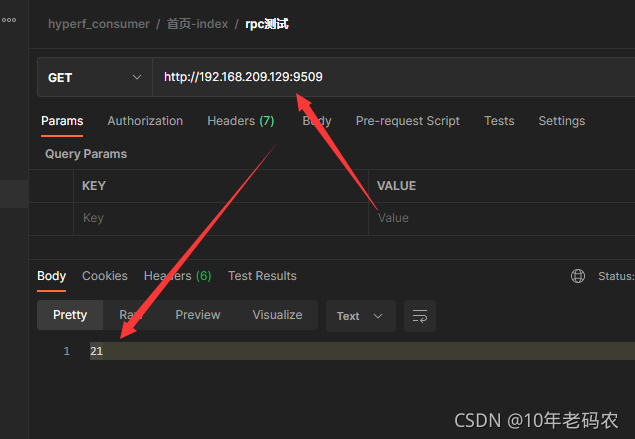
Run later and run through
error: resource android:attr/lStar not found [How to Solve]
error: resource android:attr/lStar not found…….
After searching for a long time, there is nothing related to LSTAR under my attr directory. The project has not added LSTAR related fields from the beginning to the end, but the project inexplicably reported this error, that is, it can’t run. It can run in the first minute. Suddenly it can’t run. Do you say it’s annoying or not
To get down to business, the reason is that Android. Core: core KTX: + is referenced in the third-party library, and then the system automatically updates to version 1.6.0, resulting in an error: resource Android: attr/LSTAR not found. Change the version to Android. Core: core KTX: 1.6.0, synchronize and compile it.
[Solved] Error response from daemon: Get “*“: x509: certificate signed by unknown authority
Environmental description
The harbor repository I built requires a domain name and https access
Error 1 is reported. When other docker environments log in to harbor
[root@k8s0001 ~]# docker login www.harbor.wuhan.cn
Username: admin
Password:
Error response from daemon: Get "https://www.harbor.wuhan.cn/v2/": x509: certificate signed by unknown authority
Error 2: when other docker environments pull self built harbor warehouse images
[root@k8s0001 ~]# docker pull www.harbor.wuhan.cn/22202/helloworld@sha256:0d9ce49958ea82a48c40a397ccc785674ec3ce1dfd4f749c3c7c7a63790a54cd
Error response from daemon: Get "https://www.harbor.wuhan.cn/v2/": x509: certificate signed by unknown authority
For these two errors, you need to transfer the generated key CP to the configuration file directory of the corresponding machine docker. The operations are as follows:
Configure HTTPS links
##harbor
[root@harbor opt]# cd /etc/docker/
[root@harbor docker]# ls
certs.d  key.json
[root@harbor docker]# cd certs.d/
[root@harbor certs.d]# ls
www.harbor.wuhan.cn
[root@harbor certs.d]# cd www.harbor.wuhan.cn/
[root@harbor www.harbor.wuhan.cn]# ls
ca.crt  www.harbor.wuhan.cn.cert  www.harbor.wuhan.cn.key
[root@harbor certs.d]# cd ..
[root@harbor certs.d]# scp -r www.harbor.wuhan.cn [email protected]:/etc/docker/certs.d/
[email protected]'s password:
www.harbor.wuhan.cn.cert                                                                          100% 2126   914.9KB/s   00:00
www.harbor.wuhan.cn.key                                                                           100% 3243     1.5MB/s   00:00
ca.crt                                                                                             100% 2033   839.2KB/s   00:00
[root@harbor certs.d]#
[root@harbor certs.d]# scp -r www.harbor.wuhan.cn [email protected]:/etc/docker/certs.d/
[email protected]'s password:
www.harbor.wuhan.cn.cert                                                                          100% 2126   845.3KB/s   00:00
www.harbor.wuhan.cn.key                                                                           100% 3243     1.9MB/s   00:00
ca.crt                                                                                             100% 2033     1.8MB/s   00:00
[root@harbor certs.d]#
[root@harbor certs.d]#
[root@harbor certs.d]# scp -r www.harbor.wuhan.cn [email protected]:/etc/docker/certs.d/
[email protected]'s password:
www.harbor.wuhan.cn.cert                                                                          100% 2126   227.8KB/s   00:00
www.harbor.wuhan.cn.key                                                                           100% 3243     2.5MB/s   00:00
ca.crt                                                                                             100% 2033     1.2MB/s   00:00
Then restart the docker
[root@k8s0001 opt]# systemctl restart docker
[root@k8s0002 opt]# systemctl restart docker
[root@k8s0003 opt]# systemctl restart docker
[Solved] Error initializing USB support: Other errors[-99]

[Solved] AttributeError: ‘str‘ object has no attribute ‘decode‘
Original code:
def loadTxt(filenameTxt):
    txtList = [line.strip().decode('utf-8') for line in open(filenameTxt,'r').readlines()]#变成 unicode
    return txtList#unicode
report errors:
AttributeError: ‘str‘ object has no attribute ‘decode‘
Solution: decode the byte string
def loadTxt(filenameTxt):
    txtList = [line.strip().encode('utf-8').decode('utf-8') for line in open(filenameTxt,'r').readlines()]#变成 unicode
    return txtList#unicode
AttributeError: module ‘enum‘ has no attribute ‘IntFlag‘ [How to Solve]
The error details are as follows:
Traceback (most recent call last):
  File "/usr/local/bin/evo_traj", line 5, in <module>
    import re
  File "/usr/lib/python3.6/re.py", line 142, in <module>
    class RegexFlag(enum.IntFlag):
AttributeError: module 'enum' has no attribute 'IntFlag'
Error in sys.excepthook:
Traceback (most recent call last):
  File "/usr/lib/python3/dist-packages/apport_python_hook.py", line 62, in apport_excepthook
    if not enabled():
  File "/usr/lib/python3/dist-packages/apport_python_hook.py", line 24, in enabled
    import re
  File "/usr/lib/python3.6/re.py", line 142, in <module>
    class RegexFlag(enum.IntFlag):
AttributeError: module 'enum' has no attribute 'IntFlag'

Original exception was:
Traceback (most recent call last):
  File "/usr/local/bin/evo_traj", line 5, in <module>
    import re
  File "/usr/lib/python3.6/re.py", line 142, in <module>
    class RegexFlag(enum.IntFlag):
AttributeError: module 'enum' has no attribute 'IntFlag'
Problem analysis
this problem has not occurred before. It is suspected that the python iteration version conflict is caused by the update of Ubuntu system. It is recommended to turn off the automatic update of Ubuntu to prevent such problems. It takes a long time to solve some version conflict problems.
Solution:
the query found that pythonpath was set incorrectly. The configuration left by the previous use of python2 was saved in. Bashrc, resulting in python3 unable to find the correct enum location. After commenting out the relevant statements in bashrc, clear the $pythonpath variable:
 unset PYTHONPATH
 echo $PYTHONPATH
Then it can be used normally. Pythonpath is a multi-purpose configuration in python2. It is generally no longer needed after using python3.
Python quote error: * * * keyerror: u ‘\ uxx’ [How to Solve]
Problem: urllib.quote (xxx) error after running * * * keyerror: u '\ uxx'
reason: look at XXX type: & lt; type 'unicode'>, and params in urlib.quote (params) is a string. You can only guess that the encoding of the string does not meet the requirements, so the code XXX
solution: urlib.quote (XXX. Encode ("UTF-8") or urlib.quote (STR (xxx))
Examples are as follows:
>>> import urllib
>>> xxx = u'[{"test":"Test"}]'
>>> urllib.quote(xxx)
Traceback (most recent call last):
  File "<stdin>", line 1, in <module>
  File "/System/Library/Frameworks/Python.framework/Versions/2.7/lib/python2.7/urllib.py", line 1298, in quote
    return ''.join(map(quoter, s))
KeyError: u'\u6d4b'
>>> type(xxx)
<type 'unicode'>
>>> urllib.quote(xxx.encode("utf-8"))
'%5B%7B%22test%22%3A%22%E6%B5%8B%E8%AF%95%22%7D%5D'
>>> urllib.quote(str(xxx))
Traceback (most recent call last):
  File "<stdin>", line 1, in <module>
UnicodeEncodeError: 'ascii' codec can't encode characters in position 10-11: ordinal not in range(128)
>>> import sys
>>> sys.setdefaultencoding('utf-8')
Traceback (most recent call last):
  File "<stdin>", line 1, in <module>
AttributeError: 'module' object has no attribute 'setdefaultencoding'
>>> reload(sys)
<module 'sys' (built-in)>
>>> sys.setdefaultencoding('utf-8')
>>> urllib.quote(str(xxx))
'%5B%7B%22test%22%3A%22%E6%B5%8B%E8%AF%95%22%7D%5D'
[Solved] Fatal error: GLOG/logging. H: there is no such file or directory
System version: Ubuntu 18.04
ROS version: Melody
catkin_ Make error:
In file included from /home/Username/Desktop/AutonomousMining/src/pnc/src/file.cc:17:0:
/home/Username/Desktop/AutonomousMining/src/pnc/include/file.h:37:10: fatal error: glog/logging.h: Don't have that file or directory
 #include <glog/logging.h>
          ^~~~~~~~~~~~~~~~
compilation terminated.
pnc/CMakeFiles/pnc.dir/build.make:134: recipe for target 'pnc/CMakeFiles/pnc.dir/src/file.cc.o' failed
make[2]: *** [pnc/CMakeFiles/pnc.dir/src/file.cc.o] Error 1
make[2]: *** Waiting for unfinished tasks....
Solution:
sudo apt-get install libgoogle-glog-devDone!
SSL_read: SSL_ERROR_SYSCALL, errno 10054 [How to Solve]
The errors we will encounter when using git clone or git get are as follows:
SSL_read: SSL_ERROR_SYSCALL, errno 10054
The problem is caused by an SSL certificate error. Just ignore the setting. The command line is as follows:
$ git config –global http.sslVerify”false”
Finally, GIT clone