Author Archives: Robins

### The error may involve defaultParameterMap ### The error occurred while setting parameters

I encountered an error today. Running rankdao. Selectbyid (ID) directly reported an error to me. I didn’t understand it

Error message:

2021-09-22 10:40:58.824 ERROR 8364 --- [nio-8888-exec-4] o.a.c.c.C.[.[.[/].[dispatcherServlet]    : Servlet.service() for servlet [dispatcherServlet] in context with path [] threw exception [Request processing failed; nested exception is org.springframework.jdbc.BadSqlGrammarException: 
### Error querying database.  Cause: java.sql.SQLSyntaxErrorException: You have an error in your SQL syntax; check the manual that corresponds to your MySQL server version for the right syntax to use near 'rank WHERE id=1' at line 1
### The error may exist in com/brilliantZC/music/dao/MusicRankDao.java (best guess)
### The error may involve defaultParameterMap
### The error occurred while setting parameters
### SQL: SELECT id,song_list_id,consumer_id,score FROM rank WHERE id=?
### Cause: java.sql.SQLSyntaxErrorException: You have an error in your SQL syntax; check the manual that corresponds to your MySQL server version for the right syntax to use near 'rank WHERE id=1' at line 1
; bad SQL grammar []; nested exception is java.sql.SQLSyntaxErrorException: You have an error in your SQL syntax; check the manual that corresponds to your MySQL server version for the right syntax to use near 'rank WHERE id=1' at line 1] with root cause

At the beginning, Baidu has various methods, some say

    an error is reported when the value of the column in the created table is less than the actual value. The @ resource or @ Autowired annotation is forgotten on the service interface introduced by the controller layer. The method called by the controller layer is private, resulting in distribution failure. Check whether the mapper interface code conforms to the specification (automatically ignored by mybatis plus)

    I tried again, but I still couldn’t, so I took the wrong SQL statement and executed it

    SELECT id,song_list_id,consumer_id,score FROM rank WHERE id=1
    

    Still report an error

    music> SELECT id,song_list_id,consumer_id,score FROM rank WHERE id=1
    [2021-09-22 10:55:58] [42000][1064] You have an error in your SQL syntax; check the manual that corresponds to your MySQL server version for the right syntax to use near 'rank WHERE id=1' at line 1
    

    Then I was confused. Then I removed the query statement and still reported an error

    SELECT id,song_list_id,consumer_id,score FROM rank
    

    Then Baidu saw that because rank is a keyword, it can not be directly used as a non keyword. It needs to be used with `. It can be executed after replacement

    SELECT id,song_list_id,consumer_id,score FROM `rank`
    

    Then I modified the table name and solved the error!!!

Syntax Error: Error: Cannot find module ‘less‘ [How to Solve]

Question: syntax error: error: cannot find module ‘less’

Cause: the installed version of less loader does not match that of less

pay more attention to warnings during installation to avoid this problem.
there is a prompt during installation. You must install the corresponding less version for use with

Solution: install the corresponding version (pay more attention to warnings in the future)

Error about XX error 1 querying major version

Error Code 1: Myelin (cuBLASLt error 1 querying major version.)

This error is because the appropriate version information is not found. When looking for dynamic link libraries in some libraries, they will look for them according to the version information behind so . If they are not found, an error will be reported.

resolvent:

Set all the version suffixes of. So to find the path. OK~

For example, use the ln - s libcublaslt.so.11 libcublaslt.so.11.5.2.43 command to set the corresponding so:

 libcublasLt.so -> libcublasLt.so.11
 libcublasLt.so.11
 libcublasLt.so.11.5.2.43 -> libcublasLt.so.11

How to Solve jupyter notebook service error

Jupyter notebook service error

Problem background

I created a CONDA virtual environment of Python 3.8 and prepared to install Jupiter notebook in this virtual environment. Start Jupiter notebook in CMD to pop up the browser and working interface smoothly. However, when creating a new IPython file, the kernel always shows that it is busy and cannot run the script in the cell.

reason

Through searching for information, I found that most of the reasons on the Internet were attributed to the mismatch between ipykernal and pyzmq versions. For this purpose, I refer to another virtual environment I created earlier. The jupyter notebook in this environment can run normally, and its corresponding versions are ipykernal 6.2.0 and pyzmq 19.0.2 respectively

Solution:

pip install ipykernal=6.2.0
pip install pyzmq=19.0.2

Error in startup after the supervisor modifies the configuration file: error: cannot open an HTTP server: socket.error reported errno.eaddnotavail

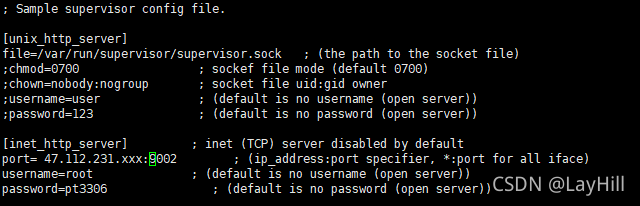
 vim /etc/supervisord.conf

Modify the configuration file
remove the comments of the [inet_http_server] module
and modify the default IP, user name and password

after modification, reload the configuration file:

supervisorctl reload

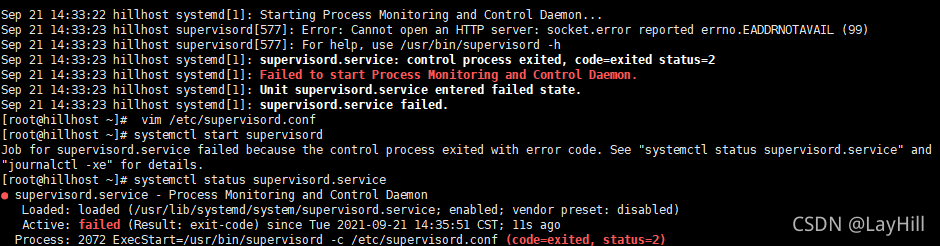
At this time, it is found that the supervisor service has stopped, systemctl status supervisor View Status:

this is generally an error in the configuration file:
note that the local address is not filled in after the port, such as 47.xxx.xxx.xxx , which refers to who can access the server’s supervisor. If it is not filled in, everyone can access it. For example, it can be directly changed to port =: 9001 , and then reload.

 supervisorctl reload
 systemctl start supervisord

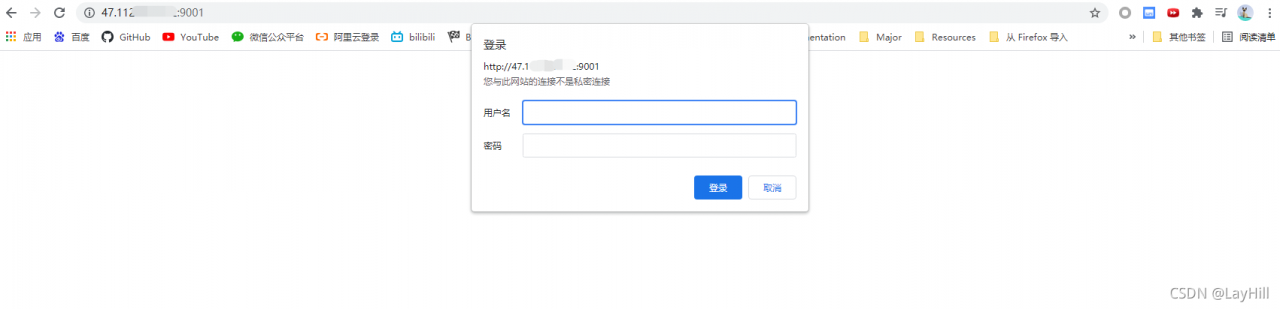
If it is set that everyone can access, you can log in to the browser:

I layhill successfully solved the problem through the above methods. Please correct the deficiencies!

Execution Error SQL_ERROR_INFO: near “.“: syntax error

I made the simplest mistake when doing SQL problems today

update  salaries set salaries.salary = salaries.salary *1.1 
where salaries.emp_no = (select emp_no from emp_bonus ) and to_date = '9999-01-01'

Then the idea reports an error. The error is near “.”: syntax error. In fact, when I update the salary table here, I don’t need to add “.” to index the elements in the table. I can call it directly.

update  salaries set salary = salary *1.1 
where emp_no = (select emp_no from emp_bonus ) and to_date = '9999-01-01'

Just change this.

[Solved] BindingException: Type interface XXX is not known to the MapperRegistry

Problem description

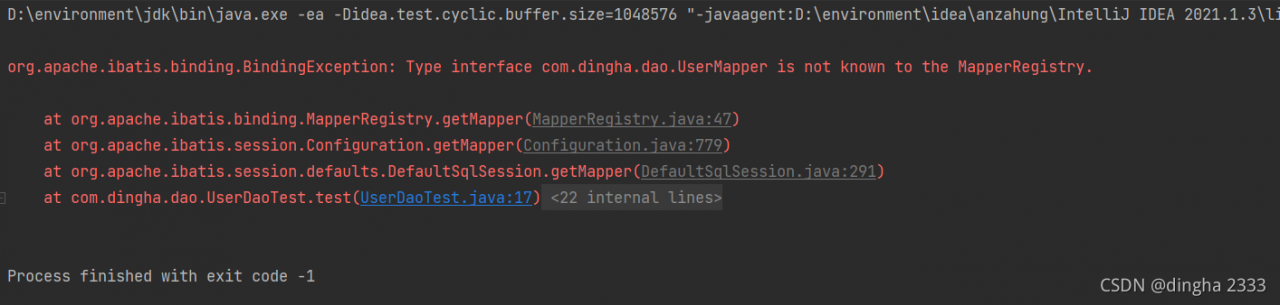
When testing the selection operation of mybatis, the idea reports an error,

org.apache.ibatis.binding.BindingException: Type interface xxx is not known to the MapperRegistry.

Solution:

Reason: each mapper.xml needs to be registered in the mybatis core configuration file
add the following code to mybatis-config.xml.

<mappers>
    <mapper resource="com/dingha/dao/UserMapper.xml"/>
</mappers>

Done!

Using JWT of distributed deployment services Error: JWT check failure:

===2021-09-18 15:55:14.445 ERROR [http-nio-8014-exec-6] com.croot.common.utils.JwtTokenKit Line:72 – JWT Check Failure:
io.jsonwebtoken.PrematureJwtException: JWT must not be accepted before 2021-09-18T15:55:42Z. Current time: 2021-09-18T15:55:14Z, a difference of 27556 milliseconds. Allowed clock skew: 0 milliseconds.
Synchronize server time
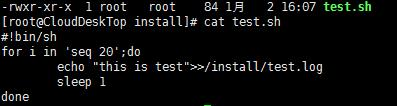
Write a script:

Add permissions for the script to be executable by all users for later testing: chmod a+x test.sh
Stop the crond service: service crond stop
Add timed tasks:
[root@CloudDeskTop install]# crontab -e

* * * * * /bin/sh /install/test.sh

View scheduled tasks:
[ root@CloudDeskTop install]# crontab -l

* * * * * /bin/sh /install/test.sh

View which users have scheduled tasks:
[ root@CloudDeskTop ~]# ls /var/spool/cron
root

Start the crond service: service crond start

Check whether there is a test.log file in the/install/directory;

Display the contents of test.log in real time: Tail – F test.log

[Solved] Hive Find Error: FAILED: RuntimeException java.lang.RuntimeException: cannot find field

Project scenario:

Using hive SQL query

Problem Description:

An error is reported when using * in data query, and the field cannot be found

select a.* from mydb.p_6 a;

Direct error reporting

Error: Error while compiling statement: FAILED: RuntimeException java.lang.RuntimeException: cannot find field (0~0 from [0:day, 1:0, 2:(0~0.1], 3:(0.1~0.2], 4:(0.2~0.3], 5:(0.3~0.4], 6:(0.4~0.5], 7:(0.5~0.6], 8:(0.6~0.7], 9:(0.7~0.8], 10:(0.8~0.9], 11:(0.9~1), 12:1] (state=42000,code=40000)

Cause analysis:

The field “0 ~ 0” cannot be found. When creating the table, the field is named (0 ~ 0.1], which leads to incomplete reading of the field,

Solution:

When creating a table, the field names should be standardized. Try not to bring commas and other symbols. Try to underline English letters and numbers