Author Archives: Robins

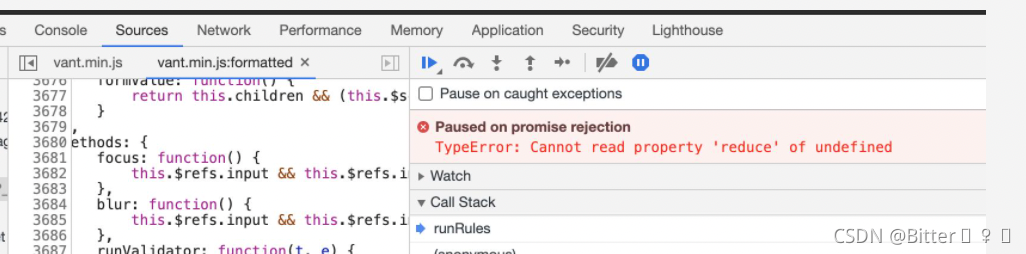
[Solved] TYPEERROR: CANNOT READ PROPERTY ‘REDUCE‘ OF UNDEFINED

The from form is used to write the mobile terminal page using the vant framework, but the error is reported in the from verification

Solution:

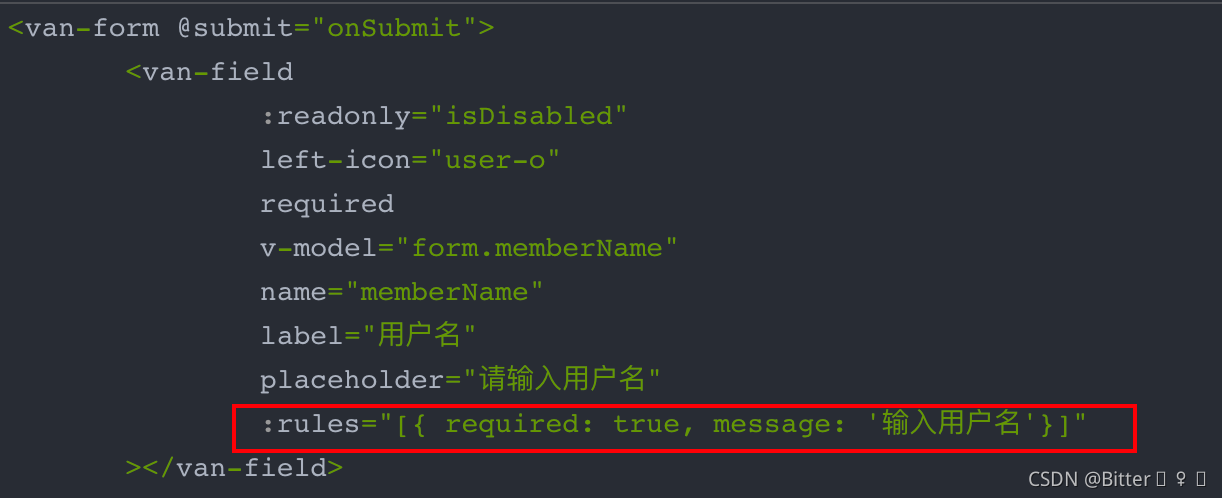
Each field of the form must have the :Rules attribute, otherwise the above error will be reported.

That is, add the :Rules validation attribute to each van field form item, even if the current form item does not perform any validation

Using next (ITER (data. Dataloader()) to report an error stopiteration

The error stopiteration is reported when using next (ITER (data. Dataloader()). This is because when using next() When accessing an iterator that has been iterated, an error will be triggered: stopiteration, that is, after a round of iteration after the dataloader imports the data, it is found that there is no data when importing again, that is, after the Iterable is completed, stopiteration is triggered, and then the loop jumps out

resolvent:

Since there is no data when importing again, we can use a data loader.

Put the in train.py

inps, targets = next(self.batch_iterator)

Change to:

try:
    inps, targets = next(self.batch_iterator)
except StopIteration:
    self.batch_iterator = iter(data.DataLoader(self.train_dataset, self.args.batch_size, shuffle=True, num_workers=self.args.num_workers, collate_fn=detection_collate))
    inps, targets = next(self.batch_iterator)

Problem solving.

Vs + CUDA compilation error: msb3721, return code 255

The second time I appeared, I looked for it for a long time. I don’t have a long memory. Record it

Problem Description: compilation error: msb3721, return code 255
solution:
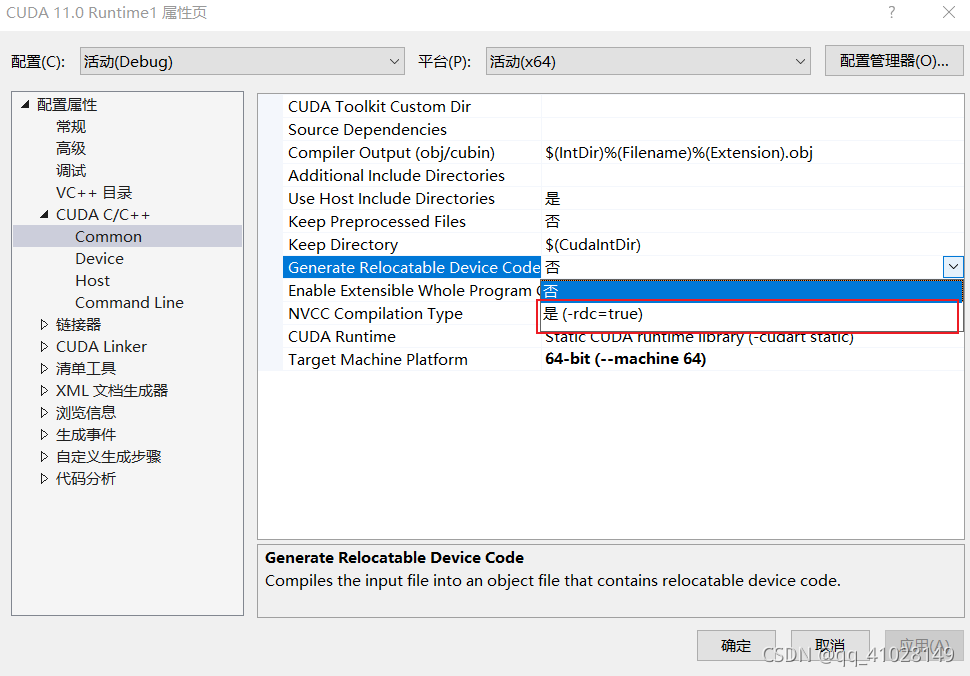
in CUDA C/C + ± & gt; Under generate relocatable device code, select * * * Yes (- RDC = true) * * *

reference: https://www.cnblogs.com/qpswwww/p/11646593.html

Video player plays flv with error flv: Unsupported audio codec IDX: 7

1、 Detailed error reporting information is as follows:

[TransmuxingController] > DemuxException: type = CodecUnsupported, info = Flv: Unsupported audio codec idx: 7
Uncaught (in promise) Error: Unhandled error. (undefined)
    at EventEmitter.emit (events.js:135)
    at EventEmitter.eval (flv-player.js:453)
    at EventEmitter.emit (events.js:144)
    at eval (transmuxer.js:729)

Flv: Unsupported audio codec.

2、 Solution

Analysis: there is no error in the front end
reason: Google does not prohibit video, but audio, but the video contains audio information, so it depends on whether the playback stream contains audio operations

Here, modify the streaming command to solve the problem:
Original:

ffmpeg -i rtsppath -vcodec copy -s 704x576 -acodec copy -f flv rtmp:/****/rtmplive/test

After modification:

ffmpeg -i rtsppath -vcodec copy -an -s 704x576 -acodec copy -f flv rtmp:/****/rtmplive/test

3、 Summary

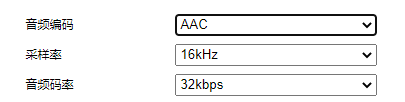
when ffmpeg streaming is used, the audio coding is forced to AAC format.

Mmdetection reports an error when running its own coco dataset. Does not match the length of \ ` classes \ ` 80) in cocodataset

Mmdetection trains its own data set to report errors ⚠️ :

# AssertionError: The `num_ classes` (3) in Shared2FCBBoxHead of MMDataParallel does not matches the length of `CLASSES` 80) in CocoDataset

This means that the category (3) you specified does not match the category (80) of cocodataset.

You may have modified the following files, but you still report an error:

mmdetection-master\mmdet\core\evaluation\class_ names.py

 def coco_classes():
     return [
         # 'person', 'bicycle', 'car', 'motorcycle', 'airplane', 'bus', 'train',
         # 'truck', 'boat', 'traffic_light', 'fire_hydrant', 'stop_sign',
         # 'parking_meter', 'bench', 'bird', 'cat', 'dog', 'horse', 'sheep',
         # 'cow', 'elephant', 'bear', 'zebra', 'giraffe', 'backpack', 'umbrella',
         # 'handbag', 'tie', 'suitcase', 'frisbee', 'skis', 'snowboard',
         # 'sports_ball', 'kite', 'baseball_bat', 'baseball_glove', 'skateboard',
         # 'surfboard', 'tennis_racket', 'bottle', 'wine_glass', 'cup', 'fork',
         # 'knife', 'spoon', 'bowl', 'banana', 'apple', 'sandwich', 'orange',
         # 'broccoli', 'carrot', 'hot_dog', 'pizza', 'donut', 'cake', 'chair',
         # 'couch', 'potted_plant', 'bed', 'dining_table', 'toilet', 'tv',
         # 'laptop', 'mouse', 'remote', 'keyboard', 'cell_phone', 'microwave',
         # 'oven', 'toaster', 'sink', 'refrigerator', 'book', 'clock', 'vase',
         # 'scissors', 'teddy_bear', 'hair_drier', 'toothbrush'
         'lm','ls'
     ]

mmdetection-master\mmdet\datasets\coco.py

 class CocoDataset(CustomDataset):
     # CLASSES = (
     #     'person', 'bicycle', 'car', 'motorcycle', 'airplane', 'bus',
     #            'train', 'truck', 'boat', 'traffic light', 'fire hydrant',
     #            'stop sign', 'parking meter', 'bench', 'bird', 'cat', 'dog',
     #            'horse', 'sheep', 'cow', 'elephant', 'bear', 'zebra', 'giraffe',
     #            'backpack', 'umbrella', 'handbag', 'tie', 'suitcase', 'frisbee',
     #            'skis', 'snowboard', 'sports ball', 'kite', 'baseball bat',
     #            'baseball glove', 'skateboard', 'surfboard', 'tennis racket',
     #            'bottle', 'wine glass', 'cup', 'fork', 'knife', 'spoon', 'bowl',
     #            'banana', 'apple', 'sandwich', 'orange', 'broccoli', 'carrot',
     #            'hot dog', 'pizza', 'donut', 'cake', 'chair', 'couch',
     #            'potted plant', 'bed', 'dining table', 'toilet', 'tv', 'laptop',
     #            'mouse', 'remote', 'keyboard', 'cell phone', 'microwave',
     #            'oven', 'toaster', 'sink', 'refrigerator', 'book', 'clock',
     #            'vase', 'scissors', 'teddy bear', 'hair drier', 'toothbrush'
     #     )
     CLASSES = ('lm', 'ls')

No more nonsense, go straight to the method. There are several methods:

one ️⃣ If you have two classes, you can replace the first two classes in the above two places with your classes. The method is relatively simple, but there may be hidden dangers.

two ️⃣ The second method is to modify the class_ After names.py and voc.py, the code must be recompiled (run Python setup.py install) and then trained.

I tried, but I still made the same mistake. Maybe my method is wrong.

reference resources:

New mmdetection v2.3.0 training test notes – it610.com

Mmdetectionv2. X version trains its own VOC dataset_ Peach jam Momo blog – CSDN blog

three ️⃣ The third method, which I use, is actually the same as recompilation. The reason for recompilation is that you report an error because the source file in the environment has not been modified. There are only some Python files in the mmdetection master directory. When the program is actually running, it is still the source file in the environment, because we directly modify the source file in the environment.

Suppose my CONDA environment is called CONDA_ env_ Name, so go to the following directory and modify two files respectively:

\anaconda3\envs\conda_ env_ name\lib\python3.7\site-packages\mmdet\core\evaluation\class_ names.py

\anaconda3\envs\conda_ env_ name\lib\python3.7\site-packages\mmdet\datasets\coco.py

Modify the categories in these two files in the CONDA environment.

⭐ In the end, I did my best to solve this bug and write this blog to help you avoid detours.
Elasticsearch imports MySQL data Error when executing the bin/logstash – f command


Error report 1


Problem Description:

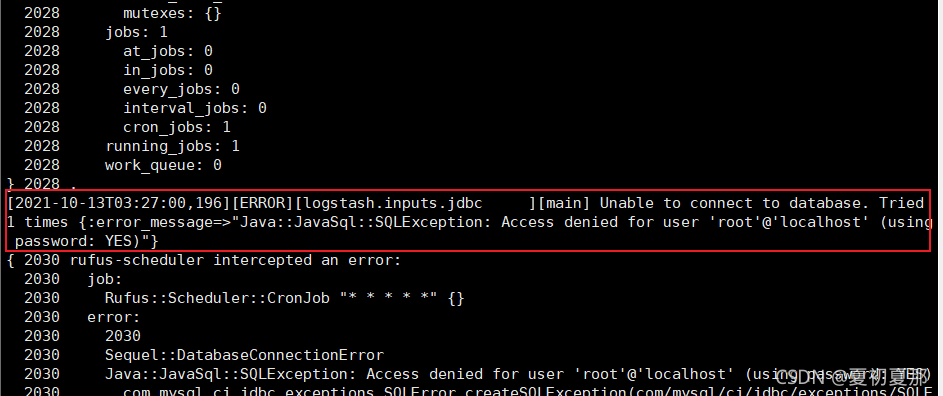
  Unable to connect to database. Tried 1 times {:error_message=>”Java::JavaSql::SQLException: Access denied for user ‘root’@’localhost’ (using password: YES)”}

Solution:

Unable to connect to database. It is possible that the configuration file, database name or password of the imported database are incorrect (this is the wrong password)

Check the jdbc.conf file configured in the logstash decompression directory

Error report 2


Problem Description:

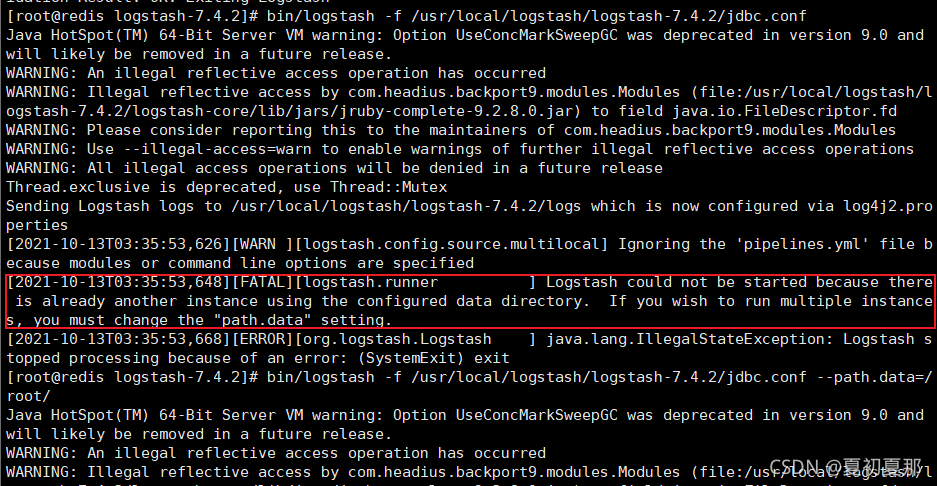
Logstash could not be started because there is already another instance using the configured data directory.   If you wish to run multiple instances, you must change the “path.data” setting.

Logstash cannot be started because another instance already uses the configured data directory. If you want to run multiple instances, you must change the “path. Data” setting.

Solution:

You need to specify your path.data and add it after starting the Import command   — path.data=/root/

  [ root@redis logstash-7.4.2]# bin/logstash -f /usr/local/logstash/logstash-7.4.2/jdbc.conf –path.data=/root/

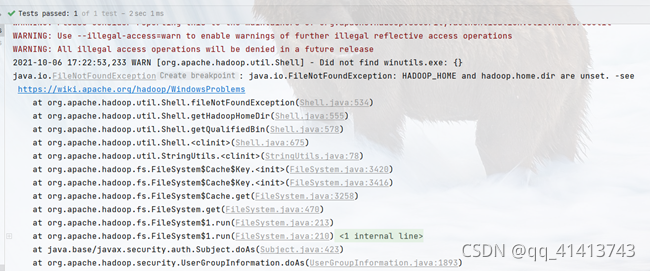
Error reported when debugging Hadoop cluster under windows failed to find winutils.exe

Modify
set Java in/etc/Hadoop/Hadoop env.cmd file_ HOME=%JAVA_ Home%
is (modified to the JDK location configured by your own machine)
set Java_ HOME=C:\Program Files\Java\jdk1.8.0_ 144 check fs.default.name
check whether the attribute value of fs.default.name in/etc/Hadoop/core-site.xml is consistent with that in the server. Inconsistency needs to be changed to consistency. Configure environment variables
Hadoop_ Home and % Hadoop in path_ Home% \ bin configure local hosts
192.168.19.185 Server1
192.168.19.184 server2
192.168.19.199 server3winutils.exe and hadoop.dll in Hadoop/bin directory, hadoop.dll in C: \ window \ system32 directory, and restart the IDE. If an error is still reported, restart the computer

Idea startup error: Port occupied/address already exists

Error message:

org.apache.catalina.LifecycleException: Failed to start component

resolvent:

Open the CMD command window and enter the netstat – ano command to view all ports and PIDs (the number in the last column).

Find the occupied port at the local address and write down the PID value.

Enter the instruction tasklist | findstr “PID value” to find the corresponding process.

Kill the process and restart.   Example: taskkill/F/T/im java.exe & lt– Java.exe is the process found in the previous step — & gt;

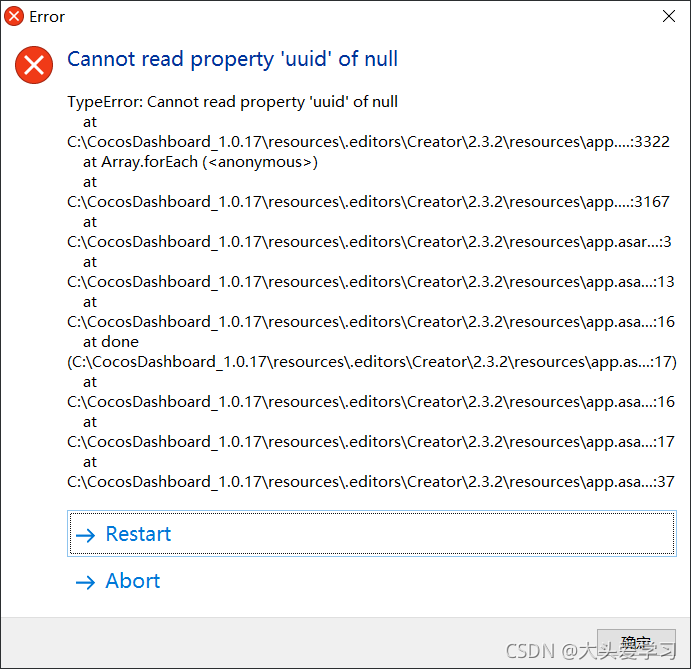
Open the Cocos creator editor and report an error property UUID of null

I found that many developers have encountered this problem recently. I’ll share it. I check this error.

As shown in Figure

I can’t seem to see where UUID is wrong!!!

Solution:

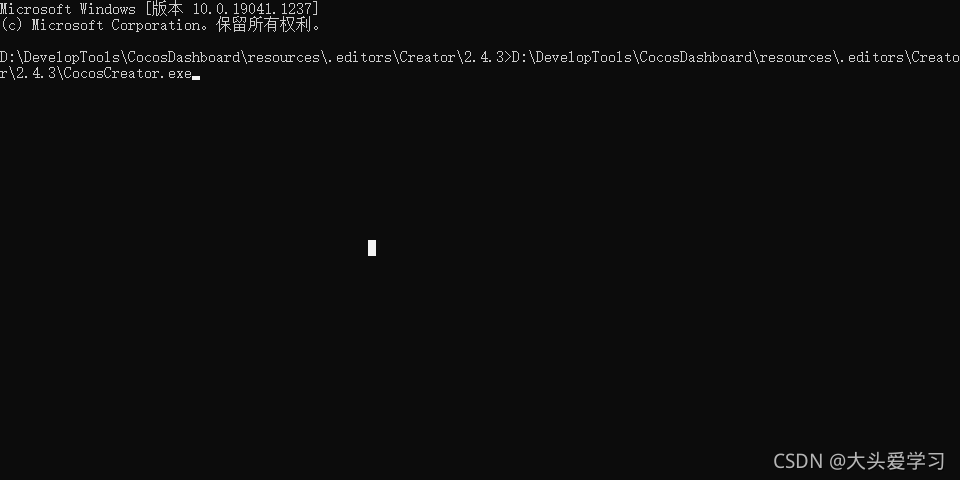
Let’s open cocos creator from the command line and choose to open your project. At this time, the command line will report an error message. When you see the error message, it indicates that there is an error in a meta file. You can directly look at the meta file and solve it easily.

Object of type timestamp is not JSON serializable

First of all, the reason for the error is the datetime type field when exporting JSON.

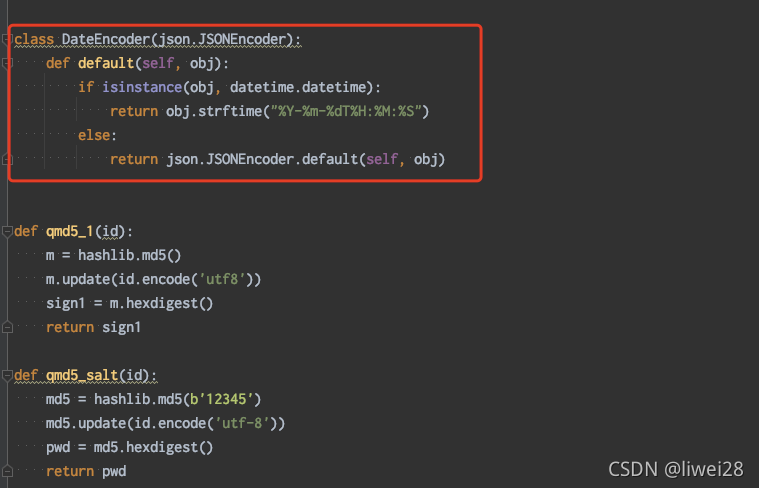
Added in the code:
class dateencoder (JSON. Jsoneencoder):
Default (self, obj):
if isinstance (obj, datetime. Datetime):
return obj.strftime (“% Y -% m -% DT% H:% m:% s”)
else:
return json.jsoneencoder.default (self, obj)

Then add a CLS = dateencoder
in json.dump to solve the problem

As shown in the figure:


no error will be reported