Author Archives: Robins

How to Solve Show() error caused by empty data

In order to solve the show() error caused by empty data, it is used during filtering! x. Isnullat (1) determines whether it is empty. If it is empty, it will be discarded


//Filter .getDouble(1) 1 refers to the first column, starting from 0
    
    DF.filter(x => !x.isNullAt(1) && x.getDouble(1) < 1995).show(10)
    

Mybatis Error: Invalid bound statement (not found)

When starting the project today, the spring boot reported an error.

This error is reported because the mapper file has not been scanned.

Why didn’t you scan it?

Cause analysis

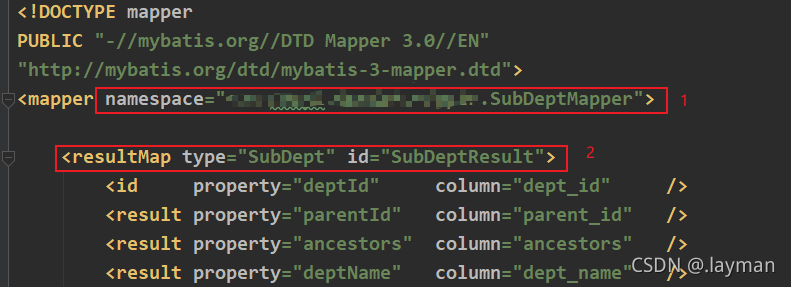
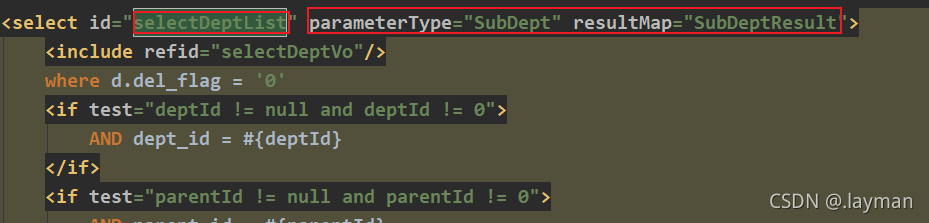
    1. incorrect namespace method undefined: the method in mapper.xml is not defined in the Java class. The return value is incorrect: the return value of the method in the Java class is different from the return value in the XML file (resultmap or resulttype). The configuration path is incorrect: is the configuration path of the mapper file correct


The error reason of my project is the fourth: the configuration path of mapper file is incorrect

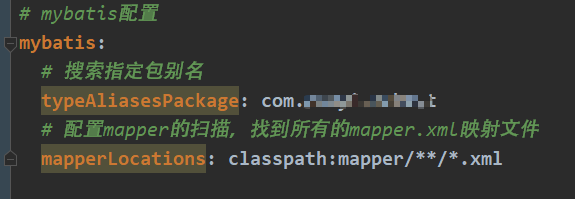
The path I configured in the project is: all XML files under the mapper folder and its subfolders.

However, my project doesn’t have a mapper folder at all

Just looking at this folder, I don’t know whether it is a primary directory or a hierarchical directory.

When I created a new folder, I entered it in one breath

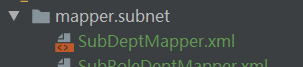
Although the name of the folder is written correctly, the name of the folder is mapper.subnet

In this case, there is no mapper folder at all, so it will not be able to match.

[Solved] Solr8 establishes the cluster node as active, but the query reports an error

Error Messages:

{
    "error": {
        "code": 500,
        "metadata": [
            "error-class",
            "org.apache.solr.common.SolrException",
            "root-error-class",
            "java.io.IOException"
        ],
        "msg": "org.apache.solr.client.solrj.SolrServerException: No live SolrServers available to handle this request:[http://10.17.6.141:8080/solr/collection2_shard2_replica_n5, http://10.17.6.143:8080/solr/collection2_shard2_replica_n4, http://10.17.6.141:8080/solr/collection2_shard1_replica_n1]",
        "trace": "org.apache.solr.common.SolrException: org.apache.solr.client.solrj.SolrServerException: No live SolrServers available to handle this request:[http://10.17.6.141:8080/solr/collection2_shard2_replica_n5, http://10.17.6.143:8080/solr/collection2_shard2_replica_n4, http://10.17.6.141:8080/solr/collection2_shard1_replica_n1]
    at org.apache.solr.handler.component.SearchHandler.handleRequestBody(SearchHandler.java:412)
    at org.apache.solr.handler.RequestHandlerBase.handleRequest(RequestHandlerBase.java:199)
    at org.apache.solr.core.SolrCore.execute(SolrCore.java:2566)
    at org.apache.solr.servlet.HttpSolrCall.execute(HttpSolrCall.java:756)
    at org.apache.solr.servlet.HttpSolrCall.call(HttpSolrCall.java:542)
    at org.apache.solr.servlet.SolrDispatchFilter.doFilter(SolrDispatchFilter.java:397)
    at org.apache.solr.servlet.SolrDispatchFilter.doFilter(SolrDispatchFilter.java:343)
    at org.apache.catalina.core.ApplicationFilterChain.internalDoFilter(ApplicationFilterChain.java:240)
    at org.apache.catalina.core.ApplicationFilterChain.doFilter(ApplicationFilterChain.java:207)
    at org.apache.catalina.core.StandardWrapperValve.invoke(StandardWrapperValve.java:212)
    at org.apache.catalina.core.StandardContextValve.invoke(StandardContextValve.java:94)
    at org.apache.catalina.authenticator.AuthenticatorBase.invoke(AuthenticatorBase.java:492)
    at org.apache.catalina.core.StandardHostValve.invoke(StandardHostValve.java:141)
    at org.apache.catalina.valves.ErrorReportValve.invoke(ErrorReportValve.java:80)
    at org.apache.catalina.valves.AbstractAccessLogValve.invoke(AbstractAccessLogValve.java:620)
    at org.apache.catalina.core.StandardEngineValve.invoke(StandardEngineValve.java:88)
    at org.apache.catalina.connector.CoyoteAdapter.service(CoyoteAdapter.java:502)
    at org.apache.coyote.http11.AbstractHttp11Processor.process(AbstractHttp11Processor.java:1152)
    at org.apache.coyote.AbstractProtocol$AbstractConnectionHandler.process(AbstractProtocol.java:684)
    at org.apache.tomcat.util.net.NioEndpoint$SocketProcessor.doRun(NioEndpoint.java:1539)
    at org.apache.tomcat.util.net.NioEndpoint$SocketProcessor.run(NioEndpoint.java:1495)
    at java.util.concurrent.ThreadPoolExecutor.runWorker(ThreadPoolExecutor.java:1149)
    at java.util.concurrent.ThreadPoolExecutor$Worker.run(ThreadPoolExecutor.java:624)
    at org.apache.tomcat.util.threads.TaskThread$WrappingRunnable.run(TaskThread.java:61)
    at java.lang.Thread.run(Thread.java:748)
Caused by: org.apache.solr.client.solrj.SolrServerException: No live SolrServers available to handle this request:[http://10.17.6.141:8080/solr/collection2_shard2_replica_n5, http://10.17.6.143:8080/solr/collection2_shard2_replica_n4, http://10.17.6.141:8080/solr/collection2_shard1_replica_n1]
    at org.apache.solr.client.solrj.impl.LBSolrClient.request(LBSolrClient.java:345)
    at org.apache.solr.handler.component.HttpShardHandlerFactory.makeLoadBalancedRequest(HttpShardHandlerFactory.java:308)
    at org.apache.solr.handler.component.HttpShardHandler.lambda$submit$0(HttpShardHandler.java:190)
    at java.util.concurrent.FutureTask.run(FutureTask.java:266)
    at java.util.concurrent.Executors$RunnableAdapter.call(Executors.java:511)
    at java.util.concurrent.FutureTask.run(FutureTask.java:266)
    at com.codahale.metrics.InstrumentedExecutorService$InstrumentedRunnable.run(InstrumentedExecutorService.java:181)
    at org.apache.solr.common.util.ExecutorUtil$MDCAwareThreadPoolExecutor.lambda$execute$0(ExecutorUtil.java:209)
    at java.util.concurrent.ThreadPoolExecutor.runWorker(ThreadPoolExecutor.java:1149)
    at java.util.concurrent.ThreadPoolExecutor$Worker.run(ThreadPoolExecutor.java:624)
    ... 1 more
Caused by: org.apache.solr.client.solrj.SolrServerException: IOException occured when talking to server at: null
    at org.apache.solr.client.solrj.impl.Http2SolrClient.request(Http2SolrClient.java:416)
    at org.apache.solr.client.solrj.impl.Http2SolrClient.request(Http2SolrClient.java:739)
    at org.apache.solr.client.solrj.impl.LBSolrClient.doRequest(LBSolrClient.java:368)
    at org.apache.solr.client.solrj.impl.LBSolrClient.request(LBSolrClient.java:296)
    ... 10 more
Caused by: java.io.IOException: 6/invalid_frame_length
    at org.eclipse.jetty.http2.HTTP2Session.onConnectionFailure(HTTP2Session.java:540)
    at org.eclipse.jetty.http2.HTTP2Session.onConnectionFailure(HTTP2Session.java:535)
    at org.eclipse.jetty.http2.parser.Parser$Listener$Wrapper.onConnectionFailure(Parser.java:410)
    at org.eclipse.jetty.http2.HTTP2Connection$ParserListener.onConnectionFailure(HTTP2Connection.java:374)
    at org.eclipse.jetty.http2.parser.BodyParser.notifyConnectionFailure(BodyParser.java:218)
    at org.eclipse.jetty.http2.parser.BodyParser.connectionFailure(BodyParser.java:210)
    at org.eclipse.jetty.http2.parser.Parser.connectionFailure(Parser.java:205)
    at org.eclipse.jetty.http2.parser.Parser.parseHeader(Parser.java:151)
    at org.eclipse.jetty.http2.parser.Parser.parse(Parser.java:117)
    at org.eclipse.jetty.http2.HTTP2Connection$HTTP2Producer.produce(HTTP2Connection.java:252)
    at org.eclipse.jetty.util.thread.strategy.EatWhatYouKill.produceTask(EatWhatYouKill.java:357)
    at org.eclipse.jetty.util.thread.strategy.EatWhatYouKill.doProduce(EatWhatYouKill.java:181)
    at org.eclipse.jetty.util.thread.strategy.EatWhatYouKill.tryProduce(EatWhatYouKill.java:168)
    at org.eclipse.jetty.util.thread.strategy.EatWhatYouKill.produce(EatWhatYouKill.java:132)
    at org.eclipse.jetty.http2.HTTP2Connection.produce(HTTP2Connection.java:171)
    at org.eclipse.jetty.http2.HTTP2Connection.onFillable(HTTP2Connection.java:126)
    at org.eclipse.jetty.http2.HTTP2Connection$FillableCallback.succeeded(HTTP2Connection.java:338)
    at org.eclipse.jetty.io.FillInterest.fillable(FillInterest.java:103)
    at org.eclipse.jetty.io.ChannelEndPoint$2.run(ChannelEndPoint.java:118)
    at org.eclipse.jetty.util.thread.Invocable.invokeNonBlocking(Invocable.java:68)
    at org.eclipse.jetty.util.thread.strategy.EatWhatYouKill.invokeTask(EatWhatYouKill.java:345)
    at org.eclipse.jetty.util.thread.strategy.EatWhatYouKill.doProduce(EatWhatYouKill.java:300)
    at org.eclipse.jetty.util.thread.strategy.EatWhatYouKill.tryProduce(EatWhatYouKill.java:168)
    at org.eclipse.jetty.util.thread.strategy.EatWhatYouKill.produce(EatWhatYouKill.java:132)
    ... 4 more
"
    },
    "responseHeader": {
        "QTime": 44,
        "params": {
            "_": "1585620400234",
            "q": "*:*"
        },
        "status": 500,
        "zkConnected": true
    }
}


Solution:
solr8 uses the http2 protocol.
JAVA_OPTS add -Dsolr.http1=true to it and it will work.

Jenkins uses NPM to build Vue error, and the manual build is normal

Error reporting scenario

Jenkins uses NPM to build Vue. The front end reports an error, and the manual build is normal

Error reporting, such as

Treating warnings as errors because process.env.CI = true.
Most CI servers set it automatically.

Failed to compile.
src/api/api.js
  Line 2:8:  'React' is defined but never used  no-unused-vars

src/api/attestation/index.js
  Line 2:8:  'qs' is defined but never used  no-unused-vars

src/api/query/index.js
  Line 2:8:  'qs' is defined but never used  no-unused-vars
...

resolvent

# Adding variables
export CI=false
npm install 

Link:

https://stackoverflow.com/questions/62663451/treating-warnings-as-errors-because-process-env-ci-true-failed-to-compile

[Solved] VS Code Error: Vetur can‘t find ‘tsconfig.json‘ or ‘jsconfig.json‘

1. Cause

A new configuration file of vetur.config.js is added in vetur 0.31.0.
after this version, priority will be given to finding whether the project is equipped with tsconfig.json (TS project) or jsconfig.json (JS project).
if these two files are not found, go to vetur.config.js. If they are not found, this prompt will be thrown.

2. Explain

The JavaScript support of vscode can run in two different modes:
file range (without jsconfig.JSON)
in this mode, JavaScript files opened in vscode are regarded as independent units
as long as the file A.js does not explicitly reference the file b.ts (using// reference instructions or commonjs modules), there is no common project context between the two files.

3. Explicit project

(use jsconfig.JSON)

The JavaScript project is defined through the jsconfig.JSON file. The existence of such a file in the directory indicates that the directory is the root directory of the JavaScript project
the file itself can optionally list files belonging to the project, files to be excluded from the project, and compiler options (see below)
the JavaScript experience improves when you have a jsconfig.json file in your workspace that defines the project context
therefore, when you open a JavaScript file in a new workspace, we provide a prompt to create a jsconfig.json file.

4. Solution (1 out of 3)

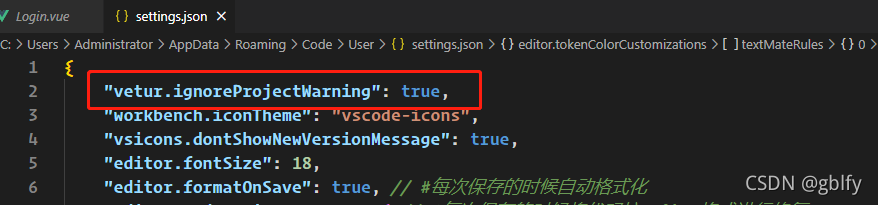
4.1. Configure the vehicle plug-in and ignore the prompt </ H6>
 "vetur.ignoreProjectWarning": true,

4.2. Create jsconfig.json file in the project root directory </ H6>

Add code:

{
    "include": [
        "./src/*"
    ]
}
4.3. Create the vetur.config.js file in the project root directory </ H6>

Add code:

module.exports = {
    // vetur configuration, which will override the settings in vscode.  default: `{}`
    settings: {
        "vetur.useWorkspaceDependencies": true,
        "vetur.experimental.templateInterpolationService": true
    },
    // Normal projects use the default configuration default: `[{ root: './' }]`
}

After asynchronous file import and springboot multipartfile upload, the @async asynchronous processing reports an error: nosuchfileexception

First question

When there is a large amount of data in Excel, the process of Java background parsing may take a long time, but users do not need to wait. At this time, consider the asynchronous import of files

There are several ways to implement the file asynchronous method. Here, it is implemented by specifying the asynchronous thread pool, that is, @ async (“thread pool name”) annotates the asynchronous method.

However, after testing, it is found that the annotations of this annotation are also annotated, but the asynchronous effect cannot be realized.

After several twists and turns, it is found that asynchronous methods can call non asynchronous methods, which can achieve asynchronous effect; First, non asynchronous methods call asynchronous methods, which will fail. What is said here is in the same Java class.

In different Java classes, the above problems do not exist

The second problem
uses the asynchronous method to receive files through the controller and process them in the service layer. At this time, the controller has returned the results of successful execution. The rest is to analyze and store them in the service layer. Unexpectedly, an error is reported in the service

java.nio.file.NoSuchFileException: D:\UserData\Temp\undertow.1407321862395783323.8400\undertow4517937229384702645upload

Methods in controller

@PostMapping("/test")
public R<String> test(MultipartFile file) {
	testService.test(file);
	return R.success("successful to import");
}

Methods in service

@Async("asyncImportExecutor")
public void test(MultipartFile file) {
    try {
        EasyExcelUtil.read(file.getInputStream(), Test.class, this::executeImport)
                    .sheet().doRead();
    } catch (Exception ex) {
        log.error("[test]Asynchronous import exceptions:", ex);
    }
}

When I saw this exception nosuchfileexception, I was stunned. The test was conducted through postman, so I began to suspect the problem of postman. After troubleshooting, there was no problem with postman and path, and the asynchronous call process was OK

Then think of the abnormal prompt, that is, the file can not be found. According to the printed log, it can’t be found locally. Then there was the following writing

Methods in controller

@PostMapping("/test")
public R<String> test(MultipartFile file) {
	try {
		testService.test(file.getInputStream());
	} catch (IOException e) {
		log.error("[test]Exception log:", e);
		return R.fail("Import failed");
	}
	return R.success("Import successful");
}

Methods in service

@Async("asyncImportExecutor")
public void test(InputStream file) {
    try {
        EasyExcelUtil.read(file, Test.class, this::executeImport)
                    .sheet().doRead();
    } catch (Exception ex) {
        log.error("[test]Asynchronous import exceptions:", ex);
    }
}

So you don’t report mistakes
later, I debugged and found that the temporary file was generated by the multipartfile object in the controller layer. I had been writing the synchronization method, and I didn’t notice that the multipartfile object would generate a temporary file. Later, it was found that after the result returned in the controller, there was no temporary file.

Error summary:
because the asynchronous method is used, there will be a main thread and an asynchronous thread. After uploading a file, an instance of multipartfile type will be formed and a temporary file will be generated. At this time, it is in the main thread. After the instance of multipartfile is handed over to the asynchronous thread for processing, the temporary file will be destroyed by springboot (spring). The above exception will appear when you go to getinputstream in the asynchronous thread.

The following method is to take the InputStream stream as the input parameter, so the file cannot be found.
[Solved] Keepalived Configurate Error: Unicast peers are not supported in strict mode

Unicast peers are not supported in strict mode

Error reporting information, reasons for error reporting, and exclusion of error digressions

Error message

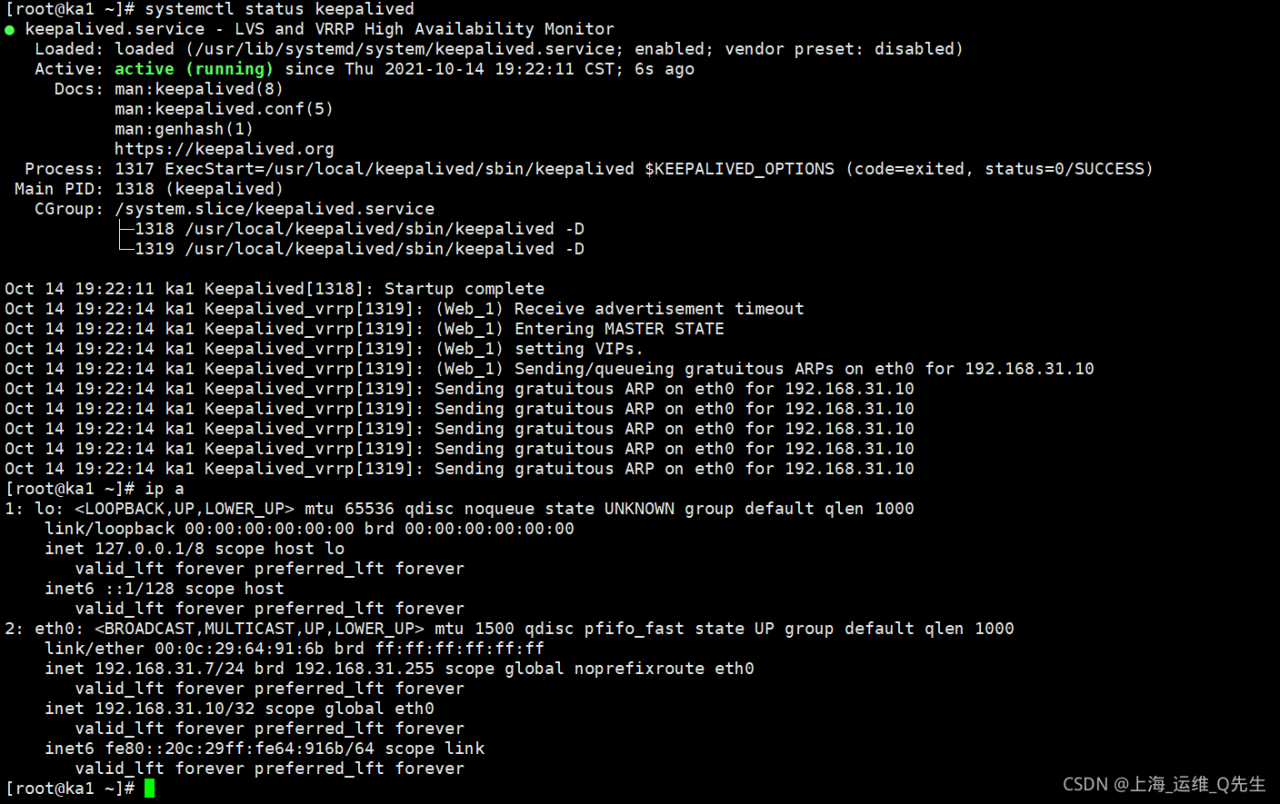
Oct 14 19:18:45 ka1 Keepalived_vrrp[1306]: (Web_1) Strict mode does not support authentication. Ignoring.
Oct 14 19:18:45 ka1 Keepalived_vrrp[1306]: (Web_1) Unicast peers are not supported in strict mode
Oct 14 19:18:45 ka1 Keepalived_vrrp[1306]: Stopped - used 0.000000 user time, 0.001451 system time
Oct 14 19:18:45 ka1 Keepalived[1305]: Startup complete
Oct 14 19:18:45 ka1 Keepalived[1305]: pid 1306 exited with permanent error CONFIG. Terminating
Oct 14 19:18:45 ka1 Keepalived[1305]: CPU usage (self/children) user: 0.000000/0.000000 system: 0.001419/0.001747
Oct 14 19:18:45 ka1 Keepalived[1305]: Stopped Keepalived v2.2.4 (08/21,2021)

Error reporting reason

vrrp_Strict mode and unicast_src_IP conflicts cause keepalived startup failure
in addition, VRRP_Strict also conflicts with nopreempt and other configurations. It is recommended to delete or comment directly

Troubleshooting errors

vi /etc/keepalived/keepalived.conf

Comment or delete the following lines

#vrrp_strict

Restart keepalived after saving

systemctl restart keepalived

Digression

See other students’ keepalived help posts during troubleshooting
https://ask.csdn.net/questions/771124?Wechatoa =
although we don’t know the final reason, we also analyze the problem

The problem is divided into two steps
first, the automatic switching of VIP caused by preemption is mainly
1.43. When 43 is started, the virtual IP is switched to 43, which is caused by preemption mode.
solution: set keepalived to non gunfight mode, so that you stop 43, switch to 47, and start 43 again without forcing the VIP to switch back to 43.
VRRP_ Nopreempt
II. VIP is inaccessible on 43.
VIP is inaccessible. The specific phenomenon of “inaccessibility” described here is not well understood. It is speculated that there are three possibilities.
1vip cannot Ping through
look at the firewall configuration
systemctl stop firewalld & amp& amp; Iptables – f (please confirm the firewall configuration again and again to avoid losing some required configurations)
for the configuration of keepalived, theoretically you do not configure VRRP_ Strict is VRRP that does not need to be configured separately_ Iptables, but you didn’t mention the specific keepalived version. It doesn’t rule out some special bugs in the small version
Global_ Adding VRRP to defs_ Iptables
3. A service such as nginx or Apache cannot be accessed
3.1. Check the listen configuration item of the corresponding configuration file. The most brutal way is to set it to 0.0.0
3.2. SS – ntlp to check the listening of the corresponding port
3.3. Use tools such as curl to test 127.0.0.1 successively, server IP and VIP to see whether they return normally.
3.4. If the database is used, check the authorization of relevant accounts

How to Solve Linux connecte to the old version of SQL Server Error

Most methods of online search can’t help me
the errors are as follows:
the server selected protocol version tls10 is not accepted by client preferences [tls12]
in the root directory of Java (mine is 1.8), the jdk11 will find the security file under conf, and there is a java.security file under JRE/lib/security, The jdk.tls.disabledalgorithms configuration in this file will disable the tls1.0 version of the transport protocol. At this time, we need to close the protocol and delete tls1.0. Of course, deletion under this file is useless. Most posts on the Internet also say that it is impossible to change this file. Therefore, the following methods are used, Create a new empty file and paste it as follows:

jdk.tls.disabledAlgorithms=SSLv3, RC4, DES, MD5withRSA, \
 DH keySize < 1024, EC keySize < 224, 3DES_EDE_CBC, anon, NULL, \
 include jdk.disabled.namedCurves```
Save it and run the java project:

```bash
-Djava.security.properties=xxx

The above parameters determine the location of the new file. At this time, the error can be solved.

CDH operation and maintenance: child node cloudera SCM agent starts Error

1.Startup Error:
./cloudera-scm-agent start
Error Screenshot:

2.Delete or backup to other corresponding pid files according to the error report
find/-name cloudera-scm-agent.pid
mv cloudera-scm-agent.pid cloudera-scm-agent.pid20211019
or rm -rf cloudera-scm-agent.pid
3.restart cloudera-scm-agent
./cloudera-scm-agent start
Done!