Direct method:
Idea-> Help-> JRebel-> configuration
Just click the button below (if you activate it normally) 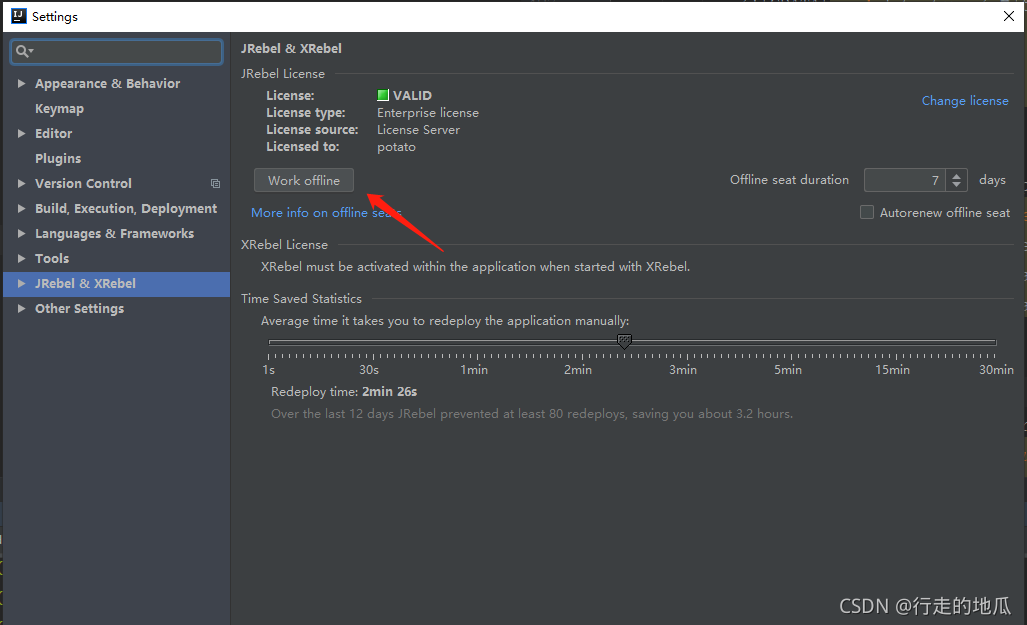
Direct method:
Idea-> Help-> JRebel-> configuration
Just click the button below (if you activate it normally)
The Keil version is v5.25.30.0
the Downloader is st-link
1. As shown in the figure below, Keil prompts error: Flash download failed – target DLL has been cancelled
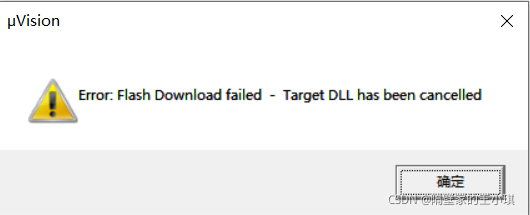
2. The reason is that the TVCC of st-link in the figure below is not connected to the 3.3V of the circuit board
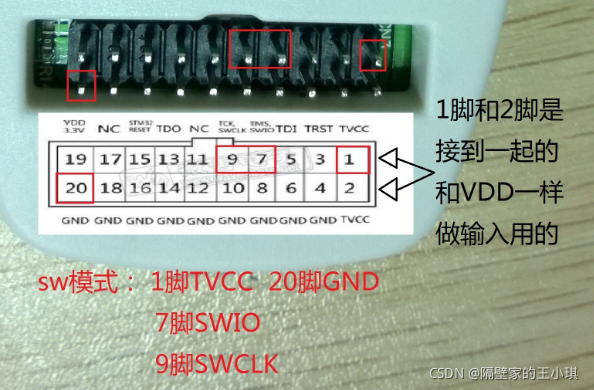
as shown in the figure below. When the yellow line is connected, it can be downloaded normally. If the yellow line is not connected to stlink, The target DLL has been cancelled error will appear
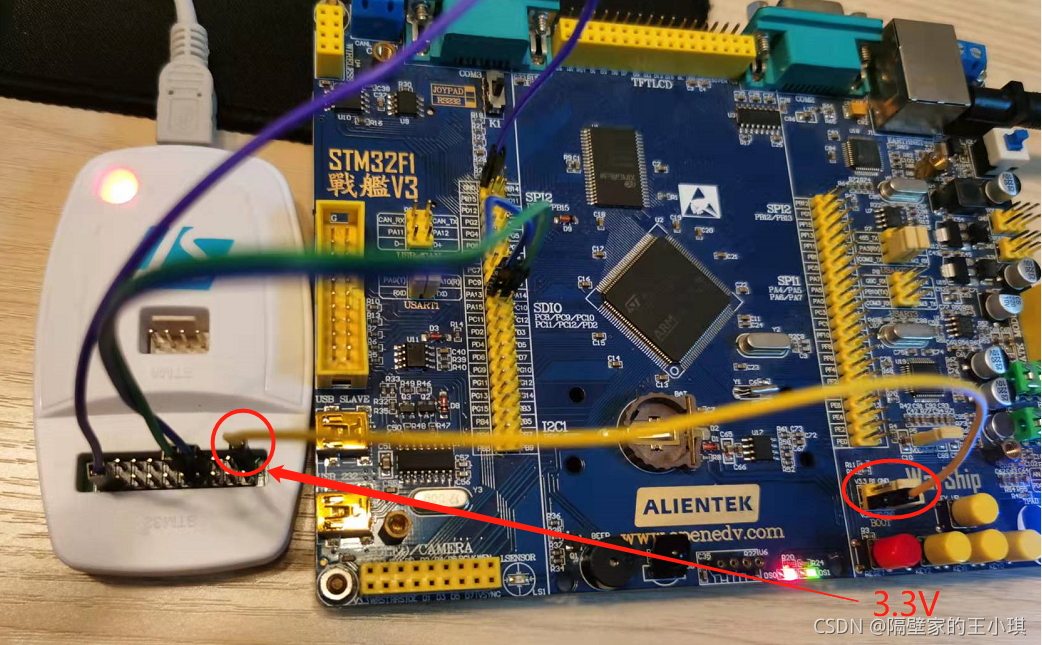
3. Discuss the difference between Vdd and TVCC in stlink
as shown in the figure below, TVCC is pin 1.2. When stlink is plugged in USB, TVCC has no 3.3V output
VDD is pin 19. When stlink is plugged in USB, VDD has 3.3V output
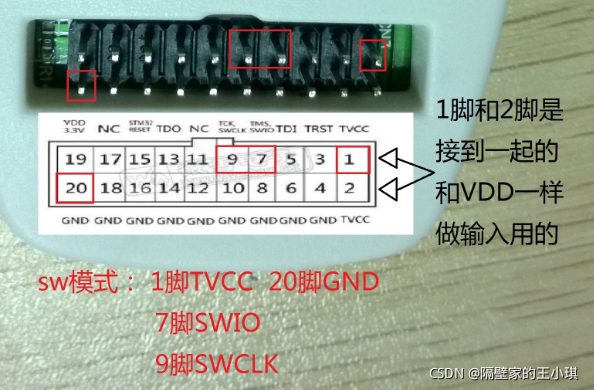
when downloading the program in SW mode:
TVCC must receive 3.3V to download successfully, otherwise an error will be reported: Flash download failed – target DLL has been cancelled
VDD is not connected
So can VDD be connected to TVCC to power up the single chip microcomputer?I tried. It is feasible in theory, but I generally don’t do so, because the 3.3V driving ability is not strong
I test with the board of the punctual atomic warship. When VDD is connected to TVCC, both Vdd and TVCC will be pulled to about 2V, and keil can also successfully download the code. As shown in the figure below, VDD gives a voltage of 3.3V to the MCU through the white line, and then to TVCC through the yellow line. However, the LED will not be lit. Personally, I think the voltage is too low
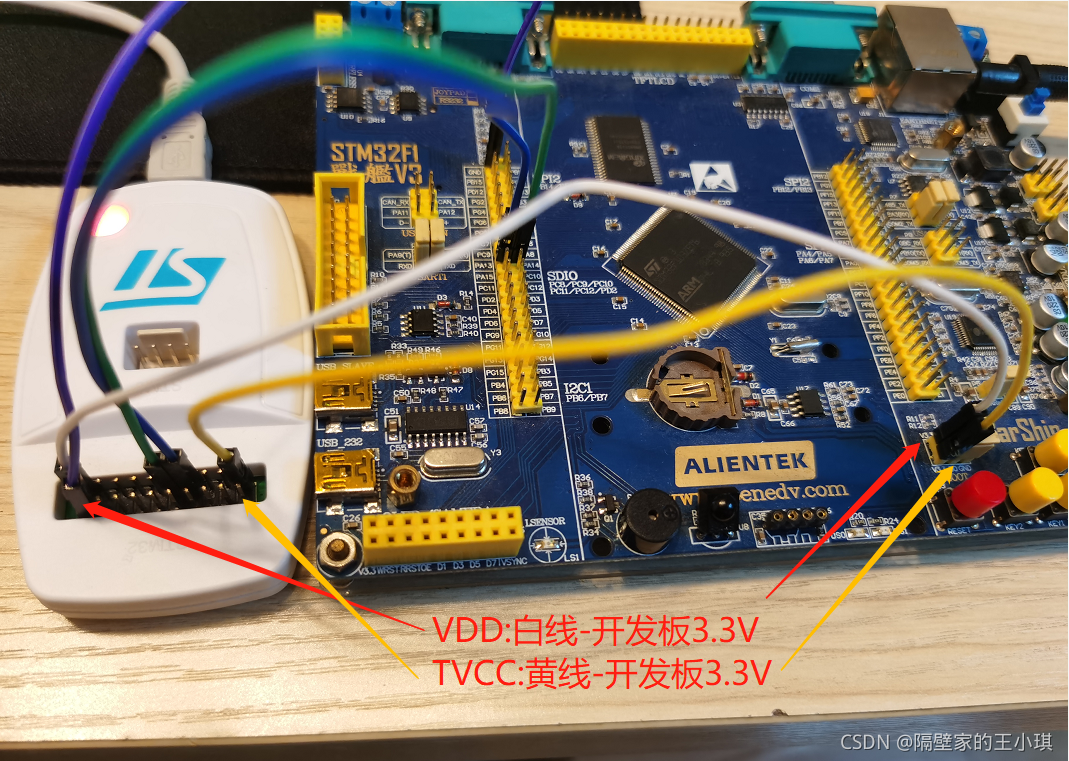
Looking through the manual of STM32, you can see that the working voltage of STM32 is 2v-3.6v, so Vdd and TVCC are two or more volts, which can also make the STM32 program download successful

to sum up:
1. TVCC itself has no voltage. When downloading the program, it needs to be connected to 3.3V of the circuit board
2. VDD can supply power to the MCU to download the program. At the same time, if the power is supplied on the circuit board or separately, VDD should not be connected to the development board to avoid the conflict between the two 3.3V. So it can be described by one word, but it’s not necessary. VDD is just a foot that doesn’t exist. Don’t use it
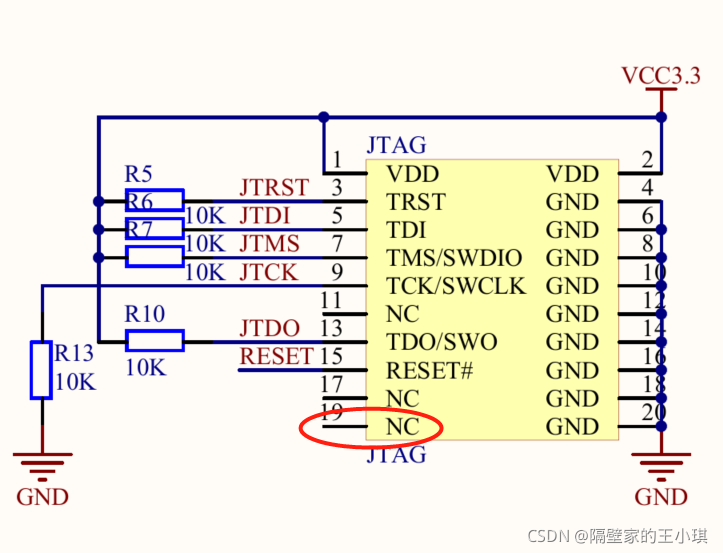
PS: the standard JTAG interface is attached. It can be seen that the 19 pin is not connected. I don’t quite understand why stlink wants to output the 19 pin to 3.3V as VDD
When running the image stylization code with tensorflow version 2.4.0, the following error occurred:
tensorflow.python.framework.errors_impl.InternalError: Blas xGEMM launch failed : a.shape=[1,480000,64], b.shape=[1,480000,64], m=64, n=64, k=480000 [Op:Einsum]
The following two solutions are found by consulting the data:
1. Add the following code to the program:
import os
os.environ['CUDA_VISIBLE_DEVICES'] = '/gpu:0'
The program can run normally, but the CPU is used, and the running speed of the program is much slower
2. Modify the cudnn version, but it is generally not recommended. It is too troublesome.
[Vue warn]: invalid prop: type check failed for prop “disabled”
Translation:
the attribute is invalid: the type check of the attribute “disabled” fails. It should be a Boolean value, and the obtained string value is “isdisabledfn()”
solution:
in the code: disabled is a Boolean value, but the judgment statement result is not a Boolean value. Just convert it.
The rtthread dcm data persistence component was used in the project, but mkdir:/data failed was reported during dcm_cache_save
But this error log is not the code of this project, it is confirmed that it is the log printed inside the dcm interface
Then confirmed that the macro #define DCM_DEFAULT_STORAGE_NAME “/user/data/db/dcm” is already in rtconfig.h
Declare that this macro is also useful for business code at system startup
The final investigation is because dcm_default_storage_name needs to be assigned when the system starts, and the dcm_strg.o of the dcm component depends on
If this variable is not assigned, it will default to mkdir:/data, but if /data has no permission, it will report that error.
So dcm_default_storage_name = DCM_DEFAULT_STORAGE_NAME is solved (it needs to be called at startup)
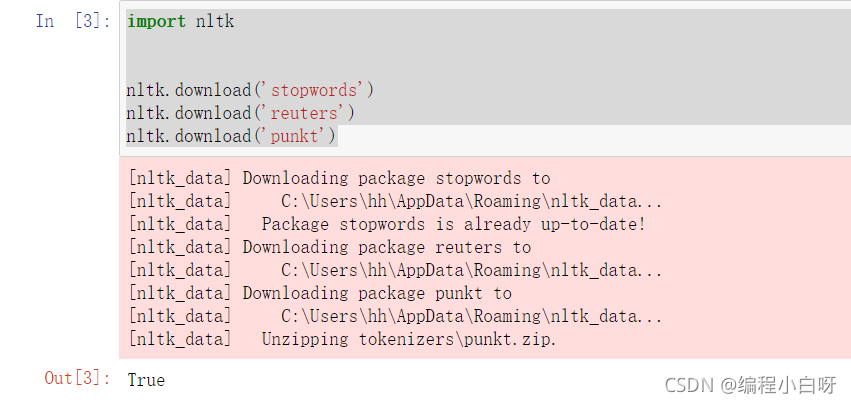
Recently, I used nltk as a downloader in my homework related to automatic Q & A. I used another computer to solve the problem, but I didn’t record the solution. I immediately forgot and spent about 2 hours looking for a solution. Therefore, I want to record the solution now.
import nltk

nltk.download('stopwords')
nltk.download('reuters')
nltk.download('punkt')
When executing the above code, an error is found error loading stopwords: & lt; Urlopen error [errno 11004] getaddrinfo failed , the following methods are available through practical operation.
Find the hosts file under C: \ windows \ system32 \ drivers \ etc , open it as an administrator, and add the following line of IP address to the end of hosts.
185.199.108.133 raw.githubusercontent.com
As shown in the figure below,
 after adding and running again, you will find that the download is successful
The address of raw.github is changed frequently, resulting in unsuccessful download
It is possible that the address may be changed frequently, resulting in unsuccessful downloading. We can open the website for querying the IP address: https://www.ipaddress.com/ Enter raw. Githubusercontent. Com to find the corresponding new IP address.
give an example
We have added the IP address to the hosts and found that it was still unsuccessful. Therefore, let’s see if the download failed due to the change of the IP address of raw.github. We open https://websites.ipaddress.com/ website, enter raw.githubusercontent.com , and click look up
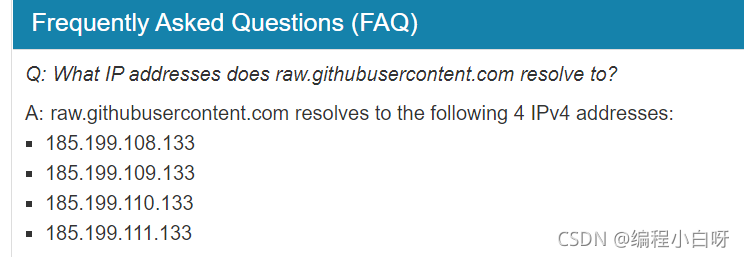 . It is found that four IPS have been found. We replace the content in hosts with
185.199.109.133 raw.githubusercontent.com
Then we re execute and find success.
If the above solutions are not solved, you can leave a message and we can communicate together~
The above solutions are from the solution reference link. Thank you very much!!
java.net.SocketException: socket failed: EPERM (Operation not permitted)
This problem always occurs when using asynchttpclient to make network requests. If you add network permissions
, you still can’t
Finally, I saw the solution of @ no forest in Norway. Uninstall the program in the virtual machine and reinstall it.
although I don’t know the principle, I still record it
ERROR: Error during SonarScanner execution
ERROR: Failed to upload report - An error has occurred. Please contact your administrator
ERROR:
ERROR: Re-run SonarScanner using the -X switch to enable full debug logging.
[Pipeline] }
View service details
Enter the corresponding sonar installation directory and look at the log below log
web.log The following error is reported, MySQL

Setting and modifying the maximum MySQL receive
vim /etc/my.cnf
Add a row
max_ allowed_ packet = 2102410240
Restart service
systemctl restart mysqld
If an error is still reported during the execution of sonar, restart sonar,
Solution: after entering the burn command, press and hold the boot button; If it doesn’t work, try holding down boot and en at the same time;
In the egg project, NPM is installed for the first time The following errors are reported when the package is:
Oops! Something went wrong! :(

ESLint: 5.16.0.
ESLint couldn't find the plugin "eslint-plugin-jsdoc". This can happen for a couple different reasons:

1. If ESLint is installed globally, then make sure eslint-plugin-jsdoc is also installed globally. A globally-installed ESLint cannot find a locally-installed plugin.

2. If ESLint is installed locally, then it's likely that the plugin isn't installed correctly. Try reinstalling by running the following:

     npm i eslint-plugin-jsdoc@latest --save-dev

Path to ESLint package: /Users/***/node_modules/eslint

If you still can't figure out the problem, please stop by https://gitter.im/eslint/eslint to chat with the team.
The eslint does not work normally, and when the file does not comply with the eslint rules, an error is reported in the console log as follows:
Failed to load plugin jsdoc: Cannot find module 'eslint-plugin-jsdoc'....reason:
When NPM v8.0 installed the project dependency, it did not correctly install the project dependency (eslint config egg) dependency (eslint plugin JSDoc)
solve:
After upgrading NPM to v8.1.2, delete the node in the project_ Modules and package-lock.json, and then reinstall
rm -rf node_modules
rm package-lock.json
npm i
Supplement:
If you have the same error, you can search globally Eslint plugin JSDoc to locate dependencies with NPM command
➜  *** git:(master) ✗ npm ls eslint-plugin-jsdoc
***@1.0.0 /Users/***
└─┬ [email protected]
  └── [email protected]
Then determine whether to install or upgrade NPM manually or for other reasons.
1. Error log
org.springframework.web.multipart.MultipartException: Failed to parse multipart servlet request; nested exception is java.lang.RuntimeException: java.nio.file.NoSuchFileException: /tmp/undertow.8081.6091954911906268442/undertow2435234810596519507upload
        at org.springframework.web.multipart.support.StandardMultipartHttpServletRequest.handleParseFailure(StandardMultipartHttpServletRequest.java:124)
        at org.springframework.web.multipart.support.StandardMultipartHttpServletRequest.parseRequest(StandardMultipartHttpServletRequest.java:115)
        at org.springframework.web.multipart.support.StandardMultipartHttpServletRequest.<init>(StandardMultipartHttpServletRequest.java:88)
        at org.springframework.web.multipart.support.StandardServletMultipartResolver.resolveMultipart(StandardServletMultipartResolver.java:87)
        at org.springframework.web.servlet.DispatcherServlet.checkMultipart(DispatcherServlet.java:1178)
        at org.springframework.web.servlet.DispatcherServlet.doDispatch(DispatcherServlet.java:1012)
        at org.springframework.web.servlet.DispatcherServlet.doService(DispatcherServlet.java:943)
        at org.springframework.web.servlet.FrameworkServlet.processRequest(FrameworkServlet.java:1006)
        at org.springframework.web.servlet.FrameworkServlet.doPost(FrameworkServlet.java:909)
2. Cause of problem
After consulting the blog, I know the cause of the problem:
in Linux system, when the spring boot application is started with Java jar command, a Tomcat (or undertow) temporary directory will be generated in the/tmp directory of the operating system. The uploaded files must be converted into temporary files and saved under this folder. Because the files in the temporary/tmp directory are not used for a long time (10 days), the system executes the TMP directory cleaning service (systemd-tmpfiles-clean. Service), resulting in the cleaning of/TMP/undertow… 8090 files. However, when uploading, the undertow server needs to create/TMP/undertow… 8090/undertow… Upload temporary files, However, when calling files. CreateFile (…), you will find that the parent directory cannot be found, which leads to the above error.
3. Solution
1) Restart
cannot be done once and for all
2) the directory specified by the configuration file
needs to be manually created on the server
MKDIR – P/data/tmp
spring:
  servlet:
      multipart:
          location: /data/tmp
3) Add startup parameter – Java.TMP.Dir =/path/to/application/temp/
preface
Use the docker build command to build a mirror: “failed to solve with frontend dockerfile. V0: failed to create LLB definition: unexpected status code [manifests 18.04]: 403 Forbidden”. The specific screenshot of the error is as follows:

resolvent
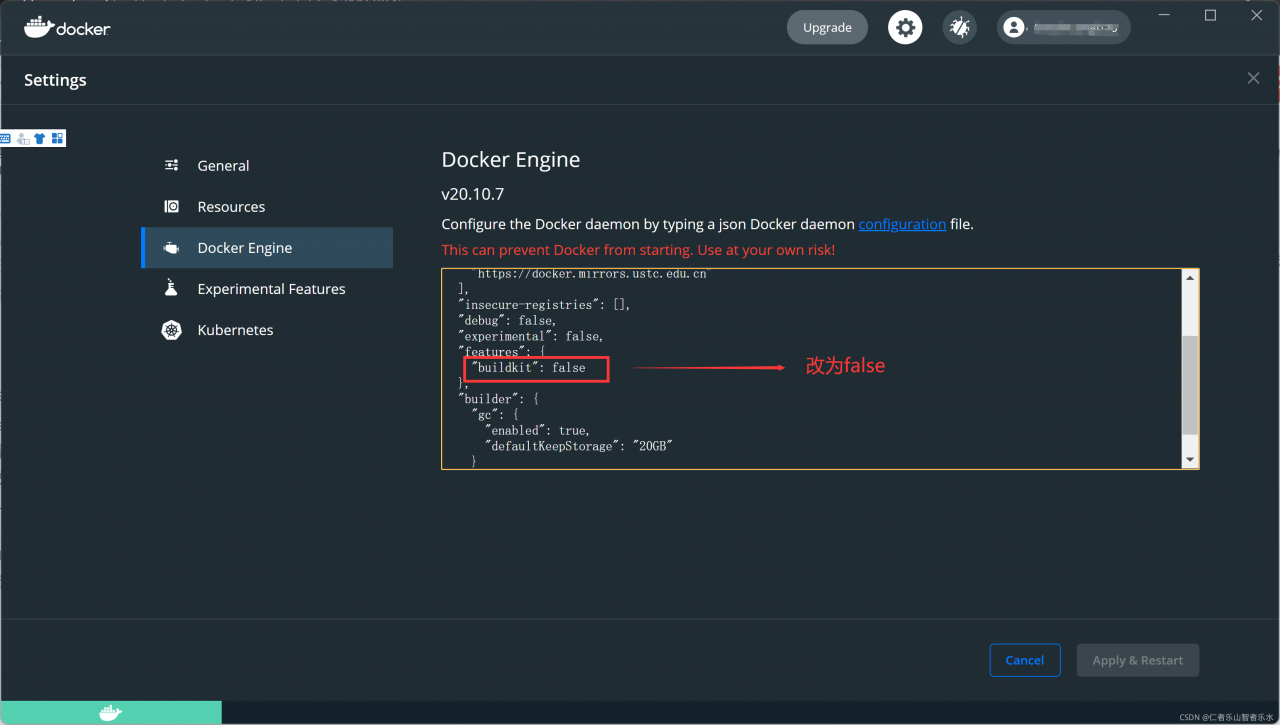
It happens during the build process. It is an error in the buildkit, considering that the buildkit is still unstable. If you use the docker desktop on MAC/windows, you may also have to disable it in the “docker engine” JSON configuration
docker desktop – & gt; Settings – & gt; Docker engine – & gt; “Features”: {buildkit: true} will “features”: {buildkit: false}
Note that this is not a fix, it is a solution until someone in the docker team implements the correct fix. Please try again when the buildkit is more stable
Reference articles
github issues