Author Archives: Robins

[Solved] Electron Error: ReferenceError: require is not defined

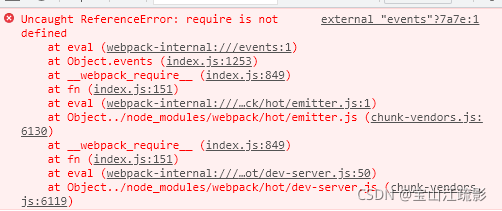
Error reported by electron: referenceerror: require is not defined

This error is suddenly reported. Many people on the Internet say that nodeintegration: true should be set, but it doesn’t work.
until I see a comment on stackoverflow:
all you need to do is add contextisolation: false after nodeintegration: true in the webpreferences object,
try it and it’s OK, This means adding contextisolation: false after nodeintegration: true

[Solved] Unity Import Xcode Project Error: iOS framework addition failed due to a CocoaPods installation failure.

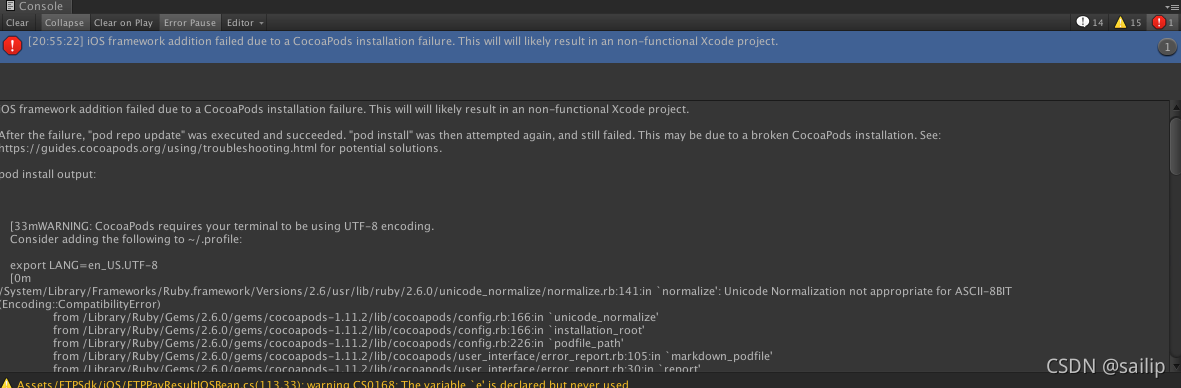
iOS framework addition failed due to a CocoaPods installation failure. This will will likely result in an non-functional Xcode project.

When unity exports the Xcode project, it relies on the third-party cocoapods library. The error is as follows.

Solution:

Although the warning is written in the error, the warning problem is solved and the error is no longer reported.

cd ~
vim .profile  # If not, execute the following command, if yes, fill in export LANG=en_US.UTF-8
touch .profile # New .profile
source .profile # Let it take effect

The specific error reports are as follows (part):

iOS framework addition failed due to a CocoaPods installation failure. This will will likely result in an non-functional Xcode project.

After the failure, "pod repo update" was executed and succeeded. "pod install" was then attempted again, and still failed. This may be due to a broken CocoaPods installation. See: https://guides.cocoapods.org/using/troubleshooting.html for potential solutions.

pod install output:


    [33mWARNING: CocoaPods requires your terminal to be using UTF-8 encoding.
    Consider adding the following to ~/.profile:

    export LANG=en_US.UTF-8
    [0m
/System/Library/Frameworks/Ruby.framework/Versions/2.6/usr/lib/ruby/2.6.0/unicode_normalize/normalize.rb:141:in `normalize': Unicode Normalization not appropriate for ASCII-8BIT (Encoding::CompatibilityError)
	from /Library/Ruby/Gems/2.6.0/gems/cocoapods-1.11.2/lib/cocoapods/config.rb:166:in `unicode_normalize'
	from /Library/Ruby/Gems/2.6.0/gems/cocoapods-1.11.2/lib/cocoapods/config.rb:166:in `installation_root'
	from /Library/Ruby/Gems/2.6.0/gems/cocoapods-1.11.2/lib/cocoapods/config.rb:226:in `podfile_path'
	from /Library/Ruby/Gems/2.6.0/gems/cocoapods-1.11.2/lib/cocoapods/user_interface/error_report.rb:105:in `markdown_podfile'
	from /Library/Ruby/Gems/2.6.0/gems/cocoapods-1.11.2/lib/cocoapods/user_interface/error_report.rb:30:in `report'
	from /Library/Ruby/Gems/2.6.0/gems/cocoapods-1.11.2/lib/cocoapods/command.rb:66:in `report_error'
	from /Library/Ruby/Gems/2.6.0/gems/claide-1.0.3/lib/claide/command.rb:396:in `handle_exception'
	from /Library/Ruby/Gems/2.6.0/gems/claide-1.0.3/lib/claide/command.rb:337:in `rescue in run'
	from /Library/Ruby/Gems/2.6.0/gems/claide-1.0.3/lib/claide/command.rb:324:in `run'
	from /Library/Ruby/Gems/2.6.0/gems/cocoapods-1.11.2/lib/cocoapods/command.rb:52:in `run'
	from /Library/Ruby/Gems/2.6.0/gems/cocoapods-1.11.2/bin/pod:55:in `<top (required)>'
	from /usr/local/bin/pod:25:in `load'
	from /usr/local/bin/pod:25:in `<main>'
/System/Library/Frameworks/Ruby.framework/Versions/2.6/usr/lib/ruby/2.6.0/unicode_normalize/normalize.rb:141:in `normalize': Unicode Normalization not appropriate for ASCII-8BIT (Encoding::CompatibilityError)
	from /Library/Ruby/Gems/2.6.0/gems/cocoapods-1.11.2/lib/cocoapods/config.rb:166:in `unicode_normalize'
	from /Library/Ruby/Gems/2.6.0/gems/cocoapods-1.11.2/lib/cocoapods/config.rb:166:in `installation_root'
	from /Library/Ruby/Gems/2.6.0/gems/cocoapods-1.11.2/lib/cocoapods/config.rb:226:in `podfile_path'
	from /Library/Ruby/Gems/2.6.0/gems/cocoapods-1.11.2/lib/cocoapods/config.rb:205:in `podfile'
	from /Library/Ruby/Gems/2.6.0/gems/cocoapods-1.11.2/lib/cocoapods/command.rb:160:in `verify_podfile_exists!'
	from /Library/Ruby/Gems/2.6.0/gems/cocoapods-1.11.2/lib/cocoapods/command/install.rb:46:in `run'
	from /Library/Ruby/Gems/2.6.0/gems/claide-1.0.3/lib/claide/command.rb:334:in `run'
	from /Library/Ruby/Gems/2.6.0/gems/cocoapods-1.11.2/lib/cocoapods/command.rb:52:in `run'
	from /Library/Ruby/Gems/2.6.0/gems/cocoapods-1.11.2/bin/pod:55:in `<top (required)>'
	from /usr/local/bin/pod:25:in `load'
	from /usr/local/bin/pod:25:in `<main>'


pod repo update output:

Updating spec repo `cocoapods`
  $ /usr/local/bin/git -C /Users/liuyongjie/.cocoapods/repos/cocoapods fetch origin --progress
  $ /usr/local/bin/git -C /Users/liuyongjie/.cocoapods/repos/cocoapods rev-parse --abbrev-ref HEAD
  master
  $ /usr/local/bin/git -C /Users/liuyongjie/.cocoapods/repos/cocoapods reset --hard origin/master
  HEAD 现在位于 9734315382c8 [Add] HBS-UI 1.1.0
Updating spec repo `ftsview-the-fotoable-cocoapods-specs`
  $ /usr/local/bin/git -C /Users/liuyongjie/.cocoapods/repos/ftsview-the-fotoable-cocoapods-specs fetch origin --progress
  $ /usr/local/bin/git -C /Users/liuyongjie/.cocoapods/repos/ftsview-the-fotoable-cocoapods-specs rev-parse --abbrev-ref HEAD
  master
  $ /usr/local/bin/git -C /Users/liuyongjie/.cocoapods/repos/ftsview-the-fotoable-cocoapods-specs reset --hard origin/master
  HEAD 现在位于 8984dba [Update] FtAdsPlatform (4.4.8.4)


    [33mWARNING: CocoaPods requires your terminal to be using UTF-8 encoding.
    Consider adding the following to ~/.profile:

    export LANG=en_US.UTF-8

Git Error: remote: HTTP Basic: Access denied [How to Solve]

reason:

The user name and password configured by local git are inconsistent with those registered on gitlab.

Solution:

If the account and password are changed, execute the following commands on the GIT command line

git config --system --unset credential.helper

Then re execute your operations (such as pull and push), and you will be prompted to enter your account and password again.

What’s your feeling?

In retrospect, it seems that I did create a new user name and password, or I changed my password. ok

How to Solve Vue loading 3D model Error

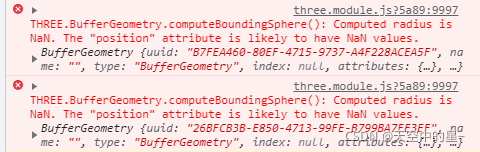
Loading the 3D model in vue today keeps reporting errors

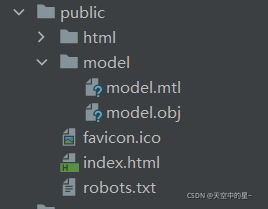
There is no error in the code, but the path of the model is wrong, resulting in an error when loading the model (the model was originally placed under the assets path and imported through the relative path). After checking the data, it is found that the model file cannot be placed under the assets path, but under the public path, and the file under the public must be imported through the absolute path (this depends on the configuration of publicpath in vue.config.js. The default is /)

Specific code and steps for loading 3D model in Vue:

1. NPM install three — save package for installing three.js

2. Introduce three related packages

import * as THREE from 'three';
import {OrbitControls} from 'three/examples/jsm/controls/OrbitControls';
import {MTLLoader} from 'three/examples/jsm/loaders/MTLLoader';
import {OBJLoader} from 'three/examples/jsm/loaders/OBJLoader';

3. The model should be placed in the public folder. The resources placed in the public directory will be copied directly and will not be packaged by webpack

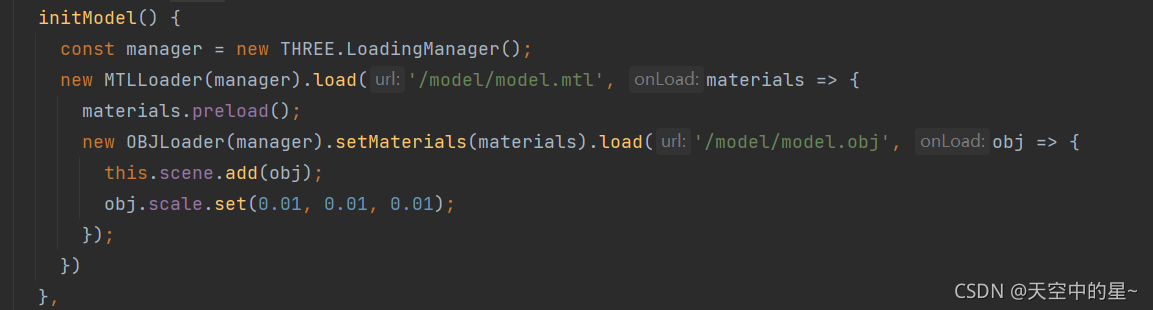
4. Load model

Vscode save Vue format eslint check error [How to Solve]

1. Problem description

When writing items with Vue, the eslint syntax check was turned on as usual, but various errors, single and double quotation marks and function spaces were found after formatting and saving with vscode. Because the formatting plug-in of vscode itself does not match eslint. Therefore, some configurations need to be modified to achieve the effect of configuration. There are two ways to modify.

2. Solution 1

Since the vsdoe formatting does not match eslint, we will modify the rules of vscode. Create a file .Pretierrc under the current project and modify relevant configuration items. Here, we only modify single and double quotation marks and semicolons.

 {
   "semi": true,
   "singleQuote": true
 }

3. Solution 2

Modify the style location where you save Vue formats:

3.1 open configuration item
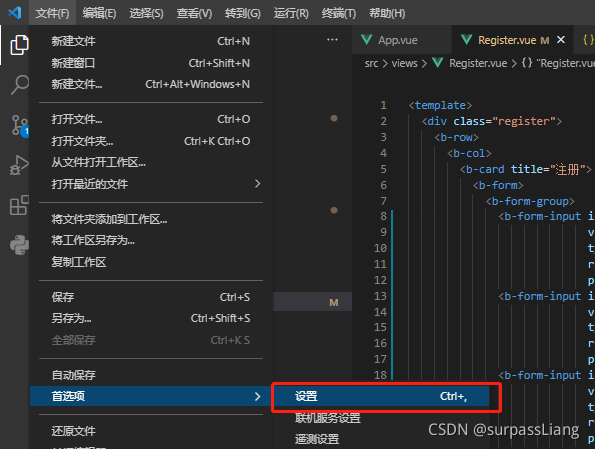
3.2 find the corresponding configuration item and modify the corresponding value

"[vue]": {
        //"editor.defaultFormatter": "esbenp.prettier-vscode" //before fixing,
         "editor.defaultFormatter": "octref.vetur" // Use vetur formatting rules, after modification
    },

3.3 setting vetur rules

"vetur.format.defaultFormatterOptions": {
        "js-beautify-html": {
            "wrap_attributes": "force-aligned" //Attribute forced line alignment
         },
         "prettier": {
             "semi": true, // keep the semicolon
             "singleQuote": true, // true uses single quotes
        },
    },
[Solved] XML file configuration database connection information logical symbol error

Reason: illegal escape characters. XML characters must be replaced with corresponding entities.

- &lt;    <(Less than)
-&gt; > (greater than)
-&amp; & (and)
-&apos; '(single quote)
-&quot; "(double quotation mark)

Solution:

Follow the shortcut keys prompted by idea to replace

        <property name="DriverClass">com.mysql.cj.jdbc.Driver</property>
        <property name="JdbcUrl">jdbc:mysql://localhost:3306/test?characterEncoding=utf8&amp;ampuseSSL=false&amp;serverTimezone=UTC&amp;rewriteBatchedStatements=true</property>
        <property name="User">root</property>
        <property name="Password">789756long</property>

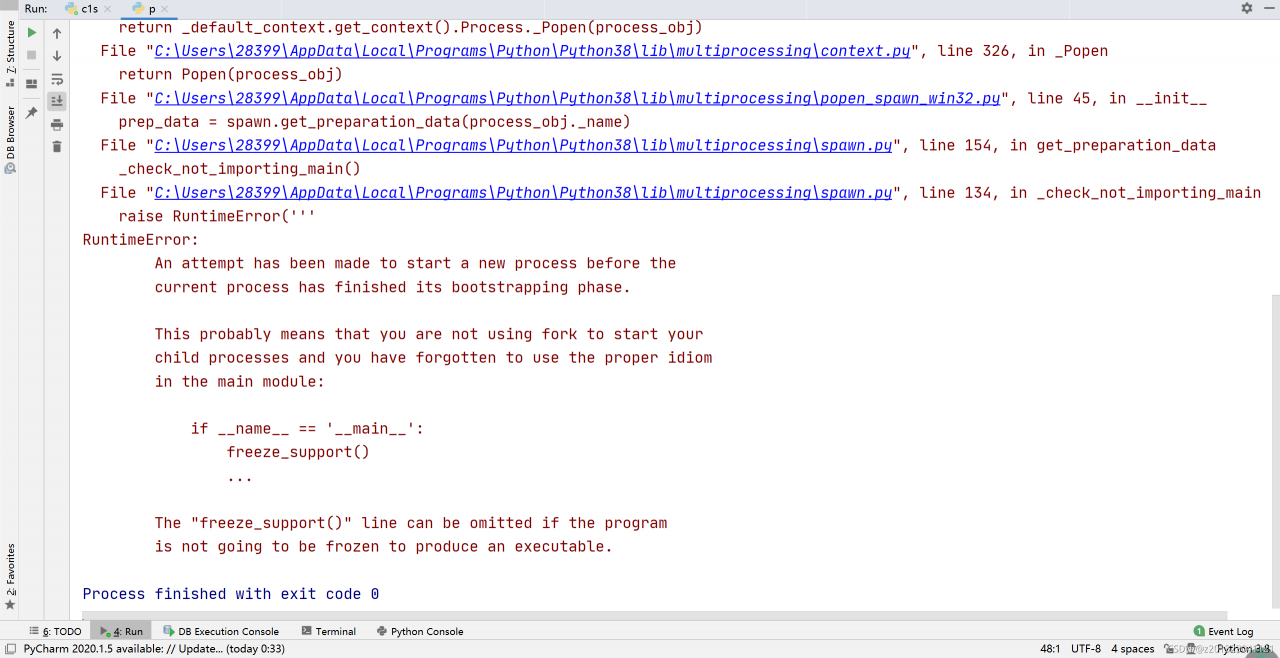
Python: How to Solve multiprocessing module Error in Windows

[problem description]

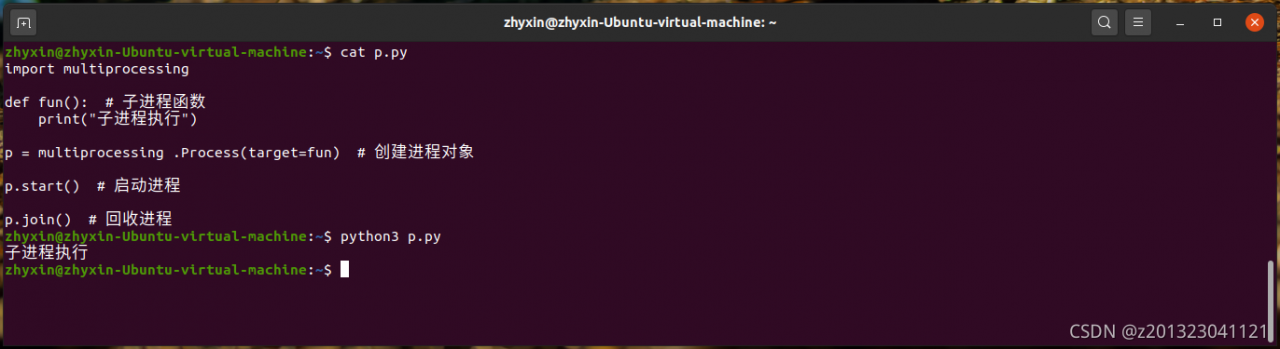
The following code can run normally in Linux, but an error is reported in windows.

import multiprocessing

def fun():  # Child process function
     print("child process execution")

p = multiprocessing .Process(target=fun) # Create process object

p.start() # Start the process

p.join() # Recycle process


[solution]

Add code as prompted:

if __name__ == '__main__':
    multiprocessing.freeze_support()

Adding only the above code will still report an error (the same error).

The code for creating process objects, starting processes, and recycling processes should also be placed in __ main__ protection

import multiprocessing

def fun():  # Child process function
     print("child process execution")

if __name__ =='__main__':
     multiprocessing.freeze_support() # Doesn't seem to be added?

     p = multiprocessing.Process(target=fun) # Create process object

     p.start() # Start the process

     p.join() # Recycle process

Done.

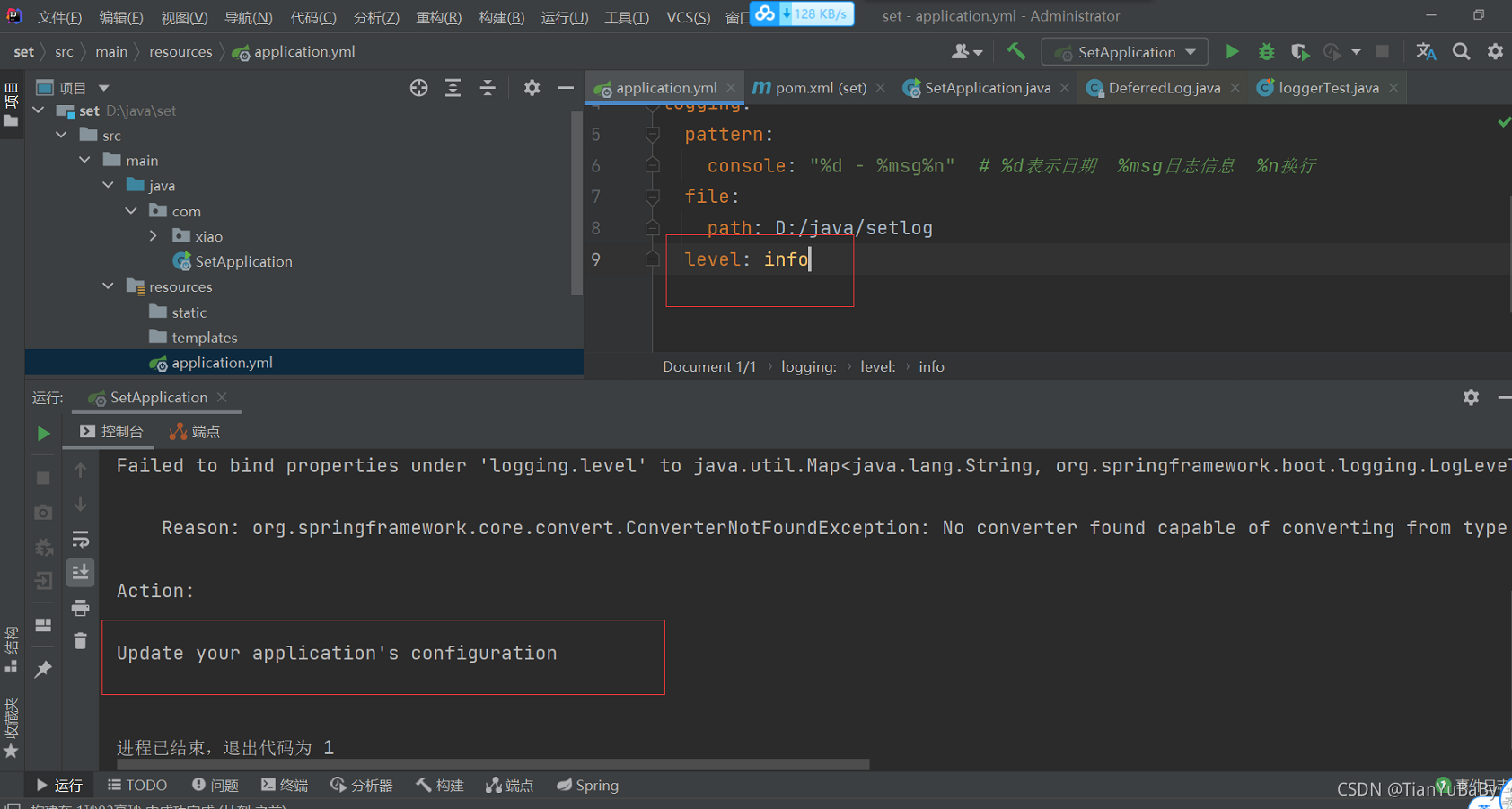
How to Solve Springboot YML configurate logging.level error

Error message

"C:\Program Files\Java\jdk-9.0.4\bin\java.exe" -XX:TieredStopAtLevel=1 -noverify -Dspring.output.ansi.enabled=always "-javaagent:C:\Program Files\JetBrains\IntelliJ IDEA 2021.1.1\lib\idea_rt.jar=49541:C:\Program Files\JetBrains\IntelliJ IDEA 2021.1.1\bin" -Dcom.sun.management.jmxremote -Dspring.jmx.enabled=true -Dspring.liveBeansView.mbeanDomain -Dspring.application.admin.enabled=true -Dfile.encoding=UTF-8 -classpath D:\java\set\target\classes;C:\Users\tianyu.wang\.m2\repository\org\springframework\boot\spring-boot-starter-web\2.5.6\spring-boot-starter-web-2.5.6.jar;C:\Users\tianyu.wang\.m2\repository\org\springframework\boot\spring-boot-starter\2.5.6\spring-boot-starter-2.5.6.jar;C:\Users\tianyu.wang\.m2\repository\org\springframework\boot\spring-boot-autoconfigure\2.5.6\spring-boot-autoconfigure-2.5.6.jar;C:\Users\tianyu.wang\.m2\repository\org\springframework\boot\spring-boot-starter-logging\2.5.6\spring-boot-starter-logging-2.5.6.jar;C:\Users\tianyu.wang\.m2\repository\ch\qos\logback\logback-classic\1.2.6\logback-classic-1.2.6.jar;C:\Users\tianyu.wang\.m2\repository\ch\qos\logback\logback-core\1.2.6\logback-core-1.2.6.jar;C:\Users\tianyu.wang\.m2\repository\org\apache\logging\log4j\log4j-to-slf4j\2.14.1\log4j-to-slf4j-2.14.1.jar;C:\Users\tianyu.wang\.m2\repository\org\apache\logging\log4j\log4j-api\2.14.1\log4j-api-2.14.1.jar;C:\Users\tianyu.wang\.m2\repository\org\slf4j\jul-to-slf4j\1.7.32\jul-to-slf4j-1.7.32.jar;C:\Users\tianyu.wang\.m2\repository\jakarta\annotation\jakarta.annotation-api\1.3.5\jakarta.annotation-api-1.3.5.jar;C:\Users\tianyu.wang\.m2\repository\org\yaml\snakeyaml\1.28\snakeyaml-1.28.jar;C:\Users\tianyu.wang\.m2\repository\org\springframework\boot\spring-boot-starter-json\2.5.6\spring-boot-starter-json-2.5.6.jar;C:\Users\tianyu.wang\.m2\repository\com\fasterxml\jackson\core\jackson-databind\2.12.5\jackson-databind-2.12.5.jar;C:\Users\tianyu.wang\.m2\repository\com\fasterxml\jackson\core\jackson-annotations\2.12.5\jackson-annotations-2.12.5.jar;C:\Users\tianyu.wang\.m2\repository\com\fasterxml\jackson\core\jackson-core\2.12.5\jackson-core-2.12.5.jar;C:\Users\tianyu.wang\.m2\repository\com\fasterxml\jackson\datatype\jackson-datatype-jdk8\2.12.5\jackson-datatype-jdk8-2.12.5.jar;C:\Users\tianyu.wang\.m2\repository\com\fasterxml\jackson\datatype\jackson-datatype-jsr310\2.12.5\jackson-datatype-jsr310-2.12.5.jar;C:\Users\tianyu.wang\.m2\repository\com\fasterxml\jackson\module\jackson-module-parameter-names\2.12.5\jackson-module-parameter-names-2.12.5.jar;C:\Users\tianyu.wang\.m2\repository\org\springframework\boot\spring-boot-starter-tomcat\2.5.6\spring-boot-starter-tomcat-2.5.6.jar;C:\Users\tianyu.wang\.m2\repository\org\apache\tomcat\embed\tomcat-embed-core\9.0.54\tomcat-embed-core-9.0.54.jar;C:\Users\tianyu.wang\.m2\repository\org\apache\tomcat\embed\tomcat-embed-el\9.0.54\tomcat-embed-el-9.0.54.jar;C:\Users\tianyu.wang\.m2\repository\org\apache\tomcat\embed\tomcat-embed-websocket\9.0.54\tomcat-embed-websocket-9.0.54.jar;C:\Users\tianyu.wang\.m2\repository\org\springframework\spring-web\5.3.12\spring-web-5.3.12.jar;C:\Users\tianyu.wang\.m2\repository\org\springframework\spring-beans\5.3.12\spring-beans-5.3.12.jar;C:\Users\tianyu.wang\.m2\repository\org\springframework\spring-webmvc\5.3.12\spring-webmvc-5.3.12.jar;C:\Users\tianyu.wang\.m2\repository\org\springframework\spring-aop\5.3.12\spring-aop-5.3.12.jar;C:\Users\tianyu.wang\.m2\repository\org\springframework\spring-context\5.3.12\spring-context-5.3.12.jar;C:\Users\tianyu.wang\.m2\repository\org\springframework\spring-expression\5.3.12\spring-expression-5.3.12.jar;C:\Users\tianyu.wang\.m2\repository\mysql\mysql-connector-java\8.0.27\mysql-connector-java-8.0.27.jar;C:\Users\tianyu.wang\.m2\repository\org\projectlombok\lombok\1.18.22\lombok-1.18.22.jar;C:\Users\tianyu.wang\.m2\repository\org\slf4j\slf4j-api\1.7.32\slf4j-api-1.7.32.jar;C:\Users\tianyu.wang\.m2\repository\org\hamcrest\hamcrest\2.2\hamcrest-2.2.jar;C:\Users\tianyu.wang\.m2\repository\org\springframework\spring-core\5.3.12\spring-core-5.3.12.jar;C:\Users\tianyu.wang\.m2\repository\org\springframework\spring-jcl\5.3.12\spring-jcl-5.3.12.jar;C:\Users\tianyu.wang\.m2\repository\junit\junit\4.13.1\junit-4.13.1.jar;C:\Users\tianyu.wang\.m2\repository\org\hamcrest\hamcrest-core\2.2\hamcrest-core-2.2.jar;C:\Users\tianyu.wang\.m2\repository\org\springframework\boot\spring-boot-test\2.5.6\spring-boot-test-2.5.6.jar;C:\Users\tianyu.wang\.m2\repository\org\springframework\boot\spring-boot\2.5.6\spring-boot-2.5.6.jar;C:\Users\tianyu.wang\.m2\repository\org\springframework\spring-test\5.3.12\spring-test-5.3.12.jar com.SetApplication
2021-11-14 13:09:22,447 - 

***************************
APPLICATION FAILED TO START
***************************

Description:

Failed to bind properties under 'logging.level' to java.util.Map<java.lang.String, org.springframework.boot.logging.LogLevel>:

    Reason: org.springframework.core.convert.ConverterNotFoundException: No converter found capable of converting from type [java.lang.String] to type [java.util.Map<java.lang.String, org.springframework.boot.logging.LogLevel>]

Action:

Update your application's configuration


The process has ended with exit code 1

Screenshot

Solution:

application.yml files
   logging:
  pattern:
    console: "%d - %msg%n"  # %d represents the date %msg log information %n wraps
  file:
    path: D:/java/setlog
  level:
   root: info

How to Solve Error: Invalid bound statement (not found)

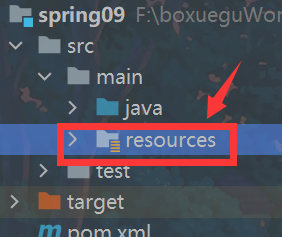
When spring integrates mybatis, such an error is reported because the package name is created incorrectly when the mapper.xml file is created in the resources directory. Because the package cannot be created under resources, only the folder directory can be created. The key point is (the folder cannot be in the form of “.”), so it can’t be lazy and easy. The directory should be created level by level

[Solved] Windows Configurate Python Environment error: Microsoft Visual C++ 14.0 or greater is required. Get it with “Microsoft

Problem description

An error occurs when configuring and installing pycotools package in Anaconda environment under Windows 10:

error: Microsoft Visual C++ 14.0 or greater is required. Get it with "Microsoft

Solution

The main reason is that my windows 10 lacks some environments and dependencies that require C + + compilation when installing Python packages, so it needs to be downloaded and installed.

Open the link and click the download generation tool:

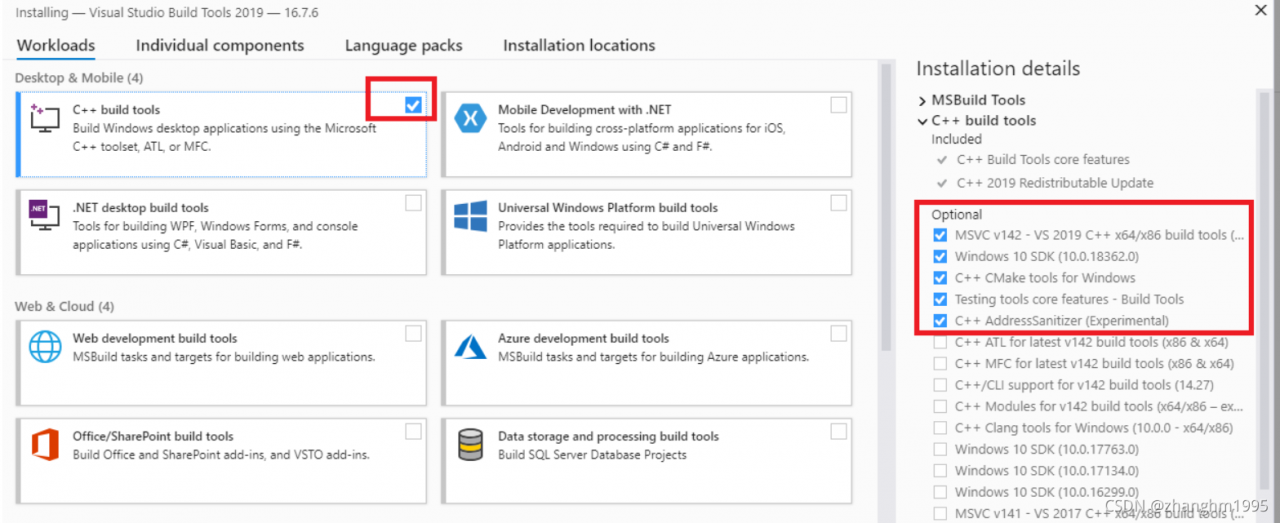
you will download a tool called vs_ buildtools__ 396764696.1636620081.exe , double-click the executable to download and install the library. Note that the following components are selected during the download process:

after the download and installation is completed, it takes effect after restarting the computer.

This completes the installation of environment dependencies such as C + +.

End.

[reference]
1 https://docs.microsoft.com/en-us/answers/questions/136595/error-microsoft-visual-c-140-or-greater-is-require.html

Vue Start Error: This relative module was not found:

This relative module was not found:
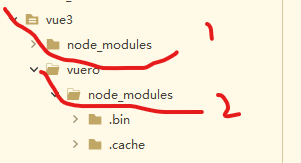
I checked it for a long time and found nothing wrong. Finally, I took a look at the directory

I first created an empty project… And then created another project in the empty project by using the terminal command NPM create. The result is that when NPM install XXX is followed, it is in the parent directory of vuero. Therefore, an error will be reported when starting vuero,
in addition, try to use cnpm install XXX instead of NPM insatl XXX

ES Error: Alternatively, set fielddata=true on [How to Solve]

Es reports an error when executing aggregate query: alternately, set fielddata = true on

GET /megacorp/employee/_search
{
  "aggs": {
    "all_interests": {
      "terms": { "field": "interests" }
    }
  }
}

Execute the following command to start fielddata

PUT /your_index_name/_mapping?pretty
{
  "properties": {
    "your_field_name": { 
      "type": "text",
      "fielddata": true
    }
  }
}