Author Archives: Robins

ERROR c.z.hikari.pool.HikariPool:594 restartedMain HikariPool-1 -Exception

  [problem description]: when starting the springboot project, the following stack error is reported

32.014 ERROR c.z.hikari.pool.HikariPool    :594  restartedMain                    HikariPool-1 - Exception during pool initialization.
com.mysql.cj.jdbc.exceptions.CommunicationsException: Communications link failure

The last packet sent successfully to the server was 0 milliseconds ago. The driver has not received any packets from the server.
        at com.mysql.cj.jdbc.exceptions.SQLError.createCommunicationsException(SQLError.java:174)
        at com.mysql.cj.jdbc.exceptions.SQLExceptionsMapping.translateException(SQLExceptionsMapping.java:64)
        at com.mysql.cj.jdbc.ConnectionImpl.createNewIO(ConnectionImpl.java:833)
        at com.mysql.cj.jdbc.ConnectionImpl.<init>(ConnectionImpl.java:453)
        at com.mysql.cj.jdbc.ConnectionImpl.getInstance(ConnectionImpl.java:246)
        at com.mysql.cj.jdbc.NonRegisteringDriver.connect(NonRegisteringDriver.java:198)
        at com.zaxxer.hikari.util.DriverDataSource.getConnection(DriverDataSource.java:138)
        at com.zaxxer.hikari.pool.PoolBase.newConnection(PoolBase.java:364)
        at com.zaxxer.hikari.pool.PoolBase.newPoolEntry(PoolBase.java:206)
        at com.zaxxer.hikari.pool.HikariPool.createPoolEntry(HikariPool.java:476)
        at com.zaxxer.hikari.pool.HikariPool.checkFailFast(HikariPool.java:561)
        at com.zaxxer.hikari.pool.HikariPool.<init>(HikariPool.java:115)
        at com.zaxxer.hikari.HikariDataSource.getConnection(HikariDataSource.java:112)
        at org.springframework.jdbc.datasource.DataSourceUtils.fetchConnection(DataSourceUtils.java:158)
        at org.springframework.jdbc.datasource.DataSourceUtils.doGetConnection(DataSourceUtils.java:116)
        at org.springframework.jdbc.datasource.DataSourceUtils.getConnection(DataSourceUtils.java:79)
        at org.springframework.jdbc.core.JdbcTemplate.execute(JdbcTemplate.java:330)
        at org.springframework.boot.jdbc.EmbeddedDatabaseConnection.isEmbedded(EmbeddedDatabaseConnection.java:184)
        at org.springframework.boot.jdbc.init.DataSourceScriptDatabaseInitializer.isEmbeddedDatabase(DataSourceScriptDatabaseInitializer.java:64)
        at org.springframework.boot.sql.init.AbstractScriptDatabaseInitializer.isEnabled(AbstractScriptDatabaseInitializer.java:87)
        at org.springframework.boot.sql.init.AbstractScriptDatabaseInitializer.initializeDatabase(AbstractScriptDatabaseInitializer.java:74)
        at org.springframework.boot.sql.init.AbstractScriptDatabaseInitializer.afterPropertiesSet(AbstractScriptDatabaseInitializer.java:65)
        at org.springframework.beans.factory.support.AbstractAutowireCapableBeanFactory.invokeInitMethods(AbstractAutowireCapableBeanFactory.java:1845)
        at org.springframework.beans.factory.support.AbstractAutowireCapableBeanFactory.initializeBean(AbstractAutowireCapableBeanFactory.java:1782)
        at org.springframework.beans.factory.support.AbstractAutowireCapableBeanFactory.doCreateBean(AbstractAutowireCapableBeanFactory.java:602)
        at org.springframework.beans.factory.support.AbstractAutowireCapableBeanFactory.createBean(AbstractAutowireCapableBeanFactory.java:524)
        at org.springframework.beans.factory.support.AbstractBeanFactory.lambda$doGetBean$0(AbstractBeanFactory.java:335)
        at org.springframework.beans.factory.support.DefaultSingletonBeanRegistry.getSingleton(DefaultSingletonBeanRegistry.java:234)
        at org.springframework.beans.factory.support.AbstractBeanFactory.doGetBean(AbstractBeanFactory.java:333)
        at org.springframework.beans.factory.support.AbstractBeanFactory.getBean(AbstractBeanFactory.java:208)
        at org.springframework.beans.factory.support.AbstractBeanFactory.doGetBean(AbstractBeanFactory.java:322)
        at org.springframework.beans.factory.support.AbstractBeanFactory.getBean(AbstractBeanFactory.java:208)
        at org.springframework.beans.factory.support.DefaultListableBeanFactory.preInstantiateSingletons(DefaultListableBeanFactory.java:944)
        at org.springframework.context.support.AbstractApplicationContext.finishBeanFactoryInitialization(AbstractApplicationContext.java:918)
        at org.springframework.context.support.AbstractApplicationContext.refresh(AbstractApplicationContext.java:583)
        at org.springframework.boot.web.servlet.context.ServletWebServerApplicationContext.refresh(ServletWebServerApplicationContext.java:145)
        at org.springframework.boot.SpringApplication.refresh(SpringApplication.java:754)
        at org.springframework.boot.SpringApplication.refreshContext(SpringApplication.java:434)
        at org.springframework.boot.SpringApplication.run(SpringApplication.java:338)
        at com.abc.wiki.WikiApplication.main(WikiApplication.java:19)
        at sun.reflect.NativeMethodAccessorImpl.invoke0(Native Method)
        at sun.reflect.NativeMethodAccessorImpl.invoke(NativeMethodAccessorImpl.java:62)
        at sun.reflect.DelegatingMethodAccessorImpl.invoke(DelegatingMethodAccessorImpl.java:43)
        at java.lang.reflect.Method.invoke(Method.java:498)
        at org.springframework.boot.devtools.restart.RestartLauncher.run(RestartLauncher.java:49)
Caused by: com.mysql.cj.exceptions.CJCommunicationsException: Communications link failure

The last packet sent successfully to the server was 0 milliseconds ago. The driver has not received any packets from the server.
        at sun.reflect.NativeConstructorAccessorImpl.newInstance0(Native Method)
        at sun.reflect.NativeConstructorAccessorImpl.newInstance(NativeConstructorAccessorImpl.java:62)
        at sun.reflect.DelegatingConstructorAccessorImpl.newInstance(DelegatingConstructorAccessorImpl.java:45)
        at java.lang.reflect.Constructor.newInstance(Constructor.java:423)
        at com.mysql.cj.exceptions.ExceptionFactory.createException(ExceptionFactory.java:61)
        at com.mysql.cj.exceptions.ExceptionFactory.createException(ExceptionFactory.java:105)
        at com.mysql.cj.exceptions.ExceptionFactory.createException(ExceptionFactory.java:151)
        at com.mysql.cj.exceptions.ExceptionFactory.createCommunicationsException(ExceptionFactory.java:167)
        at com.mysql.cj.protocol.a.NativeSocketConnection.connect(NativeSocketConnection.java:89)
        at com.mysql.cj.NativeSession.connect(NativeSession.java:144)
        at com.mysql.cj.jdbc.ConnectionImpl.connectOneTryOnly(ConnectionImpl.java:953)
        at com.mysql.cj.jdbc.ConnectionImpl.createNewIO(ConnectionImpl.java:823)
        ... 42 common frames omitted
Caused by: java.net.ConnectException: Connection timed out: connect
        at java.net.DualStackPlainSocketImpl.waitForConnect(Native Method)
        at java.net.DualStackPlainSocketImpl.socketConnect(DualStackPlainSocketImpl.java:85)
        at java.net.AbstractPlainSocketImpl.doConnect(AbstractPlainSocketImpl.java:350)
        at java.net.AbstractPlainSocketImpl.connectToAddress(AbstractPlainSocketImpl.java:206)
        at java.net.AbstractPlainSocketImpl.connect(AbstractPlainSocketImpl.java:188)
        at java.net.PlainSocketImpl.connect(PlainSocketImpl.java:172)
        at java.net.SocksSocketImpl.connect(SocksSocketImpl.java:392)
        at java.net.Socket.connect(Socket.java:589)
        at com.mysql.cj.protocol.StandardSocketFactory.connect(StandardSocketFactory.java:155)
        at com.mysql.cj.protocol.a.NativeSocketConnection.connect(NativeSocketConnection.java:63)
        ... 45 common frames omitted

[cause of problem]: when debugging the project locally today, the WiFi connected to the computer changed, resulting in the change of IP, which finally led to this problem.

[solution]: modify the configuration of the project connection database to a new IP address.
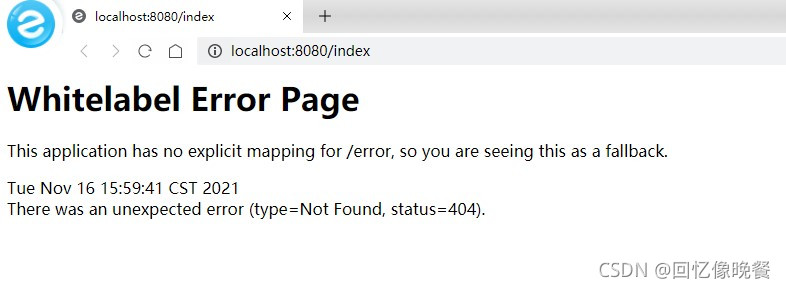
[Solved] Springboot loads static page Error: whitelabel error page

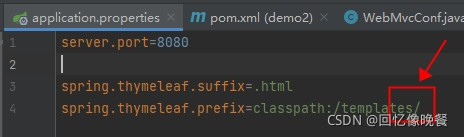
Loading the local static page card has been in this place for a long time. I tried all kinds of methods. Finally, I found the one suitable for me. Finally, I loaded it. Record it. If you encounter this situation, you can try it.

1. Add in the following place/

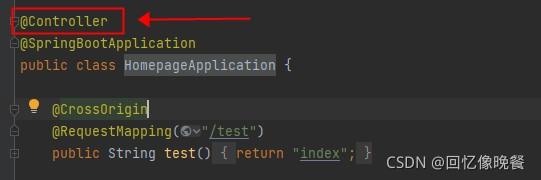
2. This place uses @controller

If you have this problem, you can try it. If you can’t change another method, it’s mainly the problem of configuration. Small places may lead to failure

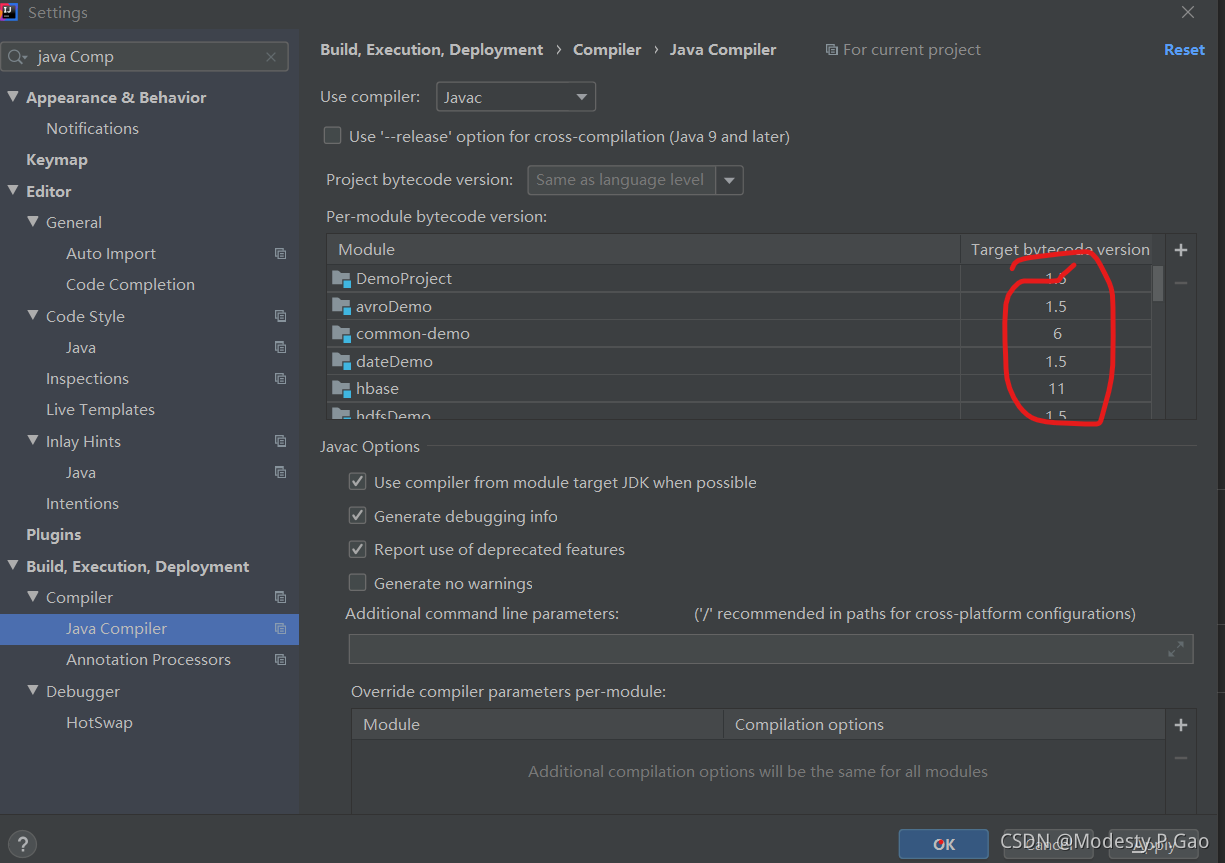
Error: Java: error: release version 5 not supported solution to run error

Error reporting reason

Java compiler setting error in project structure or setting

resolvent

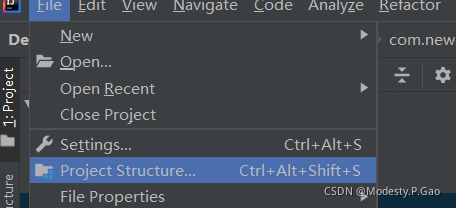
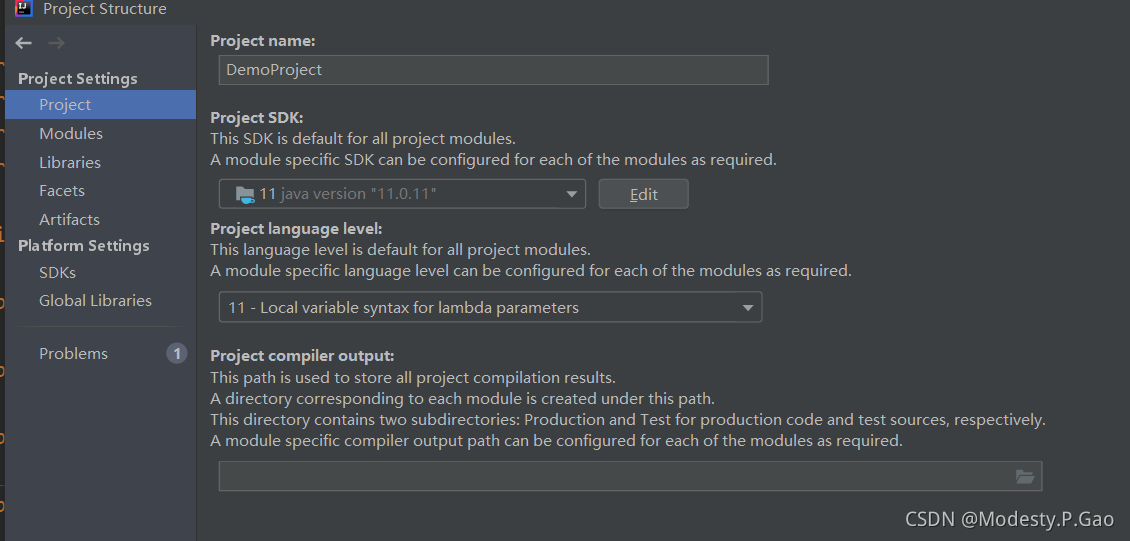
1. Project structure
Click f I l e → P R O j e c t s t r u c t u r e file \ rightarrow project structurefile → projectstructure

Ensure that the SDK versions under project are the same

2、Preferences

    Click setting in preferences (or win version) to search java compiler and ensure that the target byte code
    version is the same as the selected version

Monkey error: error: A RuntimeException occurred [How to Solve]

When running monkey with Xiaomi mobile phone, the following error occurs just after startup:

** Error: A RuntimeException occurred:
java.lang.SecurityException: Injecting to another application requires INJECT_EVENTS permission
	at android.os.Parcel.createException(Parcel.java:2074)
	at android.os.Parcel.readException(Parcel.java:2042)
	at android.os.Parcel.readException(Parcel.java:1990)
	at android.hardware.input.IInputManager$Stub$Proxy.injectInputEvent(IInputManager.java:925)
	at android.hardware.input.InputManager.injectInputEvent(InputManager.java:886)
	at com.android.commands.monkey.MonkeyKeyEvent.injectEvent(MonkeyKeyEvent.java:133)
	at com.android.commands.monkey.Monkey.runMonkeyCycles(Monkey.java:1324)
	at com.android.commands.monkey.Monkey.run(Monkey.java:815)
	at com.android.commands.monkey.Monkey.main(Monkey.java:675)
	at com.android.internal.os.RuntimeInit.nativeFinishInit(Native Method)
	at com.android.internal.os.RuntimeInit.main(RuntimeInit.java:380)
Caused by: android.os.RemoteException: Remote stack trace:
	at com.android.server.input.InputManagerService.injectInputEventInternal(InputManagerService.java:740)
	at com.android.server.input.InputManagerService.injectInputEvent(InputManagerService.java:714)
	at android.hardware.input.IInputManager$Stub.onTransact(IInputManager.java:422)
	at android.os.Binder.execTransactInternal(Binder.java:1021)
	at android.os.Binder.execTransact(Binder.java:994)


** System appears to have crashed at event 1 of 1000000 using seed 200

**Solution**

Turn on USB debugging (security setting) and check the setting ☑️ “It is allowed to modify permissions or simulate clicking through USB debugging”, and it is OK to take off again.

Workbench Could not connect the SSH Tunnel Authentication error

1. Problem phenomenon

The workbench that is normally used on weekdays finds that it cannot connect to the corresponding database after restarting the computer, and the workbench log displays

SSH tunnel]: Authentication error opening SSH tunnel: Authentication error, unhandled exception caught in tunnel manager, please refer to logs for details

Check the complete log and find the following:

$ tail -f ~/.mysql/workbench/log/wb.log 
  File "/usr/share/mysql-workbench/sshtunnel.py", line 303, in _connect_ssh
    look_for_keys=has_key, allow_agent=has_key, timeout=SSH_CONNECTION_TIMEOUT)
  File "/usr/lib/python2.7/dist-packages/paramiko/client.py", line 325, in connect
    t.start_client()
  File "/usr/lib/python2.7/dist-packages/paramiko/transport.py", line 492, in start_client
    raise e
NotImplementedError: Use module Crypto.Signature.pkcs1_15 instead

14:17:14 [INF][     SSH tunnel]: TunnelManager.wait_connection authentication error: Authentication error, unhandled exception caught in tunnel manager, please refer to logs for details
14:17:14 [ERR][     SSH tunnel]: Authentication error opening SSH tunnel: Authentication error, unhandled exception caught in tunnel manager, please refer to logs for details
14:18:24 [INF][      WBContext]: Connection to XinJangCityWolMart cancelled by user: Tunnel connection cancelled

The point is

NotImplementedError: Use module Crypto.Signature.pkcs1_15 instead

Found after querying with PIP list

$ pip2 list | grep crypto
asn1crypto (1.4.0)
cryptography (2.7)
pycrypto (2.6.1)
pycryptodome (3.11.0)

There is a pycryptodome , which may be installed when installing other tools later

2. Solutions

Uninstall pycryptodome

sudo pip2 uninstall pycryptodome

Then reopen the workbench to connect to the database and return to normal.

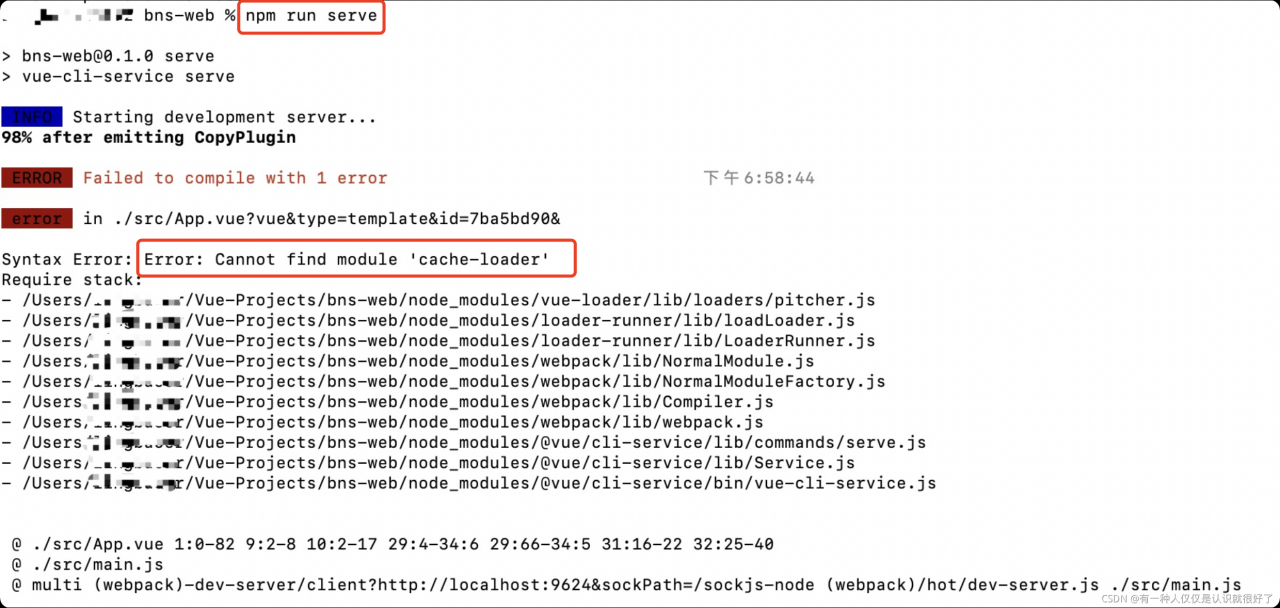
[Solved] Syntax Error: Error: Cannot find module ‘cache-loader‘

The following problem occurs. It should be that some dependent packages are not downloaded successfully and need to be reinstalled

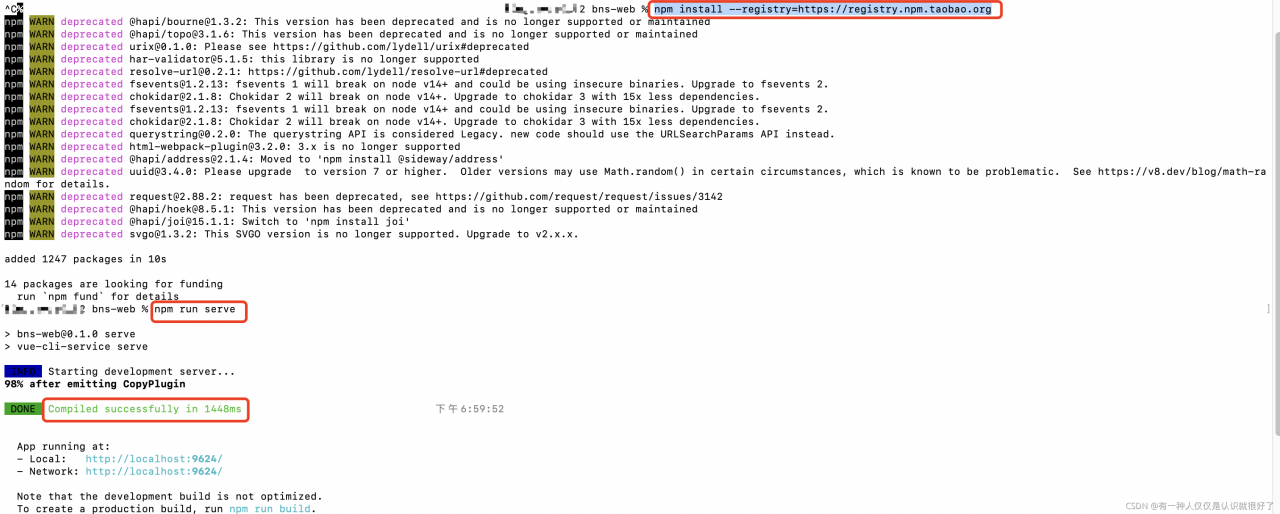
Solution:
1. Enter the folder directory of the project and delete the node_ Modules file and package-lock.json file. Note that it is not package.json (if it cannot be deleted, check whether the project is open and try again after closing)
2. Enter NPM install installation dependency

3. Start the project and it can be started normally.

Error: Duplicate plugin/preset detected [How to Solve]

Reason: element UI in .Babel is repeated

Solution: remove duplicate code in babel.config.js

Before modification

module.exports = {
  "presets": [
    "@vue/cli-plugin-babel/preset"
  ],
  "plugins": [
    [
      "component",
      {
        "libraryName": "element-ui",
        "styleLibraryName": "theme-chalk"
      }
    ],
    [
      "component",
      {
        "libraryName": "element-ui",
        "styleLibraryName": "theme-chalk"
      }
    ]
  ]
}

After modification

module.exports = {
  "presets": [
    "@vue/cli-plugin-babel/preset"
  ],
  "plugins": [
    [
      "component",
      {
        "libraryName": "element-ui",
        "styleLibraryName": "theme-chalk"
      }
    ]
  ]
}

Error creating webgl context [How to Solve]

Error creating webgl context

This error is a webgl context error. There is a stupid way to use it for the time being:

chrome://flags/#ignore-gpu-blacklist

Open the address in the browser, search webgl, change the items of enablers display component to use a new GPU thread to default, and then click relax in the lower right corner

raise HTTPError(req.full_url, code, msg, hdrs, fp)urllib.error.HTTPError: HTTP Error 404: Not Found

import requests
url=['www....','www.....',...]
for i in range(0,len(url)):
     linkhtml = requests.get(url[i])

The crawler reported the following error:


  File "C:\Users\lenovo7\AppData\Local\Programs\Python\Python38\lib\urllib\request.py", line 247, in urlretrieve
    with contextlib.closing(urlopen(url, data)) as fp:
  File "C:\Users\lenovo7\AppData\Local\Programs\Python\Python38\lib\urllib\request.py", line 222, in urlopen
    return opener.open(url, data, timeout)
  File "C:\Users\lenovo7\AppData\Local\Programs\Python\Python38\lib\urllib\request.py", line 531, in open
    response = meth(req, response)
  File "C:\Users\lenovo7\AppData\Local\Programs\Python\Python38\lib\urllib\request.py", line 640, in http_response
    response = self.parent.error(
  File "C:\Users\lenovo7\AppData\Local\Programs\Python\Python38\lib\urllib\request.py", line 569, in error
    return self._call_chain(*args)
  File "C:\Users\lenovo7\AppData\Local\Programs\Python\Python38\lib\urllib\request.py", line 502, in _call_chain
    result = func(*args)
  File "C:\Users\lenovo7\AppData\Local\Programs\Python\Python38\lib\urllib\request.py", line 649, in http_error_default
    raise HTTPError(req.full_url, code, msg, hdrs, fp)
urllib.error.HTTPError: HTTP Error 404: Not Found

Refer to an article on stack overflow

Python: urllib.error.HTTPError: HTTP Error 404: Not Found – Stack Overflow

In the crawler scenario, the original link may not open. Naturally, it will prompt HTTP Error 404. What you need to do is skip this link and then crawl to the following page

Correction code

import requests
url=['www....','www.....',...]
for i in range(0,len(url)):
    try:
        linkhtml = requests.get(url[i])
    except:
        pass

[Solved] The Shell Script error: syntax error: “(” unexpected “)

Execute the shell script with the following error messages

This is related to the version of shell you actually use. It can be printed with LS - L/bin/*sh, for example:

Here, SH is redirected to dash, so if sh positionpara.Sh, dash is used. There are many ways to avoid error reporting, such as executing bash positionpara.Sh, or executing ./positionpara.Sh .