Author Archives: Robins

Android Studio Error: Error:moudle not specified [How to Solve]

Android studio solves error: mouse not specified

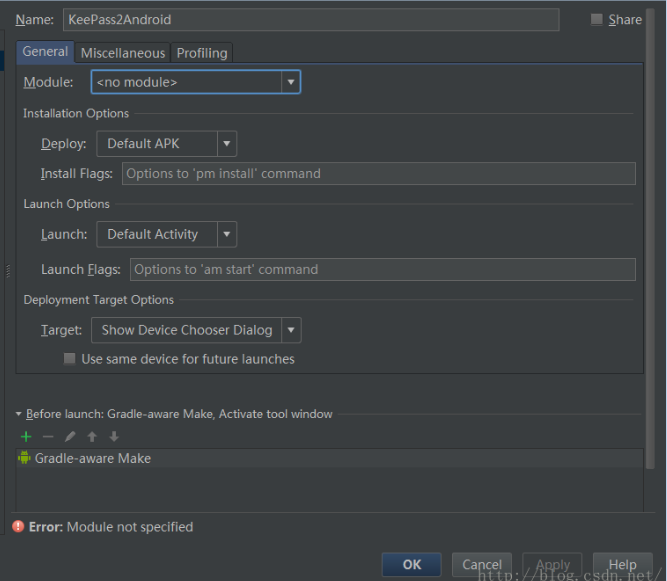
When using Android studio for builder apks, if you find that you can’t degub,

No module can be specified during configuration, as shown in (borrow a figure)

The reason for the problem is that the grade files are not synchronized effectively.

1. First ensure grade Synchronization is complete.

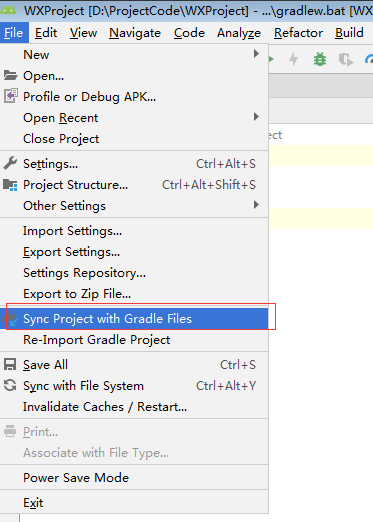
2. Perform manual synchronization

Old as version   Click Tools – > Android—> Sync Project With Gradle Files

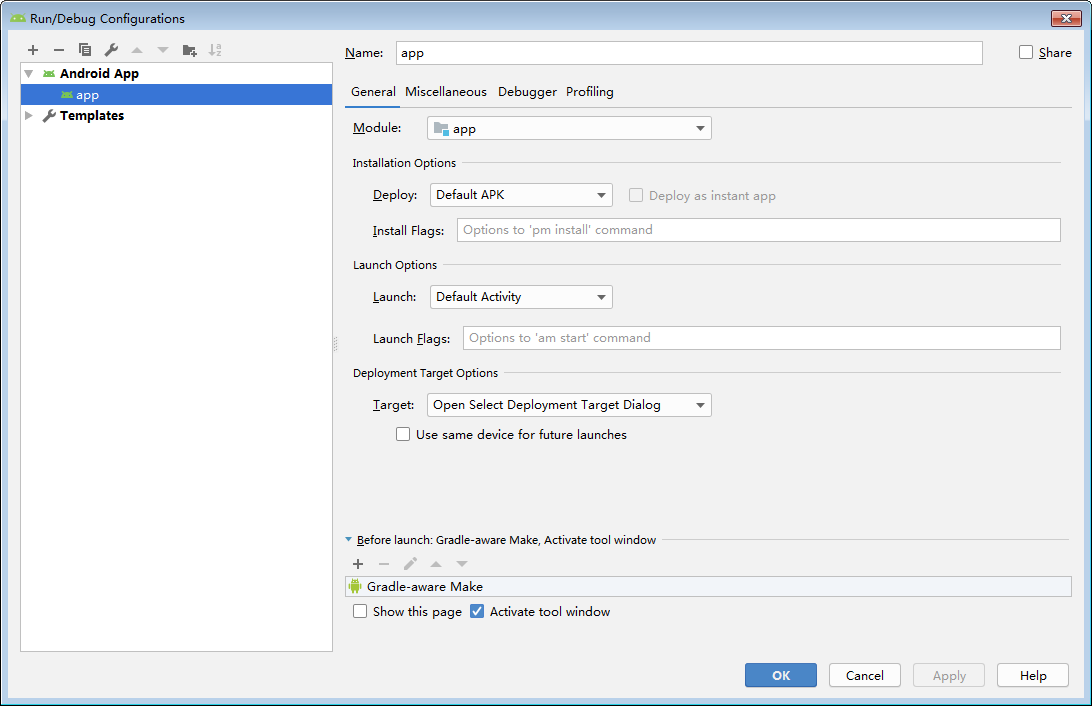
The new version (I am the new version) is shown in the figure:

Generally, you can debug, and the module has been configured

[Solved] thymeleaf.TemplateEngineException processing template “main“: An error happened during template pars

preface

This project uses the thymeleaf template in the springboot project. The main error is that the front-end HTML page uses thymeleaf to obtain the value passed from the background. There is a problem (the value cannot be obtained, or it is empty and null)

Error message

1. error 1: the forwarded is used as redirect:/main

2021-11-18 21:02:01.321 ERROR 9272 — [nio-8082-exec-4] org.thymeleaf.TemplateEngine : [THYMELEAF][http-nio-8082-exec-4] Exception processing template “main”: An error happened during template parsing (template: “class path resource [templates/main.html]”)
*
* org.thymeleaf.exceptions.TemplateInputException: An error happened during template parsing (template: “class path resource [templates/main.html]”)
* at org.thymeleaf.templateparser.markup.AbstractMarkupTemplateParser.parse(AbstractMarkupTemplateParser.java:241) ~[thymeleaf-3.0.12.RELEASE.jar:3.0.12.RELEASE]
* caused by: org.thymeleaf.exceptions.templateprocessingexception: exception evaluating springel expression: "page. Getcurrent()" (template: "main" - line 86, col 17)
* redirection cannot be used here: otherwise, the front-end data cannot be obtained through thymeleaf

2. error 2: null value error

 org.springframework.expression.spel.SpelEvaluationException: EL1007E: Property or field ‘records’ cannot be found on null

Solution:

1. The first error is that when the data queried in the background is sent to the front-end HTML page, there is no corresponding value, and redirection cannot be used, otherwise the front-end data cannot be obtained through thymeleaf. Remove redirect directly and return “main” directly “;
2. The second error is somewhat similar to the first one. This error can find the corresponding data in the background on the page, but the paging data cannot be obtained without corresponding request. If you enter this page directly from the login interface, it is an error because the data of another requested page paging query is used, and there is no query directly The paging data is null. Therefore, you can only send a request to query the page paging data before it can successfully reach the main page.

Corresponding part code

1. Front end code main.html

<!--Employee data table display-->
<div class="container table-responsive" style="margin-top: 50px">
    <table class="table table-bordered">
        <caption class="caption"><a th:href="@{/showemp}">Display employee information</a> </caption>
        <thead>
            <tr>
                <th>ID</th>
                <th>ID</th>
                <th>Name</th>
                <th>Password</th>
                <th>operate</th>
            </tr>
        </thead>
        <tbody>
            <tr th:each="book,statu:${page.records}">
                <th>[[${statu.count}]]</th>
                <td th:text="${book.id}"></td>
                <td>[[${book.name}]]</td>
                <td>[[${book.password}]]</td>
                <td>
                    <a th:href="@{/delete}" type="button" class="btn btn-danger btn-sm">delete</a>
                    <a th:href="@{/update}" type="button" class="btn btn-info btn-sm">update</a></td>
            </tr>
        </tbody>
    </table>
</div>

2.CrudController.java

@Controller
public class CrudController {
   @Autowired
   BookServiceImpl bookService;

   @GetMapping("/showemp")
   public String selectAll(@RequestParam(value = "pn",defaultValue = "1")Integer pn,
                           Model model){
       Page<Book> page = new Page<>(pn,2);
       Page<Book> bookPage = bookService.page(page, null);
       model.addAttribute("page",bookPage);
       System.out.println(bookPage.getCurrent());
       System.out.println(bookPage.getRecords().size());
       /**
        * 2021-11-18 21:02:01.321 ERROR 9272 --- [nio-8082-exec-4] org.thymeleaf.TemplateEngine             : [THYMELEAF][http-nio-8082-exec-4] Exception processing template "main": An error happened during template parsing (template: "class path resource [templates/main.html]")
        *
        * org.thymeleaf.exceptions.TemplateInputException: An error happened during template parsing (template: "class path resource [templates/main.html]")
        * 	at org.thymeleaf.templateparser.markup.AbstractMarkupTemplateParser.parse(AbstractMarkupTemplateParser.java:241) ~[thymeleaf-3.0.12.RELEASE.jar:3.0.12.RELEASE]
        * Caused by: org.thymeleaf.exceptions.TemplateProcessingException: Exception evaluating SpringEL expression: "page.getCurrent()" (template: "main" - line 86, col 17)
        * Redirection cannot be used here: otherwise the front-end data cannot be obtained through thymeleaf
        */
//        return "redirect:/main";
       return "main";
   }
}

3.LoginController.java

@PostMapping("/login")
    public String LoginValidation(Book book,
                                  RedirectAttributes redirectAttributes){
        String name = book.getName();
        String password = book.getPassword();
        Map<String,Object> map = new HashMap<>();
        map.put("name",name);
        map.put("password",password);
        QueryWrapper<Book> queryWrapper = new QueryWrapper<>();
        queryWrapper.ge("name",name );
        queryWrapper.ge("password",password);
        Book one = bookService.getOne(queryWrapper);
        if (one.toString()!=null){
            /**
             * org.springframework.expression.spel.SpelEvaluationException: EL1007E: Property or field 'records' cannot be found on null
             * It is wrong to enter this page directly from the login interface, because the page paging query data requested by showemp is used here, and there is no query when entering directly, and the page paging data is null.
              * So you can only successfully reach the main page by sending a showemp request to query the page paging data.
             */
//            return "redirect:/main";
            return "redirect:/showemp";
        }
        return "login";
    }

[Solved] RuntimeError: Error(s) in loading state_dict for Net:

size mismatch for classifier.4.weight: copying a param with shape torch.Size([7, 256]) from checkpoint, the shape in current model is torch.Size([751, 256]).
size mismatch for classifier.4.bias: copying a param with shape torch.Size([7]) from checkpoint, the shape in current model is torch.Size([751]).

Training the tracking weight of deepsort. The default data set is market1501. Replace it with your own data set. Test the weight and report an error. As above, change the num_Class in model.py is changed to the number of its own classes. (for example, my num_class is 7, and market1501 defaults to 751.)

class Net(nn.Module):
    def __init__(self, num_classes=751, reid=False):#Change the number of training classes

How to Solve Opencv Error: CPP: 1557 error

Opencv Error:
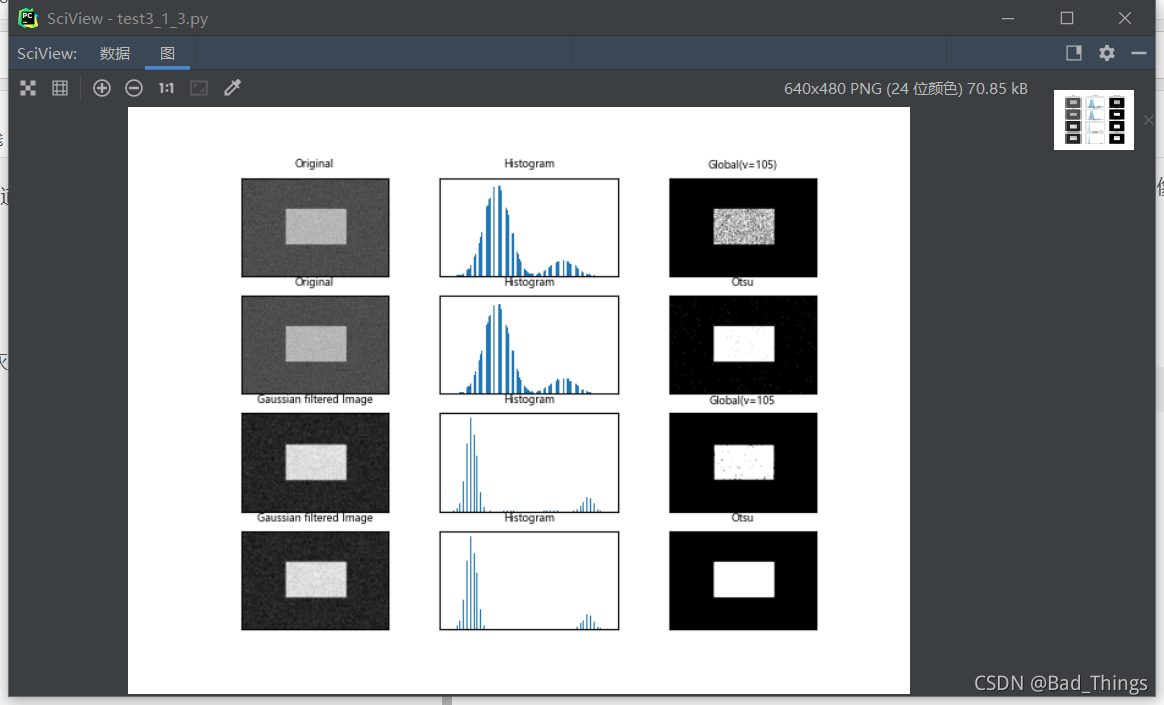
ret2, th2 = cv.threshold(img, 0, 255, cv.THRESH_BINARY + cv.THRESH_OTSU)
cv2.error: OpenCV(4.5.3) C:\Users\runneradmin\AppData\Local\Temp\pip-req-build-c2l3r8zm\opencv\modules\imgproc\src\thresh.cpp:1557: error: (-2:Unspecified error) in function ‘double __cdecl cv::threshold(const class cv::_InputArray &,const class cv::_OutputArray &,double,double,int)’

THRESH_OTSU mode:
‘src_type == CV_8UC1 || src_type == CV_16UC1’
where
‘src_type’ is 16 (CV_8UC3)

Original Codes:

img = cv.imread('noisy.jpg')  
  
# Fixed threshold method
ret1, th1 = cv.threshold(img, 105, 255, cv.THRESH_BINARY)
# Otsu threshold method
ret2, th2 = cv.threshold(img, 0, 255, cv.THRESH_BINARY + cv.THRESH_OTSU)
# Perform Gaussian filtering first, and then use Otsu threshold method  
blur = cv.GaussianBlur(img, (5, 5), 0)  
ret3, th3 = cv.threshold(blur, 105, 255, cv.THRESH_BINARY)  
ret4, th4 = cv.threshold(blur, 0, 255, cv.THRESH_BINARY + cv.THRESH_OTSU) 

Problem analysis

The CV2.Threshold() function inputs graphics in the form of single channel, while the image in the above code is input in the form of color three channels, resulting in an error.

Solution:

Convert the color image into a single channel gray image for input.

img = cv.imread('noisy.jpg',0)

Rerun the program

Run successfully
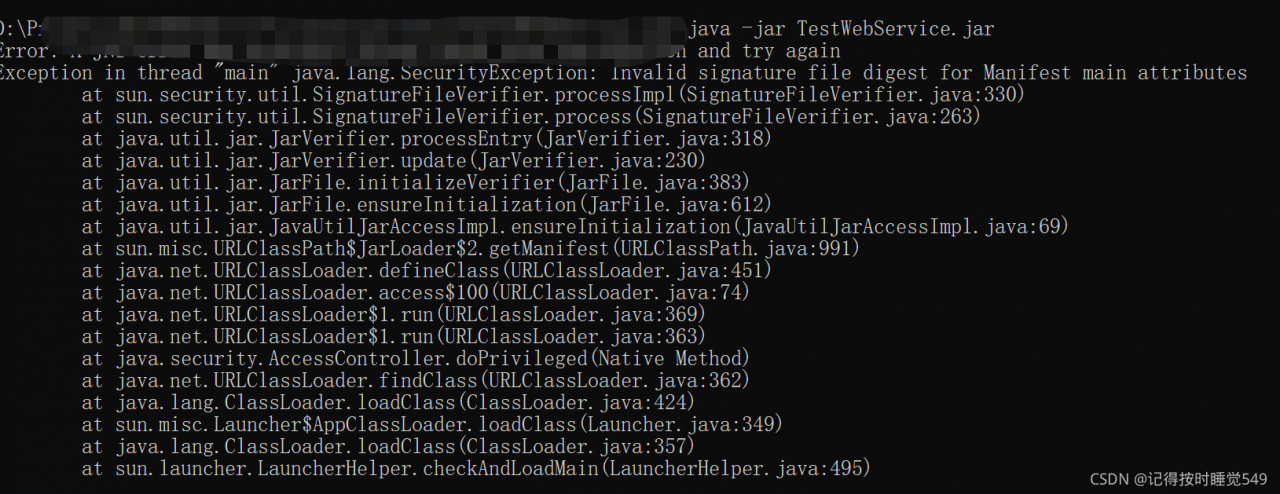
[Solved] Error: A JNI error has occurred, please check your installation and try again

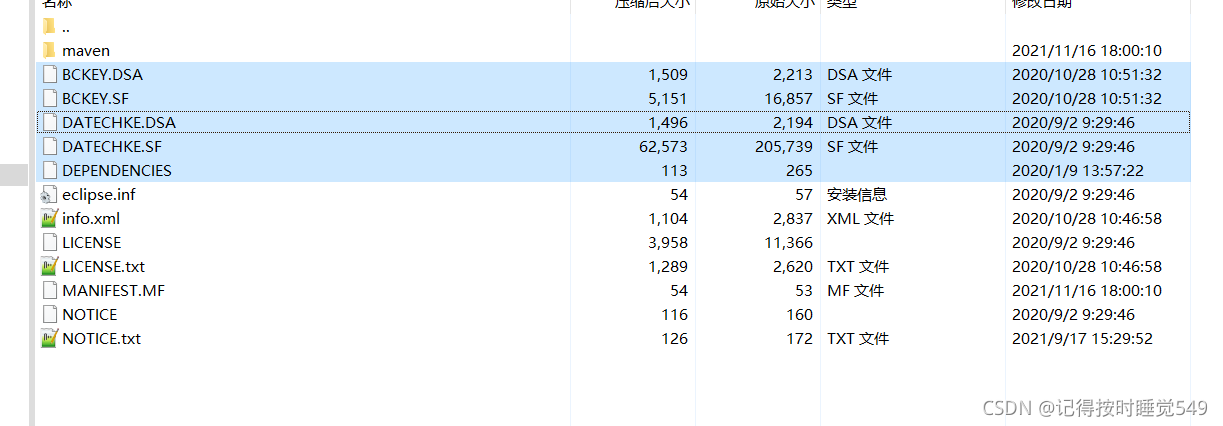
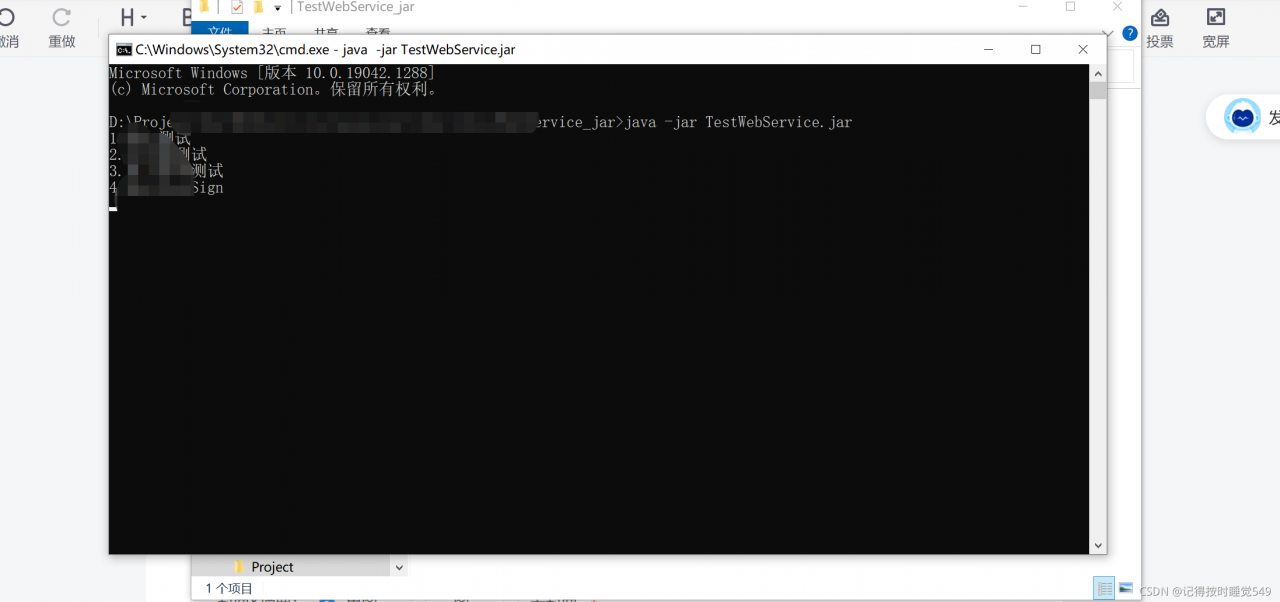
This problem probably occurs because the JDK versions are inconsistent, and the jar package will have signature files, which does not affect the logic of the program, but will cause the test demo to fail. Therefore, you need to delete the signature related files in the jar package

error condition

It is the .DSA under meta-inf\   And files with .SF suffix can be deleted

Done!

MYSQL8 Startup Error: mysqld_safe error: log-error set to ‘/var/log/mariadb/mariadb.log‘

Starting MySQL.2021-11-17T11:04:25.022108Z mysqld_safe error: log-error set to '/var/log/mariadb/mariadb.log', however file don't exists. Create writable for user 'mysql'.
 ERROR! The server quit without updating PID file (/data/mysql/data/localhost.localdomain.pid).

After msyql8 compilation and installation, start MySQL with/etc/init.d/mysqld start command. The above errors are reported, and then I rechecked the content of my.cnf, as follows:

[mysqld]
server-id=1
port=3306
datadir=/data/mysql/data
basedir=/usr/local/mysql
socket=/usr/local/mysql/mysql.sock
skip-grant-tables
# Disabling symbolic-links is recommended to prevent assorted security risks
symbolic-links=0
# Settings user and group are ignored when systemd is used.
# If you need to run mysqld under a different user or group,
# customize your systemd unit file for mariadb according to the
# instructions in http://fedoraproject.org/wiki/Systemd
[client]
socket=/usr/local/mysql/mysql.sock


[mysqld_safe]
log-error=/var/log/mariadb/mariadb.log
pid-file=/var/run/mariadb/mariadb.pid

#
# include all files from the config directory
#
!includedir /etc/my.cnf.d

There is no problem with the overall configuration of my.cnf, and then the startup fails all the time. Finally, it is found that it is the log directory configured by mysqld_safe was not created

[mysqld_safe]
log-error=/var/log/mariadb/mariadb.log
pid-file=/var/run/mariadb/mariadb.pid

So create authorization directly

Note: the path of log error I configured here is under/var/log/MariaDB. The created path is configured according to its own actual path. Be sure not to forget to create mariadb.log, otherwise an error will be reported

mkdir /var/log/mariadb     
touch /var/log/mariadb/mariadb.log

MySQL users and users authorize directories

chown -R mysql:mysql /var/log/mariadb/

Start the MySQL service again

/usr/local/mysql/support-files/mysql.server start

perhaps

/etc/init.d/mysqld start

Other startup methods are implemented according to their actual situation

[Solved] Upload object failed, error: error domain = nscocoaerrordomain code = 260 “aliyun object stores OSS IOS upload files

Aliyun object stores OSS and IOS uploaded files,

Alibaba cloud OSS object store official demo


put.uploadingFileURL = [NSURL fileURLWithPath:@"<filePath>"];
// put.uploadingData = <NSData *>; // Upload NSData

You need a file path here. You can’t write the file name directly.

Upload object failed, error: error domain = nscocoaerrordomain code = 260 “the file” 123456.PNG “couldn’t be opened because there is no such file

The correct wording should be:

    NSString * filePath = [[NSBundle mainBundle] pathForResource:@"123456" ofType:@"png"];
    put.uploadingFileURL = [NSURL fileURLWithPath:filePath];

Then it succeeded!!!

[Solved] Error: java.io.EOFException: Premature EOF from inputStream

Solve the problem of error: java.io.eofexception: precondition EOF from InputStream

1. Question

1. Problem process

During the log parsing task, an error is reported suddenly, and the task is always very stable. How can an error be reported suddenly?A tight heart

2. Detailed error type:

Check the log and find the following errors

21/11/18 14:36:29 INFO mapreduce.Job: Task Id : attempt_1628497295151_1290365_m_000002_2, Status : FAILED
Error: java.io.EOFException: Premature EOF from inputStream
	at com.hadoop.compression.lzo.LzopInputStream.readFully(LzopInputStream.java:75)
	at com.hadoop.compression.lzo.LzopInputStream.readHeader(LzopInputStream.java:114)
	at com.hadoop.compression.lzo.LzopInputStream.<init>(LzopInputStream.java:54)
	at com.hadoop.compression.lzo.LzopCodec.createInputStream(LzopCodec.java:83)
	at com.hadoop.mapreduce.LzoSplitRecordReader.initialize(LzoSplitRecordReader.java:58)
	at org.apache.hadoop.mapred.MapTask$NewTrackingRecordReader.initialize(MapTask.java:548)
	at org.apache.hadoop.mapred.MapTask.runNewMapper(MapTask.java:786)
	at org.apache.hadoop.mapred.MapTask.run(MapTask.java:341)
	at org.apache.hadoop.mapred.YarnChild$2.run(YarnChild.java:164)
	at java.security.AccessController.doPrivileged(Native Method)
	at javax.security.auth.Subject.doAs(Subject.java:422)
	at org.apache.hadoop.security.UserGroupInformation.doAs(UserGroupInformation.java:1907)
	at org.apache.hadoop.mapred.YarnChild.main(YarnChild.java:158)

The error is queried through a search engine, and the result points to the upper limit of the dfs.datanode.max.transfer.threads parameter, such as
https://blog.csdn.net/zhoujj303030/article/details/44422415

Viewing the cluster configuration, it is found that the parameter is modified to 8192. Check other problems.

Later, it was found that there was an LZO empty file in the log file. After deletion, the task was executed again and successfully.

2. Solution

To prevent the above problems from happening again, write a script to delete LZO empty files before performing the parsing task

1. Traverse the files under the specified path

for file in `hdfs dfs -ls /xxx/xxx/2037-11-05/pageview | sed '1d;s/  */ /g' | cut -d\  -f8`;
do  
	echo $file; 
done

Result output:

/xxx/xxx/2037-11-05/pageview/log.1631668209557.lzo
/xxx/xxx/2037-11-05/pageview/log.1631668211445.lzo

2. Judge whether the file is empty

for file in `hdfs dfs -ls /xxx/xxx/2037-11-05/pageview | sed '1d;s/  */ /g' | cut -d\  -f8`;
do  
	echo $file; 
	lzoIsEmpty=$(hdfs dfs -count $file | awk '{print $3}')
	echo $lzoIsEmpty;
	if [[ $lzoIsEmpty -eq 0 ]];then 
		# is empty, delete the file
		hdfs dfs -rm $file;
	else
		echo "Loading data"
	fi
done

3. Final script

for type in webclick error pageview exposure login
do
    isEmpty=$(hdfs dfs -count /xxx/xxx/$do_date/$type | awk '{print $2}')
    if [[ $isEmpty -eq 0 ]];then 
        echo "------ Given Path:/xxx/xxx/$do_date/$type is empty" 
    else 
		for file in `hdfs dfs -ls /xxx/xxx/$do_date/$type | sed '1d;s/  */ /g' | cut -d\  -f8`;
		do  
			echo $file; 
			lzoIsEmpty=$(hdfs dfs -count $file | awk '{print $3}')
			echo $lzoIsEmpty;
			if [[ $lzoIsEmpty -eq 0 ]];then 
				echo Delete Files: $file
				hdfs dfs -rm $file;
			fi
		done
		
		echo ================== Import log data of type $do_date $type into ods layer ==================
		... Handling log parsing logic
   fi
done

DevC++ Error: [Error] Id returned 1 exit status [How to Solve]

DEVC + + reports an error [error] ID returned 1 exit status

Cause

The computer in the school computer room always compiles twice and always reports errors

Error reporting prompt

[Error] Id returned 1 exit status

Solution

Premises

First check whether the console window of your program is closed, and then recompile if there is an error. The following scheme is for the case where an error is still reported after closing the window.

Operation

Right click dev C + + icon -> Properties – > Compatibility > Check “run this program as an administrator” open dev C + + –> tools –> compilation options –> code generation/Optimization –> connector –> set “link objective C program” to yes, and switch the compiler in the upper right corner of the dev C + + main page to debug mode (for example, tdm-gcc 4.9.2 64 bit debug) If your computer has a restore card, please place the project and its files on an unprotected disk.

[TensorRT] INTERNAL ERROR: Assertion failed: mem = nullpt

[TensorRT] ERROR: FAILED_EXECUTION: std::exception
^C[TensorRT] INTERNAL ERROR: Assertion failed: mem != nullptr
../rtExt/cuda/cudaPointWiseRunner.cpp:28
Aborting…
The above error is encountered when using tensorrt. This error occurs after the RT model is built. The reason for the error is:

Output was not copied to the video memory, resulting in illegal access

def setup_binding_shapes(engine: trt.ICudaEngine, context: trt.IExecutionContext, host_inputs, input_binding_idxs,
                         output_binding_idxs):
    # Explicitly set the dynamic input shapes, so the dynamic output
    # shapes can be computed internally
    for host_input, binding_index in zip(host_inputs, input_binding_idxs):
        context.set_binding_shape(binding_index, host_input.shape)
    assert context.all_binding_shapes_specified
    host_outputs = []
    device_outputs = []
    for binding_index in output_binding_idxs:
        output_shape = context.get_binding_shape(binding_index)
        # Allocate buffers to hold output results after copying back to host
        buffer = np.empty(output_shape, dtype=np.float32)
        host_outputs.append(buffer)
        # Allocate output buffers on device
        device_outputs.append(cuda.mem_alloc(buffer.nbytes))
        # Bind output shape
    utput_names = [engine.get_binding_name(binding_idx) for binding_idx in output_binding_idxs]
    return host_outputs, device_outputs

Note that in the for loop, you need to allocate video memory to all outputs.

Hadoop ERROR: Attempting to operate on hdfs namenode as root ERROR: but there is no HDFS_NAMENODE_US

In the sbin directory under the hadoop installation directory, respectively modify /start-dfs.sh /stop-dfs.sh /start-yarn.sh /stop-yarn.shThe content of the modified file should be added in the file #!/usr/bin/env bash

/start-dfs.sh /stop-dfs.sh Modified content (HADOOP_SECURE_DN_USER is replaced by HADOOP_SECURE_DN_USER.) above hadoop 3.2 version.)

HDFS_DATANODE_USER=root
HADOOP_SECURE_DN_USER=hdfs
HDFS_NAMENODE_USER=root
HDFS_SECONDARYNAMENODE_USER=root

/start-yarn.sh  /stop-yarn.sh Modify content

YARN_RESOURCEMANAGER_USER=root
HADOOP_SECURE_DN_USER=yarn
YARN_NODEMANAGER_USER=root