Author Archives: Robins

[Solved] AttributeError: module ‘thread‘ has no attribute ‘start_new_thread‘

There is a package name thread in the project (the folder name in Python is also the package name), which conflicts with the thread library of the system. Just rename the folder in the project.

That is, change thread.py in the project to another name.

Right click thread.py → refactor → rename → in pycharm to change the name to be different from the system thread library.

[Solved] curl: symbol lookup error: curl: undefined symbol: curl_mime_free

curl: symbol lookup error: curl: undefined symbol: curl_mime_free
Execute curl command to report error

curl -s https://www.adas.com

report errors:

curl: symbol lookup error: curl: undefined symbol: curl_mime_free

Solution:

#ubuntu system
apt-get update -y

#centos
yum update -y

Execute curl – s again, normal

[Solved] error:getaddrinfo ENOTFOUND xxx.xxxx.com xxx.xxxx.com:443

The nodejs request interface on the container docker server reports error: getaddrinfo ENOTFOUND xxx.xxxx.com xxx.xxxx.com:443.

Reason:

The current server cannot be connected to the request you want to request.

Solution:

1. Ping xxx.xxxx.com on the current server to see if it can be pinged (If the ping fails, it is a proxy problem, add xxxx xxx.xxxx.com in the hosts file.)
2. If it can be pinged, use the curl command to request the path to see if it can be called
3. If you are using the ip path interface, the call may be unsuccessful or the default port is not opened (80 is the default port of http, 443 is https)
4. If it can be pinged and the interface can be successfully called by using the curl command on the server, but it cannot be called in the project, it may be that the hosts file has been modified but did not take effect. Solution for this situation: add hosts in the container or inherit the hosts when starting the container (inherit hosts: when starting the docker container, add a sentence $(cat /etc/hosts|awk -F ”'{if(NR>2 ){print “–add-host “$2”:”$1}}’), you can integrate the host’s hosts file)

docker run --restart=always $(cat /etc/hosts|awk -F ' ' '{if(NR>2){print "--add-host "$2":"$1}}') -d -p 主机端口:容器端口 --name 指定容器名字 仓库/容器

[Solved] Error updating system (error: GPGME error: No data

Solution:

First make sure the first mirror in [sudo vim /etc/pacman.d/mirrorlist] is whitelisted
Then:

sudo rm -R /var/lib/pacman/sync

If you use e2guardian, make sure ‘blanket block for SSL’ is not enabled in [examplef1.story].
Then

sudo -E pacman -Syu

Note: I don’t understand the meaning of the above two sentences. I’m in raspberry pie (armv7). An error occurred in the title after installing archlinux. Found a lot of methods, did not find a solution. Finally, I saw something about this website. Just give it a try. But I don’t know what he said..

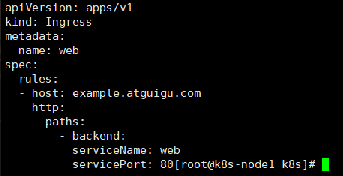
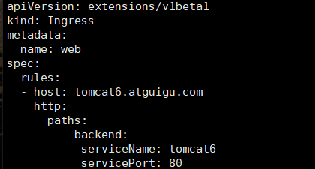
error: error validating “ingress-tomcat6.yaml“: error validating data: [ValidationError(Ingress.spec

kubectl apply -f ingress-tomcat6.yaml
error: error validating “ingress-tomcat6.yaml”: error validating data: [ValidationError(Ingress.spec.rules[0].http.paths[0]): unknown field “serviceName” in io.k8s.api.extensions.v1beta1.HTTPIngressPath, ValidationError(Ingress.spec.rules[0].http.paths[0]): unknown field “servicePort” in io.k8s.api.extensions.v1beta1.HTTPIngressPath, ValidationError(Ingress.spec.rules[0].http.paths[0]): missing required field “backend” in io.k8s.api.extensions.v1beta1.HTTPIngressPath]; if you choose to ignore these errors, turn validation off with –validate=false

Ingress yaml file-backend has one space missing in the next line
before Modified

Modified

whitelabel error page SpEL RCE vulnerability recurrence [How to Fix]

Causes of loopholes

Normally, you can access/article and enter a numeric ID to get the article content. However, if a spel expression is passed in, you will go to the error page and parse the spel expression content and reflect it in the error page.

Debug process

Similarly, starting from the dispatcherservlet.Dodispatch() function, we quickly located the key class: propertyplaceholderhelper class
in dispatcherservlet, an error is reported due to the following judgment:

protected void doDispatch(HttpServletRequest request, HttpServletResponse response) throws Exception {
...
		if (asyncManager.isConcurrentHandlingStarted()) {
		                    return;
		                }
...
}

The error content is numberformatexception, which converts the entered value into a digital error.

First look at the propertyplaceholderhelper.Parsestringvalue() method

rotected String parseStringValue(String strVal, PropertyPlaceholderHelper.PlaceholderResolver placeholderResolver, Set<String> visitedPlaceholders) {
        StringBuilder result = new StringBuilder(strVal);
        int startIndex = strVal.indexOf(this.placeholderPrefix);

        while(startIndex != -1) {
            int endIndex = this.findPlaceholderEndIndex(result, startIndex);
            if (endIndex != -1) {
                String placeholder = result.substring(startIndex + this.placeholderPrefix.length(), endIndex);
                String originalPlaceholder = placeholder;
                if (!visitedPlaceholders.add(placeholder)) {
                    throw new IllegalArgumentException("Circular placeholder reference '" + placeholder + "' in property definitions");
                }

                placeholder = this.parseStringValue(placeholder, placeholderResolver, visitedPlaceholders);
                //Here
                String propVal = placeholderResolver.resolvePlaceholder(placeholder);
                if (propVal == null && this.valueSeparator != null) {
                    int separatorIndex = placeholder.indexOf(this.valueSeparator);
                    if (separatorIndex != -1) {
                        String actualPlaceholder = placeholder.substring(0, separatorIndex);
                        String defaultValue = placeholder.substring(separatorIndex + this.valueSeparator.length());
                        propVal = placeholderResolver.resolvePlaceholder(actualPlaceholder);
                        if (propVal == null) {
                            propVal = defaultValue;
                        }
                    }
                }

                ......
        }

        return result.toString();
    }

After that, it will return to the view, which contains ${timestamp}, ${error}, ${status}, and ${message}. The view will judge whether the value starts with “${” through circular traversal
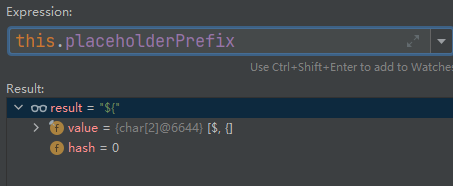
As long as it starts with “${“, it will enter the spel expression execution stage. However, when we set the value of message to payload, which also starts with “${“, it will also execute payload. It does not verify the value of controllable parameter message.

After that, use the errormvcautoconfiguration.Resolveplaceholder() method to parse the spel expression and get the value.
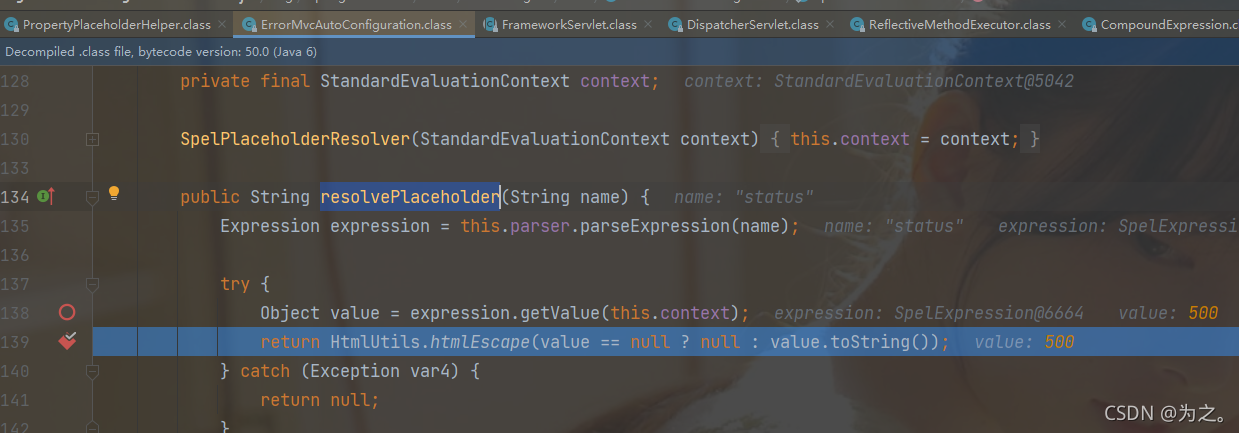
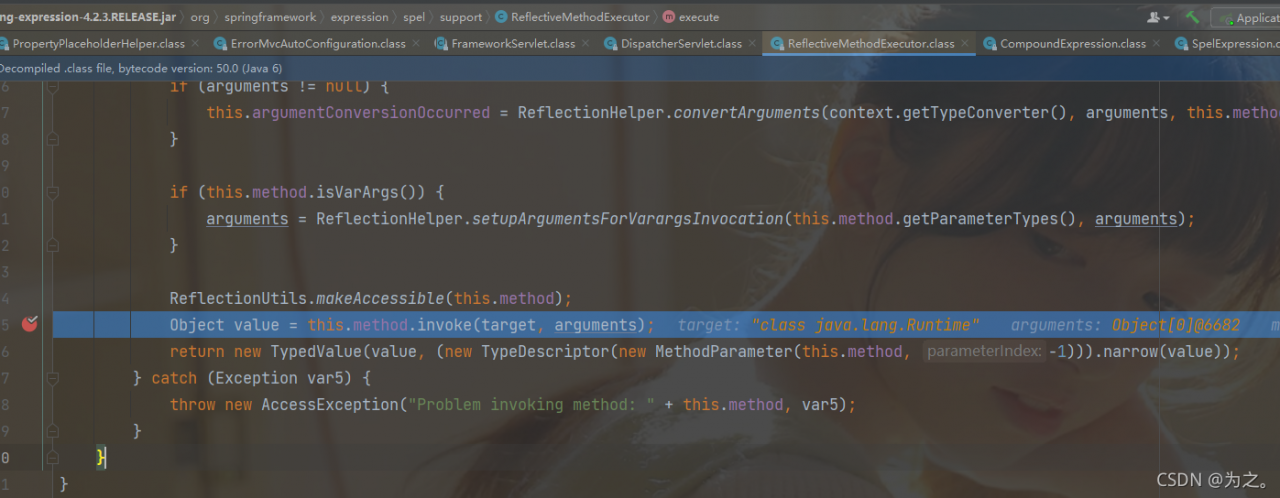
this step is to get the value of status. When the payload is reached, it will be parsed into the runtime class and execute the exec method. This step is to get the runtime instance through reflection.
Summary

Because the value passed in will determine whether it is a number, if it is not a number, an error will be reported and you will enter the error page. The error page contains some spel expressions, so the spel expressions in the error page will be searched and parsed in a loop, and finally rendered to the page. However, the reason for the problem is ${messgae} If the value of is also a spel expression, it will continue to parse the expression circularly, so as to achieve command injection, that is, the user-controllable parameters are not verified.

Repair suggestions

The reason is that the ID is not filtered in the spel direction. Therefore, I summarize and suggest the following points:

    filter IDS, set black-and-white lists, filter values such as ${, upgrade the Framework version, patch, and customize the error page
[Solved] raise ContentTooShortError(urllib.error.ContentTooShortError: <urlopen error retrieval incomplete:

1. Problem description

The following error occurred during crawler batch download

 raise ContentTooShortError(
urllib.error.ContentTooShortError: <urlopen error retrieval incomplete: got only 0 out of 290758 bytes>

2. Cause of problem

Problem cause: urlretrieve download is incomplete

3. Solution

1. Solution I

Use the recursive method to solve the incomplete method of urlretrieve to download the file. The code is as follows:

def auto_down(url,filename):
    try:
        urllib.urlretrieve(url,filename)
    except urllib.ContentTooShortError:
        print 'Network conditions is not good.Reloading.'
        auto_down(url,filename)

However, after testing, urllib.ContentTooShortError appears in the downloaded file, and it will take too long to download the file again, and it will often try several times, or even more than a dozen times, and occasionally fall into a dead cycle. This situation is very unsatisfactory.

2. Solution II

Therefore, the socket module is used to shorten the time of each re-download and avoid falling into a dead cycle, so as to improve the operation efficiency
the following is the code:

import socket
import urllib.request
#Set the timeout period to 30s
socket.setdefaulttimeout(30)
#Solve the problem of incomplete download and avoid falling into an endless loop
try:
    urllib.request.urlretrieve(url,image_name)
except socket.timeout:
    count = 1
    while count <= 5:
        try:
            urllib.request.urlretrieve(url,image_name)                                                
            break
        except socket.timeout:
            err_info = 'Reloading for %d time'%count if count == 1 else 'Reloading for %d times'%count
            print(err_info)
            count += 1
    if count > 5:
        print("downloading picture fialed!")

[Solved] Node uploads files to FTP server error: timed out while making data connection

Wrong reason
An FTP server was built in the local area network. Because the project uses an FTP file upload and download service packaged by node-ftp, the following error is reported when uploading files:

(node:29020) UnhandledPromiseRejectionWarning: Error: Timed out while making data connection
at Timeout. (D:\git project\nexrender\packages\nexrender-provider-ftp\node_modules\ftp\lib\connection.js:901:12)
at listOnTimeout (internal/timers.js:554:17)
at processTimers (internal/timers.js:497:7)
(Use node --trace-warnings ... to show where the warning was created)
(node:29020) UnhandledPromiseRejectionWarning: Unhandled promise rejection. This error originated either by throwing inside of an async function without a catch block, or by rejecting a promise which was not handled with .catch(). To terminate the node process on unhandled promise rejection, use the CLI flag --unhandled-rejections=strict (see https://nodejs.org/api/cli.html#cli_unhandled_rejections_mode). (rejection id: 1)
(node:29020) [DEP0018] DeprecationWarning: Unhandled promise rejections are deprecated. In the future, promise rejections that are not handled will terminate the Node.js process with a non-zero exit code.

Problem analysis

Open port 21 on the server and use cmd locally to connect to the ftp service. It is possible to connect normally and upload and download files.

Solution
Turn off the firewall, the server is CentOS7, the steps to turn off are as follows

#View the ports opened by the firewall
firewall-cmd --list-ports
#8008/tcp 21/tcp 80/tcp
#View the status of the firewall
firewall-cmd --state
#running
#Turn off the firewall
systemctl stop firewalld
#View firewall status
firewall-cmd --state
#not running

[Solved] CMake Error: Could not create named generator Visual Studio 16 2019 -A Win64

Preface
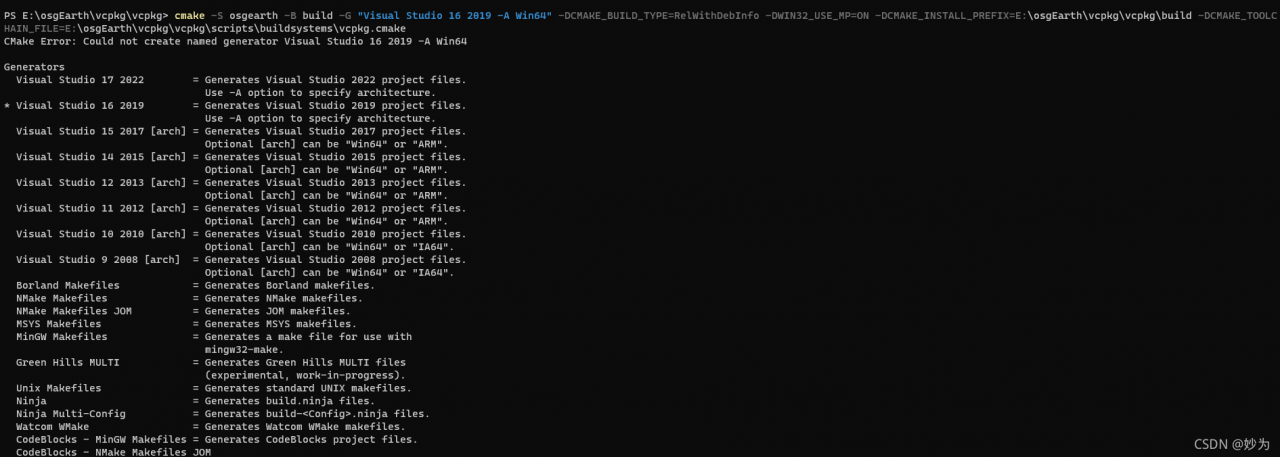
CMake Error: Could not create named generator Visual Studio 16 2019 -A Win64
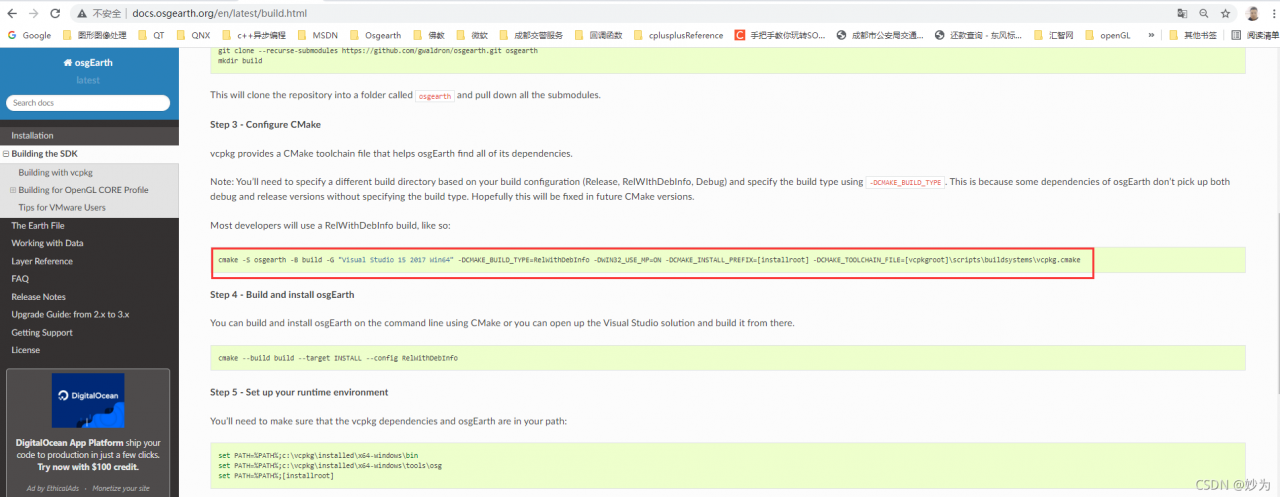
When using vcpkg to compile OsgEarth, the official compilation method is:
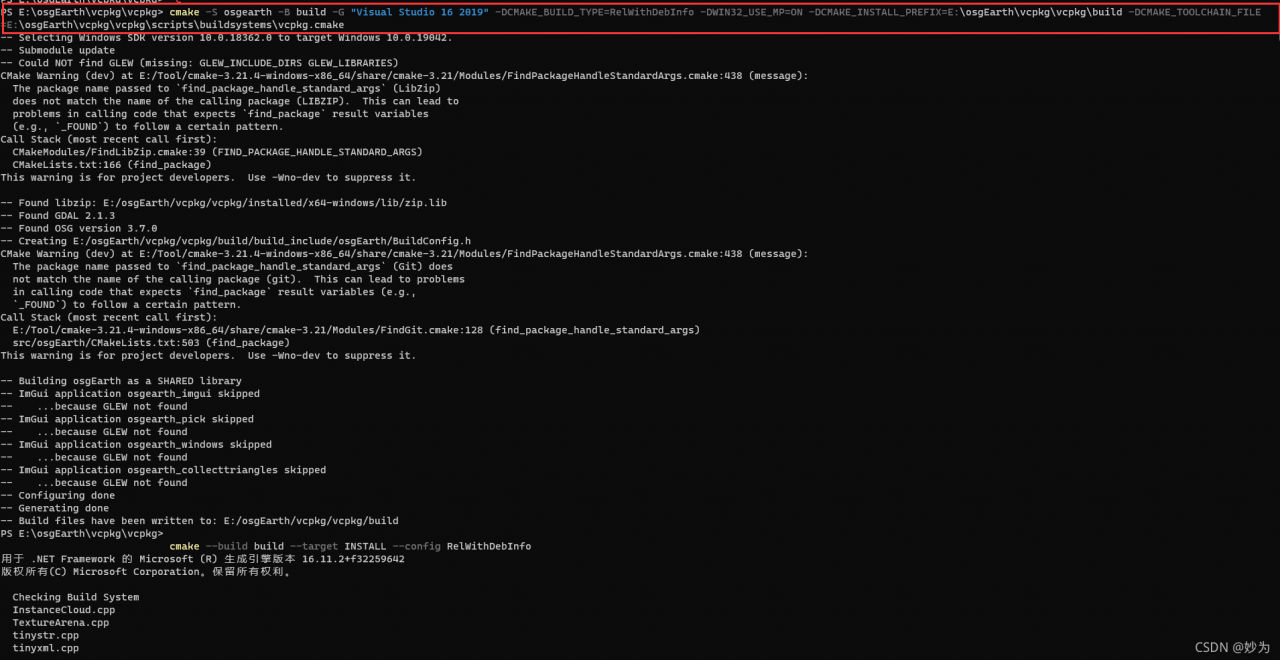
cmake -S osgearth -B build -G “Visual Studio 15 2017 Win64” -DCMAKE_BUILD_TYPE=RelWithDebInfo -DWIN32_USE_MP=ON -DCMAKE_INSTALL_PREFIX=[installroot] -DCMAKE_TOOLCHAIN_FILE=[vcpkgroot]\scripts\buildsystems\vcpkg.cmake


Change the commands below:
cmake -S osgearth -B build -G “Visual Studio 15 2017 Win64” -DCMAKE_BUILD_TYPE=RelWithDebInfo -DWIN32_USE_MP=ON -DCMAKE_INSTALL_PREFIX=[installroot] -DCMAKE_TOOLCHAIN_FILE=[vcpkgroot]\scripts\buildsystems\vcpkg.cmake
to:
cmake -S osgearth -B build -G “Visual Studio 16 2019” -DCMAKE_BUILD_TYPE=RelWithDebInfo -DWIN32_USE_MP=ON -DCMAKE_INSTALL_PREFIX=E:\osgEarth\vcpkg\vcpkg\build -DCMAKE_TOOLCHAIN_FILE=E:\osgEarth\vcpkg\vcpkg\scripts\buildsystems\vcpkg.cmake
That is
(1) Remove Win64
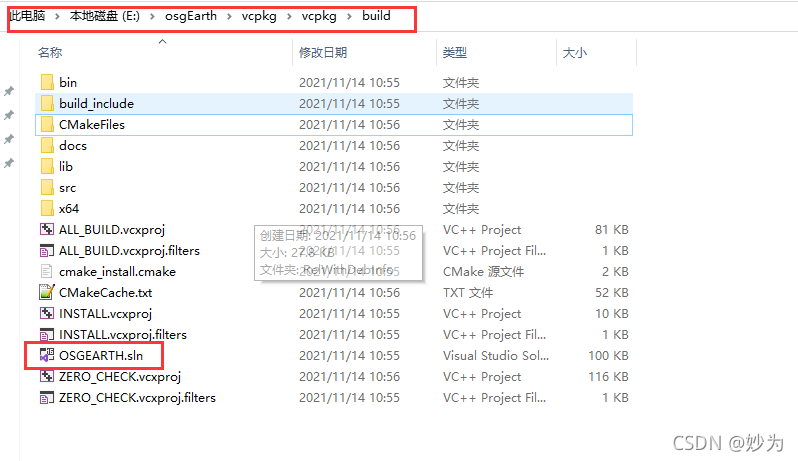
(2) Then change installroot to your OsgEarth generation project path, for example, here is: the path to generate OsgEarth.sln project

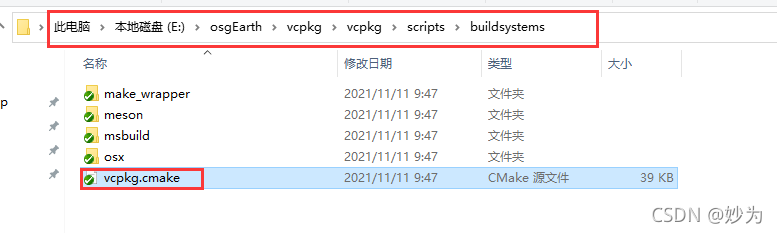
(3) Set the path of vcpkg.cmake to
Here:

[Solved] ZK Connect Error: A JNI error has occurred, please check your installation and try again

Connect ZK

public static void main(String[] args) {
        CuratorFramework curator = CuratorFrameworkFactory.builder().connectString("127.0.0.1")
                .retryPolicy(new RetryOneTime( 4))
                .connectionTimeoutMs(10000)
                .sessionTimeoutMs(6000)
                .build();
        curator.start();
    }

Error Messages:
Error: A JNI error has occurred, please check your installation and try again
Exception in thread “main” java.lang.NoClassDefFoundError: org/apache/curator/RetryPolicy
at java.lang.Class.getDeclaredMethods0(Native Method)
at java.lang.Class.privateGetDeclaredMethods(Class.java:2701)
at java.lang.Class.privateGetMethodRecursive(Class.java:3048)
at java.lang.Class.getMethod0(Class.java:3018)
at java.lang.Class.getMethod(Class.java:1784)
at sun.launcher.LauncherHelper.validateMainClass(LauncherHelper.java:544)
at sun.launcher.LauncherHelper.checkAndLoadMain(LauncherHelper.java:526)
Caused by: java.lang.ClassNotFoundException: org.apache.curator.RetryPolicy
at java.net.URLClassLoader.findClass(URLClassLoader.java:382)
at java.lang.ClassLoader.loadClass(ClassLoader.java:424)
at sun.misc.Launcher$AppClassLoader.loadClass(Launcher.java:349)
at java.lang.ClassLoader.loadClass(ClassLoader.java:357)
… 7 more

To solve it, it is not suitable for the execution of the main method, just use the following method

@Test
    public void testzk() {
        CuratorFramework curatorFramework = Demo.getCuratorFramework();
        System.out.println(curatorFramework);

    }


public static CuratorFramework getCuratorFramework() {

        CuratorFramework client = CuratorFrameworkFactory.builder().connectString("127.0.0.1:2181")
                .connectionTimeoutMs(60 * 1000)
                .sessionTimeoutMs(60 * 1000).retryPolicy(new RetryUntilElapsed(1000, 4)).build();

        client.start();

        return client;
    }