Author Archives: Robins

[Solved] IDEA Error: java Compilation failed internal java compiler error

Java: compilation failed: internal java compiler error

Write an article to record the painful experience of finding an idea error for half an hour

java: Compilation failed: internal java compiler error

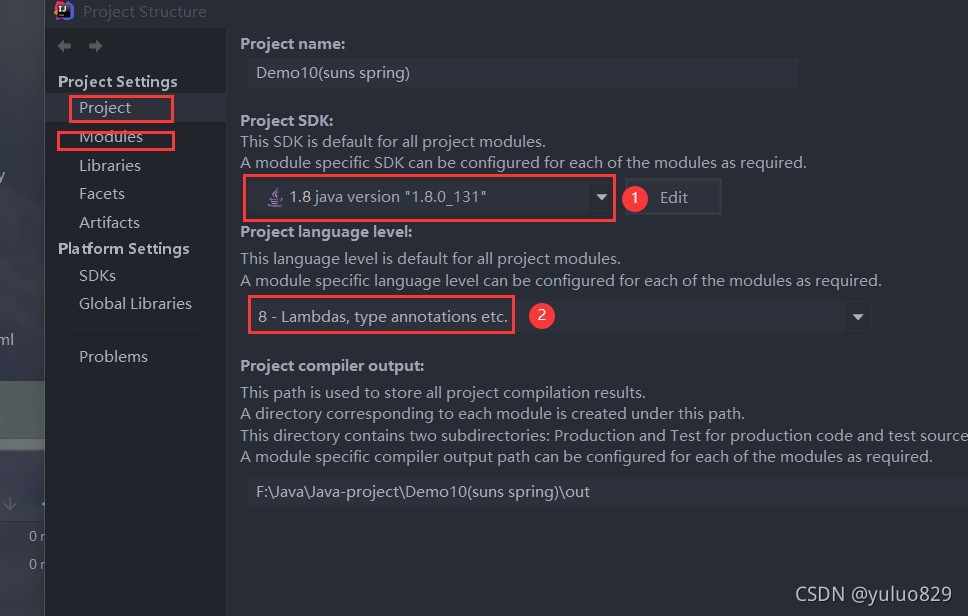
The solution is as follows:

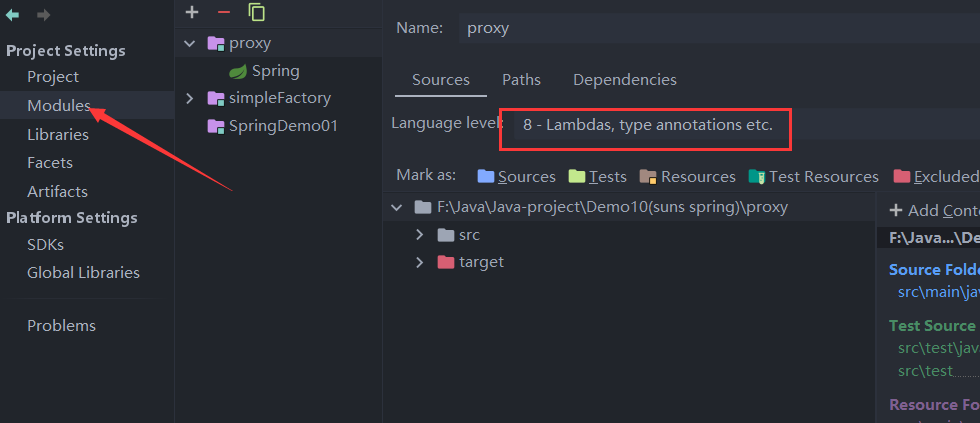
①: check item configuration

②: module configuration

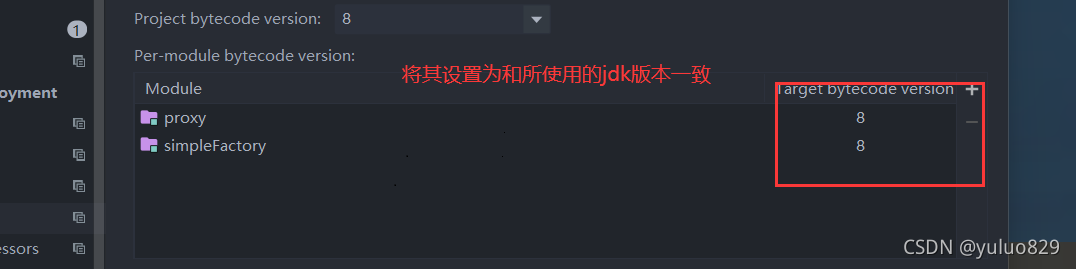
③: The most important step. This setting solves the problem

Next step. This setting solves the problem

[Solved] Pytorch Download CIFAR1 Datas Error: urllib.error.URLError: <urlopen error [SSL: CERTIFICATE_VERIFY_FAILED] certi

urllib.error.URLError: < urlopen error [SSL: CERTIFICATE_VERIFY_FAILED] certi

Solution:

Add the following two lines of code before the code starts:

import ssl
ssl._create_default_https_context = ssl._create_unverified_context

Complete example:

import torch
import torchvision
import torchvision.transforms as transforms
import ssl
ssl._create_default_https_context = ssl._create_unverified_context
#Download the data set and adjust the image, because the output of the torchvision data set is in PILImage format, and the data field is in [0,1]
#We convert it into the tensor format of the standard data field [-1,1]
#transform Data Converter
transform=transforms.Compose([transforms.ToTensor(),transforms.Normalize((0.5,0.5,0.5),(0.5,0.5,0.5))])
trainset=torchvision.datasets.CIFAR10(root='./data',train=True,download=True,transform=transform)
# The downloaded data is placed in the trainset
trainloader=torch.utils.data.DataLoader(trainset,batch_size=4,shuffle=True,num_workers=2)
# DataLoader Data Iterator Encapsulate data into DataLoader
# num_workers: Two threads read data
# batch_size=4 batch processing

testset=torchvision.datasets.CIFAR10(root='./data',train=False,download=True,transform=transform)
testloader=torch.utils.data.DataLoader(testset,batch_size=4,shuffle=False,num_workers=2)
classes=('airplane', 'automobile', 'bird', 'cat', 'deer', 'dog', 'frog', 'horse', 'ship', 'truck')

Download result

[Solved] OpenCV error: #error “This header with legacy C API declarations has been removed from OpenCV.

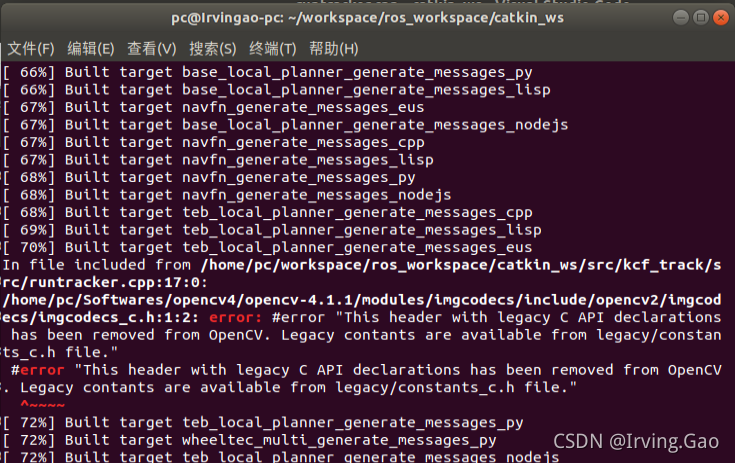
Error reporting details

Error reporting reason

In the opencv version you are currently using, the definition declaration related to legacy C API has been removed, and the content of legacy can still be from legacy/constants_c.H from the header file.

Therefore, the solution is also obvious. Open the error file directly, delete the original part of the error header file, and replace it with legacy/constants_c.H.

Solution:

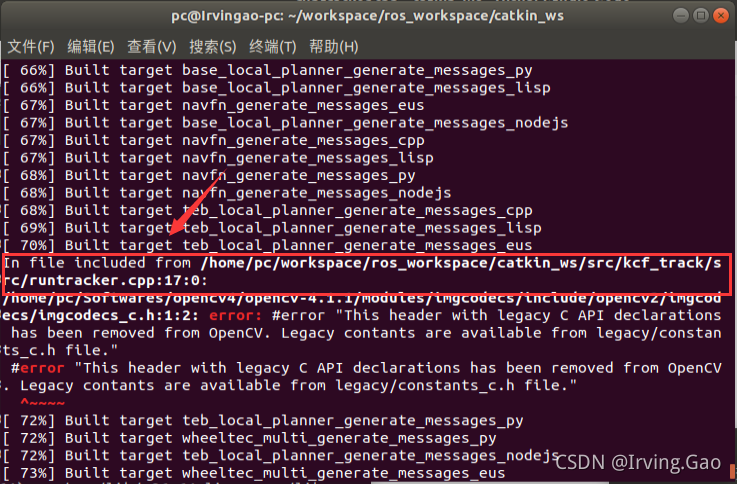
Open the cpp file with error
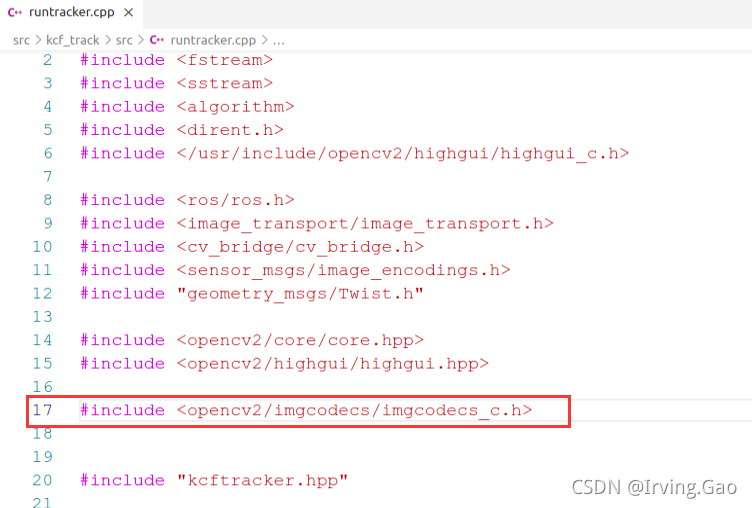
find the error header file location:

Delete the code of the header file containing the error and replace it with:

#include "opencv2/imgcodecs/legacy/constants_c.h"

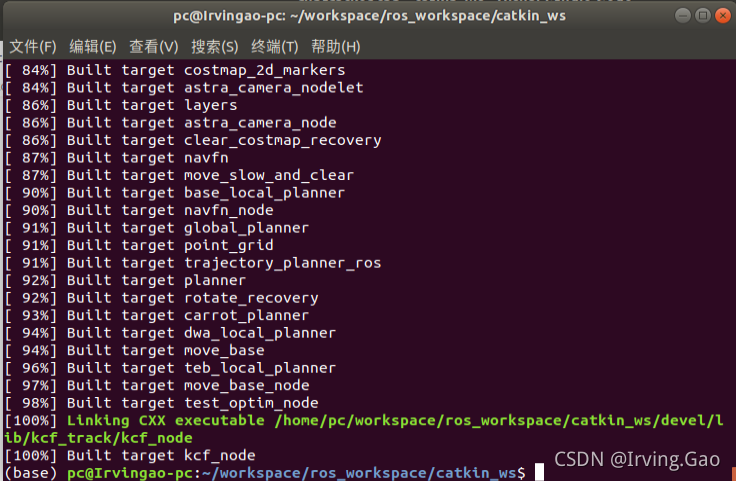
Compiled successfully ~

if your problem is also solved, leave a praise~

[Solved] flash initializate database error: Keyerror: ‘migrate’

from flask_sqlalchemy import SQLAlchemy

from flask_migrate import Migrate, migrate

def create_app(register_all=True, **kwargs):
    #Add this code under this method, add the database package and initialize,
     db=SQLAlchemy()
     db.init_app(app)
     #Import and initialize
    migrate=Migrate(db=db)
    migrate.init_app(app)
    return app

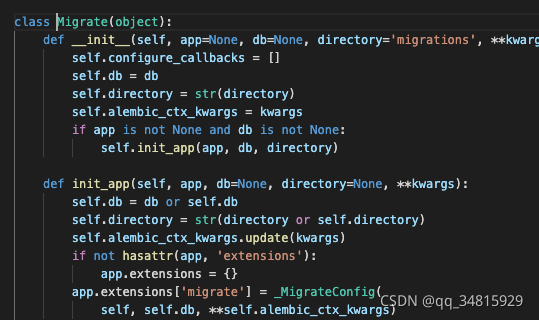
directory = current_ app.extensions[‘migrate’].directory

This sentence means that migrations are not generated

So you need to add migrate and initialize

DB needs to be added for initialization

[Solved] RuntimeError: function ALSQPlusBackward returned a gradient different than None at position 3, but t

class ALSQPlus(Function):
    @staticmethod
    def forward(ctx, weight, alpha, g, Qn, Qp, per_channel, beta):
        # assert alpha > 0, "alpha={}".format(alpha)
        ctx.save_for_backward(weight, alpha, beta)
        ctx.other = g, Qn, Qp, per_channel
        if per_channel:
            sizes = weight.size()
            weight = weight.contiguous().view(weight.size()[0], -1)
            weight = torch.transpose(weight, 0, 1)
            alpha = torch.broadcast_to(alpha, weight.size())
            beta = torch.broadcast_to(beta, weight.size())
            w_q = Round.apply(torch.div((weight - beta), alpha)).clamp(Qn, Qp)
            w_q = w_q * alpha + beta
            w_q = torch.transpose(w_q, 0, 1)
            w_q = w_q.contiguous().view(sizes)
        else:
            w_q = Round.apply(torch.div((weight - beta), alpha)).clamp(Qn, Qp)
            w_q = w_q * alpha + beta
        return w_q

    @staticmethod
    def backward(ctx, grad_weight):
        weight, alpha, beta = ctx.saved_tensors
        g, Qn, Qp, per_channel = ctx.other
        if per_channel:
            sizes = weight.size()
            weight = weight.contiguous().view(weight.size()[0], -1)
            weight = torch.transpose(weight, 0, 1)
            alpha = torch.broadcast_to(alpha, weight.size())
            q_w = (weight - beta)/alpha
            q_w = torch.transpose(q_w, 0, 1)
            q_w = q_w.contiguous().view(sizes)
        else:
            q_w = (weight - beta)/alpha
        smaller = (q_w < Qn).float() #bool value to floating point value, 1.0 or 0.0
         bigger = (q_w > Qp).float() #bool value to floating point value, 1.0 or 0.0
         between = 1.0-smaller -bigger #Get the index in the quantization interval
        if per_channel:
            grad_alpha = ((smaller * Qn + bigger * Qp + 
                between * Round.apply(q_w) - between * q_w)*grad_weight * g)
            grad_alpha = grad_alpha.contiguous().view(grad_alpha.size()[0], -1).sum(dim=1)
            grad_beta = ((smaller + bigger) * grad_weight * g).sum().unsqueeze(dim=0)
            grad_beta = grad_beta.contiguous().view(grad_beta.size()[0], -1).sum(dim=1)
        else:
            grad_alpha = ((smaller * Qn + bigger * Qp + 
                between * Round.apply(q_w) - between * q_w)*grad_weight * g).sum().unsqueeze(dim=0)
            grad_beta = ((smaller + bigger) * grad_weight * g).sum().unsqueeze(dim=0)
        grad_weight = between * grad_weight
        #The returned gradient should correspond to the forward parameter
        return grad_weight, grad_alpha, grad_beta, None, None, None, None

RuntimeError: function ALSQPlusBackward returned a gradient different than None at position 3, but the corresponding forward input was not a Variable

The gradient return value of the backward function of Function should be consistent with the order of the parameters of forward

Modify the last line to return grad_weight, grad_alpha, None, None, None, None, grad_beta
[Solved] Beeline Error: Error: Could not open client transport with JDBC Failed to Connection


Error: Could not open client transport with JDBC Uri: jdbc:hive2://node01:10000: java.net.ConnectException: Connection refused (Connection refused) (state=08S01,code=0)

Error: unable to open client transport with JDBC URI: JDBC: hive2:// node01:10000: java.net.connectexception: connection rejected (connection rejected) (state = 08s01, code = 0)

Solution

When connecting to beeline through the command, it is found that the client connection fails

[ root@node03 ~]# beeline -u jdbc:hive2://node01:10000 -n root

Check port 10000 and find that it is not started

[ root@node01 ~]# netstat -anp|grep 10000

It takes time for hiveserver2 to start. You need to wait for a while. It will not start until hiveserver2 displays four hive session IDs (I just started four successfully).

Then I realized that no wonder the teacher mentioned that he had to wait a while to connect beeline.

This is a successful start, so don’t worry and deal with it calmly when you report an error.

[Solved] javax.mail.AuthenticationFailedException: 535 Error: authentication failed

163 mailbox server to send mail, confirm to start POP3/SMTP service, and set client authorization code
mail.username is not an alias. The following is an incorrect configuration:

spring.mail.username=Dispatch center

Mail.username must be the same as mail.from as the email address. Mail.password is not the email login password, but the authorization code set/generated when the POP3/SMTP service is enabled
correctly configured:

# All email addresses
[email protected]
[email protected]
# Authorization code
spring.mail.password=RKQXXTUNAHUXBWXO

[Solved] Vue Use gzip Package Error: Rule can only have one resource source

How to configure:

NPM I compression webpack plugin - d install the plug-in and add the following configuration in Vue.Config.JS (the compression plugin configuration options depend on your personal needs)

configureWebpack: {
	plugins: [
		new CompressionPlugin({
			test: /\.(js|css)?$/i, // Which files to compress
                        algorithm:'gzip', // Use gzip compression
		})
	]
}

Problems:
usegzip to unzip the Vue project report an error:Error: Rule can only have one resource source (provided resource and test + include + exclude).
Cause Analysis:
Webpack version conflict in package.json

Solution:
npm i [email protected] -D
npm i [email protected] [email protected] -D

[Solved] SyntaxError: Cannot use import statement outside a module

Solve the syntaxerror: cannot use import statement outside a module problem

Originally, I wanted to test blob and format in the node environment. After importing relevant JS files, an error cannot use import statement outside a module occurs. Here are the following references to solve the problem:

    1. use commonjs syntax to bypass import
let Blob = require('blob-polyfill/Blob');

It can solve the problem of failed file import at present, but it means that you can’t use import to import in the future. The fundamental problem has not been solved. Of course, this is not my style. Then go to consult the data. What the elder brother said is well summarized as follows:

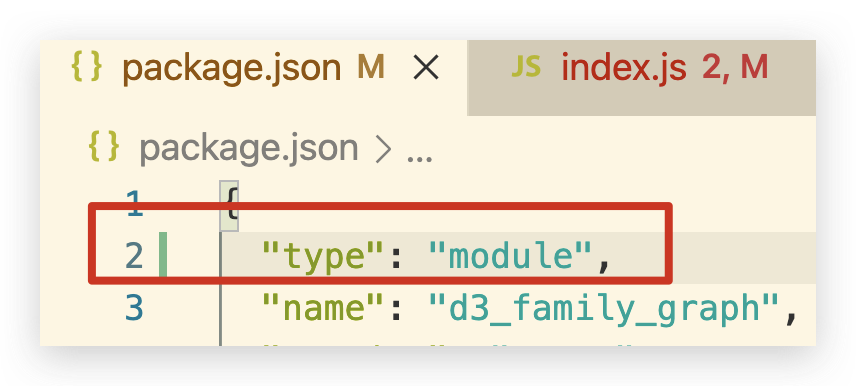
The error is reported because the node environment does not support ES6 syntax. We can install Babel jest, @Babel/core, @Babel/preset env to solve the problem (these plug-ins can convert ES6 code into Es5 so that the node environment can be recognized. Here I choose @Babel/preset env for installation). After installation, create babel.config.js file in the root log of the project: see the name of this file, Babel is configured; (similar to webpack.Config.JS),

module.exports = {
    "presets": [
        ["@babel/preset-env",
            {
                "targets":
                    { "node": true }
            }
        ]
    ]
}

Generally speaking, package.json is not configured with type, and it is equipped with type: type: "module". The problem is solved here. Finally, I also remembered that when I first used sass, I had to configure it to compile sass into CSS and be recognized by the environment (Longyin).