Author Archives: Robins

Pychart remote debugging display picture, tkagg error report troubleshooting

It’s convenient to use pychart remote debugging program, but PLT can’t display pictures.

You can refer to pycham to remotely connect to the server and display the picture_ Cowboy does not catch a cold blog – CSDN blog

 

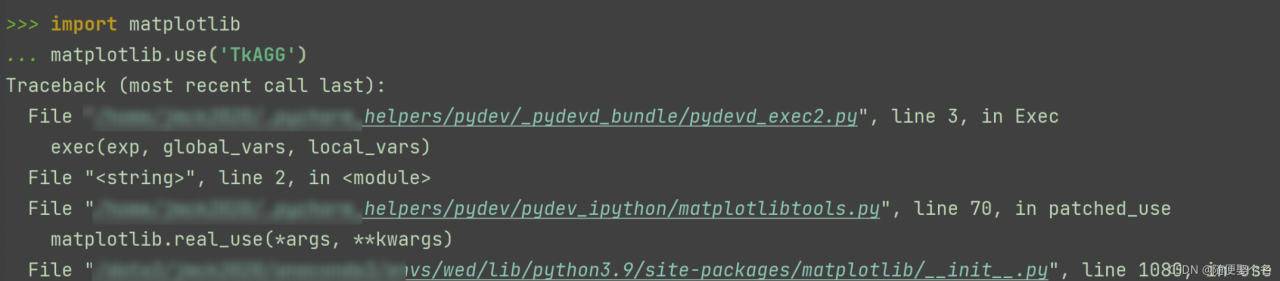
The following is the troubleshooting of errors reported by Matplotlib. Use (‘tkagg ‘) during the recent use of Matplotlib. Record it:  

Use the remote server debugger. In order to display the picture, modify matplotlib.use to report an error.

Cannot load backend 'TkAgg' which requires the 'tk' interactive framework, as 'headless' is currently running

Xshell failed to open successfully. The error is eliminated after restarting xshell and xming.

But xming doesn’t pop up a window to display pictures. Restart debugging, here comes again


Then the above problem is probably not xshell and xming. Check env in the terminal and see display = localhost: 12.0

Recheck the pycharm running configuration. First clear the environment variable

Delete the display environment variable and display successfully.
After debugging and looking again, the error is reported again.

Check env again, display = localhost: 10.0

Add display = localhost: 10.0 again, the debugging is successful, try again, no problem, OK
[Solved] Ubuntu 18.04 Install opencv3.2.0 and opencv_contrib Error

After configuring the ROS melody environment for Jetson nano B01 and planning to install the turtle BOT, you need to install opencv3.2.0 and add GPU acceleration support to the compilation of OpenCV. There is a problem when installing opencv from the source code:

CMake Error at cmake/OpenCVModule.cmake:286 (add_subdirectory):
  The binary directory

    /home/fdse/tools/opencv-3.2.0/release/modules/cudaarithm/.cudaarithm

  is already used to build a source directory.  It cannot be used to build
  source directory

    /home/fdse/tools/opencv_contrib/modules/cudaarithm

  Specify a unique binary directory name.
Call Stack (most recent call first):
  modules/CMakeLists.txt:7 (ocv_glob_modules)


CMake Error at cmake/OpenCVModule.cmake:286 (add_subdirectory):
  The binary directory

    /home/fdse/tools/opencv-3.2.0/release/modules/cudabgsegm/.cudabgsegm

  is already used to build a source directory.  It cannot be used to build
  source directory

    /home/fdse/tools/opencv_contrib/modules/cudabgsegm

  Specify a unique binary directory name.
Call Stack (most recent call first):
  modules/CMakeLists.txt:7 (ocv_glob_modules)


CMake Error at cmake/OpenCVModule.cmake:286 (add_subdirectory):
  The binary directory

    /home/fdse/tools/opencv-3.2.0/release/modules/cudacodec/.cudacodec

  is already used to build a source directory.  It cannot be used to build
  source directory

    /home/fdse/tools/opencv_contrib/modules/cudacodec

  Specify a unique binary directory name.
Call Stack (most recent call first):
  modules/CMakeLists.txt:7 (ocv_glob_modules)


CMake Error at cmake/OpenCVModule.cmake:286 (add_subdirectory):
  The binary directory

    /home/fdse/tools/opencv-3.2.0/release/modules/cudafeatures2d/.cudafeatures2d

  is already used to build a source directory.  It cannot be used to build
  source directory

    /home/fdse/tools/opencv_contrib/modules/cudafeatures2d

  Specify a unique binary directory name.
Call Stack (most recent call first):
  modules/CMakeLists.txt:7 (ocv_glob_modules)

The reason is that the version of opencv_conteib is inconsistent with that of opencv. When cloning opencv, add -b 3.2.0. Similarly, when cloning opencv_contrib, clone version 3.2.0 and add -b 3.2.0, then no error will be reported.

Spring project import @Resource Annotation Error [How to Solve]

An error is reported after the @resource annotation is introduced into the spring project

Solution:

@Resource annotations are provided by J2EE

However, jdk1.9 and above versions need to import a javax.annotation dependency package from pom.xml in maven:

<dependencies>
    <dependency>
        <groupId>javax.annotation</groupId>
        <artifactId>javax.annotation-api</artifactId>
        <version>1.3.2</version>
    </dependency>
</dependencies>

Pikachu vulnerability is installed in the shooting range, and an error is reported when connecting to the MySQL database

During the installation of Pikachu vulnerability shooting range, the processing methods of connecting to MySQL database and reporting errors are as follows:

1. Confirm that the database can be connected normally. Try connecting with tools. If it is not normal, please check the configuration problems such as service, user name and password
2. Modify the IP address, user name and password of the database in config.inc.php to the IP, user name and password of the database. Both the root directory and pkxss have this file and need to be modified.

Config.inc.php in the root directory \ pkxss \ Inc also needs to be modified. It’s difficult.

[Solved] Vue element UI form verification error: cannot read property ‘validate’ of undefined

[error report solution] Vue element UI form validation error cannot read property ‘validate’ of undefined

Error reporting restore project background error reporting reason error reporting solution

Error reporting restore

[Vue warn]: 
Error in v-on handler: 
"TypeError: Cannot read properties of undefined (reading 'validate')"

Project background

Vue + element UI uses the official form with verification function of element UI

Error reporting reason

The default name of the form has been modified, but the name of ref = “ruleform” in the ‘El form’ label has not been changed. The registration name is inconsistent, which triggers the error.

Error reporting solution

If you want to customize the form name. Be sure to modify the form name in [ref = “ruleform”].

How to Solve insufficent privileges error: Ora-01031

For Oracle database in remote multi instance linux environment, an error is reported when executing conn/as SYSDBA: ora-01031: insufficient privileges. The solution process is as follows:

Step 1: find the sqlnet.ora file. Add the following two

SQLNET.AUTHENTICATION_SERVICES=(ALL)
NAMES.DIRECTORY_PATH= (TNSNAMES, EZCONNECT, HOSTNAME)

Step 2: after saving, exit and execute lsnrctl reload

Step 3: the following errors occur after I finish executing:

TNS-12555: TNS:permission denied
 TNS-12560: TNS:protocol adapter error
  TNS-00525: Insufficient privilege for operation
   Linux Error: 1: Operation not permitted```


To solve this problem, execute: Chmod 777/var/TMP/.Oracle

Step 4: specify the connection instance. The orcl here should fill in your own instance name.

export ORACLE_SID=orcl

Step 5: when reconnecting, an error is reported connected to an idle instance.
. Note that this only means that the instance is not started, which is not a big problem. First query the status select status from V $instance

Step 6: start

startup

Since then.

[Solved] 01654 error: the index cannot be extended through 8

The existing solution attempts failed:

1. The table space is insufficient.

2. Rebuild the index or merge the index

Solution 3: delete the index directly without a large amount of data

drop index index-name;

There may be table locking problems:
step one:

 select  session_id from v$locked_object;

Step two:

 select  sid,serial#,username,osuser from v$session where sid = 545;

Step three:

alter system kill session '545,36043';

#The Sid and session here need to be modified according to their own requirements

[Solved] Python project runs the open() function error: FileNotFoundError: [Errno 2] No such file or directory

Traceback (most recent call last):
  File "D:/Python/Practice/file_path_test01.py", line 10, in <module>
    open(path1, 'wb')
FileNotFoundError: [Errno 2] No such file or directory: './output/experiment_UNet_ResFourLayerConvBlock_ResTwoLayerConvBlock_None_fold-1_coarse_size-160_channel-8_depth-4_loss-dice_metric-dice_time-2021-11-20_16-14-52\\logs\\train\\events.out.tfevents.1637396155.DESKTOP-AHH47H9123456789012345678901234567890'

Reason 1: the parent folder of the file to be created does not exist. The open function will recreate the file when it does not exist, but cannot create the nonexistent folder.

Reason 2: the character length of file name + absolute path of file exceeds the limit of the operating system. Windows system has restrictions