Author Archives: Robins

error: #error PCL requires C++14 or above [Solved]

Running a file with a PCL library reports an error #error PCL requires C + + 14 or above

Solution: find all PCL dependent function packages in the project and change their corresponding cmakelists.txt file

For specific modification methods, see

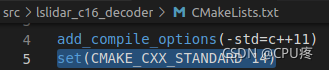
add_compile_options(-std=c++11)

Add a line of code to this line of code

set(CMAKE_CXX_STANDARD 14)

As shown in the figure

RuntimeError: CUDA out of memory. Tried to allocate 600.00 MiB (GPU 0; 23.69 GiB total capacity)

RuntimeError: CUDA out of memory. Tried to allocate 600.00 MiB (GPU 0; 23.69 GiB total capacity; 21.82 GiB already allocated; 115.25 MiB free; 21.87 GiB reserved in total by PyTorch)

Runtime error: CUDA out of memory. Attempt to allocate 600.00 MIB (GPU 0; 23.69 gib total capacity; 21.82 gib allocated; 115.25 MIB free; pytorch reserves a total of 21.87 GIB)

reason

A similar bug is due to insufficient video memory

Solution 1: release the video memory

First fuser - V/dev/NVIDIA * or sudo fuser - V/dev/NVIDIA * , view the processes running on the GPU recently, and then sudo kill the relevant process number.

Of which:

Fuser: it can display which program is currently using a file, mount point, or even network port on the disk, and give the details of the program process – V: detailed mode/dev/NVIDIA *: all NVIDIA related interfaces (such as GPU)

Solution 2: turn down the batch size

If it is not enough after releasing part of the video memory, you can reduce the batch size


Reference:
after NVIDIA GPU kill process, the video memory is still unclear

Error: DL failure on line 893 [How to Solve]

In the centos system, after installing jdk-8u60- linux- i586.tar.gz, after configuring the java environment variables in .bash_profile and /etc/profile, restart the server, enter java, and the error message is displayed;

Error: dl failure on line 893
Error: failed /usr/local/java/jdk1.8.0_60/jre/lib/i386/client/libjvm.so, because /usr/local/java/jdk1.8.0_60/jre/lib/i386/client/libjvm.so: cannot restore segment prot after reloc: Permission denied

This is caused by the security mechanism of selinux. To edit the configuration file of selinux, the command is: vim /etc/selinux/config, modify SELINUX=enforcing to SELINUX=disabled reboot the server, and then check it again, and it will be OK.

ANASYS2020R2 mesh script error [How to Solve]

Problem situation

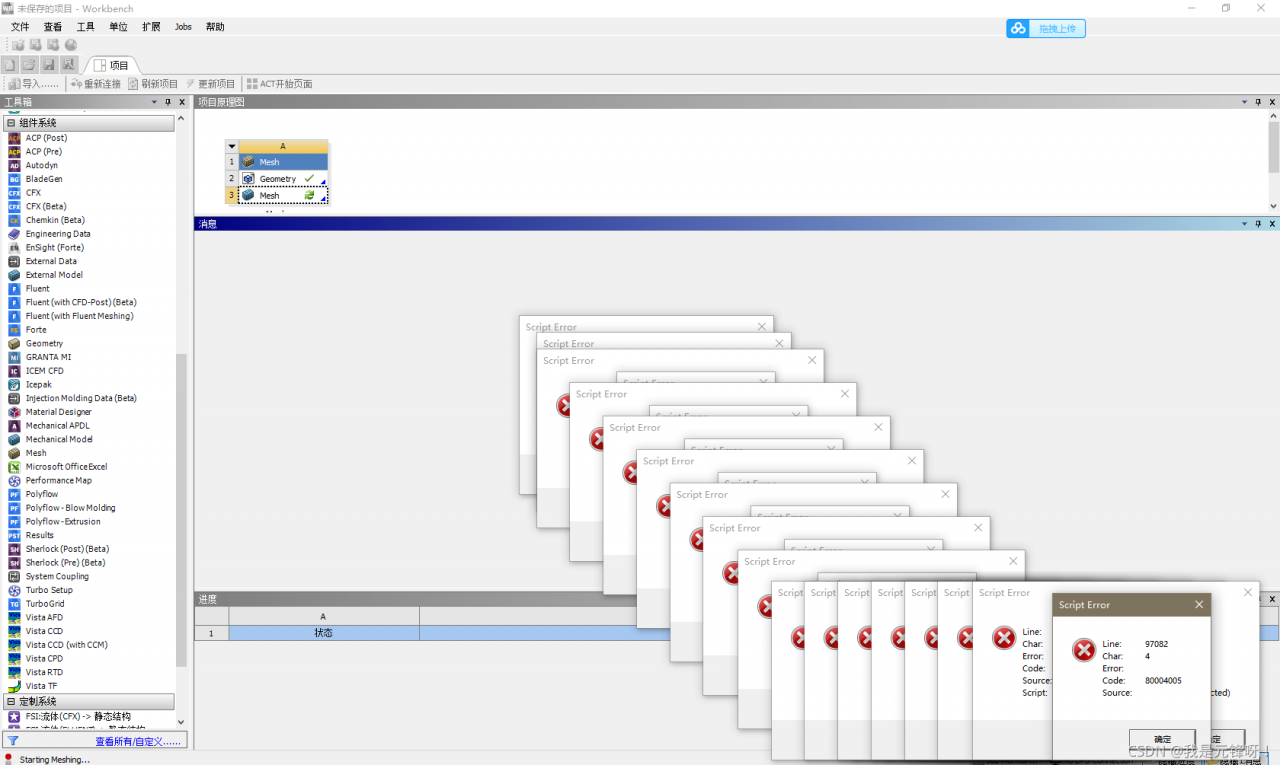
When calculating workbench 2020r2, the following screen suddenly appears:

Solution:

The scheme is as follows:
manually register the DLLs listed below by starting a command prompt (DOS) with “run as administrator”, then typing:
regsvr32.exe ole32.dll
regsvr32.exe atl.dll
regsvr32.exe oleaut32.dll
regsvr32.exe scrrun.dll
regsvr32.exe jscript.dll
regsvr32.exe vbscript.dll

make sure they all say succeeded
now open regular CMD prompt, and type the following command
Move “% appdata%\ANSYS”% appdata%\ANSYS.Old ”
when solving the problem, both ordinary CMD and administrator mode CMD can be used. Just call the interface directly from Win + R. Bold codes can be entered one by one.

[Solved] Python Django error: error: (1146, “Table ‘mydb.django_session’ doesn’t exist”)

error: (1146, "Table 'mydb.django_session' doesn't exist")

Because there is no Django in the database table_session.

Execute the command at the terminal to migrate the data structure

$ python manage.py migrate

After executing the above command, the output results are all OK. You can see that many tables have been added to the database table, The details are as follows

# By default 10 tables are automatically created in our database, as follows.
MariaDB [mydemo]> show tables;
+----------------------------+
| Tables_in_mydemo           |
+----------------------------+
| auth_group                 |
| auth_group_permissions     |
| auth_permission            |
| auth_user                  |
| auth_user_groups           |
| auth_user_user_permissions |
| django_admin_log           |
| django_content_type        |
| django_migrations          |
| django_session             |
| stu                        |
+----------------------------+
11 rows in set (0.00 sec)

Then it was solved

[Solved] ES Error: request contains unrecognized parameter [ignore_throttled]

Problem description

When using springboot to integrate es, the tools provided by springboot data are used. The specific dependencies are as follows:

 <dependency>
     <groupId>org.springframework.boot</groupId>
     <artifactId>spring-boot-starter-data-elasticsearch</artifactId>
 </dependency>

be careful,

I did not add other dependencies related to es; The version of ES is 6.5.4

Test code

In the newly created springboot project, after adding the above dependency, the configuration YML file is as follows:

spring:
  elasticsearch:
    rest:
      uris: "Server Address"
      read-timeout: "10s"

Add the test content in springboottest as follows:

package cn.smileyan.demo;

import java.io.IOException;
import org.elasticsearch.action.admin.indices.create.CreateIndexRequest;
import org.elasticsearch.action.admin.indices.create.CreateIndexResponse;
import org.elasticsearch.action.admin.indices.delete.DeleteIndexRequest;

import org.elasticsearch.client.RequestOptions;
import org.elasticsearch.client.RestHighLevelClient;

import org.junit.jupiter.api.Test;
import org.springframework.beans.factory.annotation.Autowired;
import org.springframework.boot.test.context.SpringBootTest;


/**
 * @author smileyan
 */
@SpringBootTest
class ElasticsearchDemoApplicationTests {
    @Autowired
    private RestHighLevelClient client;

    @Test
    public void testCreate() throws IOException {
        CreateIndexRequest request = new CreateIndexRequest("myindex2");
        CreateIndexResponse createIndexResponse = client.indices().create(request, RequestOptions.DEFAULT);
        assert createIndexResponse.isAcknowledged();
    }

    @Test
    public void testDelete() throws IOException {
        DeleteIndexRequest request = new DeleteIndexRequest("myindex2");
        client.indices().delete(request, RequestOptions.DEFAULT);
    }
}

Note that running testcreate does not report an error, but testdelete reports an error.

ElasticsearchStatusException[Elasticsearch exception [type=illegal_argument_exception, reason=request [/myindex2] contains unrecognized parameter: [ignore_throttled]]
]
	at org.elasticsearch.rest.BytesRestResponse.errorFromXContent(BytesRestResponse.java:176)
	at org.elasticsearch.client.RestHighLevelClient.parseEntity(RestHighLevelClient.java:1933)
	at org.elasticsearch.client.RestHighLevelClient.parseResponseException(RestHighLevelClient.java:1910)
	at org.elasticsearch.client.RestHighLevelClient.internalPerformRequest(RestHighLevelClient.java:1667)
	at org.elasticsearch.client.RestHighLevelClient.performRequest(RestHighLevelClient.java:1624)
	at org.elasticsearch.client.RestHighLevelClient.performRequestAndParseEntity(RestHighLevelClient.java:1594)
	at org.elasticsearch.client.IndicesClient.delete(IndicesClient.java:103)
	at cn.smileyan.demo.ElasticsearchDemoApplicationTests.testDelete(ElasticsearchDemoApplicationTests.java:39)
	at sun.reflect.NativeMethodAccessorImpl.invoke0(Native Method)
	at sun.reflect.NativeMethodAccessorImpl.invoke(NativeMethodAccessorImpl.java:62)
	at sun.reflect.DelegatingMethodAccessorImpl.invoke(DelegatingMethodAccessorImpl.java:43)
	at java.lang.reflect.Method.invoke(Method.java:498)
	at org.junit.platform.commons.util.ReflectionUtils.invokeMethod(ReflectionUtils.java:688)
	at org.junit.jupiter.engine.execution.MethodInvocation.proceed(MethodInvocation.java:60)
	at org.junit.jupiter.engine.execution.InvocationInterceptorChain$ValidatingInvocation.proceed(InvocationInterceptorChain.java:131)
	at org.junit.jupiter.engine.extension.TimeoutExtension.intercept(TimeoutExtension.java:149)
	at org.junit.jupiter.engine.extension.TimeoutExtension.interceptTestableMethod(TimeoutExtension.java:140)
	at org.junit.jupiter.engine.extension.TimeoutExtension.interceptTestMethod(TimeoutExtension.java:84)
	at org.junit.jupiter.engine.execution.ExecutableInvoker$ReflectiveInterceptorCall.lambda$ofVoidMethod$0(ExecutableInvoker.java:115)
	at org.junit.jupiter.engine.execution.ExecutableInvoker.lambda$invoke$0(ExecutableInvoker.java:105)
	at org.junit.jupiter.engine.execution.InvocationInterceptorChain$InterceptedInvocation.proceed(InvocationInterceptorChain.java:106)
	at org.junit.jupiter.engine.execution.InvocationInterceptorChain.proceed(InvocationInterceptorChain.java:64)
	at org.junit.jupiter.engine.execution.InvocationInterceptorChain.chainAndInvoke(InvocationInterceptorChain.java:45)
	at org.junit.jupiter.engine.execution.InvocationInterceptorChain.invoke(InvocationInterceptorChain.java:37)
	at org.junit.jupiter.engine.execution.ExecutableInvoker.invoke(ExecutableInvoker.java:104)
	at org.junit.jupiter.engine.execution.ExecutableInvoker.invoke(ExecutableInvoker.java:98)
	at org.junit.jupiter.engine.descriptor.TestMethodTestDescriptor.lambda$invokeTestMethod$6(TestMethodTestDescriptor.java:210)
	at org.junit.platform.engine.support.hierarchical.ThrowableCollector.execute(ThrowableCollector.java:73)
	at org.junit.jupiter.engine.descriptor.TestMethodTestDescriptor.invokeTestMethod(TestMethodTestDescriptor.java:206)
	at org.junit.jupiter.engine.descriptor.TestMethodTestDescriptor.execute(TestMethodTestDescriptor.java:131)
	at org.junit.jupiter.engine.descriptor.TestMethodTestDescriptor.execute(TestMethodTestDescriptor.java:65)
	at org.junit.platform.engine.support.hierarchical.NodeTestTask.lambda$executeRecursively$5(NodeTestTask.java:139)
	at org.junit.platform.engine.support.hierarchical.ThrowableCollector.execute(ThrowableCollector.java:73)
	at org.junit.platform.engine.support.hierarchical.NodeTestTask.lambda$executeRecursively$7(NodeTestTask.java:129)
	at org.junit.platform.engine.support.hierarchical.Node.around(Node.java:137)
	at org.junit.platform.engine.support.hierarchical.NodeTestTask.lambda$executeRecursively$8(NodeTestTask.java:127)
	at org.junit.platform.engine.support.hierarchical.ThrowableCollector.execute(ThrowableCollector.java:73)
	at org.junit.platform.engine.support.hierarchical.NodeTestTask.executeRecursively(NodeTestTask.java:126)
	at org.junit.platform.engine.support.hierarchical.NodeTestTask.execute(NodeTestTask.java:84)
	at java.util.ArrayList.forEach(ArrayList.java:1259)
	at org.junit.platform.engine.support.hierarchical.SameThreadHierarchicalTestExecutorService.invokeAll(SameThreadHierarchicalTestExecutorService.java:38)
	at org.junit.platform.engine.support.hierarchical.NodeTestTask.lambda$executeRecursively$5(NodeTestTask.java:143)
	at org.junit.platform.engine.support.hierarchical.ThrowableCollector.execute(ThrowableCollector.java:73)
	at org.junit.platform.engine.support.hierarchical.NodeTestTask.lambda$executeRecursively$7(NodeTestTask.java:129)
	at org.junit.platform.engine.support.hierarchical.Node.around(Node.java:137)
	at org.junit.platform.engine.support.hierarchical.NodeTestTask.lambda$executeRecursively$8(NodeTestTask.java:127)
	at org.junit.platform.engine.support.hierarchical.ThrowableCollector.execute(ThrowableCollector.java:73)
	at org.junit.platform.engine.support.hierarchical.NodeTestTask.executeRecursively(NodeTestTask.java:126)
	at org.junit.platform.engine.support.hierarchical.NodeTestTask.execute(NodeTestTask.java:84)
	at java.util.ArrayList.forEach(ArrayList.java:1259)
	at org.junit.platform.engine.support.hierarchical.SameThreadHierarchicalTestExecutorService.invokeAll(SameThreadHierarchicalTestExecutorService.java:38)
	at org.junit.platform.engine.support.hierarchical.NodeTestTask.lambda$executeRecursively$5(NodeTestTask.java:143)
	at org.junit.platform.engine.support.hierarchical.ThrowableCollector.execute(ThrowableCollector.java:73)
	at org.junit.platform.engine.support.hierarchical.NodeTestTask.lambda$executeRecursively$7(NodeTestTask.java:129)
	at org.junit.platform.engine.support.hierarchical.Node.around(Node.java:137)
	at org.junit.platform.engine.support.hierarchical.NodeTestTask.lambda$executeRecursively$8(NodeTestTask.java:127)
	at org.junit.platform.engine.support.hierarchical.ThrowableCollector.execute(ThrowableCollector.java:73)
	at org.junit.platform.engine.support.hierarchical.NodeTestTask.executeRecursively(NodeTestTask.java:126)
	at org.junit.platform.engine.support.hierarchical.NodeTestTask.execute(NodeTestTask.java:84)
	at org.junit.platform.engine.support.hierarchical.SameThreadHierarchicalTestExecutorService.submit(SameThreadHierarchicalTestExecutorService.java:32)
	at org.junit.platform.engine.support.hierarchical.HierarchicalTestExecutor.execute(HierarchicalTestExecutor.java:57)
	at org.junit.platform.engine.support.hierarchical.HierarchicalTestEngine.execute(HierarchicalTestEngine.java:51)
	at org.junit.platform.launcher.core.EngineExecutionOrchestrator.execute(EngineExecutionOrchestrator.java:108)
	at org.junit.platform.launcher.core.EngineExecutionOrchestrator.execute(EngineExecutionOrchestrator.java:88)
	at org.junit.platform.launcher.core.EngineExecutionOrchestrator.lambda$execute$0(EngineExecutionOrchestrator.java:54)
	at org.junit.platform.launcher.core.EngineExecutionOrchestrator.withInterceptedStreams(EngineExecutionOrchestrator.java:67)
	at org.junit.platform.launcher.core.EngineExecutionOrchestrator.execute(EngineExecutionOrchestrator.java:52)
	at org.junit.platform.launcher.core.DefaultLauncher.execute(DefaultLauncher.java:96)
	at org.junit.platform.launcher.core.DefaultLauncher.execute(DefaultLauncher.java:75)
	at com.intellij.junit5.JUnit5IdeaTestRunner.startRunnerWithArgs(JUnit5IdeaTestRunner.java:71)
	at com.intellij.rt.junit.IdeaTestRunner$Repeater.startRunnerWithArgs(IdeaTestRunner.java:33)
	at com.intellij.rt.junit.JUnitStarter.prepareStreamsAndStart(JUnitStarter.java:235)
	at com.intellij.rt.junit.JUnitStarter.main(JUnitStarter.java:54)
	Suppressed: org.elasticsearch.client.ResponseException: method [DELETE], host [http://es.smileyan.cn:9200], URI [/myindex2?master_timeout=30s&ignore_unavailable=false&expand_wildcards=open%2Cclosed&allow_no_indices=true&ignore_throttled=false&timeout=30s], status line [HTTP/1.1 400 Bad Request]
{"error":{"root_cause":[{"type":"illegal_argument_exception","reason":"request [/myindex2] contains unrecognized parameter: [ignore_throttled]"}],"type":"illegal_argument_exception","reason":"request [/myindex2] contains unrecognized parameter: [ignore_throttled]"},"status":400}
		at org.elasticsearch.client.RestClient.convertResponse(RestClient.java:326)
		at org.elasticsearch.client.RestClient.performRequest(RestClient.java:296)
		at org.elasticsearch.client.RestClient.performRequest(RestClient.java:270)
		at org.elasticsearch.client.RestHighLevelClient.internalPerformRequest(RestHighLevelClient.java:1654)
		... 69 more

Solution:

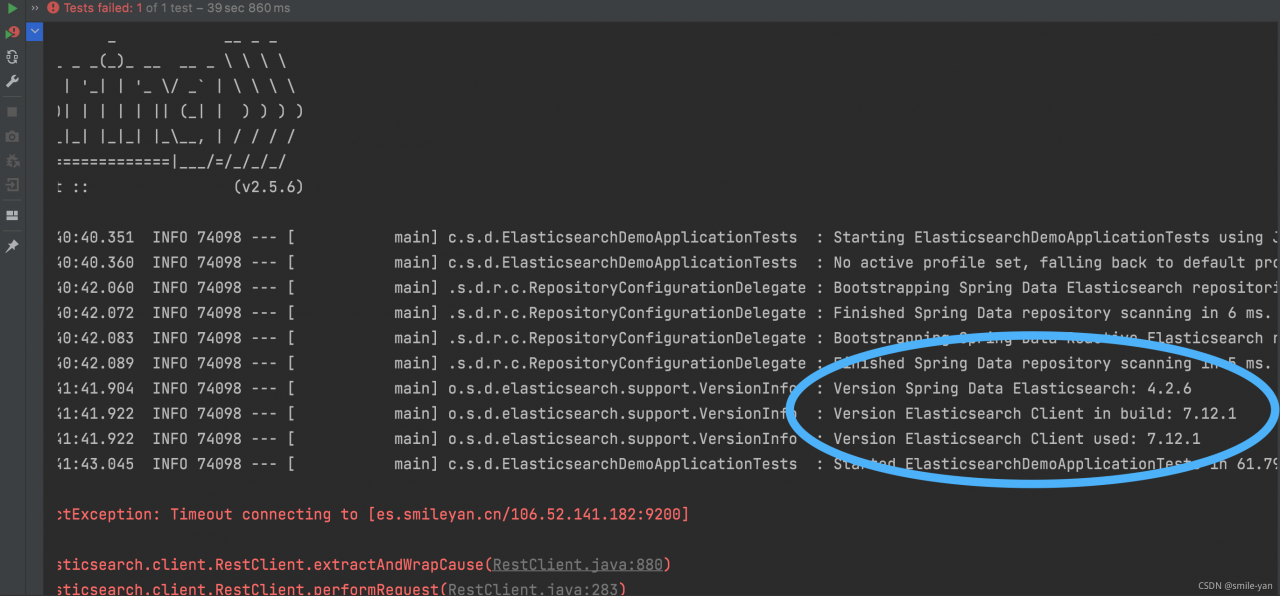
When starting springboot, please pay attention to the log entered:

as mentioned earlier, the version I use is 6.5.4, and the version conflicts.

The solution is very simple: reduce the version of springboot. My version is 2.2.13. Release, and then continue the test to solve all the problems.

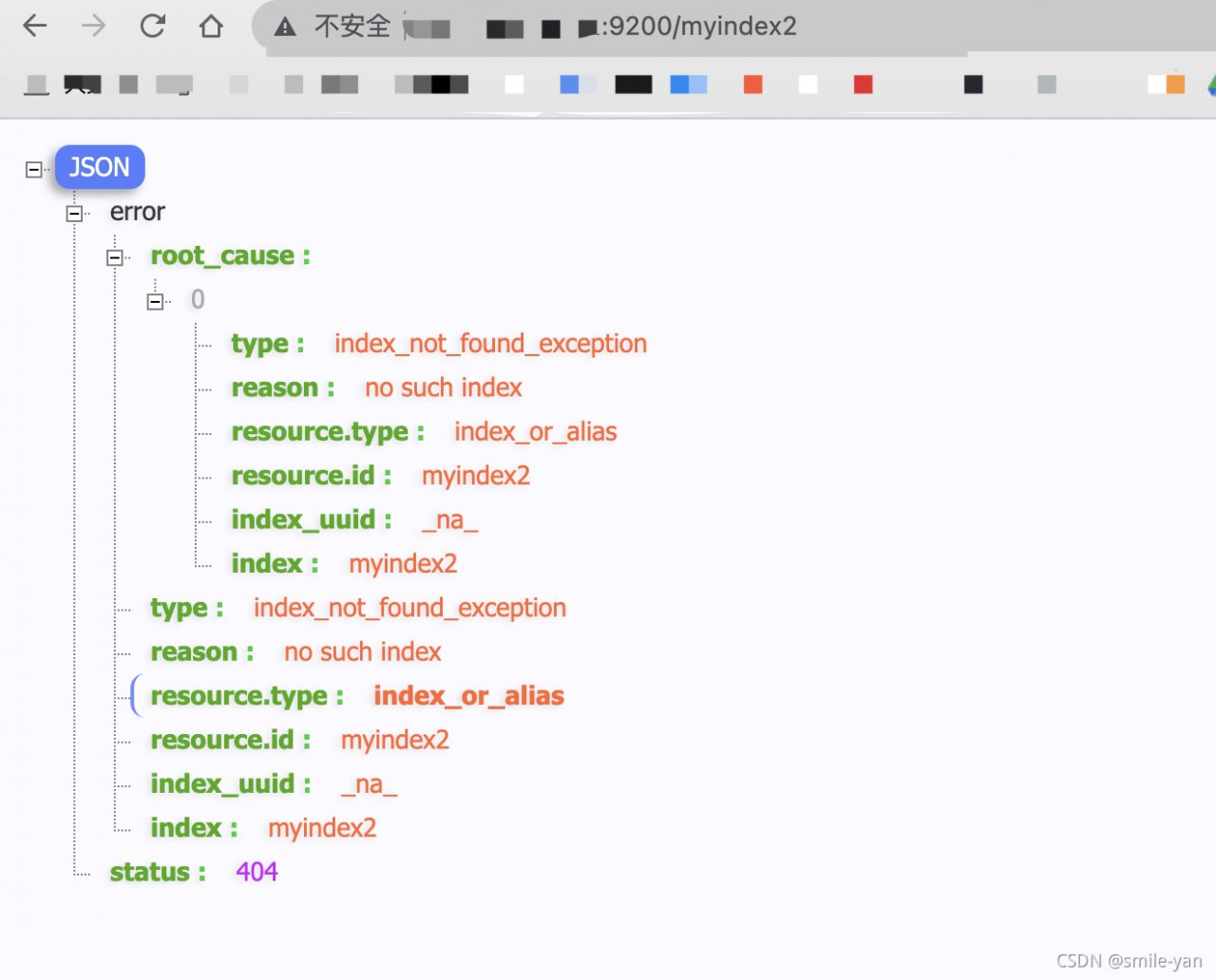
Creating the index myindex2, and deleting the index can work normally

[Solved] S3fs mount error: s3fs: unable to access MOUNTPOINT…

s3fs mount reports an error, prompting: s3fs: unable to access MOUNTPOINT /backup/fileserver/: Transport endpoint is not connected

s3fs appfiles.v1 /backup/fileserver/ -o passwd_file=/etc/passwd-s3fs -o url=http://192.168.12.30 -o uid=1002,gid=1002 -o use_path_request_style
Error Messages:
s3fs: unable to access MOUNTPOINT /backup/fileserver/: Transport endpoint is not connected

How to Solve this error:
1, confirm whether the network link ok.
ping 192.168.12.30
can ping through.
2, whether the port is open
telnet 192.168.12.30 80
port can be passed, that is not a network problem caused.
3, ls /backup/fileserver/
error message: ls: cannot access fileserver: Transport endpoint is not connected
It is good that there is an error, because ls will not report an error for an empty directory, but this error means that the directory is still mounted, but the link is not available.
Checking the process, the process hangs. I suspect that the process is hung, but the directory is not unmounted.
4. Manually unmount
umount /backup/fileserver/
No error is reported, good, that means the inference is correct.
5, mount test
s3fs appfiles.v1 /backup/fileserver/ -o passwd_file=/etc/passwd-s3fs -o url=http://192.168.12.30 -o uid=1002,gid=1002 -o use_path_request_ style
No error was reported, ok! The troubleshooting process is over. This means that the problem is caused by the lack of unmounting.
6, confirm whether it is mounted up:

df -hT
Filesystem Type Size Used Avail Use% Mounted on
devtmpfs devtmpfs 7.8G 0 7.8G 0% /dev
tmpfs tmpfs 7.8G 0 7.8G 0% /dev/shm
tmpfs tmpfs 7.8G 819M 7.0G 11% /run
tmpfs tmpfs 7.8G 0 7.8G 0% /sys/fs/cgroup
/dev/vda1 xfs 15G 4.8G 11G 32% /
/dev/vdb xfs 100G 4.0G 97G 4% /backup
tmpfs tmpfs 1.6G 0 1.6G 0% /run/user/0
s3fs fuse.s3fs 16E 0 16E 0% /backup/recordfiles
tmpfs tmpfs 1.6G 0 1.6G 0% /run/user/1000
s3fs fuse.s3fs 16E 0 16E 0% /backup/fileserver

Check that it is already there. Mount ok The whole process is over.
Json.parse: All Error & How to Solve Them

Error Messages:
Uncaught SyntaxError: Unexpected token N in JSON at position 0

JSON.parse(NaN)
JSON.parse('NaN')

Error Messages:
Uncaught SyntaxError: Unexpected token u in JSON at position 0

JSON.parse(undefind)
JSON.parse('undefind')

Error Messages:
Uncaught SyntaxError: Unexpected token o in JSON at position 1

JSON.parse({a:2})

Error Messages:
Uncaught SyntaxError: Unexpected token a in JSON at position 1

JSON.parse('{a:2}')

Error Messages:
Unexpected token ' in JSON at position 1

JSON.parse("{'a':11}")

Error Messages:

JSON.parse('{"a":11}'

**About json.parse

JSON.parseFor parsing JSON string, and returns the corresponding value, which parameters must conform to the format JSON string, otherwise an error.
JSON Is a syntax used to serialize objects, arrays, numbers, strings, Boolean values, and null.
JSON The attribute names of objects and arrays must be strings enclosed in double quotes, and there must be no comma after the last attribute.
JSON The string should also be enclosed in double quotes.
JSON values are forbidden to have leading zeros (JSON.stringify method automatically ignore leading zeros, and the JSON.parse method will report error); if there is a decimal point, then followed by at least one digit.

Vue wran name Error: Unkown custom element [How to Solve]

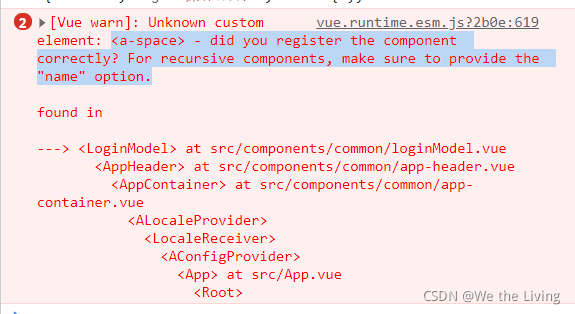
[Vue warn]: Unknown custom element: – did you register the component correctly? For recursive components, make sure to provide the “name” option.

The Vue project uses ant design. After introducing the spacing space, the name always reports an error. Adding name and modifying name are useless.

Duplicate component names or repeated import. Finally, after searching the configuration file, it is found that it is imported on-demand, and sapce of ant is not introduced. After the introduction, the error report can be solved.

const MyPlugin = {}
import bus from '@cg/bus'
import {
  Result,
  Button,
  Space,
} from 'ant-design-vue'

MyPlugin.install = function (Vue, options) {
  // To reduce the size of the dist, try to do on-demand loading
  Vue.use(Button)
  Vue.use(Form)
  Vue.use(Result)
  Vue.use(Space)
  Vue.use(FormModel)

export default MyPlugin

If there is anything wrong, please correct it and exchange technology together.

Kotlin activity Startup and Compile Error [How to Solve]

The android project added an activity written in kotlin code and tried to launch the page.
The error is reported as follows:

C:\Users\15901\Desktop\ShangXueTang\app\src\main\java\com\example\shangxuetang\MainActivity.java:41: ����: �Ҳ�������
startActivity(new Intent(MainActivity.this, LifecycleActivity.class));
^
����: �� LifecycleActivity
�: �� MainActivity
1 ������


Solution:

    1. Add the following two lines of configuration to build.gradle(:app)
apply plugin: 'kotlin-android'
apply plugin: 'kotlin-android-extensions'
    1. add the dependency path.
dependencies {
        classpath "org.jetbrains.kotlin:kotlin-gradle-plugin:$kotlin_version"
        }

nvm npm Error: segmentation fault [How to Solve]

Background

After NVM use switches the node version, NPM reports an error segmentation fault

My solution

sudo apt autoremove npm

Note: it must be autoremove, not remove. Remove is not completely cleared

Cause guess

There is a global NPM. The configuration of the global NPM affects the configuration of the NPM version corresponding to the node installed by the NVM