Author Archives: Robins

[Solved] Openfegn Remote Call Error: java.lang.NullPointerException: null

Problem Description:

tip: version dependency is the worst problem


Solution:

Introduce spring cloud loadbalancer dependency

<dependency>
    <groupId>org.springframework.cloud</groupId>
    <artifactId>spring-cloud-starter-loadbalancer</artifactId>
    <version>3.0.3</version>
</dependency>

Due to the version problem, some must exclude ribbon dependencies from Nacos, otherwise the loadbalancer is invalid

<dependency>
    <groupId>com.alibaba.cloud</groupId>
    <artifactId>spring-cloud-starter-alibaba-nacos-discovery</artifactId>
    <!--Client-side load balancing without Ribbon-->
    <exclusions>
        <exclusion>
            <groupId>org.springframework.cloud</groupId>
            <artifactId>spring-cloud-starter-netflix-ribbon</artifactId>
        </exclusion>
    </exclusions>
</dependency>

[Solved] Junit.test use error: log4j:WARN No appenders could be found for logger

1. Warning message
Error output message.
log4j:WARN No appenders could be found for logger (org.apache.ibatis.logging.LogFactory).
log4j:WARN Please initialize the log4j system properly.
log4j:WARN See http://logging.apache.org/log4j/1.2/faq.html#noconfig for more info.

Solution:
2.1 No log4j dependency is introduced
Insert the following code in the pom.xml file.

<dependency>
            <groupId>log4j</groupId>
            <artifactId>log4j</artifactId>
            <version>1.2.17</version>
        </dependency>

Configure the log4j.properties file and put this folder under Src/main/resources

log4j.rootLogger=debug, stdout, R

log4j.appender.stdout=org.apache.log4j.ConsoleAppender
log4j.appender.stdout.layout=org.apache.log4j.PatternLayout

# Pattern to output the caller's file name and line number.
log4j.appender.stdout.layout.ConversionPattern=%5p [%t] (%F:%L) - %m%n

log4j.appender.R=org.apache.log4j.RollingFileAppender
log4j.appender.R.File=example.log

log4j.appender.R.MaxFileSize=100KB
# Keep one backup file
log4j.appender.R.MaxBackupIndex=5

log4j.appender.R.layout=org.apache.log4j.PatternLayout
log4j.appender.R.layout.ConversionPattern=%p %t %c - %m%n


perhaps

# Set root category priority to INFO and its only appender to CONSOLE.
#log4j.rootCategory=INFO, CONSOLE            debug   info   warn error fatal
log4j.rootCategory=debug, CONSOLE, LOGFILE

# Set the enterprise logger category to FATAL and its only appender to CONSOLE.
log4j.logger.org.apache.axis.enterprise=FATAL, CONSOLE

# CONSOLE is set to be a ConsoleAppender using a PatternLayout.
log4j.appender.CONSOLE=org.apache.log4j.ConsoleAppender
log4j.appender.CONSOLE.layout=org.apache.log4j.PatternLayout
log4j.appender.CONSOLE.layout.ConversionPattern=%d{ISO8601} %-6r [%15.15t] %-5p %30.30c %x - %m\n

# LOGFILE is set to be a File appender using a PatternLayout.
log4j.appender.LOGFILE=org.apache.log4j.FileAppender
log4j.appender.LOGFILE.File=d:\axis.log
log4j.appender.LOGFILE.Append=true
log4j.appender.LOGFILE.layout=org.apache.log4j.PatternLayout
log4j.appender.LOGFILE.layout.ConversionPattern=%d{ISO8601} %-6r [%15.15t] %-5p %30.30c %x - %m\n


[Solved] Python Project Import Module Error: ModuleNotFoundError

Question

Importing a custom module in the project reports an error ModuleNotFoundError. The project directory structure is as follows. When in a.script.py from bc script.py, it prompts that the b module cannot be found, and the __init__.py file created in the b directory still reports an error.

Solution:

There are several methods of online search:

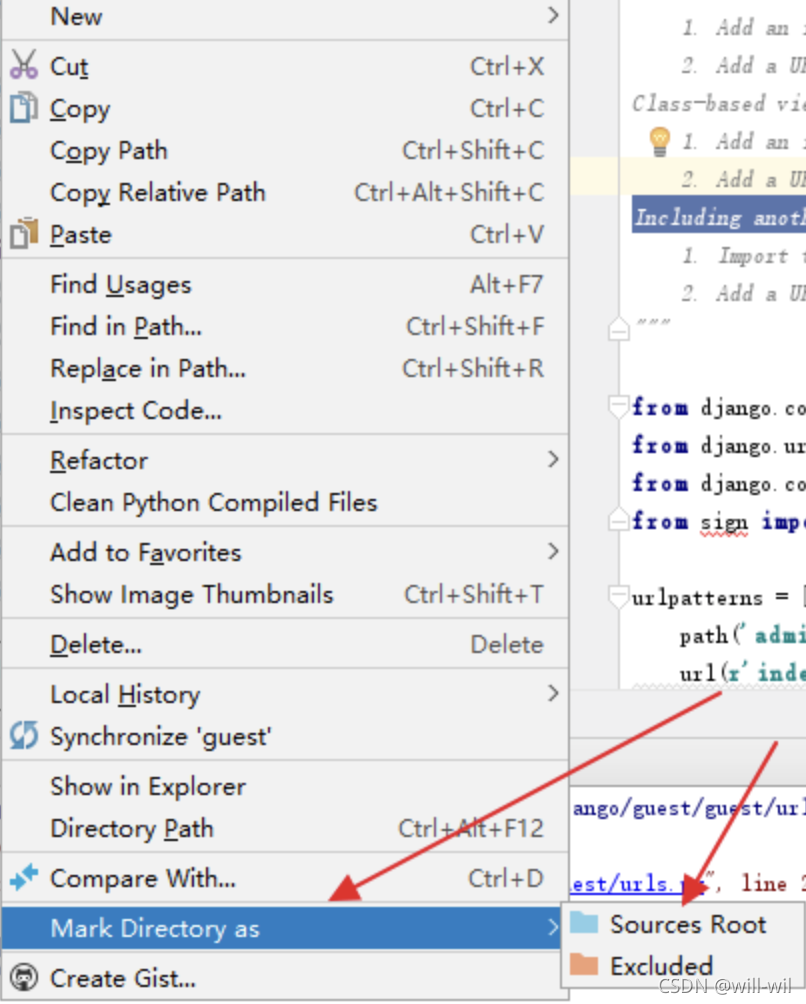
  1. If you use pycharm, you can right-click on the file directory location (not pycharm, visual inspection is useful)

2. import sys (Working)
sys.path.append(‘The address of the reference module’)
3. Create in the folder that needs to be imported __init.py__ (Not Working)
4. Direct export PYTHONPATH=path in linux (Working)


Summary

  • If the imported module and the main program are in the same directory, import directly.
  • If the imported module is in a subdirectory of the directory where the main program is located, you can add an __init__.py file to the subdirectory, which makes the python interpreter treat the directory as a package, and then you can directly “import the subdirectory. Module” “.
  • If the imported module is in the parent directory of the directory where the main program is located, the above two are not feasible, and the path needs to be modified.

1.

The following method can be used, but it is a one-time thing.
 
import sys  
sys.path.append('address of the referenced module')  
 
 
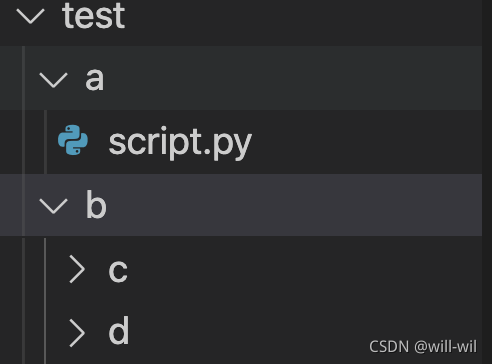
File directory structure, need to be in the a.script.py filefrom b.c.1.py report error module not found
test
├── a
│ ├── _init_paths.py
│ └── script.py
└── b
    ├── c
    │ └── 1.py
    └── d
Suggested forms.
1. Write import sys sys.path.append('address of referenced module') directly at the beginning of the script.py file to add the path.
2. Create the _init_paths.py script in the a directory, and then just import _init_paths in script.py.
 
#_init_paths.py
import os
import sys
 
def add_path(path):
    """Add path to sys system path
    """
    if path not in sys.path:
        sys.path.append(path)
 
current_dir = os.path.dirname(__file__)
parent_dir = os.path.dirname(current_dir)
add_path(parent_dir)

2.Modify the environment variables directly, you can use export PYTHONPATH=path to add in linux.

Memory error: cannot allocate memory [How to Solve]

1. Problem background

Start a process, and the process reports an error: cannot allocate memory

2. Cause of problem

Check the script of this process. It is found that the script needs to call the memory of the system kernel to start, but the current kernel memory is not allocated.

3. Troubleshooting

1. View the remaining memory of the current physical machine

free -m

2. View the number of processes in the current system

# The maximum number of processes allowed in the system
sysctl kernel.pid_max

# The maximum number of processes on the current host
ps -eLf | wc -l

3. View memory application and availability

cat /proc/meminfo | grep Commit

4. Solution

Unable to allocate kernel memory

sysctl overcommit_memory=1

Error: input is invalid type [How to Solve]

This error message is because MD5 encryption is used, but the MD5 encrypted data is not found to be undefined

curObj.creditCode ?curObj.creditCode : md5(curObj.registerNo)) 

If curobj.registerno here is undefined, an error will be reported.

When you see this error, print it on the console.

Apple M1: How to Solve Spark runs Error

snappy-java-1.1.8.3 (2021-01-20)

Could not initialize class org.xerial.snappy.Snappy
m1 no native library is found for os.name=mac and os.arch=aarch64

Solution:

<dependency>
    <groupId>org.xerial.snappy</groupId>
    <artifactId>snappy-java</artifactId>
    <version>1.1.8.3</version>
    <scope>provided</scope>
</dependency>

The latest package can support M1 chip.

[Solved] JDBC error: Communications link failure

Change url: In addition?useUnicode=true& CharacterEncoding=UTF-8& serverTimezone=UTC”

 <!-- Database connection pooling -->
    <bean id="dataSource" class="com.alibaba.druid.pool.DruidDataSource"
          destroy-method="close">
        <property name="url" value="jdbc:mysql://localhost:3306/user_db?useUnicode=true&amp;characterEncoding=UTF-8&amp;serverTimezone=UTC" />
        <property name="username" value="root" />
        <property name="password" value="123456" />
        <property name="driverClassName" value="com.mysql.jdbc.Driver" />
    </bean>

Vue Dynamic Display Picture Error 404: Not Found [How to Solve]

<img :src="image"/>

When we dynamically load pictures, an error will appear as shown in the following figure

1. The first possibility is that you write a relative path, and you need to write an absolute path

image:'../assets/image/top10-1.png'
You need to change to the specific path
image:'/src/assets/images/top10-1.png'

2. The second solution is to use require ()

<img :src="require(images)"/>

3. The third solution is to put the pictures under the public directory, but although this solves the problem, the files in this directory will not be packaged when using webpack
4. If you use ts, you cannot use require (). You can use import to import your picture path as a module

<template>
	<img :src="images"/>
</template>
<script>
	import image from '../assets/image/top10-1.png'
	export default{
		data(){
			return {
				images:image
			}
		}
	}
</script>

[Solved] Android HTTPS request resource or interface error: server certificate

Error log:

javax.net.ssl.SSLHandshakeException: java.security.cert.CertPathValidatorException: Trust anchor for certification path not found.
        at com.android.org.conscrypt.ConscryptFileDescriptorSocket.startHandshake(ConscryptFileDescriptorSocket.java:229)
        at com.android.okhttp.internal.io.RealConnection.connectTls(RealConnection.java:192)
        at com.android.okhttp.internal.io.RealConnection.connectSocket(RealConnection.java:149)
        at com.android.okhttp.internal.io.RealConnection.connect(RealConnection.java:112)
        at com.android.okhttp.internal.http.StreamAllocation.findConnection(StreamAllocation.java:184)
        at com.android.okhttp.internal.http.StreamAllocation.findHealthyConnection(StreamAllocation.java:126)
        at com.android.okhttp.internal.http.StreamAllocation.newStream(StreamAllocation.java:95)
        at com.android.okhttp.internal.http.HttpEngine.connect(HttpEngine.java:281)
        at com.android.okhttp.internal.http.HttpEngine.sendRequest(HttpEngine.java:224)
        at com.android.okhttp.internal.huc.HttpURLConnectionImpl.execute(HttpURLConnectionImpl.java:461)
        at com.android.okhttp.internal.huc.HttpURLConnectionImpl.connect(HttpURLConnectionImpl.java:127)
        at com.android.okhttp.internal.huc.DelegatingHttpsURLConnection.connect(DelegatingHttpsURLConnection.java:89)
        at com.android.okhttp.internal.huc.HttpsURLConnectionImpl.connect(HttpsURLConnectionImpl.java:26)
        at com.bumptech.glide.load.data.HttpUrlFetcher.loadDataWithRedirects(HttpUrlFetcher.java:100)
        at com.bumptech.glide.load.data.HttpUrlFetcher.loadData(HttpUrlFetcher.java:56)
        at com.bumptech.glide.load.model.MultiModelLoader$MultiFetcher.loadData(MultiModelLoader.java:100)
        at com.bumptech.glide.load.model.MultiModelLoader$MultiFetcher.startNextOrFail(MultiModelLoader.java:164)
        at com.bumptech.glide.load.model.MultiModelLoader$MultiFetcher.onLoadFailed(MultiModelLoader.java:154)
        at com.bumptech.glide.load.data.HttpUrlFetcher.loadData(HttpUrlFetcher.java:62)
        at com.bumptech.glide.load.model.MultiModelLoader$MultiFetcher.loadData(MultiModelLoader.java:100)
        at com.bumptech.glide.load.engine.SourceGenerator.startNextLoad(SourceGenerator.java:70)
        at com.bumptech.glide.load.engine.SourceGenerator.startNext(SourceGenerator.java:63)
        at com.bumptech.glide.load.engine.DecodeJob.runGenerators(DecodeJob.java:310)
        at com.bumptech.glide.load.engine.DecodeJob.runWrapped(DecodeJob.java:276)
        at com.bumptech.glide.load.engine.DecodeJob.run(DecodeJob.java:234)
        at java.util.concurrent.ThreadPoolExecutor.runWorker(ThreadPoolExecutor.java:1167)
        at java.util.concurrent.ThreadPoolExecutor$Worker.run(ThreadPoolExecutor.java:641)
        at java.lang.Thread.run(Thread.java:764)
        at com.bumptech.glide.load.engine.executor.GlideExecutor$DefaultThreadFactory$1.run(GlideExecutor.java:393)
     Caused by: java.security.cert.CertificateException: java.security.cert.CertPathValidatorException: Trust anchor for certification path not found.
        at com.android.org.conscrypt.TrustManagerImpl.checkTrustedRecursive(TrustManagerImpl.java:646)
        at com.android.org.conscrypt.TrustManagerImpl.checkTrusted(TrustManagerImpl.java:495)
        at com.android.org.conscrypt.TrustManagerImpl.checkTrusted(TrustManagerImpl.java:418)
        at com.android.org.conscrypt.TrustManagerImpl.getTrustedChainForServer(TrustManagerImpl.java:339)
        at android.security.net.config.NetworkSecurityTrustManager.checkServerTrusted(NetworkSecurityTrustManager.java:94)
        at android.security.net.config.RootTrustManager.checkServerTrusted(RootTrustManager.java:88)
        at com.android.org.conscrypt.Platform.checkServerTrusted(Platform.java:208)
        at com.android.org.conscrypt.ConscryptFileDescriptorSocket.verifyCertificateChain(ConscryptFileDescriptorSocket.java:404)
        at com.android.org.conscrypt.NativeCrypto.SSL_do_handshake(Native Method)
        at com.android.org.conscrypt.NativeSsl.doHandshake(NativeSsl.java:375)
        at com.android.org.conscrypt.ConscryptFileDescriptorSocket.startHandshake(ConscryptFileDescriptorSocket.java:224)
        at com.android.okhttp.internal.io.RealConnection.connectTls(RealConnection.java:192) 
        at com.android.okhttp.internal.io.RealConnection.connectSocket(RealConnection.java:149) 
        at com.android.okhttp.internal.io.RealConnection.connect(RealConnection.java:112) 
        at com.android.okhttp.internal.http.StreamAllocation.findConnection(StreamAllocation.java:184) 
        at com.android.okhttp.internal.http.StreamAllocation.findHealthyConnection(StreamAllocation.java:126) 
        at com.android.okhttp.internal.http.StreamAllocation.newStream(StreamAllocation.java:95) 
        at com.android.okhttp.internal.http.HttpEngine.connect(HttpEngine.java:281) 
        at com.android.okhttp.internal.http.HttpEngine.sendRequest(HttpEngine.java:224) 
        at com.android.okhttp.internal.huc.HttpURLConnectionImpl.execute(HttpURLConnectionImpl.java:461) 
        at com.android.okhttp.internal.huc.HttpURLConnectionImpl.connect(HttpURLConnectionImpl.java:127) 
        at com.android.okhttp.internal.huc.DelegatingHttpsURLConnection.connect(DelegatingHttpsURLConnection.java:89) 
        at com.android.okhttp.internal.huc.HttpsURLConnectionImpl.connect(HttpsURLConnectionImpl.java:26) 
        at com.bumptech.glide.load.data.HttpUrlFetcher.loadDataWithRedirects(HttpUrlFetcher.java:100) 
        at com.bumptech.glide.load.data.HttpUrlFetcher.loadData(HttpUrlFetcher.java:56) 
        at com.bumptech.glide.load.model.MultiModelLoader$MultiFetcher.loadData(MultiModelLoader.java:100) 
        at com.bumptech.glide.load.model.MultiModelLoader$MultiFetcher.startNextOrFail(MultiModelLoader.java:164) 
        at com.bumptech.glide.load.model.MultiModelLoader$MultiFetcher.onLoadFailed(MultiModelLoader.java:154) 
        at com.bumptech.glide.load.data.HttpUrlFetcher.loadData(HttpUrlFetcher.java:62) 
        at com.bumptech.glide.load.model.MultiModelLoader$MultiFetcher.loadData(MultiModelLoader.java:100) 
        at com.bumptech.glide.load.engine.SourceGenerator.startNextLoad(SourceGenerator.java:70) 
        at com.bumptech.glide.load.engine.SourceGenerator.startNext(SourceGenerator.java:63) 
        at com.bumptech.glide.load.engine.DecodeJob.runGenerators(DecodeJob.java:310) 
        at com.bumptech.glide.load.engine.DecodeJob.runWrapped(DecodeJob.java:276) 
        at com.bumptech.glide.load.engine.DecodeJob.run(DecodeJob.java:234) 
        at java.util.concurrent.ThreadPoolExecutor.runWorker(ThreadPoolExecutor.java:1167) 
        at java.util.concurrent.ThreadPoolExecutor$Worker.run(ThreadPoolExecutor.java:641) 
        at java.lang.Thread.run(Thread.java:764) 
        at com.bumptech.glide.load.engine.executor.GlideExecutor$DefaultThreadFactory$1.run(GlideExecutor.java:393) 

Solution:

package com.ex.pu;

import android.app.Application;

import java.security.SecureRandom;
import java.security.cert.X509Certificate;

import javax.net.ssl.HostnameVerifier;
import javax.net.ssl.HttpsURLConnection;
import javax.net.ssl.SSLContext;
import javax.net.ssl.SSLSession;
import javax.net.ssl.TrustManager;
import javax.net.ssl.X509TrustManager;

public class CApp extends Application {

    @Override
    public void onCreate() {
        super.onCreate();

        // global handling of certificate issues
        handleSSLHandshake();
    }

    /**
     * handle certificate issues globally
     * Ignore the certificate checksum for https
     * Avoid Glide loading https images reporting errors.
     * javax.net.ssl.SSLHandshakeException: java.security.cert.CertPathValidatorException: Trust anchor for certification path not found.
     */
    public static void handleSSLHandshake() {
        try {
            TrustManager[] trustAllCerts = new TrustManager[]{new X509TrustManager() {
                public X509Certificate[] getAcceptedIssuers() {
                    return new X509Certificate[0];
                }

                @Override
                public void checkClientTrusted(X509Certificate[] certs, String authType) { }

                @Override
                public void checkServerTrusted(X509Certificate[] certs, String authType) { }
            }};

            SSLContext sc = SSLContext.getInstance("TLS");
            // trustAllCerts trusts all certificates
            sc.init(null, trustAllCerts, new SecureRandom());
            HttpsURLConnection.setDefaultSSLSocketFactory(sc.getSocketFactory());
            HttpsURLConnection.setDefaultHostnameVerifier(new HostnameVerifier() {
                @Override
                public boolean verify(String hostname, SSLSession session) {
                    return true;
                }
            });

        } catch (Exception e) {
        }
    }
}

[Solved] Chrome Error: The request client is not a secure context

1. Background

When using Ajax to access across domains, an error is suddenly reported:

 Access to XMLHttpRequest at 'http://127.0.0.1:yyy/' from origin 'http://xxx:yyy' 
 has been blocked by CORS policy: 
 The request client is not a secure context 
 and the resource is in more-private address space `local`.

The general meaning is that the request is blocked by cross-domain policy, and the client is not secure.

2. Analysis

Baidu has found many times that it is caused by the upgrade of Chrome browser, and this problem also exists in edge browser.

3. Solution

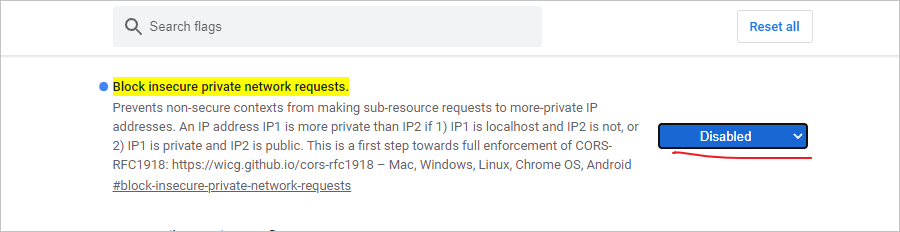
Enter in the address field chrome://flags/#block -Secure private network requests , change the option to disable disable, and then restart the browser

[Solved] Springboot upload failed to find the temporary directory error

The springboot upload failed to find the temporary directory and reported an error

1. Problem description

According to the feedback of online users, the upload file function suddenly reported an error. After checking the log file, the error message is:
failed to parse multipart servlet request; nested exception is java.lang.RuntimeException: java.nio.file.NoSuchFileException: /tmp/undertow.8099.1610110889708131476/undertow1171565914461190366upload

2. Cause investigation

Originally, when launching the spring boot application through java - jar in the linux operating system, a temporary directory will be created by default in the /tmp directory (in Windows operating system, C:\users\default\appdata\ local\temp), and the temporary directory is generally in the format of undertow. Port.* (if the Tomcat container is Tomcat.Port.*, this article will take undertow as an example, and Tomcat is the same.) , files need to be converted into temporary files and stored here when uploading. However, if the files in the /tmp directory are not used for more than 10 days, they will be automatically cleaned up by the system. Therefore, the above problems do not occur in the directory when uploading again.

3. Problem recurrence

Since the temporary directory will be created automatically when the service is started, restart the service in the local or test environment, delete the undertow.Port.* (if Tomcat, it is Tomcat.Port.*) directory generated under /tmp , and upload the file again.

4. Solution

1. Manually create the temporary directory (not recommended)

mkdir -p /tmp/undertow.8099.1610110889708131476/undertow1171565914461190366upload

PS: if the file is not uploaded for more than 10 days again, the same problem will occur. The symptoms are not the root cause.

2. Modify Linux system configuration (not recommended)

vim /usr/lib/tmpfiles.d/tmp.con
# Add at the end of the file, which means that the folder at the beginning of undertow will not be cleaned up
x /tmp/undertow*

PS: if multiple servers are deployed, each server needs to be modified.

3. Modify spring boot configuration file (recommended)

spring:
  servlet:
    multipart:
      # Specify a custom upload directory
      location: /mnt/tmp

PS: when using this method, you must ensure that /MNT/tmp exists. If it does not exist, the same error will occur. Therefore, it needs to be judged every time the service is started. If the directory exists, it will be ignored, and if it does not exist, it will be created. The code is as follows:

@Slf4j
@Configuration
public class MultipartConfig {

    @Value("${spring.servlet.multipart.location}")
    private String fileTempDir;

    @Bean
    MultipartConfigElement multipartConfigElement() {
        String os = System.getProperty("os.name");
        // windows
        if(os.toLowerCase().startsWith("win")){
            fileTempDir = "C:" + fileTempDir;
        }
        log.info("fileTempDir:{}", fileTempDir);
        MultipartConfigFactory factory = new MultipartConfigFactory();
        File tmpDirFile = new File(fileTempDir);
        // Determine whether the folder exists
         if (!tmpDirFile.exists()) {
             //Create folder
            boolean mkdirSuccess = tmpDirFile.mkdirs();
            log.info("create temp dir,result:{}", mkdirSuccess);
        }
        factory.setLocation(fileTempDir);
        return factory.createMultipartConfig();
    }

}

[Solved] Lumen Error: Class redis does not exist

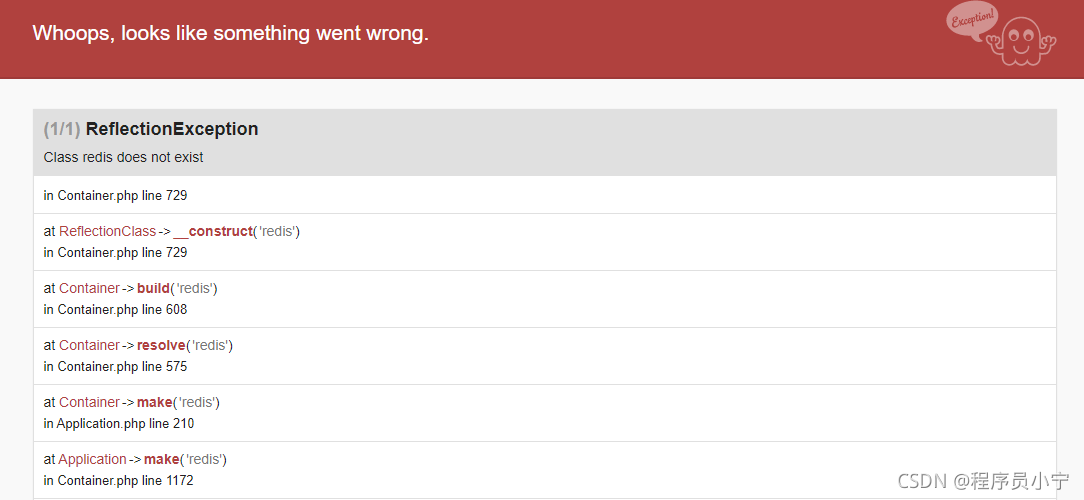
The company deployed a new project using lumen. The access interface reported a class redis does not exist error, which literally means that redis could not be found. After looking for a solution for a long time, it was later found that the redis plug-in was not added in composer.json, so the container could not find the redis service when loading. The solution is as follows:

1. Add “illuminate/redis” in composer.json: “^ 5.4”

2. Re execute composer install (if the lock file cannot be executed, delete composer.lock and then execute). After successful execution, the redis folder will be generated under vendor\illuminate

3. In bootstrap/app.php, add $app ->; register(Illuminate\Redis\RedisServiceProvider::class);