Author Archives: Robins

[Solved] Error: this may cause an update error. (“prov”, value)

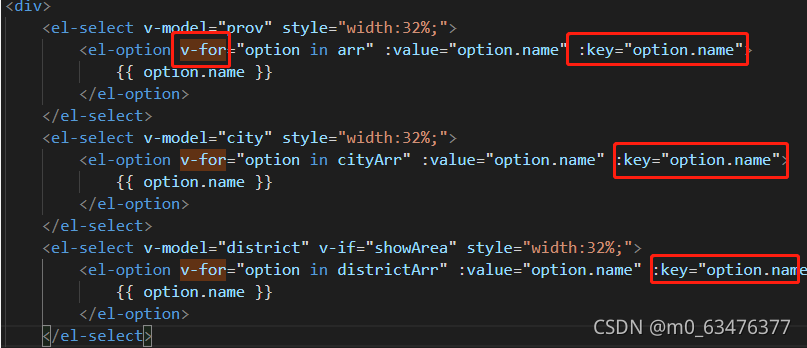
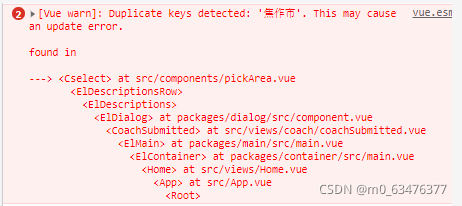
Duplicate keys detected: ‘Jiaozuo City’. This may cause an update error.
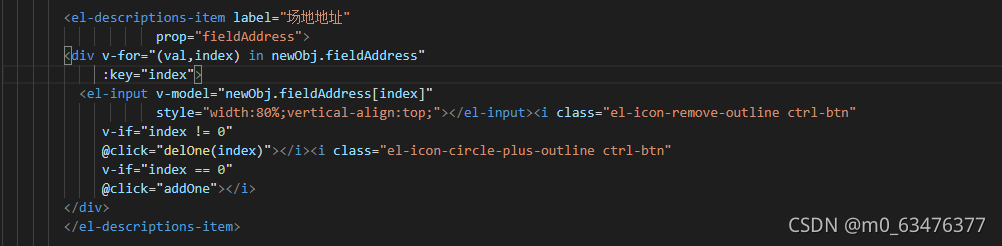
if you see this error message, it indicates that the key value of the V-for instruction is repeated,

Just modify your key value so that it will not be repeated.

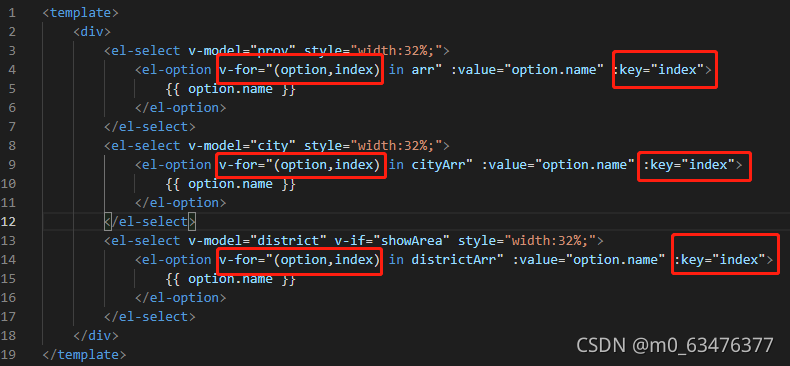
After modification, it is like this

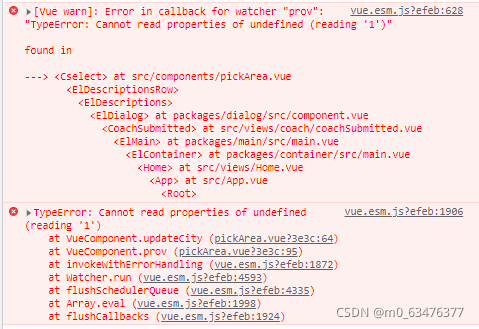
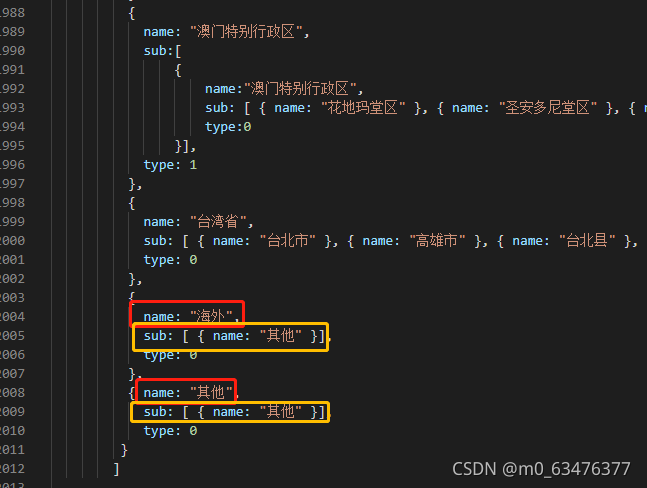
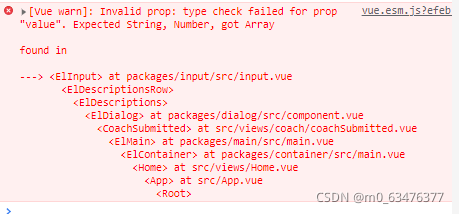
When the address is selected as other, such an error will be reported. After looking at the area.js region, the structure of other regions is different from that of other regions, and it will be changed to the same structure. (seems to be)

‘value’ is expected to be string number, But the result is array

Console.log the current error code location   Find out which are arrays, and then look in the code to see where the problem is

If you comment on this line of code, you will not report an error!

After change

[Solved] OpenCV Error: AttributeError: module ‘cv2‘ has no attribute ‘data‘

Opencv error: attributeerror: module ‘CV2’ has no attribute ‘data’
the following error will appear when running the face detection code:

face_detector = cv.CascadeClassifier(cv.data.haarcascades + "haarcascade_frontalface_alt2.xml")
eye_detector = cv.CascadeClassifier(cv.data.haarcascades + "haarcascade_eye.xml")
smile_detector = cv.CascadeClassifier(cv.data.haarcascades + "haarcascade_smile.xml")


AttributeError: module 'cv2' has no attribute 'data'

Solution: uninstall your existing opencv Python and install my version of OpenCV

1. Open Anaconda prompt and enter

pip uninstall opencv-python

2. Re input

pip install opencv-python -i http://mirrors.aliyun.com/pypi/simple --trusted-host mirrors.aliyun.com

Note: when uninstalling opencv, select y, and don’t worry about red explosion

MYSQL:ERROR 1819 (HY000): Your password does not satisfy the current policy requirements

[root@ip-172-31-43-199 ~]# mysql -V
mysql  Ver 8.0.27 for Linux on x86_64 (MySQL Community Server - GPL)

Password policy problem exception information:
error 1819 (HY000): your password does not satisfy the current policy requirements

terms of settlement:

1. View the initial password policy of MySQL,
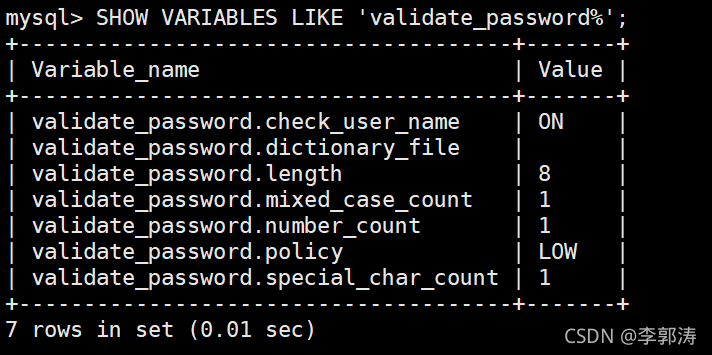
enter the statement show variables like 'validate_ password%'; view,
as shown in the following figure:
this is what I modified:

2. First, set the verification strength level of the password,
set validate_ password_ If the global parameter of policy is low,
enter the set value statement set global validate_ password.policy=LOW; to set the value,

Parameters related to MySQL password policy
1)、validate_ password_ Length the total length of the fixed password
2)、validate_ password_ dictionary_ File specifies the file path for password authentication
3)、validate_ password_ mixed_ case_ Count the total number of large/small letters in the whole password
4)、validate_ password_ number_ Count the number of Arabic numerals at least in the whole password
5)、validate_ password_ Policy specifies the strength and authentication level of the password. The default value is medium
about validate_ password_ Value of policy: 0/low: only verify the length; 1/medium: verify the length, number, case and special characters; 2/strong: verify the length, number, case, special characters and dictionary file
6)、validate_ password_ special_ char_ Count the number of special characters at least in the whole password;

Mysql5.1 password modification method:
set password for 'root' @ 'localhost' = password ('12121212 ');

https://blog.csdn.net/qq_ 39344689/article/details/89674079

[Solved] fatal error: cuda_runtime.h: No such file or directory

Background

Today, I want to run a yolact model, but in the process of training, I need a DCN network model. This requires CUDA to compile relevant files, but an error is reported. The main errors are:

	cuda_runtime.h: No such file or directory

I spent an afternoon reading a lot of blogs, but I didn’t solve it. Later I knew why. In fact, the solution is also very simple, that is, add some folder paths of CUDA installation directory to environment variables. The following are the solutions for the windows operating system:

Add the following two paths to the environment variable path:

	C:\Program Files\NVIDIA GPU Computing Toolkit\CUDA\v11.0\bin
	C:\Program Files\NVIDIA GPU Computing Toolkit\CUDA\v11.0\lib\x64

Basically, everyone’s default installation path is this. You only need to replace v11.0 according to their installed CUDA version number.

[Solved] Deploy the front-end package online. Net:: err_SSL_PROTOCOL_ERROR

Deploy to the line and report a pile of errors:
JS,CSS and HTML report the following errors

net::ERR_SSL_PROTOCOL_ERROR

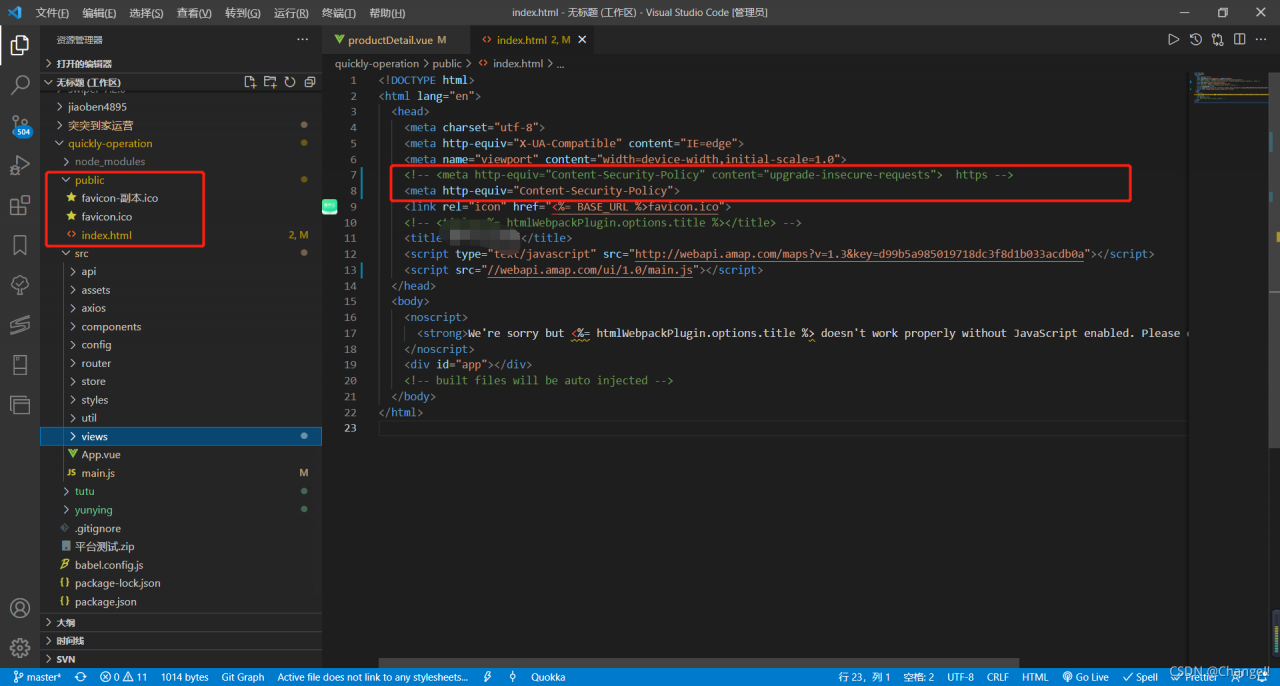
Because the domain name used by the server is HTTPS/HTTP
deployed to the online address, HTTPS starts with the first line of code and HTTP uses the second line of code

<meta http-equiv="Content-Security-Policy" content="upgrade-insecure-requests"> 
<meta http-equiv="Content-Security-Policy"> 

[Solved] cURL error 60: SSL certificate problem: unable to get local issuer certificate

When the PHP server curl is based on the HTTPS protocol API, this problem will be reported if the environment does not handle it:

cURL error 60: SSL certificate problem: unable to get local issuer certificate

Solution:
(1) download the file used to support HTTPS

(2) Place the file in a location, such as “C:\env\cacert.PEM”

(3) Modify php.ini and add support for cacert.pem

[Solved] allure Error: unrecognized arguments: — alluredir — clean alluredir

An integrated environment has been built locally and runs smoothly. When moving to the ECS for construction, allure always reports an error and prompts that the command is wrong. After repeatedly comparing various modules and versions of python, it is found that they are the same and always report this error

ubuntu@VM-16-9-ubuntu:/var/lib/jenkins/workspace/autotest_daily/pytestdemo$ sudo python3 all.py 
ERROR: usage: all.py [options] [file_or_dir] [file_or_dir] [...]
all.py: error: unrecognized arguments: --alluredir --clean-alluredir
  inifile: /var/lib/jenkins/workspace/autotest_daily/pytestdemo/pytest.ini
  rootdir: /var/lib/jenkins/workspace/autotest_daily/pytestdemo

I searched everywhere but couldn’t find it. I thought there was a problem with the version of allure pytest. Compared with the version number, the version number is the same, because the difference between the two servers lies in the difference of source addresses. Is there any difference in the same version? Stuck here for an hour, execute   Sudo PIP3 install — upgrade allure pytest

Installing collected packages: six, allure-python-commons, allure-pytest
Successfully installed allure-pytest-2.9.45 allure-python-commons-2.9.45 six-1.16.0

The problem is that the version of six is different. Finally, we found a different version. The version of six used for local construction is 1.14.0 and the server is 1.16.0

Attempt to downgrade the version of six

sudo pip3 install six==1.14.0

Then continue to build. When pytest is executed normally, the build is OK. I have to say that there are so many holes in Python.

The question is, what does six do?

I searched it again. This thing is used to be compatible with Python 2 and 3 modules. It can be seen from this,

allure   allure-pytest                     2.9.45
allure-python-commons             2.9.45

The first two modules are incompatible with six 1.16.0, so they bring this kind of pit.
[Solved] ERROR: While executing gem … (Gem::FilePermissionError)

Environment: MAC.

When learning rails, follow the official documents. Errors may be reported at this step

 gem install rails

ERROR: While executing gem … (Gem::FilePermissionError)

Even if sudo is used to force the installation, an error will be reported in the next step.

rails new blog

`auth_ data=’: couldn’t set additional authenticated data

Solution:

Installing Ruby under MacOS – 🎄 Adomikao Yu Yongjian

The reason for the error is that the MAC installs ruby in the/usr/bin directory by default. This directory has strict permissions, resulting in code execution failure. The solution is to use RVM to install ruby in the user directory without affecting the system environment.

Error in `./a.out‘: free(): invalid next size (fast): 0x0000000001da8010

Error in `./a.out’: free(): invalid next size (fast): 0x0000000001da8010

*** Error in `./a.out': free(): invalid next size (fast): 0x0000000001da8010 ***
======= Backtrace: =========
/lib/x86_64-linux-gnu/libc.so.6(+0x777f5)[0x7f216399b7f5]
/lib/x86_64-linux-gnu/libc.so.6(+0x8038a)[0x7f21639a438a]
/lib/x86_64-linux-gnu/libc.so.6(cfree+0x4c)[0x7f21639a858c]
./a.out[0x400896]
/lib/x86_64-linux-gnu/libc.so.6(__libc_start_main+0xf0)[0x7f2163944840]
./a.out[0x400609]
======= Memory map: ========
00400000-00401000 r-xp 00000000 08:01 1155                               /home/csgec/C++/a.out
00600000-00601000 r--p 00000000 08:01 1155                               /home/csgec/C++/a.out
00601000-00602000 rw-p 00001000 08:01 1155                               /home/csgec/C++/a.out
01da8000-01dc9000 rw-p 00000000 00:00 0                                  [heap]
7f215c000000-7f215c021000 rw-p 00000000 00:00 0 
7f215c021000-7f2160000000 ---p 00000000 00:00 0 
7f216370e000-7f2163724000 r-xp 00000000 08:01 923094                     /lib/x86_64-linux-gnu/libgcc_s.so.1
7f2163724000-7f2163923000 ---p 00016000 08:01 923094                     /lib/x86_64-linux-gnu/libgcc_s.so.1
7f2163923000-7f2163924000 rw-p 00015000 08:01 923094                     /lib/x86_64-linux-gnu/libgcc_s.so.1
7f2163924000-7f2163ae4000 r-xp 00000000 08:01 953576                     /lib/x86_64-linux-gnu/libc-2.23.so
7f2163ae4000-7f2163ce4000 ---p 001c0000 08:01 953576                     /lib/x86_64-linux-gnu/libc-2.23.so
7f2163ce4000-7f2163ce8000 r--p 001c0000 08:01 953576                     /lib/x86_64-linux-gnu/libc-2.23.so
7f2163ce8000-7f2163cea000 rw-p 001c4000 08:01 953576                     /lib/x86_64-linux-gnu/libc-2.23.so
7f2163cea000-7f2163cee000 rw-p 00000000 00:00 0 
7f2163cee000-7f2163d14000 r-xp 00000000 08:01 953568                     /lib/x86_64-linux-gnu/ld-2.23.so
7f2163ef7000-7f2163efa000 rw-p 00000000 00:00 0 
7f2163f12000-7f2163f13000 rw-p 00000000 00:00 0 
7f2163f13000-7f2163f14000 r--p 00025000 08:01 953568                     /lib/x86_64-linux-gnu/ld-2.23.so
7f2163f14000-7f2163f15000 rw-p 00026000 08:01 953568                     /lib/x86_64-linux-gnu/ld-2.23.so
7f2163f15000-7f2163f16000 rw-p 00000000 00:00 0 
7ffcd77e9000-7ffcd780a000 rw-p 00000000 00:00 0                          [stack]
7ffcd798b000-7ffcd798e000 r--p 00000000 00:00 0                          [vvar]
7ffcd798e000-7ffcd7990000 r-xp 00000000 00:00 0                          [vdso]
ffffffffff600000-ffffffffff601000 r-xp 00000000 00:00 0                  [vsyscall]
fish: Job 2, “./a.out” terminated by signal SIGABRT (Abort)

resolvent:

unsigned int *a = (unsigned int *)malloc(sizeof(unsigned int) * 2 * n);

Malloc dynamically allocates memory. N must have confirmed the value
① you can add int n = 5 before applying for space

int n = 5;
    unsigned int *a = (unsigned int *)malloc(sizeof(unsigned int) * 2 * n);

⑤ You can also allocate space after user input, so that the value of n is known
unknown dynamic space cannot be allocated before user input.

 scanf("%d %d",&n,&m);
   // getchar();
    unsigned int *a = (unsigned int *)malloc(sizeof(unsigned int) * 2 * n);

After correction, the error report can disappear.