Wget Error: ERROR: The certificate of ‘xxxxx’ is not trusted
Solution:
Add -- no check certificate at the end of WGet, as shown in the figure

Wget Error: ERROR: The certificate of ‘xxxxx’ is not trusted
Solution:
Add -- no check certificate at the end of WGet, as shown in the figure
org.springframework.beans.factory.BeanCreationException: Error creating bean with name ‘testApplication’: Bean instantiation via constructor failed; nested exception is org.springframework.beans.BeanInstantiationException: Failed to instantiate [com.nos.test.TestApplication$$EnhancerBySpringCGLIB$$c1828724]: Constructor threw exception; nested exception is org.springframework.dao.InvalidDataAccessApiUsageException: Invalid numeric type, found: STRING; nested exception is org.bson.BsonInvalidOperationException: Invalid numeric type, found: STRING
Question request: List all the course names that appear in the STUDENT collection (distinct)
 public List<String> test6_01(){
        Query query = new Query();
        List<Integer> list_course = mongoTemplate.findDistinct(query,"CID","student_course",Integer.class);
        System.out.println(list_course);
        List<String> list = new ArrayList<>();
        for(Integer i:list_course){
            Query query1 = new Query(Criteria.where("CID").is(i));
            Course course = mongoTemplate.findOne(query1,Course.class,"course");
            list.add(course.getNAME());
        }
        return list;
    }
Org.bson.bsoninvalidoperationexception: invalid numeric type, found: String prompts me to find the wrong data type. Only when the CID found is of string type can I find the data imported in the data. The CID is automatically set to string type.
Then let’s look at the specific usage of finddistinct() in mongodb: you can re query, but you can’t sort.
The method receives 4 or 5 parameters, respectively:
1 query criteria
2 fields to be de duplicated filed
3 collection database table to be queried
4 POJO instance corresponding to collection to be queried
5 return result class (return list of filed fields to be de duplicated)
After modification:
  public List<String> test6_01(){
        Query query = new Query();
        List<String> list_course = mongoTemplate.findDistinct(query,"CID","student_course",String.class);
        System.out.println(list_course);
        List<String> list = new ArrayList<>();
        for(String i:list_course){
            Query query1 = new Query(Criteria.where("CID").is(i));
            Course course = mongoTemplate.findOne(query1,Course.class,"course");
            list.add(course.getNAME());
        }
        return list;
    }
Query results:

Original console output:
node:events:368
      throw er; // Unhandled 'error' event
      ^

Error [ERR_STREAM_WRITE_AFTER_END]: write after end
    at new NodeError (node:internal/errors:371:5)
    at ServerResponse.end (node:_http_outgoing:846:15)
    at Server.<anonymous> (D:\files\Web_videos\Node\server\app.js:30:13)
    at Server.emit (node:events:390:28)
    at parserOnIncoming (node:_http_server:951:12)
    at HTTPParser.parserOnHeadersComplete (node:_http_common:128:17)
Emitted 'error' event on ServerResponse instance at:
    at emitErrorNt (node:_http_outgoing:726:9)
    at processTicksAndRejections (node:internal/process/task_queues:84:21) {
  code: 'ERR_STREAM_WRITE_AFTER_END'
}
Error reason:
The port number is occupied.
Solution:
Modify the port number, or kill the port number and restart the project
How to kill the port number:
1. Enter the CMD command window and write netstat – ano|findstr “8080”

2.taskkill -PID 13512 -F

Vscode error
Parsing error: Unexpected reserved word ‘await’.
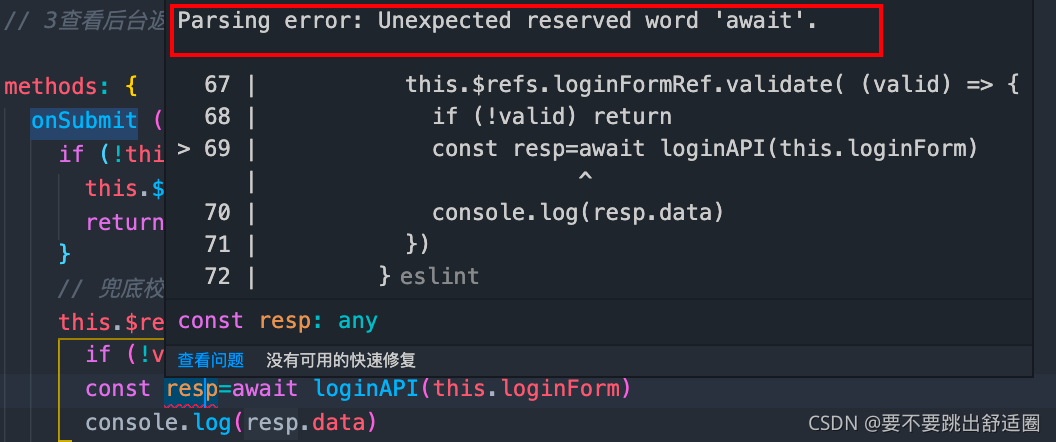
Solution:
Add async in the principle of await [proximity] for error reporting
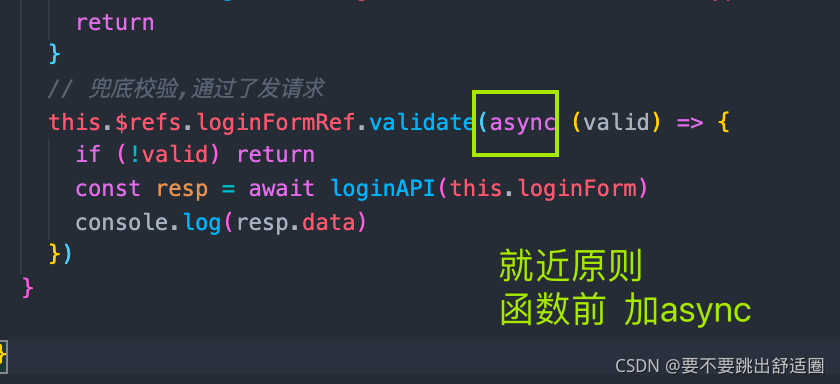
code:
bool tray::nativeEventFilter(const QByteArray &eventType, void *message, long *)
{
    qDebug("tray::nativeEventFilter:%s\n", eventType.data());
    if (eventType == "xcb_generic_event_t") {
        xcb_generic_event_t* ev = static_cast<xcb_generic_event_t *>(message);
        // ...
    }
    return false;
}
Tag Page: /home/test/Downloads/tray/tray/tray.cpp:244: error: unknown type name ‘xcb_generic_event_t’
Outcome:
../tray/tray.cpp:244:9: error: ‘xcb_generic_event_t’ was not declared in this scope
xcb_generic_event_t* ev = static_cast<xcb_generic_event_t *>(message);
^~~~~~~~~~~~~~~~~~~
../tray/tray.cpp:244:9: note: suggested alternative: ‘xGenericEvent’
xcb_generic_event_t* ev = static_cast<xcb_generic_event_t *>(message);
^~~~~~~~~~~~~~~~~~~
xGenericEvent
Solution: #include <xcb/xcb.h>
Reference: https://codesearch.isocpp.org/actcd19/main/c/clementine/clementine_1.3.1+git609-g623a53681+dfsg-1/3rdparty/qxt/qxtglobalshortcut_x11.cpp
[error] – initialize specified but the data directory has files in it. About.:
Problem Description:
MySQL is installed in Linux. Because it has been installed and uninstalled before, the uninstallation is not clean. When installing again, the following error occurs when initializing the password
2021-11-23T02:08:16.247240Z 0 [Warning] TIMESTAMP with implicit DEFAULT value is deprecated. Please use --explicit_defaults_for_timestamp server option (see documentation for more details).
2021-11-23T02:08:16.248753Z 0 [ERROR] --initialize specified but the data directory has files in it. Aborting.
2021-11-23T02:08:16.248780Z 0 [ERROR] Aborting
Cause analysis:
reason: the old version of MySQL software does not delete the original data file, that is, the content under the path/var/lib/MySQL/
Solution: delete all contents under the path, including files and folders.
[root@hadoop102 mysql]# rm -rf /var/lib/mysql/
After successful execution, initialize the password:
[root@hadoop102 opt]# mysqld --initialize --user=mysql
[root@hadoop102 opt]# cat /var/log/mysqld.log
2021-11-23T02:17:47.821574Z 0 [Warning] TIMESTAMP with implicit DEFAULT value is deprecated. Please use --explicit_defaults_for_timestamp server option (see documentation for more details).
2021-11-23T02:17:47.988844Z 0 [Warning] InnoDB: New log files created, LSN=45790
2021-11-23T02:17:48.010498Z 0 [Warning] InnoDB: Creating foreign key constraint system tables.
2021-11-23T02:17:48.066559Z 0 [Warning] No existing UUID has been found, so we assume that this is the first time that this server has been started. Generating a new UUID: 8d49959d-4c03-11ec-be82-000c29bdc989.
2021-11-23T02:17:48.067296Z 0 [Warning] Gtid table is not ready to be used. Table 'mysql.gtid_executed' cannot be opened.
2021-11-23T02:17:48.067886Z 1 [Note] A temporary password is generated for root@localhost: UBX6u)ekR:kB
Because there is no data saved in my data, direct deletion will not affect subsequent tasks, but!!! If you have data, you must back it up first~
Error message:
E20211126 11:55:13.654 140412916315904 tensorrt.cpp:10] …/rtSafe/cuda/caskUtils.cpp (98) – Assertion Error in trtSmToCask: 0 (Unsupported SM.)
Reason: tensorrt version does not match CUDA or cudnn version. For example, the author’s tensorrt version is 7.2.1, while CUDA is the latest 11.5 version. CUDA version is too high to adapt:
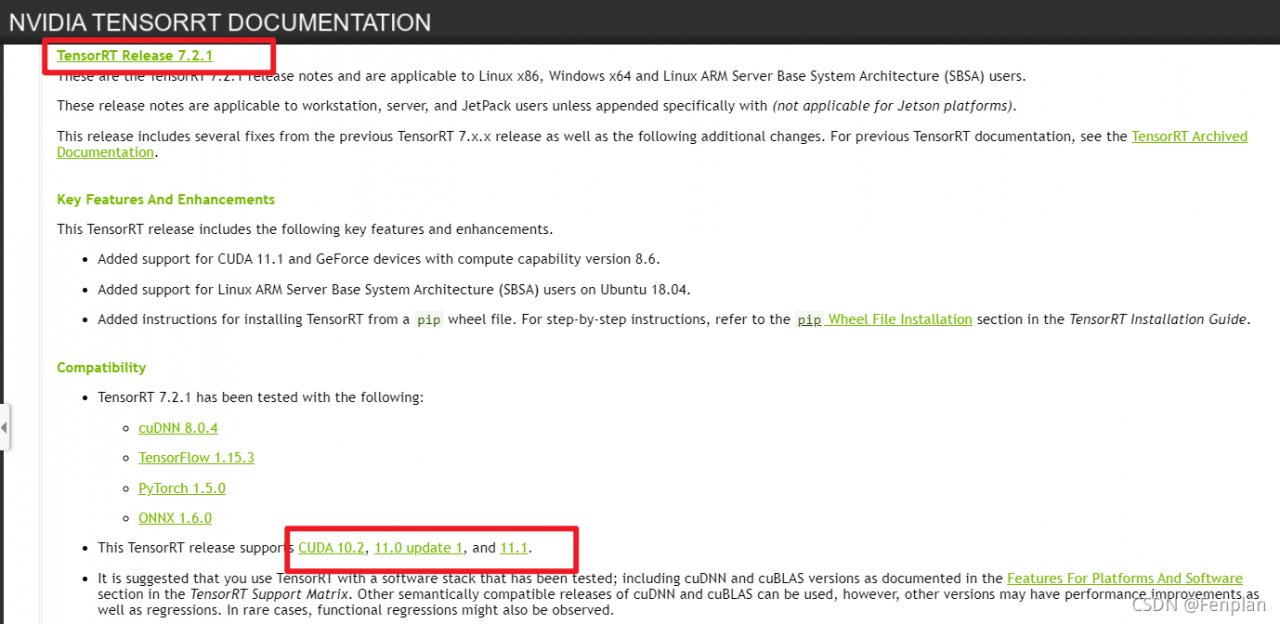
Solution: reinstall CUDA or tensorrt
suggestion: reinstall CUDA because different versions of tensorrt have inconsistent codes. For example, tensorrt 7.2.1 and tensorrt 8.2.1 require that noexcept be added when rewriting virtual functions. If the amount of code is small, consider reinstalling tensorrt
attach the matching requirements of tensorrt, CUDA and cudnn versions: tensorrt release note
Reason for resolution:
In the process of multi-level query, you need to give the table alias.
Code example
Wrong query method:
select * from (select s.sno from student s where s.ssex='woman');Correct query method:
select * from (select s.sno from student s where s.ssex='woman') as mid_sno;In fact, the difference lies in whether there is an as mid behind it_sno. This is to ensure that each derived table needs to have its own alias.
Background:
System: Ubuntu18
Problem scenario: When writing a case using react scaffolding, use instructions npm start Unsuccessful, occurred Error: enospc: system limit for number of file watchers error.
Solution:
Error: enospc: system limit for number of file watchers error. The system limit of the file monitor has reached the default upper limit and needs to be increased.
Instructions can be used $cat /proc/sys/fs/inotify/max_user_Watch to see
cat /proc/sys/fs/inotify/max_user_watch es 524288New instructions can be set for temporary limit increase:
$ sudo sysctl fs.inotify.max_user_watches = 524288 $ sudo sysctl -pPermanent increase limit
$ echo fs.inotify.max_user_watches = 524288 | sudo tee -a /etc/sysctl.conf $ sudo sysctl -pProblem Description:
For the problems encountered in automatic modeling today, we use iris data set to initialize the automl framework and pass in training data. The problem is that in the last line of fit, an error is reported: attributeerror: module ‘pandas’ has no attribute’ rolling_ At that time, I read the wrong version of pandas on the Internet. Then I reinstalled it on the Internet and found that it still couldn’t.
Use Microsoft’s flaml automated modeling framework to directly pip, Install flaml. Attach Code:
from flaml import AutoML
from sklearn.datasets import load_iris
import pandas as pd


iris = load_iris()
iris_data = pd.concat([pd.DataFrame(iris.data),pd.Series(iris.target)],axis=1)
iris_data.columns = ["_".join(feature.split(" ")[:2]) for feature in iris.feature_names]+["target"]
iris_data = iris_data[(iris_data.target==0) |(iris_data.target==1)]


flaml_automl = AutoML()
flaml_automl.fit(pd.DataFrame(iris_data.iloc[:,:-1]),iris_data.iloc[:,-1],time_budget=10,estimator_list=['lgbm','xgboost'])
After the upgrade dask is finally executed (PIP install — upgrade dask), it can run normally. However, it is strange that the error message does not prompt dask related problems. Some bloggers on the Internet say that dask provides interfaces to pandas and numpy, which may be caused by the low version of the interface??
Finally, after upgrading dask, the problem is solved!
Error creating bean with name 'captchaController': Unsatisfied dependency expressed through field 'configService'; nested exception is org.springframework.beans.factory.BeanCreationException: Error creating bean with name 'sysConfigServiceImpl': Invocation of init method failed; nested exception is org.springframework.data.redis.RedisConnectionFailureException: Unable to connect to Redis; nested exception is org.springframework.data.redis.connection.PoolException: Could not get a resource from the pool; nested exception is io.lettuce.core.RedisConnectionException: Unable to connect to localhost:6379
Check start Redis or not

When we set up redis master-slave replication, we may encounter the following problems due to various problems:
error condition on socket for Sync: no route to host
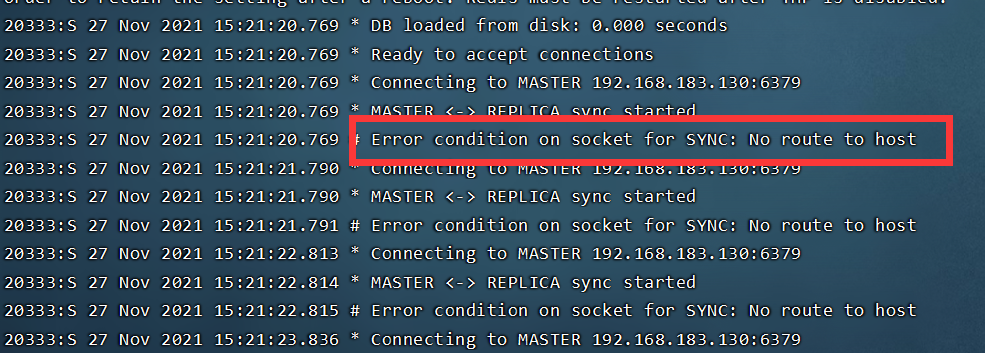
Solution:
First, modify the related configurations in redis.conf:
#Original configuration
bind 127.0.0.1
#Modify to
bind 0.0.0.0
# Although it is said that commenting it out can also solve the above problem, it is not recommended to comment out this method. Because another problem will occur.
#or comment it out
#bind 127.0.0.1
Turn off the firewall of the host. Note: it is the firewall of the host, and then restart the service.
In CentOS 7, systemctl stop firewalld turns off the firewall. Other versions can turn off the firewall through service iptables stop.
Turn off the firewall:
systemctl stop firewalld
Turn off redis service
ps -ef |grep -i redis # Find a process

kill -9 3667 #Shut down the process
Restart related services