Author Archives: Robins

Error: Node Sass does not yet support your current environment: Linux 64-bit with Unsupported runtim

Error: node sass does not yet support your current environment: Linux 64 bit with unsupported runtime (93)

It is taken for granted that the versions of node and node sass do not match.

It is useless to refer to various upgrades and demotions of the forum. mmp.

There’s really no way to install sass:

npm install sass

My project will automatically use sass. If you are worried or node sass is still working, you can also uninstall node sass:

npm uninstall node-sass

At this point, your project should run normally. Anyway, this is how I run packaging.

Reference articles:
https://zhuanlan.zhihu.com/p/405365755

[Solved] hbase Startup Error: ERROR: Can’t get master address from ZooKeeper; znode data == null

Start HBase normally, but an error is reported with the list command:

ERROR: Can’t get master address from ZooKeeper; znode data == null

Here is some help for this command:
List all user tables in hbase. Optional regular expression parameter could
be used to filter the output. Examples:

hbase> list
hbase> list ‘abc.’
hbase> list ‘ns:abc.’
hbase> list ‘ns:.*’

Check the log file of HBase first, and the following error appears:
2021-12-08 23:51:35101 fat [hadoop01:16000. Activemastermanager] master HMaster: Failed to become active master
org. apache. hadoop. ipc. RemoteException(org.apache.hadoop.ipc.StandbyException): Operation category READ is not supported in state standby

Solution:
① it is related to the active and standby of the node. In my case, there are three highly available Hadoop, of which the primary node Hadoop 01 is standby and Hadoop 02 is active, but errors will still be reported. I actively intervene in the zookeeper election, set Hadoop 01 to active and Hadoop 02 to standby, and the result is successful.
actively intervene in the zookeeper election command:

hdfs haadmin -transitionToStandby --forcemanual nn2
hdfs haadmin -transitionToActive --forcemanual nn1

② High availability Hadoop core site XML configuration
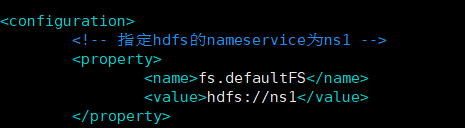
and HBase site XML doesn’t match. I configured HBase before the high availability configuration and didn’t change it later, so I had to change it.
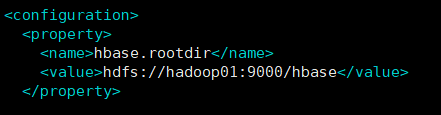
after modification:
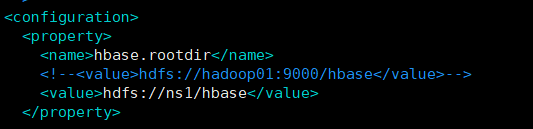
then put the Hadoop cluster configuration file core site XML and HDFS site The two configuration files, XML, are copied to the conf directory of HBase

Restart Hadoop cluster and HBase

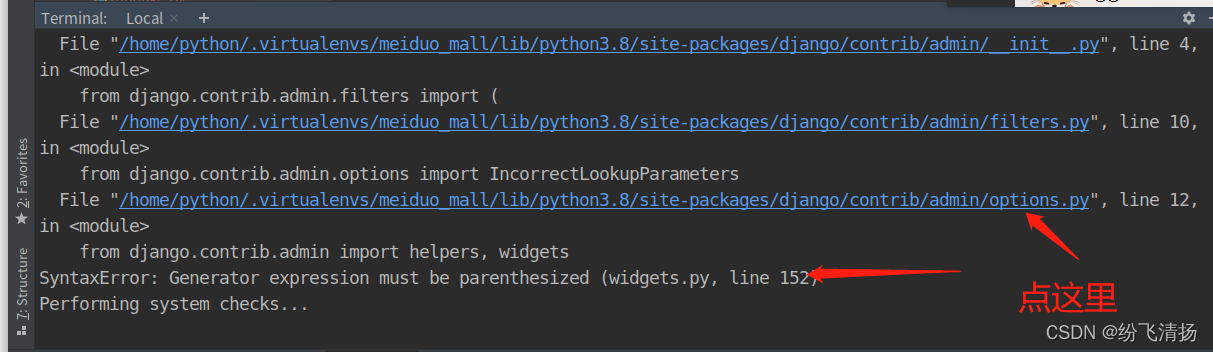
[Solved] SyntaxError: Generator expression must be parenthesized (widgets.py, line 152)

Run Django with pycharm, python manage Py runserver error

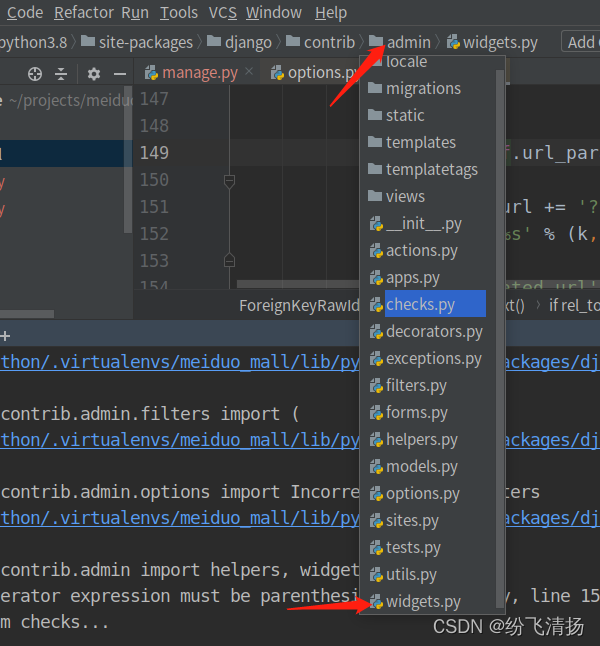
Checked the Internet and said to put widgets Delete the comma in line 152 of Py, which may be a compatibility problem between Python and Django. Try it. You can click the hyperlink above. Pycharm can quickly open the document, and then find the widgets under admin Py file is OK, because the prompt says form Django contrib. Admin import helpers, widgets, and options The PY file is in the admin directory.

Command failed with error 16412: ‘FieldPath field names may not contain ‘.‘.‘ on server 10.21.20.8:2

    problem description
    query interface error:

    {"errorMessage":
    "Command failed with error 16412: 'FieldPath field names may not contain '.'.' on server 10.21.20.8:27019. The full response is { \"ok\" : 0.0, \"errmsg\" : \"FieldPath field names may not contain '.'.\", \"code\" : 16412, \"codeName\" : \"Location16412\" }"}
    
    
    com.mongodb.MongoCommandException: Command failed with error 16412: 'FieldPath field names may not contain '.'.' on server 10.21.20.8:27019. The full response is { "ok" : 0.0, "errmsg" : "FieldPath field names may not contain '.'.", "code" : 16412, "codeName" : "Location16412" }
        at com.mongodb.connection.ProtocolHelper.getCommandFailureException(ProtocolHelper.java:115)
        at com.mongodb.connection.CommandProtocol.execute(CommandProtocol.java:114)
        at com.mongodb.connection.DefaultServer$DefaultServerProtocolExecutor.execute(DefaultServer.java:168)
        at com.mongodb.connection.DefaultServerConnection.executeProtocol(DefaultServerConnection.java:289)
        at com.mongodb.connection.DefaultServerConnection.command(DefaultServerConnection.java:176)
        at com.mongodb.operation.CommandOperationHelper.executeWrappedCommandProtocol(CommandOperationHelper.java:216)
        at com.mongodb.operation.CommandOperationHelper.executeWrappedCommandProtocol(CommandOperationHelper.java:207)
        at com.mongodb.operation.CommandOperationHelper.executeWrappedCommandProtocol(CommandOperationHelper.java:113)
        at com.mongodb.operation.AggregateOperation$1.call(AggregateOperation.java:257)
        at com.mongodb.operation.AggregateOperation$1.call(AggregateOperation.java:253)
        at com.mongodb.operation.OperationHelper.withConnectionSource(OperationHelper.java:435)
        at com.mongodb.operation.OperationHelper.withConnection(OperationHelper.java:408)
        at com.mongodb.operation.AggregateOperation.execute(AggregateOperation.java:253)
        at com.mongodb.operation.AggregateOperation.execute(AggregateOperation.java:67)
        at com.mongodb.Mongo.execute(Mongo.java:836)
        at com.mongodb.Mongo$2.execute(Mongo.java:823)
        at com.mongodb.DBCollection.aggregate(DBCollection.java:1455)
        at com.mongodb.DBCollection.aggregate(DBCollection.java:1418)
        at com.mongodb.DBCollection.aggregate(DBCollection.java:1403)
        at com.linkus.biz.prj.service.impl.PrjDevTaskStatServiceImpl.getPrjDevTaskStatData(PrjDevTaskStatServiceImpl.java:127)
    
    
      problem solving
      check the fields in the group. The grouping fields are wrong. The value “joinbiz. Resp” of resp in the group is changed to “resp”

      "$group":{
      	"_id":{
      		"prjSys":"$prjSys",
      		"prjMod":"$prjMod",
      		"resp":"$_joinBiz_.resp",
      	},
      	"devTasksCount":{
      		"$sum":1
      	},
      	"minPlanEndDate":{
      		"$min":"$_joinBiz_.planEndDate"
      	},
      	"maxPlanEndData":{
      		"$max":"$_joinBiz_.planEndDate"
      	},
      	"planCompletionCount":{
      		"$sum":"$planCompletionNum"
      	},
      	"actualCompletionCount":{
      		"$sum":"$actualCompletionNum"
      	}      
      }
      

[Solved] yum command Error: “except keyboardinterrupt, e: syntax error: invalid syntax”“

Use the yum command prompt “except keyboardinterrupt, e: syntax error: invalid syntax”

Troubleshooting of error reporting using Yum command

Error reporting using Yum command

File "/usr/bin/yum", line 30
except KeyboardInterrupt, e:
^
SyntaxError: invalid syntax

Reason for the problem:
Yum package management uses python2 X, python2 X to Python 3.0 After X, problems occurred due to Python version syntax compatibility

Solution:

Modify the yum configuration file to point the python version to the previous version

vi /usr/bin/yum
#!/usr/bin/python2.7

Modify the urlgrabber ext down file and change the python version

vi /usr/libexec/urlgrabber-ext-down
#!/usr/bin/python2.7

(node:268660) UnhandledPromiseRejectionWarning: Error: Cannot find module ‘yallist‘

NPM command error in vscode

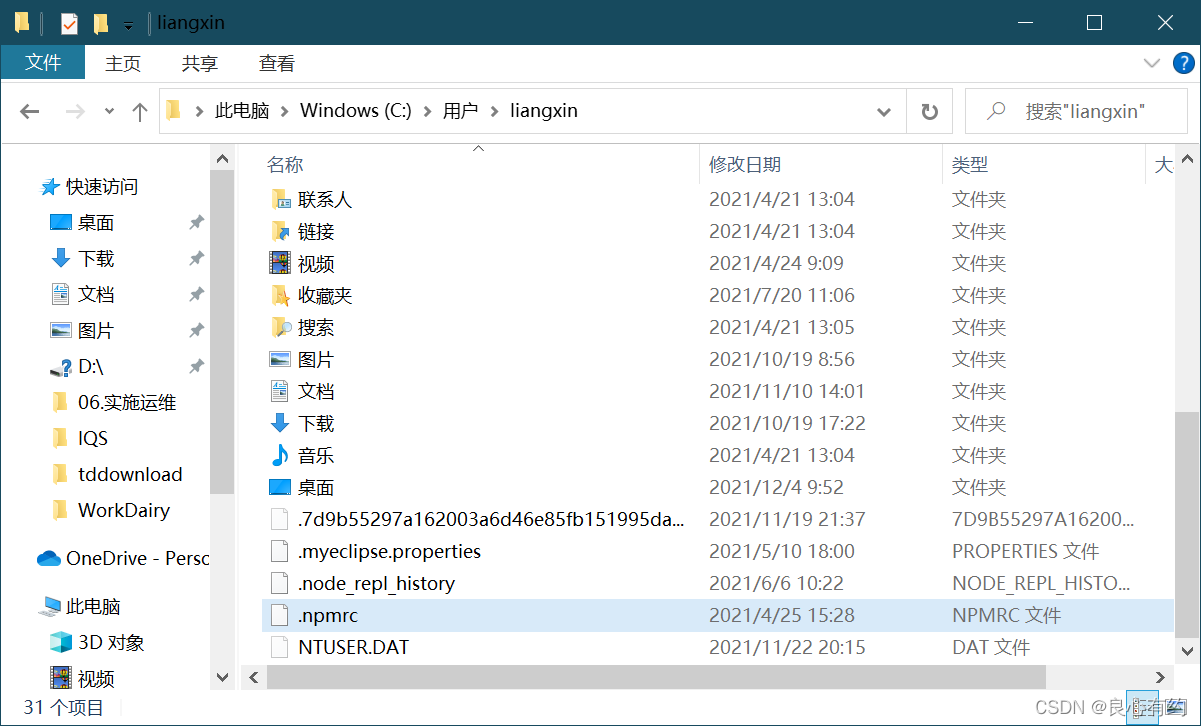
In Vue (node: 268660) unhandledpromiserejectionwarning: error: cannot find module ‘yallist’ problem solving delete the under C: \ users \ [current user name] Npmrc file Npmrc file content:

In Vue (node: 268660), unhandledpromiserejectionwarning: error: cannot find module ‘yallist’ problem solving

Delete the under C: \ users [current user name] Npmrc file

. Npmrc file content:

cache=C:\Software\Tool\nodejs\node_cache
prefix=C:\Software\Tool\nodejs\node_global
registry=https://registry.npm.taobao.org