Author Archives: Robins

[Solved] k8s error retrieving resource lock default/fuseim.pri-ifs: Unauthorized

When helm installed Prometheus, the NFS client provider serviceaccount was arranged in the default namespace and encountered a title problem

[hadoop@hadoop03 NFS]$ vim nfs-rbac.yaml

apiVersion: v1
kind: ServiceAccount
metadata:
  name: nfs-client-provisioner
  #namespace: nfs-client

---
kind: ClusterRole
apiVersion: rbac.authorization.k8s.io/v1
metadata:
  name: nfs-client-provisioner-runner
rules:
  - apiGroups: [""]
    resources: ["persistentvolumes"]
    verbs: ["get", "list", "watch", "create", "delete"]
  - apiGroups: [""]
    resources: ["persistentvolumeclaims"]
    verbs: ["get", "list", "watch", "update"]
  - apiGroups: ["storage.k8s.io"]
    resources: ["storageclasses"]
    verbs: ["get", "list", "watch"]
  - apiGroups: [""]
    resources: ["events"]
    verbs: ["create", "update", "patch"]   ## Deploy to the default namespace to report an error title error
---
kind: ClusterRoleBinding
apiVersion: rbac.authorization.k8s.io/v1
metadata:
  name: run-nfs-client-provisioner
subjects:
  - kind: ServiceAccount
    name: nfs-client-provisioner
    namespace: default
roleRef:
  kind: ClusterRole
  name: nfs-client-provisioner-runner
  apiGroup: rbac.authorization.k8s.io

---
kind: Role
apiVersion: rbac.authorization.k8s.io/v1
metadata:
  name: leader-locking-nfs-client-provisioner
  namespace: default
rules:
  - apiGroups: [""]
    resources: ["endpoints"]
    verbs: ["get", "list", "watch", "create", "update", "patch"]

---
kind: RoleBinding
apiVersion: rbac.authorization.k8s.io/v1
metadata:
  name: leader-locking-nfs-client-provisioner
  namespace: default
subjects:
  - kind: ServiceAccount
    name: nfs-client-provisioner
    namespace: default
roleRef:
  kind: Role
  name: leader-locking-nfs-client-provisioner
  apiGroup: rbac.authorization.k8s.io


kubectl logs nfs-client-provisioner-764f44f754-wdtqp nfs provider pod

E1206 08:52:27.293890       1 leaderelection.go:234] error retrieving resource lock default/fuseim.pri-ifs: endpoints "fuseim.pri-ifs" is forbidden: User "system:serviceaccount:default:nfs-client-provisioner" cannot get resource "endpoints" in API group "" in the namespace "default"

Modify clusterrole configuration permissions

kind: ClusterRole
apiVersion: rbac.authorization.k8s.io/v1
metadata:
  name: nfs-client-provisioner-runner
rules:
  - apiGroups: [""]
    resources: ["persistentvolumes"]
    verbs: ["get", "list", "watch", "create", "delete"]
  - apiGroups: [""]
    resources: ["persistentvolumeclaims"]
    verbs: ["get", "list", "watch", "update"]
  - apiGroups: ["storage.k8s.io"]
    resources: ["storageclasses"]
    verbs: ["get", "list", "watch"]
  - apiGroups: [""]
    resources: ["events"]
    verbs: ["get", "list", "watch", "create", "update", "patch"] ### 把权限修改为这个(default namespace)

[Solved] Spring Aop Error: Error creating bean with name ‘org.springframework.aop.config.internalAutoProxyCreator‘

Make a simple entry case of spring AOP, and the following error reports are generated at runtime

12月 06, 2021 9:26:16 PM org.springframework.context.support.AbstractApplicationContext refresh
Warning: Exception encountered during context initialization - cancelling refresh attempt: org.springframework.beans.factory.BeanCreationException: Error creating bean with name 'org.springframework.aop.config.internalAutoProxyCreator': Initialization of bean failed; nested exception is java.lang.NoSuchMethodError: org.springframework.util.ReflectionUtils$MethodFilter.and(Lorg/springframework/util/ReflectionUtils$MethodFilter;)Lorg/springframework/util/ReflectionUtils$MethodFilter;

org.springframework.beans.factory.BeanCreationException: Error creating bean with name 'org.springframework.aop.config.internalAutoProxyCreator': Initialization of bean failed; nested exception is java.lang.NoSuchMethodError: org.springframework.util.ReflectionUtils$MethodFilter.and(Lorg/springframework/util/ReflectionUtils$MethodFilter;)Lorg/springframework/util/ReflectionUtils$MethodFilter;

	at org.springframework.beans.factory.support.AbstractAutowireCapableBeanFactory.doCreateBean(AbstractAutowireCapableBeanFactory.java:603)
	at org.springframework.beans.factory.support.AbstractAutowireCapableBeanFactory.createBean(AbstractAutowireCapableBeanFactory.java:517)
	at org.springframework.beans.factory.support.AbstractBeanFactory.lambda$doGetBean$0(AbstractBeanFactory.java:323)
	at org.springframework.beans.factory.support.DefaultSingletonBeanRegistry.getSingleton(DefaultSingletonBeanRegistry.java:226)
	at org.springframework.beans.factory.support.AbstractBeanFactory.doGetBean(AbstractBeanFactory.java:321)
	at org.springframework.beans.factory.support.AbstractBeanFactory.getBean(AbstractBeanFactory.java:207)
	at org.springframework.context.support.PostProcessorRegistrationDelegate.registerBeanPostProcessors(PostProcessorRegistrationDelegate.java:229)
	at org.springframework.context.support.AbstractApplicationContext.registerBeanPostProcessors(AbstractApplicationContext.java:722)
	at org.springframework.context.support.AbstractApplicationContext.refresh(AbstractApplicationContext.java:535)
	at org.springframework.context.support.ClassPathXmlApplicationContext.<init>(ClassPathXmlApplicationContext.java:144)
	at org.springframework.context.support.ClassPathXmlApplicationContext.<init>(ClassPathXmlApplicationContext.java:85)
	at com.atguigu.spring5.testdemo.TestAop.testAopAnno(TestAop.java:11)
	at java.base/jdk.internal.reflect.NativeMethodAccessorImpl.invoke0(Native Method)
	at java.base/jdk.internal.reflect.NativeMethodAccessorImpl.invoke(NativeMethodAccessorImpl.java:62)
	at java.base/jdk.internal.reflect.DelegatingMethodAccessorImpl.invoke(DelegatingMethodAccessorImpl.java:43)
	at java.base/java.lang.reflect.Method.invoke(Method.java:566)
	at org.junit.runners.model.FrameworkMethod$1.runReflectiveCall(FrameworkMethod.java:50)
	at org.junit.internal.runners.model.ReflectiveCallable.run(ReflectiveCallable.java:12)
	at org.junit.runners.model.FrameworkMethod.invokeExplosively(FrameworkMethod.java:47)
	at org.junit.internal.runners.statements.InvokeMethod.evaluate(InvokeMethod.java:17)
	at org.junit.runners.ParentRunner.runLeaf(ParentRunner.java:325)
	at org.junit.runners.BlockJUnit4ClassRunner.runChild(BlockJUnit4ClassRunner.java:78)
	at org.junit.runners.BlockJUnit4ClassRunner.runChild(BlockJUnit4ClassRunner.java:57)
	at org.junit.runners.ParentRunner$3.run(ParentRunner.java:290)
	at org.junit.runners.ParentRunner$1.schedule(ParentRunner.java:71)
	at org.junit.runners.ParentRunner.runChildren(ParentRunner.java:288)
	at org.junit.runners.ParentRunner.access$000(ParentRunner.java:58)
	at org.junit.runners.ParentRunner$2.evaluate(ParentRunner.java:268)
	at org.junit.runners.ParentRunner.run(ParentRunner.java:363)
	at org.junit.runner.JUnitCore.run(JUnitCore.java:137)
	at com.intellij.junit4.JUnit4IdeaTestRunner.startRunnerWithArgs(JUnit4IdeaTestRunner.java:69)
	at com.intellij.rt.junit.IdeaTestRunner$Repeater.startRunnerWithArgs(IdeaTestRunner.java:33)
	at com.intellij.rt.junit.JUnitStarter.prepareStreamsAndStart(JUnitStarter.java:221)
	at com.intellij.rt.junit.JUnitStarter.main(JUnitStarter.java:54)
Caused by: java.lang.NoSuchMethodError: org.springframework.util.ReflectionUtils$MethodFilter.and(Lorg/springframework/util/ReflectionUtils$MethodFilter;)Lorg/springframework/util/ReflectionUtils$MethodFilter;
	at org.springframework.aop.aspectj.annotation.ReflectiveAspectJAdvisorFactory.<clinit>(ReflectiveAspectJAdvisorFactory.java:76)
	at org.springframework.aop.aspectj.annotation.AnnotationAwareAspectJAutoProxyCreator.initBeanFactory(AnnotationAwareAspectJAutoProxyCreator.java:82)
	at org.springframework.aop.framework.autoproxy.AbstractAdvisorAutoProxyCreator.setBeanFactory(AbstractAdvisorAutoProxyCreator.java:65)
	at org.springframework.beans.factory.support.AbstractAutowireCapableBeanFactory.invokeAwareMethods(AbstractAutowireCapableBeanFactory.java:1818)
	at org.springframework.beans.factory.support.AbstractAutowireCapableBeanFactory.initializeBean(AbstractAutowireCapableBeanFactory.java:1783)
	at org.springframework.beans.factory.support.AbstractAutowireCapableBeanFactory.doCreateBean(AbstractAutowireCapableBeanFactory.java:595)
	... 33 more

Check some big guys’ articles until the problem is called: injection bean failure exception.

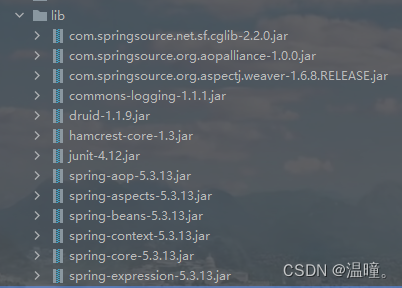
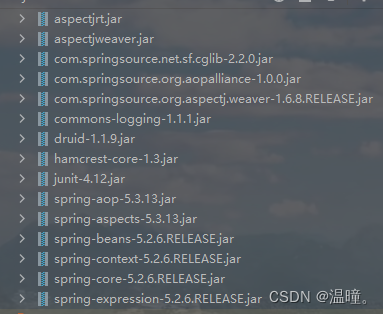
After checking, it is found that it is caused by the inconsistent version of the jar package. The version of spring I use is 5.3 13. Before, in order to save trouble, we directly copied other people’s core jar package, and its version was 5.2 6. I changed the versions of these four jar packages to 5.3.0, which is consistent with the spring version 13. The problem is solved

Modified jar package:

There is also a small problem. When using the pointcut expression, there must be a space between * and the following com, otherwise an error will be reported

@Before(value = "execution(* com.testAop.anno.User.add(..))")

error: src refspec master does not match any [How to Solve]

Summary

Solve the problem in one sentence:

Enter first

git push -u origin main

Then enter

 git config http.sslVerify "false"

Then enter

git push -u origin main

Problem background

When uploading a project to GitHub, enter the command:

git push -u origin master

report errors:

error: src refspec master does not match any

First attempt to solve

I found an answer on the Internet:

git push -u origin main

Error is still reported after input:

OpenSSL SSL_read: Connection was reset, errno 10054

Try again

Another answer was found:

 git config http.sslVerify "false"

No error is reported
Enter again:

git push -u origin main

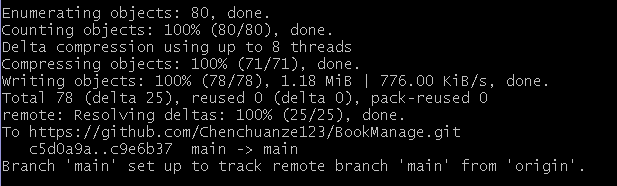
The screenshot below shows that the upload was successful

[Solved] xacro: error: expected exactly one input file as argument

xacro: error: expected exactly one input file as argument RLException: Invalid tag: Cannot load command parameter [robot_description]: command ……
Param xml is <param command="$(find xacro)/xacro $(find rot_cararm)/urdf/robot_base
/base .urdf.xacro" name="robot_description"/>
The traceback for the exception was written to the log file

Reason: There is an extra space before “/base .urdf.xacro”
Can run after modification
File names with spaces cannot be used in the workspace path where the ROS function package is located

[ERROR] Failed to execute goal on project simple-project: Could not resolve dependencies for project

[INFO] ------------------------------------------------------------------------
[INFO] BUILD FAILURE
[INFO] ------------------------------------------------------------------------
[INFO] Total time:  01:01 h
[INFO] Finished at: 2021-12-05T21:19:38+08:00
[INFO] ------------------------------------------------------------------------
[ERROR] Failed to execute goal on project simple-project: Could not resolve dependencies for project cn.edu.xmu:simple-project:jar:1.0: Could not transfer artifact org.apache.flink:flink-rpc-akka-loader:jar:1.14.0 from/to maven-default-http-blocker (http://0.0.0.0/): Blocked mirror for repositories: [jboss (http://repository.jboss.com/maven2/, default, releases+snapshots)] -> [Help 1]
[ERROR]
[ERROR] To see the full stack trace of the errors, re-run Maven with the -e switch.
[ERROR] Re-run Maven using the -X switch to enable full debug logging.
[ERROR]
[ERROR] For more information about the errors and possible solutions, please read the following articles:
[ERROR] [Help 1] http://cwiki.apache.org/confluence/display/MAVEN/DependencyResolutionException


Solution:
My flink is flink-1.14.0-bin-scala_2.12.tgz
The above error is basically the pom.xml file messing up
So in the pom.xml file

version should correspond to 1.14.0

flink-streaming-java_ also followed by 2.12
version should correspond to 1.14.0

filnk-clients_ followed by 2.12
version should correspond to 1.14.0
Changed these three places, basically it’s ok
The error that appears is basically that there is no corresponding good version, change it and save it, and then execute
/usr/local/maven/bin/mvn package
That’s it

The following is the pom.xml file that I ran successfully, and the corresponding flink is flink-1.14.0-bin-scala_2.12.tgz

<project>
    <groupId>cn.edu.xmu</groupId>
    <artifactId>simple-project</artifactId>
    <modelVersion>4.0.0</modelVersion>
    <name>Simple Project</name>
    <packaging>jar</packaging>
    <version>1.0</version>
    <repositories>
        <repository>
            <id>jboss</id>
            <name>JBoss Repository</name>
            <url>http://repository.jboss.com/maven2/</url>
        </repository>
    </repositories>
    <dependencies>
        <dependency>
            <groupId>org.apache.flink</groupId>
            <artifactId>flink-java</artifactId>
            <version>1.14.0</version>
        </dependency>
        <dependency>
            <groupId>org.apache.flink</groupId>
            <artifactId>flink-streaming-java_2.12</artifactId>
<version>1.14.0</version>
        </dependency>
        <dependency>
            <groupId>org.apache.flink</groupId>
            <artifactId>flink-clients_2.12</artifactId>
            <version>1.14.0</version>
        </dependency>
    </dependencies>
</project>


[Solved] SyntaxError: (unicode error) ‘unicodeescape‘ codec can‘t decode bytes in position 10-11: malformed

#Read a *.txt file using the read_table() function in the Pandas library
data = pd.read_table(r'D:\New\test.txt',delimiter=',',encoding = 'UTF-8')
print(data)

Title defect Solution: add “R” before the path to solve it.

python D:\New\MyTest.py
        name  date   id
0   jianghu  20210201  00001
1  jianghu1  20210202  00002
2  jianghu2  20210203  00003


[Solved] STM32F4 MDK5 Software Simulate Error: error 65: no ‘read‘ permission

Stm32f4 mdk5 software simulation error: no ‘read’ permission

Problem description

CPU: stm32f407
mdk5 software simulation prompts that you have no read-write permission and can only run step by step. The prompt code is as follows:

*** error 65: access violation at 0x40023800 : no 'read' permission
*** error 65: access violation at 0x40023800 : no 'write' permission
*** error 65: access violation at 0x40023808 : no 'write' permission
*** error 65: access violation at 0x40023800 : no 'read' permission
*** error 65: access violation at 0x40023800 : no 'write' permission

The root cause is: there is a problem with the map address space permission mapping. Some address spaces do not have read and write permissions, resulting in the program can not run automatically.

Solution:

Add map address space permission mapping
according to the introduction of network resources, there are three methods:
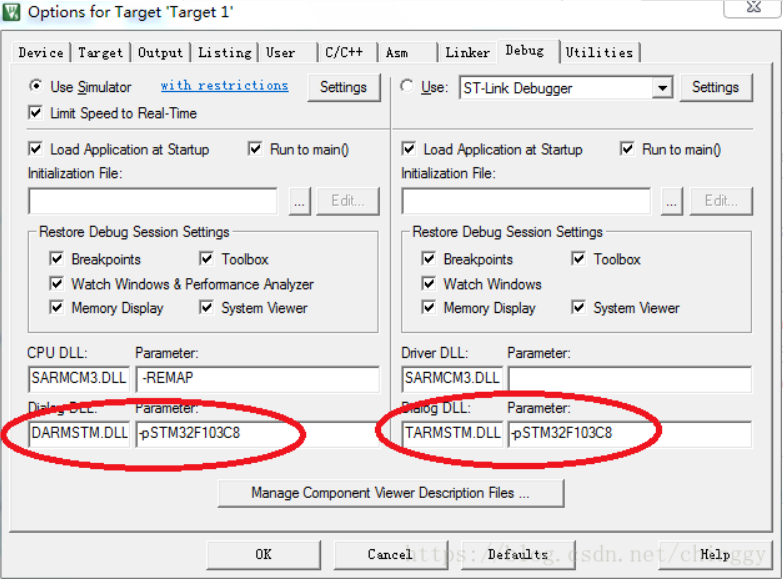
1 Modify the debug tab in the project configuration option, and stm32f1 series chip verification can be used normally. F4 series chips cannot be used normally
2. Modify the map address permission mapping directly on the debugging page. After normal modification, the program can run normally. It needs to be reset when exiting debugging, which is inconvenient to operate
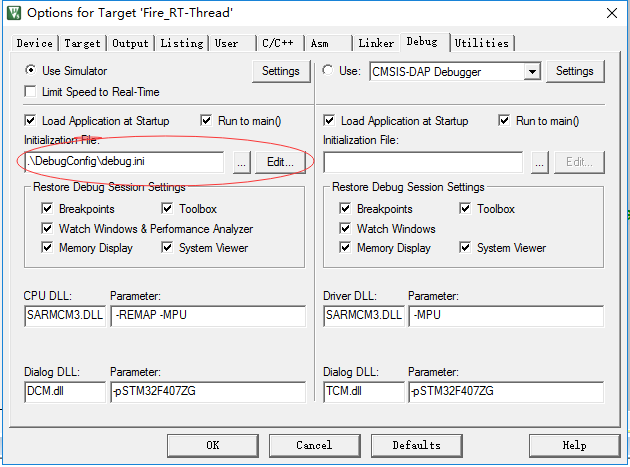
3. In the debug tab of the project configuration options, add the correct initialization file directly. (recommended)

Method 3:

Create a new “debug.ini” file in the project file, and add the map address permission mapping code in the file

map 0x40000000, 0x40007FFF read write // APB1
map 0x40010000, 0x400157FF read write // APB2
map 0x40020000, 0x4007FFFF read write // AHB1
map 0x50000000, 0x50060BFF read write // AHB2
map 0x60000000, 0x60000FFF read write // AHB3
map 0xE0000000, 0xE00FFFFF read write // CORTEX-M4 internal peripherals

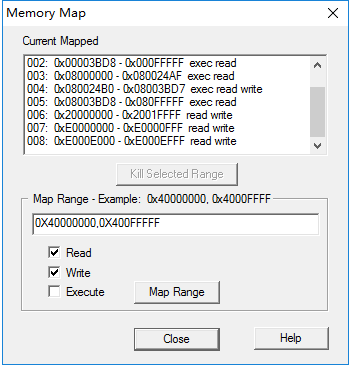
The specific map address permission mapping can also be viewed in the memory map option in the debugging interface.

Method 2:

On the debug page, select the memory map option under the debug tab, as shown below

Map address mapping can be added according to the error prompt.

Method 1:

Relevant parameters are mainly configured according to the model of Engineering chip

MAC install lightgbm and xgboost Error [How to Solve]

MAC system + anaconda3 + Python 3 eight point eight

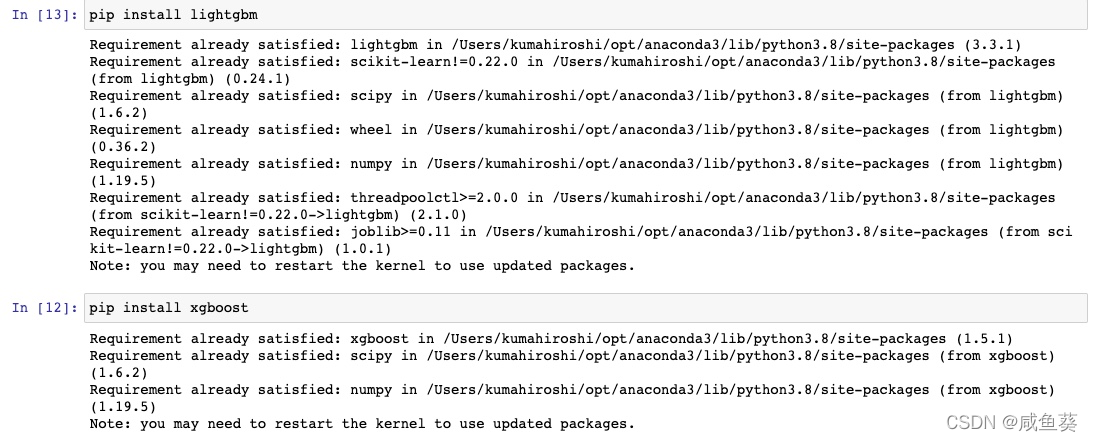
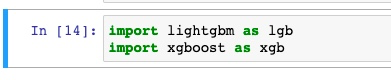
The two integrated learning algorithm packages lightgbm and xgboost were successfully installed
, but errors were always reported during import
---------------------------------------------------------------------------
OSError                                   Traceback (most recent call last)
<ipython-input-5-b18b3f8a6dc8> in <module>
----> 1 import lightgbm

dlopen(/Users/kumahiroshi/opt/anaconda3/lib/python3.8/site-packages/lightgbm/lib_lightgbm.so, 6): Library not loaded: /usr/local/opt/libomp/lib/libomp.dylib
  Referenced from: /Users/kumahiroshi/opt/anaconda3/lib/python3.8/site-packages/lightgbm/lib_lightgbm.so
  Reason: image not found

Always report: oserror reason: image not found

After consulting the data, it is found that you only need to re import this line of code after running on the terminal: brew install libomp


brew install libomp

Done!
Need to install: Homebrew,
Install commands:ruby -e "$(curl -fsSL https://raw.github.com/Homebrew/homebrew/go/install)"

[Solved] ajax Error: Uncaught SyntaxError: Unexpected end of JSON input

To record, the Ajax request is as follows:

		let xhr = new XMLHttpRequest();
        xhr.open("get","https://music.kele8.cn/search");
        xhr.send();
       
        xhr.onreadystatechange = function () {
            // Determine when the Ajax status code is 4 
            if (xhr.status==200) {
                // Get the response data from the server side
                let ans = JSON.parse(xhr.responseText);
                console.log(ans);
            }
			else {
				console.log("Request failed");
			}
        }

If you ensure that the data returned in the background is correct, the get request can be opened in the browser address bar to see the data in JSON format, but the console reports an error and the data is also obtained, it may be that you lack a judgment

Look at the following code:

let xhr = new XMLHttpRequest();
xhr.open("get", "https://music.kele8.cn/search?keywords="+str);
xhr.send();
                        
xhr.onreadystatechange = function () {
     if(xhr.readyState == 4) {
            if(xhr.status == 200) {
                let arr = xhr.responseText;
                let ctype = xhr.getAllResponseHeaders("content-type");
                if(ctype.indexOf("json") > -1) {
                         let res = JSON.parse(arr);
                         console.log(res);
                 }
                 else {
                        console.log(arr);
                }
          }
          else {
                reject('Request failed');
          }
      }
}

It seems that you need to judge XHR in the onreadystatechange event If the readyState attribute is not judged, an error will be reported by JSON

vue Error: Uncaught SyntaxError: Invalid shorthand property initializer

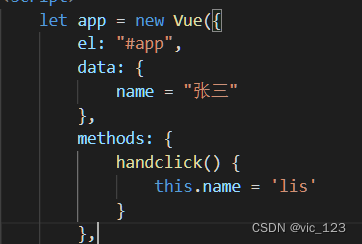
When defining an object using JSON format in JavaScript

An error occurred while debugging the browser: uncaught syntax error: invalid shorthand property initializer

<body>
    <div id=app>
        <button @click="handclick">Button</button>
        <p>{{name}}</p>
    </div>
</body>
<script src="./js/vue.js"></script>
<script>
    let app = new Vue({
        el: "#app",
        // The reason is that "=" should be written as ":"
        data: {
            name: "张三"
        },
        methods: {
            handclick() {
                this.name = 'lis'
            }
        },
        watch: {
            name(newVal, oldVal) {
                console.log(newVal, oldVal)
            }
        }
    })
</script>

[Solved] hive find error: The original program header file is: #include Modify to read

These errors occur when executing query statements in hive,

ERROR : Job Submission failed with exception 'java.net.ConnectException(Call From ************ failed on connection exception: java.net.ConnectException: 拒绝连接; For more details see:  http://wiki.apache.org/hadoop/ConnectionRefused)'
java.net.ConnectException: Call From *************** to ****************:8032 failed on connection exception: java.net.ConnectException: 拒绝连接; For more details see:  http://wiki.apache.org/hadoop/ConnectionRefused
	at sun.reflect.GeneratedConstructorAccessor34.newInstance(Unknown Source)
	at sun.reflect.DelegatingConstructorAccessorImpl.newInstance(DelegatingConstructorAccessorImpl.java:45)
	at java.lang.reflect.Constructor.newInstance(Constructor.java:423)
	at org.apache.hadoop.net.NetUtils.wrapWithMessage(NetUtils.java:831)
	at org.apache.hadoop.net.NetUtils.wrapException(NetUtils.java:755)
	at org.apache.hadoop.ipc.Client.getRpcResponse(Client.java:1549)
	at org.apache.hadoop.ipc.Client.call(Client.java:1491)
	at org.apache.hadoop.ipc.Client.call(Client.java:1388)
	at org.apache.hadoop.ipc.ProtobufRpcEngine$Invoker.invoke(ProtobufRpcEngine.java:233)
	at org.apache.hadoop.ipc.ProtobufRpcEngine$Invoker.invoke(ProtobufRpcEngine.java:118)
	at com.sun.proxy.$Proxy85.getNewApplication(Unknown Source)
	at org.apache.hadoop.yarn.api.impl.pb.client.ApplicationClientProtocolPBClientImpl.getNewApplication(ApplicationClientProtocolPBClientImpl.java:274)
	at sun.reflect.GeneratedMethodAccessor32.invoke(Unknown Source)
	at sun.reflect.DelegatingMethodAccessorImpl.invoke(DelegatingMethodAccessorImpl.java:43)
	at java.lang.reflect.Method.invoke(Method.java:498)
	at org.apache.hadoop.io.retry.RetryInvocationHandler.invokeMethod(RetryInvocationHandler.java:422)
	at org.apache.hadoop.io.retry.RetryInvocationHandler$Call.invokeMethod(RetryInvocationHandler.java:165)
	at org.apache.hadoop.io.retry.RetryInvocationHandler$Call.invoke(RetryInvocationHandler.java:157)
	at org.apache.hadoop.io.retry.RetryInvocationHandler$Call.invokeOnce(RetryInvocationHandler.java:95)
	at org.apache.hadoop.io.retry.RetryInvocationHandler.invoke(RetryInvocationHandler.java:359)
	at com.sun.proxy.$Proxy86.getNewApplication(Unknown Source)
	at org.apache.hadoop.yarn.client.api.impl.YarnClientImpl.getNewApplication(YarnClientImpl.java:270)
	at org.apache.hadoop.yarn.client.api.impl.YarnClientImpl.createApplication(YarnClientImpl.java:278)
	at org.apache.hadoop.mapred.ResourceMgrDelegate.getNewJobID(ResourceMgrDelegate.java:196)
	at org.apache.hadoop.mapred.YARNRunner.getNewJobID(YARNRunner.java:271)
	at org.apache.hadoop.mapreduce.JobSubmitter.submitJobInternal(JobSubmitter.java:157)
	at org.apache.hadoop.mapreduce.Job$11.run(Job.java:1570)
	at org.apache.hadoop.mapreduce.Job$11.run(Job.java:1567)
	at java.security.AccessController.doPrivileged(Native Method)
	at javax.security.auth.Subject.doAs(Subject.java:422)
	at org.apache.hadoop.security.UserGroupInformation.doAs(UserGroupInformation.java:1729)
	at org.apache.hadoop.mapreduce.Job.submit(Job.java:1567)
	at org.apache.hadoop.mapred.JobClient$1.run(JobClient.java:576)
	at org.apache.hadoop.mapred.JobClient$1.run(JobClient.java:571)
	at java.security.AccessController.doPrivileged(Native Method)
	at javax.security.auth.Subject.doAs(Subject.java:422)
	at org.apache.hadoop.security.UserGroupInformation.doAs(UserGroupInformation.java:1729)
	at org.apache.hadoop.mapred.JobClient.submitJobInternal(JobClient.java:571)
	at org.apache.hadoop.mapred.JobClient.submitJob(JobClient.java:562)
	at org.apache.hadoop.hive.ql.exec.mr.ExecDriver.execute(ExecDriver.java:423)
	at org.apache.hadoop.hive.ql.exec.mr.MapRedTask.execute(MapRedTask.java:149)
	at org.apache.hadoop.hive.ql.exec.Task.executeTask(Task.java:205)
	at org.apache.hadoop.hive.ql.exec.TaskRunner.runSequential(TaskRunner.java:97)
	at org.apache.hadoop.hive.ql.Driver.launchTask(Driver.java:2664)
	at org.apache.hadoop.hive.ql.Driver.execute(Driver.java:2335)
	at org.apache.hadoop.hive.ql.Driver.runInternal(Driver.java:2011)
	at org.apache.hadoop.hive.ql.Driver.run(Driver.java:1709)
	at org.apache.hadoop.hive.ql.Driver.run(Driver.java:1703)
	at org.apache.hadoop.hive.ql.reexec.ReExecDriver.run(ReExecDriver.java:157)
	at org.apache.hive.service.cli.operation.SQLOperation.runQuery(SQLOperation.java:224)
	at org.apache.hive.service.cli.operation.SQLOperation.access$700(SQLOperation.java:87)
	at org.apache.hive.service.cli.operation.SQLOperation$BackgroundWork$1.run(SQLOperation.java:316)
	at java.security.AccessController.doPrivileged(Native Method)
	at javax.security.auth.Subject.doAs(Subject.java:422)
	at org.apache.hadoop.security.UserGroupInformation.doAs(UserGroupInformation.java:1729)
	at org.apache.hive.service.cli.operation.SQLOperation$BackgroundWork.run(SQLOperation.java:329)
	at java.util.concurrent.Executors$RunnableAdapter.call(Executors.java:511)
	at java.util.concurrent.FutureTask.run(FutureTask.java:266)
	at java.util.concurrent.ThreadPoolExecutor.runWorker(ThreadPoolExecutor.java:1149)
	at java.util.concurrent.ThreadPoolExecutor$Worker.run(ThreadPoolExecutor.java:624)
	at java.lang.Thread.run(Thread.java:748)
Caused by: java.net.ConnectException: Denied to connect
	at sun.nio.ch.SocketChannelImpl.checkConnect(Native Method)
	at sun.nio.ch.SocketChannelImpl.finishConnect(SocketChannelImpl.java:717)
	at org.apache.hadoop.net.SocketIOWithTimeout.connect(SocketIOWithTimeout.java:206)
	at org.apache.hadoop.net.NetUtils.connect(NetUtils.java:531)
	at org.apache.hadoop.ipc.Client$Connection.setupConnection(Client.java:700)
	at org.apache.hadoop.ipc.Client$Connection.setupIOstreams(Client.java:804)
	at org.apache.hadoop.ipc.Client$Connection.access$3800(Client.java:421)
	at org.apache.hadoop.ipc.Client.getConnection(Client.java:1606)
	at org.apache.hadoop.ipc.Client.call(Client.java:1435)
	... 54 more

ERROR : FAILED: Execution Error, return code 1 from org.apache.hadoop.hive.ql.exec.mr.MapRedTask. Call From ****** to hadoop102:8032 failed on connection exception: java.net.ConnectException: 拒绝连接; For more details see:  http://wiki.apache.org/hadoop/ConnectionRefused

After careful analysis of this problem, the problem should be that the port belonging to 8032 has an error and has been prompting for abnormal connection. However, I set the 8032 port as the yarn port, which is also 8032. I found that my own yarn service has not been turned on. So you can enter the following command again

start-yarn.sh

Restart yarn and execute the query statement again to display success.